Welcome Guest ( Log In | Register )

Outline · [ Standard ] · Linear+

 How to connect PC to Unifi modem with ethernet cab

views
     
junclj
post Feb 15 2020, 12:43 AM

Look at all my stars!!
*******
Senior Member
2,348 posts

Joined: Apr 2008


QUOTE(rjmsfire @ Feb 14 2020, 06:22 PM)
I want to connect PC to Unifi's supplied modem with ethernet cable, but don't want to connect cable through router. Can it be done? How to do it?
*
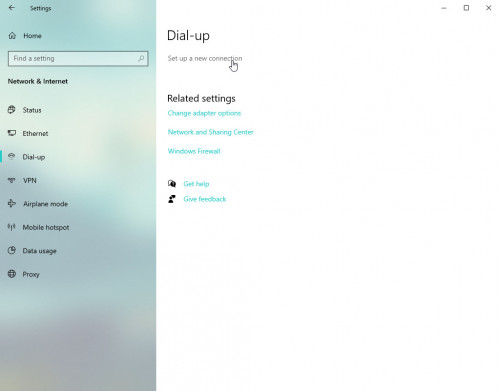
First you need to know your Unifi pppoe user and password. Then follow the steps below

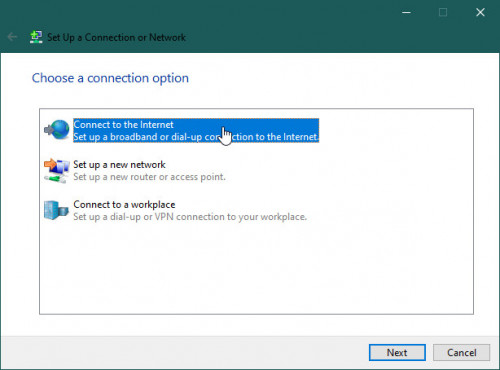
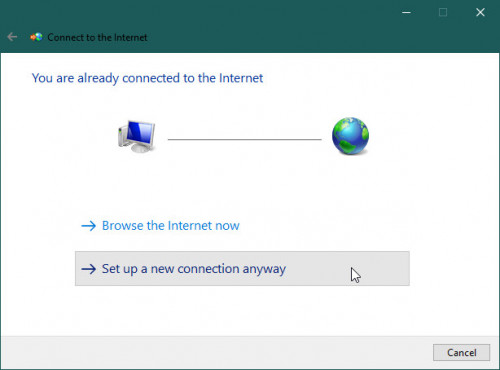
Go to Dial-up and setup new connection
user posted image

user posted image

user posted image

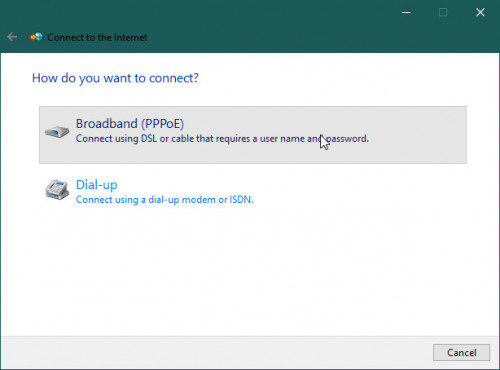
Choose Broadband (PPPOE)
user posted image

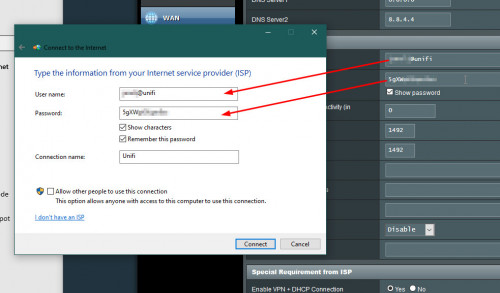
Login your router, go to the WAN settings in your router. Then copy your PPPOE username and password into here.
user posted image

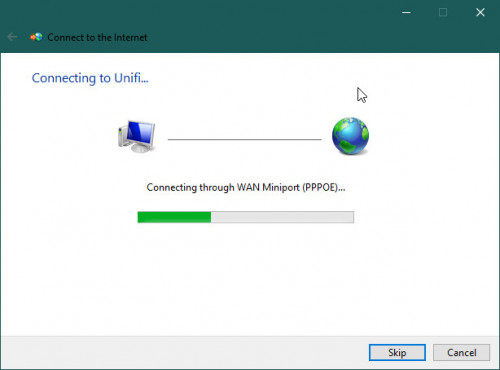
Now you can unplug your router, then connect the Unifi modem (BTU) directly to your PC. Then click "Connect".
user posted image
junclj
post Feb 15 2020, 11:53 AM

Look at all my stars!!
*******
Senior Member
2,348 posts

Joined: Apr 2008


QUOTE(yongtjunkit @ Feb 15 2020, 07:52 AM)
What about vlan? Unifi uses Vlan

Only streamyx, time fiber doesn’t use Vlan
*
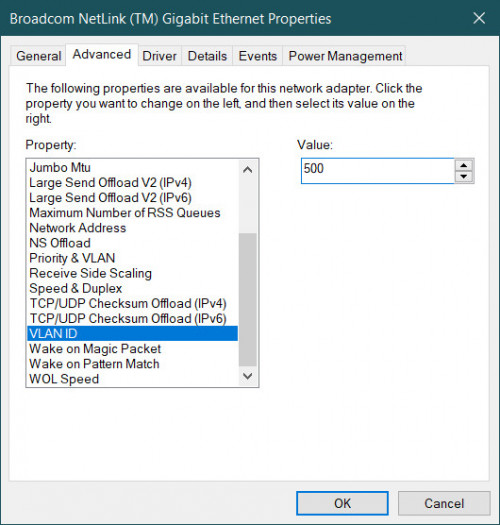
Go to your current network card, through control panel or device manager. Go to configure your network card. In the advanced tab, there have VLAN ID in the property (some network card may not have this function, so I can't help you). Change VLAN ID as 500.

user posted image

If your PC network card, such as Realtek don't have this option. You need search for solution from Google.
One video I was found here.

This post has been edited by junclj: Feb 15 2020, 12:02 PM
junclj
post Jan 18 2021, 10:16 AM

Look at all my stars!!
*******
Senior Member
2,348 posts

Joined: Apr 2008


QUOTE(Holyjolly @ Jan 17 2021, 10:57 PM)
Sorry bumping up this old thread.
As far as I being informed, we can't have internet access by connecting PC to the BTU Huawei (optical modem) ethernet ports unless we connect to the wifi router LAN.
I have similar situation where I need to shift my wifi router to upstairs through a long LAN cable that connected to BTU Huawei.
This is because I want to cover the upstairs wifi signal temporary. In fact, I can have balance wifi signal for both upstair and downstairs after I shift wifi router to upstairs.
I know you would suggest wifi extender / powerline but I need some time since we are having MCO now...

I wish I can connect my downstairs desktop directly to BTU Huawei through LAN cable.
So, this method above would work, while maintaining the same working condition for upstairs wifi router?
*
I'm not sure what is your condition. This method only works for one PC only when you don't have router. You are now asking for connect downstairs desktop PC directly to BTU, yes it may works. However, nope for the wifi router for upstairs. I guess your current situation is BTU to wifi router, this is the only best situation, so please avoid BTU to desktop PC method.

You still need to pull a long LAN cable to upstairs and buy a new wifi router (not shift your current router to upstairs) to put at upstairs. So you can connect the upstairs wifi router to your downstairs main router to get access to the internet on wifi.



Change to:
| Lo-Fi Version
0.0136sec    0.74    6 queries    GZIP Disabled
Time is now: 14th December 2025 - 11:50 AM