

Lenovo laptops is it worth for money* (Ver 2), Please check out recent offers
|
|
 Dec 15 2019, 08:12 PM Dec 15 2019, 08:12 PM
Return to original view | IPv6 | Post
#161
|
 
Junior Member
808 posts Joined: May 2008 
|
Now more and more company coming with 32GB RAM modules for laptop. However so far cannot find for desktop. Most the desktop 32GB RAM is server RAM, not sure if can use for normal consumer PC.
|
|
|
|
|
|
Dec 16 2019, 10:01 AM
Return to original view | IPv6 | Post
#162
|
|
Junior Member
808 posts Joined: May 2008
|
QUOTE(prozdennis @ Dec 16 2019, 12:56 AM) i bought Lenovo Legion Y7000 at 3.5k spec is great. waiting for shipment. You mine sharing the specs? Want to see what you can get for the price and would be good for future buyers so they have a benchmark for their purchase. |
|
|
Dec 16 2019, 11:51 PM
Return to original view | IPv6 | Post
#163
|
|
Junior Member
808 posts Joined: May 2008
|
QUOTE(Cincai lar @ Dec 16 2019, 11:50 PM) anyone know Ideapad L340 AMD 15 can put which type of internal SSD ??.. M.2 or NVMe ?? Ideapad L340 got two versions, the normal ideapad and the L340 Gaming. Which is yours?i found this M.2 very cheap wor,... 450 GB only rm245 ,...dunno can use on my L340 or not ??... https://shopee.com.my/M.2-SATA-256GB-128GB-...3911.2278172699 |
|
|
Dec 17 2019, 12:15 AM
Return to original view | IPv6 | Post
#164
|
|
Junior Member
808 posts Joined: May 2008
|
QUOTE(Cincai lar @ Dec 16 2019, 11:54 PM) i think is normal Ideapad L340-15API, .. model: 81LW.. it's Ryzen 5,.. QUOTE(Cincai lar @ Dec 17 2019, 12:09 AM) i want to buy this.. This is from the PSREF for ideapad L340-15API (but better you double check yourself).https://shopee.com.my/M.2-SATA-256GB-128GB-...3911.2278172699 but scared cannot work after read below.. https://forums.lenovo.com/t5/Lenovo-IdeaPad...SD/td-p/4527095 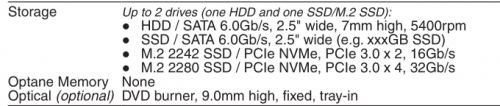 Means the M.2 slot in your laptop doesn't support SATA type M.2 SSD's which is your Goldenfir SSD. For example, if your M.2 supports SATA, it will be like the PSREF of the T495 below:  |
|
|
Dec 17 2019, 12:16 AM
Return to original view | IPv6 | Post
#165
|
|
Junior Member
808 posts Joined: May 2008
|
Cincai lar if you want SATA, you need buy those 2.5 inch type of SSD drives.
|
|
|
Dec 17 2019, 12:49 AM
Return to original view | IPv6 | Post
#166
|
|
Junior Member
808 posts Joined: May 2008
|
QUOTE(Cincai lar @ Dec 17 2019, 12:28 AM) my Ideapad L340 already came with the 2.5 inch SATA SSD,... does this mean i can't put another SSD as a second drive ??? You can probably put a second 2.5 inch SSD where the DVD-ROM like what msacras said, but if you want to make you life easy, just get a M.2 nvme ssd like this one:https://www.lazada.com.my/products/adata-xp...s694868599.html |
|
|
|
|
|
Dec 17 2019, 09:21 AM
Return to original view | IPv6 | Post
#167
|
|
Junior Member
808 posts Joined: May 2008
|
QUOTE(msacras @ Dec 17 2019, 01:15 AM) Yes, go ahead. Cincai lar normally if got dvd-rom, should be okay to use that part for ssd, but just you need buy a ssd bracket/bay for that slot, also might need to get extra cable to connect the two, so its more work.Just like mentioned above, do get NVME SSD just to be sure that it will work (some port don’t have support for the legacy SATA), you also get to enjoy a far higher speed with that. with m.2 nvme ssd, the slot is there already and all you need to do is slot the nvme ssd into it. |
|
|
Dec 17 2019, 09:45 AM
Return to original view | IPv6 | Post
#168
|
|
Junior Member
808 posts Joined: May 2008
|
QUOTE(Cincai lar @ Dec 17 2019, 01:16 AM) thanks for the recommendation,.. at least this one give 3 years warranty,... the one above from shopee only give 3 months,.. People here like the Samsung RAM (for me though I feel this RAM is hotter than usual, also does not come in proper sealed packaging cause they probably buy in bulk straight from factory and resell it):any recommendation for 16GB ram sodimm ?? https://www.lazada.com.my/products/samsung-...1020992637.html Also got Hynix, Adata, Crucial, Micron, Kingston, all should be good. If you can find your current soldered RAM model and get the same model as the onboard RAM is the best way. You can find the manufacturer and part number using the command prompt: https://www.winhelponline.com/blog/determin...ddr3-installed/ |
|
|
Dec 17 2019, 02:49 PM
Return to original view | IPv6 | Post
#169
|
|
Junior Member
808 posts Joined: May 2008
|
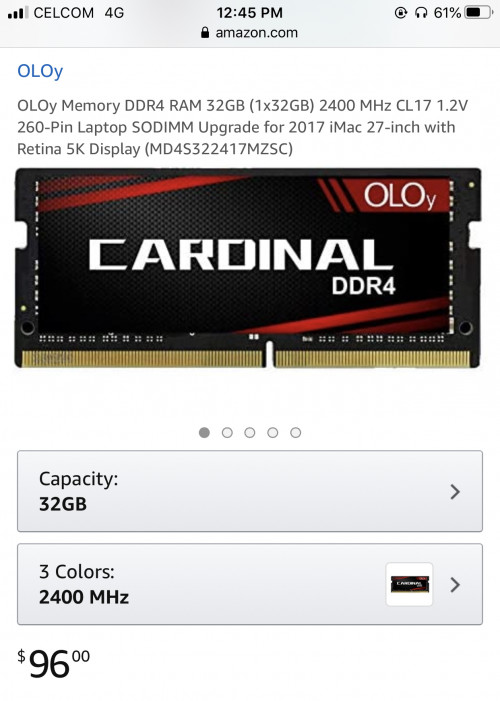
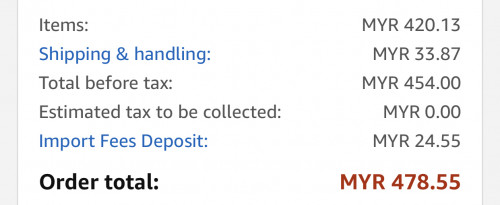
QUOTE(msacras @ Dec 17 2019, 12:02 PM) The onboard RAM should be by Micron, at least for my case. 32GB ddr4 Micron from taobao, MYR 501.59 only:https://item.taobao.com/item.htm?spm=a230r....ucket=10#detail |
|
|
Dec 17 2019, 02:55 PM
Return to original view | IPv6 | Post
#170
|
|
Junior Member
808 posts Joined: May 2008
|
QUOTE(Theoutspokenguy @ Dec 17 2019, 02:51 PM) I using 16gb ram Samsung 2666mhz seems okay. Very smooth for the price of rm189 worth every cent Smooth for me too, just the heat bugs me, anyways got myself stock hynix ram for the Thinkbook 13s, going see if that is cooler or also hot. |
|
|
Dec 17 2019, 03:01 PM
Return to original view | IPv6 | Post
#171
|
|
Junior Member
808 posts Joined: May 2008
|
QUOTE(msacras @ Dec 17 2019, 02:57 PM) L340 itself only RM1.5k, want to add a RAM that cost 1/3 of the laptop price meh? KEK. Waste or not waste depends on the user. Got other sizes also:Also, onboard only 4GB RAM, mean at most you get 8 GB of Dual channel RAM. Quite wasteful to put beyond 16GB into it. https://shopee.com.my/search?keyword=micron%20ddr4 https://s.taobao.com/search?q=micron+ddr4&s...ourceId=tb.item |
|
|
Dec 17 2019, 03:02 PM
Return to original view | IPv6 | Post
#172
|
|
Junior Member
808 posts Joined: May 2008
|
QUOTE(wild_card_my @ Dec 17 2019, 02:57 PM) Where did you get this ram for that price? when was this? https://www.lazada.com.my/products/samsung-...7.html?search=1with voucher |
|
|
Dec 17 2019, 03:04 PM
Return to original view | IPv6 | Post
#173
|
|
Junior Member
808 posts Joined: May 2008
|
QUOTE(Theoutspokenguy @ Dec 17 2019, 02:57 PM) bro where you feel the heat? If the area infront below the monitor abit warm beside that dont feel any heat I use on the lap a lot, so definitely can notice, even used the remaxel ram from thinkbook 13s on the t495 (no heat that time).Once try the Samsung ram, you feel noticeable heat. Its at the bottom of the laptop, in the middle.Keyboard surface no heat though, just the bottom of the laptop where the RAM is located. |
|
|
|
|
|
Dec 19 2019, 01:26 AM
Return to original view | Post
#174
|
|
Junior Member
808 posts Joined: May 2008
|
QUOTE(prozdennis @ Dec 18 2019, 09:56 PM) May I know what is the RAM and HDD brand used by Lenovo by default? So far RAM i see them use Remaxel, Samsung, Hynix.For SSD i've seen them use Micron, Samsung and WD. |
|
|
Dec 20 2019, 02:06 PM
Return to original view | IPv6 | Post
#175
|
|
Junior Member
808 posts Joined: May 2008
|
QUOTE(wild_card_my @ Dec 20 2019, 12:31 PM) Guys, I am going to need a dock for my X1C6, dont even need an eGPU, just the dock will do. Two words: Ugreen, BaseusWhat do we have in the market? The one from Lenovo official is RM1k. Any similar docs for less RM? |
|
|
Dec 20 2019, 02:10 PM
Return to original view | IPv6 | Post
#176
|
|
Junior Member
808 posts Joined: May 2008
|
QUOTE(wild_card_my @ Dec 20 2019, 02:07 PM) Ok bro. To Lazada I go just search "baseus hub" or "ugreen hub", should come out a lot. Btw, these brands are known to give massive discount during certain periods like 10.10, 11.11 etc so maybe christmas will too. https://www.lazada.com.my/products/baseus-u...1.html?search=1 https://www.lazada.com.my/products/baseus-u...3.html?search=1 https://www.lazada.com.my/products/ugreen-9...9.html?search=1 https://www.lazada.com.my/products/ugreen-7...9.html?search=1 |
|
|
Dec 24 2019, 01:46 PM
Return to original view | IPv6 | Post
#177
|
|
Junior Member
808 posts Joined: May 2008
|
I had issues with the ethernet port (RJ45 connector) on my T495. Sometimes connect and sometimes does not detect. I have feeling it is because the fan is next to it so when laptop gets hot, the Ethernet port maybe just stops working. And whenever the Ethernet port stops functioning, I'll have to uninstall the network drivers and restart the laptop (so it re-installs the drivers). So far just happened once, and I am hoping this is a one off incident.
Also, I notice for some reason the ethernet port installs two drivers for the ethernet port, even after uninstalling one, it will still reinstall back two drivers. Could be a software issue instead of hardware. 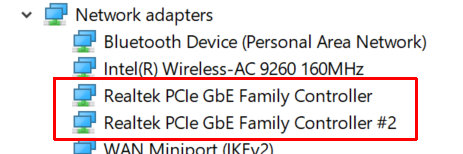 |
|
|
Dec 24 2019, 01:48 PM
Return to original view | IPv6 | Post
#178
|
|
Junior Member
808 posts Joined: May 2008
|
QUOTE(sianglee @ Dec 24 2019, 08:51 AM) So quiet this few days, any great offer during this xmas ? This christmas really quiet, even the build up to christmas like no exciting offers. All business probably calling it the end of the year already. or maybe just waiting for CNY for their goodies and banking on those festivities instead of Christmas. |
|
|
Dec 24 2019, 03:30 PM
Return to original view | Post
#179
|
|
Junior Member
808 posts Joined: May 2008
|
QUOTE(wild_card_my @ Dec 24 2019, 02:48 PM) I had the same issue with my desktop, can you try different cable? it solved my problem surprisingly. The "spoiled" cable works, but when it is used to max speed (100mbps duplex) it will disconnect. cable is not the issue, i have a "usb-c to ethernet port" adapter and it works on the same laptop. its the ethernet port, i believe its mostly software related. also found this that might be of help to you if you encounter it again:QUOTE Within Windows I recommend restarting the service "Lenovo Hotkey Client Loader" - that often gets stuck. A driver reinstall is mostly unnecessary. source: https://www.reddit.com/r/thinkpad/comments/...e_button_light/ QUOTE(Benefon @ Dec 24 2019, 03:21 PM) Realtek very bad quality well now its working hahaThis post has been edited by kuci_mayong: Dec 24 2019, 03:30 PM |
|
|
Dec 24 2019, 10:47 PM
Return to original view | IPv6 | Post
#180
|
|
Junior Member
808 posts Joined: May 2008
|
Lenovo laptop as hackintosh:
|
| Change to: |  0.0626sec 0.0626sec
 0.38 0.38
 7 queries 7 queries
 GZIP Disabled GZIP Disabled
Time is now: 13th December 2025 - 06:43 PM |
 Quote
Quote