

QUOTE(ridox_orimabu @ Oct 7 2019, 12:29 PM)
fully charge mine since 6am and then by 8am its already 86%. all i did was watch youtube and some browsing.

Wah, that is actually quite fast sia. But those 2 hour non stop ? On wifi or data ?
Samsung Galaxy Note 10 Discussion Thread V2, The 10th Series Note
|
|
 Oct 7 2019, 12:32 PM Oct 7 2019, 12:32 PM
Return to original view | Post
#101
|
 
Senior Member
1,406 posts Joined: Aug 2018 
|
QUOTE(ridox_orimabu @ Oct 7 2019, 12:29 PM) fully charge mine since 6am and then by 8am its already 86%. all i did was watch youtube and some browsing. Wah, that is actually quite fast sia. But those 2 hour non stop ? On wifi or data ? |
|
|
|
|
|
Oct 7 2019, 01:06 PM
Return to original view | Post
#102
|
|
Senior Member
1,406 posts Joined: Aug 2018
|
QUOTE(ridox_orimabu @ Oct 7 2019, 12:38 PM) data. on and off. coz i was driving. LOL Sot around ? 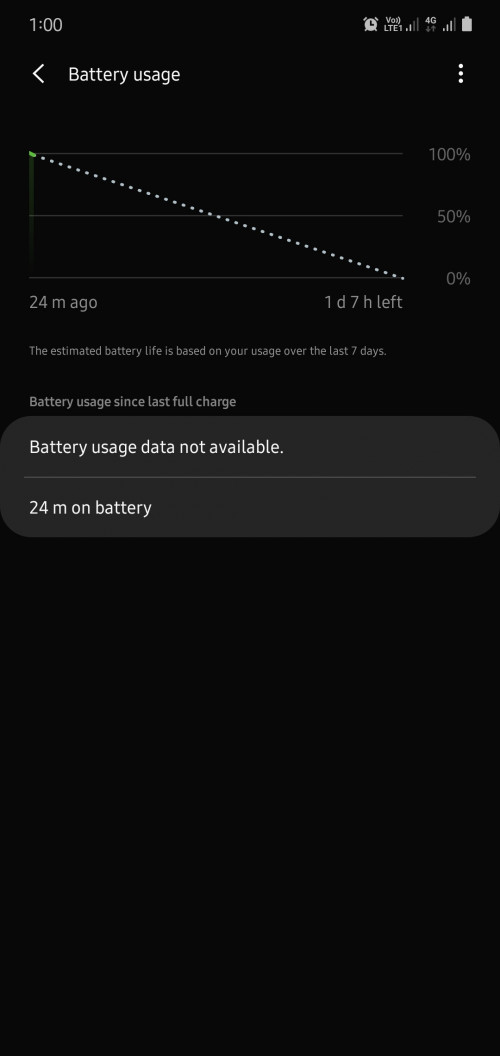 24 minutes after unplug after 98, GPS, BT WIFI all off. Maybe can argue with samsung for a replacement rather then replace the battery only? Scare water resistant and other stuff not as good after taking it apart |
|
|
Oct 7 2019, 02:21 PM
Return to original view | IPv6 | Post
#103
|
|
Senior Member
1,406 posts Joined: Aug 2018
|
QUOTE(Xaser_3 @ Oct 7 2019, 01:15 PM) That is most unfortunate since you already tried that method. Only thing I can think of is a lemon battery which you need to sort out with Samsung SC. yea going this thusday, you think if ask for a replacement phone rather then changing the battery only possible ?. Causse i really don't want to open up the phone sia |
|
|
Oct 7 2019, 06:01 PM
Return to original view | IPv6 | Post
#104
|
|
Senior Member
1,406 posts Joined: Aug 2018
|
QUOTE(randeron @ Oct 7 2019, 04:13 PM) whats wrong with your phone battery? Cant last full day? battery dropping few percent after unplug even tho not using it within 10 to 20 minutes. and quite low SOT for my usage, GPS, BT off most of the time and if on wifi or data the other one will be off, mostly chrome and social media. no game or videoQUOTE(Xaser_3 @ Oct 7 2019, 04:45 PM) I feel you Bro, but I highly doubt Samsung SC would be so generous. Fingers crossed that it materialises 🤞🤞 hopefully la, might have to talk to them about it a little since the phone not even 2 month old yet sia. worst case i will wait till the one year warranty almost end and change the screen and battery in one time, at least i feel better about taking my phone apart lol. edit: i clear the cache this morning when plug in. now around 88% but with not much usage at all, only whatsapp here and there. seems like it helped a little QUOTE(mhhee @ Oct 7 2019, 04:46 PM) Why need to go SC to check ur battery if u can check urself? Just shutdown ur phone after u charged it 100% at night, then morning just power on it. If around 99%-100% mean battery is OK. If battery faulty then it will drain even phone is power off. cause not sure whether is the software causing the drain or lemon battery. I will give this method a try anyway, thanks. how much is considered it to be faulty ? This post has been edited by zoixc: Oct 7 2019, 06:02 PM |
|
|
Oct 7 2019, 06:20 PM
Return to original view | IPv6 | Post
#105
|
|
Senior Member
1,406 posts Joined: Aug 2018
|
QUOTE(Jeffreynsx @ Oct 7 2019, 06:09 PM) Hi bro, you can try this method to solve the issue. I have actually done this this morning battery seems better in idle haha. Have to use abit more to tell. 1. Turn off your device 2. Press and Hold arrow up and power button at the same time 3. Once the Android menu button appear, release all 4. Use the down arrow button to scroll all the way down and look for clear system partition 5. Press power button and select yes 6. Once done, select reboot now and click ok using power button You can see the different after done this method. Try it out and the apps settings still remained the same. You might feel your phone getting more stable in terms of temperature to reduce your battery consumption. QUOTE(Jeffreynsx @ Oct 7 2019, 06:18 PM) Before send in your device to Samsung SC, please make sure remove your SP or else your 1 time free screen replacement will be void. Will keep this in mind ! |
|
|
Oct 7 2019, 07:51 PM
Return to original view | IPv6 | Post
#106
|
|
Senior Member
1,406 posts Joined: Aug 2018
|
QUOTE(Jeffreynsx @ Oct 7 2019, 06:32 PM) I done this most of the time if the phone temperature felt unusual. You can see some different. What you mean app data ?On top of that, try to clear the app data from Device Care before clear the partition. Relaunch the Device Care and let it optimized your phone. Turn on optimized battery in the settings, advance column to enable it. You can see some different in terms of standby time. So far my 1 hour standby time only reduce 1%. I turn on my data and GPS all the time. Satisfied with the result. This post has been edited by zoixc: Oct 7 2019, 08:44 PM |
|
|
|
|
|
Oct 7 2019, 11:45 PM
Return to original view | IPv6 | Post
#107
|
|
Senior Member
1,406 posts Joined: Aug 2018
|
QUOTE(Jeffreynsx @ Oct 7 2019, 09:32 PM) Guide on how to clear app data on Galaxy Note 10 Plus Clearing app data remove all it's data as well, am i missing something or ?From the Home screen, slide down the notification panel. Tap the 'gear icon' to open Settings. On the settings menu, tap Apps. Here, you will see the list of apps installed on your device. Choose the app you want to clear data. Tap 'clear data'. Tap 'OK' to confirm. QUOTE(mhhee @ Oct 7 2019, 10:09 PM) Never expect good battery life for samsung flagship phones. All S & Notes series I tried none of them give me good bettery standby. My usage of Note 10+ 100% 6AM-10PM left 20% & need to charge. Yea standby is worst then my old mate 10. But this can last me the whole day la at leastBattery standby iPhone is the best, 50%. Huawei P30 pro also can have 40% juice left with same usage of mine. Exynos is disaster & Samsung should ditch it as well as other useless features like Bibxy. LOL. |
|
|
Oct 8 2019, 09:56 AM
Return to original view | Post
#108
|
|
Senior Member
1,406 posts Joined: Aug 2018
|
QUOTE(ridox_orimabu @ Oct 8 2019, 08:30 AM) I charge last 3am. Now 87% d. Very dissapointed but with 1 hour of sot seems not bad imo.[attachmentid=10329755] QUOTE(Joseph Hahn @ Oct 8 2019, 08:57 AM) Finally made the jump since my Mate 10 contract is (almost) over. Still tied with Celcom but at least i didn't have to pay anything except for the monthly commitment. 1st impression, so tall and so hard to get used to curved edges, punchhole, button on left and camera on right side. Hi, i remember you from mate 10 thread haha, i came from mate 10 as well. This is my 1st Samsung Android device after using Samsung Omnia many many years ago. xD This is my 1st Samsung Android device after using Samsung Omnia many many years ago. xD |
|
|
Oct 8 2019, 09:59 AM
Return to original view | Post
#109
|
|
Senior Member
1,406 posts Joined: Aug 2018
|
QUOTE(Jeffreynsx @ Oct 8 2019, 05:05 AM) |
|
|
Oct 8 2019, 08:20 PM
Return to original view | IPv6 | Post
#110
|
|
Senior Member
1,406 posts Joined: Aug 2018
|
QUOTE(samsungXP @ Oct 8 2019, 08:18 PM) i mean bottom of photo show phone model everytime u take photo I don't think there is a setting to do this other then using other app or placing it manually |
|
|
Oct 10 2019, 12:04 AM
Return to original view | IPv6 | Post
#111
|
|
Senior Member
1,406 posts Joined: Aug 2018
|
QUOTE(leewh23 @ Oct 9 2019, 02:34 PM) Install this back skin for my n10+, feel better then direct touching the back glass... Wah damn nice leh, you apply it yourself? Does this sticker wrap nicely around the side ? 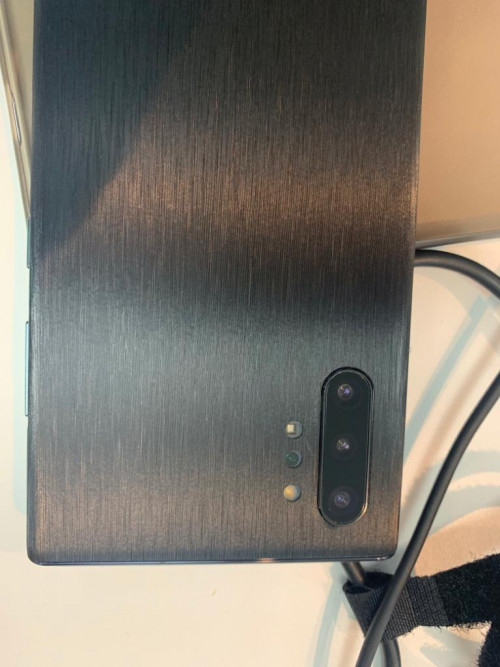 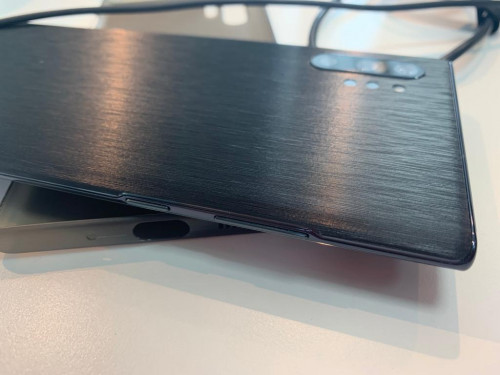 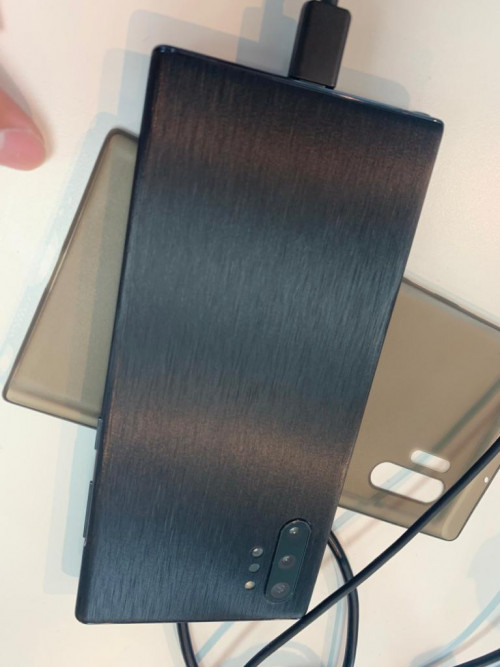 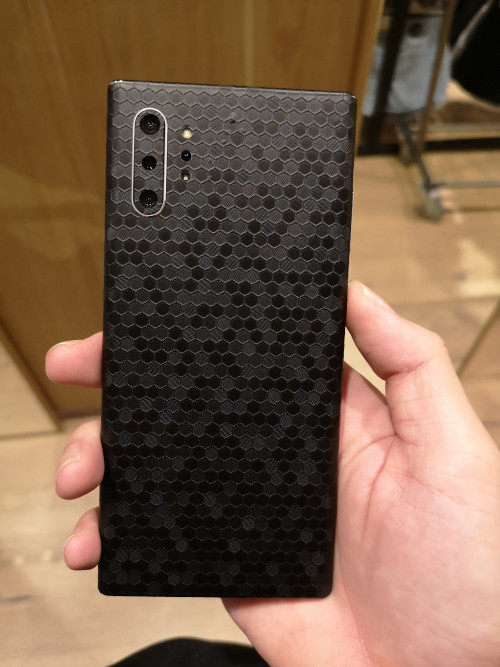 I stick this at one utama mojo skin haha |
|
|
Oct 10 2019, 08:07 AM
Return to original view | IPv6 | Post
#112
|
|
Senior Member
1,406 posts Joined: Aug 2018
|
QUOTE(blackmarket @ Oct 10 2019, 12:14 AM) How much? Any warranty? Will it leaves any residue behind when peel off? Rm 55 plus installation rm 5 total 60 for this skin. No warranty haha. Haven't peel off yet so no idea whether got residue or not. One thing is the side is not full wrapped QUOTE(samsungXP @ Oct 10 2019, 12:31 AM) if aura glow do that is wasted White colour la mine hahaQUOTE(Andrewtst @ Oct 10 2019, 12:44 AM) This looks awesome! Haha thanks |
|
|
Oct 10 2019, 11:02 AM
Return to original view | IPv6 | Post
#113
|
|
Senior Member
1,406 posts Joined: Aug 2018
|
QUOTE(leewh23 @ Oct 10 2019, 10:54 AM) Ya I apply my self, I bought 2, prepare for failure...Haha, almost fully cover, still left about 1mm to side frame. Your back skin looks futuristic, I want to try that next time ohh haha, easy to apply ? 1mm not bad le, mine this from the shop can still see the metal frame of the phone, not fully covered the side, quite disappointed in came out like that tbh. But the back look nice and nice to touch as well ! |
|
|
|
|
|
Oct 10 2019, 08:34 PM
Return to original view | IPv6 | Post
#114
|
|
Senior Member
1,406 posts Joined: Aug 2018
|
QUOTE(Joseph Hahn @ Oct 10 2019, 05:03 PM) Wow very extreme. Even covered the camera glass. Ye, not bad if view from the back. yes the camera work fine, no blocking at all.  Does the camera still works just fine? Does the camera still works just fine?I got from Celcom and i did it myself. You need to take a pic of your receipt and upload as proof of purchase. I got mine on Monday and just registered yesterday. And somehow it seems they extended the warranty to 31/12/2020? Yesterday i noticed it was 7/10/2020. 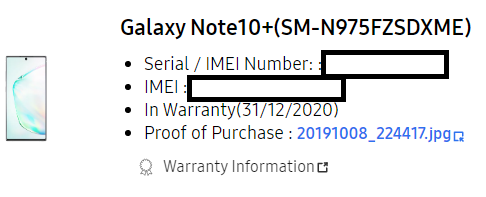 Also, how do you disable bixby ya ? Where do you check the extended warranty ya ? QUOTE(Jitty @ Oct 10 2019, 07:28 PM) Sorry for the noob question. i think most probably wont la, cause face unlock also use the camera for a few second only. no big deal for meWill I damage the front camera if I use the face unlock non-stop? QUOTE(Jitty @ Oct 10 2019, 08:19 PM) Usually what you guys will do after an update? yes, clear cache for meWill you guys boot into recovery and clear the cache? Or just restart phone after update will do? This post has been edited by zoixc: Oct 10 2019, 08:35 PM |
|
|
Oct 11 2019, 12:51 AM
Return to original view | IPv6 | Post
#115
|
|
Senior Member
1,406 posts Joined: Aug 2018
|
QUOTE(samsungXP @ Oct 11 2019, 12:26 AM) do need to drain out the battery to 0% for the 1st time charging ? From what i know going that low is not so good for your battery but i could be wrong. Not sure |
|
|
Oct 11 2019, 03:00 PM
Return to original view | IPv6 | Post
#116
|
|
Senior Member
1,406 posts Joined: Aug 2018
|
Update of battery after clearing the cache, dark mode and using adaptive power saving ON.
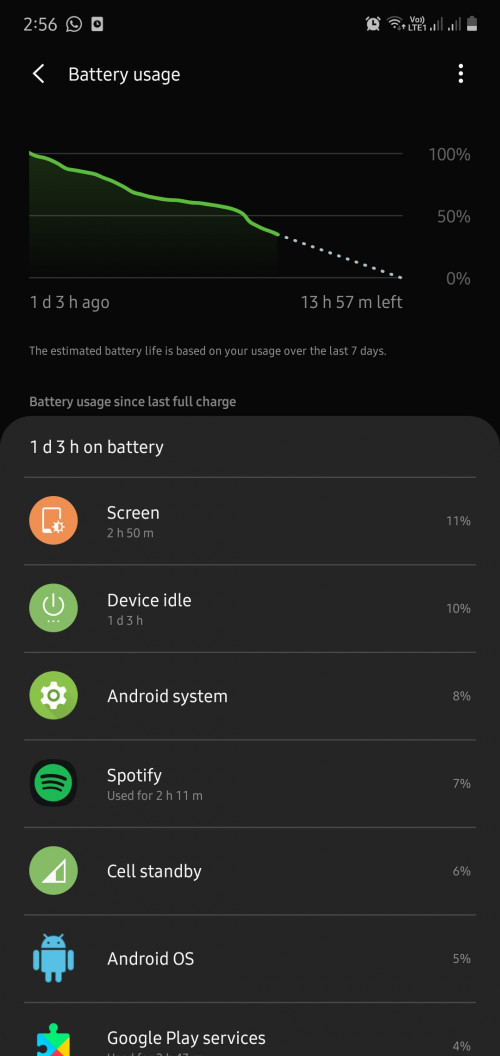 As of writing this post the battery is at 35. Seems better then previously. Now hesitate to go let Samsung check and reset my phone or not. |
|
|
Oct 11 2019, 05:43 PM
Return to original view | IPv6 | Post
#117
|
|
Senior Member
1,406 posts Joined: Aug 2018
|
QUOTE(TOMEI-R @ Oct 11 2019, 04:28 PM) Is this the Note 10 or 10+? Plus, i didn't reset before clearing cache. Standby is better but sot is low, and same problem 5% within 30 minute of unplug with light usageIf you hard reset your phone and use it without any apps installed and running, of course battery life would improve. It's mainly the apps draining your battery. |
|
|
Oct 11 2019, 08:46 PM
Return to original view | IPv6 | Post
#118
|
|
Senior Member
1,406 posts Joined: Aug 2018
|
QUOTE(TOMEI-R @ Oct 11 2019, 06:55 PM) SOT depends heavily on your type of usage, apps running in your background your network coverage, whether you are on wifi or data most of the time and a whole list of reasons. Different people would have different SOTS on their phones. I have AOD set to tap to show and resolution is the default one. I know for sure mt dual sim drain alot of battery. The problem is after unplug the battery almost instantly drop to around 97 within 10 minutes of no usage. While we wont know exactly which is the reason for the drain on your phone, I suggest turning off AOD, lowering screen brightness to see if it makes a difference. Being in an area with poor network coverage contributes to battery drain as well. Just when to samsung SC to send for diagnostic. Was told that i would tske one hour and will wipe data on Tuesday. Today go just plug in computer and do a simple checking only lol. She said nothing wrong with the battery. Somemore tell me my battery drop 3% after unplug is due to i don't have antivirus ON. What does antivirus has to do with battery dropping 3% after unplug. |
|
|
Oct 12 2019, 12:20 AM
Return to original view | IPv6 | Post
#119
|
|
Senior Member
1,406 posts Joined: Aug 2018
|
QUOTE(Xaser_3 @ Oct 11 2019, 08:49 PM) Nonsense! I never ever turned on the anti virus on any of my Samsung flagships and never encountered this kind of issue with the battery also. Let's see what other story they tell you come Tuesday. Actually is this Tuesday i go they told me will reset if diagnostic. So i when back today after backup all thing, then get this stupid ans. And i now i don't know can turn off the antivirus thing or not...QUOTE(TOMEI-R @ Oct 11 2019, 09:20 PM) If you have the time, backup your data. Hard Reset your phone. Do a manual restore, meaning you restore everything but the apps. Apps you download again manually and restore data. Thinking of doing it tmr, as i done it before already once. I do know dual sim drain more battery but this is very not normal.Oh... and YES, dual sim standby does drain more power because the phone needs to keep searching for two different networks at all times. QUOTE(sakuraboo @ Oct 11 2019, 09:37 PM) My battery used to be like yours but only initially for the first 1 week of usage. Then it doesn't happen anymore. The other day idling on wifi screen off from 100 to 97% was about 5 hours Happy for you bro. Sadly mine already lose 5% in 30 minute even with no usage. Poor customer service experience at Samsung SC at one utama, lowyat one is better by a lot |
|
|
Oct 12 2019, 11:44 AM
Return to original view | IPv6 | Post
#120
|
|
Senior Member
1,406 posts Joined: Aug 2018
|
QUOTE(ridox_orimabu @ Oct 12 2019, 08:36 AM) Say. Any of u guys have this issue when put the phone on flat surface.. the touch responsiveness gone from 100% accuracy to only maybe i dunno.. 50%? Damn hard to type of whatever. I don't use the phone flat down. Even when i do i use the pen, seems fine for me iAlready disable the accident touch. |
|
Topic ClosedOptions
|
| Change to: |  0.0276sec 0.0276sec
 0.19 0.19
 7 queries 7 queries
 GZIP Disabled GZIP Disabled
Time is now: 15th December 2025 - 07:02 AM |
 Quote
Quote