


PC Audio Stoner Acoustics User Thread, New UD130 Released
PC Audio Stoner Acoustics User Thread, New UD130 Released
|
|
 Oct 10 2019, 01:20 PM Oct 10 2019, 01:20 PM
|
 
Senior Member
1,108 posts Joined: Jul 2006 From: Kedah / Skudai  
|
Is there an upgrade programme available? From UD125 to UD130? Hehe
|
|
|
|
|
|
Oct 10 2019, 02:09 PM
|

Senior Member
1,074 posts Joined: Jan 2003 From: Verdun 
|
QUOTE(StonerAcoustics @ Oct 10 2019, 10:53 AM) That's great. Thanks for the support. I think the previous setup i have were much warmer/bassy. Which was quite noticeable when playing on Bass oriented headphone.  UD130 is more on neutral side right StonerAcoustics? Since i am stuck to one kind of setup for long time. This post has been edited by minizian: Oct 10 2019, 02:10 PM |
|
|
Oct 18 2019, 07:23 PM
Show posts by this member only | IPv6 | Post
#37
|

Junior Member
126 posts Joined: Apr 2011
|
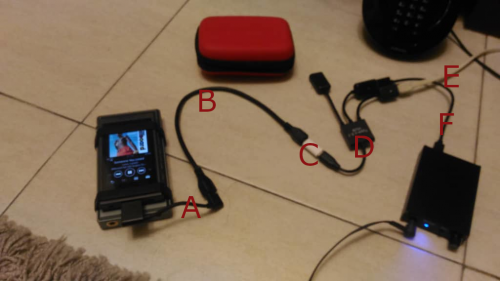 Hi, above is my setup to play Sony music player that has wmport. A) Fiio L27 wmport to micro usb cable B) Female to female micro usb cable C) Micro C female to male micro usb adapter D) Micro C male otg to type A female with power (female micro usb) E) Micro usb male to Type A male cable (this cable is to power) F) Cable that comes with ud130 (actually same type as E) If anyone is wondering, the device underneath the sony player is another amp/dac which you can just ignore. Just sharing in case anyone wants to use ud130 with a Sony with wmport interface.  This post has been edited by raif: Oct 18 2019, 07:42 PM |
|
|
Oct 18 2019, 11:06 PM
|

Newbie
9 posts Joined: Dec 2011
|
Hi raif,
Nice! Though it's working for u, there are just too many cables on the table that my wife will approve. What's the reason for not directly connect L27 to ud130? Is it because Sony do not have enough power to drive ud130? That could be the reason why my player was detected but no sound from the DAC. Battery also drain noticeably faster when DAC is connected. Got to try the split cable one day. |
|
|
Oct 20 2019, 01:54 PM
|
|
Junior Member
126 posts Joined: Apr 2011
|
QUOTE(adn6244 @ Oct 18 2019, 11:06 PM) Hi raif, Yup, that's the reason, my Sony A45 doesn't have enough power or the L27 does not provide power connection otherwise it would be awesome. The E cable (to power) can use a power bank if you want. I'm waiting for another otg cable that could tidy up the connection. Will update you guys later if that is working. Nice! Though it's working for u, there are just too many cables on the table that my wife will approve. What's the reason for not directly connect L27 to ud130? Is it because Sony do not have enough power to drive ud130? That could be the reason why my player was detected but no sound from the DAC. Battery also drain noticeably faster when DAC is connected. Got to try the split cable one day. This post has been edited by raif: Oct 20 2019, 02:01 PM |
|
|
Oct 20 2019, 03:47 PM
|

Newbie
34 posts Joined: Aug 2016
|
QUOTE(raif @ Oct 18 2019, 07:23 PM) Hi, above is my setup to play Sony music player that has wmport. A) Fiio L27 wmport to micro usb cable B) Female to female micro usb cable C) Micro C female to male micro usb adapter D) Micro C male otg to type A female with power (female micro usb) E) Micro usb male to Type A male cable (this cable is to power) F) Cable that comes with ud130 (actually same type as E) If anyone is wondering, the device underneath the sony player is another amp/dac which you can just ignore. Just sharing in case anyone wants to use ud130 with a Sony with wmport interface. |
|
|
|
|
|
Oct 20 2019, 09:19 PM
|
|
Junior Member
126 posts Joined: Apr 2011
|
QUOTE(StonerAcoustics @ Oct 20 2019, 03:47 PM) That is a very impressive setup. We have a customer (Malaysian) in Singapore who runs both the UD125 and UD130 with a very clean separate power bank to his DAP/Phone setup as well Thank you. Speaking of ud125, please reply my pm on how to purchase it. Thanks |
|
|
Oct 20 2019, 09:57 PM
|

All Stars
13,494 posts Joined: Jan 2012
|
Hi Stoner,
I want to ask about this particular problem I faced when using UD125. I'm using it primarily with my Windows PC (win8). I noticed that whenever I play multiple source (like playing one youtube stream and another from facebook), the device will start to hang after a while. I will then need to unplug and plug it in again to 'reset' it. Is there anything I can do to solve this bug? |
|
|
Oct 22 2019, 03:09 AM
|
|
Newbie
34 posts Joined: Aug 2016
|
QUOTE(andrekua2 @ Oct 20 2019, 09:57 PM) Hi Stoner, This is certainly odd. We have not encountered such an issue before. The UD125 funnily doesn't run on proprietary drivers, so the conflict may perhaps be explained by Windows' stock UAC 1 drivers.I want to ask about this particular problem I faced when using UD125. I'm using it primarily with my Windows PC (win8). I noticed that whenever I play multiple source (like playing one youtube stream and another from facebook), the device will start to hang after a while. I will then need to unplug and plug it in again to 'reset' it. Is there anything I can do to solve this bug? Have you tried upgrading to Windows 8.1 with the latest updates? |
|
|
Oct 22 2019, 03:12 AM
|
|
Newbie
34 posts Joined: Aug 2016
|
QUOTE(raif @ Oct 20 2019, 09:19 PM) Thank you. Speaking of ud125, please reply my pm on how to purchase it. Thanks cheers, you got pm! |
|
|
Oct 23 2019, 08:22 PM
|
|
Junior Member
126 posts Joined: Apr 2011
|
I saw the unboxing of ud130 at Z Unboxing ... https://www.youtube.com/watch?v=TuvR7KD0by4
|
|
|
Oct 23 2019, 10:11 PM
Show posts by this member only | IPv6 | Post
#46
|
|
Senior Member
1,074 posts Joined: Jan 2003 From: Verdun
|
QUOTE(raif @ Oct 23 2019, 08:22 PM) Wonder if it as bought by himself or was send to him for tryout. Buatana Malaysia for sure.  |
|
|
Oct 27 2019, 08:02 AM
|
|
Newbie
4 posts Joined: Mar 2008
|
hi, does anyone still has the driver for ud110 for both windows7 and windows10?
My harddisk just died and can't seem to find the driver online. Or is there any similar driver that I can use? Tks |
|
|
|
|
|
Oct 27 2019, 02:31 PM
Show posts by this member only | IPv6 | Post
#48
|
|
Newbie
34 posts Joined: Aug 2016
|
QUOTE(bluesavana @ Oct 27 2019, 08:02 AM) hi, does anyone still has the driver for ud110 for both windows7 and windows10? The UD110 runs on UAC 1.0, you should not be needing drivers. My harddisk just died and can't seem to find the driver online. Or is there any similar driver that I can use? Tks  |
|
|
Oct 27 2019, 04:42 PM
|
|
Newbie
4 posts Joined: Mar 2008
|
QUOTE(StonerAcoustics @ Oct 27 2019, 02:31 PM) The UD110 runs on UAC 1.0, you should not be needing drivers. hmm.. strange. It's not recognizable in my PC. Perhaps i can PM you to seek more clarification. Tks. |
|
|
Nov 3 2019, 10:40 AM
|
|
Newbie
9 posts Joined: Dec 2011
|
Dear UD130 users : anyone using jriver can share your experience?
I am using jriver v25. Installed bravo driver. Also installed musicbee as alternate music player. 1. In jriver, I choose ud130 uac2, wasapi, audio Output set as per source. A. Play dsd file first. Result : good music B. Play 16 bit file first, then follow by dsd. Result : 16bit good music. Dsd total silence and follow by system hang. C. Reboot and repeat 1A or 1B. Result : total silence. Now jriver won't play thru ud130. Playing fine thru odac (plug and play). 2. In jriver, I choose bravo hd, Output set as per source. Result : total silence 3. Restart laptop and open musicbee. Repeat A and B. Result : good music Is anyone using jriver? Could you share the audio and DSP setting? 4. While music is playing, I touch or pick up ud130, I can hear statics when I touch it. Lesser if I put a piece of plastic between my hand and the DAC. Is this normal? This post has been edited by adn6244: Nov 3 2019, 10:44 AM |
|
|
Nov 3 2019, 11:46 PM
|
|
Newbie
9 posts Joined: Dec 2011
|
I have reinstall jriver, reset to default. At the end, it just keep repeating 1 A B C above.
This is the first DAC that I own required so much testing yet it doesn't work at the end. Will try again when I have time. Or it's time to move on. |
|
|
Nov 4 2019, 10:46 AM
|
|
Newbie
34 posts Joined: Aug 2016
|
QUOTE(adn6244 @ Nov 3 2019, 11:46 PM) I have reinstall jriver, reset to default. At the end, it just keep repeating 1 A B C above. Hi could you try playing back with Foobar as per instructed on this page:This is the first DAC that I own required so much testing yet it doesn't work at the end. Will try again when I have time. Or it's time to move on. https://stoneracoustics.com/ud130-manual/ It may perhaps be a misconfiguration of software on Jriver side. Let us do some testing on our side. EDIT: The DSD Switch is handled by the microcontroller. The microcontrolller on board does this by detecting the DSD flag from the audio receiver. The Jriver might not be sending the right message to the audio receiver via the USB during the switching that is why it may cause some hangups on the UD130 side. That's our initial hypothesis. Let us know. This post has been edited by StonerAcoustics: Nov 4 2019, 10:48 AM |
|
|
Nov 6 2019, 11:06 PM
|
|
Newbie
9 posts Joined: Dec 2011
|
Hi ,
Thanks for the input. I was busy testing different components, sequence of file play and cables used. Finally it's working on my win10 laptop + jriver v25. What I did : 1. Make sure all windows update are installed. Unlikely to be the reason since Usb 2 driver already come with win 10 and I've installed bravo driver. no harm doing this. 2. Update jriver with the latest release. Change audio output to bravo asio in jriver. 3. Use usb split cable to provide power to DAC independent from the data. Similar to bro Raif did but I only have one split cable (haha) connect to the belkin cable come with ud130! Result : music again !! Observations : ud130 need quite high power (relative to other DAC that I owned) and really need to find the right usb cable to make it work. Tested different usb split cable, usb ports (laptop or usb hub). It works when power is supplied by power bank or laptop usb port. No idea why it requires separate power as my laptop is used with other DAC via the same usb port without problem. Most importantly I can enjoy music now. Time to get rid of the old odac and amp instead haha. This post has been edited by adn6244: Nov 6 2019, 11:16 PM |
|
|
Nov 7 2019, 08:59 PM
Show posts by this member only | IPv6 | Post
#54
|
|
Junior Member
126 posts Joined: Apr 2011
|
Congrats adn6244 !!
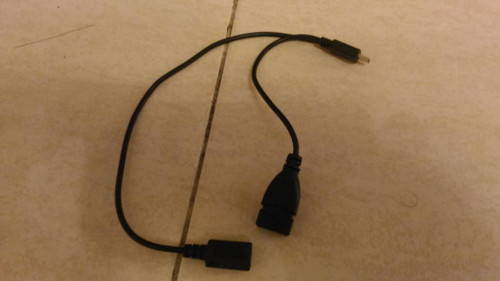 I got a simpler split-Y with power cable 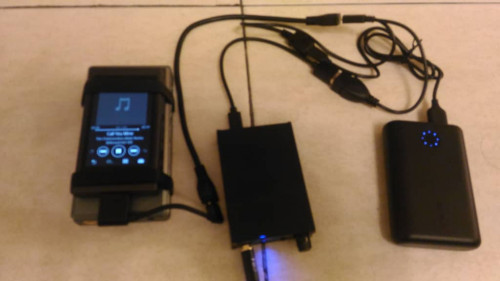 Now, this is the setup with the cable and power bank This post has been edited by raif: Nov 8 2019, 03:00 PM |
| Change to: |  0.0192sec 0.0192sec
 1.11 1.11
 5 queries 5 queries
 GZIP Disabled GZIP Disabled
Time is now: 23rd December 2025 - 05:08 AM |
 Quote
Quote