Welcome Guest ( Log In | Register )

Outline · [ Standard ] · Linear+

PC Audio Stoner Acoustics User Thread, New UD130 Released

views
     
raif
post Oct 2 2019, 01:45 PM

Getting Started
**
Junior Member
126 posts

Joined: Apr 2011
Just got this yesterday. Played fine on Windows10... On another computer with Windows 7, no such luck. Complained about no driver. Does Stoner have any windows 7 driver? I already installed the Savi Audio software but no such luck
raif
post Oct 2 2019, 03:58 PM

Getting Started
**
Junior Member
126 posts

Joined: Apr 2011
QUOTE(StonerAcoustics @ Oct 2 2019, 03:17 PM)
Did you run as administrator before installation?

wink.gif
*
Well at 1st I didn't then the 2nd time I did. Maybe I need to remove and install again.

Edit: After removing driver and installing it again, still no luck!! Anybody here has luck with windows7 and ud130?

This post has been edited by raif: Oct 2 2019, 05:16 PM
raif
post Oct 2 2019, 08:22 PM

Getting Started
**
Junior Member
126 posts

Joined: Apr 2011
QUOTE(adn6244 @ Sep 7 2019, 01:33 PM)
Finally collected ud130 from the post office today.

I'm using Samsung Note 9, playing through UAPP connecting to ud130 with fiio CL06 cable. The app recognise the device and playback is running on the phone. I just couldn''t hear anything from the output.

LED flashed during boot up and off when UAPP continue playing. No indication whether it's low or hi gain as per the user guide.

Swap to the cable came with the device and connect it to the phone using the Samsung otg adaptor. Same result.

Tested it with hidizs ap60 pro too. Ud130 was detected by the player. Same behaviour as phone.

So for now I can't use it on the go with my phone or music player.

Did I do anything wrong or not doing something right to make it work with the phone? Or is Note 9 not supported? I am shocked if it isn't.

Went home test it using jriver and it's working fine. Low gain have to turn all the way to 2 o clock  to reach my usual listening loudness. Hi gain make the sound bigger at 1 o clock settling.

Sound musical and nice in the brief testing .

The device look solid and light for portable use. Slightly thicker than I have imagined but overall still happy with the physical size.
*
I agree with you on the volume. I had to dial in to 3 oclock on low gain but as I understand from PM with Stoner the digital knob is different from analog. Yes, incremental increase after around 12 oclock increased the volume substantially so I never max on low gain. However what I don't understand is why high gain seem not to do much amplification?? If I was at 3 oclock on low, when high I expect at least I would be around 12 oclock, as it is the volume remained at slightly less than 3 oclock for me. Hopefully Stoner Acoustics engineers can take a look at this.

I tried also line out mode and I'm more than satisfied with its performance. I tried this on a pair of cheap usb speakers and they sound much louder compared to the sound coming out of my laptop headphone jack. The usb speakers has a volume controller so what I did was I set the usb speaker volume at a comfortable sound with ud130, then without changing the volume I take out the 3.5mm jack from ud130 and inserted it the laptop. I could hardly hear the sound. It was so soft from the laptop, so line out mode using the cheap usb speakers was a success. smile.gif .

This post has been edited by raif: Oct 2 2019, 08:27 PM

raif
post Oct 2 2019, 11:39 PM

Getting Started
**
Junior Member
126 posts

Joined: Apr 2011
QUOTE(StonerAcoustics @ Oct 2 2019, 09:54 PM)
This is certainly odd. The UD130's Audio Receiver dates back to Windows 7 Era!

Can you try it with USB Class 1.0?
*
I think this is a small issue for me as I don't use the computer with windows 7 to listen music. OK, one last try...the windows 7 is not connected to internet so during installation, does the installer try to connect to internet for file transfer etc.?

ps: I did try usb class 1.0

This post has been edited by raif: Oct 2 2019, 11:39 PM
raif
post Oct 18 2019, 07:23 PM

Getting Started
**
Junior Member
126 posts

Joined: Apr 2011
user posted image

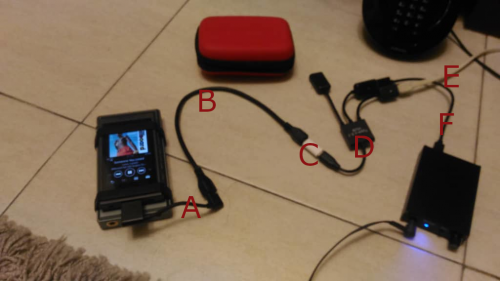
Hi, above is my setup to play Sony music player that has wmport.

A) Fiio L27 wmport to micro usb cable
B) Female to female micro usb cable
C) Micro C female to male micro usb adapter
D) Micro C male otg to type A female with power (female micro usb)
E) Micro usb male to Type A male cable (this cable is to power)
F) Cable that comes with ud130 (actually same type as E)

If anyone is wondering, the device underneath the sony player is another amp/dac which you can just ignore. Just sharing in case anyone wants to use ud130 with a Sony with wmport interface. smile.gif

This post has been edited by raif: Oct 18 2019, 07:42 PM
raif
post Oct 20 2019, 01:54 PM

Getting Started
**
Junior Member
126 posts

Joined: Apr 2011
QUOTE(adn6244 @ Oct 18 2019, 11:06 PM)
Hi raif,
Nice! Though it's working for u, there are just too many cables on the table that my wife will approve. 

What's the reason for not directly connect L27 to ud130? Is it because Sony do not have enough power to drive ud130?

That could be the reason why my player was detected but no sound from the DAC. Battery also drain noticeably faster when DAC is connected. Got to try the split cable one day.
*
Yup, that's the reason, my Sony A45 doesn't have enough power or the L27 does not provide power connection otherwise it would be awesome. The E cable (to power) can use a power bank if you want. I'm waiting for another otg cable that could tidy up the connection. Will update you guys later if that is working. smile.gif

This post has been edited by raif: Oct 20 2019, 02:01 PM
raif
post Oct 20 2019, 09:19 PM

Getting Started
**
Junior Member
126 posts

Joined: Apr 2011
QUOTE(StonerAcoustics @ Oct 20 2019, 03:47 PM)
That is a very impressive setup. We have a customer (Malaysian) in Singapore who runs both the UD125 and UD130 with a very clean separate power bank to his DAP/Phone setup as well
*
Thank you. Speaking of ud125, please reply my pm on how to purchase it. Thanks

raif
post Oct 23 2019, 08:22 PM

Getting Started
**
Junior Member
126 posts

Joined: Apr 2011
I saw the unboxing of ud130 at Z Unboxing ... https://www.youtube.com/watch?v=TuvR7KD0by4
raif
post Nov 7 2019, 08:59 PM

Getting Started
**
Junior Member
126 posts

Joined: Apr 2011
Congrats adn6244 !!

user posted image

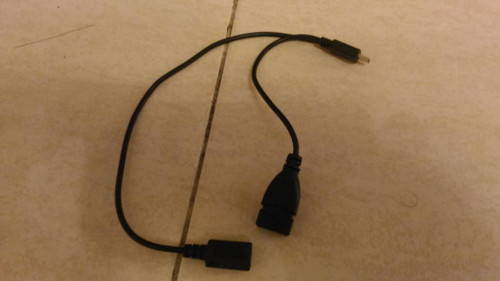
I got a simpler split-Y with power cable

user posted image

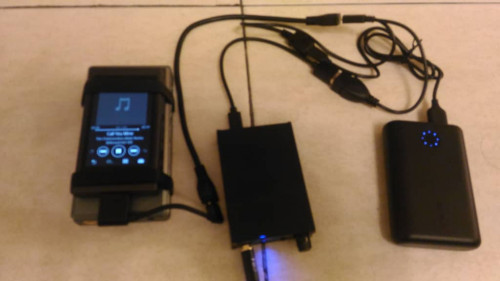
Now, this is the setup with the cable and power bank

This post has been edited by raif: Nov 8 2019, 03:00 PM
raif
post Nov 10 2019, 04:18 PM

Getting Started
**
Junior Member
126 posts

Joined: Apr 2011
Well to be fair...due to Sony wmport usage, you see at least 2 more extra cables in the picture. If I were to use just a handphone/dap with micro usb, wiring would be simpler.

This post has been edited by raif: Nov 10 2019, 04:35 PM
raif
post Nov 10 2019, 11:02 PM

Getting Started
**
Junior Member
126 posts

Joined: Apr 2011
Well, technically ud130 does require external power because it doesn't have a battery. When you connect it directly to a pc or phone, it draws power from the connecting device so this is external power. If the connecting device cannot supply power then it needs the split y connection as shown from my usecase with power drawn from power bank.

Edit: Of course, if you say that usb powered does not count as external supply, then yes one might say ud130 does not need external power thumbsup.gif . I'm editing this post coz I saw somewhere that a device that is usb powered, a reviewer just said that the unit does not need an external power.

This post has been edited by raif: Nov 13 2019, 06:51 AM
raif
post Sep 8 2020, 11:39 AM

Getting Started
**
Junior Member
126 posts

Joined: Apr 2011
What is the max line-out voltage for ud130? Doesn't say in the spec but on the site of ud125, the max line out voltage is stated at 4.8Vrms. Any idea for ud130? Thanks


Change to:
| Lo-Fi Version
0.0210sec    0.82    6 queries    GZIP Disabled
Time is now: 23rd December 2025 - 04:49 AM