Welcome Guest ( Log In | Register )

Bump Topic Topic Closed RSS Feed
4 Pages < 1 2 3 4 >Bottom

Outline · [ Standard ] · Linear+

 Super Noobs Help! [Thread V2], Post Your ULTRA Simple Questions Here

views
     
ktek
post May 27 2008, 10:50 PM

小喇叭
********
All Stars
13,204 posts

Joined: Jul 2006
QUOTE(Enclave Recruit @ May 27 2008, 09:24 PM)
Uhhh...is the performance gap between normal value rams and performance-grade rams substantial??? (example - A DDR2 800 Kingston Value RAM VS Kingston HyperX DDR2 800)
I heard that performance-grade RAMs are only useful for overclockers as they can fully benefit from the lower timings (some dude told me lower timings are better). Is this TRUE??
Apologies for my n00bishness...
*

in my opinion, the gap is small.
no, if you purchase and install high speed and/or LL (Low Latency) memories, you get the immediate effects like plug & play.
you are paying for the "XXX MHz Ready/Gurantee" speed ( and overclockers always demand MOAR laugh.gif )
if you use generic/value RAMs, you may need to find out yourself the maximum speed ( and tightest timing ) the memory sticks can reach.
depend on skills ( eg. burn-in technique, memory latency fine-tune ) and luck ( God of Handpicking gems ), etc.
ktek
post May 29 2008, 09:08 PM

小喇叭
********
All Stars
13,204 posts

Joined: Jul 2006
QUOTE(LawdRetep @ May 29 2008, 10:48 AM)
Maybe its the size of the processor?
The one i'm using now is 65nm whereas the E7200 is 45nm, still can use?
*

wait for the website to update CPU compatible list.
processor size is same, as long as it is a LGA775.
65nm & 45nm is the production process read moar here: klik

QUOTE(croness @ May 29 2008, 05:01 PM)
this is super noob thread so i ask super noob quest.
why is ddr1 is more expensive than ddr2,??
someone said because ddr1 no longer being produced,
but someone replied a company*(dont remember what brand)
still producing ddr1.
is 1gb ddr1 work as fast as 1gb ddr2?
do normal comp shops items price higher than lowyat?
what the differnce between pentium M and pentium D
is laptop parts price higher than PC parts?
**sorry bad english.
*

DDR1 is less produced now, nobody can confirm the no longer being produced
DDR1 can be as fast as DDR2 brows.gif look for overclocking database section.
lowyat or non-lowyat shop depends on certain season and nego skills whistling.gif
Pentium M is focus on mobile users ( laptop, tablet PC )
Pentium D is first generation of dual core processor from Intel for desktop PC
most of the time, laptop parts are more expensive if compared to same generation (old PC vs old lappy, new PC vs new lappy)

This post has been edited by ktek: May 29 2008, 09:15 PM
ktek
post May 31 2008, 09:43 PM

小喇叭
********
All Stars
13,204 posts

Joined: Jul 2006
QUOTE(izcuje @ May 31 2008, 04:56 PM)
another super noob question, hopefully it's in the right thread.
So i got me a new mobo, gigabyte P35C-DS3R.
got everything hooked up, plugged in the PSU. turned on the power.
nothing happened.no fan spinning, no lights, no nothing.
*

at least the mini LED near PCI slots light up?
any weird clicking sound from power supply?
check for bent "pin" on processor slot.
use flathead screwdriver touch the PWR ON jumper (becareful & check mobo manual) because sometimes PC casing button is not reliable.
ktek
post Jun 8 2008, 09:46 PM

小喇叭
********
All Stars
13,204 posts

Joined: Jul 2006
QUOTE(kerollowyat @ Jun 8 2008, 09:29 PM)
hmm.gif
This one, I'm not sure...
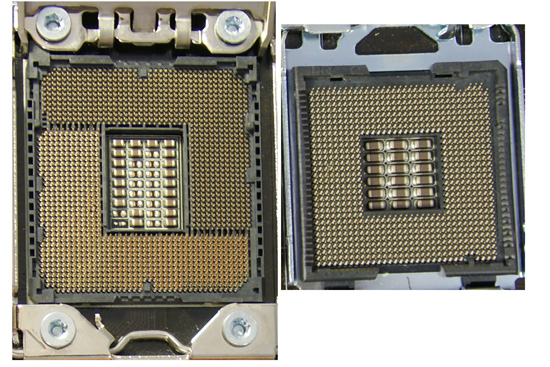
As Intel will introduce new processor, codename Nehalem, that require new socket on the mobo (socket 771, the current socket is 775), the X48 I think, will be the best choice for 775 mobo, as no newer chipset for 775 will be introduced. Or you might take P35 mobo that support x16, single slot. It is cheaper than X48 and X38. Suitable if you use only one GC. Save money. Then, when new 771 mobo comes out, you upgrade. Though, the price for 771 mobo most likely expensive.
...Hope that will help.  laugh.gif
*

not 771pin but 1366pin
771 already in production back in the day.

user posted image

pictar sauce: klik
ktek
post Jun 9 2008, 03:58 PM

小喇叭
********
All Stars
13,204 posts

Joined: Jul 2006
QUOTE(ayie1984 @ Jun 9 2008, 09:09 AM)
Noob Q here:
Why is it cpuz detects my proc to only 1Ghz? I'm using AMD X2 5600+
Tq in advance
*

big possibility it's running power save mode a.k.a. Cool 'n Quiet.
you keep looking at CPU-Z and run other program, the speed will return to normal but maybe back to 1.0GHz after the program load finish.


Added on June 9, 2008, 4:09 pmthis also means your CPU will adjust speed (like laptop) according to usage and back to 1.0GHz when nothing to do.

This post has been edited by ktek: Jun 9 2008, 04:09 PM
ktek
post Jun 10 2008, 10:38 PM

小喇叭
********
All Stars
13,204 posts

Joined: Jul 2006
QUOTE(p0s31d0n @ Jun 10 2008, 10:07 PM)
i want it like this
user posted image
*

LOL... i see laugh.gif
that one is not any "mod", just watermark to any pictars uploaded thru LYN.
you can check almost all thumbnails from LYN has it.
ktek
post Jun 11 2008, 12:46 PM

小喇叭
********
All Stars
13,204 posts

Joined: Jul 2006
QUOTE(vobboblogs @ Jun 11 2008, 08:54 AM)
i'm planning to buy amd x2 5000
does it come with heat sink fan
or only BE does not come with hsf
*

X2 5000+ standard version has hsf inside (bigger box)
X2 5000+ black version no hsf (small box)

This post has been edited by ktek: Jun 11 2008, 12:47 PM
ktek
post Jun 12 2008, 12:35 AM

小喇叭
********
All Stars
13,204 posts

Joined: Jul 2006
QUOTE(amduser @ Jun 11 2008, 09:59 PM)
but in some cases, ur so called "dark side" r brighter than the "bright side"
i have a question, my modem have a USB plug, something like a round shape USB, and also a network slot and a slot for telephone line.
can i use the USB to replace my network cable? means i connect my modem with my laptop using USB line instead of network cable, can i do that?
-----------------------
another questions, wat's the different between CAT5 and CAT5e? which one r better for normal modem-PC usage? and the cross over cable is CAT wat?
*

i called Intel Core2 series as Dark Side as they have really bad ass performance tongue.gif

a DSL modem? you can use it (provided you have the USB cable & CD driver)
prepare for the headache-ness of USB modems rclxub.gif

CAT5/CAT5e you can wiki
lazy coffee pasta whistling.gif

for straight/crossover network wiring, the only difference is each type will have different wire arrangement in the cable for serving different purposes.
link
ktek
post Jun 19 2008, 10:55 PM

小喇叭
********
All Stars
13,204 posts

Joined: Jul 2006
QUOTE(LiMcZ @ Jun 19 2008, 05:00 PM)
Can a laptop with
Technology: DDR SDRAM - 333 MHz
Memory Specification Compliance: PC2700
support DDR2 667mhz RAM?
*

DDR2 667 is PC5300/5400, not compatible.
ktek
post Jun 22 2008, 12:36 PM

小喇叭
********
All Stars
13,204 posts

Joined: Jul 2006
i suggest not to mention anything about overclocking in Super Noobs Help! thread.
any mishandling or inappropriate action may harm your hardware, void warranty and data lost.
ADD: nobody (include LYN) will responsible for your lost.

This post has been edited by ktek: Jun 22 2008, 12:37 PM
ktek
post Jun 22 2008, 09:38 PM

小喇叭
********
All Stars
13,204 posts

Joined: Jul 2006
how to update/flash BIOS?
go to mobo official support website (eg. http://www.gigabyte.com.tw for your gigabyte mobo).
look for your mobo (EP35-DS3) product overview/specification page.
inside the "Related link" click the BIOS link.
from there you download which version of BIOS you want, usually newer is better.
after download, unzip and put in a proper named folder.
install @BIOS (for giga mobos) from driver CD/internet.
backup old BIOS, load new BIOS, flash to new BIOS. leave mouse/keyboard alone until it's done.
recommend to tick reset DMI/clear CMOS after restart.
done flashing, reboot, go BIOS setup (hit "del" key), load optimized default, do your setting (boot sequence, etc..), save& exit.

a new BIOS may fix bugs, improve functions or add new CPU support.
DO IT AT YOUR OWN RISK. for beginners, if it ain't broken, don't fix it.
ktek
post Jun 30 2008, 03:19 PM

小喇叭
********
All Stars
13,204 posts

Joined: Jul 2006
QUOTE(kazek @ Jun 30 2008, 10:49 AM)
What heatsink should I buy ?
And does it matter which one i buy or any one will do ?
*

depends on your needs.
look in price ($100,$200,$300), design(multi fin,heatpipe), material(alu, copper), weight(500g,1Kg), fan(noise,CFM), mobo compatibility(block RAMslot), etc..
ktek
post Jul 6 2008, 02:07 PM

小喇叭
********
All Stars
13,204 posts

Joined: Jul 2006
QUOTE(wen9x88 @ Jul 5 2008, 01:30 AM)
why my samsung 2253BW cannot auto adjustment oredi?
*

if you use DVI(digital) cable, it will auto adjust, no need to press AUTO ADJUSTMENT button.

QUOTE(Dai Li @ Jul 5 2008, 06:12 PM)
uhm..i have this old casing and im not sure which is negative and positive on the casing front panel molex(power switch n etc).but the molex do have an indicator(a triangle shape) on it..so now im just not sure wether the one with the triangle is negative or positive.  laugh.gif
*

i guess you're trying to say connectors, not molex sweat.gif
you can check positive or negative from wires colour, the common colour (white, or black sometimes) is negative.
other colours (red blue green pruple etc..) are positive.
ktek
post Jul 7 2008, 01:11 AM

小喇叭
********
All Stars
13,204 posts

Joined: Jul 2006
QUOTE(FoxNope @ Jul 6 2008, 11:31 PM)
I got 2 question here...hehe
Can any one tell me, what is Bottelneck that everybody talking about in graphic card and mobo thread?
and what is means by Bang of Bucks?
notworthy.gif Thanks
*

well, you know the coca cola glass bottle version (as seen in kopitiam) tongue.gif
the "neck" of bottle is slimmer than the "body"
the drinks flow slower because it's limited by the "neck"
similar in PC a fast display card will perform slower if CPU and mobo "bottleneck" it.
get it?

i believe it's Bang Per Bucks.
BANG = sound effect, loud BANG.
BUCKS = money $$
usually means the performance worth for what you're paying.
you pay less cash and get impressive result.

QUOTE(wonghanjiang @ Jul 6 2008, 11:49 PM)
Har !!! super noob treads is talking about computer hardware???
*

why not? this thread is under Hardware Q&A section.
ktek
post Jul 8 2008, 04:22 PM

小喇叭
********
All Stars
13,204 posts

Joined: Jul 2006
QUOTE(wen9x88 @ Jul 8 2008, 01:55 PM)
...sometimes i need press 2-3 times......why?
it this normal?
*

i think you expect too mush from wireless products laugh.gif
gamers stick to wired.

QUOTE(chin20350 @ Jul 8 2008, 03:19 PM)
my question regarding to my computer is that my CPU will come out sound of  " Di..." and after few second, "Di..."  again...
i suspect that the sound is come out from either Graphic card or Power Supply Unit as i use the built-in power supply from casing...
*

why you never suspect the sound come from mobo/casing
i think it's overheat warning (check BIOS setting to cancel or cut wire)
look for a buzzer (round black thing) inside your mobo/ connected to PC case.
ktek
post Aug 1 2008, 09:03 AM

小喇叭
********
All Stars
13,204 posts

Joined: Jul 2006
8pin is EPS, 4pin is not EPS rclxub.gif
no harm/ problem by the way.
ktek
post Aug 14 2008, 12:37 PM

小喇叭
********
All Stars
13,204 posts

Joined: Jul 2006
QUOTE(afosz @ Aug 13 2008, 10:51 PM)
WD 640GB 16MB and SG 500GB 32MB, does those have any significant diff in performance like moving/copying ? I'll be using any of those as secondary HDD just for storage, not as primary for OS.
*

i get average speed over 100MB/s but burst speed only 150+MB/s in benchmark for WD6400AAKS.
AA means big capacity platter. not sure about Seagate 500GB.
ktek
post Aug 18 2008, 12:58 PM

小喇叭
********
All Stars
13,204 posts

Joined: Jul 2006
QUOTE(nameitnow @ Aug 18 2008, 11:09 AM)
for gaming.....
*

come on, WC3 is already near 5 years old.
any modern card can play it.
ktek
post Aug 22 2008, 11:11 PM

小喇叭
********
All Stars
13,204 posts

Joined: Jul 2006
QUOTE(kueh karas @ Aug 22 2008, 09:04 PM)
1. is there any different interm of pc performance (doing graphic and rendering 3D) or gaming between value ram and performance rams if i didnt OC.
2. when the peak hour for pc to strees the ram until the max level?..
*

1. Intel implements high-speed FSB & large cache to reduce memory read/write latency, AMD use Direct Connect Architecture (IMC & HTT) to do similar thing. so when processor maker already so hard working, you better aim for high capacity thumbup.gif because bottleneck always happen on hard disk.
2. when hard disk on load (reading and writing) and when processor busy (swapping raw data and processed information)
ktek
post Aug 25 2008, 02:25 PM

小喇叭
********
All Stars
13,204 posts

Joined: Jul 2006
QUOTE(prinny101 @ Aug 25 2008, 02:16 PM)
so if i installed another 512mb, does that mean I will have 1gb memory?
another thing, how would i know if my SLI is enable once i plug in the GC? will my motherboard auto detect? do i have to manually enable it?
*

512MB + 512MB? 1GB you'll get WRONG! by 016
older generation need to enable from nVidia control panel
not sure for new one.

This post has been edited by ktek: Aug 25 2008, 10:09 PM

4 Pages < 1 2 3 4 >Top
Topic ClosedOptions
 

Change to:
| Lo-Fi Version
0.0266sec    0.59    7 queries    GZIP Disabled
Time is now: 12th December 2025 - 08:11 AM