OnePlus service center can service non official sets but at a cost. They have a list of all service centers operated by MobileTechnic
I suggest you call them yourself. Their general email support is in a word : HOPELESS (benny888)
http://www.mobiletechnic.com/For those intending to flash their OP7 Pro with Hydrogen (without Playstore) to Oxygen, below are the necessary steps.
The download sites are as below. Download the whole OTA Zip file.
https://forums.oneplus.com/threads/oneplus-...builds.1033129/Step-by-step Guide: OnePlus Hydrogen OS to OnePlus Oxygen OS
Note: This will delete all your data, so be sure to backup first.
• Download the Official OnePlus 7 Pro Oxygen ROM
• Move the downloaded Zip file to the root directory.◦Downloads > Select File > Options Move > Options Show Internal Storage > Top Left ‘One Plus’ root > Move
• Next, we need to enable developer mode & turn on advanced reboot.◦Settings > About Phone > Tap Built Number 6 Times
◦Settings > System > Developer Options > Turn ‘on’ advanced reboot
• Now we’ll install the OnePlus Oxygen Download.◦System Updates > Top Right Cog > Local Upgrade > Select Package > Install
• Hold down the power button & select ‘Recovery’.◦Choose to wipe data and cache and reboot.
Disclaimer : Take note that you do so on your own risk. While the procedures may be simple for those in the know how, those who don't might risk bricking your phone. I will not be responsible should anything wrong happen during these processes. (TOMEI-R)
How to install Gcam on OnePlus 7 Pro
https://www.theandroidsoul.com/how-to-downl...-oneplus-7-pro/https://www.celsoazevedo.com/files/android/google-camera/

 May 15 2019, 08:54 AM, updated 7y ago


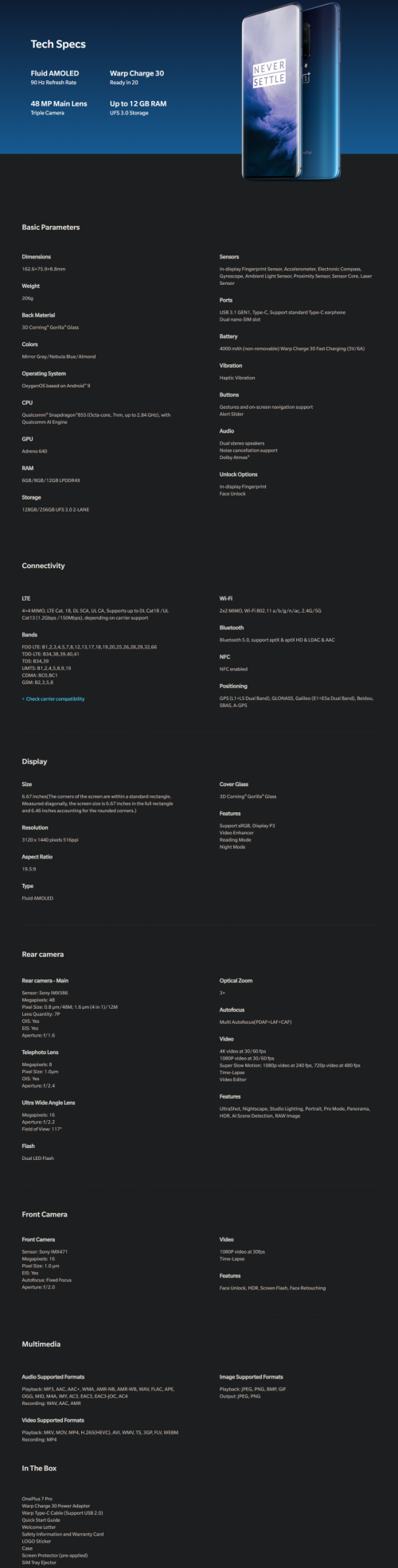

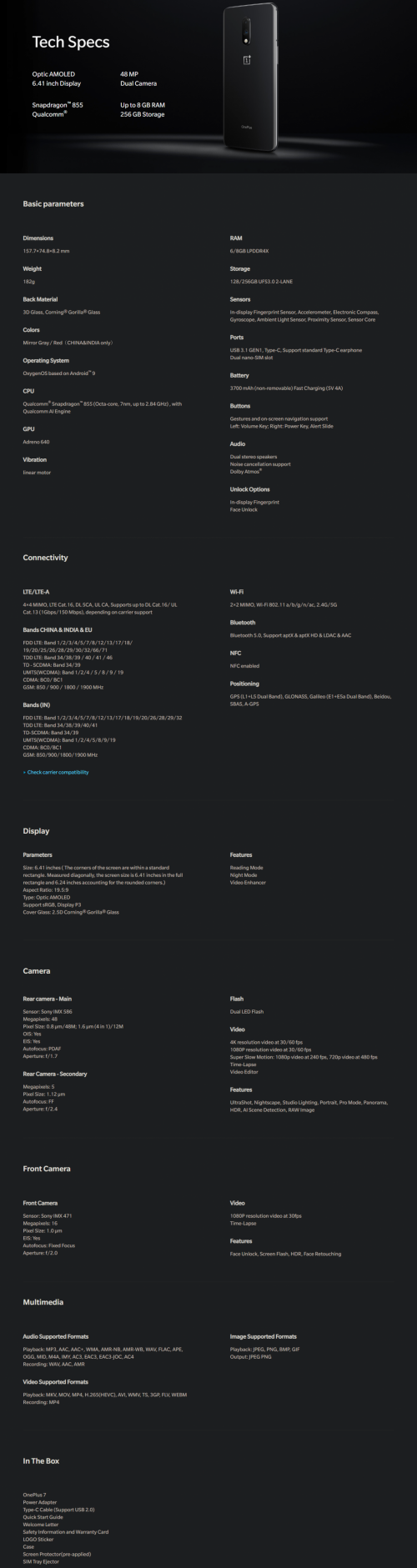
 Quote
Quote





 But I mind if you say those high-end amp or dedicated lossless audio player went for wireless.



 0.0277sec
 0.28
0.28
 6 queries
 GZIP Disabled