Welcome Guest ( Log In | Register )

Bump Topic Topic Closed RSS Feed
21 Pages « < 2 3 4 5 6 > » Bottom

Outline · [ Standard ] · Linear+

Unifi Official TM UniFi High Speed Broadband Thread V37, READ 1ST PAGE FOR TURBO SPEED INFO!

views
     
soonwai
post Mar 6 2019, 02:50 PM


********
All Stars
11,458 posts

Joined: Oct 2007
From: KL


QUOTE(laihuhng @ Mar 6 2019, 02:44 PM)
I'm on 300M but only 24mths promo. What happen after 2 yrs? The 2yrs promo counted from the installation date or the date after turbo upgrade? Coz I saw my service start date has changed to the date where turbo upgrade was performed.

So far, anyone upgrade, from 300M to 500M or 800M?
*
Contract starts from your pre-turbo installation date. A typical Turbo upgrade does not affect the contract.
https://forum.lowyat.net/index.php?showtopi...post&p=92003518

This post has been edited by soonwai: Mar 6 2019, 02:51 PM
soonwai
post Mar 7 2019, 11:12 AM


********
All Stars
11,458 posts

Joined: Oct 2007
From: KL


QUOTE(lemonboyz @ Mar 7 2019, 11:03 AM)
Hi, any update on Unifi business plan ?
Im still paying rm210 for 50mps businees plan...
is expensive nowadays
*
My mum’s office in PJ Turbo’ed from 20 to 300 just last month. She’s paying 249.
soonwai
post Mar 8 2019, 05:55 PM


********
All Stars
11,458 posts

Joined: Oct 2007
From: KL


QUOTE(podrunner @ Mar 8 2019, 04:16 AM)
Hi all,

May I know if it’s necessary to include “@unifi” when renaming our WiFi network name?

My old network name was xxxx unifi, and when the router was changed, the tech said I have to name it xxxx@unifi. It doesn’t make sense to me, as I thought it can be any name we choose. Please advise.

Many thanks in advance.
*
If the router allows it, you can change to anything. I usually use ""\F0\9F\96\95UniFi".
The first part is an Emoji. My router cannot enter emoji so have to enter the unicode. Some like DLink can straight enter emoji.
soonwai
post Mar 8 2019, 08:45 PM


********
All Stars
11,458 posts

Joined: Oct 2007
From: KL


QUOTE(MrSpeedy @ Mar 8 2019, 07:16 PM)
Wait, so thats mean we can have emoji SSID?
The is some next-level WiFi meme going on.
*
Can, no problem.
https://forum.lowyat.net/topic/4211291/all
Last time I use a rocket for my 5Ghz and an ascii fish for my 2.4G. Then I got angry at Unifi and used "\F0\9F\96\95UniFi".

DLink WiFi routers, my old DIR-655 n newer DAP-1665, will accept emojis. Other routers like Mikrotik cannot then you have to use the encoded Unicode.

This post has been edited by soonwai: Mar 8 2019, 08:47 PM
soonwai
post Mar 9 2019, 12:19 PM


********
All Stars
11,458 posts

Joined: Oct 2007
From: KL


QUOTE(Jeremy_John @ Mar 9 2019, 12:20 AM)
I'm been noticing for few weeks already that during peak hours and weekend UDP traffic is throttled to 20Mbps and torrents are affected also.

When I used my OpenVPN to Singapore and ran a Socks5 over it for torrenting I manage to get full speed of 100Mbps well at least the maximum speed of OpenVPN's TAP Adapter on windows.

So having a 500Mbps line and getting UDP throttled down to 20Mbps is kind of too much don't you guys think?
*
Something new? Have not faced it here. What time and day? Weekends right? Later today can check. 20Mbps throttle is definitely too much.
soonwai
post Mar 9 2019, 01:19 PM


********
All Stars
11,458 posts

Joined: Oct 2007
From: KL


QUOTE(thecodez @ Mar 9 2019, 12:38 PM)
im having a weird problem, both my router c3150 built in speed test and chrome measure about 460mbps while firefox show full speed 840mbps..
*
Yeah, I have had the same observation.
https://forum.lowyat.net/index.php?showtopi...post&p=91536311
soonwai
post Mar 9 2019, 11:53 PM


********
All Stars
11,458 posts

Joined: Oct 2007
From: KL


QUOTE(Jeremy_John @ Mar 9 2019, 12:20 AM)
I'm been noticing for few weeks already that during peak hours and weekend UDP traffic is throttled to 20Mbps and torrents are affected also.

When I used my OpenVPN to Singapore and ran a Socks5 over it for torrenting I manage to get full speed of 100Mbps well at least the maximum speed of OpenVPN's TAP Adapter on windows.

So having a 500Mbps line and getting UDP throttled down to 20Mbps is kind of too much don't you guys think?
*
Just tested 5 public torrents at 11:35pm. On 800Mbps. Seems OK.

user posted image
soonwai
post Mar 11 2019, 05:00 PM


********
All Stars
11,458 posts

Joined: Oct 2007
From: KL


QUOTE(Sky.Live @ Mar 11 2019, 04:45 PM)
aiks.. should have lodge my complain before my contract ends

Their router supplied said support my speed on their system but it doesn't..
*
Strange. C5v2 should have no probs with 500 or even 800Mbps. Make sure NAT boost is on and any QoS and rate limits are off.
soonwai
post Mar 11 2019, 08:57 PM


********
All Stars
11,458 posts

Joined: Oct 2007
From: KL


QUOTE(pheranchis @ Mar 11 2019, 06:21 PM)
ok someone might have the issue i'm facing now before, but here goes.

was on astro iptv with maxis 10 mbps, which was then terminated.
after around 2 weeks, wanted to apply for unifi/maxis, got told port not available.
asked maxis, why is that, they told me to refer to TM cos they're on TM's fiber.
asked TM to clarify why the port is closed/not available, they keep copypasting bulls**t non-answers, saying coverage has not reached my area (bulls**t cos my neighbour is on unifi).
so it's been 3 months now. more or less given up, at this point i just want to know what happened to the port (which TM refuses to answer). can anyone provide any enlightenment on this? thanks.
*
Note that the TM ports and Maxis ports are virtually separate. TM’s may be all full and Maxis all empty but you apply for UniFi, you’ll still get “no ports available”. There may be exceptions where they use a shared pool of ports.
soonwai
post Mar 11 2019, 08:59 PM


********
All Stars
11,458 posts

Joined: Oct 2007
From: KL


QUOTE(Micky78 @ Mar 11 2019, 08:42 PM)
can used my nephew standard 1 ID to apply?
*
Can, must be 18 and above. But if still standard 1, maybe better deal if apply for OKU package.
soonwai
post Mar 11 2019, 10:44 PM


********
All Stars
11,458 posts

Joined: Oct 2007
From: KL


QUOTE(cpmlml @ Mar 11 2019, 10:21 PM)
Hi, anyone protected thier unifi modem amd router with UPS? If during power black out the Unifi still working?
*
I use a DIY powerbank (4x18650 batteries) which has usual USB 5V as well as 12V output for my router and BTU.

You can also use those car jump start powerbank. Most of them have 12V output.
soonwai
post Mar 12 2019, 01:28 PM


********
All Stars
11,458 posts

Joined: Oct 2007
From: KL


QUOTE(nag @ Mar 12 2019, 10:11 AM)
Apart from Unifi fibre broadband, in comparison to Maxis Fibre Broadband vs Celcom MiFi (using SIM card locked to specific registrated location, correct me if I'm wrong), what is your opinion ?

May be some will oppose these comparison.

Maxis DTTH rely on TM infras., problem may arise here and there sometime.

ConnectMe satellite Broadband, too costly.
*
Unifi good. Maxis riding on Unifi therefore Maxis also good.
LTE latency higher and wireless is subject to atmospheric conditions.

soonwai
post Mar 12 2019, 02:25 PM


********
All Stars
11,458 posts

Joined: Oct 2007
From: KL


QUOTE(Sky.Live @ Mar 12 2019, 09:38 AM)
Anyone know if Mikrotik  MikroTik RB951G-2HnD can support 500Mbps Unifi? in that case i just buy few AP to extend my wireless network which is much easier
*
It can, provided Fasttrack and bridge_hwoffload are both enabled. By default, they are but certain things that you do with the router may disable one or the other. For example, your own vlans in a bridge will disable hwoffload for all ports in that bridge. Queues will disable fasttrack for devices subjected to the queues.

I don't have any RB951G tests but this is a test of an older RB750GL pushing 500Mbps. The RB951 should be faster.
Mikrotik RB750GL from 2011. Still relevant in 2019.
RouterOS 6.43.12
Fasttrack ON
CPU Usage: ~80%
user posted image
Tested on Turbo 800Mbps.
soonwai
post Mar 14 2019, 12:45 AM


********
All Stars
11,458 posts

Joined: Oct 2007
From: KL


QUOTE(myteam94 @ Mar 13 2019, 11:17 PM)
Hi guys,

not sure here the right place to ask

okay, previously when i was still in college i applied for UNIFI and been using till i move out back to my home. I've terminate my UNIFI and able to keep the modem, router and all

at my house, we already have a unifi and it using fibre optic cable...so i was wondering is it possible to convert the optic cable to gigabit ethernet cable since the i still have the my previous DLink DIR850L router

thank you.
*
Possible but expensive. You can use an optical-ethernet media converter to bridge the optical fibre cable and your Cat5e cable. Another option is to get a router that accepts optical, usually via an SFP module. or if desktop PC, a PCIe card that accepts optical.

This post has been edited by soonwai: Mar 14 2019, 12:46 AM
soonwai
post Mar 14 2019, 12:59 PM


********
All Stars
11,458 posts

Joined: Oct 2007
From: KL


QUOTE(myteam94 @ Mar 14 2019, 09:00 AM)
optical-ethernet media converter to bridge the optical fibre cable and your Cat5e cable.

yea i've been searching and found one of this method
but I dont know where to look for it

is there store in KL selling it (eg: All it/thundermatch and etc) or it can only be purchase online?
*
TPLink sells one. Retail shops probably don't have but I'm sure they can order. Or look online.
soonwai
post Mar 14 2019, 03:15 PM


********
All Stars
11,458 posts

Joined: Oct 2007
From: KL


QUOTE(elmond @ Mar 14 2019, 02:24 PM)
...
RGX4400 actually suppose able to handle quite good speed for wifi except it can input WAN 100M only
...
*
Despite what the specs say, RGX4400 has gigabit ports.
soonwai
post Mar 15 2019, 03:29 PM


********
All Stars
11,458 posts

Joined: Oct 2007
From: KL


QUOTE(bcteh @ Mar 15 2019, 02:42 PM)
So far stream TV BOX all ok ? TIME offering me 500mbps. I wondering to take or not.
My concern is TV BOX only...
*
Apple TV box count or not? If count then no problem most of the time.
soonwai
post Mar 15 2019, 06:18 PM


********
All Stars
11,458 posts

Joined: Oct 2007
From: KL


QUOTE(prody @ Mar 15 2019, 05:36 PM)
Was wondering if anybody came upon this problem.

Wanted to to the 30 days notice online to terminate for my very old contract (> 5 years).
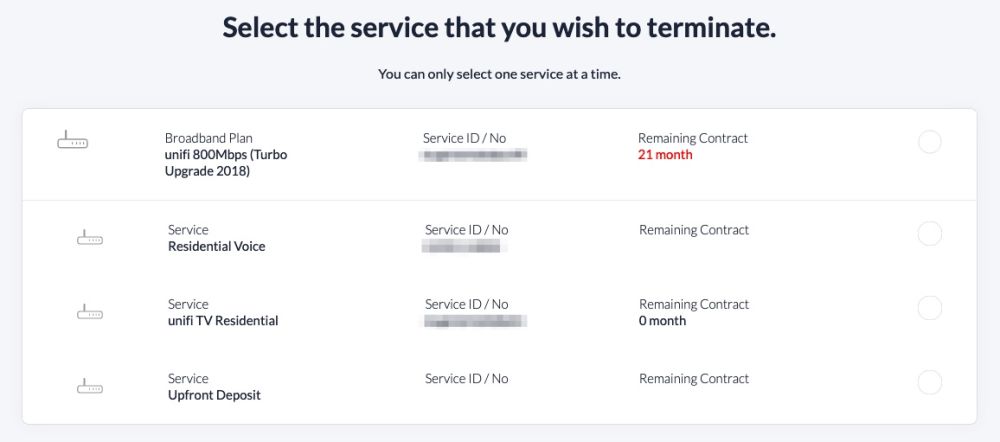
VIP10, then auto upgraded to VIP30, then upgraded to "unifi 300Mbps (Turbo Upgrade 2018)"

It states remaining contact 23 months.
They also give this warning: "There are some services that are still under contract. Early Termination Fees will be applied in the final bill."

Is this correct?
Did they renew contract because of the Turbo upgrade?
*
They should not have renewed the contract. I'm seeing the same thing. My Turbo was done end of Dec 2018. The correct number of months remaining for my contract should be 8 monthsuser posted image. Naughty, naughty TM.

This post has been edited by soonwai: Mar 15 2019, 06:20 PM
soonwai
post Mar 17 2019, 12:44 PM


********
All Stars
11,458 posts

Joined: Oct 2007
From: KL


QUOTE(cyclone2 @ Mar 17 2019, 12:16 PM)
finally pulling a CAT6A cable yesterday from upstair to downstair. Tested the network speed using iperf3 managed to get closed to 1Gbps speed....

But then using tm speedo meter and speedtest.net only can get 500-600mbps download....

Already made a report to TM.....

Iperf3 test result
[attachmentid=10204907]

TM speedtest
[attachmentid=10204908]
*
Try a different browser or a different server for speed tests.
soonwai
post Mar 17 2019, 06:55 PM


********
All Stars
11,458 posts

Joined: Oct 2007
From: KL


QUOTE(cyclone2 @ Mar 17 2019, 05:52 PM)
Tested different server and using windows 10 speedtest app as well, speed not consistent....

Anyway oredi reported to TM. wait them to feedback....
*
What browser?

21 Pages « < 2 3 4 5 6 > » Top
Topic ClosedOptions
 

Change to:
| Lo-Fi Version
0.1964sec    0.60    7 queries    GZIP Disabled
Time is now: 13th December 2025 - 12:48 AM