Welcome Guest ( Log In | Register )

Bump Topic Topic Closed RSS Feed

Outline · [ Standard ] · Linear+

Unifi Official TM UniFi High Speed Broadband Thread V37, READ 1ST PAGE FOR TURBO SPEED INFO!

views
     
lukemanz
post Jun 15 2019, 12:41 AM

Getting Started
**
Junior Member
249 posts

Joined: Aug 2009
QUOTE(merinyu @ Jun 14 2019, 07:57 PM)
cry.gif Very sad with unifi 100Mbps contract penalty. Still got 18 months contract had to pay penalty if terminate even the owner had passed away recently. So the relatives had to continue paying for the unused service or kena penalty if terminate. The only option left is to find someone to continue the contract by change of ownership.

TM don't have any sense of compassionate at all. Makan kaw kaw.  rclxub.gif
*
Dont fall for this shit.
Legally, any service provider cannot request relative to pay for deceased customer, unless the relative sign on behalf during registration. Just send again the termination with reason account owner already passed away. Also, do not agree to transfer owner to any relative, or the relative will be legally bound to pay the penalty. Every service provider is using this tactic too

This post has been edited by lukemanz: Jun 15 2019, 12:42 AM
lukemanz
post Sep 4 2019, 11:46 PM

Getting Started
**
Junior Member
249 posts

Joined: Aug 2009
QUOTE(wira1979 @ Sep 4 2019, 03:40 PM)
Currently on the Unifi Basic RM79 plan. Is there a way to wiggle out of the contract?

I'm asking since Maxis has the RM89 unlimited which offers far better value.
*
You can request directly from TM at TMpoint, unlimited@RM89 or unlimited 50Mbps@RM99, but I think your contract will be renew to 2 years
Best of luck icon_rolleyes.gif

This post has been edited by lukemanz: Sep 5 2019, 12:01 AM
lukemanz
post Sep 5 2019, 09:48 AM

Getting Started
**
Junior Member
249 posts

Joined: Aug 2009
QUOTE(westlife @ Sep 5 2019, 09:12 AM)
Which mesh wifi router has native support for unifi? really hope to get one to have house covered with good signal and constant surfing experience.
*
You can try this https://www.tp-link.com/my/home-networking/deco/deco-m4/
lukemanz
post Sep 5 2019, 09:51 AM

Getting Started
**
Junior Member
249 posts

Joined: Aug 2009
QUOTE(hellfried @ Sep 5 2019, 07:57 AM)
Has anyone tried to get their unifi user id and pw from TM? This is the reply I got from them:

"For your information we do not keep record of unifi password, so if you wish to get the password we will need to submit report to reset it and you will receive password within 24 hours via sms. Once receive password via sms internet will get disconnected and you will need to reconfigure the router to reconnect back."

Sounds like a very complicated process. Why do they make it so hard for customers to use their own router?
*
Sounds like they dont trust their own staff laugh.gif
lukemanz
post Sep 5 2019, 12:41 PM

Getting Started
**
Junior Member
249 posts

Joined: Aug 2009
QUOTE(westlife @ Sep 5 2019, 10:37 AM)
i see. thanks. but does it support hypptv + unifi together? understand that it needs vlan tagging function to work.
*
From my TM member, the good news is these DECO M4 can be used as router or as repeater
The bad news is it does not have VLAN tagging. Thus, you need to let go HyppTV STB if you set is as router. doh.gif
lukemanz
post Sep 5 2019, 03:23 PM

Getting Started
**
Junior Member
249 posts

Joined: Aug 2009
QUOTE(haturaya @ Sep 5 2019, 12:55 PM)
FYI, latest firmware comes with proper UniFi vlan tagging for HyppTv. Tested - it work but you'll lose extra port. Deco M4 only come with 2 ports.

BTU -> Deco M4 (Router Mode) -> HyppTV box
*
QUOTE(SilentVampire @ Sep 5 2019, 01:17 PM)
You need to update to the latest firmware to get VLAN tagging. It does support HyppTV now.
*
Great news rclxms.gif
Seems like you guys are more expert than the TM staff laugh.gif

So if I configure it as AP as below, can the M4 transfer both HyppTV and Internet from upstair to downstair?

BTU > TM Router > Deco M4 (Upstairs) > Deco M4 (downstair) > HyppTV Box > TV

This post has been edited by lukemanz: Sep 5 2019, 03:37 PM
lukemanz
post Sep 5 2019, 08:50 PM

Getting Started
**
Junior Member
249 posts

Joined: Aug 2009
QUOTE(haturaya @ Sep 5 2019, 08:37 PM)
Some of user here is certified in networking. CCNA, CCNP, Juniper, Mikrotik, etc.  biggrin.gif

Maybe possible if you get rid of TM Router. Use Deco M4 as main router and properly set iptv vlan tagging. Not so sure, haven't try this setup before.

BTU -> Deco M4 (upstairs) >>> Deco M4 (downstairs) -> HyppTV Box

-> Wired
>>> wireless
*
Yeah, you write exactly like whats on my mind notworthy.gif
Any Deco M4 owner can try this setup?
lukemanz
post Sep 5 2019, 11:49 PM

Getting Started
**
Junior Member
249 posts

Joined: Aug 2009
QUOTE(haturaya @ Sep 5 2019, 08:58 PM)
Dang,  sad.gif

My Deco M4 already in permanent setup (cabling, trunking, power, etc). Else I can give it a try.  sweat.gif

The setting that I tried before, with latest Deco M4 firmware of course.

BTU -> Deco M4 (Router mode) -> HyppTV box

          >>> Deco M4 >>> all wifi devices
*
QUOTE(blacktubi @ Sep 5 2019, 10:09 PM)
Deco M4 in router mode wouldn't forward IPTV VLAN traffic to the mesh node.

IPTV traffic will only be available from the main node.

The current mesh implementation on the Deco lineup will not allow any workaround for now.
All TP-Link Deco lineup support Unifi Internet.
HyppTV is added to M4, M5 and M9 recently.

It's all really simple to setup, just enable IPTV and select Unifi.
*
So is this mean Deco M4 in AP mode wouldn't forward both IPTV VLAN traffic and internet traffic to the mesh node but it can forward independent traffic to the mesh node (internet only or iptv only, we can choose)?

QUOTE(sHawTY @ Sep 5 2019, 10:33 PM)
Buy ASUS then you don't have to worry about HyppTV or UniFi support because they enable those 2 things in all of their mesh supported devices
*
Can Asus mesh device solve my problem?
lukemanz
post Sep 6 2019, 07:56 AM

Getting Started
**
Junior Member
249 posts

Joined: Aug 2009
QUOTE(blacktubi @ Sep 6 2019, 12:13 AM)
Technically what you want to achieve is to bridge VLAN 600 wirelessly to the node.

I don't see any way it can be achieved easily either with TP-Link Deco or ASUS AiMesh. They are pretty rigid in their configuration to ensure system stability.

A set of cheap PLC powerline can solve your issue. smile.gif
*
Noted. Thank you very much Sifu notworthy.gif
I already have 2 pair of PLC powerline. Set 1 pair for internet and 1 pair hypptv failed miserably.
So currently only 1 pair set for hypptv and another pair was unused for it to be functional.
When I downstairs, i will be connected to internet using TM router upstairs, but the speed was so so only sweat.gif

lukemanz
post Sep 7 2019, 06:35 AM

Getting Started
**
Junior Member
249 posts

Joined: Aug 2009
QUOTE(sHawTY @ Sep 6 2019, 10:12 PM)
UniFi 100Mb/s @ RM129 - Yes, no HyppTV set top box and no phone
UniFi 100Mb/s @ RM159 - Have both
*
I think UniFi 100Mb/s @ RM159 - Have HyppTV set top box but no phone

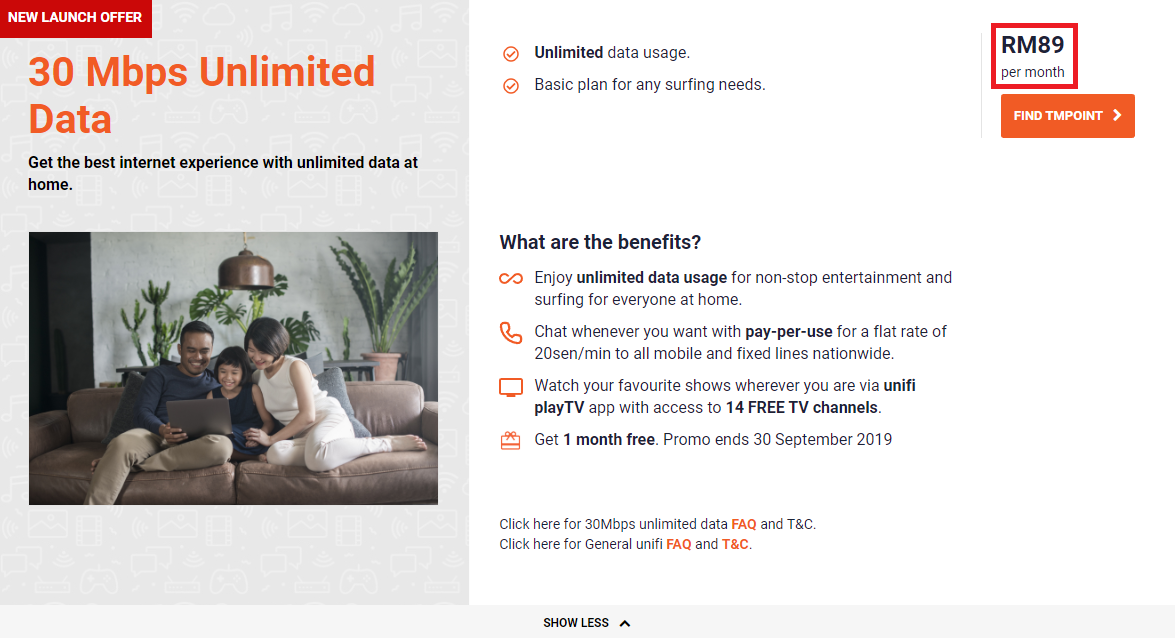
QUOTE(sHawTY @ Sep 6 2019, 10:12 PM)
They finally launched it

user posted image
*
Thanks for the info thumbsup.gif

QUOTE(Cendol_Pulut90 @ Sep 6 2019, 11:33 PM)
Rm 89 for 30Mbps unlimited + unifi mobile postpaid rm 99 = rm 188. Cheaper than my previous rm 189 package.

But i just renew contract last July. If Downgrade at tm point can nego or not ?
*
Which package that you subscribe previously?
I think if you renew on Aug can still nego, but July, best of luck at tmpoint

QUOTE(pakji @ Sep 6 2019, 10:57 PM)
when launch 800MBPS ????
*
I think there are 4 reasons of delaying the 800M:
1) Waiting for Maxis so that that can counter the price
2) Too many 800M Turbo customer complain on wifi/downgrade to 100M. So low demand/avoid too many wifi complain
3) Dont have budget to upgrade network equipment/pay overseas ISP for international routing/waiting from Gov budget/waiting to lease TNB infra/waiting to share infra cost with other Malaysia ISP (current infra cost i suspect 10% gov 90% TM)
4) In dilemma to go for 800M or 1Gbps
whistling.gif

This post has been edited by lukemanz: Sep 7 2019, 06:47 AM
lukemanz
post Sep 7 2019, 07:56 AM

Getting Started
**
Junior Member
249 posts

Joined: Aug 2009
QUOTE(Cendol_Pulut90 @ Sep 7 2019, 07:18 AM)
My previous package was rm 179 for 30Mbps ( turboed to 500 Mbps ). Last July renew for rm 159, 100 Mbps. Even at 100 Mbps very underutilized.
*
Owh..that RM89 does not have hypptv box, so your package I think not compatible to be downgrade.
You can try request at tmpoint. Best of luck icon_rolleyes.gif
lukemanz
post Sep 10 2019, 09:14 PM

Getting Started
**
Junior Member
249 posts

Joined: Aug 2009
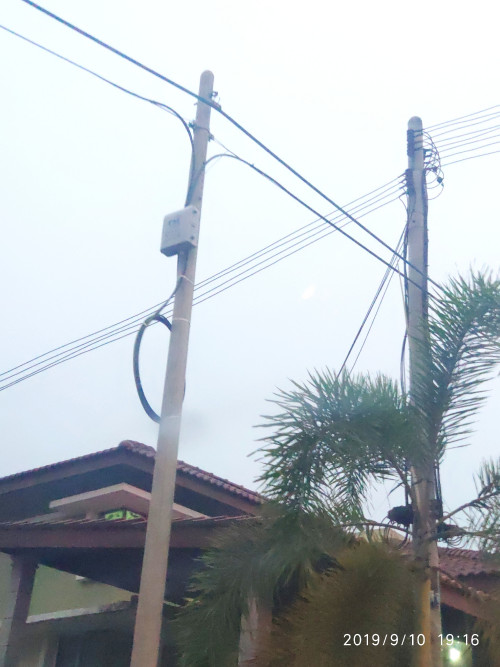
QUOTE(sp3d2 @ Sep 10 2019, 07:30 PM)
user posted image

Guys. Please congratulate me.

After 7 years of waiting, today TM come to install this box infront of my house.

Please, congratulate me again. Finally I can feel proud living in Malaysia.
*
Congratulations ! Looks like 16ports box rclxms.gif
lukemanz
post Sep 17 2019, 07:59 AM

Getting Started
**
Junior Member
249 posts

Joined: Aug 2009
QUOTE(PowerGadget @ Sep 17 2019, 01:31 AM)
Anybody that from last two years applied unifi and offered for 300Mbps turbo upgrade that has 24 months discount?

what happened to the charges after the 24 months discount?
*
From what I heard, you will be charged the normal price on the 25th month (no more 24month discount)
But no worries, as you can downgrade to the 100Mbps, sadly can only be done at tmpoint
lukemanz
post Sep 17 2019, 08:42 PM

Getting Started
**
Junior Member
249 posts

Joined: Aug 2009
QUOTE(PowerGadget @ Sep 17 2019, 10:58 AM)
Thanks for your reply, mate.

If I downgrade to 30Mbps, it the mean that I’m going to renew another 24 months contract?

EDIT: should I do it in 23rd month?
*
Yep, contract will renew 24 months.
It is up to you when you want to downgrade. You can even do it right now.
As you did not share you pakej price and speed,you need to compare, whether current promotion price is much better for you or your 24months discounted price
lukemanz
post Sep 28 2019, 07:03 PM

Getting Started
**
Junior Member
249 posts

Joined: Aug 2009
QUOTE(vknight @ Sep 28 2019, 06:02 PM)
Hi Guys. Just checking. If a condo recently have been installed with Time Fiber, ia there a possibility that TM will also install  Fiber? 

Cause I am paying quite high for 50 Mbps and planning to change to Time.  I asked TM but they are not giving any answer.
*
From what I heard, TM have been requesting Time to lease their fiber, but sadly they cannot get the same price as what Maxis leasing TM fiber cool2.gif
lukemanz
post Sep 30 2019, 02:34 PM

Getting Started
**
Junior Member
249 posts

Joined: Aug 2009
QUOTE(cannavaro @ Sep 30 2019, 10:22 AM)
Any leaked info or rumors about TM's upcoming October surprise? Have not been reading this thread for a while
*
Attached Image
lukemanz
post Sep 30 2019, 03:37 PM

Getting Started
**
Junior Member
249 posts

Joined: Aug 2009
QUOTE(firdausbhari @ Sep 30 2019, 02:44 PM)
unifi mobile?
*
Not eligible for unifi mobile
lukemanz
post Oct 1 2019, 07:57 AM

Getting Started
**
Junior Member
249 posts

Joined: Aug 2009
QUOTE(soonwai @ Oct 1 2019, 01:00 AM)
Aiyo, I just paid my bill in full yesterday.
*
QUOTE(nasilemaksedap @ Oct 1 2019, 01:16 AM)
What about existing customer…
*
QUOTE(ClarenceT @ Oct 1 2019, 05:56 AM)
Aiyo I just changed plan to 30Mbps@RM89 in September.
*
QUOTE(hellfried @ Oct 1 2019, 06:34 AM)
I just installed Unifi 100 MBPS last month. Can I apply for this waiver and maintain my current package? Haven't even got my first bill yet.
*
All existing customer can apply through myunifi app of selfcare portal at unifi.com.my. And yes, can choose maintain current package. Contract will be renew 24 months, you will pay RM0 for monthly fee until 31Dec2019 and start charge back 1Jan2020. So if apply now get 3 months free. Apply 1 Nov get only 2 months free. The catch is when you convert, the penalty is no longer RM500 but remaining months of your contract period. Also, any video on demand, voice usage still need to pay as tm only give waiver on monthly fee. If you already pay your bills, it will carry over and will be deducted when bill start kick in back 1Jan2020
lukemanz
post Oct 1 2019, 08:01 AM

Getting Started
**
Junior Member
249 posts

Joined: Aug 2009
QUOTE(firdausbhari @ Sep 30 2019, 04:01 PM)
no, i meant the offer. is it unifi mobile offer?
*
No, it is for new and existing unifi VDSL & FTTH offer. Unifi air, unifi mobile, and unifi lite (streamyx) will not get the offer.
lukemanz
post Oct 1 2019, 08:23 AM

Getting Started
**
Junior Member
249 posts

Joined: Aug 2009
QUOTE(hellfried @ Oct 1 2019, 08:08 AM)
So i go to unifi website and select the same plan as i am currently on?
*
Correct. What I have done to my account is login to the selfcare portal. Then go to https://unifi.com.my/campaign/paynothing and click the 'via self care button'

QUOTE(ClarenceT @ Oct 1 2019, 08:16 AM)
SECTION O-1: ORDER DETAILS
Order ID:
Order Type: Modify
Package: unifi 30Mbps (VDSL) - Super Value 2019
Previous Package: unifi 100Mbps (Turbo Upgrade 2018)
Login ID:

SECTION O-3: ORDER PROCESSING INFORMATION
Processor ID:
Agent CD:
Date Submitted: 27/09/2019
Date Completion: 28/09/2019


Can re-contract again (only 2-3 days old) for same package without penalty?  confused.gif
*
From what I understand, yes can re-contract again for 2-3 days old to the same package without penalty.

3 Pages < 1 2 3 >Top
Topic ClosedOptions
 

Change to:
| Lo-Fi Version
0.0257sec    0.41    7 queries    GZIP Disabled
Time is now: 2nd December 2025 - 05:01 AM