


Unifi Official TM UniFi High Speed Broadband Thread V37, READ 1ST PAGE FOR TURBO SPEED INFO!
Unifi Official TM UniFi High Speed Broadband Thread V37, READ 1ST PAGE FOR TURBO SPEED INFO!
|
|
 Mar 9 2019, 11:38 PM Mar 9 2019, 11:38 PM
Return to original view | Post
#21
|
 
Senior Member
3,669 posts Joined: Apr 2006 
|
How come every time.....TM network will have problem on Friday night till Monday morning?
|
|
|
|
|
|
Mar 12 2019, 09:04 PM
Return to original view | IPv6 | Post
#22
|
|
Senior Member
3,669 posts Joined: Apr 2006
|
QUOTE(miloaisdino @ Feb 5 2019, 11:19 PM) Update on miloiot tm coverage checker: Dino, what is the latest link for the checker? It seems that tm had migrated from NOVA to GRN for coverage checks, this gives many benefits such as no limit on number of addresses returned, instant results, autocomplete address, and no need to separate address entered into unit, state, road, roadtype etc.. however i still need to reengineer the coverage checker, pls be patient.   |
|
|
Mar 12 2019, 10:08 PM
Return to original view | Post
#23
|
|
Senior Member
3,669 posts Joined: Apr 2006
|
QUOTE(go626201 @ Mar 12 2019, 09:52 PM) Entry level router might not have the function for connection record. QUOTE(SilentVampire @ Mar 12 2019, 09:58 PM) Not possible on entry level router. You will need an expensive router for that, or use a Raspberry Pi and install some network monitoring tools on it. |
|
|
Mar 12 2019, 10:31 PM
Return to original view | Post
#24
|
|
Senior Member
3,669 posts Joined: Apr 2006
|
QUOTE(miloaisdino @ Mar 12 2019, 10:27 PM) i have not fixed the coverage checker yet. However you can still check the coverage from unifi portal after selecting a plan for new signup and entering your details. It does not matter which plan you choose  .........I think I better wait for your coverage checker. .........I think I better wait for your coverage checker.Current TM website lacks the "detailed" info. |
|
|
Mar 14 2019, 07:33 PM
Return to original view | Post
#25
|
|
Senior Member
3,669 posts Joined: Apr 2006
|
I just received the turbo SMS today:
QUOTE RM0 unifi home: You have been levelled up! There's so much you can do with TURBO internet. Click i.unifi.my/t500 to know more. Strangely enough, both of my accounts had been turbo-ed last year...... |
|
|
Mar 14 2019, 08:48 PM
Return to original view | Post
#26
|
|
Senior Member
3,669 posts Joined: Apr 2006
|
QUOTE(SmokeyTheBear @ Mar 14 2019, 08:27 PM) Hi, would like to ask concerning a HyppTV/router problem. Set IGMP Version 3 yet?I bought my own router a few days ago (D-Link DIR-878), internet/wifi is working fine. HyppTV is troublesome as whenever the Set Top Box is put in "Standby mode", and then switched on again later, I lose Multicast Connectivity (Network Test using STB) and get a black screen showing a satellite dish with X. I have to switch off the STB and reboot it every time to get Multicast Connectivity/HyppTV working again. The old router didn't have this problem. I have tried setting high Priority ID for the IPTV VLAN, turning off Priority ID but no luck. IPV6 settings have no bearing on IPTV VLAN? I have IPV6 off for my router. My parents are using HyppTV and they find it troublesome having to reboot the STB every time now. |
|
|
|
|
|
Mar 15 2019, 09:27 PM
Return to original view | IPv6 | Post
#27
|
|
Senior Member
3,669 posts Joined: Apr 2006
|
QUOTE(fin8Ex @ Mar 15 2019, 08:58 PM) well i guess these few days US site is on tortoise/snail speed? It was fine for one day......which is yesterday....... pretty slow  |
|
|
Mar 15 2019, 11:16 PM
Return to original view | IPv6 | Post
#28
|
|
Senior Member
3,669 posts Joined: Apr 2006
|
QUOTE(zellleonhart @ Mar 15 2019, 11:14 PM) Hey all, since yesterday my ping increased to 21~22ms from the usual 8~9ms out of sudden. Restarted few times and until today still the same. Try to get 218.x.x.x address range. So far, this is the only IP address range doesn't seem to be affectedWhat could be causing the issue? |
|
|
Mar 19 2019, 01:50 PM
Return to original view | IPv6 | Post
#29
|
|
Senior Member
3,669 posts Joined: Apr 2006
|
QUOTE(cyclone2 @ Mar 19 2019, 12:37 PM) The TM technician just came.... they just using Mozilla firefox and that's it...... If you insist on using chrome.....what is the chrome speedtest result when you run it in Safe Mode with Networking? able to reach the speed... able to reach the speed...they told me not to use chrome next time...  |
|
|
Mar 27 2019, 09:29 PM
Return to original view | IPv6 | Post
#30
|
|
Senior Member
3,669 posts Joined: Apr 2006
|
QUOTE(annoymous1234 @ Mar 27 2019, 09:21 PM) between Archer A6 and these 2, which one is better, using 100mbps fyi? A7 = can flash openwrt, assuming if you got Version 5 hardware.https://www.lazada.com.my/products/tp-link-...obsbNW&search=1 https://www.lazada.com.my/products/tp-link-...obsbNW&search=1 https://dd-wrt.com/support/other-downloads/...archer-a7-v5%2F https://forum.openwrt.org/t/support-for-archer-a7/20790/10 Reason = TP-Link normally stops update for their router after one year.  Thus, having third-party firmware support = important Thus, having third-party firmware support = important |
|
|
Mar 27 2019, 09:37 PM
Return to original view | IPv6 | Post
#31
|
|
Senior Member
3,669 posts Joined: Apr 2006
|
QUOTE(annoymous1234 @ Mar 27 2019, 09:33 PM) actually what does flashing do? Security patch and extra features (adblocking via dns or one can just use adguard dns instead)?Who knows....maybe openwrt might add WPA3 support in future whereas TP-Link will never do it?  |
|
|
Apr 2 2019, 11:36 PM
Return to original view | IPv6 | Post
#32
|
|
Senior Member
3,669 posts Joined: Apr 2006
|
Is cloudflare 1.1.1.1 and 1.0.0.1 ping-able on Unifi now?
I can ping 8.8.8.8 and 8.8.4.4 just fine....except cloudflare ipv4 dns... Cloudflare ipv6 dns ping-able normally. This post has been edited by JohnLai: Apr 2 2019, 11:40 PM |
|
|
Apr 2 2019, 11:52 PM
Return to original view | Post
#33
|
|
Senior Member
3,669 posts Joined: Apr 2006
|
QUOTE(soonwai @ Apr 2 2019, 11:44 PM) OK here. From 1.32.x.x Strange, I was on IP address 60.50.x.x and 60.49.x.x so far and I can't ping 1.1.1.1 and 1.0.0.1 at all.» Click to show Spoiler - click again to hide... « |
|
|
|
|
|
Apr 3 2019, 12:04 AM
Return to original view | Post
#34
|
|
Senior Member
3,669 posts Joined: Apr 2006
|
QUOTE(soonwai @ Apr 3 2019, 12:01 AM) I changed to 60.54.x.x and ping to 1.1.1.1 also OK. Eh? After latest reboot, the routing table become :Previous routings: 
Latest routing: 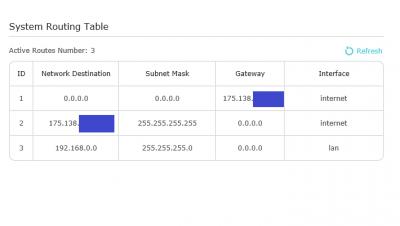
With this routing, I can ping 1.1.1.1 again. Weird.....  |
|
|
Apr 3 2019, 12:17 AM
Return to original view | Post
#35
|
|
Senior Member
3,669 posts Joined: Apr 2006
|
QUOTE(soonwai @ Apr 3 2019, 12:12 AM) Definitely routing problem. What is that WAN interface? Where did that come from? I have no idea. I've seen something like this before in my Aztech FG7008, it routes 1.0.0.0/8 to the bridge. The router is using it for a captive portal. Used to be ok when the internet didn't used 1.0.0.0/8. I was browsing websites so syiok until my sister suddenly came over and ask why others can online while she can't. Turned out her smartphone is configured to use cloudflare dns. Can't ping successfully through pc and router internal pinging tool. I rebooted the router (yes, my new A6 router, sure boot-up fast) several times with different public IPv4 address while checking the routing (4 routes) until I posted here. Then on the latest reboot, the routing tables become 3 routes and cloudflare is pingable again. I wonder what TM did? |
|
|
Apr 4 2019, 12:41 AM
Return to original view | IPv6 | Post
#36
|
|
Senior Member
3,669 posts Joined: Apr 2006
|
......cable linking borneo to peninsula got cut off again?
Can't browse bbc news and reddit now. |
|
|
Apr 5 2019, 07:02 PM
Return to original view | Post
#37
|
|
Senior Member
3,669 posts Joined: Apr 2006
|
QUOTE(gedebe @ Apr 5 2019, 03:40 PM) i just got a a6 from lazada but thinking of returning it since i can't fully utilize it, all my notebook is just support up to N protocol, might as well get something that is free from TM I also bought Archer A6, I can't say I am happy about it ----> IPv6 issues. No 'reply' from TP-Link Malaysia at all even after emailing support.my@tp-link.com...... |
|
|
Apr 5 2019, 07:24 PM
Return to original view | IPv6 | Post
#38
|
|
Senior Member
3,669 posts Joined: Apr 2006
|
QUOTE(zellleonhart @ Apr 5 2019, 07:19 PM) I have an A6 without any issues, happy with it so far. What is the ipv6 issue? I have disabled it and only using ipv4. If you use IPv4 only, then the router is perfect.IPv6 on the other hand.....https://forum.lowyat.net/topic/4301282/+1560 |
|
|
Apr 5 2019, 09:32 PM
Return to original view | IPv6 | Post
#39
|
|
Senior Member
3,669 posts Joined: Apr 2006
|
QUOTE(SilentVampire @ Apr 5 2019, 08:26 PM) For IPv4, it is good though, and most of us don’t need IPv6 as of yet. Let just hope TM will not allocate private IPv4 address to fiber users anytime soon....  GCN-NAT is very troublesome for end users. |
|
|
Apr 9 2019, 07:55 PM
Return to original view | Post
#40
|
|
Senior Member
3,669 posts Joined: Apr 2006
|
QUOTE(gedebe @ Apr 9 2019, 05:48 PM) dlink 842 is better than all of these? Don't buy TP-Link Archer A6 yet.RG TP-LINK ARCHER C1200 , RG TP-LINK ARCHER C5v2 , RG D-Link DIR 850L There is problem with its IPV6 firewall. |
|
Topic ClosedOptions
|
| Change to: |  0.1633sec 0.1633sec
 0.83 0.83
 7 queries 7 queries
 GZIP Disabled GZIP Disabled
Time is now: 6th December 2025 - 04:09 PM |
 Quote
Quote