Welcome Guest ( Log In | Register )

444 Pages « < 129 130 131 132 133 > » Bottom

Outline · [ Standard ] · Linear+

 Unifi TV Ver 2, Formerly known as HyppTV

views
     
jackytan.tt
post Feb 16 2021, 10:22 PM

Getting Started
**
Junior Member
52 posts

Joined: Jul 2020


QUOTE(xxboxx @ Feb 16 2021, 12:39 PM)
I read back some of the previous pages, seem Unifi playTV account can't use STB? Same as what TM people told me.
Only Unifi TV account can use STB?

The funny thing is I try login on STB with my unifi broadband password, it say wrong ID or password. But if I try login with playtv account password, it just stuck there, no message wrong ID or password, but also didn't go into the app.
*
Well, by right, all unifi accounts should have a unifi TV ID. If it’s just a playTV ID, then you can’t use the STB. But since you got the STB, they would’ve provided an ID, and you have @iptv so it should work.

So you tried logging into the playTV app and nothing happened, or you tried logging into the STB?

If STB, try both your @iptv and @tvos ID, with the password 123456 or 999999 and see what happens?

Otherwise, assuming you know your password and ID, go to Settings > IPTV Settings > Field Switcher > unifi. You can also enter your ID manually in the IPTV Authentication Settings. The maintenance code is either 3008 or 6872.

Do this at your own risk - you might have to play around with the settings.

This post has been edited by jackytan.tt: Feb 16 2021, 10:33 PM
xxboxx
post Feb 17 2021, 12:51 AM

The mind is for having ideas, not holding them
*******
Senior Member
5,261 posts

Joined: Oct 2004
From: J@Y B33


QUOTE(jackytan.tt @ Feb 16 2021, 10:22 PM)
Well, by right, all unifi accounts should have a unifi TV ID. If it’s just a playTV ID, then you can’t use the STB. But since you got the STB, they would’ve provided an ID, and you have @iptv so it should work.

So you tried logging into the playTV app and nothing happened, or you tried logging into the STB?

If STB, try both your @iptv and @tvos ID, with the password 123456 or 999999 and see what happens?

Otherwise, assuming you know your password and ID, go to Settings > IPTV Settings > Field Switcher > unifi. You can also enter your ID manually in the IPTV Authentication Settings. The maintenance code is either 3008 or 6872.

Do this at your own risk - you might have to play around with the settings.
*
Don't know if this is also part of the reason, when I change to Unifi, they give me a new ID that is different from Streamyx ID. They say can't just upgrade my account to unifi.

I tried login on the STB, when the STB start it's the big icon/button on the left, which I assume also an app since the STB is android box. But the name is Unifi TV. Just to be clear, I login in with my ID@iptv and password which is the one that I use on playTV app on my phone. On my phone I can login into playTV and watch the stream. On the STB it just stuck at login page, didn't come out wrong ID or password so means it's not wrong info but it won't log me in.

I have tried 123456 and 999999 password with @iptv when I read earlier post this morning but it say wrong ID or password. Haven't try with @tvos.

The bolded part, you mean password for @iptv that I use on playTV app or @unifi that I use on WAN setting in router? I know both password. Will try enter it on the Settings page tomorrow, now already late. Thanks for the help. thumbup.gif
jackytan.tt
post Feb 17 2021, 12:59 AM

Getting Started
**
Junior Member
52 posts

Joined: Jul 2020


QUOTE(xxboxx @ Feb 17 2021, 12:51 AM)
Don't know if this is also part of the reason, when I change to Unifi, they give me a new ID that is different from Streamyx ID. They say can't just upgrade my account to unifi.

I tried login on the STB, when the STB start it's the big icon/button on the left, which I assume also an app since the STB is android box. But the name is Unifi TV. Just to be clear, I login in with my ID@iptv and password which is the one that I use on playTV app on my phone. On my phone I can login into playTV and watch the stream. On the STB it just stuck at login page, didn't come out wrong ID or password so means it's not wrong info but it won't log me in.

I have tried 123456 and 999999 password with @iptv when I read earlier post this morning but it say wrong ID or password. Haven't try with @tvos.

The bolded part, you mean password for @iptv that I use on playTV app or @unifi that I use on WAN setting in router? I know both password. Will try enter it on the Settings page tomorrow, now already late. Thanks for the help. thumbup.gif
*
Ok, so you use @iptv for both phone and TV. Since it works on your phone, it should work on your TV as well.

The one in bold, might be because your box has the new user interface, but your account hasn’t been migrated yet. So, enter your ID manually in the IPTV Authentication Settings. Try 123456 or 999999. The maintenance code is either 3008 or 6872. Then Settings > IPTV Settings > Field Switcher > unifi. If unifi doesn’t work, try Streamyx.

Since @iptv works, I don’t think you need to try @tvos.

I was referring to the @iptv used on playTV app, and the settings for your STB.

This post has been edited by jackytan.tt: Feb 17 2021, 01:03 AM
doubleM2
post Feb 24 2021, 10:43 AM

Regular
******
Senior Member
1,031 posts

Joined: Jun 2019
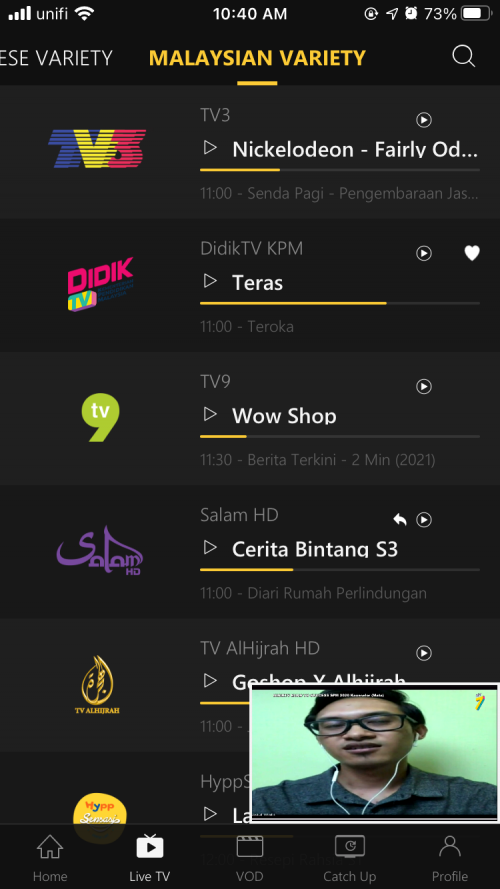
ntv7 renamed as DidikTV KPM on unifi TV as of today, Feb 24, 2021.

Keep in mind that ntv7 still exists, despite its major airtime is from DidikTV KPM.
user posted image
user posted image

And some good material to read regarding the future of ntv7 x DidikTV KPM: https://themalaysianreserve.com/2021/02/17/...nel-for-a-year/

» Click to show Spoiler - click again to hide... «


This post has been edited by doubleM2: Feb 24 2021, 11:25 AM

MustyBalls92
post Mar 2 2021, 06:40 PM

Getting Started
**
Junior Member
111 posts

Joined: May 2015
Right now I'm using the unifiTV app on my androidTV device (TivoStream 4k) and the app always got issue, need to restart sometimes.. sometimes session log out and stuff.. u guys face same issue when using with AndroidTV?
likie3
post Mar 2 2021, 06:52 PM

New Member
*
Junior Member
1 posts

Joined: Jan 2020


QUOTE(MustyBalls92 @ Mar 2 2021, 06:40 PM)
Right now I'm using the unifiTV app on my androidTV device (TivoStream 4k) and the app always got issue, need to restart sometimes.. sometimes session log out and stuff.. u guys face same issue when using with AndroidTV?
*
Mine on panasonic atv have 2 sound like an app open 2x and also freez 5,6sec while on watching 😂
MustyBalls92
post Mar 2 2021, 06:55 PM

Getting Started
**
Junior Member
111 posts

Joined: May 2015
QUOTE(likie3 @ Mar 2 2021, 06:52 PM)
Mine on panasonic atv have 2 sound like an app open 2x and also freez 5,6sec while on watching 😂
*
damn LOL. Glad to know its the app issue not my device. I solve by restart or force stop app but its ANNOYING. Unifi need to step up dun so sohai...
amirul hafizz
post Mar 2 2021, 07:23 PM

Casual
***
Junior Member
369 posts

Joined: Sep 2018


QUOTE(MustyBalls92 @ Mar 2 2021, 06:40 PM)
Right now I'm using the unifiTV app on my androidTV device (TivoStream 4k) and the app always got issue, need to restart sometimes.. sometimes session log out and stuff.. u guys face same issue when using with AndroidTV?
*
i am used mi stick. alhamdulilah, don't have any problem. no need restart and apps don't freezing.
MustyBalls92
post Mar 2 2021, 07:31 PM

Getting Started
**
Junior Member
111 posts

Joined: May 2015
QUOTE(amirul hafizz @ Mar 2 2021, 07:23 PM)
i am used mi stick. alhamdulilah, don't have any problem. no need restart and apps don't freezing.
*
mi stick user here too. Same sh*t. Very bodo unifi. I browse other threads also people complain same thing.
likie3
post Mar 2 2021, 07:34 PM

New Member
*
Junior Member
1 posts

Joined: Jan 2020


Ultimately unifitv app yg problem. Even on plus box have issues . Unifi punya developer tidor.. Zzzzzz😁
MustyBalls92
post Mar 2 2021, 07:38 PM

Getting Started
**
Junior Member
111 posts

Joined: May 2015
QUOTE(likie3 @ Mar 2 2021, 07:34 PM)
Ultimately unifitv app yg problem. Even on plus box have issues . Unifi punya developer tidor.. Zzzzzz😁
*
aku siap log out from all unifitv apps except the damn tvbox. Still same session timeout issue. Zzzzzzzz. Kadang bukan dev yang malas, company tak nak spend duit on better infrastructure..
tharmaraj
post Mar 3 2021, 02:29 AM

Casual
***
Junior Member
312 posts

Joined: Apr 2015


QUOTE(MustyBalls92 @ Mar 2 2021, 06:40 PM)
Right now I'm using the unifiTV app on my androidTV device (TivoStream 4k) and the app always got issue, need to restart sometimes.. sometimes session log out and stuff.. u guys face same issue when using with AndroidTV?
*
NVIDIA Shield TV Pro user also same issues. I believe the APP going to die soon, can we report this issue to MCMC hmm.gif
birain
post Mar 3 2021, 10:29 AM

良い一日を
******
Senior Member
1,448 posts

Joined: Apr 2007
QUOTE(MustyBalls92 @ Mar 2 2021, 07:38 PM)
aku siap log out from all unifitv apps except the damn tvbox. Still same session timeout issue. Zzzzzzzz. Kadang bukan dev yang malas, company tak nak spend duit on better infrastructure..
*
dah try clear unifitv cache and storage? bagi dia reset setting.
tharmaraj
post Mar 5 2021, 01:17 AM

Casual
***
Junior Member
312 posts

Joined: Apr 2015


Today Unifi TV got updated and so far I don't see any of the reported issues on my Shield TV. Hopefully all the issues are fixed!
birain
post Mar 5 2021, 02:04 PM

良い一日を
******
Senior Member
1,448 posts

Joined: Apr 2007
was watching 8tv last night, keep getting error, asking me to login. 🤦‍♀️

logout out, clear cache and setting, relogin, no help. few minutes, stop, keep repeating until show end. 🤦‍♀️🤦‍♀️🤦‍♀️

this app super worse, atleast hyyptv app don't do this to you.

dunno why need to pay $30 per month getting bugs and can't enjoying my show.
rain_wolf
post Mar 5 2021, 05:56 PM

Getting Started
**
Junior Member
164 posts

Joined: Jul 2009

Hi guys. Recently I bought Chromecast with Google TV, and I managed to install Unifi TV apps from the play store. But when I tried to login using my unifi credential, the xxxx@iptv, it kept saying wrong id/password. Though the id and password work well on my hypptv STP. Any idea on how I can solve this?
John42
post Mar 5 2021, 09:43 PM

Getting Started
**
Junior Member
256 posts

Joined: Aug 2019
Hey guys there's a new update available for the UnifiTV app on UPB. The latest version is 1.2.12 which was released on the 4th of March. Yesterday it was on the 1.2.11 version which was released on the 3rd of March. Within a day 2 updates. The improvement is minor as far as I notice. On some channels, the picture quality has improved a bit but most of the channels are not. The subtitles are still the same with visible pixels. Screw those app developers. Till now they are not able to solve the issue. They should just resign instead of being working there doing a lousy job 😡

linkinxmen
post Mar 5 2021, 10:46 PM

New Member
*
Junior Member
42 posts

Joined: Aug 2013
For those with iptv login issue on Android tv. I suggest you contact tm to reset your port.
Since reset on 22/2/21, so far no login issues for me. So far so good.

user posted image
jackytan.tt
post Mar 6 2021, 12:04 AM

Getting Started
**
Junior Member
52 posts

Joined: Jul 2020


QUOTE(rain_wolf @ Mar 5 2021, 05:56 PM)
Hi guys. Recently I bought Chromecast with Google TV, and I managed to install Unifi TV apps from the play store. But when I tried to login using my unifi credential, the xxxx@iptv, it kept saying wrong id/password. Though the id and password work well on my hypptv STP. Any idea on how I can solve this?
*
Usually the STB and playTV passwords are different. Try 123456 (default) and see if it works?
kkm
post Mar 6 2021, 10:08 AM

Regular
******
Senior Member
1,258 posts

Joined: Jan 2003
QUOTE(jackytan.tt @ Mar 6 2021, 12:04 AM)
Usually the STB and playTV passwords are different. Try 123456 (default) and see if it works?
*
I think unifi gives you a different id/pw for unifi tv from the stb id/pw.

444 Pages « < 129 130 131 132 133 > » Top
 

Change to:
| Lo-Fi Version
0.0159sec    0.29    6 queries    GZIP Disabled
Time is now: 22nd December 2025 - 07:53 AM