Welcome Guest ( Log In | Register )

68 Pages « < 9 10 11 12 13 > » Bottom

Outline · [ Standard ] · Linear+

 PlayStation 4™ Community Official Thread | V17, Happy New Year 2019

views
     
GamersFamilia
post Apr 10 2019, 08:13 PM

Proud to be Malaysian
********
All Stars
17,815 posts

Joined: Dec 2007
From: Bandar Baru Bangi , Malaysia


All PS4 owners can change their online ID starting tomorrow 11/4/2019 ( Asia ) devil.gif

user posted image

devil.gif You can change your online ID here : https://asia.playstation.com/en-sg/psn/acco...DUrkbdFC7nD5ob8
devil.gif US playstation blog : https://blog.us.playstation.com/2019/04/10/...Yxzq623kqUQNyCk

This post has been edited by GamersFamilia: Apr 10 2019, 09:19 PM
raclette
post Apr 11 2019, 12:15 AM

Casual
***
Junior Member
428 posts

Joined: Aug 2009
Hi again. Its really tempting to buy cheap games on shoppee. Those digital download (basic or premium). Is it unadvisable? Can sony ban us for it?
mujinkun
post Apr 11 2019, 07:37 AM

Enthusiast
*****
Junior Member
845 posts

Joined: Nov 2007
From: 3°05′N 101°39′E plus α
Sifus...

May I know how to connect Bluetooth Earphones to the PS4?

I'm using Bluedio TN2 BTW.

Reguards
SUSskyforcerld
post Apr 11 2019, 10:18 AM

Casual
***
Junior Member
306 posts

Joined: Jan 2019


QUOTE(raclette @ Apr 11 2019, 12:15 AM)
Hi again. Its really tempting to buy cheap games on shoppee. Those digital download (basic or premium). Is it unadvisable? Can sony ban us for it?
*
I think very mah fan wan....need to create a separate user id for each game, last time i asked.
SUSskyforcerld
post Apr 11 2019, 10:19 AM

Casual
***
Junior Member
306 posts

Joined: Jan 2019


QUOTE(greyshadow @ Apr 9 2019, 05:18 PM)
it's intermittent blackout for few seconds, even during game play where you still can hear the audio playing
by default the display is set to RGB
but changing it to YUV420 solved the issue

seems to be HDR10 handshake issues between the Pro and some of the 4K HDR TVs, Sony TVs included doh.gif

my friend's high end premium Sony OLED TV also facing the same issue doh.gif
*
SONY PS4 don't like SONY TVs...

doh.gif

So far my PS4 Slim HDR have no problem with my Sharp TV. laugh.gif

This post has been edited by skyforcerld: Apr 11 2019, 10:20 AM
SUSskyforcerld
post Apr 11 2019, 10:27 AM

Casual
***
Junior Member
306 posts

Joined: Jan 2019


QUOTE(SSJBen @ Apr 10 2019, 05:16 PM)
The issue is the HDMI cable, not the TV or console. A very common misconception.

Please use certified HDMI cables that conforms to the 2.0 spec, being able to transmit 18gbps bandwidth at a specified length. The cable that comes with the PS4 Pro is not certified, that's why it is hit-and-miss, inconsistent results across all users.

Also the longer the cable length, the harder it'll be for the HDMI cable to transmit the signal.
*
From what i have read so far, the HDMI cables is not really issue. As long as it is "High Speed" HDMI cable (capable of transmitting ethernet), it will do. The spec is only meant between the equipments. Ex, TV support HDMI 2.0a, AVR must also support HDMI 2.0a, if you want to passthrough HDR to from PS4 to TV via the AVR. But yes, it is recommended the cable not to be too long...can't remember how many metres or things might goes wonky.

https://www.cnet.com/news/4k-hdmi-cables-are-nonsense/

Btw, further to testing the HDR on our discussion earliar, i found Uncharted 4 very good for testing as it can turn on and off the HDR in-game from the options, i can see the difference clearly now between HDR ON/OFF. But i am still not convinced it is better...just different. Ex, when look up at the Sun, non-HDR cannot see Sun clearly, just a dim round circle. With HDR ON. can see the sun is bright. Also the environment looks more yellowish supposely from the direct sunlight of the Sun.

It looks suspiciously like just reprogramming the color pallete and effects of the objects. Maybe it need really high end TV to see the difference. Anyway, i just leave it on....kiasu mah...

This post has been edited by skyforcerld: Apr 11 2019, 12:10 PM
greyshadow
post Apr 11 2019, 10:47 AM

I bleed it out, Diggin' deeper just to throw it away!
******
Senior Member
1,844 posts

Joined: Jan 2003
From: Kingdom of Sarawak


QUOTE(SSJBen @ Apr 10 2019, 05:16 PM)
The issue is the HDMI cable, not the TV or console. A very common misconception.

Please use certified HDMI cables that conforms to the 2.0 spec, being able to transmit 18gbps bandwidth at a specified length. The cable that comes with the PS4 Pro is not certified, that's why it is hit-and-miss, inconsistent results across all users.

Also the longer the cable length, the harder it'll be for the HDMI cable to transmit the signal.
*
hmm.gif My friend purchased a Belkin Premium Certified HDMI 2.0 2M cable from Harvey Norman, tried on his Pro & Sony A1 OLED, still the same
tried the same cable on my Pro & Sammy NU7400, same also
faulty cable?
have to use YUV420, can't use RGB
greyshadow
post Apr 11 2019, 10:55 AM

I bleed it out, Diggin' deeper just to throw it away!
******
Senior Member
1,844 posts

Joined: Jan 2003
From: Kingdom of Sarawak


QUOTE(raclette @ Apr 11 2019, 12:15 AM)
Hi again. Its really tempting to buy cheap games on shoppee. Those digital download (basic or premium). Is it unadvisable? Can sony ban us for it?
*
Not recommended
some are selling games funded via scams
it's like you're buying stolen stuffs


QUOTE(mujinkun @ Apr 11 2019, 07:37 AM)
Sifus...

May I know how to connect Bluetooth Earphones to the PS4?

I'm using Bluedio TN2 BTW.

Reguards
*
You can't, PS4 doesn't support BT audio natively
the only way is to use a BT dongle, or via TV if your TV supports BT audio

but I won't recommend using it with your Bluedio, as the audio lag will be unbearable

you'll need something with aptX-LL for gaming & movie watching

SUSskyforcerld
post Apr 11 2019, 12:05 PM

Casual
***
Junior Member
306 posts

Joined: Jan 2019


QUOTE(greyshadow @ Apr 11 2019, 10:47 AM)
hmm.gif  My friend purchased a Belkin Premium Certified HDMI 2.0 2M cable from Harvey Norman, tried on his Pro & Sony A1 OLED, still the same
tried the same cable on my Pro & Sammy NU7400, same also
faulty cable?
have to use YUV420, can't use RGB
*
Belkin is overated thrash. Bought a "Premium" surge protector last time for high price. Spoilt in a few months, no lightning strike also. My friend last time bought a Belkin router i think, also sucks.

raclette
post Apr 11 2019, 02:32 PM

Casual
***
Junior Member
428 posts

Joined: Aug 2009
QUOTE(skyforcerld @ Apr 11 2019, 10:18 AM)
I think very mah fan wan....need to create a separate user id for each game, last time i asked.
*
One off only laugh.gif the so called premium one can use ur id to play. Or so i understand.
raclette
post Apr 11 2019, 02:38 PM

Casual
***
Junior Member
428 posts

Joined: Aug 2009
QUOTE(greyshadow @ Apr 11 2019, 10:55 AM)
Not recommended
some are selling games funded via scams
it's like you're buying stolen stuffs
Sounds like game sharing but ur charging ppl for it. But yeah doesnt seem right. Still tempting tho. mostly for single player games. I guess ill steer away from that.
SUSskyforcerld
post Apr 11 2019, 02:41 PM

Casual
***
Junior Member
306 posts

Joined: Jan 2019


QUOTE(raclette @ Apr 11 2019, 02:38 PM)
Sounds like game sharing but ur charging ppl for it. But yeah doesnt seem right. Still tempting tho. mostly for single player games. I guess ill steer away from that.
*
I think PSN games very cheap when on sale, somemore got free PSN games...bought Crash Bandicoot for RM25 on PSN....Nintendo sells for USD 26 (when on sale!).
raclette
post Apr 11 2019, 03:43 PM

Casual
***
Junior Member
428 posts

Joined: Aug 2009
QUOTE(skyforcerld @ Apr 11 2019, 02:41 PM)
I think PSN games very cheap when on sale, somemore got free PSN games...bought Crash Bandicoot for RM25 on PSN....Nintendo sells for USD 26 (when on sale!).
*
Yeah.need to wait for good sales then. smile.gif
SSJBen
post Apr 11 2019, 04:48 PM

Stars deez nuts.
*******
Senior Member
4,522 posts

Joined: Apr 2006


QUOTE(skyforcerld @ Apr 11 2019, 10:27 AM)
From what i have read so far, the HDMI cables is not really issue. As long as it is "High Speed" HDMI cable (capable of transmitting ethernet), it will do. The spec is only meant between the equipments. Ex, TV support HDMI 2.0a, AVR must also support HDMI 2.0a, if you want to passthrough HDR to from PS4 to TV via the AVR. But yes, it is recommended the cable not to be too long...can't remember how many metres or things might goes wonky.

https://www.cnet.com/news/4k-hdmi-cables-are-nonsense/

Btw, further to testing the HDR on our discussion earliar, i found Uncharted 4 very good for testing as it can turn on and off the HDR in-game from the options, i can see the difference clearly now between HDR ON/OFF. But i am still not convinced it is better...just different. Ex, when look up at the Sun, non-HDR cannot see Sun clearly, just a dim round circle. With HDR ON. can see the sun is bright. Also the environment looks more yellowish supposely from the direct sunlight of the Sun.

It looks suspiciously like just reprogramming the color pallete and effects of the objects. Maybe it need really high end TV to see the difference. Anyway, i just leave it on....kiasu mah...
*
How do you certify if the cable is actually "High Speed" then? You can't, without a consortium certification. In markets like Malaysia, consumers can be easily lied to because all a distro/retailer needs to do is slap a sticker on the cables and call it "High Speed".

Similarly, there are many HDMI cables that are not certified either but pass the HDMI 2.0 bandwidth requirements (fibre optic HDMI cables for example has a high rate of success). Most HDMI cables start getting issues after 5 meters btw. The 'standard' is 1.5m to 3m.

What is your TV again? Are you sure you have the proper settings? HDR shouldn't just look "different", in all cases assuming the HDR tone mapping isn't bullshit to begin with (RDR2 for example is pure bs) - it will always look better than SDR. Of course your display's capability to reproduce HDR is equally as important as the source.


QUOTE(greyshadow @ Apr 11 2019, 10:47 AM)
hmm.gif  My friend purchased a Belkin Premium Certified HDMI 2.0 2M cable from Harvey Norman, tried on his Pro & Sony A1 OLED, still the same
tried the same cable on my Pro & Sammy NU7400, same also
faulty cable?
have to use YUV420, can't use RGB
*
You sure under the TV's HDMI settings - "Enhanced" format is enabled? Also, are you sure you connected to the correct HDMI port? On the A1, only HDMI port 2 and 3 are full bandwidth. Others are not.
SUSskyforcerld
post Apr 11 2019, 05:09 PM

Casual
***
Junior Member
306 posts

Joined: Jan 2019


QUOTE(SSJBen @ Apr 11 2019, 04:48 PM)
How do you certify if the cable is actually "High Speed" then? You can't, without a consortium certification. In markets like Malaysia, consumers can be easily lied to because all a distro/retailer needs to do is slap a sticker on the cables and call it "High Speed".

Similarly, there are many HDMI cables that are not certified either but pass the HDMI 2.0 bandwidth requirements (fibre optic HDMI cables for example has a high rate of success). Most HDMI cables start getting issues after 5 meters btw. The 'standard' is 1.5m to 3m.

What is your TV again? Are you sure you have the proper settings? HDR shouldn't just look "different", in all cases assuming the HDR tone mapping isn't bullshit to begin with (RDR2 for example is pure bs) - it will always look better than SDR. Of course your display's capability to reproduce HDR is equally as important as the source.
You sure under the TV's HDMI settings - "Enhanced" format is enabled? Also, are you sure you connected to the correct HDMI port? On the A1, only HDMI port 2 and 3 are full bandwidth. Others are not.
*
For HDMI cables, just buy online UGREEN cables from lapsada. No worries. I won't buy chap XXX from ALL IT Hypermarket for sure. Expensive gila somemore. Honestly, in all my years of using HDMI cables with various gadgets, from short to very long (like 12 feet or more), there wasn't any issue at all. They are just avg cables, nothing premium.

I don't have RDR2 so can't compare, maybe i google RDR2 HDR later. But like i said earliar, even the Youtube videos comparison, just looked different. I really don't find HDR "better". I guess to each their own opinions. It's not really a big jump for me. This is after all, just a TV display tech, not a GPU tech which i can clearly see the difference like from programmable pixel shader to tessellation, which is very obvious improvements.

As for movie HDRs, i haven't really make any comparisons. So far it looks good, but it is even harder to compare without a second TV.
greyshadow
post Apr 11 2019, 05:27 PM

I bleed it out, Diggin' deeper just to throw it away!
******
Senior Member
1,844 posts

Joined: Jan 2003
From: Kingdom of Sarawak


QUOTE(SSJBen @ Apr 11 2019, 04:48 PM)
You sure under the TV's HDMI settings - "Enhanced" format is enabled? Also, are you sure you connected to the correct HDMI port? On the A1, only HDMI port 2 and 3 are full bandwidth. Others are not.
*
we tried all the display settings on his TV, switch off/on, tried all ports
same results
only YUV420 works

he wanna go buy and try the stupid overpriced gold plated Monster cable, luckily I stopped him tongue.gif
SSJBen
post Apr 11 2019, 05:43 PM

Stars deez nuts.
*******
Senior Member
4,522 posts

Joined: Apr 2006


QUOTE(skyforcerld @ Apr 11 2019, 05:09 PM)
For HDMI cables, just buy online UGREEN cables from lapsada. No worries. I won't buy chap XXX from ALL IT Hypermarket for sure. Expensive gila somemore. Honestly, in all my years of using HDMI cables with various gadgets, from short to very long (like 12 feet or more), there wasn't any issue at all. They are just avg cables, nothing premium.

I don't have RDR2 so can't compare, maybe i google RDR2 HDR later. But like i said earliar, even the Youtube videos comparison, just looked different. I really don't find HDR "better". I guess to each their own opinions. It's not really a big jump for me. This is after all, just a TV display tech, not a GPU tech which i can clearly see the difference like from programmable pixel shader to tessellation, which is very obvious improvements.

As for movie HDRs, i haven't really make any comparisons. So far it looks good, but it is even harder to compare without a second TV.
*
If you can tell the difference between tessellation enabled and disabled, you can certainly tell the difference between HDR and SDR.

Clearly something is wrong in your chain. Saying HDR is not better is like saying 1080p isn't better than 480p or a 10bit panel isn't better than an 6-bit with FRC (or 8 bit). The difference is day and night. Don't use Youtube as a comparison tool, none of it is accurate. HDR vs SDR can be objectively compared, it's not audio.


QUOTE(greyshadow @ Apr 11 2019, 05:27 PM)
we tried all the display settings on his TV, switch off/on, tried all ports
same results
only YUV420 works

he wanna go buy and try the stupid overpriced gold plated Monster cable, luckily I stopped him tongue.gif
*
I just calibrated an A8F (which is a cut down A1) 2 days ago, 4k RGB works on the Pro and XboneX. Cable used was monoprice cables, bought from Amazon - pretty cheap.

The setting to make sure it's enabled is under Settings > External Inputs > HDMI signal format > Enhanced. Also this must be done prior to the console being turned on. The TV has to reset itself when changing the signal format, if you have a source connected then the source will send the wrong EDID data, which means no matter what you change after that doesn't really do anything.


*EDIT*

Ah, I understand your problem now greyshadow. You're trying to push 4k60 with RGB at 10-bit for HDR, that simply won't work with HDMI 2.0 because that requires 22.7gbps. You are locked to YUV420 because that's a limitation of the HDMI 2.0 spec. You can still do 4k60 with RGB if you disable HDR (8-bit) however.

This post has been edited by SSJBen: Apr 11 2019, 06:49 PM
SUSskyforcerld
post Apr 11 2019, 05:59 PM

Casual
***
Junior Member
306 posts

Joined: Jan 2019


QUOTE(SSJBen @ Apr 11 2019, 05:43 PM)
If you can tell the difference between tessellation enabled and disabled, you can certainly tell the difference between HDR and SDR.

Clearly something is wrong in your chain. Saying HDR is not better is like saying 1080p isn't better than 480p or a 10bit panel isn't better than an 6-bit with FRC (or 8 bit). The difference is day and night. Don't use Youtube as a comparison tool, none of it is accurate. HDR vs SDR can be objectively compared, it's not audio.
*
Tessellation is procedural generation of 3d geometry as opposed to slapping bitmaps on polygons in bump mapping. This is day and night!

Between 1080p and 480p is obvious. But between 1080p and 4k, the improvement curve has gone to the top of an exponential curve...yes, there is improvement, but not as significant. And it will get even less from 4k to 8k.


So, can't agree bro. Let's just agree to disagree. thumbsup.gif

I think unless there is a bunch of different TVs, done with different test HDR ON/OFF and seen LIVE, it is very hard to make a judgement. hence, i think it will be hard sell to the consumers because you can't immediately show justification of the supposed improvements.

In a way, i feels that HDR can be done by bloom lightning (which was present since DX10), but not a lot of games doing that, maybe it is costly in terms of processing power.

Like the 3DS...till today i still haven't see a real 3DS 3D effect...haha.

This post has been edited by skyforcerld: Apr 11 2019, 06:02 PM
SSJBen
post Apr 11 2019, 06:27 PM

Stars deez nuts.
*******
Senior Member
4,522 posts

Joined: Apr 2006


QUOTE(skyforcerld @ Apr 11 2019, 05:59 PM)
Tessellation is procedural generation of 3d geometry as opposed to slapping bitmaps on polygons in bump mapping. This is day and night!

Between 1080p and 480p is obvious. But between 1080p and 4k, the improvement curve has gone to the top of an exponential curve...yes, there is improvement, but not as significant. And it will get even less from 4k to 8k.
So, can't agree bro. Let's just agree to disagree.  thumbsup.gif

I think unless there is a bunch of different TVs, done with different test HDR ON/OFF and seen LIVE, it is very hard to make a judgement. hence, i think it will be hard sell to the consumers because you can't immediately show justification of the supposed improvements.

In a way, i feels that HDR can be done by bloom lightning (which was present since DX10), but not a lot of games doing that, maybe it is costly in terms of processing power.

Like the 3DS...till today i still haven't see a real 3DS 3D effect...haha.
*
Nothing to agree to disagree about because you're not even factually right.

Where did the sudden comparison of bitmaps came from? What does this have to do with a comparison to HDR? I was saying that if you can tell the difference between tessellation enabled and disabled, you can tell how HDR is better than SDR. You say you can't so the only conclusion is then something is wrong in your chain, as evident when you keep using Youtube as an example as a tool of comparison. You still haven't answered me, what is the TV you are using?

"HDR" in games is not the same as HDR used on displays. How in the world did you even co-relate them? HDR in games are used as point lights to simulate real time calculation of lighting effects. It was the wrong term to be used all along! Also, you have no idea how bloom lighting works as you just proven that you think it can be simulate HDR. They are 2 entirely different things.
Convael
post Apr 11 2019, 08:42 PM

Regular
******
Senior Member
1,109 posts

Joined: Sep 2007
From: Kuala Lumpur
QUOTE(skyforcerld @ Apr 11 2019, 05:09 PM)
I don't have RDR2 so can't compare, maybe i google RDR2 HDR later. But like i said earliar, even the Youtube videos comparison, just looked different. I really don't find HDR "better". I guess to each their own opinions. It's not really a big jump for me. This is after all, just a TV display tech, not a GPU tech which i can clearly see the difference like from programmable pixel shader to tessellation, which is very obvious improvements.

As for movie HDRs, i haven't really make any comparisons. So far it looks good, but it is even harder to compare without a second TV.
*
A majority of the comparison videos , especially on youtube are invalid . Primarily because 99 % of time these people have no idea what they are talking about , including those big name with millions of subscribers . (With the exception of the more technical channels such as CalibrateHD , AVS , Digital Foundry and Vincent T etc )

Why ? Because these people are no calibrator . They have no idea what an accurate, a near perfect picture should look like . Especially when these videos are not even encoded in HDR , how do you showcase the extended dynamic range of HDR on a regular SDR youtube video ?

Not to mention the long term exposure of overly blue-ish white from these ridiculously inaccurate and overly saturated smart phone and monitors , a lot of people don't recognize what does a simple color such as white looks anymore.

"HDR ? MEH , OVERRATED " is also a very common opinion. There is a reason behind that .

Take a look at this unfortunate color chart .
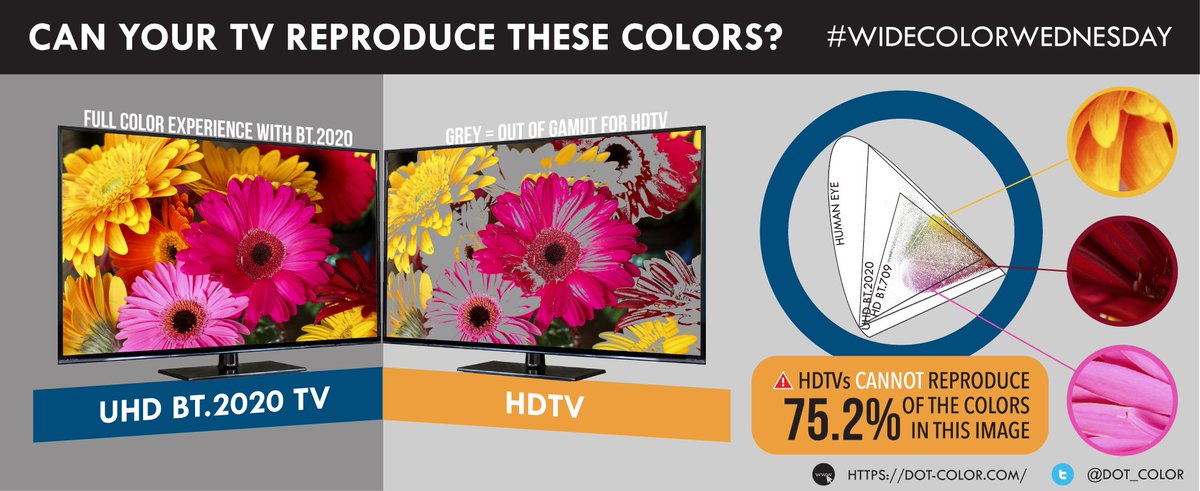
user posted image


When the TV is unable to showcase a specific color shade , it will simply pick one from the nearby palette and melt it together on the picture, causing images to look too soft and washed out , color and texture details are lost in the process . In such cases you are better off sticking with SDR .


TV makers are also partially to be blamed for this . A lot of these so called HDR TVs are just TV with upgraded pixel numbers . Their limited color gamut and cheap brightness ratings , terribad color volume have severely impeded the intended HDR effects . Yet most of these TV owners , who usually don't know much about PQ will arrive at the same conclusion as you - HDR is nothing more than a myth.

For eg : Horizon zero dawn on an appropriate HDR display almost look like a different game . During the night , the contrast between the moon , the stars and the clouds is a sight to behold.
Compare with SDR , the sky is more than just a uniformly blackout . Shifting between very dark shades of colors expose more shadow details, the moon shines like an elusive pearl in a dark room , you can see more texture and details around edges of the moon and clouds . The torch effects look almost 3d , as if someone has lighten up a match stick in front of your TV . It is incredible how HDR can transform a night scene which is usually monotone and muted , into such vivid scene with deep , dark shades of gray and shadow matchup.

Perhaps the situation will improve in the near future , but as of now true HDR compatible displays are still quite pricey and remains out of reach for many .
I am not posting this to insult these cheaper TVs , people have rights to reserve how much of a budget they want to spend on their AV equipment . But I have had many friends who were in your boat and they have completely changed their opinions about HDR after I've shown them how HDR looks like on the calibrated AF9 I have gotten from Sony China a while ago .

Fun fact : do you know 95% of the TV on market is unable to show the color - red from a simple Cola Can ? Yes all the "red " Cola cans you saw on TV are actually different than what you perceived in real life .

This post has been edited by Convael: Apr 11 2019, 09:35 PM

68 Pages « < 9 10 11 12 13 > » Top
 

Change to:
| Lo-Fi Version
0.0260sec    0.65    6 queries    GZIP Disabled
Time is now: 9th December 2025 - 11:29 PM