

QUOTE(miyakochan89 @ Apr 3 2019, 07:23 AM)
When do you all think will be the next sales in PSN Asia store?

My guess next is the usual April Flash Sales 
PlayStation 4™ Community Official Thread | V17, Happy New Year 2019
|
|
 Apr 3 2019, 01:51 PM Apr 3 2019, 01:51 PM
|
 
Junior Member
321 posts Joined: May 2012 
|
QUOTE(miyakochan89 @ Apr 3 2019, 07:23 AM) When do you all think will be the next sales in PSN Asia store? My guess next is the usual April Flash Sales |
|
|
|
|
|
Apr 3 2019, 01:55 PM
|

Senior Member
6,724 posts Joined: Aug 2008 
|
QUOTE(azyune @ Apr 3 2019, 01:51 PM) My guess next is the usual April Flash Sales Oh wow usually around when? |
|
|
Apr 3 2019, 04:06 PM
|

Senior Member
4,522 posts Joined: Apr 2006 
|
QUOTE(skyforcerld @ Apr 3 2019, 09:29 AM) Just got a new 4K HDR TV. Tried HDR gaming. Not sure if it's better or what. What TV did you get? Understand that most 4k TVs still can't do HDR properly even in 2019. Also did you make sure your settings are correct and if you calibrated your display?Tried GOW, Spiderman and HZD so far. Not sure if it's better or what since can't do side by side comparison. But i have watched some Youtube comparison videos. And frankly, it looks like non-HDR is better? What do you guys think? QUOTE(skyforcerld @ Apr 3 2019, 09:30 AM) I think mine also a bit warm. Using a new HDMI cable recently. Noticed that the end connecting to the PS4 is pretty hot. End on TV not so hot. Is this normal? That's normal of course. The heat comes out through the back of the power supply. A good way to identify good cooing is: high heat exhaust, fan not in maximum RPM mode, and the system isn't clearly thermal throttling. You can tell your system is thermal throttling when you start to get extremely erratic framerate drops in games (especially the ones with unlocked framerates or those that targets 60fps). |
|
|
Apr 3 2019, 04:31 PM
|

Junior Member
306 posts Joined: Jan 2019
|
QUOTE(SSJBen @ Apr 3 2019, 04:06 PM) What TV did you get? Understand that most 4k TVs still can't do HDR properly even in 2019. Also did you make sure your settings are correct and if you calibrated your display? Didnt calibrate anything. Wont know how also. But the point is, i am watching videos of comparison on Youtube. HDR doesn't seems so hot to me...actually worst in a lot of scenarios. Or maybe it cant be seen via Youtube videos? In General, HDR just makes things darker from whatvi have observed from the Youtube comparisons.That's normal of course. The heat comes out through the back of the power supply. A good way to identify good cooing is: high heat exhaust, fan not in maximum RPM mode, and the system isn't clearly thermal throttling. You can tell your system is thermal throttling when you start to get extremely erratic framerate drops in games (especially the ones with unlocked framerates or those that targets 60fps). My own TV i cant tell since can't do side by side comparison. |
|
|
Apr 3 2019, 05:08 PM
|
|
Senior Member
4,522 posts Joined: Apr 2006
|
QUOTE(skyforcerld @ Apr 3 2019, 04:31 PM) Didnt calibrate anything. Wont know how also. But the point is, i am watching videos of comparison on Youtube. HDR doesn't seems so hot to me...actually worst in a lot of scenarios. Or maybe it cant be seen via Youtube videos? In General, HDR just makes things darker from whatvi have observed from the Youtube comparisons. How did you do the comparisons on HDR via Youtube? Was it direct feed or captured off cam?My own TV i cant tell since can't do side by side comparison. HDR becomes darker and crushes shadow or HDR makes the image looks washed out is a very common complain people who are new to the technology brings up. It's actually a misconception. It does depend on the source too, quite a number of games (alarmingly) has been using "fake HDR" too. |
|
|
Apr 3 2019, 05:23 PM
|
|
Junior Member
306 posts Joined: Jan 2019
|
QUOTE(SSJBen @ Apr 3 2019, 05:08 PM) How did you do the comparisons on HDR via Youtube? Was it direct feed or captured off cam? Looks like direct feed, off cam better for comparisons?HDR becomes darker and crushes shadow or HDR makes the image looks washed out is a very common complain people who are new to the technology brings up. It's actually a misconception. It does depend on the source too, quite a number of games (alarmingly) has been using "fake HDR" too. |
|
|
|
|
|
Apr 3 2019, 10:47 PM
|

Junior Member
428 posts Joined: Aug 2009
|
QUOTE(raclette @ Apr 2 2019, 04:16 PM) Hi, sorry total noob here. Let's say i bought a digital copy of overcooked R3 and I have a malaysian set ps4 slim. How does it work? Up pls1-received "licence serial number" from seller 2-need to create Malaysian PSN account 3-download game And then if i want to buy digital game from let say uk/eu store. 1-create uk/eu account on psn 2-buy using uk/eu credit/debit card 3-download game is that all? tqvm! |
|
|
Apr 4 2019, 08:46 AM
|
 
Elite
2,718 posts Joined: Mar 2006
|
QUOTE(raclette @ Apr 3 2019, 10:47 PM) Up pls If you’ve a R3 digital code, just create a R3 psn account and input the code in. You’ll then be able to download it and use it. If you’ve only 1 ps4, set that PS4 as primary on the psn account. That way, any account can play that game on your PS4 and you don’t need to be always online. If you want to buy a digital game from EU/US, you need to create that region psn account. You then need to add that region credit card or purchase reload cards for that region if you wanna buy games. This post has been edited by LegendLee: Apr 4 2019, 08:49 AM |
|
|
Apr 4 2019, 05:50 PM
|
|
Junior Member
428 posts Joined: Aug 2009
|
QUOTE(LegendLee @ Apr 4 2019, 08:46 AM) If you’ve a R3 digital code, just create a R3 psn account and input the code in. You’ll then be able to download it and use it. thank youIf you’ve only 1 ps4, set that PS4 as primary on the psn account. That way, any account can play that game on your PS4 and you don’t need to be always online. If you want to buy a digital game from EU/US, you need to create that region psn account. You then need to add that region credit card or purchase reload cards for that region if you wanna buy games. |
|
|
Apr 6 2019, 04:48 PM
Show posts by this member only | IPv6 | Post
#190
|
|
Junior Member
225 posts Joined: Dec 2009
|
Do you experience this? While playing with PS4 Pro, somehow the screen flicks to blank screen, about 2 seconds and then back to normal. Not frequent and it looks random. I am using Sony 4k TV and Sony sound bar. The HDMI cable used is of version 2.0. I wonder it is because of temperature of the console or it is a known issue.
This post has been edited by ckl1998: Apr 6 2019, 04:49 PM |
|
|
Apr 7 2019, 07:30 AM
Show posts by this member only | IPv6 | Post
#191
|

Senior Member
2,748 posts Joined: Jan 2005 From: T20 area
|
Stifled is one of the best PS4 games I've played.. Story line is good
|
|
|
Apr 8 2019, 09:31 AM
|
|
Elite
2,718 posts Joined: Mar 2006
|
QUOTE(ckl1998 @ Apr 6 2019, 04:48 PM) Do you experience this? While playing with PS4 Pro, somehow the screen flicks to blank screen, about 2 seconds and then back to normal. Not frequent and it looks random. I am using Sony 4k TV and Sony sound bar. The HDMI cable used is of version 2.0. I wonder it is because of temperature of the console or it is a known issue. Don’t think it’s the temp. Temp would just cause it to shut down or if that fails to kick it, you’ll get extreme slowdown/graphical glitches. This sounds like the cable/port issue. |
|
|
Apr 8 2019, 09:32 AM
|
|
Elite
2,718 posts Joined: Mar 2006
|
Any recommended controllers for the PS4 remote app on iOS?
Something which can hold the phone as well. |
|
|
|
|
|
Apr 8 2019, 10:21 AM
|

Senior Member
1,844 posts Joined: Jan 2003 From: Kingdom of Sarawak 
|
QUOTE(ckl1998 @ Apr 6 2019, 04:48 PM) Do you experience this? While playing with PS4 Pro, somehow the screen flicks to blank screen, about 2 seconds and then back to normal. Not frequent and it looks random. I am using Sony 4k TV and Sony sound bar. The HDMI cable used is of version 2.0. I wonder it is because of temperature of the console or it is a known issue. it's the common issues with some 4k TV's hdr with PS4Prochange your PS4pro display setting to YUV420 will solve the issue my previous 4k Non HDR Sammy had no issue with the pro but after changing the to the HDR 4K TV, having similar intermittent black screen issue This post has been edited by greyshadow: Apr 8 2019, 10:21 AM |
|
|
Apr 8 2019, 06:21 PM
|

All Stars
17,760 posts Joined: Dec 2007 From: Bandar Baru Bangi , Malaysia 
|
QUOTE(LegendLee @ Apr 8 2019, 09:32 AM) Any recommended controllers for the PS4 remote app on iOS? Something which can hold the phone as well.  dualshock 4 dualshock 4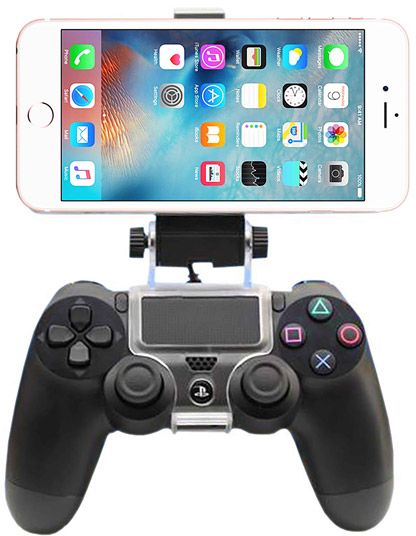 |
|
|
Apr 8 2019, 09:13 PM
|
|
Elite
2,718 posts Joined: Mar 2006
|
QUOTE(GamersFamilia @ Apr 8 2019, 06:21 PM) dualshock 4Especially when I’m far from the PS4. The DS4 connects to the PS4 rather than the phone. |
|
|
Apr 9 2019, 04:55 PM
|

Senior Member
6,410 posts Joined: Jan 2003 From: MLK
|
QUOTE(greyshadow @ Apr 8 2019, 10:21 AM) it's the common issues with some 4k TV's hdr with PS4Pro Isn't that normal if the game support HDR? I mean, when the game loads the TV will switch from SDR to HDR mode.change your PS4pro display setting to YUV420 will solve the issue my previous 4k Non HDR Sammy had no issue with the pro but after changing the to the HDR 4K TV, having similar intermittent black screen issue |
|
|
Apr 9 2019, 05:18 PM
|
|
Senior Member
1,844 posts Joined: Jan 2003 From: Kingdom of Sarawak
|
QUOTE(Joseph Hahn @ Apr 9 2019, 04:55 PM) Isn't that normal if the game support HDR? I mean, when the game loads the TV will switch from SDR to HDR mode. it's intermittent blackout for few seconds, even during game play where you still can hear the audio playingby default the display is set to RGB but changing it to YUV420 solved the issue seems to be HDR10 handshake issues between the Pro and some of the 4K HDR TVs, Sony TVs included  my friend's high end premium Sony OLED TV also facing the same issue This post has been edited by greyshadow: Apr 10 2019, 08:12 AM |
|
|
Apr 10 2019, 10:29 AM
|
|
Senior Member
6,410 posts Joined: Jan 2003 From: MLK
|
Oooh... i don't have that issue with my cheapo LG TV though. Everything set to auto.
|
|
|
Apr 10 2019, 05:16 PM
|
|
Senior Member
4,522 posts Joined: Apr 2006
|
The issue is the HDMI cable, not the TV or console. A very common misconception.
Please use certified HDMI cables that conforms to the 2.0 spec, being able to transmit 18gbps bandwidth at a specified length. The cable that comes with the PS4 Pro is not certified, that's why it is hit-and-miss, inconsistent results across all users. Also the longer the cable length, the harder it'll be for the HDMI cable to transmit the signal. This post has been edited by SSJBen: Apr 10 2019, 05:17 PM |
| Change to: |  0.0262sec 0.0262sec
 0.54 0.54
 6 queries 6 queries
 GZIP Disabled GZIP Disabled
Time is now: 2nd December 2025 - 09:28 AM |
 Quote
Quote