

QUOTE(Orpheus1120 @ Jan 10 2019, 09:14 PM)
Has turbo reached Johor?

Yes, Already Turbo for 2-3 weeks. I think Johor got people get turbo from 1-2 months ago.Unifi Official TM UniFi High Speed Broadband Thread V36, READ 1ST PAGE FOR TURBO SPEED INFO!
|
|
 Jan 10 2019, 09:49 PM Jan 10 2019, 09:49 PM
Return to original view | Post
#61
|
 
Senior Member
1,882 posts Joined: Sep 2017 
|
QUOTE(Orpheus1120 @ Jan 10 2019, 09:14 PM) Has turbo reached Johor? Yes, Already Turbo for 2-3 weeks. I think Johor got people get turbo from 1-2 months ago. |
|
|
|
|
|
Jan 11 2019, 03:10 PM
Return to original view | Post
#62
|
|
Senior Member
1,882 posts Joined: Sep 2017
|
Just Format my Desktop Get almost full speed again.
|
|
|
Jan 11 2019, 03:40 PM
Return to original view | Post
#63
|
|
Senior Member
1,882 posts Joined: Sep 2017
|
QUOTE(ulart_mie @ Jan 11 2019, 03:13 PM) Guys!!! if you are on turbo 800mb 500mb 300mb please check again your DL/UL speed at www.dslreports.com it show more detail, i use this site to setup my game bufferbloat and other related things... its funny its show my true TURBO!! 800mb WOW!! test using cat 6 cable !! huawei HG8240H BTU / asus rt-ac86u  Just Format my pc. (I7-6700K,32GB Ram,Samsung 250G 850EVO,Mikrotik RB750Gr3) This post has been edited by go626201: Jan 11 2019, 03:41 PM |
|
|
Jan 13 2019, 07:56 PM
Return to original view | Post
#64
|
|
Senior Member
1,882 posts Joined: Sep 2017
|
QUOTE(soonwai @ Jan 13 2019, 06:51 PM) Trying out hAP AC2 as my RB750Gr3 was not fast enough to handle Turbo800 due to my use of local VLANs and a VLAN trunk for HyppTV and Internet. TM give you higher peak bandwidth(900+mbps)..hahaHappy to report hAP AC2 more than capable. See the screen recording for CPU usage. HyppTV is also streaming at the same time as the test. Forgot to turn the TV off but it didn't affect the test. At RM300, a very affordable choice if you're on Turbo800 and trunking your HyppTV. Can put off buying the RB4011 for now.  hAP AC2 (IPQ4018 CPU same as ASUS RT-AC58U) ether1 - Unifi BTU ether2 - vlan 50 and 600 trunk to RB2011UAS downstairs ether5 - to my MacBook Pro (Thunderbolt GbE adaptor) Fasttrack: ON Bridge ports hw_offload: OFF (auto off due to vlans in bridge) VLANs configured are 500, 600, 50 (ipv4 LAN), 56 (ipv6 LAN) and 70 (IoT LAN.) Only 500, 600 and 50 in use during this test.  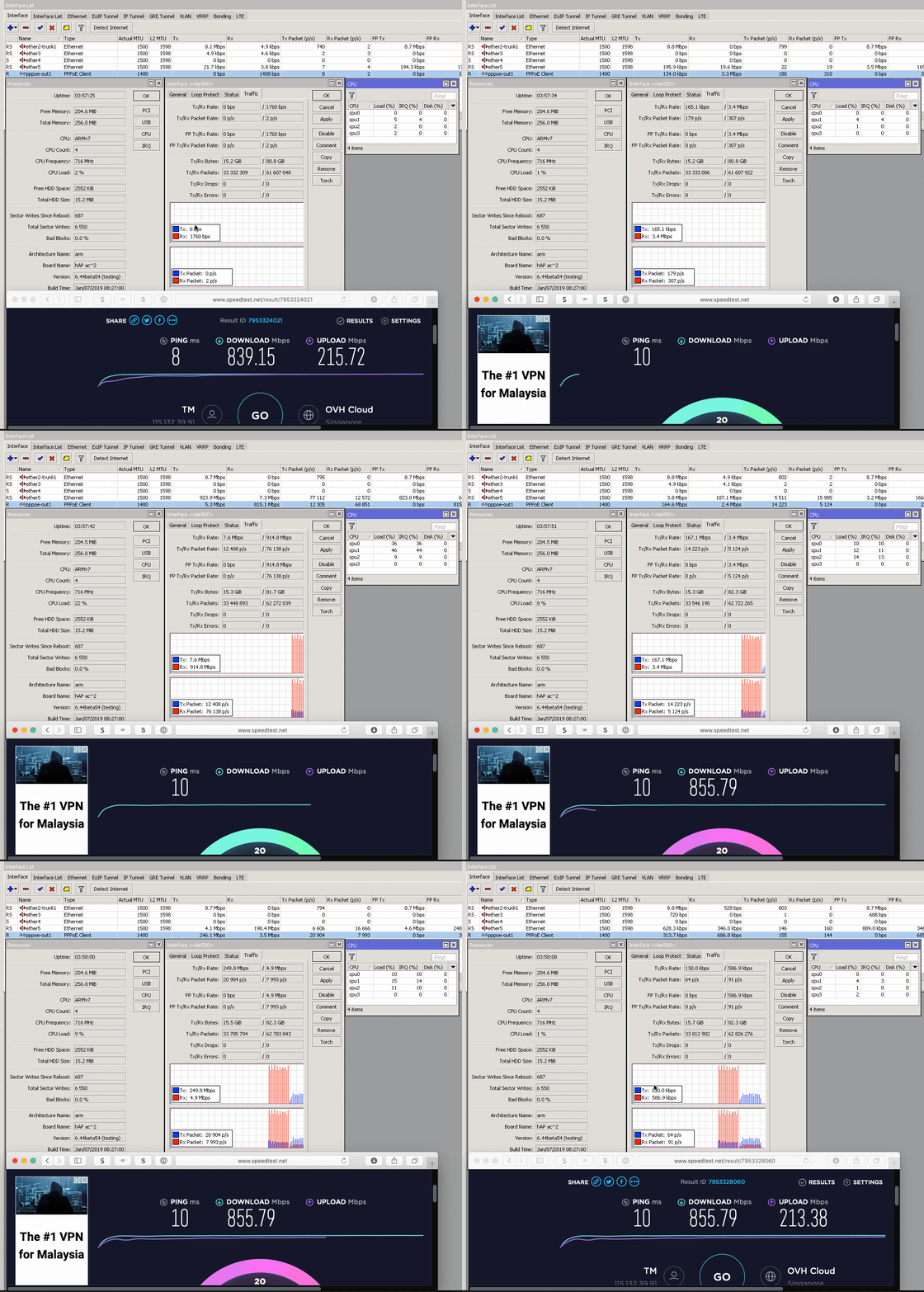 https://res.cloudinary.com/soonwai/image/up...t-cpu_usage.gif so sad mine max only 860+mbps in mikrotik .. |
|
|
Jan 14 2019, 12:34 AM
Return to original view | Post
#65
|
|
Senior Member
1,882 posts Joined: Sep 2017
|
QUOTE(soonwai @ Jan 13 2019, 09:05 PM) I also wonder how TM decides how much to over provision a connection. You would think they’d have an SOP for this but it seems everyone get different speeds. Is it +5 or 10 or 15%? Or depends the mood of the technician. See mood i think ?  |
|
|
Jan 14 2019, 12:42 PM
Return to original view | IPv6 | Post
#66
|
|
Senior Member
1,882 posts Joined: Sep 2017
|
After second query to TM for asking the status of ipv6 problem to OVH SG, they finally reply a email that asking ipv6 traceroute again...(After 3days of second query,i submit this issue 1 month ago...)
BullSxxt Support,i Already send few times of the ipv4 and ipv6 traceroute result to them ,and they say they didn't received it... What the Fxk... |
|
|
|
|
|
Jan 16 2019, 01:54 PM
Return to original view | Post
#67
|
|
Senior Member
1,882 posts Joined: Sep 2017
|
QUOTE(mmohdnor @ Jan 16 2019, 01:51 PM) anyone else still have problem accessing sites/servers located in singapore? Trace route always get disconnects/timeouts. which site u having problem?been weeks now. |
|
|
Jan 17 2019, 11:22 AM
Return to original view | Post
#68
|
|
Senior Member
1,882 posts Joined: Sep 2017
|
QUOTE(BladeRider88 @ Jan 17 2019, 11:17 AM) This is my max cum best speed MB/s to mbps = MB/s x 8 = mbps == 12.5MB/s x 8 = 100mbps I am not very good with the data transfer conversion, hopefully someone can shed some light for me So yours 17.3MB/s = 138.4 mbps |
|
|
Jan 20 2019, 10:39 AM
Return to original view | Post
#69
|
|
Senior Member
1,882 posts Joined: Sep 2017
|
QUOTE(muscaa @ Jan 20 2019, 09:45 AM) I think that's the best effort by TM Actually can run more than 800++ mbps but the problem is tm to worldwide network routing is shit and also alot of server didn't have the dedicated 1gbps bandwidth,so even we got the capacity to download it,the server still didn't have enough bandwidth to give us.They promise 800Mbps but it's hard to achieve For me i using IDM to download files from bigger website or cdn,can always get 100MB/s. |
|
Topic ClosedOptions
|
| Change to: |  0.2191sec 0.2191sec
 0.32 0.32
 7 queries 7 queries
 GZIP Disabled GZIP Disabled
Time is now: 4th December 2025 - 11:51 AM |
 Quote
Quote