Welcome Guest ( Log In | Register )

Bump Topic Topic Closed RSS Feed
4 Pages < 1 2 3 4 >Bottom

Outline · [ Standard ] · Linear+

Unifi Official TM UniFi High Speed Broadband Thread V36, READ 1ST PAGE FOR TURBO SPEED INFO!

views
     
go626201
post Dec 26 2018, 07:56 PM

Regular
******
Senior Member
1,882 posts

Joined: Sep 2017
QUOTE(PoorMan @ Dec 26 2018, 07:20 PM)
Are you using Ookla's PC app to speedtest or via a browser?

If you are using a browser, please note that speedtest results will differ across different browsers especially for speeds above 100Mbps. You can test it out yourself if you haven't yet.

For more than 100Mbps, Ookla recommends using their app instead of going via browser.

As mentioned by someone earlier, just take the consistent highest score you have obtained to ensure that DL/UL speed is indeed what you have subscribed for.
*
Actually I think Speedtest app for pc not accurate for Upload speed,it seems like more 10% than like actual speed.
go626201
post Dec 26 2018, 09:36 PM

Regular
******
Senior Member
1,882 posts

Joined: Sep 2017
QUOTE(dirk_diggler @ Dec 26 2018, 08:56 PM)
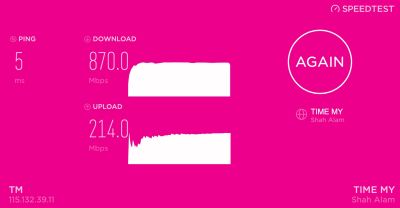
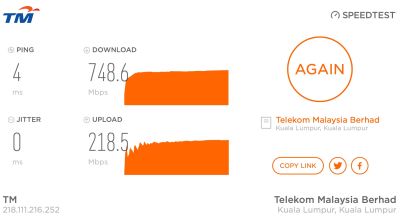
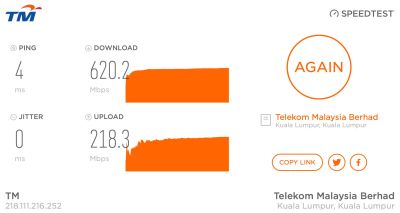
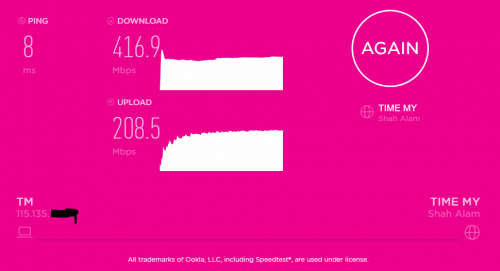
Once again, you are da MAN! The moment I switched to the Ookla app, voila!

user posted image

Ookla app

user posted image

Firefox

I've been using Firefox for testing all these while and never got 800mbps. Changed to the app and got it in the first try.

Go626201, have u been using a browser all these while?

Thank you PoorMan and go626201 for your valuable inputs.
*
user posted image
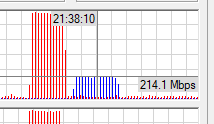
Upload speed not accurate.
From My router side never hit more than 220mbps.

Usually use web version,becuase of the upload speed abit fake,so i use web version more.
go626201
post Dec 26 2018, 09:41 PM

Regular
******
Senior Member
1,882 posts

Joined: Sep 2017
QUOTE(PoorMan @ Dec 26 2018, 09:37 PM)
You may be right. For the most part, we just want to verify that we can get the speeds we paid for. So, lebih kurang is good enough biggrin.gif 
Just sharing experience. I've learnt a lot too from this forum.
*
user posted image
Ya but i just want to mention the software version upload speed is not accurate.
Download speed is okay.

QUOTE(dirk_diggler @ Dec 26 2018, 09:40 PM)
Are u using chrome? I see the app is available for chrome as well.
*
Yes.I am using Chrome.

Just Tried Chrome App Version,not good.Cant choose Server. Result is same.

But the same word: Speedtest Result changes in Anytime When Network Congest happens.

This post has been edited by go626201: Dec 26 2018, 09:45 PM
go626201
post Dec 26 2018, 11:22 PM

Regular
******
Senior Member
1,882 posts

Joined: Sep 2017
QUOTE(PoorMan @ Dec 26 2018, 10:59 PM)
Noted. But what do you use to determine what is the correct UL speed? Mine fluctuates between 206-230Mbps regardless of app or web browser. Unlike DL, the UL speed is consistently above 200Mbps regardless of what speed test I use.
For a 2x2 antenna device, 866Mbps theoretical max speed. If you can get 500Mbps, that's pretty awesome if you are not standing next to the wireless router. But anything between 400 - 500 Mbps is quite acceptable, IMHO.
*
The picture from my post is screenshot from my router to log the current speed go through from my router,so the max speed of outgoing to internet(tm pppoe) will be show on the software of the router.
And the picture is screenshot as i speedtesting,so current speed will be show at the same time.
go626201
post Dec 27 2018, 11:14 AM

Regular
******
Senior Member
1,882 posts

Joined: Sep 2017
QUOTE(lyc1982 @ Dec 27 2018, 09:43 AM)
first...how come you guys are getting 200Mbps UL, i thought it's suppose to be 100Mbps UL only ?

second...i am on 500Mbps and using ac86u with cat7 cable...however speedtest on my iphone 7+ only can reach 200-300-ish
*
They are on 800mbps plan thats why 200mbps upload speed...
go626201
post Dec 27 2018, 12:24 PM

Regular
******
Senior Member
1,882 posts

Joined: Sep 2017
QUOTE(lyc1982 @ Dec 27 2018, 12:22 PM)
can you guys login to unifi account on unifi page now...?

mine seems to be unable to login
*
TM's problem. Try login later.
go626201
post Dec 29 2018, 02:28 PM

Regular
******
Senior Member
1,882 posts

Joined: Sep 2017
QUOTE(RAGNOROK2000 @ Dec 29 2018, 02:21 PM)
Hi guys! I’m facing some network issue:

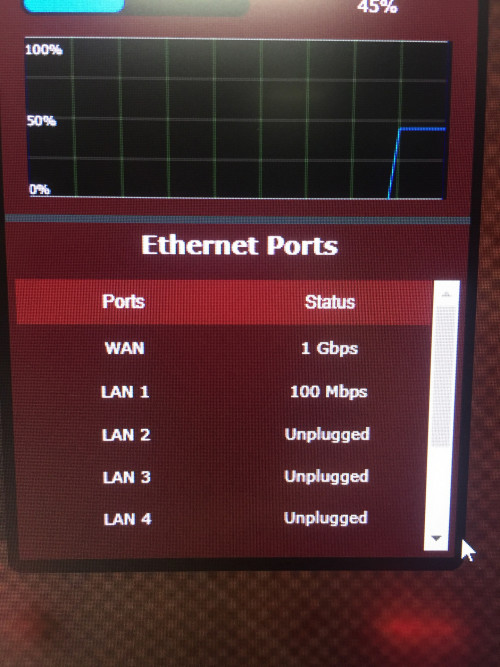
I’ve got turbo-ed to 800mbps but my pc(wired connection directly from the router) shows only 100mbps at the Ethernet status. I think I’m supposed to see 1.0Gbps right? Maybe I need to change some setting on my network adapter?

Here’s the detail of my setup:
Speed: turbo 800mbps
Router: ASUS GT-AC5300
*
Seems like pc to router cable problem. Change another cable try?
Or your pc too old...
Which network adapter you are using.

This post has been edited by go626201: Dec 29 2018, 02:29 PM
go626201
post Dec 29 2018, 02:55 PM

Regular
******
Senior Member
1,882 posts

Joined: Sep 2017
QUOTE(RAGNOROK2000 @ Dec 29 2018, 02:43 PM)
Yes; I’m currently using a cat6 cable(might be faulty, need to purchase another one to test)

Pc lan port is a intel I219-V(shouldn’t be the problem)

user posted image

I think the modem wasn’t the problem too coz the WAN able to hit 1Gbps right?
*
It should be cable issue.
go626201
post Jan 1 2019, 03:42 PM

Regular
******
Senior Member
1,882 posts

Joined: Sep 2017
QUOTE(Sean2k @ Jan 1 2019, 03:17 PM)
as standard calculation 800mbps can get max 100ms/s
*
From my last 2 week usage of 800mbps plan, most server only run about 30-40mb/s with IDM, seems like only a few server can utilizes full bandwidth.
go626201
post Jan 2 2019, 03:30 PM

Regular
******
Senior Member
1,882 posts

Joined: Sep 2017
QUOTE(Doraku @ Jan 2 2019, 02:11 PM)
thats was pirated movie la not speedtest file doh.gif  doh.gif try download large test media from xiph instead
https://media.xiph.org/video/derf/

Largest sample footage 88GB : https://media.xiph.org/video/derf/meridian/...60909_OV_01.mxf
*
The Max speed that i can get from that site only about 60mb/s and after that drop to 30-40+mb/s...
(With Unifi Direct IDM download)
go626201
post Jan 4 2019, 10:44 PM

Regular
******
Senior Member
1,882 posts

Joined: Sep 2017
No issue for me.
Twitch 1080p also smooth smooth. (Taiwan Broadcaster, stream by singapore server cdn)
(Iskandar Puteri,Johor)
(IP: 60.49.X.X)

user posted image
go626201
post Jan 4 2019, 10:52 PM

Regular
******
Senior Member
1,882 posts

Joined: Sep 2017
QUOTE(Jeremy_John @ Jan 4 2019, 10:44 PM)
user posted image

user posted image
For digitalocean,i think it just because routing different from newmedia express and ovh cloud sg.
Because from my last 1 year traceroute test,linode vultr digitalocean always change routing everyday or every few days.

Edit: Sometime vultr can get below 10ms, sometime linode can get lower than 10ms or sometimes digitalocean also can get below 10ms. For me most of the connection to singapore should not have any issue for 90% of time,only 5-10% might got problem to singapore connection.

Anyone got issue can try disable IPv6.

This post has been edited by go626201: Jan 4 2019, 10:55 PM
go626201
post Jan 6 2019, 08:26 PM

Regular
******
Senior Member
1,882 posts

Joined: Sep 2017
QUOTE(soonwai @ Jan 6 2019, 02:15 PM)
Anyone else on Turbo 800Mbps getting inconsistent speed tests from speedtest.tm.com.my? Both 210.187.84.114 & 58.26.239.30. Mine are fluctuating from 550-700, seldom goes above 800.

Tests with http://testyourspeed.time.com.my and speedtest.net OVH SG server are at consistent 850+-20Mbps.

Testing with Safari and speedtest desktop app. Router: Mikrotik hAP AC2. MTU/MRU: 1480.

user posted image
speedtest.net OVH Cloud Singapore

user posted image
http://testyourspeed.time.com.my

user posted image
http://speedtest.tm.com.my (58.26.239.30)

user posted image
http://speedtest.tm.com.my (210.187.84.114)

go626201 Were you having the same observations with TM speedtest servers?
*
Your Speed maximum limit should be high than me.
My best speed to any server can only run up to 850mbps and below.
For TM speedtest server,i think got 2 reason.
1st- should be too many people speedtest together,so speed cant max.
2rd pipe congestion, so some time all connection together cant utilize full 800+mbps.


Edit:
Maybe my pc --> AC66U(AP) not using good cable so speed cant run more than 840.
(But i think it just cause by account limitation by TM)
Since when rye 100mbps,some people can reach more than 110mbps same theory.

My network setup is
BTU(I-240G) > Mikrotik RB750Gr3 > Asus RT-AC66U(AP) > all floor 1 device(including my desktop pc)

This post has been edited by go626201: Jan 6 2019, 08:39 PM
go626201
post Jan 8 2019, 01:11 AM

Regular
******
Senior Member
1,882 posts

Joined: Sep 2017
user posted image
What the fxxk is this speed?
Change IP also this speed???
800mbps plan get this at 1.10am???

Edit:
After reboot router speed back...
user posted image

This post has been edited by go626201: Jan 8 2019, 01:17 AM
go626201
post Jan 8 2019, 03:58 PM

Regular
******
Senior Member
1,882 posts

Joined: Sep 2017
TM got qos or speed limit or what, already few time can only get 200++mbps again...
(800mbps plan)
need to reboot router everyday oh?
go626201
post Jan 8 2019, 04:05 PM

Regular
******
Senior Member
1,882 posts

Joined: Sep 2017
QUOTE(SilentVampire @ Jan 8 2019, 04:02 PM)
Are you sure that it is not an issue with your router?
*
I dont think that cause by router.
Because this issue only happens sometimes,and i didn't change any setting since few days ago.
After Turbo, this is the second time drop to 200++mbps.
before this 2 time the lowest i get is 500++ if the tm network congest,so i think it just tm problems.
go626201
post Jan 9 2019, 11:55 PM

Regular
******
Senior Member
1,882 posts

Joined: Sep 2017
QUOTE(soonwai @ Jan 9 2019, 09:02 PM)
Not important. 1480 is the default for most routers. 1492 very very very slight increase in throughput but 1480 is safer. Less chance of fragmentation.

Many factors to consider too. Router? I got another router can only do max 640Mbps bcos its cpu is not fast enough.  Your location? gos123456, sorry bro, forgot your actual id, gets 5ms from JB to SG. ipv6? ipv6 peering to SG not fully in place yet so it goes to HK and to SG. I just test with ipv4 for now.
*
I complain to TM 2weeks about the ipv6 between tm and ovh sg.
Yesterday send a email again for asking the status, they didn't reply me yet.
They got reply me at the first email of my complain said that they will look into it.

And the best speed your always faster than mine. I think it is locked by the TM unifi account limitation.
But something i dont know why,when i speedtest with more than 830++mbps,i can see the pppoe-out1 bandwidth is running more than 860++ almost evey time when the best speed that i can get.

About the latency,i dont think it is important since it lower than 15ms, then i dont care anymore about it.
I just dont know why my speed always having different max speed in different time. For my presume,i think it is TM problem,cause i didn't restart my router and i ask for tm to reset port and after that speed max again.but a moment later drop again below 600mbps, this 2day i got some result with 200++ 300++ only...but then wait for some time later and test again speed max again...So my temporary conclusion is TM Pipe Congestion...

Edit:
Added TM Speedtest
user posted image
Added OVH SG Speedtest
user posted image

This post has been edited by go626201: Jan 10 2019, 12:04 AM
go626201
post Jan 10 2019, 02:53 PM

Regular
******
Senior Member
1,882 posts

Joined: Sep 2017
QUOTE(soonwai @ Jan 10 2019, 02:35 PM)
Can you try with TIME or OVH Cloud Singapore?

I get fluctuating results with TM's Speedtest servers. Both 210.187.84.114 & 58.26.239.30. Fluctuating from 550-700, seldom goes above 800. Maybe their server overloaded.

Tests with http://testyourspeed.time.com.my and speedtest.net OVH SG server are at consistent 850+-20Mbps.

Testing with Safari and speedtest desktop app. Router: Mikrotik hAP AC2. MTU/MRU: 1480.

user posted image
speedtest.net OVH Cloud Singapore

user posted image
http://testyourspeed.time.com.my

user posted image
http://speedtest.tm.com.my (58.26.239.30)

user posted image
http://speedtest.tm.com.my (210.187.84.114)
*
So sad my speed currently drop again..
user posted image

OVH SG
user posted image

TM
user posted image

Soonwai The Time one seems like also got 2 server
nslookup result
223.28.43.117
223.28.43.124

Is that possible cause by mikrotik router? i really not understand why sometime full speed sometime drop speed...

This post has been edited by go626201: Jan 10 2019, 03:03 PM
go626201
post Jan 10 2019, 04:25 PM

Regular
******
Senior Member
1,882 posts

Joined: Sep 2017
QUOTE(soonwai @ Jan 10 2019, 03:26 PM)
I suspect the RB750Gr3 might be playing a part in the fluctuating speeds but I can't really check now because my RB750Gr3 config is not clean. Got vlans and other stuff. Later once I configure my hAP AC2 for HyppTV trunk - have to do that first, if not my wife will complain  sad.gif - I'll test RB750Gr3 again with a clean config.

Which ethernet port are you using to connect to BTU? And which ether port connects to your PC/laptop/switch? Make sure they are on odd/even ports. See the block diagram. https://mikrotik.com/product/RB750Gr3#fndtn-downloads Port 1,3,5 and 2,4 have separate 1Gbps to CPU.
*
Port 1 connected to BTU
Port 2 and 5 connected to CCTV and NAS.
Port 3 no on because connected to 2rd floor router but normally not open.
Port 4 connected to my RT-AC66U AP.

2days ago i directly connect my pc to port 3 also speed drop,so confirm not asus router problem.
And at the same time i livechat to tm for port reset,full speed again without restarting router and btu.
So now i also presume tm problem since this very serious problem start from this weeks.
Before this week if drop speed drop to 600++ only.
I just speed test get 100++... to OVH SG

Edit
Just speed test to
Myrepublic SG get 400++
TM get 600++
OVH SG 100++
i think oh... tm problem la...

This post has been edited by go626201: Jan 10 2019, 04:30 PM
go626201
post Jan 10 2019, 05:17 PM

Regular
******
Senior Member
1,882 posts

Joined: Sep 2017
Sorry guys,i just found out that the speed drop problem is cause by my pc,because i just use another desktop pc to speed test and get the full speed again...

4 Pages < 1 2 3 4 >Top
Topic ClosedOptions
 

Change to:
| Lo-Fi Version
0.0237sec    0.54    7 queries    GZIP Disabled
Time is now: 3rd December 2025 - 09:24 AM