Welcome Guest ( Log In | Register )

Bump Topic Topic Closed RSS Feed
4 Pages < 1 2 3 4 >Bottom

Outline · [ Standard ] · Linear+

Unifi Official TM UniFi High Speed Broadband Thread V36, READ 1ST PAGE FOR TURBO SPEED INFO!

views
     
go626201
post Dec 22 2018, 11:11 AM

Regular
******
Senior Member
1,882 posts

Joined: Sep 2017
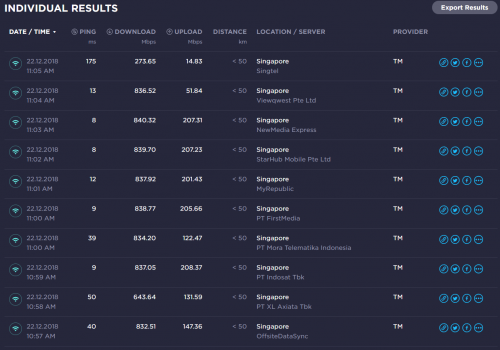
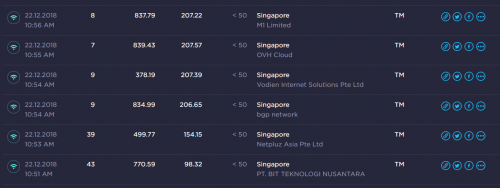
Second Test for Singapore SpeedTest Server.

user posted image

user posted image

(All done by IPv4) (IPv6 is disabled for testing)

So i think the throttling for Singapore Server is not exist.
Just got some routing issue for some singapore server only.
Like the Singtel one,it cant be so slow and ping so high.
And Viewqwest server definitely abnormal.
go626201
post Dec 22 2018, 12:34 PM

Regular
******
Senior Member
1,882 posts

Joined: Sep 2017
QUOTE(dirk_diggler @ Dec 22 2018, 12:25 PM)
U have many 800+ hits with sg servers. I didn't even manage get a single one.
*
I suspect yours download speed not turbo to 800, try restart btu. if still cant reach higher speed ask tm to check.
go626201
post Dec 22 2018, 12:42 PM

Regular
******
Senior Member
1,882 posts

Joined: Sep 2017
My Turbo 800mbps Bills just came out today.
Bill Charge RM168.55 including ST.
So the original price supposed to be RM159 per month.
go626201
post Dec 22 2018, 05:06 PM

Regular
******
Senior Member
1,882 posts

Joined: Sep 2017
QUOTE(MetalIronWood @ Dec 22 2018, 01:40 PM)
why so cheap? my bill is RM210.95  ranting.gif  ranting.gif mad.gif  vmad.gif
*
I think the last batch upgrade(About 14-16 Dec 2018) together to 800mbps get the same price?
With RM200 + RM30 discount
go626201
post Dec 23 2018, 01:00 PM

Regular
******
Senior Member
1,882 posts

Joined: Sep 2017
user posted image
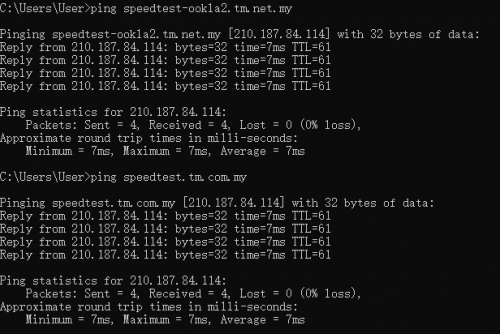
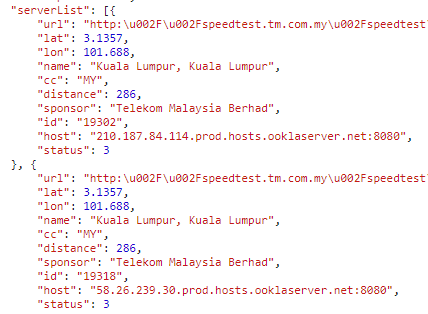
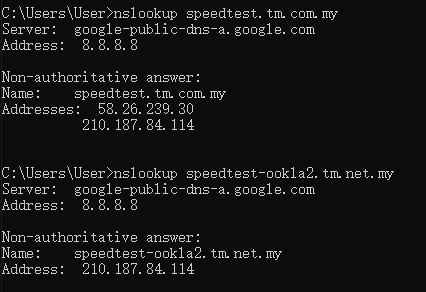
The Speedtest.net got 2 TM server selection.
But actually select which one also same,it will random give one of the sever below in the picture for speedtest usage.
TM's Website own speedtest tools also using the same 2 server for random server round-robin for user to speedtest.
user posted image

So Conclusion, Speedtest.net TM Server equal to TM Website SpeedTest.

Edit: Just nslookup again found out that one of the speedtest.net TM Server selection only have one server.
user posted image

This post has been edited by go626201: Dec 23 2018, 01:02 PM
go626201
post Dec 23 2018, 10:47 PM

Regular
******
Senior Member
1,882 posts

Joined: Sep 2017
QUOTE(dirk_diggler @ Dec 23 2018, 10:30 PM)
For the time being I'm trying to first solve the 800 vs 500 on TM server ookla speedtest vs speedtest.tm.com.my. Worry bout SG later.
*
If you can run up to 800mbps then not TM unifi account problem. No need to find TM.
That just TM routing shit. Which IP block your are using?
I also getting slow today afternoon with 147.158.X.X with TM server speedtest.net. Only 600++
But after i reboot my router and changed to 60.53.X.X IP my speed came back.

Now i also speed cant full again. Later might restart my router again for testing.
But i think it really just tm bandwidth congestion.
Find TM to fix, no use i think...
Wait next year New more ISP to disperse user might better...

user posted image
This Speedtest with 1 1080p twitch and 1 4k netflix streaming.

QUOTE(soonwai @ Dec 23 2018, 10:15 PM)
Yeah, it's all fine for dirk based on #5101 and the 800+/200+ that he's getting. Not sure what the discussion is all about. That's all TM is gonna care about. To anywhere else is not really their problem. At least not the department that handles subscriptions.

As goxxxx's test demonstrates, you need peering to get full speed to SG. IPv4, for the most part, has had their peering between MY and SG sorted out. IPv6 not so much. Same MY ISP to SG iSP gets peered properly on IPv4 but goes to HK or some other country and back for IPv6.
*
Actually all can be easily fix by TM for adding more bandwidth and routing optimize...
And The main point is speed is not so important,but routing must optimize 1st...
That OVH IPv6 problem, i send to TM for few days, just give me a email and no more news...I will email them again in next 2 week after finish my degree program...

This post has been edited by go626201: Dec 23 2018, 10:53 PM

go626201
post Dec 23 2018, 10:56 PM

Regular
******
Senior Member
1,882 posts

Joined: Sep 2017
QUOTE(Lon3Rang3r00 @ Dec 23 2018, 10:53 PM)
dry.gif  Guys, Wired should be able to support 800mbps right? Running on 800mbps but few test shows 300Mbps, is there any configuration i need? i'm using the 850L, Cat5E cable, can see my laptop's network connection speed is on 1Gbps.
*
See your processor usage when you speedtest. If full usage when speedtest then it is your pc problem.

But My I7 7700HQ also got problem for speed cant run more than 300mbps... I think this one is my laptop problem,i am going to take it to Asus service center is checking with fan sound problem...
go626201
post Dec 23 2018, 11:21 PM

Regular
******
Senior Member
1,882 posts

Joined: Sep 2017
QUOTE(JohnLai @ Dec 23 2018, 11:02 PM)
7700HQ?
Microsoft hasn't release 'optimized' microcode for this model yet.

You can disable spectre mitigation via registry method.

Command Prompt with admin right,
Manage the mitigation for CVE-2017-5715 (Spectre Variant 2)
*
Not microcode problem, cpu usage not full for speedtest.
Second i use cable to speedtest also 200++,but when i enable jumbo frame suddenly full speed....

That my pc problem iperf to local pc also got speed problem... wifi or cable same result

This post has been edited by go626201: Dec 23 2018, 11:21 PM
go626201
post Dec 24 2018, 12:04 AM

Regular
******
Senior Member
1,882 posts

Joined: Sep 2017
Just found out that Unifi To Mega.nz Upload Speed very slow...
With Direct Upload with Unifi, 2.X mb/s
With SG VPN upload, 10.X mb/s
Super fast with vpn...
go626201
post Dec 24 2018, 12:36 AM

Regular
******
Senior Member
1,882 posts

Joined: Sep 2017
user posted image
Quite a good speedtest result.
go626201
post Dec 24 2018, 12:52 AM

Regular
******
Senior Member
1,882 posts

Joined: Sep 2017
QUOTE(soonwai @ Dec 24 2018, 12:47 AM)
That's awesome. You still using the RB750Gr3? Which SG server? What MTU/MRU, 1480 or 1492? IPv4?
*
Yup,using RB750Gr3 as main router.
Server is OVH Cloud Singapore
IPv4
(I had disable IPv6 function on my desktop,but IPv6 function on RB750Gr3 still enable,but my pc will not use it)
user posted image
go626201
post Dec 24 2018, 12:58 AM

Regular
******
Senior Member
1,882 posts

Joined: Sep 2017
Actually i think the speed at night might have some throttling or network congest?
Because sometimes i speedtest get full speed,sometime cant full speed with same pc,same ip,same speedtest server, just the time not same.
So for now i still believing network congestion happens in anytime.
go626201
post Dec 24 2018, 01:04 AM

Regular
******
Senior Member
1,882 posts

Joined: Sep 2017
QUOTE(JohnLai @ Dec 24 2018, 01:01 AM)
Eh? Normally MTU value is same as MRU value.
How come yours are different?
*
I dont know oh..
I just set like this...I also dont know why i cant get 1492 mtu...I think the pppoe server do not give 1492 value just give 1480...
user posted image
go626201
post Dec 24 2018, 01:11 AM

Regular
******
Senior Member
1,882 posts

Joined: Sep 2017
user posted image
Coincidence? Over 850mbps cool2.gif
go626201
post Dec 24 2018, 01:52 AM

Regular
******
Senior Member
1,882 posts

Joined: Sep 2017
3 More Singapore Speedtest Website:
But i dont know why all download speed okay, upload speed very slow.
(I test with IPv4 only)
SimpleCloud SG
Singapore SG1:

http://103.25.202.105/

http://150.107.152.58/

DigitalOcean SG Speedtest:
http://speedtest-sgp1.digitalocean.com/

Edit 1:
1 more better speedtest HawkHost SG
(This one download upload can max)
https://sng.hawkhost.com/speedtest/

Edit 2:
The Best Speedtest Website for now with server max bandwidth list
https://www.nperf.com/en/

This post has been edited by go626201: Dec 24 2018, 02:05 AM
go626201
post Dec 24 2018, 11:46 AM

Regular
******
Senior Member
1,882 posts

Joined: Sep 2017
QUOTE(soonwai @ Dec 24 2018, 11:09 AM)
Agreed especially for the 200Mbps upload speed if one uses a lot of cloud stuff. Very good.
*
I agree with you.
I also using upload speed to resharing Runningman to upload mega.nz and onedrive from china baiducloud.
But actually i have a 10Gigabit new york vps..haha upload speed damn fast...
go626201
post Dec 24 2018, 03:57 PM

Regular
******
Senior Member
1,882 posts

Joined: Sep 2017
QUOTE(choonsern @ Dec 24 2018, 03:49 PM)
few questions here.. hope sifu here can shed some lights

i already got my turbo 800mbps

a. i tried connected using LAN Cat 5 cable to test the speed and got between 760-780. but when i tried wireless, pathetically less than 90. apa masalahnya

b. any solutions to get max speed wirelessly

c. even when i connected the LAN cable, youtube was fast when downloading (about 40-60mbps) but when loading, the meter quite slow coz i expected it to be fast. apa masalahnya?

d. actually got many more questions but sudddenly kepala otak sangkut...later i will ask again..tq
*
a.It is depent on device and distance

b. which router you are using? normally 5ghz can run about 6-700++ max if device and router support( 20% loss consideration)

c.disable ipv6 and try again
go626201
post Dec 24 2018, 05:17 PM

Regular
******
Senior Member
1,882 posts

Joined: Sep 2017
user posted image
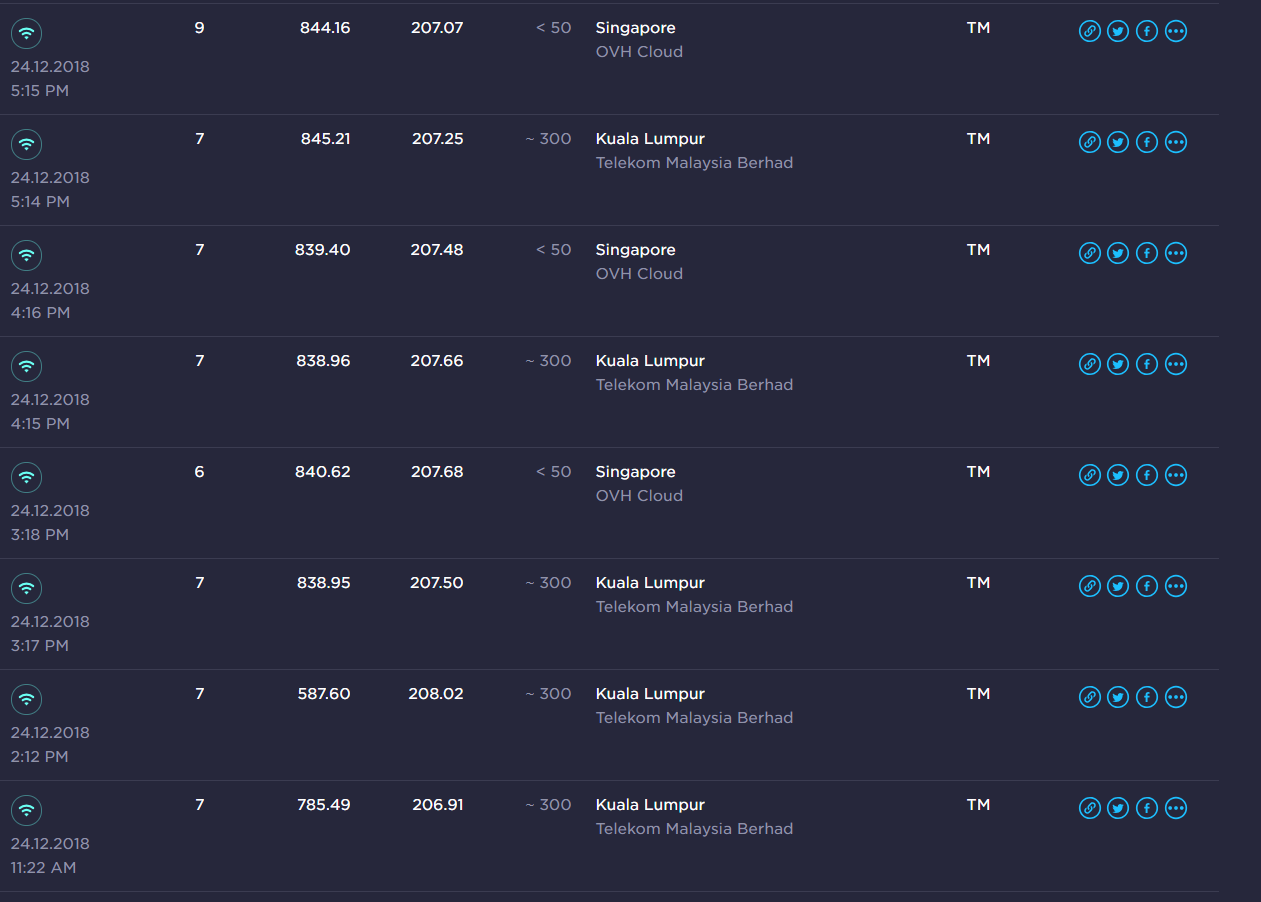
Already Speedtest for once per hours with TM Server and OVH SG Server.
So far i think that 500++mbps is connected to different TM server rather than others.
go626201
post Dec 24 2018, 09:26 PM

Regular
******
Senior Member
1,882 posts

Joined: Sep 2017
user posted image
TM Server
user posted image
OVH Cloud SG Server
See this...After evening exercise just came back and test again get this result...
Only 1 1080p twitch streaming running...
Confirm network congestion...

Before 6pm i get full speed for few hours and now speed drop.

Edit:
Added nperf speedtest
user posted image
SG True Server 10G Pipe


This post has been edited by go626201: Dec 24 2018, 09:31 PM
go626201
post Dec 26 2018, 06:16 PM

Regular
******
Senior Member
1,882 posts

Joined: Sep 2017
QUOTE(dirk_diggler @ Dec 26 2018, 05:18 PM)
U are in Jaybee? Am at the Molek area.

This makes your tests especially to SG to be the benchmark for me.
*
I dont really think location is affect the speed, since the pipe to worldwide is not in Johor.
Maybe something may affect like:
1. Your Big Area's Exchange Centre might got a bit network congest. (Try SpeedTest in 1am or after school holiday try again)

2. Your IP block do not have good routing to worldwide. (For me, i think 60.5X.X.X is best,but normally i getting 147.158.X.X this one seems like a new ip block for TM,because the geolocation may save as New Zealand)
(From last week testing, all ip block for me can run up to 840mbps)
But sometimes even the same ip block and didn't run anything also cannot get more than 500 mbps even tm server,
So i suspect when the time i cant run max speed, that is something about network congestion in TM network)
U see now i cant run full speed
user posted image

3.Network Congestion in TM Network
This one is the main reason i think for speed cant max problem.

Last: For few times speed drop issue,i restart my router and suddenly full speed again.

Edit
Suddenly OVH SG full speed again...
user posted image

This post has been edited by go626201: Dec 26 2018, 06:26 PM

4 Pages < 1 2 3 4 >Top
Topic ClosedOptions
 

Change to:
| Lo-Fi Version
0.1963sec    0.67    7 queries    GZIP Disabled
Time is now: 1st December 2025 - 04:08 PM