


AMDŽ Socket-AM2 Overclocking thread (V2), discuss our setup/overclocking issues
AMDŽ Socket-AM2 Overclocking thread (V2), discuss our setup/overclocking issues
|
|
 Jun 29 2007, 10:50 PM Jun 29 2007, 10:50 PM
|
 
Senior Member
1,413 posts Joined: Jun 2006 From: Shah Alam 
|
Max? Stay below 1.5 I guess, but some already reach 3GHz with 1.42 or 1.45 with proper combination
|
|
|
|
|
|
Jun 29 2007, 10:53 PM
|

Junior Member
298 posts Joined: May 2006 From: Klang 
|
@afosz
thanks for da info |
|
|
Jun 29 2007, 11:43 PM
|

Senior Member
580 posts Joined: Dec 2005 From: Hell
|
hurmm... i think 3600+ brisbane becomes more popular nowadays. maybe it juz about oc potential. lets hope am2+ and am3 got the same ways as 3600+
|
|
|
Jun 30 2007, 01:09 AM
|
|
Senior Member
971 posts Joined: Aug 2006 From: Penang
|
QUOTE(afosz @ Jun 29 2007, 10:17 PM) But 89W consumes even more power after OCed than 65W Not really, on the same voltage and speed all processors of the same core and stepping will have very similar power consumption. Differences will be less than 10%, typically less than 5%.  QUOTE(nazril @ Jun 29 2007, 11:43 PM) hurmm... i think 3600+ brisbane becomes more popular nowadays. maybe it juz about oc potential. lets hope am2+ and am3 got the same ways as 3600+ Brisbane is popular not only because its nicely overclockable, but also because its getting cheaper and more available. Which should be no surprise, as you can manufacture double the number of chips in the similar time and operating cost for each step in transistor size. Only thing stopping AMD and Intel from rushing new transistor tech is that the research and development is very time consuming and damn expen$ive... |
|
|
Jun 30 2007, 01:17 AM
|

Senior Member
1,083 posts Joined: Sep 2004
|
QUOTE(lohwenli @ Jun 28 2007, 01:23 PM) The point is that is it won't be much cooler, in fact its often slightly hotter because it blocks the chips from direct airflow. The only ramsink I know that does reduce ram temp is thermalright's HR-07. If the thermal interface material in between the RAM chipsets and heat spreader is efficient then it will help to transfer heat out off the chipsets. But yeah, it adds bling..  And it protects the chips from physical damage. And it protects the chips from physical damage.  Btw, how did you measure your ram temp? If the TIM is of low grade type (especially those low grade thermal tape) then I agree with you that it might not transfer heat out from chipset efficiently, hence might bring up temp instead b'cos the heat spreaders itself will limit the air flows, this will be more obvious if cooler is not use for cooling the spreaders. To me, thermal transfer efficiency of thermal tape is far below than thermal paste/grease. I can't measure the actual RAM chipset surface temp because they've been covered up by the spreaders. My fan coolers will bring down the spreaders surface temp to ~33C. Give an allowance of 3C to 5C for the chipsets temp higher than the spreaders my DDR2 still running much lower temp compare to the bare DDR module without proper cooling. My DDR2 running well at 2.25V, the spreaders surface temp, as I mentioned just barely warm! This post has been edited by ongbs: Jun 30 2007, 02:05 AM |
|
|
Jun 30 2007, 03:58 PM
|
|
Senior Member
1,081 posts Joined: Jan 2003
|
how do the foxconn mobos fare for oc-ing am2? specifically this model - N570SM2AA-8EKRS2H
|
|
|
|
|
|
Jun 30 2007, 04:02 PM
|

Senior Member
2,323 posts Joined: Apr 2006 From: Somewhere I Belong 
|
QUOTE(slash @ Jun 30 2007, 03:58 PM) how do the foxconn mobos fare for oc-ing am2? specifically this model - N570SM2AA-8EKRS2H i think the AM2 motherboard from Foxconn is quite rare..check at the first post if got anyone here that using it.. and if u cant find the review from this forum, dont worry, Google is here for us.  This post has been edited by kalakatu: Jun 30 2007, 04:02 PM |
|
|
Jun 30 2007, 05:08 PM
|
 
Elite
8,545 posts Joined: Aug 2006 From: 224.0.0.6
|
Guys,
Any idea for me to use 667MHz ram divider and achieve 3GHz? If using 667Mhz, my com will not boot above roughly at 2.6 - 2.7GHz. Currently using 533 ram divider w 4-4-4-12. Already tested a lot of solutions and would like to hear u guys' opinions.  Thanks in advance -pWs- |
|
|
Jun 30 2007, 06:28 PM
|
|
Senior Member
971 posts Joined: Aug 2006 From: Penang
|
QUOTE(ongbs @ Jun 30 2007, 01:17 AM) If the thermal interface material in between the RAM chipsets and heat spreader is efficient then it will help to transfer heat out off the chipsets. Yeah, DDR2 produces much less heat than DDR. And thermal tape sucks pretty bad compared with thermal compound, but at least is still way better than having nothing at all. There's a detailed comparsion review somewhere of many thermal pastes and 3M thermal tape, for some reason I can't find it again even with google.If the TIM is of low grade type (especially those low grade thermal tape) then I agree with you that it might not transfer heat out from chipset efficiently, hence might bring up temp instead b'cos the heat spreaders itself will limit the air flows, this will be more obvious if cooler is not use for cooling the spreaders. faren To me, thermal transfer efficiency of thermal tape is far below than thermal paste/grease. I can't measure the actual RAM chipset surface temp because they've been covered up by the spreaders. My fan coolers will bring down the spreaders surface temp to ~33C. Give an allowance of 3C to 5C for the chipsets temp higher than the spreaders my DDR2 still running much lower temp compare to the bare DDR module without proper cooling. My DDR2 running well at 2.25V, the spreaders surface temp, as I mentioned just barely warm! This review of the HR-07 shows something interesting-the ram chips are cooled better without the heatspreader. However from other reviews heatpreader vs none results varies, with case ventilation the likely key factor (heatspreaders lose out when case ventilation is poor). http://www.bigbruin.com/2007/hr07_5 -before anyone gets a heart attack from the temp, fyi its in fahrenheit. Added on June 30, 2007, 6:30 pmFound another better review with comparision of with heatspreader and without http://www.madshrimps.be/?action=getarticl...290&articID=540 This post has been edited by lohwenli: Jun 30 2007, 06:30 PM |
|
|
Jun 30 2007, 07:13 PM
|
|
Junior Member
298 posts Joined: May 2006 From: Klang
|
QUOTE(-pWs- @ Jun 30 2007, 05:08 PM) Guys, what is your voltage of the brisbane cpu and the ddr2 ram?Any idea for me to use 667MHz ram divider and achieve 3GHz? If using 667Mhz, my com will not boot above roughly at 2.6 - 2.7GHz. Currently using 533 ram divider w 4-4-4-12. Already tested a lot of solutions and would like to hear u guys' opinions. Thanks in advance -pWs- I just bought brisbane 3600+. I am also in quest for increasing my cpu clock. Currently 1.38v for the cpu at 2470MHz (260 x 9.5). RAM still at 1.95v, 533MHz ram divider with 5-5-5-15-1T. I am wondering if the cpu volt at 1.38v is safe for 24/7 usage? Quite afraid that I might shorten the cpu lifespan? I can boot if using 667MHz divider, but the ram will heat quickly and after about 30 - 60 minutes later, the computer will crash and reboot even I increase ram volt to 2.1v. I didn't dare to increase higher because this kingston ram have neither passive cooling nor active cooling yet. I think, you can try use any active cooling such as AllnGap's ram cooler if you want to try the 667MHz divider so that it won't be so hot during long operation hours. Hope this idea helps. But everest shows wrong ram divider information. CPU-Z shows the correct ram divider that I am currently using. 
This post has been edited by coolblade: Jun 30 2007, 07:22 PM Attached thumbnail(s) 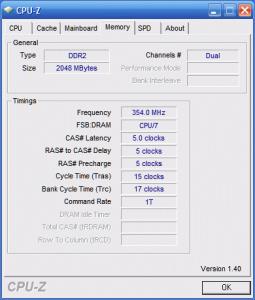
|
|
|
Jun 30 2007, 07:27 PM
|
|
Elite
8,545 posts Joined: Aug 2006 From: 224.0.0.6
|
QUOTE(coolblade @ Jun 30 2007, 07:13 PM) what is your voltage of the brisbane cpu and the ddr2 ram? Vcore 1.45v Vdimm 2.2vI just bought brisbane 3600+. I am also in quest for increasing my cpu clock. Currently 1.38v for the cpu at 2470MHz (260 x 9.5). RAM still at 1.95v, 533MHz ram divider with 5-5-5-15-1T. I am wondering if the cpu volt at 1.38v is safe for 24/7 usage? Quite afraid that I might shorten the cpu lifespan? I can boot if using 667MHz divider, but the ram will heat quickly and after about 30 - 60 minutes later, the computer will crash and reboot even I increase ram volt to 2.1v. I didn't dare to increase higher because this kingston ram have neither passive cooling nor active cooling yet. I think, you can try use any active cooling such as AllnGap's ram cooler if you want to try the 667MHz divider so that it won't be so hot during long operation hours. Hope this idea helps. But everest shows wrong ram divider information. CPU-Z shows the correct ram divider that I am currently using.
And yes, already using AllnGap's ram cooler as stated in my siggy. Of course, i can use 667Mhz too. But if wan to pass 2.7Ghz barrier, my pc cannot boot. That is the problem and thanks for helping   -pWs- |
|
|
Jun 30 2007, 08:10 PM
|

Senior Member
1,404 posts Joined: Apr 2006 From: ......
|
QUOTE(-pWs- @ Jun 30 2007, 05:08 PM) Guys, I understand your situation , because it is where I've stucked as well. My problem more or less same with you, pc reboot or bluescreened at 2.7Ghz-2.8Ghz if i use 667 divider. I've look at your spec, your are using a Nforce4 chipset mobo. I'm using Tforce 6100 AM2. I suspect this is a bug of Nforce4 chipset...... I've seen people use 667divider and push to 1000Mhz without problem by using biostar TA690G, some 590 SLI chipset mobo , some 550 mobo .... but yet havent see anyone do that with nforce 4 series mobo Any idea for me to use 667MHz ram divider and achieve 3GHz? If using 667Mhz, my com will not boot above roughly at 2.6 - 2.7GHz. Currently using 533 ram divider w 4-4-4-12. Already tested a lot of solutions and would like to hear u guys' opinions. Thanks in advance -pWs-  |
|
|
Jun 30 2007, 08:14 PM
|
|
Elite
8,545 posts Joined: Aug 2006 From: 224.0.0.6
|
QUOTE(dblooi @ Jun 30 2007, 08:10 PM) I understand your situation , because it is where I've stucked as well. My problem more or less same with you, pc reboot or bluescreened at 2.7Ghz-2.8Ghz if i use 667 divider. I've look at your spec, your are using a Nforce4 chipset mobo. I'm using Tforce 6100 AM2. I suspect this is a bug of Nforce4 chipset...... I've seen people use 667divider and push to 1000Mhz without problem by using biostar TA690G, some 590 SLI chipset mobo , some 550 mobo .... but yet havent see anyone do that with nforce 4 series mobo You are right. That is the situation i face. Tried many ram timing, pump vcore pump vdimm wont help any. Sigh  So, you also using 533 divider now? -pWs- |
|
|
|
|
|
Jun 30 2007, 08:14 PM
|
|
Senior Member
1,404 posts Joined: Apr 2006 From: ......
|
QUOTE(coolblade @ Jun 30 2007, 07:13 PM) what is your voltage of the brisbane cpu and the ddr2 ram? IMHO, i think that your vcore is abit high for brisbane to reach 2.4Mhz. What's the stepping of your proc? Mind to share? For me i can push to 300X9.5 with stock vcore without any problem and it is not the limit yet I just bought brisbane 3600+. I am also in quest for increasing my cpu clock. Currently 1.38v for the cpu at 2470MHz (260 x 9.5). RAM still at 1.95v, 533MHz ram divider with 5-5-5-15-1T. I am wondering if the cpu volt at 1.38v is safe for 24/7 usage? Quite afraid that I might shorten the cpu lifespan? I can boot if using 667MHz divider, but the ram will heat quickly and after about 30 - 60 minutes later, the computer will crash and reboot even I increase ram volt to 2.1v. I didn't dare to increase higher because this kingston ram have neither passive cooling nor active cooling yet. I think, you can try use any active cooling such as AllnGap's ram cooler if you want to try the 667MHz divider so that it won't be so hot during long operation hours. Hope this idea helps. But everest shows wrong ram divider information. CPU-Z shows the correct ram divider that I am currently using.
 Added on June 30, 2007, 8:24 pm QUOTE(-pWs- @ Jun 30 2007, 08:14 PM) You are right. That is the situation i face. Tried many ram timing, pump vcore pump vdimm wont help any. Sigh maybe you can try cpu multiplier X8 and ram divider 533. In that case, the ram frequency is equal to CPU/6 which means same as ram divider 667. I've tried it just now, failed at 2.95Ghz for unknown reason again So, you also using 533 divider now? -pWs-  I'm using 800 divider for daily usage. See screen shot below This post has been edited by dblooi: Jun 30 2007, 08:27 PM Attached thumbnail(s) 

|
|
|
Jun 30 2007, 08:27 PM
|
|
Senior Member
2,323 posts Joined: Apr 2006 From: Somewhere I Belong
|
QUOTE(dblooi @ Jun 30 2007, 08:14 PM) IMHO, i think that your vcore is abit high for brisbane to reach 2.4Mhz. What's the stepping of your proc? Mind to share? For me i can push to 300X9.5 with stock vcore without any problem and it is not the limit yet yes..its kinda high for 2.4Ghz..i used only stock vcore and managed to hit 2.8GHz..the difficult part is from 2.9GHz to 3.0GHz, becoz for me the raise of the vcore is quite high for each megahertz.. |
|
|
Jun 30 2007, 08:30 PM
|
|
Elite
8,545 posts Joined: Aug 2006 From: 224.0.0.6
|
QUOTE(dblooi @ Jun 30 2007, 08:14 PM) maybe you can try cpu multiplier X8 and ram divider 533. In that case, the ram frequency is equal to CPU/6 which means same as ram divider 667. I've tried it just now, failed at 2.95Ghz for unknown reason again Do not wan to try x8 multi ar... Need to raise a lot of HTT to reach 2.9 or 3.0GHz. I'm using 800 divider for daily usage. See screen shot below I think i will stick to my current setting. Just wonder is there anyway to solve o not actually. -pWs- |
|
|
Jun 30 2007, 08:30 PM
|
|
Senior Member
1,404 posts Joined: Apr 2006 From: ......
|
QUOTE(kalakatu @ Jun 30 2007, 08:27 PM) yes..its kinda high for 2.4Ghz..i used only stock vcore and managed to hit 2.8GHz..the difficult part is from 2.9GHz to 3.0GHz, becoz for me the raise of the vcore is quite high for each megahertz.. hmm...ic. So what's your best result so far? I meant the highest CPU frequency that you ever achieved.Added on June 30, 2007, 8:33 pm QUOTE(-pWs- @ Jun 30 2007, 08:30 PM) Do not wan to try x8 multi ar... Need to raise a lot of HTT to reach 2.9 or 3.0GHz. haha, i just did it because i'm so curious. Supposed my mobo can hit around 390 HTT but dunno why today keep failing at 370x 8 I think i will stick to my current setting. Just wonder is there anyway to solve o not actually. -pWs- btw, what's your best shot? I meant the highest CPU frequency that you ever achieved This post has been edited by dblooi: Jun 30 2007, 08:33 PM |
|
|
Jun 30 2007, 08:40 PM
|
|
Senior Member
2,323 posts Joined: Apr 2006 From: Somewhere I Belong
|
QUOTE(dblooi @ Jun 30 2007, 08:30 PM) hmm...ic. So what's your best result so far? I meant the highest CPU frequency that you ever achieved. by using my previous TForce 570U, the highest fsb achieved was 321.1MHz with multiplier x9..but i failed the SuperPI 32M    that time i didnt try hard, i gave up because i need to play a lot with ram timing so i switched to x9.5 multiplier, and i stopped after i achieved 3.0GHz |
|
|
Jun 30 2007, 08:46 PM
|
|
Senior Member
1,404 posts Joined: Apr 2006 From: ......
|
QUOTE(kalakatu @ Jun 30 2007, 08:40 PM) by using my previous TForce 570U, the highest fsb achieved was 321.1MHz with multiplier x9..but i failed the SuperPI 32M ic.... how much vcore that u fed to ur proc in order to get 3GHz? that time i didnt try hard, i gave up because i need to play a lot with ram timing so i switched to x9.5 multiplier, and i stopped after i achieved 3.0GHz |
|
|
Jun 30 2007, 08:49 PM
|
|
Elite
8,545 posts Joined: Aug 2006 From: 224.0.0.6
|
QUOTE(dblooi @ Jun 30 2007, 08:30 PM) hmm...ic. So what's your best result so far? I meant the highest CPU frequency that you ever achieved. My best shot ar... 3150MHz w DDR900 @ 4-4-4-12. I forgot to take the screenshot. Sigh. Added on June 30, 2007, 8:33 pm haha, i just did it because i'm so curious. Supposed my mobo can hit around 390 HTT but dunno why today keep failing at 370x 8 btw, what's your best shot? I meant the highest CPU frequency that you ever achieved The 2nd highest i got take screenshot 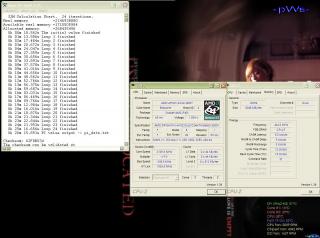
-pWs- |
|
Topic ClosedOptions
|
| Change to: |  0.0197sec 0.0197sec
 0.63 0.63
 6 queries 6 queries
 GZIP Disabled GZIP Disabled
Time is now: 6th December 2025 - 03:15 PM |
 Quote
Quote