Welcome Guest ( Log In | Register )

Bump Topic Topic Closed RSS Feed

Outline · [ Standard ] · Linear+

 AMDŽ Socket-AM2 Overclocking thread (V2), discuss our setup/overclocking issues

views
     
coolblade
post Jun 17 2007, 11:18 AM

Getting Started
**
Junior Member
298 posts

Joined: May 2006
From: Klang


QUOTE(smokey @ Jun 14 2007, 08:51 PM)
wah..change mobo jz to OC...
dont u think changing mobo is the most hassle part coz need to reinstall windows frm scratch..besides tat, need to unscrew everything frm the casing and re-arrange all those cacing wire...
i will keep my mobo for at least a lng time....
*
Not need to reinstall windows XP after changing mobo. Do you ever heard Sysprep? Google it dude biggrin.gif

It worked out for me. I changed from ASUS M2NPV-MX mATX to Biostar T-Force 550 (still use till present).

If I am not mistaken, I ever posted the way to use Sysprep in this thread.

Ok, care to let me up the method again? However this article is written in BM.

» Click to show Spoiler - click again to hide... «


coolblade
post Jun 29 2007, 10:25 PM

Getting Started
**
Junior Member
298 posts

Joined: May 2006
From: Klang


what is the max allowed voltage for overclocking brisbane proc?

I gonna to get a brisbane cpu within few days..
coolblade
post Jun 29 2007, 10:53 PM

Getting Started
**
Junior Member
298 posts

Joined: May 2006
From: Klang


@afosz

thanks for da info
coolblade
post Jun 30 2007, 07:13 PM

Getting Started
**
Junior Member
298 posts

Joined: May 2006
From: Klang


QUOTE(-pWs- @ Jun 30 2007, 05:08 PM)
Guys,
Any idea for me to use 667MHz ram divider and achieve 3GHz?
If using 667Mhz, my com will not boot above roughly at 2.6 - 2.7GHz.
Currently using 533 ram divider w 4-4-4-12.

Already tested a lot of solutions and would like to hear u guys' opinions. icon_question.gif
Thanks in advance 
-pWs-
*
what is your voltage of the brisbane cpu and the ddr2 ram?

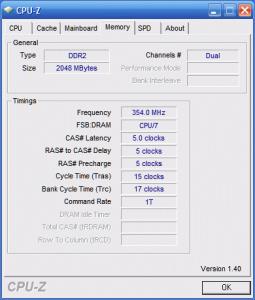
I just bought brisbane 3600+. I am also in quest for increasing my cpu clock. Currently 1.38v for the cpu at 2470MHz (260 x 9.5). RAM still at 1.95v, 533MHz ram divider with 5-5-5-15-1T.

I am wondering if the cpu volt at 1.38v is safe for 24/7 usage? Quite afraid that I might shorten the cpu lifespan?

I can boot if using 667MHz divider, but the ram will heat quickly and after about 30 - 60 minutes later, the computer will crash and reboot even I increase ram volt to 2.1v. I didn't dare to increase higher because this kingston ram have neither passive cooling nor active cooling yet.

I think, you can try use any active cooling such as AllnGap's ram cooler if you want to try the 667MHz divider so that it won't be so hot during long operation hours. Hope this idea helps.

But everest shows wrong ram divider information. CPU-Z shows the correct ram divider that I am currently using.

Attached Image


This post has been edited by coolblade: Jun 30 2007, 07:22 PM


Attached thumbnail(s)
Attached Image
coolblade
post Jun 30 2007, 09:49 PM

Getting Started
**
Junior Member
298 posts

Joined: May 2006
From: Klang


@dblooi

Ok, I lowered the vcore a bit. But got BSOD when using 1.30v. Now I using 1.35v. This midnight I want to orthos priming for several hours, after tinkering with OC setup tonight.

My Brisbane proc is ADO3600IAA5DD CAALG 0717EAT
coolblade
post Jul 1 2007, 07:11 AM

Getting Started
**
Junior Member
298 posts

Joined: May 2006
From: Klang


QUOTE(dblooi @ Jun 30 2007, 10:42 PM)
if you don't mind can you upload a screen shot of cpu-z? bcoz it is kinda weird to get BSOD at low frequency + little bit pumped vcore

oh ya, you can try to change the command rate to 2T laugh.gif
*
Attached Image

Attached Image

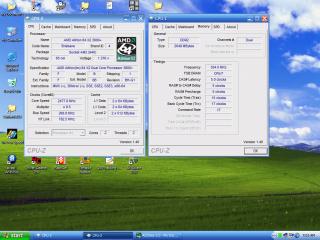
I don't know why I got BSOD at 1.30v, then I have to pump again the 1.35v vcore, which in CPUZ it's shown as 1.376v

To all, any workaround to get default vcore when clocking at 2.4 GHz (or 2.6 GHz perhaps)?
coolblade
post Jul 1 2007, 11:53 AM

Getting Started
**
Junior Member
298 posts

Joined: May 2006
From: Klang


QUOTE(kalakatu @ Jul 1 2007, 09:37 AM)
i dun think its becoz of ur vcore..
since u used 1T command rate, i bet u didnt pump enuff vdimm..
what is ur vdimm anyway?
vdimm is currently 1.95v

I've tried your suggestion: pump vdimm to 2.1v whilst set auto (default vcore) for the cpu but not to avail. I got BSOD afterward..

I think it is weird that I have to use 1.35v to reach 2.477 GHz, but other people such as dblooi just use default vcore to reach 2.8GHz, higher than mine.

Maybe it's RAM limitation, or cpu limitation. Overclocking result is different from a person's experience to other person's experience. Maybe my brisbane proc is not from a good production batch, whilst other are lucky get a better binned cpu?
coolblade
post Jul 3 2007, 07:24 AM

Getting Started
**
Junior Member
298 posts

Joined: May 2006
From: Klang


QUOTE(coolblade @ Jul 1 2007, 07:11 AM)
Attached Image

Attached Image

I don't know why I got BSOD at 1.30v, then I have to pump again the 1.35v vcore, which in CPUZ it's shown as 1.376v

To all, any workaround to get default vcore when clocking at 2.4 GHz (or 2.6 GHz perhaps)?
*
@dblooi and kalakatu

now I understand why I got BSOD previously. I forgot to update the BIOS, therefore the cpu wouldn't boot into windows at default vcore.

Now I am using BIOS downloaded from this website:

http://www.biostar.com.tw/app/en-us/t-seri...os.php?S_ID=161

After applying this BIOS update, I can boot at 2.477 GHz at 1.28v (default vcore?). I'll keep on bumping the clockspeed tonight. hehehe...

Anyone can confirm that this is the latest BIOS for tforce 550?

This post has been edited by coolblade: Jul 3 2007, 07:25 AM
coolblade
post Jul 9 2007, 10:50 PM

Getting Started
**
Junior Member
298 posts

Joined: May 2006
From: Klang


QUOTE(soulfly @ Jul 9 2007, 01:33 PM)
I flash BIOS like change cloth only laugh.gif
*
But if power failure happen during flashing BIOS? I think it is safer to use UPS alongside the BIOS flashing process.

Topic ClosedOptions
 

Change to:
| Lo-Fi Version
0.0533sec    0.44    7 queries    GZIP Disabled
Time is now: 3rd December 2025 - 03:58 PM