

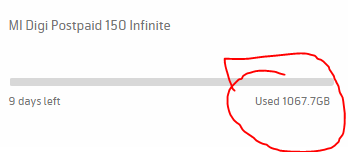
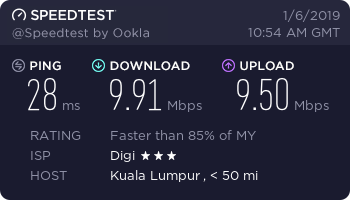
Finally reached 1TB limit on infinite 150, they really capped your speed to 10mbps when reached limit lol
[url=https://pictr.com/image/0CesXJ]
 [/url]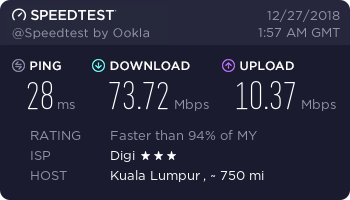
Digi Infinite Fan Club [V4], Infinite 150, 100, 80
|
|
 Jan 7 2019, 10:32 PM Jan 7 2019, 10:32 PM
Return to original view | Post
#1
|
 
Senior Member
1,601 posts Joined: Jan 2016  
|
Finally reached 1TB limit on infinite 150, they really capped your speed to 10mbps when reached limit lol [url=https://pictr.com/image/0CesXJ] [/url] |
|
|
|
|
|
Jan 7 2019, 10:41 PM
Return to original view | Post
#2
|
|
Senior Member
1,601 posts Joined: Jan 2016
|
QUOTE(piglover @ Jan 7 2019, 10:37 PM) Really cap at 10mbps? Not bad! 👍👍 At least it is still faster than my 4mbps shitmax   |
|
|
Jan 10 2019, 09:35 PM
Return to original view | Post
#3
|
|
Senior Member
1,601 posts Joined: Jan 2016
|
Just wondering, since I hit the quota of 1000GB on infinite 150
but reading their T&C it doesnt say anything regarding about quota...should I try contacting online CS asking them if they could reset the quota for me? |
|
|
Jan 10 2019, 09:44 PM
Return to original view | Post
#4
|
|
Senior Member
1,601 posts Joined: Jan 2016
|
QUOTE(fruitie @ Jan 10 2019, 09:39 PM) It will be refreshed on your billing cycle. Reee 6 days away, and I still got an entire google drive's files to dwload  |
|
|
Jan 10 2019, 10:36 PM
Return to original view | Post
#5
|
|
Senior Member
1,601 posts Joined: Jan 2016
|
QUOTE(fruitie @ Jan 10 2019, 10:16 PM) You still can download now with 10Mbps speed which is not too bad. A bit slow after dropping down from the usual 70mbps |
|
|
Apr 1 2019, 05:52 PM
Return to original view | Post
#6
|
|
Senior Member
1,601 posts Joined: Jan 2016
|
Little help here guys, I've been using I150 with Huawei B310s-22 for quite a long time now, but the signal and speed varies throughtout the day so I had bought an OMNI directional external antenna...but I couldnt find any setting to switch the antenna to external, or is it automatic?
BTW the speed changes so much...that 70mbps+ one is full bar while the 30mbps one is 2 bars...yikes 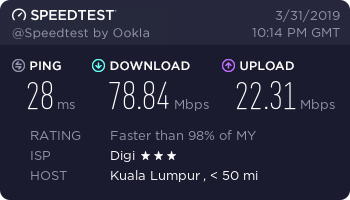 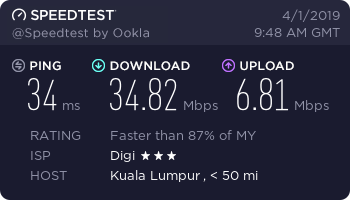 |
|
|
|
|
|
Apr 5 2019, 07:40 PM
Return to original view | Post
#7
|
|
Senior Member
1,601 posts Joined: Jan 2016
|
QUOTE(alexchew_2020 @ Apr 2 2019, 01:02 AM) are u using android phone? install hmanager.. get data rsrp n sinr..at least u know what dbm reading u had to compare... I forgot to take a screenshot of the signal strength before putting that antenna up, basically after installing it the rssi never went below 69 external antenna need to be turn on on setting inweb ui 192.168.8.1 and there isnt any need for turning on external antenna in B310s, there isnt an option for it...router automatically switches to external once plugged in 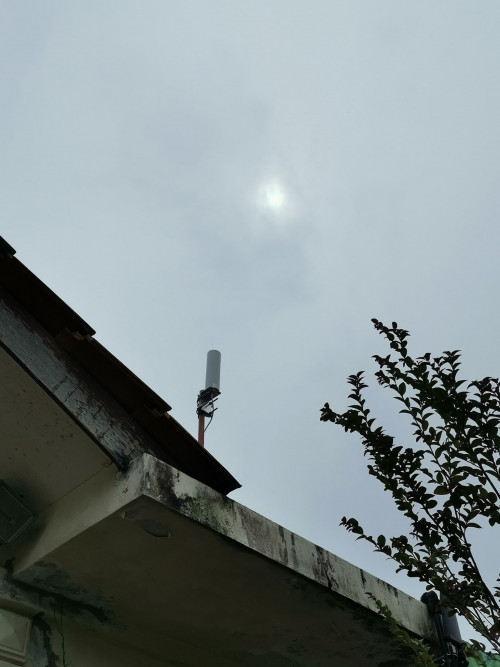 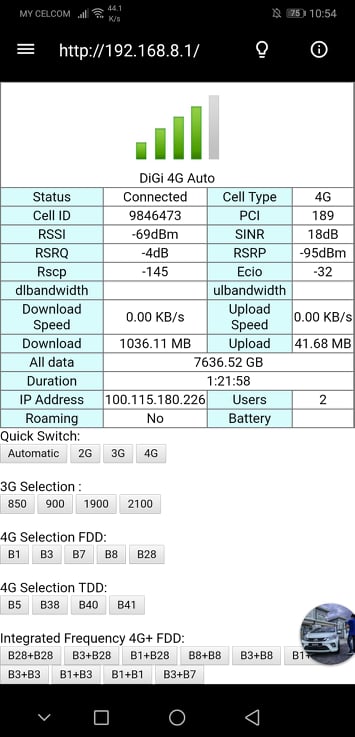 This post has been edited by QuantumEdge: Apr 5 2019, 07:40 PM |
|
|
Apr 7 2019, 01:16 AM
Return to original view | Post
#8
|
|
Senior Member
1,601 posts Joined: Jan 2016
|
QUOTE(alexchew_2020 @ Apr 5 2019, 11:12 PM) is it? i'm not sure your web ui for b310 how is it.. With enternal antenna and withoutbut previously i'm using b310 my model UI need to enable external..else it wont run... selectable... maybe u put auto...hmm..not sure... haha... it does got auto, external, internet option... can we see before plug antenna and after plug antenna reading on hmanager apps?  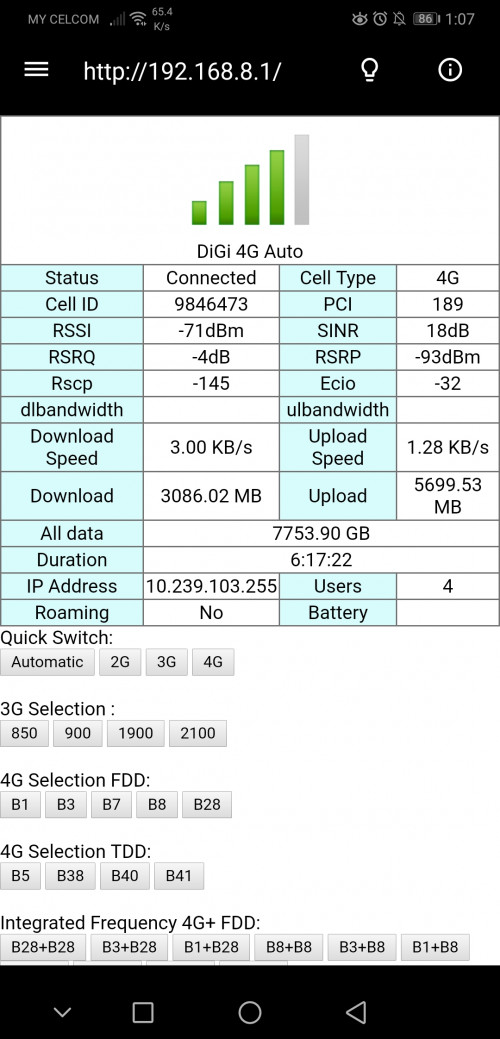 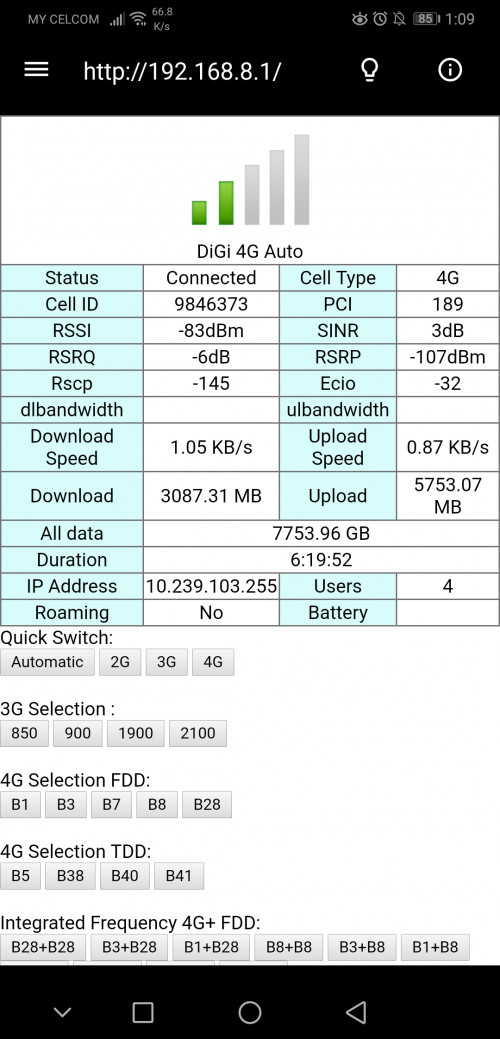 I saw someone's B310s had the options to choose the antenna, but mine doesnt 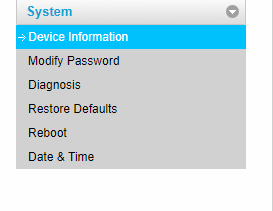 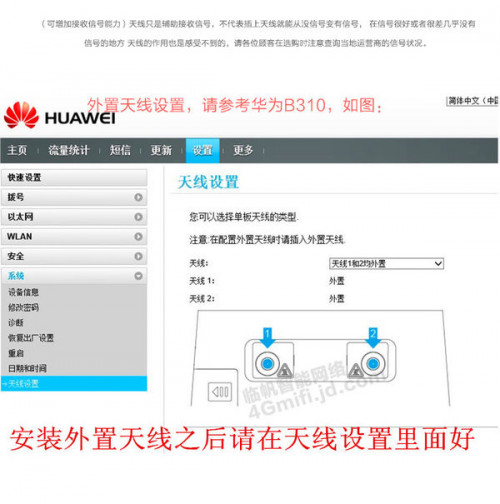 This post has been edited by QuantumEdge: Apr 7 2019, 01:16 AM |
|
|
Apr 8 2019, 11:23 PM
Return to original view | Post
#9
|
|
Senior Member
1,601 posts Joined: Jan 2016
|
QUOTE(ArthurHew @ Apr 8 2019, 08:25 AM) May I know how much is it cost? And which model? Look so great. The model I got was OS-A104, around RM85 on shopee…but I suggest getting those which is modem certified as my B310s doesn't have the option to manually switch to antenna…automatic sometimes doesn't detect the external antenna due to differences in resistance (1.2kΩ for most HUAWEI router)had to be that number or lower |
|
|
Apr 12 2019, 08:06 AM
Return to original view | Post
#10
|
|
Senior Member
1,601 posts Joined: Jan 2016
|
QUOTE(anthraxxxx @ Apr 11 2019, 10:41 PM) Can I apply for Digi Infinite 150 in the Digi centers or this plan is only valid for online offer? Online registration only |
|
|
Apr 27 2019, 07:53 PM
Return to original view | Post
#11
|
|
Senior Member
1,601 posts Joined: Jan 2016
|
QUOTE(alexchew_2020 @ Apr 26 2019, 03:53 PM) nope... u only can lock one... if it's keep switching tower, your line will be lag and spike and line drop. do monitor the cell ID aswell normally which u are connected For me at least, using band 3 alone is way better than using CA on 3+7 (off the same cell tower) 40Mbps vs 20Mbps....weird ah? |
|
|
May 22 2019, 12:56 PM
Return to original view | Post
#12
|
|
Senior Member
1,601 posts Joined: Jan 2016
|
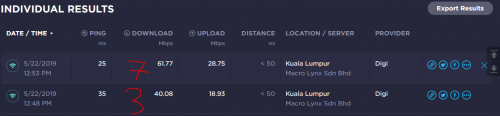 Found something interesting, my area does have band 3 and band 7 avaliable and both has good signal but the router just refused to connect to both of them on LTE-A FDD-1800+FDD-2600 So far I only managed to have LTE-A connection once, any idea why? 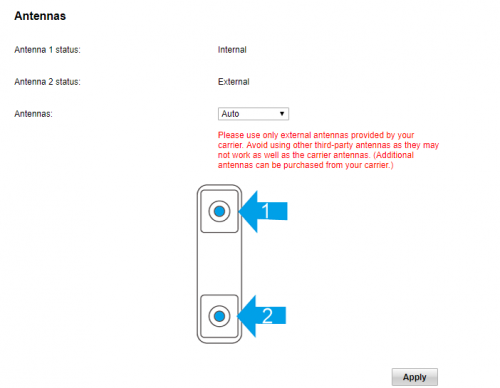 |
|
|
May 22 2019, 11:21 PM
Return to original view | Post
#13
|
|
Senior Member
1,601 posts Joined: Jan 2016
|
QUOTE(moshpit21 @ May 22 2019, 06:51 PM) how do you choose the band? hmanager? http://192.168.8.1or huawei manager, both works |
|
|
|
|
|
May 26 2019, 02:55 PM
Return to original view | Post
#14
|
|
Senior Member
1,601 posts Joined: Jan 2016
|
QUOTE(moshpit21 @ May 23 2019, 07:26 AM) then what do you mean it didn't want to connect to both? It wont connect as LTE-A, all I get is LTE even when both bands are around |
|
|
Jun 25 2019, 12:42 AM
Return to original view | Post
#15
|
|
Senior Member
1,601 posts Joined: Jan 2016
|
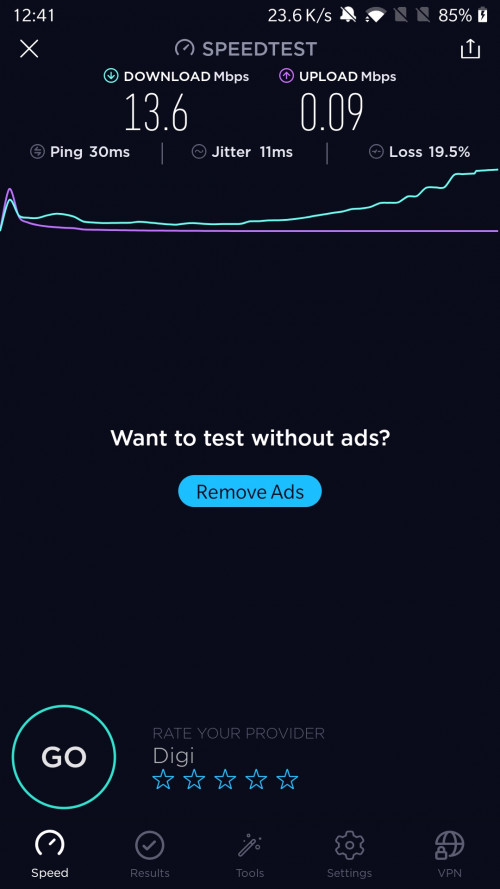 Upload speed seems a bit drunk tonight, am I the only one? |
|
|
Jun 25 2019, 12:46 AM
Return to original view | Post
#16
|
|
Senior Member
1,601 posts Joined: Jan 2016
|
QUOTE(alexchew_2020 @ Jun 25 2019, 12:44 AM) congested network maybe? Seems to be, been having issue with low upload speed since last week…usually 20+mbps, few days ago dropped to 5mbps, now not even 1mbps… |
|
|
Jun 25 2019, 12:49 AM
Return to original view | IPv6 | Post
#17
|
|
Senior Member
1,601 posts Joined: Jan 2016
|
QUOTE(alexchew_2020 @ Jun 25 2019, 12:47 AM) tried lock others band? b3 vs b7 vs b8? all bad? Band 7 suddently no signal, Band 8 shitty as usual, Band 3 super slow |
|
|
Jun 25 2019, 12:58 AM
Return to original view | IPv6 | Post
#18
|
|
Senior Member
1,601 posts Joined: Jan 2016
|
QUOTE(alexchew_2020 @ Jun 25 2019, 12:55 AM) could be tower problems... try report... Will do in the morning, cant backup anything to my drive now...haizbetter sleep early  |
|
|
Jun 25 2019, 01:47 PM
Return to original view | IPv6 | Post
#19
|
|
Senior Member
1,601 posts Joined: Jan 2016
|
Getting worst...now no speed at all
|
|
|
Jun 25 2019, 01:50 PM
Return to original view | IPv6 | Post
#20
|
|
Senior Member
1,601 posts Joined: Jan 2016
|
QUOTE(alexchew_2020 @ Jun 25 2019, 12:55 AM) could be tower problems... try report... QUOTE(ckimsem @ Jun 25 2019, 08:25 AM) Digi may have migrated they tower, it happened to my area last year. And since then, the worst network till I decided porting to Maxis. Complaints are useless. QUOTE(JLA @ Jun 25 2019, 09:33 AM) normally download speed higher than upload is congestion isue. yours is something else. It's getting worst, just came back from work...no speed at all, on both upload and download eventhou the network signal is normal and strong |
| Change to: |  0.1625sec 0.1625sec
 0.53 0.53
 7 queries 7 queries
 GZIP Disabled GZIP Disabled
Time is now: 17th December 2025 - 08:44 PM |
 Quote
Quote