Outline ·
[ Standard ] ·
Linear+
TIME [OFFICIAL] TIME Fibre Broadband™ v4, Experience the ONE TRUE 2Gbps
|
ryansxs
|
 Nov 30 2021, 08:35 PM Nov 30 2021, 08:35 PM
|

|
QUOTE(KingArthurVI @ Nov 30 2021, 08:10 PM) Hi guys I bought an ASUS TUF-AX3000 in anticipation for moving into my condo next year, and I've already decided to get the 500Mbps plan. Is there anything I need to do to set it up, or can I ask the technician who's coming to install to set it up for me? Thanks in advance. Can set up. Easy setup. Just get the time login and password (usually they will write on the installation form too). Not sure if they are willing to do the setup on your router than the stock router. You can ask. I use TUF-AX3000 as well, paired with AX3000 for mesh. Its super stable and easy to setup. No worries. |
|
|
|
|
|
ryansxs
|
Dec 1 2021, 12:10 PM
|
|
|
QUOTE(KingArthurVI @ Dec 1 2021, 12:22 AM) Thanks, if I can DIY then definitely do that better than paying random "custom job" fee to the technicians for sure. So all I need is the TIME username, password, then plug that into the router config page? Is that called the PPPOE username and password? Yes. You only need the PPPoE credentials and you are good to go. |
|
|
|
|
|
ryansxs
|
Dec 11 2021, 09:20 AM
|
|
|
QUOTE(markypcs @ Dec 10 2021, 09:53 PM) Is the Asus RT AC768U sufficient for my space? 2.8k sqft condo, under a 300mbps plan from Time. Condo layout is rectangular. The wifi setup is currently at one end of the condo, and the rooms on the other end don't have coverage. Looking to add some routers to extend the range. Open to suggestions! Set up mesh Wifi. Only one router, will not cover that huge space. |
|
|
|
|
|
ryansxs
|
Dec 11 2021, 03:13 PM
|
|
|
QUOTE(markypcs @ Dec 11 2021, 02:16 PM) Would you guys suggest the router or mesh solution? Or a mix of both? I did pull a line to the middle bedroom, which is sort of the middle point of the unit. Was thinking to setup the Asus there, would that be sufficient to cover the space? You can try to put a router in the middle and check the coverage. Get a router that can support mesh wifi. (I would recommend asus AX routers) Then if you feel the coverage is not good (places where you spend most of the time), add one more router there (as a node). You can add as many nodes as you want. Of course it will cost you more. Rule of thumb is, cover with signal at locations where you spend most of your time at home. Just my 2cents |
|
|
|
|
|
ryansxs
|
Dec 11 2021, 10:02 PM
|
|
|
QUOTE(markypcs @ Dec 11 2021, 03:27 PM) Thanks for the replies! I was recommended the Asus RT-AC768U. Would it be good enough for the space? Its a good router. But I would suggest you to get AX router. As most devices supports AX now, rather than AC. |
|
|
|
|
|
ryansxs
|
Dec 12 2021, 09:57 AM
|
|
|
QUOTE(markypcs @ Dec 12 2021, 12:49 AM) Would you recommend this for 300 mbps plan? Asus RT-AX55 (twin pack) https://shopee.com.my/ASUS-Router-RT-AX55-A...c5-f14afbb0e08cAnd follow up question: Should I buy a slightly better router where the optic cable is, and buy a 'cheaper' router to pair with it? Does it help with the wifi strength and coverage? Do note that I have lan access for both positions in my house. You can use the LAN as the backhaul for your internet. You can simply connect one end of the LAN to router and the other end of the LAN to a WIFI AP. |
|
|
|
|
|
ryansxs
|
Dec 12 2021, 02:02 PM
|
|
|
QUOTE(markypcs @ Dec 12 2021, 01:42 PM) What does it mean actually? Lol, sorry not well versed with networking lingo. You mean just get 2 of the same routers, and connected a LAN cable and one works as the main router, the other works as a 'WIFI AP' (is it a repeater?) ^ one option option 2 is set up as mesh. but between 2 routers, you use LAN as the connection instead of WIFI backhaul. |
|
|
|
|
|
ryansxs
|
Jan 2 2022, 09:36 PM
|
|
|
QUOTE(engonaplane @ Jan 2 2022, 09:33 PM) hi all. Just got a subsale condo and plan to install Time. However I suspect the previous owner cut the fiber - cannot find the fiber wall socket anywhere in the house and found a fibre dangling from the ceiling next to the MDB. if i go with Time - does the standard installation cover the fiber wall socket or do i need to top up / find an external contractor to fix it prior to installation? 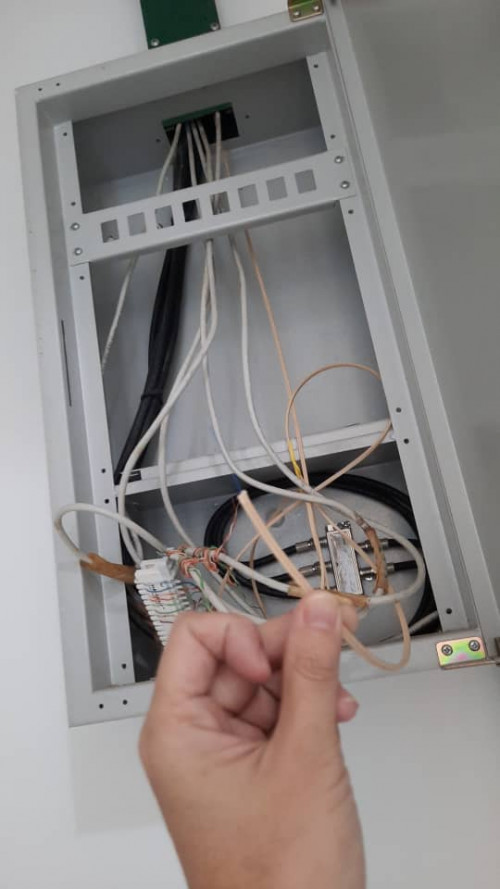 how do you know that fiber is coming from your home? (is this box outside?) |
|
|
|
|
|
ryansxs
|
Jan 2 2022, 11:26 PM
|
|
|
QUOTE(engonaplane @ Jan 2 2022, 10:16 PM) inside the house. next to the main distribution box for power - where the MCB and fuses are. this fiber maybe is the pre-laid fiber for your house. they will use this fiber if you apply for TIME for example. |
|
|
|
|
|
ryansxs
|
Jan 3 2022, 01:32 PM
|
|
|
QUOTE(engonaplane @ Jan 3 2022, 01:01 AM) noted - will TIME cover the cost or do i need to top up for installation? Possibly you might need to top up. But i am not sure. |
|
|
|
|
|
ryansxs
|
Feb 15 2022, 03:17 AM
|
|
|
QUOTE(garybenjamin @ Feb 14 2022, 04:05 PM) Hi friend i subscribed Time 500mbps and upgraded to HG8145X6. But my router is at living room but my computer and laptop at master room i.e. 2 room away, around 15m away with 3 concrete wall in between. So if I buy AX3 Pro is it sufficient to repeat it to master room to reap for full speed so i can use lan cable at master bedroom / got 5ghz wifi. Or i will need stronger mesh modem to repeat it? 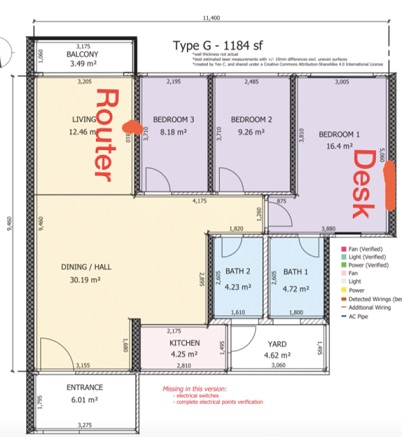 If you want full speed, pull a cable from your router to you master bed room. Or Build a mesh Temporarily, if you want to get better speed, move your router closer to your dining hall, open your masterbedroom door and test the speed. |
|
|
|
|
|
ryansxs
|
Oct 5 2023, 09:29 AM
|
|
|
QUOTE(ronnie @ Oct 5 2023, 07:45 AM) same same.... faster reduce the price, oh TIME..we love your services, but we love money saved more than ever. TIME pricing is almost the lowest in the market. I doubt they will steeply slash the price. |
|
|
|
|
|
ryansxs
|
Oct 5 2023, 08:44 PM
|
|
|
QUOTE(Doomsday @ Oct 5 2023, 08:29 PM) Their international routing caused my fps competitive gaming to have constant packet loss/drops. Already escalated to mcmc and the issue seems to "resolved" then few months the line. The issue reoccurring. Was using 500Mbps line and only me and my partner using the line all the time. To add more. Given them the Wireshark logs they also can't interpret what's going on. Had to pin point their so called level 3 support. LMAO Guess allo just wasted a good physical infrastructure (fiber connection) that they have, with poor performance.  |
|
|
|
|
|
ryansxs
|
Apr 15 2024, 08:19 PM
|
|
|
QUOTE(FoxSeaTiger @ Apr 15 2024, 07:26 PM) I just call them yesterday. Surprising they give me port fowrding today. Not try yet because I still at work. public static IP? |
|
|
|
|





 Quote
Quote
 0.0352sec
 0.35
0.35
 7 queries
 GZIP Disabled