

QUOTE(dickybird @ Sep 25 2018, 12:15 PM)
Dah turbo ke? Dah dapat?

the real turbo is look like this
Unifi Official TM UniFi High Speed Broadband Thread V35, READ 1ST PAGE FOR TURBO SPEED INFO!
|
|
 Sep 25 2018, 01:26 PM Sep 25 2018, 01:26 PM
Return to original view | IPv6 | Post
#1
|
 
Senior Member
2,347 posts Joined: Apr 2008  
|
QUOTE(dickybird @ Sep 25 2018, 12:15 PM) Dah turbo ke? Dah dapat? the real turbo is look like this
|
|
|
|
|
|
Sep 25 2018, 01:30 PM
Return to original view | IPv6 | Post
#2
|
|
Senior Member
2,347 posts Joined: Apr 2008
|
QUOTE(saiko3d @ Sep 25 2018, 12:11 PM) i call to replace the router, anybody know what brand TM using right now ? i wonder if they still give bad one of router again.. I already asked the TM guy that day he come my house to check the connection about why can't reach 500mbps full speed (only 300mbps). He say only provide free TP-Link or D-Link. So I don't want, I will upgrade my router later. |
|
|
Sep 26 2018, 10:48 AM
Return to original view | IPv6 | Post
#3
|
|
Senior Member
2,347 posts Joined: Apr 2008
|
QUOTE(amirul hafizz @ Sep 26 2018, 12:50 AM) why 50mbps still aneka pack plus. 50mbps should be come with ultimate pack. I hope can terminate the hypptv because I never use it. The STB provided by TM was thrown and use my own tvbox to watch astro iptv. |
|
|
Sep 26 2018, 02:55 PM
Return to original view | IPv6 | Post
#4
|
|
Senior Member
2,347 posts Joined: Apr 2008
|
QUOTE(yoko @ Sep 26 2018, 02:47 PM) Just to understand... highrise customer cannot turbo? My condo is fully fibre cuz new development, still cannot be turbo-ed? you are eligible to upgrade to turbo if your condo is using FTTH fiber, as long as your devices are BTU+router.Btw, anyway to check when am I scheduled for turbo? However, some of them may using VDSL modem. Probably they need to wait for technician to pull the new fiber cable into their home. This post has been edited by junclj: Sep 26 2018, 03:02 PM |
|
|
Sep 26 2018, 03:08 PM
Return to original view | IPv6 | Post
#5
|
|
Senior Member
2,347 posts Joined: Apr 2008
|
QUOTE(SilentVampire @ Sep 26 2018, 02:59 PM) Nope. They only care about giving you the best wired speed. They won’t care about giving you the best wireless speed. You have to get your own router for that. I was read your given first page and my Asus RT-AC55UHP is rated as 300mbps. However, the current situation is my Unifi was turboed to 500mbps but my speedtest for "network cable" wired connection only can reach 300mbps (not wireless speed). Just need to clarify, the information for first page is based on wired or wireless?If your high rise have fibre from TM, you will be turboed. If not, forget it. What do you mean change? There is no need for me to write anything about change from 2.4Ghz to 5GHz, as the settings will all be done from your router manually. Log into your router and see what SSID your 5GHz is using, and just connect to it. If you can’t see 5GHz, either it have been disabled, or you have smart connect on your router enabled, or your device does not support 5GHz. |
|
|
Sep 26 2018, 03:16 PM
Return to original view | IPv6 | Post
#6
|
|
Senior Member
2,347 posts Joined: Apr 2008
|
QUOTE(dickybird @ Sep 26 2018, 03:13 PM) Wired. QUOTE TURBO SPEED - SUITABLE WIRELESS ROUTER GUIDE - ALL ROUTERS LISTED HERE HAVE GIGABIT LAN PORTS For Wi-Fi, if you are upgraded to the turbo speed, you will need to change routers to enjoy the maximum achievable speed, depending on your speeds. Please refer to the list below. All speeds listed below are the maximum Wi-Fi speed that the router can achieve. If you are connected via WIRED RJ45 CAT5E or CAT6 directly to any of the router below, you can achieve gigabit speed as all routers listed below have gigabit LAN ports. |
|
|
|
|
|
Sep 28 2018, 03:16 PM
Return to original view | IPv6 | Post
#7
|
|
Senior Member
2,347 posts Joined: Apr 2008
|
QUOTE(blackamikaze @ Sep 28 2018, 03:13 PM) update on my downgrade process from 30mb to new 100mb package. no, because your router need a BTUYesterday my line has been change from copper to fiber. Now need to wait another technician to come on monday to change the router. I already have a good router, should just update through the system.  |
|
|
Sep 28 2018, 03:24 PM
Return to original view | IPv6 | Post
#8
|
|
Senior Member
2,347 posts Joined: Apr 2008
|
QUOTE(blackamikaze @ Sep 28 2018, 03:21 PM) They already changed my btu yesterday lor. If like that, you can do it yourself as long as you have the password of your unifi IDNope, high rises but with fiber infra |
|
|
Sep 28 2018, 05:14 PM
Return to original view | IPv6 | Post
#9
|
|
Senior Member
2,347 posts Joined: Apr 2008
|
QUOTE(notok @ Sep 28 2018, 05:00 PM) are hardware and performance same ? the price difference is a lot, local malaysia version selling at RM900++ while other selling at RM500++ Yes, performance are the same. The new version of RT-AC86U is 1.8GHz dual core CPU. You buy from China also the same. Just depends on your choice, for me is ok. I was placed order from taobao to buy a CNY899 RT-AC86U, the router can flash to both Asus official firmware or Merlin custom firmware. The seller also free two fans for me to attach behind that router. So you can calculate CNY899 divided by 1.63 after conversion rate + bank charges is equal to RM551.54.  Delivery charges from China is RM30++ something. So I assume total purchase is RM590. If you buy the same router in local here, they are selling around RM1,400 for this router. Is it worth for you to pay the extra RM810 for warranty?  RM810, I can buy one more RT-AC86U from taobao to build AImesh. I still have RM220 in my pocket. Usually Asus is quite hard to get broken down. I am now using RT-AC55UHP for more than 2 years but never broken down. Connection is very stable and never complain. So, do you think RM810 really worth to pay for Asus warranty? It is cost too much for me. |
|
|
Sep 28 2018, 05:19 PM
Return to original view | IPv6 | Post
#10
|
|
Senior Member
2,347 posts Joined: Apr 2008
|
QUOTE(notok @ Sep 28 2018, 04:55 PM) I am interested to buy ASUS router Rt-AC68U just to get 500Mbps. I found a lot of variations of it eg. T-Mobile AC1900 and some other chinese version. what are the difference between all these variations ? if you buy the T-mobile version from taobao, they do not ship to outside of China, unless you have to register a forwarder to get yourself a china warehouse address. So you can let the seller ship to your china address. After the router arrive to your china address, the forwarder will update to you then let you to arrange the payment of shipping charges.Can i buy those router and flash OEM RT-AC68U firmware into it ? Thanks Usually they will treat as sensitive item for items which is not ship out from china. So for best solution, just buy the china version. For best is only buy from Tmall seller. |
|
|
Sep 28 2018, 05:28 PM
Return to original view | IPv6 | Post
#11
|
|
Senior Member
2,347 posts Joined: Apr 2008
|
QUOTE(stringfellow @ Sep 28 2018, 05:21 PM) Are there options like this (buying from Ali or Taobao) for other Asus routers? Like the higher end ones, RT-AC5300 or GT-AC5300? this router is selling CNY1399(around RM860) in Tmall. Quite cheap you know? In Malaysia here, RM860 only can afford to buy a RT-AC68U. However, RT-AC86U is more than enough for me.https://detail.tmall.com/item.htm?spm=a230r...e27b&abbucket=6 |
|
|
Sep 28 2018, 10:24 PM
Return to original view | IPv6 | Post
#12
|
|
Senior Member
2,347 posts Joined: Apr 2008
|
QUOTE(phhweittt @ Sep 28 2018, 10:19 PM) Jailbreak i guess no need to jailbreak. just restore back to the old os version. the backup file is inside the stb. you need to restart then press some key on the remote control to boot into bootloader, i forgot already. you can search in google too.This post has been edited by junclj: Sep 28 2018, 10:25 PM |
|
|
Sep 28 2018, 10:36 PM
Return to original view | IPv6 | Post
#13
|
|
Senior Member
2,347 posts Joined: Apr 2008
|
QUOTE(jiaen0509 @ Sep 28 2018, 10:26 PM) Last time I just download the File Manage app from Google Play. Then insert pendrive and can install the .apk file. i also install es file explorer last time into my TM set top box. actually hypptv stb old version got google play store. I can easily access to play store to install es file explorer. So I can download apk from my PC then use pendrive to install all the apk in the hypptv stb. many of them ask for how. because their hypptv stb was updated to new version. the new version dont have google play store, thats why many user ask for how. actually it is quite easy, just search in google. there have a malays tutorial to teach you how to restore back to the old version. only the old version got google play store, so you can access to play store to download es file explorer in order to install some third party apk such like MYIPTV 4K. This post has been edited by junclj: Sep 28 2018, 10:43 PM |
|
|
|
|
|
Sep 29 2018, 10:49 AM
Return to original view | IPv6 | Post
#14
|
|
Senior Member
2,347 posts Joined: Apr 2008
|
QUOTE(soonwai @ Sep 29 2018, 02:57 AM) As we all know, when it comes to TM, being passive does not help much. In case anyone is planning to contact TM UniFi support with a different posture. that one is TM kopitiam chatting room only, I was go in to chat with them to complain about my unifi turbo 500mbps only can reach 300mbps maximum speed. They just answer me keep monitor, just monitor. Nothing can do other than that, they never take action to help fix my speed back to 500mbps. So I just directly open report to MCMC.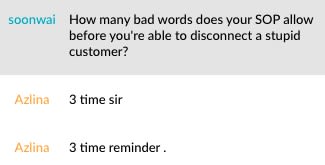 Applies to both live chat and 100. |
|
|
Sep 29 2018, 01:21 PM
Return to original view | IPv6 | Post
#15
|
|
Senior Member
2,347 posts Joined: Apr 2008
|
QUOTE(zioburosky13 @ Sep 29 2018, 11:54 AM) Update on the test result with Wired connection and Wireless connection. So you can ensure that your 300mbps upload speed is 50mbps.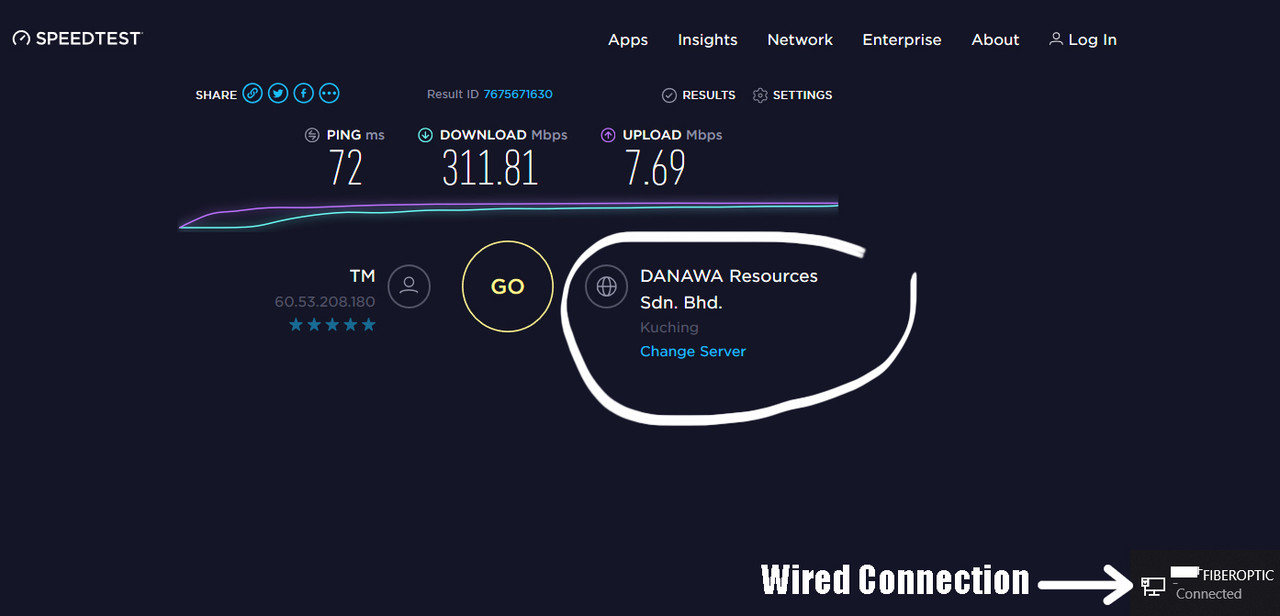    With cable connection it can achieve maximum speed, while 1/2 of the promised speed on Wireless, in this case, 5Ghz connection. Gonna try it with a CAT-6 cable. |
|
|
Sep 29 2018, 01:27 PM
Return to original view | IPv6 | Post
#16
|
|
Senior Member
2,347 posts Joined: Apr 2008
|
QUOTE(zioburosky13 @ Sep 29 2018, 01:19 PM) LOL. While trying to replace the old router with a new one, I forgot my Unifi user password. Now have to wait for TmNet to send me a new one for the setup.. No need, you just need to login to your old router to check. 

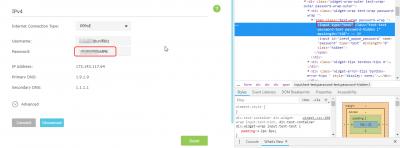
|
|
|
Sep 29 2018, 01:31 PM
Return to original view | IPv6 | Post
#17
|
|
Senior Member
2,347 posts Joined: Apr 2008
|
QUOTE(zioburosky13 @ Sep 29 2018, 01:26 PM) For wired connection, yes. I notice that you are coming from KK, can you change to server "Telekom Malaysia" or server "Time dotcom" then redo speedtest again?However, in order to achieve the same speed via wireless connection, a new router and cable replacement are required for that. This post has been edited by junclj: Sep 29 2018, 01:32 PM |
|
|
Oct 1 2018, 12:09 PM
Return to original view | IPv6 | Post
#18
|
|
Senior Member
2,347 posts Joined: Apr 2008
|
My unifi was turboed but the problem is my line can't get full speed. My package now is Unifi turbo 500mbps but please look at my signature. Speedtest result only has 60% of my subscribed speed. So I was lodged report to MCMC and waiting TM to solve my issue.
I never receive email from TM but my unifi get turboed suddenly at 17th September, then I only receive a SMS notification by TM after one week of turboed. So you can wait and come back to check after 15th Oct 2018. I guess that TM is upgrading phase by phase base on pilot basis in the mid of every month. Let's say they start to upgrade from 15th Oct until 19th Oct. This post has been edited by junclj: Oct 1 2018, 12:17 PM |
|
|
Oct 1 2018, 12:56 PM
Return to original view | IPv6 | Post
#19
|
|
Senior Member
2,347 posts Joined: Apr 2008
|
QUOTE(WaCKy-Angel @ Oct 1 2018, 12:45 PM) doubt mine will get upgraded, if yes also 30mbps only due to copper line. when you get turboed, TM will arrange technician to come to your house to replace your current copper to fiber. So you will get 300mbps turboed. That's what my presumption.gonna change to maxshit 30mbps soon |
|
|
Oct 1 2018, 01:07 PM
Return to original view | IPv6 | Post
#20
|
|
Senior Member
2,347 posts Joined: Apr 2008
|
QUOTE(WaCKy-Angel @ Oct 1 2018, 12:59 PM) doubt so coz its condo, usually management need to fork out money for upgrade the infra. TM may do like what TIME dotcom did. |
|
Topic ClosedOptions
|
| Change to: |  0.0271sec 0.0271sec
 0.56 0.56
 7 queries 7 queries
 GZIP Disabled GZIP Disabled
Time is now: 4th December 2025 - 12:11 PM |
 Quote
Quote