

QUOTE(TamiyaOne @ Oct 2 2018, 01:25 PM)
was turboed but cannot maintain... 10Mbps turbo to 100Mbps.. drop and maintain at 50Mbps during speed test... tested afew day also same

base on wired or wifi?Unifi Official TM UniFi High Speed Broadband Thread V35, READ 1ST PAGE FOR TURBO SPEED INFO!
|
|
 Oct 2 2018, 01:31 PM Oct 2 2018, 01:31 PM
Return to original view | IPv6 | Post
#21
|
 
Senior Member
2,347 posts Joined: Apr 2008  
|
QUOTE(TamiyaOne @ Oct 2 2018, 01:25 PM) was turboed but cannot maintain... 10Mbps turbo to 100Mbps.. drop and maintain at 50Mbps during speed test... tested afew day also same base on wired or wifi? |
|
|
|
|
|
Oct 3 2018, 07:57 PM
Return to original view | IPv6 | Post
#22
|
|
Senior Member
2,347 posts Joined: Apr 2008
|
QUOTE(stormaker @ Oct 3 2018, 07:48 PM) I'm still on 8MB streamyx, and TM just launched Unifi in my area. Installation will be on this coming Saturday, but my confirmation e-mail stated "Lite", means it's not the one listed on TM website ? TM website didn't mention 100M BEST too ... yes, 100mbps is considered as lite. Only 300/500/800mbps are Unifi Advance  |
|
|
Oct 4 2018, 05:43 PM
Return to original view | IPv6 | Post
#23
|
|
Senior Member
2,347 posts Joined: Apr 2008
|
QUOTE(Fatz_Cat @ Oct 4 2018, 05:35 PM) no worries...i understand the feeling...sometimes hard to teach a 'batu'..hahaha.... my guess is bottlenecking issue of your router. Its time to upgrade your router. I know you must say everything talk about money. Because once Unifi upgrade to more than 300mbps, we need to upgrade everything too. Router have to upgrade too. We cannot expect that TM will free to you the best router. i use my laptop to connect to 5Ghz AC, also can get max to 60Mbps, is the laptop specs affects the perfomance? this is what I get from. It's true that my old router is Asus RT-AC55UHP. I only can get 300mbps maximum when doing speedtest based on "wired" (not wifi). When I test with wifi is getting even worse, only around 150mbps. Perhaps you need to take a look in here for what I was discussed recently. 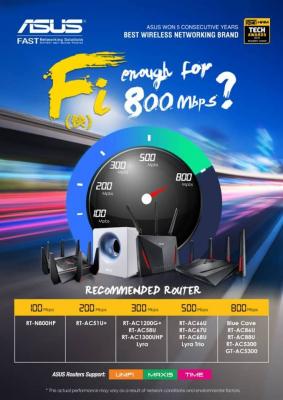
|
|
|
Oct 5 2018, 03:58 PM
Return to original view | IPv6 | Post
#24
|
|
Senior Member
2,347 posts Joined: Apr 2008
|
May I know isnt TM is provide a black color Nokia brand BTU for the new subscribed unifi 100mbps users?
|
|
|
Oct 5 2018, 04:28 PM
Return to original view | IPv6 | Post
#25
|
|
Senior Member
2,347 posts Joined: Apr 2008
|
QUOTE(csimloo @ Oct 5 2018, 04:25 PM) After several complaint, tm remove my ruby pack, rm159 exclusive sst for now. can remove hypptv?? really can? I want to try too if can |
|
|
Oct 5 2018, 04:40 PM
Return to original view | IPv6 | Post
#26
|
|
Senior Member
2,347 posts Joined: Apr 2008
|
Should I try? I never watch the hypptv. My unifi was applied since March 2016.
Attached thumbnail(s) 
|
|
|
|
|
|
Oct 5 2018, 05:09 PM
Return to original view | IPv6 | Post
#27
|
|
Senior Member
2,347 posts Joined: Apr 2008
|

tried to chat with TM CS, HyppTV is compulsory. No luck for me. |
|
|
Oct 5 2018, 09:10 PM
Return to original view | IPv6 | Post
#28
|
|
Senior Member
2,347 posts Joined: Apr 2008
|
QUOTE(devil98 @ Oct 5 2018, 06:01 PM) my 500mbps turbo upgrade (previously was 50mbps) now is RM208 include SST and HypTV (RM30) you can try to chat with TM CS, see whether can remove hypptv. Some of us are applied with Earlybird plan during 2016, because that plan is cheapter therefore we cannot remove HyppTV. My plan is initially Unifi Advance 30mbps Early Bird Promotion. That time I was subscribed for RM179/mth and RM189.75 after 6% tax. Come to year 2017, my Unifi being upgraded to Unifi Advance 50mbps Thank You Campaign 2017. The price is still maintain as RM179/mth and RM189.75 after 6% tax. Come to last month, my Unifi being upgraded again to Unifi Advance 500mbps Turbo 2018. So the price is still maintaining RM189.75 after tax.how come i see some of you pay lesser than me, can those 500mbps users tell me how much your monthly bill now? This post has been edited by junclj: Oct 5 2018, 09:13 PM |
|
|
Oct 5 2018, 09:20 PM
Return to original view | IPv6 | Post
#29
|
|
Senior Member
2,347 posts Joined: Apr 2008
|
QUOTE(leezhijiang @ Oct 5 2018, 08:02 PM) So after some escalation mails, a girl from TM called me to inform that see mineI am paying RM 199 for 30 Mbps and will only get Turbo to 300 Mbps which I am not satisfied since other users got 50 Mbps and 100 Mbps. She asked to provide evidence to show her because she don't believe. Anyone mind to share their ORDER ID / Bills / screenshot that proved the above without revealing your name ? 

This post has been edited by junclj: Oct 5 2018, 09:26 PM |
|
|
Oct 5 2018, 09:28 PM
Return to original view | IPv6 | Post
#30
|
|
Senior Member
2,347 posts Joined: Apr 2008
|
QUOTE(leezhijiang @ Oct 5 2018, 09:26 PM) I ope it helps in arguing with them you can try to use this screenshot to lodge MCMC report too. |
|
|
Oct 9 2018, 12:48 PM
Return to original view | IPv6 | Post
#31
|
|
Senior Member
2,347 posts Joined: Apr 2008
|
QUOTE(nazeeman @ Oct 9 2018, 12:44 PM) anybody have a good template to make aduan at mcmc? Just fill in the form then write down your notes only. |
|
|
Oct 10 2018, 02:57 PM
Return to original view | IPv6 | Post
#32
|
|
Senior Member
2,347 posts Joined: Apr 2008
|
QUOTE(sHawTY @ Oct 10 2018, 02:51 PM) I'm paying RM189 for 100Mb/s How you get so cheap, I really want to complain TM already. Need get cheaper offer! Mine now is 500mbps for RM179 before SST.Started with 30Mb/s for RM179 Free upgrade to 50Mb/s in 2016 Then got the RYE 2017 to 100Mb/s for an extra RM10 |
|
|
Oct 10 2018, 05:48 PM
Return to original view | IPv6 | Post
#33
|
|
Senior Member
2,347 posts Joined: Apr 2008
|
I want to ask something weird happen to me in this morning.
In this morning, I was woke up then took my phone then found 1 SMS notification. CODE RM0.00:unifi: Apologize, there may be some delay in restoring yr service (my unifi phone number). Expected restoration by 10/10/2018 03:40PM. Chat at unifi.com.my/chat The problem is, my line all still ok. I was woke up in the morning then just took up my phone to play facebook. Everything just running smooth without problem. Internet speed is fast, no lagging or disconnected. Come to 16:00 in the afternoon, I was received the same SMS again but the expected restoration was delayed until 11:54PM tonight. I was login to my home CCTV, everything is OK. My home got internet but not sure why TM keep sending to me these message? |
|
|
|
|
|
Oct 10 2018, 05:57 PM
Return to original view | IPv6 | Post
#34
|
|
Senior Member
2,347 posts Joined: Apr 2008
|
QUOTE(fruitie @ Oct 10 2018, 05:46 PM) So, if now I'm willing to pay RM 189, will they give me 800Mbps? I doubt so. Have you login to your Unifi portal to check your Unifi plan status? Are you sure is 500mbps but not 800mbps?I mind a lot on the entitlement, simple understanding 100 to 800, since when become 500 only? Doesn't make sense. I will not give in even if my sister is OK with it. What is your upload speed? 100mbps or 200mbps? If you found that download speed 500mbps and upload speed 200mbps. It could be your router issue too. I have facing the problem 300mbps download speed and 100mbps download speed. The real 300mbps plan only has 50mbps upload speed. I was upgraded to RT-AC86U then solved my issue. This post has been edited by junclj: Oct 10 2018, 05:59 PM |
|
|
Oct 10 2018, 07:00 PM
Return to original view | IPv6 | Post
#35
|
|
Senior Member
2,347 posts Joined: Apr 2008
|
QUOTE(fruitie @ Oct 10 2018, 06:01 PM) This is my third time sharing this screenshot: 🤭 so sad tosee that 100mbps rye turbo to 500mbps. fortunately, i did not accept the rye offer. so now is maintaining RM179 monthly.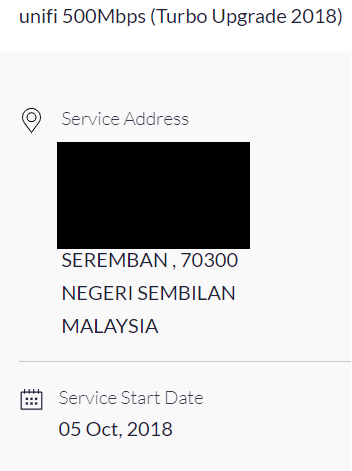 |
|
|
Oct 10 2018, 07:12 PM
Return to original view | Post
#36
|
|
Senior Member
2,347 posts Joined: Apr 2008
|
QUOTE(dickybird @ Oct 10 2018, 07:06 PM) 179¿ I'm paying 159 while waiting to get 500 Mbps. Sad for you bro. Hehe bro, my unifi is only RM149, plus hypptv RM30. i wish can cancel it but asked customer service, it is compulsory. so later that i was lodged mcmc report.This post has been edited by junclj: Oct 10 2018, 07:13 PM |
|
|
Oct 11 2018, 06:27 PM
Return to original view | IPv6 | Post
#37
|
|
Senior Member
2,347 posts Joined: Apr 2008
|
For those guys who are keep complaining your unifi speed on LAN cable is not stable, for example with Unifi turbo 500mbps. Sometimes 400mbps, sometimes 450mbps, sometimes 470mbps. But hardly to reach 500mbps during doing speedtest.
I got a hint to tell you how to optimize your speedtest results. If your PC got antivirus or internet security. Just switch it off or just straight quit the antivirus. I was exited my Kaspersky Internet Security, then straight speed up to 510~520mbps when redo speedtest. Another hints to optimize your speedtest results, you need to install an add-on "adblock" to your Chrome browser. It will remove all the banner ads from the speedtest.net website. |
|
|
Oct 12 2018, 06:51 PM
Return to original view | IPv6 | Post
#38
|
|
Senior Member
2,347 posts Joined: Apr 2008
|
QUOTE(AlexisStarZ @ Oct 12 2018, 09:05 AM) my home still using Huawei HG850A What I know is users with Alcatel Lucent I-240G-T will be arranged to upgrade in first priority. This is what some people tell me base on their research. I guess that TM maybe first to turbo for users with gigabit BTU. Maybe TM have to order millions unit of gigabit BTU now.guess is gonna take a long time to get turbo speed  |
|
|
Oct 12 2018, 08:20 PM
Return to original view | IPv6 | Post
#39
|
|
Senior Member
2,347 posts Joined: Apr 2008
|
QUOTE(OKLY @ Oct 12 2018, 08:00 PM) Just tested out my Turbo 800mbps and I am unable to achieve anywhere near 800mbps. The maximum I'm getting is 300mbps download and 200mbps upload. I have the same problem like you but mine is RT-AC55UHP. After getting my turbo, unifi only can achieve 300mbps dl and 100mbps ul speed. After I go to taobao China to buy a China version RT-AC86U, then replaced my old RT-AC55UHP. Finally I can get 500mbps full speed but need to disabled Kaspersky Internet Security on my PC first to do the speedtest. My router is an Asus AC86U, QoS is disabled, all HW acceleration are enabled. I am using a CAT6 cable from BTU to my router and my router is reporting 1gbps link. I am using a CAT5E cable from my laptop to router, also verified to be a 1gbps link on both router and laptop. I have also tested to run speedtest on multiple devices at the same time, it should be able to max out 800mbps but no, even when multiple devices are running speedtest together, the max downstream speed is 300mbps on my WAN port as per reported on the bandwidth meter by the router. Next step to report to TM? But they will give me standard reply that it is still in pilot phase right? Do you updated your RT-AC86U to the latest firmware then reset your router? It's impossible that RT-AC86U not able to achieve 800mbps. However, my router speed cap issue was fixed after updated to the latest beta firmware. |
|
|
Oct 13 2018, 11:55 AM
Return to original view | IPv6 | Post
#40
|
|
Senior Member
2,347 posts Joined: Apr 2008
|
QUOTE(UserU @ Oct 13 2018, 11:44 AM) Just got in touch with the CS, that's the standard reply I got: just wait for next week, 3rd batch turbo will start from 15 Oct onward. |
|
Topic ClosedOptions
|
| Change to: |  0.2125sec 0.2125sec
 0.63 0.63
 7 queries 7 queries
 GZIP Disabled GZIP Disabled
Time is now: 4th December 2025 - 11:13 PM |
 Quote
Quote