Welcome Guest ( Log In | Register )

Bump Topic Topic Closed RSS Feed
7 Pages « < 2 3 4 5 6 > » Bottom

Outline · [ Standard ] · Linear+

Unifi Official TM UniFi High Speed Broadband Thread V34, READ 1ST PAGE FOR TURBO SPEED INFO!

views
     
soonwai
post Sep 10 2018, 11:26 PM


********
All Stars
11,458 posts

Joined: Oct 2007
From: KL


QUOTE(fruitie @ Sep 10 2018, 11:09 PM)
I also want the speed but there's no news until now. sad.gif Especially what happened to my 50-100Mbps upgrade, I'm not optimistic it will be a smooth upgrade.
*
Same same, still waiting too.

Every day before checking my Unifi plan smile.gif
After checking my Unifi plan sad.gif
Reading about other who got Turbo-ed shakehead.gif
Going to bed optimistic that tomorrow will be the day biggrin.gif

But seriously quite a few have gotten the upgrade all over Malaysia. Most people don't post about it so it seems like not much is happening. A random forumer from GS I talked with yesterday also got his Turbo already.
soonwai
post Sep 10 2018, 11:30 PM


********
All Stars
11,458 posts

Joined: Oct 2007
From: KL


QUOTE(miloaisdino @ Sep 10 2018, 11:19 PM)
5.7 If you are dissatisfied with TM Website, the materials available on or through the TM Service, Website or with the provisions of this T&C, you agree that your sole and exclusive remedy is to discontinue using TM Website or any of TM’s other products and services.

Savage af
*
LOL, good find, so cannot throw eggs at TM Point?
soonwai
post Sep 11 2018, 12:05 AM


********
All Stars
11,458 posts

Joined: Oct 2007
From: KL


QUOTE(zack.gap @ Sep 10 2018, 11:37 PM)
Turbo got activated last Monday (3/9) and I'm happy as can be (600++dl, 200++ul)

Facing a minor issue tho, when I'm downloading direct from router at max speed , there seems to be green artifacts/screen tearing on Unifi/IPTV. Remember those days when it starts to rain and astro has those jittery pictures? Well yeah that's what i'm seeing.

Double checked the connections in case there are loose connectors but nope. Problem goes away when I remove the LAN cable connected to my comp direct from router.

Is it possible that @ ~800 mbps, the bandwidth to my BTU is soo saturated that IPTV is competing with my internet? Anyone who already got 800mbps upgrade having the same issue? Fyi I have the Huawei HG8240 BTU and the D-Link DIR-850L router with CAT 6 for all connections.
*
Sounds like the router not fast enough, cpu hitting 100%. What you can do is throttle your downloads by 50mbps or so to give the router some breathing space. The DIR-850L according to smallnetbuilder can only handle about 950Mbps total routing speed (simultaneous up/down). That test was probably done with large packet sizes without PPPoE or vlans. Smaller packets, PPPoE, vlans, things that we need for UniFi add to the processing load for the router.
soonwai
post Sep 11 2018, 12:14 AM


********
All Stars
11,458 posts

Joined: Oct 2007
From: KL


QUOTE(Ben Ling @ Sep 11 2018, 12:07 AM)
Hmm still waiting for 800Mbps turbo, mahkota cheras anyone got it ?
*
Next door to you, still waiting. So far I know only one in Sg Long that has got it. zherxxx forgot this username. Anyone else in Sg Long or BMC?

This post has been edited by soonwai: Sep 11 2018, 12:14 AM
soonwai
post Sep 11 2018, 12:40 AM


********
All Stars
11,458 posts

Joined: Oct 2007
From: KL


QUOTE(zack.gap @ Sep 11 2018, 12:17 AM)
...
I swapped the all the cables out to Cat 6 Amp NetConnect cables so I think it ought to be shielded... maybe?
...
*
Usually not the cables. Normal network cables are unshielded. That's the U in UTP. I'm sure you seen pictures of cables all bundled together in datacenters or server racks. If shielding or interference is a problem, they won't be doing that.

This post has been edited by soonwai: Sep 11 2018, 12:45 AM
soonwai
post Sep 11 2018, 01:21 AM


********
All Stars
11,458 posts

Joined: Oct 2007
From: KL


QUOTE(StuartLee2015 @ Sep 11 2018, 01:16 AM)
I have the RGX4400 , is that the same 10/100 BaseT For Wan?

Wan is the one connect from modem to router?
*
RGX4400 is gigabit (1000 mbps) for all network ports including the WAN port.

I don't have mine anymore but both anfieldude & Jjuggler have confirmed that. It's a bit confusing because the manual states only 10/100 mbps.

This post has been edited by soonwai: Sep 11 2018, 01:29 AM
soonwai
post Sep 11 2018, 01:33 AM


********
All Stars
11,458 posts

Joined: Oct 2007
From: KL


QUOTE(StuartLee2015 @ Sep 11 2018, 01:26 AM)
tested using RGX 4400 on 2.4Ghz...

My package was 500Mbps.... i am getting less?
*
What phone are you using to do the Speedtest?

Try testing with cable first to establish a baseline. Just to make sure that everything, TM, BTU, optical line quality is all OK first. Later can move on to testing wifi.

What routers do you have aside from the RGX4400? Sorry I haven't been following.

This post has been edited by soonwai: Sep 11 2018, 01:38 AM
soonwai
post Sep 11 2018, 02:03 AM


********
All Stars
11,458 posts

Joined: Oct 2007
From: KL


QUOTE(StuartLee2015 @ Sep 11 2018, 01:39 AM)
Right now, the ASUS RT-N12HP-B1 and RGX4400

phone say it's AC capable, which is 5GHz?

Is it possible to achieve like 300 - 400Mbps of 500Mpbs using Wifi on phone?

I don't have any other adapter aside from N , DWA131 ( 300Mbps ) and only Cat5 cable.

My pc says it has gigabit port. So right now i either buy an AC router + AC USB adapter to see if i can achieve around 400Mbps of 500Mbps...

Samsung J7 Pro
*
The RGX4400 is better than the RT-N12HP. So use this for now. I think it should be able to handle routing of 500Mbps.

WiFi wise, it has 2.4 and 5Ghz AC. It has 2 wifi streams. So a max link speed of 300Mbps for 2.4Ghz and 866Mbps for 5Ghz.
Marketing dept did the maths so 300+866=1200. It's an AC1200 wifi router.
Note that I use the term "link speed". You won't get that in real life. The max you can expect is about 2/3 of it. Provided everything else is good.

Yes, if your phone says it's got AC, that will also mean that it has 5Ghz. What model is it? We need to know how many wifi streams it has.

One wifi stream 5Ghz AC is 433Mbps. Most phones have one. 2 streams will be 866Mbps. More expensive phones will have 2. Ain't seen a phone with 3 stream yet.

Best thing to do now is to connect your PC directly to the RGX4400 and test. No Cat5e cable at all? How about the cable connecting to the HyppTV? Pinjam that one first.

QUOTE(StuartLee2015 @ Sep 11 2018, 01:46 AM)
How do i correctly set it up? I don't really know... what to click inside...
*
Default settings for the RGX4400 is good enough. If you haven't changed anything, just leave it alone for now.

This post has been edited by soonwai: Sep 11 2018, 02:06 AM

soonwai
post Sep 11 2018, 02:18 AM


********
All Stars
11,458 posts

Joined: Oct 2007
From: KL


QUOTE(StuartLee2015 @ Sep 11 2018, 02:10 AM)
I have one which is like 40cm long, my pc is in my room, the router , modem is at the dining hall which is just outside my room, so can't reach at all. PC is heavy and can't move around...

and here's with RT-N12HP-B1... on 2.4GHz, 40Mhz, Channel 10. not even sure how to read anymore... ahahaha
*
OK, no choice but to test with wifi.

Keep it simple. Use the RGX4400. Connect the phone to the 5Ghz wifi and test.

If you need to set your wifi settings, set:
2.4Ghz: Channel: Auto, 20Mhz
5Ghz: Channel: Auto, 80Mhz
Make sure the wifi have different names so you can choose to connect 2.4 or 5 Ghz.

What model is your phone?

These are the speeds you can expect on LAN with the RGX4400. As tested by Jjuggler with UniFi 800Mbps. Your 500Mbps should get around the same. Of course upload will be 100Mbps.
https://forum.lowyat.net/index.php?showtopi...post&p=90209988

This post has been edited by soonwai: Sep 11 2018, 02:25 AM
soonwai
post Sep 11 2018, 02:33 AM


********
All Stars
11,458 posts

Joined: Oct 2007
From: KL


QUOTE(stasio @ Sep 11 2018, 02:30 AM)
@soonwai...but both routers he got is only 100M WAN/LAN ports and probably btu to router is Cat5 cable.

So now he deal with 100Mbps speed.
*
The RGX4400 is gigabit. I know, the manual says it's 10/100.

Good point about the cable to the BTU.

StuartLee2015 Please check that the cable from BTU to RGX4400 is Cat5e. If you haven't used them, the RGX4400 box should have some Cat5e cables.


This post has been edited by soonwai: Sep 11 2018, 02:36 AM
soonwai
post Sep 11 2018, 02:48 AM


********
All Stars
11,458 posts

Joined: Oct 2007
From: KL


QUOTE(StuartLee2015 @ Sep 11 2018, 02:43 AM)
The cable from Modem WAN to RGX4400 WAN is the short Cat5e.

Speedtest on PC using Wifi @ 2.4Ghz get 72.67Mbps on DWA 131 USB adapter ( 300Mbps ) - RGX4400

Speedtest on Samsung J7 Pro get 21.0Mbps @ Wifi 5GHz ...  rclxub.gif
*
Can you see the link speed in your J7 Pro? I think Android can see but I'm not sure how.

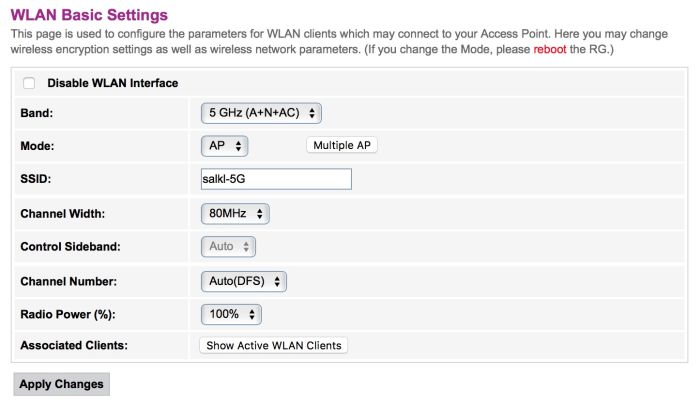
Check RGX4400 5Ghz settings. Is channel width set to 20/40/80Mhz?


soonwai
post Sep 11 2018, 02:52 AM


********
All Stars
11,458 posts

Joined: Oct 2007
From: KL


QUOTE(StuartLee2015 @ Sep 11 2018, 02:49 AM)
80Mhz
*
user posted image
RGX4400 5Ghz settings like this?

This post has been edited by soonwai: Sep 11 2018, 02:53 AM
soonwai
post Sep 11 2018, 02:56 AM


********
All Stars
11,458 posts

Joined: Oct 2007
From: KL


QUOTE(StuartLee2015 @ Sep 11 2018, 02:53 AM)
All same except SSID and channel number... mine's 44
*
Try setting Band to "5Ghz (AC Only)" and Channel to "Auto"

Tap on the Wifi name on your J7, I think it should show you the Link Speed. What is it?

This post has been edited by soonwai: Sep 11 2018, 03:02 AM
soonwai
post Sep 11 2018, 03:04 AM


********
All Stars
11,458 posts

Joined: Oct 2007
From: KL


QUOTE(StuartLee2015 @ Sep 11 2018, 03:02 AM)
Okay, tried that, phone shows 27.3 Mbps on Download, 93.4 on Upload.
Using 5ghz

shouldn't the phone speedtest app shows like 400.0Mbps or so?
*
I'm not sure how many wifi streams the J7 Pro has. If one stream, you should be getting around 250Mbps. If 2 streams, you should get 450-500Mbps.

What's the link speed when your J7 is connected to 5Ghz?

Also don't stand too close to the router. About 5-6ft away would be good.

This post has been edited by soonwai: Sep 11 2018, 03:06 AM
soonwai
post Sep 11 2018, 03:11 AM


********
All Stars
11,458 posts

Joined: Oct 2007
From: KL


QUOTE(StuartLee2015 @ Sep 11 2018, 03:04 AM)
Network speed : 65Mbps , 5ghz frequency
*
Sorry, not sure why it connects at only 65Mbps. You should be connecting at 300-400 at least. Any other wifi devices/laptop you can try?

My iPhone 6s connects at 433Mbps to my Mikrotik hAP AC Lite which is the max since my hAP AC Lite 5Ghz AC 80Mhz is only single stream.

This post has been edited by soonwai: Sep 11 2018, 03:13 AM
soonwai
post Sep 11 2018, 03:17 AM


********
All Stars
11,458 posts

Joined: Oct 2007
From: KL


QUOTE(StuartLee2015 @ Sep 11 2018, 03:11 AM)
none atm....

I've got my phone ( samsung J7 pro )
My PC on DWA 131 USB wifi adapter
no laptop...
*
Are you very close to the router when testing?

If you are, one last thing to try, turn down the RGX4400 radio power to 35%. Power cycle the RGX4400 and try again.
soonwai
post Sep 11 2018, 03:29 AM


********
All Stars
11,458 posts

Joined: Oct 2007
From: KL


QUOTE(StuartLee2015 @ Sep 11 2018, 03:23 AM)
does it works for the 2.4Ghz and should be getting 200 to 300 Mbps of 500Mbps?
*
On 2.4, you probably get max 80-100Mbps. Most/All phones will only use 20Mhz even if you set the router to 40Mhz. This is assuming 2 streams. I think the J7 Pro should be 2 streams.

Connect to 2.4 and look at your link speed.

As as guesstimate, the max speedtest you can get is usually 1/2 to 2/3 of the link speed.

Your PC is quite far from the RGX4400? The Speedtest you did just now for the PC is quite OK. Don't expect too much from 2.4 and the tiny DWA-131.

This post has been edited by soonwai: Sep 11 2018, 03:35 AM
soonwai
post Sep 11 2018, 03:41 AM


********
All Stars
11,458 posts

Joined: Oct 2007
From: KL


QUOTE(StuartLee2015 @ Sep 11 2018, 03:38 AM)
hahaha, i know, i am saving up to get USB AC55 ... should be good right?

As for the Router, maybe AC66U for Unifi 500Mbps?
*
Be aware that 5Ghz not so good for even slightly moderate distance. It's hard to say without knowing what's between your PC and the router.

Any brand will do. I don't use Asus so can't recommend anything from them. Personally I use Mikrotik.

This post has been edited by soonwai: Sep 11 2018, 03:43 AM
soonwai
post Sep 11 2018, 01:37 PM


********
All Stars
11,458 posts

Joined: Oct 2007
From: KL


QUOTE(neooren @ Sep 11 2018, 08:23 AM)
I have both mi a1 and redmi note 5

Mi a1 sd 625

[attachmentid=10016890]

Redmi note 5 sd 636
[attachmentid=10016891]
So mi a1 max speed 364mbps only even on 2x2 mu mimo?
*
Looks like a typo on their part. 2x2 will be 2 times as fast as 1x1. Have you tested?
soonwai
post Sep 11 2018, 01:47 PM


********
All Stars
11,458 posts

Joined: Oct 2007
From: KL


QUOTE(Doraku @ Sep 11 2018, 09:09 AM)
At wifi status its say my Wifi speed link is 300Mbps hmm maybe i guess the 300Mbps is combined Wifi Upload and Download speed bandwidth? 144+144 = 288
*
Not combined like that. 300Mbps link speed is for 2.4Ghz 2 streams with 40 Mhz channel width. IRL about 1/2 or 2/3. More to the lower end since 40Mhz width will be subjected to a lot of interference. So your iPerf looks spot on.

7 Pages « < 2 3 4 5 6 > » Top
Topic ClosedOptions
 

Change to:
| Lo-Fi Version
0.0263sec    0.22    7 queries    GZIP Disabled
Time is now: 8th December 2025 - 05:50 PM