Welcome Guest ( Log In | Register )

Bump Topic Topic Closed RSS Feed
7 Pages < 1 2 3 4 5 > » Bottom

Outline · [ Standard ] · Linear+

Unifi Official TM UniFi High Speed Broadband Thread V34, READ 1ST PAGE FOR TURBO SPEED INFO!

views
     
soonwai
post Sep 9 2018, 06:54 PM


********
All Stars
11,458 posts

Joined: Oct 2007
From: KL


QUOTE(Edlois @ Sep 9 2018, 06:40 PM)
Guys is this normal ??
All the light are green except the LINK light are red

I restarted many times. And can't access the internet. Router is fine. I did not do anything to it
*
Spoilt already. Try another power adaptor. I think should be 12V 1A?

Maybe not, not all your lights are on. phone line working? could be optical cable fault.

This post has been edited by soonwai: Sep 9 2018, 06:56 PM
soonwai
post Sep 9 2018, 06:57 PM


********
All Stars
11,458 posts

Joined: Oct 2007
From: KL


QUOTE(ccxh @ Sep 9 2018, 06:54 PM)
Hi guys.

I don't know if it's just me but i am having trouble connecting to certain websites since earlier this afternoon.

Can you check if it's just me?

coinmarketcap.com
bitfinex.com
oanda.com

Thanks!  sad.gif
*
Same here, all ok.
soonwai
post Sep 9 2018, 07:05 PM


********
All Stars
11,458 posts

Joined: Oct 2007
From: KL


QUOTE(ccxh @ Sep 9 2018, 06:59 PM)
Thanks bro.
*
Just tested coinmarketcap.com on both IPv4 and IPv6, both OK.

Can you ping coinmarketcap.com? What IP address do you get?

imacpro:~$ ping coinmarketcap.com
PING coinmarketcap.com (104.17.141.178): 56 data bytes
64 bytes from 104.17.141.178: icmp_seq=0 ttl=60 time=3.334 ms
64 bytes from 104.17.141.178: icmp_seq=1 ttl=60 time=3.443 ms
64 bytes from 104.17.141.178: icmp_seq=2 ttl=60 time=3.198 ms
^C
--- coinmarketcap.com ping statistics ---
3 packets transmitted, 3 packets received, 0.0% packet loss
round-trip min/avg/max/stddev = 3.198/3.325/3.443/0.100 ms

imacpro:~$ ping6 coinmarketcap.com
PING6(56=40+8+8 bytes) 2001:e68:5428:791c:95f6:194d:5586:f639 --> 2400:cb00:2048:1::6811:8db2
16 bytes from 2400:cb00:2048:1::6811:8db2, icmp_seq=0 hlim=252 time=3.408 ms
16 bytes from 2400:cb00:2048:1::6811:8db2, icmp_seq=1 hlim=252 time=3.129 ms
16 bytes from 2400:cb00:2048:1::6811:8db2, icmp_seq=2 hlim=252 time=3.311 ms
16 bytes from 2400:cb00:2048:1::6811:8db2, icmp_seq=3 hlim=252 time=2.959 ms
^C
--- coinmarketcap.com ping6 statistics ---
4 packets transmitted, 4 packets received, 0.0% packet loss
round-trip min/avg/max/std-dev = 2.959/3.202/3.408/0.172 ms

From my side, they are 104.17.141.178 and 2400:cb00:2048:1::6811:8db2 which are both Cloudflare.

soonwai
post Sep 9 2018, 07:21 PM


********
All Stars
11,458 posts

Joined: Oct 2007
From: KL


QUOTE(ccxh @ Sep 9 2018, 07:10 PM)
C:\Users\chris>ping coinmarketcap.com

Pinging coinmarketcap.com [2400:cb00:2048:1::6811:89b2] with 32 bytes of data:
Request timed out.
Request timed out.
Request timed out.
Request timed out.

Ping statistics for 2400:cb00:2048:1::6811:89b2:
    Packets: Sent = 4, Received = 0, Lost = 4 (100% loss),

C:\Users\chris>
*
Looks like peering problem from TM Penang to where Cloudflare is located. All sites above are on Cloudflare except lowyat.net. Cloudflare's PoP is in AIMS Cyberjaya or KL? www.lowyat.net is not Cloudflared but I think they also in AIMS datacenter.


soonwai
post Sep 9 2018, 10:28 PM


********
All Stars
11,458 posts

Joined: Oct 2007
From: KL


QUOTE(miloaisdino @ Sep 9 2018, 08:59 PM)
Most routers including asus are unable to sustain speeds above anywhere between 200-600mbps with qos. Unless its those 'gaming' routers with qos for gaming latency.

So many diff names for the same thing..
NAT Boost
Hardware acceleration
Fasttrack
*
Yeah, also CTF: Cut-Through-Forwarding which is probably the most accurate description. It's really got very little to do with NAT so NAT Boost is really a misnomer. Can thank the marketing dept for that.
soonwai
post Sep 9 2018, 10:30 PM


********
All Stars
11,458 posts

Joined: Oct 2007
From: KL


QUOTE(Doraku @ Sep 9 2018, 09:41 PM)
Well there is somone who use mikrotik for his 10Gbps internet in singapore unsure.gif

*
This one is a bit different from ours. He's basically plugging one fibre optic cable from his ISP optical switch to his router. Just like how we connect our router to our PC with a LAN cable.

This post has been edited by soonwai: Sep 9 2018, 10:31 PM
soonwai
post Sep 9 2018, 10:37 PM


********
All Stars
11,458 posts

Joined: Oct 2007
From: KL


QUOTE(ycs @ Sep 9 2018, 10:25 PM)
no need reboot anything? just happen like magic?
*
No need, the router would have disconnected and reconnected PPPoE. If one was paying attention, may have noticed the sudden lost in internet or a change in IP address but I think most ppl will not notice it.
soonwai
post Sep 9 2018, 10:38 PM


********
All Stars
11,458 posts

Joined: Oct 2007
From: KL


QUOTE(wilson1stop @ Sep 9 2018, 10:26 PM)
iphone 7 plus 4x4 MU-MIMO, pls upgrade your router to 4x4 MIMO for around 500-600Mbps if needed.
*
Where got? iPhone 7 Plus 5Ghz AC is 1x1 only.

Even iPhone X is 1x1. Or maybe 2x2 not sure. Steve Jobs say you don't need such crazy speeds for your RM5000 phone.

This post has been edited by soonwai: Sep 9 2018, 10:47 PM
soonwai
post Sep 9 2018, 10:44 PM


********
All Stars
11,458 posts

Joined: Oct 2007
From: KL


QUOTE(crazycrazyman @ Sep 9 2018, 10:37 PM)
Can I ask if it's a must to connect with cable to enable the turbo speed? This is what I was told by the TM cs
*
what turbo speed? if 800 then you need at least 3x3 AC on both ends, wifi router and device.

like this:
iPerf3
user posted image
800Mbps+ iPerf3 from MacBook Pro Retina 2013 (USB3 GBe Ethernet) to MacBook Pro Retina 2013 (3x3 5Ghz AC 80MHz)
AP: Aztech FG7008GR (4x4)
soonwai
post Sep 9 2018, 10:45 PM


********
All Stars
11,458 posts

Joined: Oct 2007
From: KL


QUOTE(jason18689 @ Sep 9 2018, 10:28 PM)
I mentioned to the staff that I want an upgrade (streamyx to Unifi) in order to maintain my existing number.
So i would say its an upgrade smile.gif
According to the staff, yeap will process tomorrow.  From our side, we could check at unifi website under "My Activity".
No forms are filled, the staff took a laptop that is connected to the thumb print scanner and the IC slot.
Pretty fast, less than 5 minutes only.
*
Custom firmware for geeks tend to use the most accurate description. They can't afford a marketing department. smile.gif
soonwai
post Sep 9 2018, 11:17 PM


********
All Stars
11,458 posts

Joined: Oct 2007
From: KL


QUOTE(wilson1stop @ Sep 9 2018, 11:07 PM)
Rumored iPhone Xs 4x4 MIMO but only for OLED version, ETA 12 Sep.
https://www.macrumors.com/roundup/iphone-xs/
*
Yeah but that's for LTE not for WiFi. I doubt Apple will put more than 2x2 AC into their phones.

I'll confirm later this year since this year is my iPhone upgrade year. biggrin.gif

This post has been edited by soonwai: Sep 9 2018, 11:18 PM
soonwai
post Sep 9 2018, 11:48 PM


********
All Stars
11,458 posts

Joined: Oct 2007
From: KL


QUOTE(cucubud @ Sep 9 2018, 11:23 PM)
You can check the iPhone WiFi specifications here.
https://help.apple.com/deployment/ios/#/apd1c22e481c
*
Thanks for that. Finally definitive information. I stand corrected. iPhone 6s and up are 2x2 5Ghz AC.

This post has been edited by soonwai: Sep 9 2018, 11:52 PM
soonwai
post Sep 9 2018, 11:55 PM


********
All Stars
11,458 posts

Joined: Oct 2007
From: KL


QUOTE(ace4828 @ Sep 9 2018, 11:43 PM)
Dear All Sifu,

I am facing some problem with my wifi connection. I have split it into 2 channel 2.5 gHZ and 5.0 gHZ.

5.0 GHZ has delivered download speed at 300++ and upload speed around 120.
However, for 2.5 GHZ, download speed is stuck at 30++ but upload speed is around 90++

Is this speed rational or is there some hiccup happening here?

Router : TP Link C1200
Unifi Turbo 500 MBPS
*
What's on the other end of the WiFi? For C1200, max wifi link speed is 866Mbps so best you can expect, say 2/3 of that, is 577Mbps.
soonwai
post Sep 10 2018, 12:22 AM


********
All Stars
11,458 posts

Joined: Oct 2007
From: KL


QUOTE(cyberic @ Sep 9 2018, 11:55 PM)
Modify ticket completed. So after restart my router, Speedtest with iPhone X. Lazy to open laptop to test WiFi speed.

I’m happy 😊
*
Very nice, what router are you using?
soonwai
post Sep 10 2018, 04:34 AM


********
All Stars
11,458 posts

Joined: Oct 2007
From: KL


QUOTE(cyberic @ Sep 10 2018, 01:58 AM)
Mikrotik CCR  and 2 ubiquity AC smile.gif
*
oooooohhhh notworthy.gif

QUOTE(cannavaro @ Sep 10 2018, 03:09 AM)
So I read that if QOS is enabled NAT boost and such won't work, meaning you won't get max speed on say, a 800Mbps account...
Let's say the max achievable speed for a single user due to NAT boost being turned off is 200Mbps,
If there are 4 users running speedtest at the same time, does it mean: 200Mbps divided by 4, about 50Mbps each user or... 200Mbps for each user?  hmm.gif
*
If total the router can handle is 200Mbps then 200/4=50 for 4 users.

Some routers, for example a Mikrotik, you can selectively fasttrack (like NAT Boost) certain users while other users go through the queues but if these other users are using a lot of traffic, they will still slow the router down enough to affect the fasttracked users..

This post has been edited by soonwai: Sep 10 2018, 04:49 AM
soonwai
post Sep 10 2018, 04:40 PM


********
All Stars
11,458 posts

Joined: Oct 2007
From: KL


QUOTE(hjh87 @ Sep 10 2018, 02:33 PM)
Guy, lasy year thank you campaign also will automatically renew the contract??
*
The early 2017 Thank You campaign free upgrade, no contract renewal. Even the late 2017 RM10 upgrade also no contract. Even though TM told me got 2yr contract renewal when I signed up for it. They gave a free C1200 router which is usually indicative of a contract renewal but I checked recently and my contract wasn't renewed.
soonwai
post Sep 10 2018, 04:55 PM


********
All Stars
11,458 posts

Joined: Oct 2007
From: KL


QUOTE(hjh87 @ Sep 10 2018, 04:46 PM)
Thanks for your reply, gonna check with TM again.

Cause saw the service start date through their website which stated a new date that is after getting the campaign upgrade, not sure about the contract though.

By the way, people who get Turbo-ed do TM provide new router if it old one can't support??
*
The service start date is not the contract start date. Last time you can see your contract end date when you go to terminate on the website. But now I think they removed the terminate option.

No new router for Turbo upgrade but BTU will be changed for free if necessary.

This post has been edited by soonwai: Sep 10 2018, 04:56 PM
soonwai
post Sep 10 2018, 10:42 PM


********
All Stars
11,458 posts

Joined: Oct 2007
From: KL


QUOTE(fruitie @ Sep 10 2018, 10:17 PM)
Learn how to multi-quote. https://forum.lowyat.net/index.php?act=faq&article=10

Sorry too many posts for me to catch up, can I ask regarding this RM 129 100Mbps plan? If existing users, downgrade need to pay for penalty right if under contract?
*
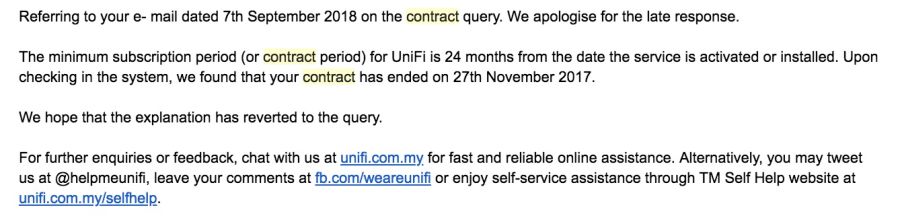
You or your sis' account is RYE2017, the RM10 upgrade? Check with TM because I asked 100 and they checked and said that I was not under contract. When I took the RM10 upgrade, there was a contract renewal. They even gave me a new C1200. I asked via email and got the same answer, out of contract. Hmmm.
soonwai
post Sep 10 2018, 10:57 PM


********
All Stars
11,458 posts

Joined: Oct 2007
From: KL


QUOTE(fruitie @ Sep 10 2018, 10:44 PM)
My account, my sis is just using it but I'm the owner.
Yes, RYE 2017 with RM 10 top up. If not under contract is the best, then can downgrade anytime.
I was told my contract was refreshed upon upgrade.
*
I was told the same too. Maybe it's a glitch. I'm sure TM would not have given out free routers without a contract.

This what I got from email.
user posted image
My RYE2017 service start date is Dec 4, 2017.

This post has been edited by soonwai: Sep 10 2018, 10:58 PM
soonwai
post Sep 10 2018, 11:05 PM


********
All Stars
11,458 posts

Joined: Oct 2007
From: KL


QUOTE(cucubud @ Sep 10 2018, 10:52 PM)
I asked in live chat. Mine was RYE2017 with RM10 upgrade from 10 to 30. I have the contract until Dec 2019.
*
Thanks for checking. I guess mine's a glitch. Won't make any difference. While I have a penalty free option of changing to the RM129 package, I probably won't do it. Feel the need for speed! smile.gif

7 Pages < 1 2 3 4 5 > » Top
Topic ClosedOptions
 

Change to:
| Lo-Fi Version
0.2552sec    0.27    7 queries    GZIP Disabled
Time is now: 8th December 2025 - 05:47 AM