

If I buy a M.2 Mvme drive, would it backward compatible with M.2 SATA 6Gbps?
What's the Max speed this laptop can support?
-PCI-E 2.0 x2
-PCI-E 2.0 x4
-PCI-E 3.0 x2
-PCI-E 3.0 x4
Does M.2 Nvme backward support M.2 SATA ?, Does M.2 Nvme backward support M.2 SATA
|
|
 Aug 2 2018, 11:05 AM, updated 8y ago Aug 2 2018, 11:05 AM, updated 8y ago
Show posts by this member only | Post
#1
|
 
Junior Member
12 posts Joined: Jan 2014  
|
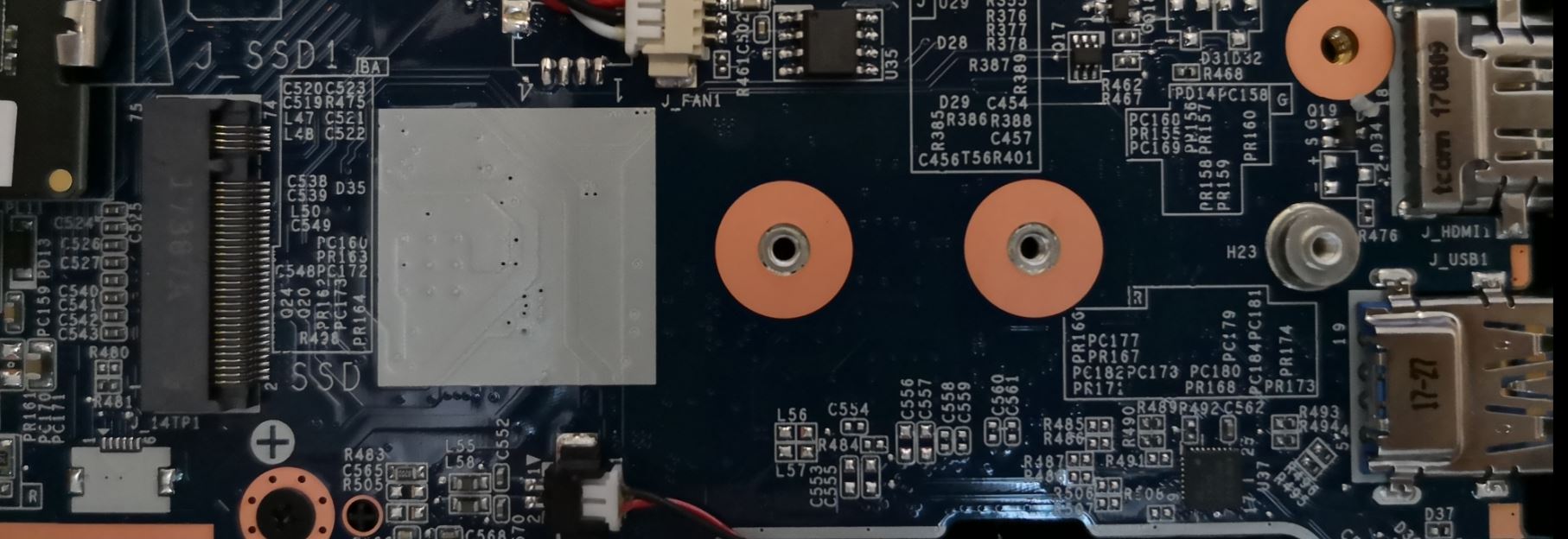
I have a laptop here. May I know the M.2 slot interface on laptop is SATA or Nvme ?
If I buy a M.2 Mvme drive, would it backward compatible with M.2 SATA 6Gbps? What's the Max speed this laptop can support? -PCI-E 2.0 x2 -PCI-E 2.0 x4 -PCI-E 3.0 x2 -PCI-E 3.0 x4 |
|
|
|
|
|
Aug 2 2018, 11:13 AM
Show posts by this member only | Post
#2
|

Senior Member
5,827 posts Joined: Jan 2003 From: Selayang, Selangor
|
I'm pretty sure it won't work. Generally NVMe slots won't be connected to a SATA controller so if you plug in a SATA based M.2 drive it just won't work, and vice versa. I'm not sure if there are any slots in existence that work with both.
What's the model of the laptop? I don't think there's a way we can tell from looking at the slot since M.2 slots whether they are meant for NVMe or SATA drives are both physically the same. |
|
|
Aug 2 2018, 11:31 AM
Show posts by this member only | Post
#3
|

Junior Member
87 posts Joined: Mar 2012
|
m.2 nvme/pcie ssd cannot put on m.2 sata slot, it wont recognize;
but m.2 sata ssd might can put on m.2 pcie (need to check with laptop manual) |
|
|
Aug 2 2018, 11:35 AM
Show posts by this member only | Post
#4
|
|
Junior Member
12 posts Joined: Jan 2014
|
QUOTE(RViN @ Aug 2 2018, 11:13 AM) I'm pretty sure it won't work. Generally NVMe slots won't be connected to a SATA controller so if you plug in a SATA based M.2 drive it just won't work, and vice versa. I'm not sure if there are any slots in existence that work with both. The laptop is Nexstgo NS14N1.What's the model of the laptop? I don't think there's a way we can tell from looking at the slot since M.2 slots whether they are meant for NVMe or SATA drives are both physically the same.  There's no datasheet on their official website, support is not replying to my email. |
|
|
Aug 2 2018, 11:36 AM
Show posts by this member only | Post
#5
|
|
Junior Member
12 posts Joined: Jan 2014
|
QUOTE(kobanpro @ Aug 2 2018, 11:31 AM) m.2 nvme/pcie ssd cannot put on m.2 sata slot, it wont recognize; Are you able to identify my laptop is M.2 SATA or M.2 Nvme ?but m.2 sata ssd might can put on m.2 pcie (need to check with laptop manual) |
|
|
Aug 2 2018, 11:47 AM
Show posts by this member only | Post
#6
|
|
Senior Member
5,827 posts Joined: Jan 2003 From: Selayang, Selangor
|
QUOTE(superuserz @ Aug 2 2018, 11:35 AM) The laptop is Nexstgo NS14N1. Well looking at this (check the diagram):There's no datasheet on their official website, support is not replying to my email. https://en.wikipedia.org/wiki/M.2#Form_factors_and_keying Seems like yours is M-keyed, which indicates it is keyed to support PCIe-x4. But this doesn't mean its not connected to a SATA controller, as the paragraph in the wiki describes. Seems like there's no way to tell from just looking at the physical slot. |
|
|
|
|
|
Aug 2 2018, 01:01 PM
Show posts by this member only | Post
#7
|
|
Junior Member
417 posts Joined: Jan 2013
|
QUOTE(superuserz @ Aug 2 2018, 12:35 PM) The laptop is Nexstgo NS14N1. You can refers to their website :-There's no datasheet on their official website, support is not replying to my email. https://www.nexstgo.com/my/product/su-series/support |
|
|
Aug 2 2018, 01:36 PM
Show posts by this member only | Post
#8
|
|
Junior Member
87 posts Joined: Mar 2012
|
since your are laptop, maybe u can bring the laptop to the shop to ask for test plug before buying it. but all the shop can let u test first.
|
|
|
Aug 2 2018, 03:17 PM
Show posts by this member only | Post
#9
|
|
Senior Member
1,894 posts Joined: Jul 2011 From: Heaven in Hell
|
i also got the same question as well
but the interface for the ssd not same tho, whats the differences the 2 in pic can both put into the same m.2 slot? Attached thumbnail(s) 
|
|
|
Aug 2 2018, 05:34 PM
|

Senior Member
818 posts Joined: Nov 2009 From: Not Your Business
|
since u lack of mobo info, best way is to bring to shop n ask them test for u...
coz, both are not competible.. |
|
|
Aug 2 2018, 05:36 PM
|
|
Senior Member
818 posts Joined: Nov 2009 From: Not Your Business
|
QUOTE(1qaz1qaz @ Aug 2 2018, 03:17 PM) i also got the same question as well but the interface for the ssd not same tho, whats the differences the 2 in pic can both put into the same m.2 slot?  |
|
|
Aug 2 2018, 05:37 PM
|
|
Senior Member
1,894 posts Joined: Jul 2011 From: Heaven in Hell
|
QUOTE(psyduck89 @ Aug 2 2018, 05:36 PM) |
|
|
Aug 2 2018, 05:42 PM
|
|
Senior Member
818 posts Joined: Nov 2009 From: Not Your Business
|
QUOTE(1qaz1qaz @ Aug 2 2018, 05:37 PM) but both also can put in to same m.2 slot? erm...i think depends on the mobo socket... QUOTE M.2 SSD Buyers Checklist: Whether your motherboard/notebook supports M.2 SATA or M.2 PCI-Express (hint: check the specs page!) The type of keying (B/M/B+M) supported by the motherboard/notebook socket If it is PCI Express, whether it supports 2x or 4x PCI-Express The maximum length of SSD drive supported (2232 to 22110) (hint: it should say on the PCB) 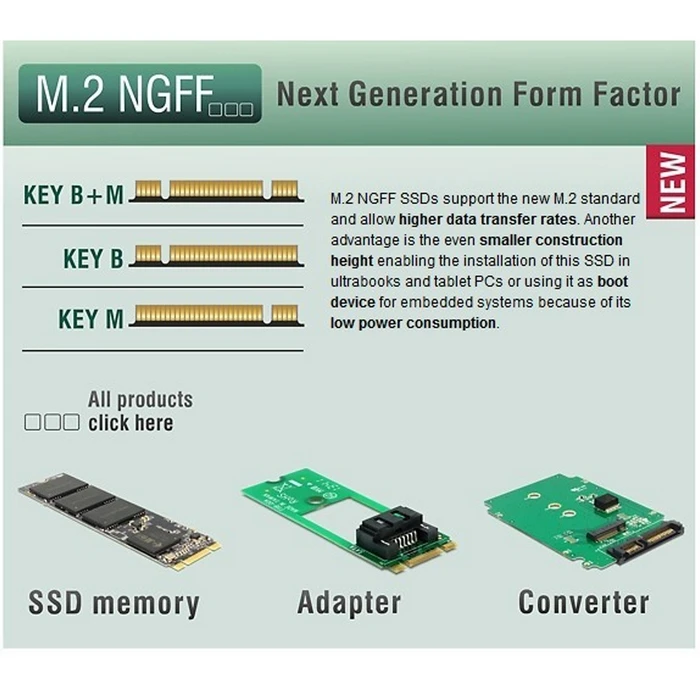 |
|
|
|
|
|
Aug 2 2018, 05:50 PM
|
|
Senior Member
1,894 posts Joined: Jul 2011 From: Heaven in Hell
|
QUOTE(psyduck89 @ Aug 2 2018, 05:42 PM) erm... okok tyvm now i get it i think depends on the mobo socket... So the below info i get it on mobo website, so my mobo can support m.2 pcie nvme ssd key-m rite? Attached thumbnail(s) 
|
|
|
Aug 2 2018, 05:52 PM
|
|
Senior Member
818 posts Joined: Nov 2009 From: Not Your Business
|
QUOTE(1qaz1qaz @ Aug 2 2018, 05:50 PM) okok tyvm now i get it yup So the below info i get it on mobo website, so my mobo can support m.2 pcie nvme ssd key-m rite?  |
|
|
Aug 2 2018, 06:32 PM
|

Junior Member
485 posts Joined: Mar 2009
|
QUOTE(1qaz1qaz @ Aug 2 2018, 05:50 PM) okok tyvm now i get it Wow it could support fastest M.2 PCIe SSD like Samsung Pro/Evo.So the below info i get it on mobo website, so my mobo can support m.2 pcie nvme ssd key-m rite? https://forum.lowyat.net/topic/4172951 |
|
|
Aug 2 2018, 06:45 PM
|
|
Senior Member
1,894 posts Joined: Jul 2011 From: Heaven in Hell
|
QUOTE(jemmi @ Aug 2 2018, 06:32 PM) Wow it could support fastest M.2 PCIe SSD like Samsung Pro/Evo. hmm? what do u mean?https://forum.lowyat.net/topic/4172951 |
|
|
Aug 3 2018, 08:52 AM
|
|
Junior Member
485 posts Joined: Mar 2009
|
QUOTE(1qaz1qaz @ Aug 2 2018, 06:45 PM) hmm? what do u mean? M.2 sata version too slow compare with M.2 PCIe 4x version. Refer the samsung link inside there. I can feel it when compare my macbook 2014 with my friend macbook 2017. Double/triple the ssd speed different.I suggest TS could invest with M.2 PCIe 4x SSD, just get 256GB evo or cheaper version(oem) like this: https://forum.lowyat.net/topic/4626495 This post has been edited by jemmi: Aug 3 2018, 08:56 AM |
|
|
Aug 27 2018, 06:49 PM
|

Junior Member
78 posts Joined: Jul 2013
|
-Deleted-
This post has been edited by jianqiang: Aug 27 2018, 07:19 PM |
|
|
Aug 27 2018, 07:18 PM
|
|
Junior Member
78 posts Joined: Jul 2013
|
QUOTE(superuserz @ Aug 2 2018, 11:35 AM) The laptop is Nexstgo NS14N1. Have you try the nvme ssd on your Nexstgo NS14N1?There's no datasheet on their official website, support is not replying to my email. |
|
|
Aug 29 2018, 12:22 AM
|

Junior Member
68 posts Joined: Sep 2014 From: KL
|
LTT forums confirmed that JSSD1 port only supports Sata Speed(6 Gigabit per second).
Well sadly it doesn't support nvme.  This post has been edited by ljl87: Aug 29 2018, 12:23 AM |
|
|
Aug 29 2018, 06:57 PM
|

Senior Member
2,746 posts Joined: Jun 2006 From: LYN Database
|
QUOTE(superuserz @ Aug 2 2018, 11:05 AM) I have a laptop here. May I know the M.2 slot interface on laptop is SATA or Nvme ? M.2 sockets are rather confusing.. I did quite some research on it awhile ago.. from the socket itself, it's really hard to tell what protocol it supports. The best answer you could get is from the manufacturer themselves. Or else, you might want to try dig around in your BIOS (hopefully it could show some hint) or worst case scenario, trial and error.If I buy a M.2 Mvme drive, would it backward compatible with M.2 SATA 6Gbps? What's the Max speed this laptop can support? -PCI-E 2.0 x2 -PCI-E 2.0 x4 -PCI-E 3.0 x2 -PCI-E 3.0 x4 For my case (Dell Vostro) the M.2 socket does support both SATA and PCIE protocol. How I got to know is by downloading the device official service manual and found out that the official supported SSD is SATA based and as for PCIE support, I need to email them, get their team to check on the BIOS to verify, in the BIOS it has a setting allows user to toggle the M.2 protocol to run on SATA or PCIE . This post has been edited by more2teayap: Aug 29 2018, 06:58 PM |
|
|
Aug 29 2018, 11:06 PM
|

Junior Member
518 posts Joined: May 2008
|
QUOTE(ljl87 @ Aug 29 2018, 12:22 AM) LTT forums confirmed that JSSD1 port only supports Sata Speed(6 Gigabit per second). JSSD1 only indicates its for SSD. The forum post shows that it's a mSATA port instead of M.2 like OP one.Well sadly it doesn't support nvme. By the way the manual from the website shown this. Attached image(s)  |
| Change to: |  0.0876sec 0.0876sec
 0.87 0.87
 6 queries 6 queries
 GZIP Disabled GZIP Disabled
Time is now: 13th December 2025 - 03:44 AM |
 Quote
Quote