

 Aug 29 2018, 06:57 PM


QUOTE(superuserz @ Aug 2 2018, 11:05 AM)
I have a laptop here. May I know the M.2 slot interface on laptop is SATA or Nvme ?
If I buy a M.2 Mvme drive, would it backward compatible with M.2 SATA 6Gbps?
What's the Max speed this laptop can support?
-PCI-E 2.0 x2
-PCI-E 2.0 x4
-PCI-E 3.0 x2
-PCI-E 3.0 x4
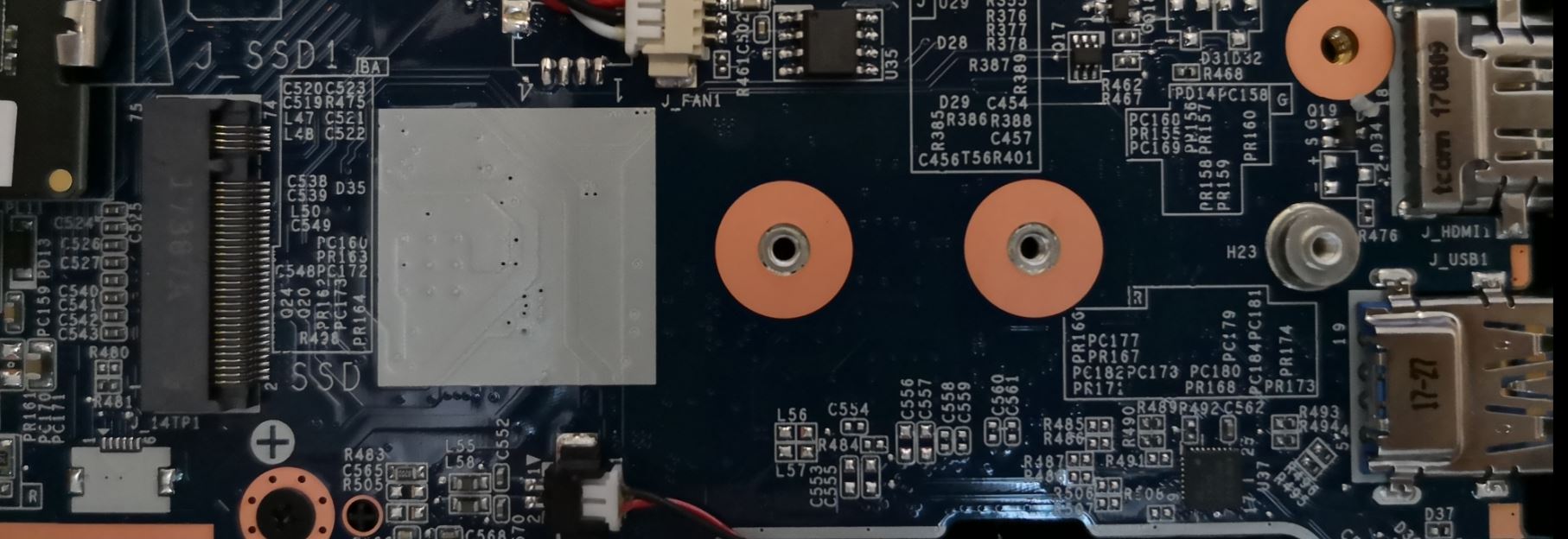

M.2 sockets are rather confusing.. I did quite some research on it awhile ago.. from the socket itself, it's really hard to tell what protocol it supports. The best answer you could get is from the manufacturer themselves. Or else, you might want to try dig around in your BIOS (hopefully it could show some hint) or worst case scenario, trial and error.If I buy a M.2 Mvme drive, would it backward compatible with M.2 SATA 6Gbps?
What's the Max speed this laptop can support?
-PCI-E 2.0 x2
-PCI-E 2.0 x4
-PCI-E 3.0 x2
-PCI-E 3.0 x4
For my case (Dell Vostro) the M.2 socket does support both SATA and PCIE protocol. How I got to know is by downloading the device official service manual and found out that the official supported SSD is SATA based and as for PCIE support, I need to email them, get their team to check on the BIOS to verify, in the BIOS it has a setting allows user to toggle the M.2 protocol to run on SATA or PCIE .
This post has been edited by more2teayap: Aug 29 2018, 06:58 PM
 Quote
Quote
 0.0133sec
 0.59
0.59
 7 queries
 GZIP Disabled