Welcome Guest ( Log In | Register )

6 Pages « < 3 4 5 6 >Bottom

Outline · [ Standard ] · Linear+

 How to buy cheap ASUS RT-AC68U router, come have a look

views
     
junclj
post Dec 19 2018, 09:59 AM

Look at all my stars!!
*******
Senior Member
2,348 posts

Joined: Apr 2008


QUOTE(cwk0713 @ Dec 18 2018, 08:09 PM)
God damn.... finger crossed for my shipment... Hope they cleared it after the inspection, or check the sender details, since ASUS didn't manufacture/sold speaker products.....
I use every website I can find for tracking, all same results... Already sent email to DEX-I to follow up too... Need to find a way to contact this 西马直送仓...

user posted image
*
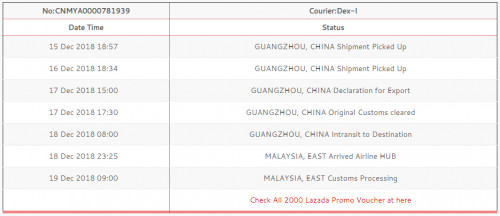
still no luck for yours? Mine already reached Malaysia customs clearance processing.
user posted image
junclj
post Dec 26 2018, 04:08 PM

Look at all my stars!!
*******
Senior Member
2,348 posts

Joined: Apr 2008


QUOTE(CKC_1 @ Dec 25 2018, 03:43 PM)
[attachmentid=10146152]
[attachmentid=10146154]
[attachmentid=10146157]

Still no internet...sigh

Is this wiring correct?
[attachmentid=10146190]
[attachmentid=10146193]
[attachmentid=10146209]
*
I found your problem, please plug your LAN cable to LAN1 of your BTU but not LAN4.
junclj
post Jan 2 2019, 02:28 PM

Look at all my stars!!
*******
Senior Member
2,348 posts

Joined: Apr 2008


QUOTE(lyc1982 @ Jan 2 2019, 01:59 PM)
how to check / bring up cpu usage monitor ?

mine is i3-8100 on 500Mbps...using ac86u with tp-link t9uh wireless usb adapter but can only manage 200-250Mbps

bangwall.gif

edit: disabled all forms of antivirus programs still same result...
tried to enter win10 safe mode with networking but can't connect to wifi...what did i do wrong ?
*
biggrin.gif rclxms.gif cannot expect wifi can reach 400mbps and above. Have your change to unifi-business in the iptv settings? then do speedtest in http://speedtest.tm.com.my with firefox only.
junclj
post Jan 3 2019, 05:18 PM

Look at all my stars!!
*******
Senior Member
2,348 posts

Joined: Apr 2008


QUOTE(theROCKeteer @ Jan 3 2019, 05:02 PM)
Just asking, can I use AiMesh feature between T-Mobile AC-1900 merlin and RT-AC86U stock firmware?
*
merlin custom firmware do not support aimesh because don't have this feature in the asuswrt merlin. However, there have a Chinese unofficial firmware with the name Koolshare is able to support aimesh. The problem is this is not a fully custom firmware, they just simply to modify from the official asus firmware.

I do not recommend to flash to Koolshare because this Chinese firmware is only exclusive for China user, especially for those who need to install VPN add-on into their Asus router. As we know that China is very strict on blocking websites such as google.com, youtube.com, facebook.com and instagram.
junclj
post Jan 14 2019, 10:36 AM

Look at all my stars!!
*******
Senior Member
2,348 posts

Joined: Apr 2008


QUOTE(jiaen0509 @ Jan 7 2019, 11:02 AM)
Just received my Asus Blue Cave.

But the speed only 400/200 for my Turbo-ed 800mbps on 5Ghz, iPhone XS Max.

Is it normal? If want to get 800mbps I need to connect to LAN?

Wifi possible to 800mbps?
*
About wifi 5GHz, it's hardly to get full speed by connecting directly to the device itself. However, you may easily to get full speed by connecting to an access point router which attached to LAN socket of your main router.

I have the same experience with my RT-AC86U. When my iPhone connected to main router, no matter how many times I do speedtest and server was changed to Telekom Malaysia Berhad. I still only can get 430~450mbps. Never get 500mbps or more than it.

However, when I was plugged a RT-AC55UHP directly to my RT-AC86U main router and make it as access point. I can easily to get 490~510mbps on my RT-AC55UHP. Which is the speedtest result get from the 5GHz of my access point (RT-AC55UHP).

In this situation, the performance is performed by my RT-AC86U but wifi is connected to my access point RT-AC55UHP. I only can use this method to get my wifi speed max out to 500mbps.

This is the results tested on my RT-AC55UHP (access point) since my main router (RT-AC86U) never able to reach to the maximum speed. My main router is placed on the upstairs because the TM fiber is coming from the roof of my home upstairs. My access point is mainly used in the living room, so this is the most commonly daily used router. That's why actually I not really care about what is my main router wifi connection speed.
Attached Image

This post has been edited by junclj: Jan 14 2019, 10:51 AM
junclj
post Jan 15 2019, 03:33 PM

Look at all my stars!!
*******
Senior Member
2,348 posts

Joined: Apr 2008


QUOTE(Plus+ @ Jan 14 2019, 09:56 AM)
Link pls where you bought it from
*
https://detail.tmall.com/item.htm?spm=a220o...id=551177435200
junclj
post Jan 16 2019, 04:28 PM

Look at all my stars!!
*******
Senior Member
2,348 posts

Joined: Apr 2008


QUOTE(sHawTY @ Jan 15 2019, 08:44 PM)
I wouldn't advise anyone to buy from Taobao / TMall right now as CNY is coming around so there will be a lot of delays
More delays than 11.11
*
I think one week holidays should be okay. Just don't ship with third party forward agents.

Attached Image
junclj
post Jan 18 2019, 11:15 AM

Look at all my stars!!
*******
Senior Member
2,348 posts

Joined: Apr 2008


QUOTE(lalawang123 @ Jan 18 2019, 10:24 AM)
Hi, my friends,
I also just bought a AC86U from taobao few days ago.
But my firmware seems like not compatible with unifi.

Do you have any idea on this issue?
*
You forgot to set IPTV to Unifi-Home or Unifi-Business

This post has been edited by junclj: Jan 18 2019, 11:16 AM
junclj
post Jan 26 2019, 09:05 AM

Look at all my stars!!
*******
Senior Member
2,348 posts

Joined: Apr 2008


QUOTE(jhleo1 @ Jan 18 2019, 02:00 PM)
Someone posted before:-
go under Wireless > Professional tab , on the last column , REGION set to ASIA ( default is China )
you should have 9 channels not 5 ( default for China )

*
It doesn't matter in which regions, I was changed to Australia region because it has higher channel frequencies.
junclj
post Mar 27 2019, 01:39 PM

Look at all my stars!!
*******
Senior Member
2,348 posts

Joined: Apr 2008


QUOTE(cthcthcth @ Mar 26 2019, 09:42 AM)
too late, i bought the AC88u, i need 8 port to connect my home device, etc CCTV, desktop.

do AC88U overheat problem?
*
You should try gigabit switch or smart switch. Not neccesary to buy a AC88U for all the home devices, PC and CCTV. Mine is RT-AC86U only 4 ports but link with a 16-port gigabit switch to connect with 2 routers, a 5-port gigabit switch, smart TV, receiver, CCTV, alarm, 2 desktop PCs, PS4 console. All by LAN cable connections.
junclj
post May 8 2019, 01:54 PM

Look at all my stars!!
*******
Senior Member
2,348 posts

Joined: Apr 2008


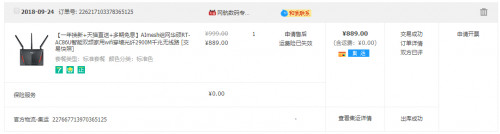
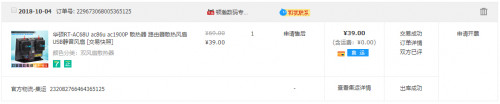
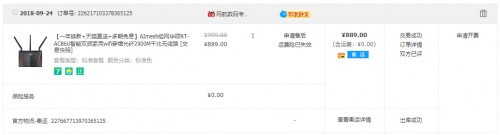
My RT-AC86U was bought at 24 Sept 2018. Considered it start using it from October 2018 until now. Already 7 months of usage, so far so good. Don't know why you guys Asus router bought from China got so much problems and need to send back to China for RMA?

user posted image


Did your people attach fans on your RT-AC86U? If no then better do it now.
user posted image

I was noticed that the 3M tape can't attach the two fans firmly on my router. So I just hang the two fans with wires and tie up the wires around the antennas.

This post has been edited by junclj: May 8 2019, 02:00 PM
junclj
post May 8 2019, 02:48 PM

Look at all my stars!!
*******
Senior Member
2,348 posts

Joined: Apr 2008


QUOTE(sHawTY @ May 8 2019, 02:14 PM)
Do you understand the concept of manufacturing fault?
A few units in the manufacturing batches may become faulty, this happens to all manufacturers

There is no way to produce a 100% perfect product for every single unit
*
This is depends on how and where did they put their router. Since Malaysia here has hot weather unlike China. China is -20'c ~ 20'c between very cold to cool weather country. That's why I say the manner on how do you treat your router. Also how is your house environment? Dirty? Dusty? Hot until 34'c? No aircond?

I also saw many of you, your BTU and router are dirty until like 10 years never wipe out the dust. That's what I describe as a rude user.

This post has been edited by junclj: May 8 2019, 02:55 PM
junclj
post May 28 2019, 11:22 AM

Look at all my stars!!
*******
Senior Member
2,348 posts

Joined: Apr 2008


QUOTE(Nando's @ May 28 2019, 11:10 AM)
Wondering why so cheap?

Btw, can share link?

Only found RM849 hmm.gif

Link
*
Here is the link shared from previous page
https://shopee.com.my/-Ready-Stock-ASUS-RT-...4761.1359873119
junclj
post Jul 20 2019, 11:34 AM

Look at all my stars!!
*******
Senior Member
2,348 posts

Joined: Apr 2008


I'm here come back to report my latest status on my China version Asus RT-AC86U. So far so good, no issue, everything are running in well condition.

This router was purchased at 24/9/2018 and received at October 2018.
user posted image

Start from October 2018, this router was served me almost 10 months. So far no issue.

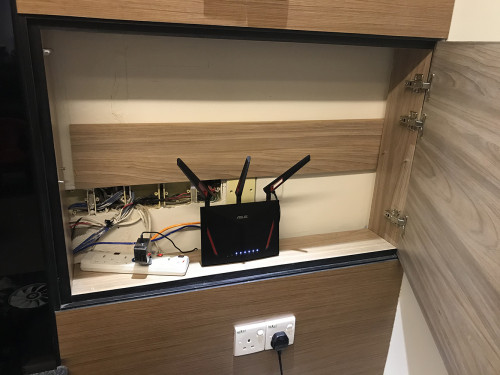
As long as to keep your router in best condition, you must first make sure your router is placed to an open air, clean and dry area, low room temperature condition. Make sure to prevent your router keep overheating for all day long. Also I was set my wifi smart power switch to off 1 minute for every Monday, Wednesday and Saturday at 2.00am to cycle its IP address and CCTV/alarm DDNS connections.

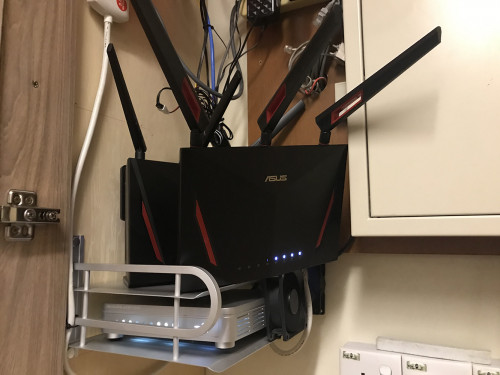
Currently my RT-AC86U was attached with 2pcs of 7cm fans and 1pc of 12cm ID-COOLING WF-12025 at the behind. My BTU, the grey TM brand Alcatel Lucent I-240G-T was attached 1pc of 8cm fan beside fiber optics socket area and another 9cm fan behind the fiber optics socket area. All the fans were connected with 4-pin pwm and 4-pin molex with a AC to DC universal adapter which can adjust voltage from 1.5v to 12v. So I was set to 7.5v because fans are getting noisy when set too high voltage. Another little 4cm fan was attached on the dc universal adapter to prevent it getting overheat.
user posted image

So the place that I put router is sometimes getting very hot especially in the afternoon. Sometimes my switch on air-cond 24hr to cool down that area.
junclj
post Jul 23 2019, 10:17 AM

Look at all my stars!!
*******
Senior Member
2,348 posts

Joined: Apr 2008


QUOTE(jhleo1 @ Jun 19 2019, 01:37 PM)
Yes, definitely. Well depend your luck too. If affected by water, not sure you can claim warranty not.
*
item is deliver with fully sealed, won't easily affect by water.
junclj
post Aug 1 2019, 05:26 PM

Look at all my stars!!
*******
Senior Member
2,348 posts

Joined: Apr 2008


QUOTE(Jjuggler @ Aug 1 2019, 04:49 PM)
Sweet. AiMesh now fully supported by Asus-Merlin.

[attachmentid=10294586]
*
wow great, will back home and flash merlin later.
junclj
post Dec 5 2019, 04:50 PM

Look at all my stars!!
*******
Senior Member
2,348 posts

Joined: Apr 2008


Last week I was helped my father to buy a china set RT-AC86U for his home. After I received the router, I was immediately test that router and try out the aimesh for my home before I pass that router to him.

My first time to enjoy aimesh, took me around 1 hour to do research on how to switch the new router to aimesh node. So after I successfully switch that new router to aimesh node. I just need to take this router and put to near my main router, then login to my main router to add the new router into aimesh group.

I was tried it and feel not bad. So now, I am deciding to buy one more again for my house. The one China set which bought from shopee already passed to my father so I cant use aimesh anymore.

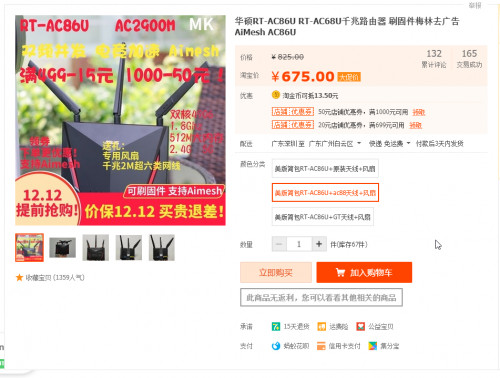
So now I go to taobao again to find the even cheaper RT-AC86U. The US version was just selling CNY660 (around RM395), with upgrade to RT-AC88U antenna and free 2 fans. This router do not ship to Malaysia, so I choose to deliver to third party forwarder warehouse. https://item.taobao.com/item.htm?spm=a1z09....&_u=53jnm3n313f

user posted image

user posted image

I will come back later after I receive this router and give some feedback about this router. Should be not a big deal because I just need this router as aimesh node only.

This post has been edited by junclj: Dec 5 2019, 04:57 PM
junclj
post Dec 5 2019, 05:20 PM

Look at all my stars!!
*******
Senior Member
2,348 posts

Joined: Apr 2008


QUOTE(Nando's @ Dec 5 2019, 05:04 PM)
Price gooding yo  brows.gif

Btw, what's the difference between US version and others hmm.gif
*
Not so sure, I just buy one for aimesh purpose only. Not sure whether got region locked. But I look at the users review there, all of the China users were able to use this US version to connect into their internet too. Doesn't seems like got region locked too.
junclj
post Dec 13 2019, 08:53 AM

Look at all my stars!!
*******
Senior Member
2,348 posts

Joined: Apr 2008


Finally I was received the US version RT-AC86U.

So here is my short review about the US-version RT-AC86U. The most importantly, you may eager to know that will this router works in Malaysia too? Then answer is, YES!

I'm not so sure since Asus which version of firmware updates, Asus was removed the region settings in the Wireless > Professional. Last time when I bought my China set RT-AC86U from China, this router was able to set to Asia, US, Europe and Australia. Unfortunately, probably Asus new firmware updates were removed the "region" option from wireless settings. Both of my main router and this US-router does not found this setting anymore.

My purpose to buy this router is just for aimesh. However, since my curiosity to ask myself whether this router (US version) works for TM Unifi too?

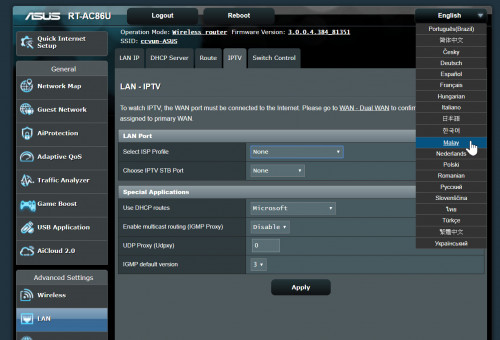
I can find out Unifi and Maxis under the IPTV option in this router (don't have TIME)
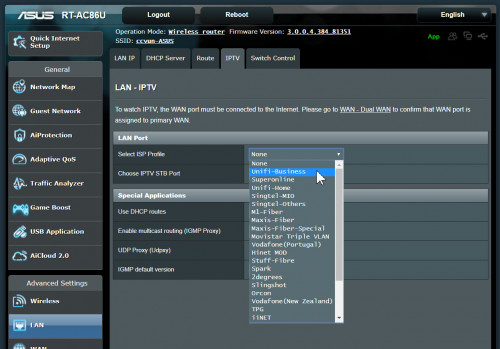
user posted image

The US version got multilanguages.
user posted image

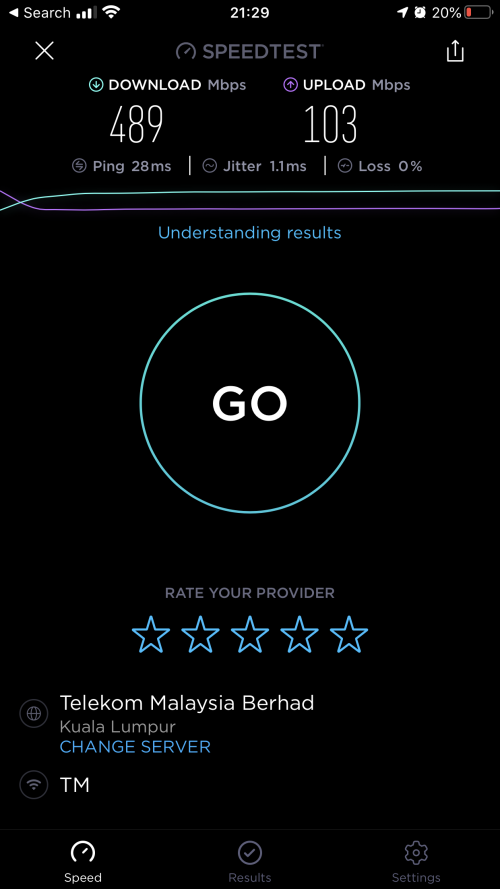
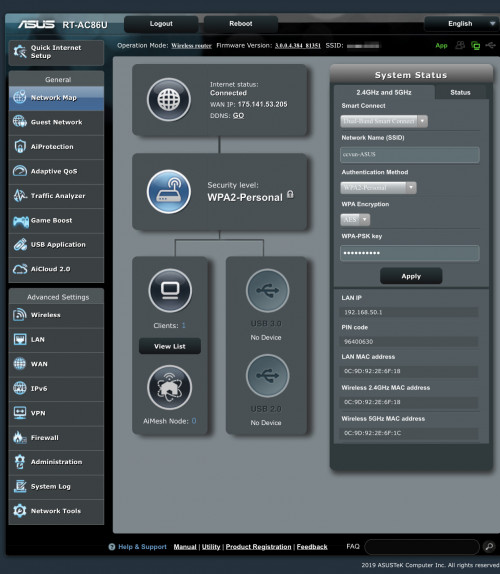
US version get connected and working fine on TM Unifi
user posted image

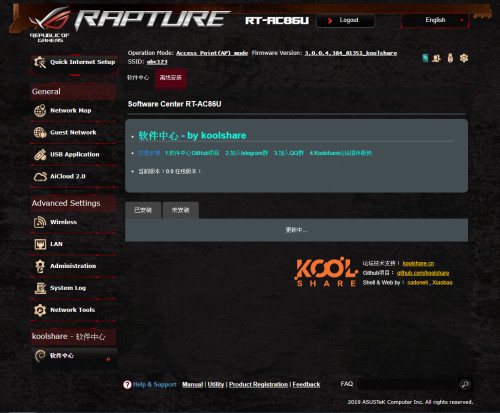
This router comes with the Chinese Koolshare Merlin 384.13_1. I can easily flash back to Asus official firmware. Everything working fine and router get connected to the internet.
user posted image

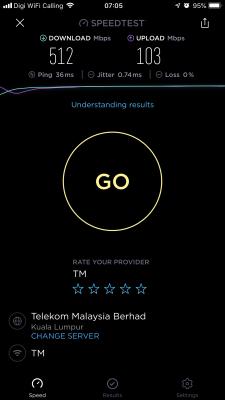
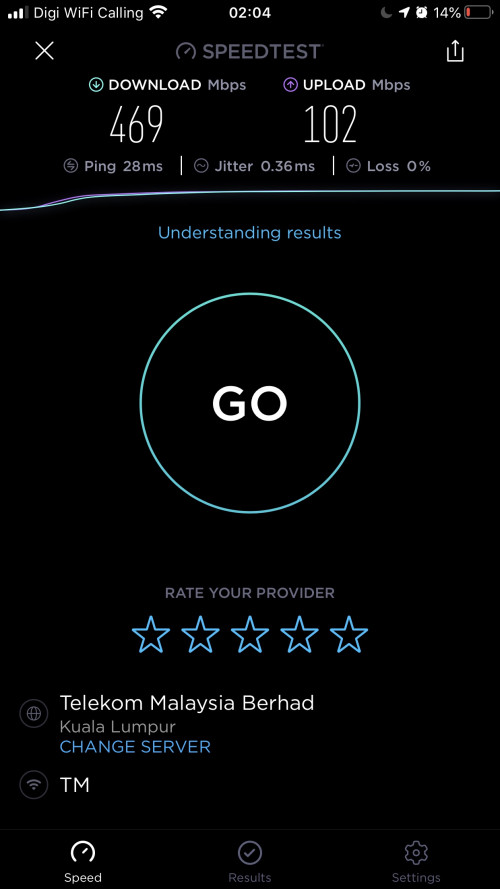
Speedtest on Wifi, not bad.
user posted image

I also can flash to any third party custom firmware, either merlin or the Chinese Koolshare.
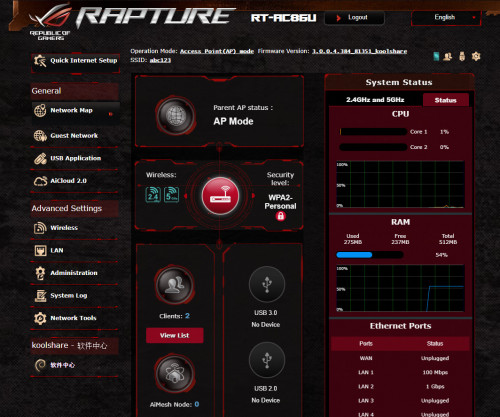
user posted image
user posted image

This post has been edited by junclj: Dec 13 2019, 11:32 AM

junclj
post Dec 13 2019, 08:54 AM

Look at all my stars!!
*******
Senior Member
2,348 posts

Joined: Apr 2008


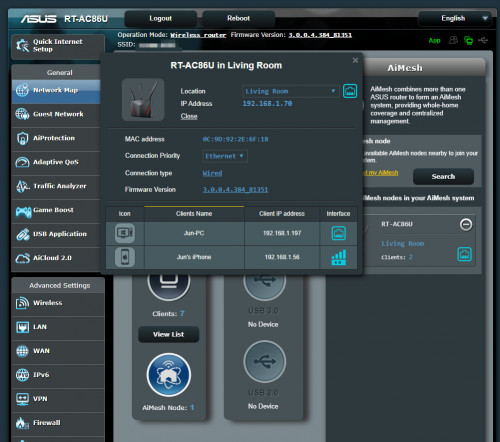
Ok, now is time to set up this router as aimesh node.
user posted image

user posted image

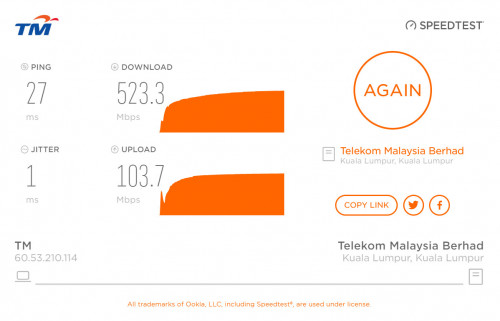
I was tried to do speedtest on wifi. However, the wifi speed is not always guarantee full speed but as long as it can guarantee your wifi is working stable. Usually the wifi speed on the aimesh router is floating around 300mbps.

Here is screenshot of what maximum speed I can get
user posted image

However, if you get connected to LAN connection with PC. The speedtest may guarantee able to reach to maximum speed.
user posted image

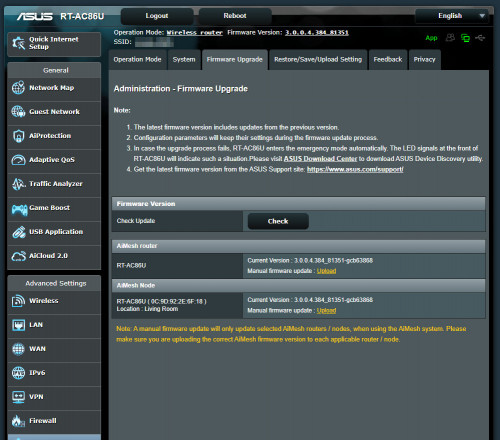
You cannot login to the aimesh node anymore since it will redirect automatic to the main router. So how do I update my aimesh node firmware? Actually I still can access to my main router to update my aimesh node firmware.
user posted image

6 Pages « < 3 4 5 6 >Top
 

Change to:
| Lo-Fi Version
0.0546sec    0.50    7 queries    GZIP Disabled
Time is now: 15th December 2025 - 08:05 AM