QUOTE(westlife @ Jun 11 2019, 01:48 AM)
Are u guys using keyboard protector on ur MBP?

yes[2018/2019] MacBook Pro User Thread
|
|
 Jun 11 2019, 08:13 AM Jun 11 2019, 08:13 AM
Return to original view | Post
#41
|
 
Senior Member
7,598 posts Joined: May 2012  
|
QUOTE(westlife @ Jun 11 2019, 01:48 AM) Are u guys using keyboard protector on ur MBP? yes |
|
|
|
|
|
Jul 31 2019, 02:44 PM
Return to original view | Post
#42
|
|
Senior Member
7,598 posts Joined: May 2012
|
QUOTE(willi_chs @ Jul 31 2019, 12:02 PM) How about casual gaming? i'm using 8GB to play games from steam. So far right fine for 3K, Cities skylines, Battletech & sudden strike 4 |
|
|
Aug 9 2019, 09:52 PM
Return to original view | Post
#43
|
|
Senior Member
7,598 posts Joined: May 2012
|
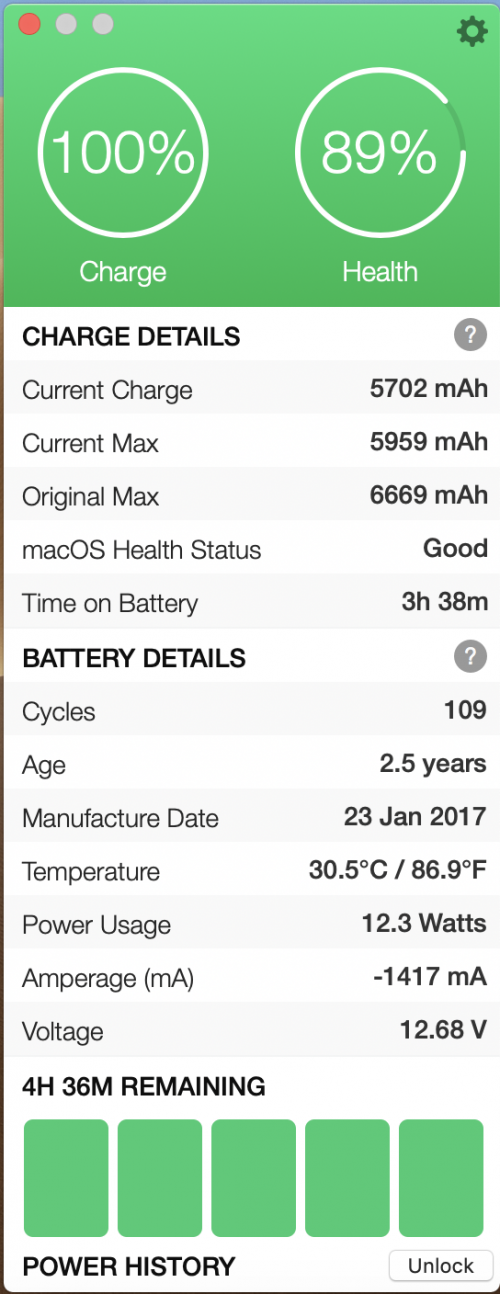
QUOTE(chiahau @ Aug 9 2019, 05:17 PM) My almost 1,5 year old MacBook battery health is around 89%. how to get this?Should I be a little cautious about it? Still covered 1,5 years left under AppleCare but I won't want to claim anything except for the keyboard towards the end of the 3rd year period. » Click to show Spoiler - click again to hide... « |
|
|
Aug 10 2019, 11:54 AM
Return to original view | Post
#44
|
|
Senior Member
7,598 posts Joined: May 2012
|
QUOTE(westlife @ Aug 10 2019, 06:02 AM) in macOS, can check the battery capacity natively too. charge remaining 474. Mean going to die soon?2017 macbook pro touch bar. my battery status after 2 years 2 months. (battery changed few months back for free at apple becos it was bloated, warranty expired and no applecare purchased.  [attachmentid=10297922] if one needs third party tool for battery check, this is a good one too. https://www.coconut-flavour.com/coconutbattery/ |
|
|
Aug 10 2019, 01:55 PM
Return to original view | Post
#45
|
|
Senior Member
7,598 posts Joined: May 2012
|
QUOTE(westlife @ Aug 10 2019, 01:19 PM) No la. charge remaining is ur current battery used level. for example, if the battery is 30% it is the charge level remaining. when u charge it to 100%, it will be back to the max level. Eh...not really. Mine is currently 100%. Here is my info:Charge Information: Charge Remaining (mAh): 4311 Fully Charged: Yes Charging: No Full Charge Capacity (mAh): 4407 Health Information: Cycle Count: 50 Condition: Normal That charge remaining already since few hours. |
|
|
Aug 18 2019, 11:25 AM
Return to original view | Post
#46
|
|
Senior Member
7,598 posts Joined: May 2012
|
QUOTE(babyCincau @ Aug 18 2019, 11:21 AM) If I buy a used macbook from someone who has 1 month left warranty, can I still buy apple care for it? Yes. you can but it tie to previous owner apple user account if i am not mistaken. Under apple account can see your devices. Not sure if can transfer to other people |
|
|
|
|
|
Aug 19 2019, 01:43 PM
Return to original view | Post
#47
|
|
Senior Member
7,598 posts Joined: May 2012
|
QUOTE(firdausbhari @ Aug 19 2019, 12:35 PM) anyone here using malwarebytes? is it good? macbook need antivirus? |
|
|
Sep 13 2019, 09:06 PM
Return to original view | Post
#48
|
|
Senior Member
7,598 posts Joined: May 2012
|
QUOTE(Zaryl @ Sep 13 2019, 05:36 PM) and about the extended warranty Apple Care, the coverage is the same as the original 1 year , just that it's extended to another 2 more years right? u can buy by calling apple support. I did mine before end of 1st yearwe don't have Apple Care+ here? |
|
|
Oct 6 2019, 07:11 PM
Return to original view | Post
#49
|
|
Senior Member
7,598 posts Joined: May 2012
|
QUOTE(westlife @ Oct 6 2019, 06:54 PM) yes, already 4 years since the last redesigned. but i think apple will unlikely to do major redesign. maybe just keyboard changed, display change (to mini-LED or OLED etc.) or just making the bezel of the display thinner like the rumoured 16" macbook pro that is going to launch end of this month. agreed!macbook pro is always my favourite laptop to use. once you get used to macbook pro, you can never go back to any windows laptop that has mediocre display, keyboard and touchpad. haha. |
|
|
Oct 29 2019, 02:08 PM
Return to original view | Post
#50
|
|
Senior Member
7,598 posts Joined: May 2012
|
QUOTE(ClericKilla @ Oct 29 2019, 01:28 AM) Urgent question.. scam...I saw on fb marketplace people are selling rmbp 2019 for rm1500-1800 lesser than official RRP from Apple Malaysia store. The sellers told me they got it from US.. I checked US education pricing also cannot beat these pricing set by Malaysian seller. RM10499 rrp RM8299 for same spec... what on earth is happening |
|
|
Oct 31 2019, 10:46 PM
Return to original view | Post
#51
|
|
Senior Member
7,598 posts Joined: May 2012
|
QUOTE(cHaRsIeWpAu^^ @ Oct 31 2019, 06:02 PM) anyone using egpu for their mbp? use steam that stream from PC with GPU. Then macbook wont heat up easily. With Catalina, some games is 32 bits. but still can play which stream from windows PC. i wish to play dota 2 with my mbp but seems impossible lol. Able to set higher Graphic settings and enjoy games. |
|
|
Nov 1 2019, 09:46 PM
Return to original view | Post
#52
|
|
Senior Member
7,598 posts Joined: May 2012
|
QUOTE(Derps @ Nov 1 2019, 09:39 PM) Hi everyone! just got my very own MacBook pro yesterday and i couldn't be any happier. However I am facing some issue and would like to get some help as I'm not familiar with the macOS yet check process under utility which is taking up consumption. For my case, i found out is due to one drive. So i disable it from start up. 1. I installed a couple of stuff like spotify, microsoft office and steam. The bottom of my MacBook starting to heat up, like really heating up, and its really hot, i don't think this is normal for a brand new laptop? is there any way I can overcome this issue? 2. after putting my MacBook to sleep yesterday and went to work this whole day, i came home finding out my battery went from 100% to 50%. I mean how is this even possible? Did I get a faulty one and should I request for an return? |
|
|
Nov 13 2019, 01:37 PM
Return to original view | Post
#53
|
|
Senior Member
7,598 posts Joined: May 2012
|
QUOTE(fox_shinoda @ Nov 13 2019, 01:03 PM) I'm currently using MacBook Pro with Touch Bar (13-inch, 2016, Four Thunderbolt 3 Ports) as my daily work driver. Some coding and linux server remote management. App drain battery.Bought it Dec 2017 at a discount from an IT retailer here in KL. I hardly use it unplugged, once I reached the office, it will be connected constantly on the power adapter. Unless I need it for meeting or meeting client out of office, then only it will be on battery. Battery cycle count is only 115. My current predicament is that when it is running on battery, the battery can only last for like 1.5 to 2 hours at most when it is on 100%. Checked the battery condition is Normal. 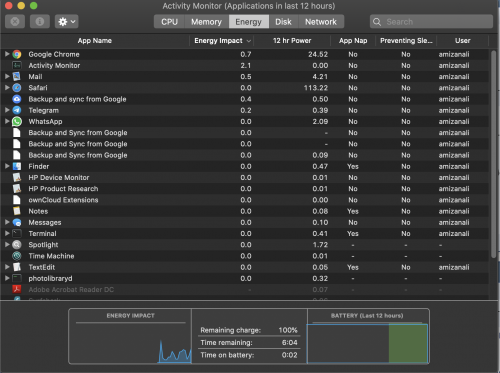 From the screenshot above it shows now the battery is at 100%, however every 3-4 minutes on battery it will minus time remaining 10 minutes  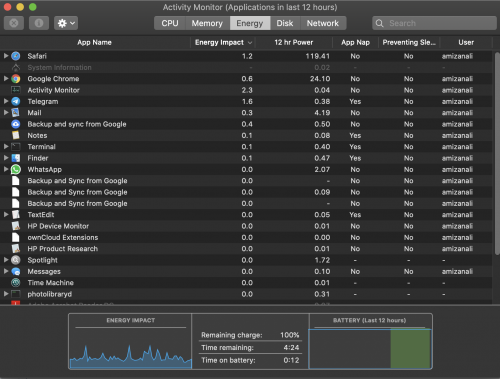 This is after 12 minutes of usage on battery. I've did SMC reset, but still the issue persist. Contact Apple Support and they are saying based on the numbers from System Information, and the battery condition, all is normal. Take note, I've lowered the screen brightness to 60%, and keyboard backlight to none. Any other ideas I can try to improve the battery life usage? |
|
|
|
|
|
Nov 18 2019, 10:11 PM
Return to original view | Post
#54
|
|
Senior Member
7,598 posts Joined: May 2012
|
QUOTE(super_evil_alien @ Nov 18 2019, 06:57 PM) Hello people. no inspection. it is easy. just go to portal and click buy apple care. someone will contact u. then they will give u quote and u just pay.Has anyone purchased AppleCare recently? I've been checking Apple's website for the instruction but it's kinda vague. For those who purchased Apple Care recently, did you have to bring in your Mac for inspection? that is how i buy last year. Covered for another 2 years. |
|
|
Nov 25 2019, 11:17 AM
Return to original view | Post
#55
|
|
Senior Member
7,598 posts Joined: May 2012
|
QUOTE(ILV @ Nov 25 2019, 10:14 AM) Hi Sifu, been using 2017 model for a year+. No issue but i use transparent keyboard plastic and put on top of the keyboard to avoid dust go in. It is free when u get a casing for macbook.reading all the post and is it advisable to buy macbook pro 13 2018? the price is very tempting as compare to 2019.. basically i just use it for personal daily usage, some photo/video editing..no gaming nor programming.. is the keyboard a real big issue? Thanks all for the advise. Anyway if you worry too much, get applecare. I bought it before my 1 year warranty expire. So now worry free for 2 years with applecare |
|
|
Dec 31 2019, 11:06 PM
Return to original view | Post
#56
|
|
Senior Member
7,598 posts Joined: May 2012
|
QUOTE(ngkwdaniel @ Dec 31 2019, 12:34 PM) I can't seem to obtain any information from the team when I requested a call from them. All they did was directing to the Malaysia support website which doesn't show any results for buying a apple care plan. Mine work like this1. On portal - select applecare. Login in . It will ask which product. Select Macbook > Other Mac Topics 2. Got 2 options: Talk to Apple Support Now (will call in 2 min) or Schedule call 3. Apple called & tell me amount to pay. If agreed, they will send an email which link to pay 4. Paid. Confirmation email 5. Reflect in system I can even chat with Apple support via live chat or they are willing to call me (but must be before 12am).That time, i ask for assistance around 11pm+ Here is the link:- https://support.apple.com/en-my |
|
|
Jan 1 2020, 11:39 PM
Return to original view | Post
#57
|
|
Senior Member
7,598 posts Joined: May 2012
|
QUOTE(Grajindo @ Jan 1 2020, 05:51 PM) Using a 2018 MBP and 2 weeks ago, out of sudden while I was using it the screen just got into black screen. However when i connect to external monitor it works normally (in display preference, I could no longer find my MBP screen anymore) No AppleCare...that is going to cost a lotTried out resetting PRAM, SMC etc but none of it works. Did a hardware diagnosis and it's VFD001 error (There may be an issue with the display) Highly suspecting it's the flexgate issue. Found out that Apple only do free replacement for 2016 models. Machine is telling me RM20xx to do the screen replacement! Have anyone faced similar issue with 2018 MBP? I have no AppleCare and warranty has just passed 2 months ago! |
|
|
Jan 7 2020, 09:46 PM
Return to original view | Post
#58
|
|
Senior Member
7,598 posts Joined: May 2012
|
QUOTE(INGfusion @ Jan 7 2020, 04:18 PM) macbook with applecare+ can send to malaysia service center ? Yes |
|
|
Jan 11 2020, 02:59 PM
Return to original view | Post
#59
|
|
Senior Member
7,598 posts Joined: May 2012
|
QUOTE(Grajindo @ Jan 11 2020, 02:26 PM) Brought my 2018MBP with screen display issue to service centre and they can almost confirm it's the Flexgate issue. Afterall Apple couldn't solve their design flaw. Worse that it's not covered under the free repair programme. macbook -> it is important to get applecare+. At least for 3 years without worry. My main worry now is after replacing it now paying from my own pocket, I will have the same problem next year and replacing it once will cost me more than RM2k. For those who are thinking to buy the new MBP, think properly. I bought it expecting my MBP to function for next 3 years at least like my old MBP. Think is time for me to ditch Apple notebook and go for other option. After 3 years, it is old and time to get new unit. With so many issue posted by people in the forum, it is better than sorry later. |
|
|
Jan 14 2020, 09:59 PM
Return to original view | Post
#60
|
|
Senior Member
7,598 posts Joined: May 2012
|
QUOTE(leo_caesar @ Jan 14 2020, 09:38 PM) Hi guys, I just recently purchase MacBook pro, do I need specific dongle cable to connect an external monitor ? yes. any usb c to hdmi or vga adapter |
| Change to: |  0.1140sec 0.1140sec
 1.22 1.22
 7 queries 7 queries
 GZIP Disabled GZIP Disabled
Time is now: 24th December 2025 - 12:00 PM |
 Quote
Quote