Outline ·
[ Standard ] ·
Linear+
[2018/2019] MacBook Pro User Thread
|
ericlaiys
|
 Jul 2 2020, 10:05 AM Jul 2 2020, 10:05 AM
|

|
QUOTE(rylim @ Jul 2 2020, 09:42 AM) I bought it when I was in US and I think the T&C is different [attachmentid=10526844] So it QCD? I'm not sure which one is reliable Yes. QCD not bad the service |
|
|
|
|
|
ericlaiys
|
Jul 23 2020, 10:40 AM
|
|
|
QUOTE(alandhw @ Jul 23 2020, 09:36 AM) recently just bought a macbook pro 15 with i9 spec. Found the fan is spinning fast and loud when using a light weight application such as google chrome. Any idea what has goes wrong with the Macbook? something to do with the setting or it is hardware faulty? Thanks. use safari...lol |
|
|
|
|
|
ericlaiys
|
Jul 23 2020, 10:43 AM
|
|
|
QUOTE(alandhw @ Jul 23 2020, 10:42 AM) ermmm..in fact try run with Safari, the fan still give the noise. Feel like the fan is always running in full speed. last time my problem is one drive. so I have disable it and no longer running on background. |
|
|
|
|
|
ericlaiys
|
Jul 24 2020, 08:04 AM
|
|
|
QUOTE(super_evil_alien @ Jul 24 2020, 02:49 AM) Anyone knows a good way to clean the speaker hole? I've tried toothpicks, brushes & cleaning gel but none of them clean the dirt in my Macbook's speaker holes. Vacumn it. |
|
|
|
|
|
ericlaiys
|
Jul 24 2020, 08:07 AM
|
|
|
QUOTE(destfull @ Jul 24 2020, 02:20 AM) Chrome is memang like that. 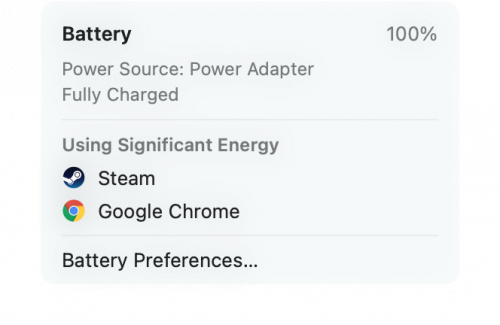 You can check by viewing "using significant energy". I use Big Sur, the view on Catalina might be different How is the experience on big sur. Don't dare to upgrade as it is my working laptop. |
|
|
|
|
|
ericlaiys
|
Sep 14 2020, 04:14 PM
|
|
|
QUOTE(dinozilla @ Sep 14 2020, 03:33 PM) just check and see that AppleCare for MBP13 is 895....how many of you actually got it? Me. bought it before 1sy year warranty end. Claim battery 2k due to battery swallow during RMCO. Worth it when really face problem. Now my apple care valid till 1 years + 2 month left. Consider ROI liao...lol This post has been edited by ericlaiys: Sep 14 2020, 04:15 PM |
|
|
|
|
|
ericlaiys
|
Sep 14 2020, 10:15 PM
|
|
|
QUOTE(dinozilla @ Sep 14 2020, 10:03 PM) good that you got covered.... I just wonder if batt % deteriorate can cover? LOL wear and tear - no |
|
|
|
|
|
ericlaiys
|
Oct 14 2020, 02:17 PM
|
|
|
QUOTE(tzxsean @ Oct 14 2020, 01:03 PM) I don't plan to resell my laptop (will use until it's dead) though but the discoloration is really an annoying sight can fix discoloration by using skin...lol |
|
|
|
|
|
ericlaiys
|
Nov 1 2020, 08:28 PM
|
|
|
QUOTE(Kilohertz @ Nov 1 2020, 06:15 PM) does anyone know how much it takes to replace a late 2011 mbp screen? not worth it since it too old. Since already 9 years ago, recommend to buy new one |
|
|
|
|
|
ericlaiys
|
Nov 9 2020, 11:09 PM
|
|
|
QUOTE(hamdanchiuyanyehh @ Nov 9 2020, 09:50 PM) Hi, I never use Macbook Air or Pro previously. Previosuly I use lenovo laptops, build desktop for my personal use. Now thinking of whether shd get one Macbook. The usage will be use excel or words, use some softwares, use VPN, watch netflix, sometime will attach to Monitor. I will also need to bring it to customers to do presentation and marketing. My concern which stopping me to buy Macbook which is so much expensive is...I worried that this laptop will just become very slow and lag like my previous few lenovo laptops, even add 16gb ram, ssd, after 3-4 years, it's slow like hell... even the boot... will Macbook having this issue? But I actually like the look of Macbook and it's weight, since it's really light to bring it out. Kindly advise. Mac os is not same like Windows which require more cpu, ram, etc Your workload is not heavy |
|
|
|
|
|
ericlaiys
|
Nov 14 2020, 07:35 PM
|
|
|
QUOTE(yayiyu99 @ Nov 14 2020, 05:33 PM) Now Safari can play 4K & 2K video on Youtube  Just tested it few minutes ago. Using Big Sur MacOS on 16 inch MBP Yup, the UI, control centre and widget look great. New refresh |
|
|
|
|
|
ericlaiys
|
Nov 15 2020, 01:04 PM
|
|
|
QUOTE(eddmecha @ Nov 15 2020, 11:54 AM) Anyone on big sur have issues with ms office apps? Nope. Mine working fine |
|
|
|
|
|
ericlaiys
|
Nov 15 2020, 07:22 PM
|
|
|
QUOTE(hown @ Nov 15 2020, 06:41 PM) safari.i thought it was the best browser for mac os users no issue on macbook pro 2017 (dual core with 8GB RAM). But i still prefer google chrome. Even after updated with Big Sur, i tried to use Safari but.... still back to chrome...(lol) |
|
|
|
|
|
ericlaiys
|
Nov 15 2020, 08:18 PM
|
|
|
QUOTE(Lego Warfare @ Nov 15 2020, 07:58 PM) I get that with just 1 tab Netflix on safari alone which is bloody stupid? I’m using MBP 16” and I shouldn’t even get that even with 10 tabs with Netflix on. The new firmware update instead of saving resources for faster efficient performance seems to be doing the opposite. It's first released. Sure got bug. Even iphone 12 has reported few OS issue. You need to wait for bug fixes on few version. |
|
|
|
|
|
ericlaiys
|
Nov 15 2020, 11:15 PM
|
|
|
QUOTE(westlife @ Nov 15 2020, 10:22 PM) any prob with ur display on macbook pro 2017? Nope. So far so good. Only parallel and vmware fusion is incompatible. Need to upgrade to latest version to support Big Sur |
|
|
|
|
|
ericlaiys
|
Nov 18 2020, 06:03 PM
|
|
|
QUOTE(splinter @ Nov 18 2020, 04:55 PM) Hi, im using 2016 MacBook Pro 256Gb. I don't have much things to install however my 256GB drive left some only. Check storage 160GB++ on others where I can't found what is it. Can assist? click on Review Files under reduce clutter. Then click on File Browser. u can know which folder consist of the big files |
|
|
|
|
|
ericlaiys
|
Nov 18 2020, 06:45 PM
|
|
|
|
|
|
|
|
|
ericlaiys
|
Nov 19 2020, 09:54 AM
|
|
|
QUOTE(amoxacilin @ Nov 19 2020, 09:38 AM) Hi. I cannot use my bootcamp after updating to Big Sur. Did anyone facing the same issue? When selecting drive to boot, it not showing Windows drive, but instead EFI drive. After selecting it, the windows logo appeared until the log in screen, but it will restart itself back to Mac OS. Try few times also the same. not compatible with big sur. same as parallel or fusion. found out is due to missing driver |
|
|
|
|
|
ericlaiys
|
Nov 19 2020, 10:53 AM
|
|
|
QUOTE(westlife @ Nov 19 2020, 10:18 AM) wow. luckily i never upgrade my macOS, still remain at high sierra now. its matter of time that you upgrade. anway, i found out that my mac running smooth after upgrade to big sur. With updated on chrome, it seem that my mac seldom hot and less fan noise. not sure if other having the same feedback |
|
|
|
|
|
ericlaiys
|
Dec 13 2020, 08:09 AM
|
|
|
QUOTE(whycare @ Dec 13 2020, 12:28 AM) I have 2019 15" MBP. I connect to an external monitor all the time, however i'm not sure if its the same issue with yours. After upgraded to Big Sur, the palm rest gets very warm / considered hot to even rest my palm. Then I realized my MBP fan is not running as frequent. I have to install fan controller app to manually turn the fan on / off, which is an annoyance. Anyone have this issue, and how can it be resolved other than manually turn the fan on/off ? Mine become better, less fan noise and less heat. I found better management |
|
|
|
|



 Quote
Quote
 0.0919sec
 0.78
0.78
 7 queries
 GZIP Disabled