Welcome Guest ( Log In | Register )

11 Pages  1 2 3 > » Bottom

Outline · [ Standard ] · Linear+

 4k tv under RM3k, Sony or Samsung or LG??

views
     
Convael
post Jun 14 2018, 01:54 AM

Regular
******
Senior Member
1,109 posts

Joined: Sep 2007
From: Kuala Lumpur
QUOTE(berrycoo~ @ Jun 13 2018, 07:20 PM)
Hi, looking to buy a 4k tv mainly to play ps4 pro and watch some videos (non-4k) with budget RM3k. Currently looking at:

Sony
KD55x7000e ~RM2.6k
KD49x8000e ~RM3k

Samsung
UA55MU6100 ~RM2.7k
UA50NU7400 ~RM3k

LG
55UJ630t ~RM2.4k
49SJ800t ~RM3k

Which one should I go for? Also is it worth going for wcg ie 49SJ800t/KD49x8000e/UA50NU7400 but with smaller screen size? Is it worth to get smaller screen size + wcg for the PQ difference?
*
X7000e : the most basic UHD TV entry from Sony last year , second cheapest among your list , steady brightness , NO WCG (expected from this price range ) , No Local dimming ( again , expected from this price range ) , good motion handling , MI / BFI options to play judder-free 24p content , great sport programs supports , doesn't support WiFi 5G , the 55 " version is a VA panel which I would recommend if you can find one cheaper .

XF70 / X7000F : The successor of XE70 . I find this TV slightly brighter than XE70, might be due to panel variance . Other than that , not much has changed from its 2017 predecessor.

XF75 / X7500F : In a nut shell , a repackage of the XF70 model in Android TV OS .

x8000e : Lotsa fanbois singing praises of model this in Lowyat , to the point comparing it with OLED , truly the joke of the decade. One of them attacked me with a death threat before . It's scary when people paid a large sum of money for something mediocre yet want to feel justified for the high expenses.

Back to the TV , this is actually a decent SDR TV just not for the price it is asking . It used to be much more pricey.

Being a mid range TV, the brightness of model is very limited , which hampered its ability to display any decent HDR .
There is also the inherent flaw of unimpressive contrast level being an IPS model . It does has a Wider-Color-Gamut compare to the basic 4k models , mediocre motion handling ( worse than XE70 in fact) . Input lag is a little on the high side as well , which means it is not very suitable for gaming purposes .


Samsung : Their lower end TVs has been getting worse by each year , from the all amazing KU series to the not so impressive MU series , this year's NU series is a hit or miss

MU6100 : The MU 6 series have amazing contrast ratings , despite of not having a local dimming system . No support of WCG , No local dimming ( it relies on Samsung's CE dimming ) , great BFI (if you can withstand the screen dimming ). This is the most complete 4k entry level VA TV ( features wise ) in 2017 . This TV model has been discontinued .

NU7100 : The successor of MU6100 , more or less the " castrated " version. Picture Quality should remain in the same levels as MU 6 series while some of the features such as WIFI 5Ghz , blue tooth , smart remote control & voice control are removed .

Nu7400 : Suppose to be the true successor to MU 6 series with Wider Color Gamut , also has a steam link support . It is essentially a NU7100 but has all the trivial features from MU 6 series . Slightly more expensive than the former two.


LG : LG's Mid ~ lower end models love to use RGBW panel , buy at your own risk

UJ630 T = The cheapest TV among the bunch . This TV uses RGBW panel , which really hurts its color volume especially when showing Brighter NON-white colors , if you decide to use your TV as monitor one day , colorful fonts are going to look weird. If you can look past this , it isn't very different than the Sony x7000e .

SJ800T = The supreme UHD LED TV from LG , of IPS panel . This is probably the best TV among your list , it has all the features required to display HDR . While it still can't really compete with higher end models, this is the most comprehensive IPS TV you can buy @ around 3k


As for screen size , Amazon recommends the distance from your 4K TV to be around 1.5x the size of TV screen . EG : for a 55 inches TV , the distance between you and your TV should be @ 55 inches - 75 inches . Although the whole point of getting UHD TV is , you can sit closer to the screen to witness the awesomeness of all the 4K pixels

This post has been edited by Convael: Oct 26 2018, 06:38 AM
Convael
post Jun 14 2018, 01:58 AM

Regular
******
Senior Member
1,109 posts

Joined: Sep 2007
From: Kuala Lumpur
QUOTE(berrycoo~ @ Jun 13 2018, 11:51 PM)
Thats what I keep hearing as well sweat.gif That's why not sure if I should go for 49+wcg or 55 or just top up abit get 55+wcg drool.gif
*
WCG plays an important role when you are playing HDR content , which you will be since you mentioned PS4 pro
Convael
post Jun 14 2018, 02:32 PM

Regular
******
Senior Member
1,109 posts

Joined: Sep 2007
From: Kuala Lumpur
QUOTE(berrycoo~ @ Jun 14 2018, 01:39 PM)
Just now went to take a look at the TVs mentioned above. Cant really compare them as they are either not side by side or not displaying same content.

But I managed to compare Sony ones as they have all 3 X70E, X75F and X80E side by side. In general I realised bigger size TV will have brighter (or washed out not sure how to describe it) image no matter the model. Can anyone explain why is that so? Also The X7500F have better color than the X7000E. Is it really the same but with incremental update? Looks like have different panel altogether
*
Are they playing the same display Demo ?
Convael
post Jun 14 2018, 03:19 PM

Regular
******
Senior Member
1,109 posts

Joined: Sep 2007
From: Kuala Lumpur
QUOTE(muss90 @ Jun 14 2018, 01:23 PM)
Very detailed info.
What is your opinion on Sharp LC50UA6800X?
*
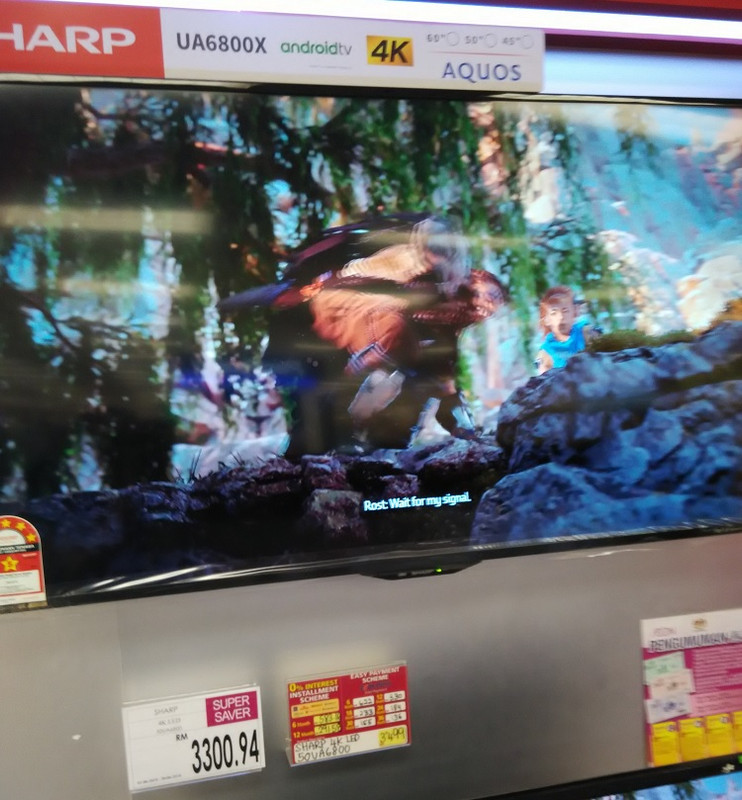
I have spent really long time looking at this Sharp Model and its little brother 6500 awhile ago .
Managed to find a not so crowded shop and spent at least 2 hours checking out them out before the salesman shoo me away

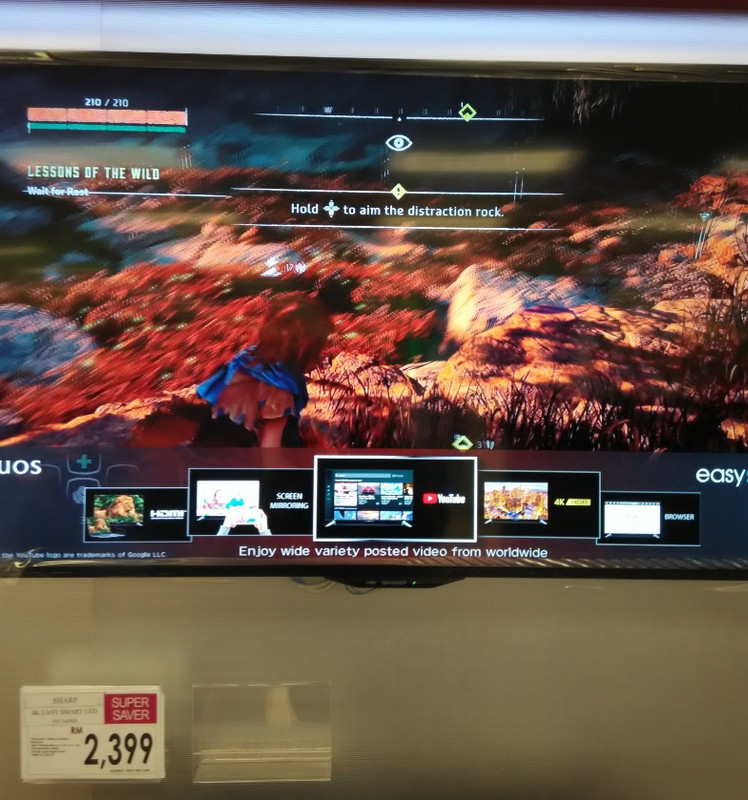
6800
» Click to show Spoiler - click again to hide... «

6500
» Click to show Spoiler - click again to hide... «


Both TV seems to be brighter than its predecessor UE630x
Between the two , the 6800 looks to be more " consistent " on the HDR highlights , with the highlight zones on Sun fading at slightly slower pace than the 6500x


I can probably take a guess at the peak luminance . The zones of sun highlight details from the menu of Horizon Zero has to be reaching the peak brightness yet it wasn't quite nearly as bright as my B7. This suggest a 500 ~ cd/m2 peak brightness , it was definitely brighter than the mu6300 (peak @ 360 cd/m2 ~) which was displaying just few feet away.

Took a peek behind the screen , no cable management or anything of sorts , the TV build feels a little cheap .


I saw a lot of motion blurs and trails when the cutscene transition into fast pace action scene , perhaps much more severe than most other TV I've came across ( namely LG , Samsung and Sony ) , so this is probably not the best TVs for sports.

In terms of colors I actually wasn't able to notice much of a difference , maybe because they were looping Horizon Zero in HD (1080P) . But the WCG is clearly present in the 6800x as I noticed the sun is slightly more orange than the one from 6500x , but overall their HDR performance and PQ should be very identical. Still If you insist on getting the these models , get the 6800 version over 6500 , as the price gap aren't too large .


Remember these are merely opinions and with no professional tools involved , human perception can be very flawed afterall , so take these opinions as a grain of salt

This post has been edited by Convael: Jun 15 2018, 12:27 AM
Convael
post Jun 14 2018, 07:39 PM

Regular
******
Senior Member
1,109 posts

Joined: Sep 2007
From: Kuala Lumpur
QUOTE(berrycoo~ @ Jun 14 2018, 01:39 PM)
Just now went to take a look at the TVs mentioned above. Cant really compare them as they are either not side by side or not displaying same content.

But I managed to compare Sony ones as they have all 3 X70E, X75F and X80E side by side. In general I realised bigger size TV will have brighter (or washed out not sure how to describe it) image no matter the model. Can anyone explain why is that so? Also The X7500F have better color than the X7000E. Is it really the same but with incremental update? Looks like have different panel altogether
*
If I remember correctly , someone mentioned that specific models of x7000E were stuck with the 8 bit color depth before , while all models of x7500F has been updated to 10 bits color depth ( 8bit + FRC ) .


The shop lighting condition will also have an impact on the screen . It is known that TV sellers tend to play with the TV settings , so a lot of the TV in the shop look oversaturated and far brighter than its native settings in order to attract customers .


When you brought the TV home and turn it on , just to find out it looks almost like an entirely different model than what you've seen in the shop .

This post has been edited by Convael: Jun 14 2018, 08:08 PM
Convael
post Jun 14 2018, 08:20 PM

Regular
******
Senior Member
1,109 posts

Joined: Sep 2007
From: Kuala Lumpur
QUOTE(berrycoo~ @ Jun 14 2018, 08:10 PM)
Ah now that makes sense. And the content they play too sweat.gif

Anyways my living room max sitting distance is about 3m. So I am still thinking 49" is abit too small. Should I go for 55" (x7500f/nu7400) or go for 49" LG SUHD for nano cell and sit nearer to the TV? Which configuration is better? My living room is well lit so contrast isn't that important.
*
At that distance , I would suggest you get the LG SUHD IPS Panel since contrast isn't a big issue for you . 49 inches is a little too small for 3 meters viewing distance , the whole point of getting a 4K TV is to sit closer to the screen than traditional TV ( but not too close ) , if you can move it to somewhere around 2 meters that will be perfect .

This post has been edited by Convael: Jun 15 2018, 12:31 AM
Convael
post Jun 14 2018, 10:56 PM

Regular
******
Senior Member
1,109 posts

Joined: Sep 2007
From: Kuala Lumpur
QUOTE(berrycoo~ @ Jun 14 2018, 09:39 PM)
Is the color of nano cell really much better than triluminous/wcg display? I didn't get the chance to compare LG SUHD and Sony triluminous side by side. Need more input from sifus here flex.gif
*
In all honesty , every year the TV makers tend to come out with all sort of fancy words for the technology . The Nano Cell is basically a variation of the Quantum Dot technology found in the Samsung QLED display . But at the end of the day , what we really care about are the results , a.k.a the numbers measured by the Pro. We look at the numbers , the coverage of color and the color volume , instead of the fancy terms.


From what I can see , Nano Cell isn't nearly as good as LG claimed . As the standards set by UHD Alliance , A TV with WCG needs to be able to show at least 90% of the P3 color gamut , a TV carrying the Nano Cell tag should be exceeding this value , but they are still quite behind comparing with the more expensive TVs. The new Samsung QLED are able to display almost 100% of the P3 colors coverage with the OLED TVs following closely behind.


And no , in this case my suggestion isn't base on the specification itself , but because of the Panel itself . Since you play your TV in the living room , you would have benefit to have a wider viewing angle , such as the occasion of having guests in the house , or you wish to lay on the couch at the left corner for some casual game time. On top of that the LG SUHD models having some pretty good ANTI Reflection display which can , to a certain degree fight off the reflection in a bright room.


VA panel is more suitable for private room , like bed room or your personal gaming room , where it is darker and the picture quality will receive a greater boost displaying blacker black.

This post has been edited by Convael: Oct 2 2018, 02:29 AM
Convael
post Jun 15 2018, 12:38 AM

Regular
******
Senior Member
1,109 posts

Joined: Sep 2007
From: Kuala Lumpur
QUOTE(enkil @ Jun 14 2018, 08:50 PM)
Wow 2metres is too close thats 6.5  feet. I sit exactly 13 ft or 4m with a 55inch tv and feels it is big.  console.gif
*
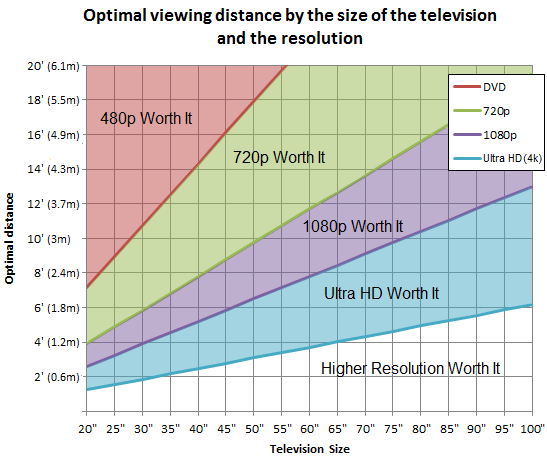
user posted image


If you sit too far from the screen , then the upgrade to UHD TV isn't going to worth it

However , everyone has a preference . If you like what you are seeing , no one has the rights to say you're wrong.
Convael
post Jun 15 2018, 06:43 AM

Regular
******
Senior Member
1,109 posts

Joined: Sep 2007
From: Kuala Lumpur
QUOTE(berrycoo~ @ Jun 14 2018, 09:39 PM)
Also is the new SK8000 series better than the SJ800?
*
Their performance are in the same ballpark , but since the SK8000 comes with a newer CPU it is only natural to assume the TV will be a little more responsive in the user interface.


This post has been edited by Convael: Jun 15 2018, 06:51 AM
Convael
post Jun 15 2018, 06:57 AM

Regular
******
Senior Member
1,109 posts

Joined: Sep 2007
From: Kuala Lumpur
QUOTE(berrycoo~ @ Jun 14 2018, 11:32 PM)
Hmm, for my case I don't really need the viewing angle because mainly will be using this alone. Yea I do need anti reflection as there is sunlight from the side. Another main factor for me is the picture quality, or color reproduction tbe. Like I am not sure why Samsung's color is always abit cool (or washed out/pale). Is it because of a setting problem?
*
If you don't need the wider viewing angles you can pretty much give up on the IPS panel .


If picture quality is important to you , contrast rating of the TV should be taken into consideration , hence the VA panels from Samsung .
For a brighter room you will need a fairly bright TV as well , higher brightness can overcome the glare from other light source to preserve the picture quality of the TV.

Now this can be a bit of a challenge , because at this budget I am not sure if there is a TV that is both bright enough and have good contrast (which translate into picture quality )

This post has been edited by Convael: Jun 15 2018, 07:02 AM
Convael
post Jun 15 2018, 08:12 AM

Regular
******
Senior Member
1,109 posts

Joined: Sep 2007
From: Kuala Lumpur
QUOTE(Ree73 @ Jun 15 2018, 07:41 AM)
i am choosing my 4k tv too...things in my mind is sammy 7100 55 inches. Any good suggestion on other brand?

Next is i am thinking on my av receiver, how should i connect all my wires.

Suppose is all 4k source direct to TV. and TV need to have a optical source to my old AV. The max audio setting i can get is 5.1 DTS. Without any TRUEHD or MASTER HD.
*
Budget approximate ?

What do you use your TV for most of the time ?

How is the room condition of your TV, bright , dim or dark ?

This post has been edited by Convael: Jun 15 2018, 08:15 AM
Convael
post Jun 15 2018, 01:39 PM

Regular
******
Senior Member
1,109 posts

Joined: Sep 2007
From: Kuala Lumpur
QUOTE(berrycoo~ @ Jun 15 2018, 12:29 PM)
What about the new image processor?
*
There are no reports of it being exceptional better . Most modern 4k TV can do a good job of upscaling older content , some ( like Sony ) can do slightly better to produce cleaner image. Again the difference is so minor , most people wouldn't notice the difference ( if there is any ) .


QUOTE
Actually I am not that hardcore into TV. So the best that fits my budget would do. PQ of the TV is my main concern. Yes the living room might be bright during afternoons but I can pull down the curtains etc so the tv need not be that bright. So for my case I should go for the Samsung 55" NU7400 rather than LG 49" SUHD?


If picture quality is your concern , you will need to look for TV with darker black , hence the contrast ratings.


The Samsung nu7400 is brighter on average (300+cd/m2), probably at the same level as Mu6100 / nu7100 . Because it lacks any sort of local dimming , it is can't to produce the bright highlights you see from the HDR content typically mastered at above 1000cd/m2 + . This TV are mostly in VA panels so it will have much better contrast than the LG SJ800, thus producing better picture quality , especially in the darker room.


On the other hand , the LG sJ800 is equipped with local dimming system , a very underwhelming one that is . But it is better than nothing . The local dimming can brighten different areas of the screen up to 600cd/m2 + , so the HDR effects will look better on this TV. But outside of the HDR mode , it is not a very bright TV ( average brightness ~ 220 cd/m2 )

This is assuming you have a lot of HDR compatible movies / games to watch . For SDR content , they appear to be performing similarly
Neither TV are bright enough to fight off the glare if there is sunlight in the room

If you are looking for brighter TV, the Sharp 6800x is brighter than both of these 2 TV but can usually be found at similar price tags


QUOTE(Ree73 @ Jun 15 2018, 08:32 AM)
Budget? Prefer to <3k. Previously ask abt Sony x75 around $3600. Browse around and saw sammy with all HDR features <3k.

TV usage? stream 720 program.

Room condition? Room bright in the morning session.

Was getting a rebate from electronic purchase. Was thinking to add a 4K TV by topping up a bit. Meanwhile saw Haier TV around $2500 with all features, follow by LG, toshiba, philips, and sammy ($3000)...

With this plan to upgrade TV 1st (Ya, how much is the shop charge to trade in any old 42 inch LED TV lately?), later maybe AV (such as Dannon 2500 or onkyo)

Thanks
*
Most of the entry level 4k TV can only process the HDR metadata, they cannot really display the true effect of HDR . The only TVs that truly able to show off HDR in its most gorgeous form are the OLED TV and the very high-end LED TV which usually cost ~ 10k


Especially base on the content you watch , you don't have to worry too much about HDR .


I remain skeptical of the Chinese brands such as Haier , Skyworth , and to a certain Degree , Sharp since its acquisition by Taiwan

This post has been edited by Convael: Jun 15 2018, 01:57 PM
Convael
post Jun 15 2018, 11:30 PM

Regular
******
Senior Member
1,109 posts

Joined: Sep 2007
From: Kuala Lumpur
QUOTE(berrycoo~ @ Jun 15 2018, 02:55 PM)
So I can say that for gaming and watching tv show purpose, its better to get VA panel?

I don't really get this local dimming thing. On samsung website they claim the nu7400 has uhd dimming. Is that not local dimming? Also how about the X7500F/X7000E? 55" X7500F using what panel and do they have local dimming? Is it worth getting the 55" X7000E compared to the nu7400? Since its quite cheap now and VA panel as well.
*
The difference is marginal , so just pick whichever you can find cheaper .

Whichever purpose you are using it for , as long as you get the chance to sit directly in front of your TV , you should go a VA instead of IPS


Local Dimming exists to dim the backlight of the TV so the dark area on the screen will appear more black , creating an overall stronger contrast of the picture , thus enhancing picture quality . The UHD dimming found in Samsung TV is basically a CE Dimming system , where it dims entire screen at once . While this will darken the area to create deeper black levels , unfortunately it will also dim the brighter area / highlights of the other area , so it isn't very efficient and cannot be compared with Full Array Local dimming system.

This post has been edited by Convael: Jun 18 2018, 02:52 PM
Convael
post Jun 17 2018, 12:53 AM

Regular
******
Senior Member
1,109 posts

Joined: Sep 2007
From: Kuala Lumpur
QUOTE(Lego Warfare @ Jun 16 2018, 11:00 PM)
If you want 4k i'd suggest minimum display size at 55"
*
It isn't the size they should be concerned about , it is the distance from the TV , as shown by the picture below.

user posted image


If you sit too far away , regardless of the size of the TV , the upgrade to 4k pixels will not be noticeable , hence not worth investing money to get a larger screen to begin with,


Refer to this article for more details here

This post has been edited by Convael: Jun 19 2018, 11:55 AM
Convael
post Jun 17 2018, 12:59 AM

Regular
******
Senior Member
1,109 posts

Joined: Sep 2007
From: Kuala Lumpur
QUOTE(danielSinclair @ Jun 16 2018, 10:00 PM)
Hi Sir,

I'm looking for 4k smart TV budget around 2k +- and below my shortlist

1. Samsung UA49MU6100KXXM 49" MU6100 Flat Smart 4K UHD TV UA49MU6100 https://www.lazada.com.my/products/samsung-...s485884973.html

2. Toshiba 49U7750VM 49˝ 4K UHD Android LED TV https://www.lazada.com.my/products/toshiba-...s326659679.html

3. Sharp 4k UHD Android Smart Slim LED TV 50" LC50UA6800X Black https://www.lazada.com.my/products/sharp-4k...s311828734.html

Between this 3, I prefer Samsung since I used LED Samsung for 5 years before and quality is good. However I don't mind to change to other brands ie Smart TV with Android OS like Toshiba and Sharp. Between this 3 which one is better? My priorities is can use at least for 3 to 5 years and good picture quality for Unifi TV and Streaming movie.. 😁😁😁
*
The Sharp obviously come packing with more advanced features , with a more hefty price tag .

The Toshiba TV has left the race a while ago , but in this case it is the cheapest Android TV model you can find now ( RM 2400~ ), without the support for HDR . Although at this price range HDR will not make a difference than SDR ( Standard Dynamic Range )


Is there any particular reason you are obsessed with Android TV ? The Android OS are sluggish , unresponsive and more prone to frequent crashes .
Just look at all the high end Sony TV , despite having some fantastic performance the Android OS has been dragging the TV down from their review scores.


Almost every single Sony TV review mention some horrible experience about their Android OS .


Since you don't use HDR content at all , the WCG and Higher brightness shouldn't be a concern , as all 3 TVs have more than enough brightness for SDR content.
Save yourself some money , grab a mu6100 and you have a good deal.

This post has been edited by Convael: Jun 17 2018, 05:23 AM
Convael
post Jun 17 2018, 08:27 PM

Regular
******
Senior Member
1,109 posts

Joined: Sep 2007
From: Kuala Lumpur
QUOTE(danielSinclair @ Jun 17 2018, 04:31 PM)
Hi. thank you for your feedback. The only reason I would like to choose Android OS TV maybe because can install streaming apps on the TV ie Astro Go, Iflix, Netflix, Terrarium TV, Kodi etc so can play without need to use different Android box. I still considering MU6100 as the best choice within my budget 😁
*
edited : Iflix and netflix are generic apps that are available on most modern smart TV . Thx to Avfan pointed out , certain apps like Kodi , will only work under Android OS , therefore is unavailable on OS like Tizen which is base on Linux.

This post has been edited by Convael: Jun 17 2018, 10:48 PM
Convael
post Jun 17 2018, 10:01 PM

Regular
******
Senior Member
1,109 posts

Joined: Sep 2007
From: Kuala Lumpur
QUOTE(titanmelvin @ Jun 17 2018, 09:42 PM)
Hi sifu, i asked about Android tv in previous post but no one replied.

Samsung MU6100 and Sony X7000E also can kodi, netflix etc? Which would you recommend from the two. I see side by side i feel Samsung is clearer/sharper? It was ntv7 and also Astro hd channel, i thought Sony supposed to have better upscaling?
*
Kodi and netflix are typical apps , as such they can be installed on any smart TV , specifically the 2 units you mention.

Edited : Kodi is not available on NON-Android OS , therefore you cannot install these App from the the TV 's appstore .


It is hard to tell a difference from a TV display in the shop , because TV merchant are known to play with the TV settings in order to bait buyers into buying the TV.
We also don't know what settings they use in the shop unit . Perhaps the Samsung TV you saw has set up for higher sharpness in the menu ?


When we said better, the difference is so small most people will not notice it . Not to mention Sony's slight advantage is virtually non existent here because Samsung has excellent upscaling as well.


For a budget of 2-3k , x7000e and mu6100 are generally the most solid choice in Malaysia . They are still superior to the other China brands in terms of TV design ,build and features .

If you want a VA panel , go for mu6100 . For IPS panel ,go for x7000e .
55 inches of x7000e is a VA panel . 43 inches version of mu6300 is an IPS panel.


P/S : x7000e is slightly better for sports viewing and mu6100 is slightly better for gaming

This post has been edited by Convael: Jun 18 2018, 07:09 AM
Convael
post Jun 17 2018, 10:23 PM

Regular
******
Senior Member
1,109 posts

Joined: Sep 2007
From: Kuala Lumpur
QUOTE(AVFAN @ Jun 17 2018, 10:09 PM)
are you sure samsung smart tv's can install kodi and astrogo?

i mean install and run om tv, not chromecast or use pc->hdmi->tv.
*
My bad on that , kodi does not install on non - android OS like Tizen natively .

I am unsure about Astro go , will check later . I am only aware it was recently added to LG 's webOS
Convael
post Jun 19 2018, 12:36 AM

Regular
******
Senior Member
1,109 posts

Joined: Sep 2007
From: Kuala Lumpur
QUOTE(danielSinclair @ Jun 19 2018, 12:09 AM)
hi sir, between mu6100 and nu7100 which one should I go for it? mu6100 only available via online shop ie lazada shopee etc and nu7100 available in phisical shop ie Senheng n Harvey Norman. The price doesn't different much. Which 1 is good or better specs? thanks ☺️
*
Mu6100 is last year model . TV stores have been doing major sales for the model , it is not surprising if you don't find the models in physical shop anymore.


As I have mentioned previously, Samsung is dropping the ball for their budget TV.
Every years , they have been getting worse .
From the KU /KS series to Mu , and now the NU series .
Nu7100 is not as bright as the Mu6100 , not as deep Contrast ratings , worse remote control , no voice control etc etc


Not that nu7100 is a bad TV , just not as good as its predecessor


Between mu6100 and nu7100 , just find whichever that is cheaper .


note :nu7100 come pre-installed with Steam Link functions , so if you are wish to use the steam functions on your tv, it may be worth consideration.
Convael
post Jun 23 2018, 07:18 PM

Regular
******
Senior Member
1,109 posts

Joined: Sep 2007
From: Kuala Lumpur
QUOTE(Topet @ Jun 23 2018, 12:27 PM)
SJ800T uses RGBW?
*
Nope , RGB

11 Pages  1 2 3 > » Top
 

Change to:
| Lo-Fi Version
0.0683sec    0.81    7 queries    GZIP Disabled
Time is now: 15th December 2025 - 05:25 AM