Welcome Guest ( Log In | Register )

36 Pages « < 28 29 30 31 32 > » Bottom

Outline · [ Standard ] · Linear+

 Astro Version 13A, All about Astro Malaysia offerings

views
     
doubleM2
post Mar 3 2025, 12:22 AM

Regular
******
Senior Member
1,024 posts

Joined: Jun 2019
QUOTE(joshhd @ Mar 3 2025, 12:02 AM)
Ah, so it's not just me...  sweat.gif
user posted image
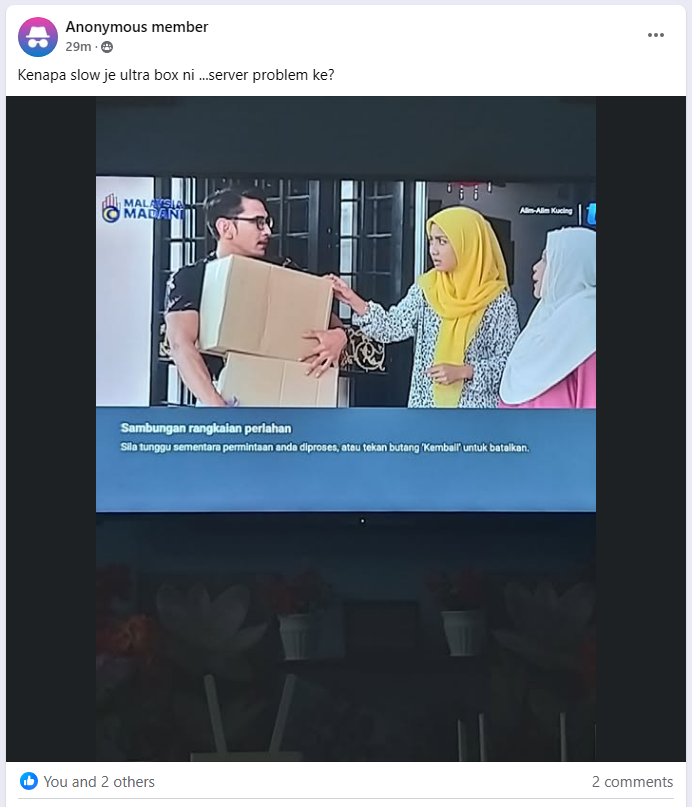
I also encounter this exact error on my Ultra Box in recent weeks, especially when I'm watching linear TV channel and then I try to trigger Play from Start or Live Pause feature.
It happens randomly, and that message can stay there as long as it wants.
I just press Back, then the message dismisses, then nothing happens afterwards.
So I have to initiate Play from Start or Live Pause again, and try my luck to see if works. 

And of course, there's nothing wrong with my Internet connection at that time.

Anyone notice this error recently?
*
I’m not having this error.. just yet. I’m using 100Mbps Maxis Home Fibre.
doubleM2
post Mar 5 2025, 02:27 AM

Regular
******
Senior Member
1,024 posts

Joined: Jun 2019
Glad I didn’t listen to FM radio anymore, ytjt
doubleM2
post Mar 6 2025, 12:29 PM

Regular
******
Senior Member
1,024 posts

Joined: Jun 2019
QUOTE(smileguy @ Mar 6 2025, 09:48 AM)
On another matter just found out from astro sales that all blacklisted astro accounts can be reactivated by paying  RM40  and that for all new customers will have acess to INdian Favourites  included in astro one @RM49.90
*
Permanently or just a treat for new customers reactivating Astro?
doubleM2
post Mar 6 2025, 12:32 PM

Regular
******
Senior Member
1,024 posts

Joined: Jun 2019
QUOTE(izwanikhsan @ Mar 6 2025, 04:52 AM)
What is OK vision?
*
It’s a new prepaid satellite TV from MNC Group (the one that airs sinetrons from RCTI). I’m also using it currently. RM20/month after 3-months trial.
doubleM2
post Mar 7 2025, 03:05 PM

Regular
******
Senior Member
1,024 posts

Joined: Jun 2019
QUOTE(joshhd @ Mar 7 2025, 01:19 PM)
Don't get your hopes up just yet. I think that RM40 thingy is meant for Astro accounts that already been inactive for a very long time.
*
And for new first timers as well. Free Indian Favourites preview for 2 years.
doubleM2
post Mar 11 2025, 01:28 AM

Regular
******
Senior Member
1,024 posts

Joined: Jun 2019
Max Ultimate Plan is officially available for upgrade on Ch 200 & My Astro app. Add RM18 if you're on Movies or Astro One: Epic Pack, or à la carte at RM 51.90 (save RM1, RRP RM 52.90).

Source: https://promotions.astro.com.my/details/MAX

This post has been edited by doubleM2: Mar 11 2025, 05:00 AM
doubleM2
post Mar 11 2025, 12:36 PM

Regular
******
Senior Member
1,024 posts

Joined: Jun 2019
QUOTE(Feliex @ Mar 11 2025, 10:31 AM)
I wonder if subscribe Max Ultimate Plan, will the Astro Ulta Box can stream the HBO's content in 4K or not (MAX Section & Movie Section).
*
I’m afraid that the Ultra Box doesn’t offer Max content in 4K 2160p — all limited offerings from Max tab are only in FHD 1080p.
doubleM2
post Mar 12 2025, 01:54 PM

Regular
******
Senior Member
1,024 posts

Joined: Jun 2019
QUOTE(doubleM2 @ Mar 11 2025, 01:28 AM)
Max Ultimate Plan is officially available for upgrade on Ch 200 & My Astro app. Add RM18 if you're on Movies or Astro One: Epic Pack, or à la carte at RM 51.90 (save RM1, RRP RM 52.90).

Source: https://promotions.astro.com.my/details/MAX
*
Max app is now available on all Ultra & Ulti Boxes effective yesterday, March 11, 2025. Go to the Apps rail to start streaming.

Also, on My Astro app, Max Standard, previously in the Content section via TV pack > Add-ons, has been moved to Apps. Adding the streaming app to Astro bill will also get 4 HBO channels (Ch 411, 412, 414, 415) and Max content via On Demand & Astro GO.

This post has been edited by doubleM2: Mar 12 2025, 01:55 PM
doubleM2
post Mar 16 2025, 03:06 PM

Regular
******
Senior Member
1,024 posts

Joined: Jun 2019
AXN Ch 701 has aired LIVE* broadcast of LIV Golf Singapore 2025 for two days. Exclusive on Astro & sooka; Unifi TV Ch 453 aired different programming during those slots (separate feed from AXN itself).

*Delayed for 10 minutes.

This post has been edited by doubleM2: Mar 16 2025, 03:07 PM
doubleM2
post Mar 20 2025, 02:26 PM

Regular
******
Senior Member
1,024 posts

Joined: Jun 2019
QUOTE(izwanikhsan @ Mar 20 2025, 04:59 AM)
No popup channel for Raya? I guess Ria, Prima, Oasis, Citra and Ceria sufficient already?
*
No. And yes, sufficient enough.
doubleM2
post Mar 28 2025, 04:12 PM

Regular
******
Senior Member
1,024 posts

Joined: Jun 2019
Prime Video arrives to Astro next month.

Complimentary access for Movies Pack, Platinum Pack, and Astro One: Epic Pack subscribers. RM25 add-on for other packs.
doubleM2
post Apr 2 2025, 11:04 PM

Regular
******
Senior Member
1,024 posts

Joined: Jun 2019
QUOTE(honkkydorry @ Apr 2 2025, 05:46 PM)
Hi all, I have just bought a new Sharp 4K Google TV but I don't know how to connect my Astro subscription to it. I tried to connect by scanning the QR code in the Astro apps as asked but I get a message telling me that I need to subscribe multiroom. I just want to be able to access Astro in my main TV only. Anyone know how to go about to connect? I have Ultra box. I tried searching this forum but too many pages to go through to find the relevant response.
*
Did you check on My Astro app that you’re subscribed to Multiroom Smart TV (RM14.99/mth)?

This post has been edited by doubleM2: Apr 2 2025, 11:05 PM
doubleM2
post Apr 3 2025, 12:22 AM

Regular
******
Senior Member
1,024 posts

Joined: Jun 2019
QUOTE(fruitie @ Apr 3 2025, 12:03 AM)
Eh so cheap? Not RM 29.99? I thought 14.99 is just for a few months? Can I know if there’s a compatible smart TV list?
*
The promo price is there for quite a while, originally should be ended January 2024 if I’m not mistaken. But Astro continues the RM15 price cut till this day, so I’m glad with it.

The official TV brands are:
• LG (webOS),
• Samsung (Tizen OS),
• Sharp (Android TV; Google TV), and
• Sony (Android TV; Google TV).
Source: https://acm-cms-assets.eco.astro.com.my/acm...er/smtvlist.pdf

Others, I suspect, include Hisense (Android TV; Google TV) and select streaming boxes (in my case: Unifi TV Box V2 Hybrid, Android TV 12).

This post has been edited by doubleM2: Apr 3 2025, 12:38 AM
doubleM2
post Apr 3 2025, 02:18 AM

Regular
******
Senior Member
1,024 posts

Joined: Jun 2019
QUOTE(fruitie @ Apr 3 2025, 01:30 AM)
This is awesome! Gotta find a way to subscribe to it. I’m using Sony TV so it’s compatible. I checked with CS before I terminated my multiroom Ultrabox, she said after three months will be RM 30, hence I didn’t proceed. Main reason is also I didn’t know it was without contract tied. My mistake for not checking. laugh.gif

Anyway, I assume no remote won’t be given and I have to use my tv remote to navigate through the channels.
*
Yes, it’s contract-free and can be canceled anytime (only via Astro’s WhatsApp chatbot), as the Astro TV app also functions as a streaming service. You can add-on the service through the My Astro app or via Astro’s WhatsApp chatbot.

There’s no dedicated remote control—you can use your regular TV remote to navigate the app.

Just a heads-up: all radio channels 852–877, some TV channels 398, 521 & 522, interactive channels 200 & 480, and third-party apps (Netflix, Disney+, Max, etc.) are not available on the Astro TV app, despite content availability mirrors your current TV pack subscription.

This post has been edited by doubleM2: Apr 3 2025, 02:30 AM
doubleM2
post Apr 3 2025, 02:30 AM

Regular
******
Senior Member
1,024 posts

Joined: Jun 2019
QUOTE(fruitie @ Apr 3 2025, 02:20 AM)
How to change channels? Just press the numbers on the tv remote right?
*
Press up/down to change the channels.
doubleM2
post Apr 3 2025, 02:35 AM

Regular
******
Senior Member
1,024 posts

Joined: Jun 2019
QUOTE(fruitie @ Apr 3 2025, 02:32 AM)
sweat.gif That’s quite a hassle. laugh.gif
*
Yeah I know.
doubleM2
post Apr 4 2025, 11:10 AM

Regular
******
Senior Member
1,024 posts

Joined: Jun 2019
QUOTE(jimbet1337 @ Apr 4 2025, 08:31 AM)
During startup of Ultrabox & entering the home/navigation page GUI, there's auto-play of random clips. That's kinda annoying after a while. I didn't find option to disable it in settings page.

Any workaround? At least if I can disable the audio that would be good.
*
Unfortunately, no. There’s no option to disable autoplay on homepage.
doubleM2
post Apr 4 2025, 11:41 PM

Regular
******
Senior Member
1,024 posts

Joined: Jun 2019
QUOTE(deanitro @ Apr 4 2025, 09:37 PM)
This is it. Is it Cheap, expensive, or can i get a better offer? [attachmentid=11511995][attachmentid=11511995]
*
As always, correct me if I’m wrong.

New TV Pack Offering (with Cost Breakdown):

RM 49.99 — Astro One: Entertainment Pack
RM 31.39 — Max Standard (previously Movies Pack)*
RM 14.99 — Multiroom (Smart TV)

Subtotal (before 8% SST): RM 96.37
Total (after 8% SST): RM 104.08/month

*Notes:

• Max Standard is now listed as an app add-on via the My Astro app/portal.
• Previously known as the Movies Pack, it no longer includes Netflix and Disney+ Hotstar (and soon, Amazon Prime Video).
• The add-on includes: 1) HBO linear channels 411, 412, 414, 415; 2) access to Max app (Standard Plan).
• Other movie channels that were once part of the Movies Pack (Ch 241, 251, 309, 401, 413, 416) are now under the newest Astro One: Entertainment Pack.

Read more below if you’re concerned about Netflix & Disney+ Hotstar app access.


Recommendation:

Stick to your current pack — you’re already getting the best of the Movies Pack:

• Netflix
• Disney+ Hotstar
• Max
• Amazon Prime Video (coming soon)

—all included for free.


Important Info if You’re Considering Switching:

You’ll lose Netflix & Disney+ Hotstar access after your next billing cycle.

Even if you add Max Standard, it only gives:
• HBO channels
• Max (Standard Plan) app access

To regain Netflix & Disney+ Hotstar, you must re-add them via My Astro app.

Note: Netflix on Astro requires a one-time 24-month contract (for Basic, Standard & Premium plans). This is the first-ever Astro–Netflix partnership of its kind.


Streaming App Add-On Costs (with 8% SST):

• RM 44.90 — Netflix (Standard) (2-year contract)
• RM 33.90 — Max (Standard)
• RM 18.30 — Disney+ Hotstar (Basic)

Total (for apps only): RM 97.10/month
With Multiroom Smart TV (RM 14.99): RM 112.09/month


Grand Total (All Add-ons + Astro One): RM 167.28/month

So yeah, just stick to your current pack. Hope it helps.

This post has been edited by doubleM2: Apr 4 2025, 11:55 PM
doubleM2
post Apr 5 2025, 12:02 AM

Regular
******
Senior Member
1,024 posts

Joined: Jun 2019
QUOTE(fruitie @ Apr 4 2025, 11:58 PM)
Is there any rule now need to switch to the latest package in order to get multiroom etc? I remember reading it somewhere that this condition has been removed, not sure if I remember it wrongly.
*
Afaik, only via Astro WhatsApp or CS number. My Astro app disallows this action for legacy packs.

This post has been edited by doubleM2: Apr 5 2025, 12:02 AM
doubleM2
post Apr 10 2025, 06:47 PM

Regular
******
Senior Member
1,024 posts

Joined: Jun 2019
QUOTE(cdspins @ Apr 10 2025, 12:23 PM)
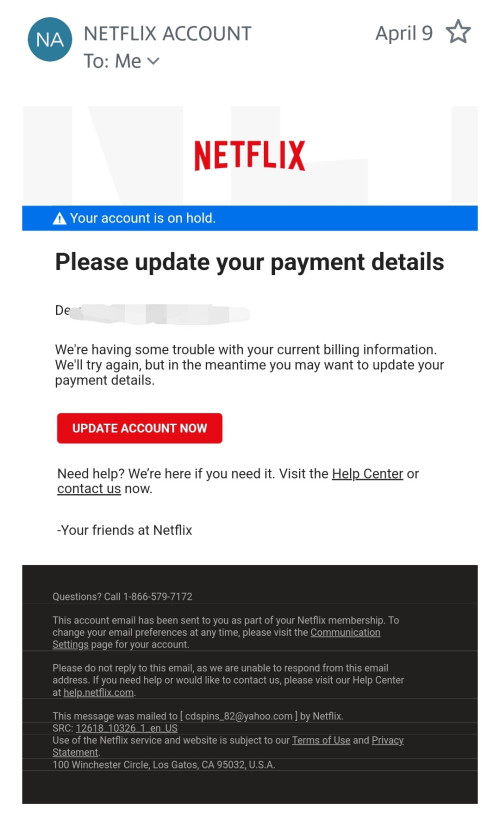
Just information sharing regarding Netflix account tie with Astro that usually will prompt late payment

user posted image

Although account is not suspended and still can view Netflix normally but will receive this email consistently monthly
*
Be careful. It’s NOT an official Netflix email message. I can tell.

Consider checking sender’s contact details above to verify that it’s a spam.

I assume you’re using Yahoo Mail. The icon should be showing Netflix’s “N” logo and the verified check icon besides it. This one isn’t at all.

This post has been edited by doubleM2: Apr 11 2025, 12:07 AM

36 Pages « < 28 29 30 31 32 > » Top
 

Change to:
| Lo-Fi Version
0.5684sec    0.50    7 queries    GZIP Disabled
Time is now: 4th December 2025 - 11:16 PM