Welcome Guest ( Log In | Register )

28 Pages « < 25 26 27 28 >Bottom

Outline · [ Standard ] · Linear+

 Astro Version 13A, All about Astro Malaysia offerings

views
     
yongtjunkit
post Dec 4 2022, 02:09 PM

Look at all my stars!!
*******
Senior Member
2,517 posts

Joined: Mar 2016
QUOTE(joshhd @ Dec 4 2022, 01:26 PM)
Nope, it is optional to switch to the new packs. But of course, the CS agent will try to upsell you the new packs as you contact them.
Tell them you want to relocate, and the new address already has a satellite dish but it is not DCSS. Then they'll do the necessary arrangements.

On the other note:
If you are currently using Astro IPTV (Multicast), then you will lose access to IPTV Multicast service as you relocate to the new house, hence you'll be converted to either Satellite (applies to any Astro box models) or Plug & Play user (Ulti/Ultra Box only) in the process.
*
I see, if I were to submit a request for relocation on the Self service web portal is it any better or is it better to contact CS? sweat.gif


This post has been edited by yongtjunkit: Dec 4 2022, 04:34 PM
yongtjunkit
post Dec 17 2022, 05:25 PM

Look at all my stars!!
*******
Senior Member
2,517 posts

Joined: Mar 2016
Anyone here was able to login to the BBC player app on the ultra box? For some reason I can’t seem to login to the app on the ultra box sweat.gif
yongtjunkit
post Dec 18 2022, 05:32 PM

Look at all my stars!!
*******
Senior Member
2,517 posts

Joined: Mar 2016
QUOTE(brandonkl @ Dec 18 2022, 04:33 PM)
No issue for me.
*
Do you scan the QR code with your phone QR code or via the App?

Scanning the QR code with the phone QR code just opens the app on my phone and for some reason the app on the Ultra box froze(back button doesn't work)
yongtjunkit
post Aug 27 2023, 07:55 PM

Look at all my stars!!
*******
Senior Member
2,517 posts

Joined: Mar 2016
Hi, does Astro reconnection fees applies to an active account(paid on time) but the Astro decoder is off for a long time till need to WhatsApp Astro to “update the list of service” error code: WAFT
yongtjunkit
post Aug 27 2023, 09:53 PM

Look at all my stars!!
*******
Senior Member
2,517 posts

Joined: Mar 2016
QUOTE(joshhd @ Aug 27 2023, 09:04 PM)
Reconnection fee is only applicable if your Astro account is somewhat being deactivated and you want to re-activate the account again.

If you see We Apologise For The Service Interruption message (Code: WAFT), especially when your Astro box is either power off or didn't receive Astro satellite signal for too long, that means you'll need to refresh your Astro smart card. It has nothing got to do whether your Astro account is active or not, and this can also happen to NJOI boxes.

You can refresh your Astro smart card on My Astro after logging in to your Astro ID:
https://myastro.astro.com.my/account/tv-pack/main-room/

Otherwise, WhatsApp "REFRESH" to +60395433838.
Before you proceed with the refresh, please double confirm your Astro smart card number.
*
I see, by any chance do you know if I left the decoder unplug for a while, how long would it take to show the “We Apologise For The Service Interruption message (Code: WAFT)”?
yongtjunkit
post Dec 9 2023, 09:58 PM

Look at all my stars!!
*******
Senior Member
2,517 posts

Joined: Mar 2016
Hi, just wondering if the ultra box installation settings -> satellite settings(transponder), is it supposed to be 19 Future 01?

LNB is DCSS

This post has been edited by yongtjunkit: Dec 9 2023, 09:58 PM
yongtjunkit
post Dec 9 2023, 10:40 PM

Look at all my stars!!
*******
Senior Member
2,517 posts

Joined: Mar 2016
QUOTE(joshhd @ Dec 9 2023, 10:04 PM)
Nah... Just choose the first option, 01 M3B VL - 10732 one will do.
Generally, no need to bother selecting others also.
*
Yup, I did choose that but somehow the ultra box by itself changes to that option sweat.gif

Ive tried this troubleshooting method
https://support.astro.com.my/question/servi...ra-box-ulti-box

But sometime the ultra box also give the “switch now” message when the weather is clear even after the troubleshooting method, the signal readings shows 0 when the “switch now” message is shown

This post has been edited by yongtjunkit: Dec 10 2023, 05:59 AM
yongtjunkit
post Dec 10 2023, 04:08 PM

Look at all my stars!!
*******
Senior Member
2,517 posts

Joined: Mar 2016
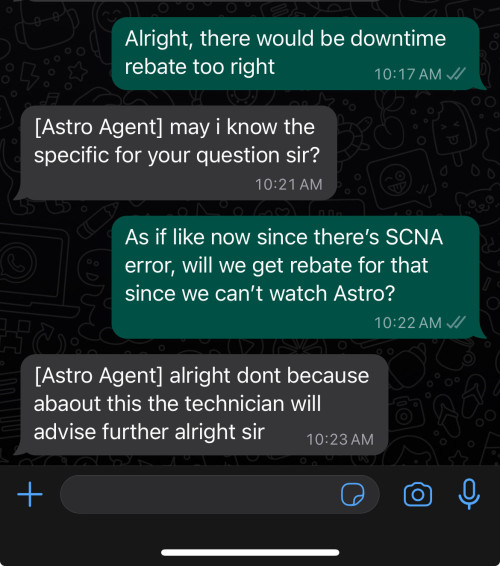
hmm.gif , just contacted astro customer service on whatsapp apparently the option is to either pay

Rm65 for the technician to come
-or-
renew contract for 24 months (box swap request)

btw for cases like this can claim downtime rebate? sweat.gif

This post has been edited by yongtjunkit: Dec 10 2023, 04:32 PM
yongtjunkit
post Dec 10 2023, 04:53 PM

Look at all my stars!!
*******
Senior Member
2,517 posts

Joined: Mar 2016
QUOTE(joshhd @ Dec 10 2023, 04:43 PM)
Currently which pack you're on again? Have ongoing contract?

btw for cases like this can claim downtime rebate? sweat.gif
"Downtime rebate" that you refer to, will start counting only from the day you file a report to them.
If it has started "many days ago" and you didn't tell Astro about it, then those days won't count (because there's no proof or black and white on their end).

And once the issue solves, you'll need to contact them to inform that the issue has resolved, then only they can issue a prorated rebate based on the number of days you're unable to watch Astro.
*
Super pack lite 3 movies + mini add ons

contract ended in 2022(box contract)

currently the SCNA issue is intermitment(on clear weather) though it has been going on for 2-3 weeks before sweat.gif

This post has been edited by yongtjunkit: Dec 10 2023, 04:55 PM
yongtjunkit
post Dec 10 2023, 11:37 PM

Look at all my stars!!
*******
Senior Member
2,517 posts

Joined: Mar 2016
QUOTE(pokemon @ Dec 10 2023, 11:04 PM)
24 months contract is a rip off.
You may check whether the free upgrade to ultra without contract is still available.
*
I’m actually currently using the ultra box sweat.gif
yongtjunkit
post Dec 11 2023, 08:40 AM

Look at all my stars!!
*******
Senior Member
2,517 posts

Joined: Mar 2016
QUOTE(joshhd @ Dec 10 2023, 11:43 PM)
You're using own Astro dish, right?
Not centralised dish like in apartment/condo, right?

You're getting the "Switch to Continuous Viewing" message (or SCNA) on all channels or certain channels only?
*
Yup, own dish, landed

All channels shows the "Switch to Continuous Viewing" message with the diagnostic showing no signal

Noticed that the transponder setting changes itself from 01 M3B to 19 Future01(tried changing it back to 01M3B, after some while, it would change back again)

Also after reboot it would work for a while then the "Switch to Continuous Viewing" message shows up

This post has been edited by yongtjunkit: Dec 11 2023, 08:55 AM
yongtjunkit
post Dec 11 2023, 02:02 PM

Look at all my stars!!
*******
Senior Member
2,517 posts

Joined: Mar 2016
QUOTE(pokemon @ Dec 11 2023, 10:17 AM)
How come ultra like to switch transponder setting?
*
I’ve no idea why the ultra box is doing that sweat.gif but that transponder setting looks off to me
yongtjunkit
post Dec 11 2023, 03:54 PM

Look at all my stars!!
*******
Senior Member
2,517 posts

Joined: Mar 2016
QUOTE(joshhd @ Dec 11 2023, 02:17 PM)
Have you tried this below? 😁
https://forum.lowyat.net/index.php?showtopi...&#entry96465062

From what I know, not just Ultra/Ulti Box, even Astro HD or PVR box will automatically keep changing entry point if it detects no satellite signal on that selected entry point for a period of time.

Nothing to be surprised here.
*
Hmm, I’ve tried unplugging and repluging the satellite cable, didn’t really notice that’s it’s coming lose, signal strength still goes to 0 after a while(not sure what causes it/ can’t tell the pattern at the moment) sweat.gif

This post has been edited by yongtjunkit: Dec 11 2023, 03:56 PM
yongtjunkit
post Dec 13 2023, 10:18 AM

Look at all my stars!!
*******
Senior Member
2,517 posts

Joined: Mar 2016
QUOTE(joshhd @ Dec 11 2023, 09:44 PM)
So it seems that the cable connector is somewhat loose? Try re-terminate the cable, and see if issue persists. 
Or re-terminate with a new F connector.

If you can do it yourself, and the issue solves, then congrats, you've successfully saved RM65.  smile.gif
It's been a while that DCSS LNB is no longer mandatory for Ultra Box.
Today, both Universal LNB and DCSS LNB can be used on Ultra Box.
*
hmm.gif the connector, after disconnecting it from the ultra box, notice that I can move it slightly in/out

So far after moving the connector in/ out a bit, didn’t notice the transponder setting change sweat.gif
yongtjunkit
post Dec 30 2023, 10:29 AM

Look at all my stars!!
*******
Senior Member
2,517 posts

Joined: Mar 2016
QUOTE(joshhd @ Dec 11 2023, 09:44 PM)
So it seems that the cable connector is somewhat loose? Try re-terminate the cable, and see if issue persists. 
Or re-terminate with a new F connector.

If you can do it yourself, and the issue solves, then congrats, you've successfully saved RM65.  smile.gif
It's been a while that DCSS LNB is no longer mandatory for Ultra Box.
Today, both Universal LNB and DCSS LNB can be used on Ultra Box.
*
QUOTE(joshhd @ Dec 13 2023, 10:42 AM)
the connector, after disconnecting it from the ultra box, notice that I can move it slightly in/out
By right, if you're able to pull out the F connector easily from the cable, then you should re-terminate the cable already.
For best results, use a new F connector instead. You can buy it online, like this one: https://shp.ee/fjc94i6
Select "F Type connector"
*
An update, swapped decoder between house A(ultra box)and B(DMT5v2 PVR box) and the ultra box works in house B

While the PVR box from house B can’t complete Installation setting setup in house A


Reported to Astro but no downtime rebate?

user posted image
yongtjunkit
post Dec 30 2023, 12:35 PM

Look at all my stars!!
*******
Senior Member
2,517 posts

Joined: Mar 2016
QUOTE(joshhd @ Dec 30 2023, 11:36 AM)
What is the LNB Type used in your House A and House B?
And does House A and House B used any kinds of cable splitters in between the connection from Astro box to satellite dish?
Cable splitters, that may also includes having multiple Astro TV wall sockets in the same house (e.g. upstairs bedroom and downstairs living room). 

If you're not sure, then have to test manually like this... Need you to provide this info so that I can advise further:

1) Press home>Settings>Satellite Settings>LNB Setup, change the "LNB Type" setting to "Universal".
Then Next, Next, Finish.

Then tune to these channels, and let me know what do you see on your TV for all these channels below:

CH122, CH124, CH305 = Can watch as usual / Switch to Continuous Viewing / Services Currently Not Available
CH549, CH805 = Can watch as usual / Services Currently Not Available / Unable to Play Video (HDCP Video Failed)

2) Press home>Settings>Satellite Settings>LNB Setup, change the "LNB Type" setting to "DCSS".
Then Next, Next, Finish.

Then tune to these channels, and let me know what do you see on your TV for all these channels below:

CH122, CH124, CH305 = Can watch as usual / Switch to Continuous Viewing / Services Currently Not Available
CH549, CH805 = Can watch as usual / Services Currently Not Available / Unable to Play Video (HDCP Video Failed)

Let me know the outcome for House A and House B respectively.
Otherwise, just get Astro technician to come over to our house, pay RM65 to fix the problem.
*
House A DCSS, House B SatCR, both house no splitter(as far as I know)

Tried switching house B PVR box to DCSS in house A, got stuck at installation settings setup with no signal

Noticed that the satellite cable is hanging(not secured down anymore) in house A
yongtjunkit
post Dec 30 2023, 08:41 PM

Look at all my stars!!
*******
Senior Member
2,517 posts

Joined: Mar 2016
QUOTE(joshhd @ Dec 30 2023, 06:51 PM)
If you use your PVR box to connect to a satellite dish that uses DCSS LNB, unfortunately you'll need to use a 2 way splitter and make sure that both Tuner 1 and Tuner 2 are connected to that 2 way splitter. You cannot just leave either one of the Tuner port unconnected when the LNB setting on your PVR box is set to DCSS or Universal. If it's SatCR then no issue.

So you'll need to terminate a short length RG6 cable (with F connector) to connect to Tuner 1 and Tuner 2 ports.
*
Hmm, can’t connect to tuner 1 to test? sweat.gif
yongtjunkit
post Dec 31 2023, 02:59 PM

Look at all my stars!!
*******
Senior Member
2,517 posts

Joined: Mar 2016
QUOTE(joshhd @ Dec 30 2023, 09:40 PM)
| House | Box model | LNB Type |
House A Ultra Box DCSS
House B DMTv2 PVR box SatCR

The proper installation for PVR box that uses DCSS LNB is, a 2 way splitter must be used, and both of its outputs ports should be connected to both Tuner ports of the PVR box respectively.
Well, I don't know why it was oddly designed like that... 🤷‍♂️

If your 1 only DCSS cable is connected to only either one of the Tuner port, and now you change the LNB setting on your PVR box to DCSS, and if you get stuck at satellite signal page even though Tuner 1 or 2 has signal, just press Back.
Then you'll see "Please wait..." setting. When the message dismisses, you shall see that the LNB Input Source setting has set to DCSS.

But still, most importantly is, you got to solve the loose F connector problem of your RG6 satellite cable first.
Otherwise, it's gonna make your troubleshooting difficult and "inaccurate" (as in things that should work, yet it doesn't work on you, because of your loose cable connector).
*
An update, got the Astro installer to come and troubleshoot the issue, it appears that the DCSS LNB is faulty(black color), the techician replaced the LNB with a new DCSS LNB(blue color) and was able to receive the satellite signal again but I’ve noticed this

The technician did mention that DCSS LNB would only last roughly about 2-3 years unlike universal LNB which last a long time sweat.gif

user posted image

Is this normal, or does this mean that the installer didn’t align the dish properly? sweat.gif
He did use his alignment tool(but the technician mentioned that the tool only works with DCSS LNB)

This post has been edited by yongtjunkit: Dec 31 2023, 03:30 PM
yongtjunkit
post Dec 31 2023, 04:46 PM

Look at all my stars!!
*******
Senior Member
2,517 posts

Joined: Mar 2016
QUOTE(joshhd @ Dec 31 2023, 04:10 PM)
Since the technician came, I assume he also re-terminated your Astro cable with new connector? Or he did not?
CNR reading of 12dB is considered low, and isn't normal to me. Mine can get up to 18-19dB max sweat.gif Didn't you show that page to the technician before he leave?
How is the condition of your satellite cable? Is it more than 10 years already?

When you go to this Diagnostics page, what is the TV channel number that you tuned to when you take that picture you provided earlier?
And then, try tune to either channel 393 or 707, and then go to this Diagnostics page again, what is the CNR signal reading do you see now?

He did use his alignment tool(but the technician mentioned that the tool only works with DCSS LNB)
No. It will still be able to get signal, even when the actual LNB Type used, is DCSS LNB.

There is a possibility that the technician may not be knowledgeable or aware in that (unfortunately that can happen to some installers out there).
Some installers would think that satfinder won't get any signal at all if use a DCSS LNB, which is not true.

In reality, he can use his "alignment tool" (referring to satellite signal finder device, or some people call it "satfinder") and set the technical parameters to:
- Frequency: Either 10732MHz or 10892MHz or 10932MHz or 10982MHz
- Polarisation: Vertical
- Symbol rate: 30000
- LO Frequency: Universal (9750-10600MHz)

So I assume that you paid him RM65, right? Then it should come with at least 2 weeks or 1 month warranty.
If you're concerned about this, ask him to come back.
*
Nope he did not sweat.gif , the 1st thing he tried is the swapping the LNB with universal LNB but it doesn't work(probably due to bad alignment), installer said his SatFinder/ Alignment Tool doesn't work with Universal sweat.gif

The cable is 9-10 years old

The channel that was on while I was on the diagnostic page is ch326
Changed to ch393 and the CNR reading is hovering between 12.5-12.6

He did check the satelite signal screen on the decoder before leaving but while packing up, we asked him if he's supposed to put the cover that covers the connector back on but he said DCSS doesn't need that cover since it's built in to the LNB itself rclxub.gif also he acidentally hit the satelite dish while packing

Yup, paid him rm65, trying to contact him about the "poor quality reading"

I belive leaving it like this mean it would be easier to lose satelite signal while raining?

This post has been edited by yongtjunkit: Dec 31 2023, 04:46 PM
yongtjunkit
post Dec 31 2023, 07:31 PM

Look at all my stars!!
*******
Senior Member
2,517 posts

Joined: Mar 2016
QUOTE(joshhd @ Dec 31 2023, 05:04 PM)
installer said his SatFinder/ Alignment Tool doesn't work with Universal sweat.gif
Whut? 😓

also he acidentally hit the satelite dish while packing
Hmm...

I belive leaving it like this mean it would be easier to lose satelite signal while raining?
If use a short RG6 cable (around 2 meters?) and connect from his sat finder to your new DCSS LNB installed at your satellite dish there, and the CNR reading is still 12dB, then yes, alignment is needed on dish and/or LNB. And you are correct, if you leave it like that, it'll be easier to lose satellite signal as it rain.

However, if the CNR reading at your satellite dish there is already high (let's say 17-18dB), you go back to your Ultra Box there, unplug the sat cable from Ultra Box and connect to the satfinder, then it becomes 12dB, that means "something wrong somewhere" between the satellite cable from your LNB to your Ultra Box. It could be the cable is too old, or too long, or somehow damaged. And you confirm there's no cable splitters or amplifiers or whatsoever is connected in between the cable connection, right?
*
Yup, confirmed that it’s a direct connection from satellite to the decoder (surface wiring)

28 Pages « < 25 26 27 28 >Top
 

Change to:
| Lo-Fi Version
0.0475sec    0.89    7 queries    GZIP Disabled
Time is now: 21st December 2025 - 05:44 PM