QUOTE(fruitie @ Jan 24 2025, 02:34 PM)
Hi guys, the DCSS in my condo is having issue and MO mentioned it requires an upgrade. However, the upgrade amount is quite hefty considering not many users are using DCSS.
Like suddenly yesterday while watching, it went to 0 signal and I had to switch to Internet viewing (continuous viewing)but switching channels is a PITA. I have to press a few buttons to be able to switch channels.
Here are my questions:
1) Can I unplug the RG6 cable from the wall satellite port and will it auto change to full a P&P box? Or any settings required?
2) If it can be changed to P&P by just unplugging the cable, will I miss out any channels if on P&P?
3) Is there any delay compared to the actual live TV?
4) Is it also that annoying to switch channels on P&P? Or can straight press the channel no. like on satellite?
5) Can I still switch back to DCSS in the future?
If the answers are negative, I may need to find other solutions.
You're saying that yesterday while you're watching Astro, suddenly you see the "Switch to Continuous Viewing" message (on all channels, I assume?).
Can you confirm whether the connection of the satellite cable (especially the F connector), is it in good and proper condition? Is the entire F connector can be easily turned (loose) or easily pulled out?
And when you contact your building management office, they confirmed that there is an issue with their centralise dish system (DCSS)?
What exactly is the issue till the point it requires an "upgrade"?
And now they tell you to pay for it, to continue using Astro centralise dish. Is my understanding correct?
How much did they ask you to pay? All other residents also being asked to pay?
QUOTE(doubleM2 @ Jan 24 2025, 04:10 PM)
First of all, your Astro Ultra Box is under Satellite right?
Afaik, here are the answers:
1) You need to reset the Ultra Box first. When reboot, set the box as “IPTV Plug & Play (self-install)” on step 3 of the startup page.
2) Yes, Ch 398; due to the broadcasting rights by the channel provider itself.
3) 30 seconds to 1 minute delay. Since it’s using a streaming method, not directly from satellite dish.
4) Um no, same as satellite. Just it buffers a bit when switching channels. The picture will be blurry first then goes to the highest quality by 5 seconds minimum (1080p 50fps). 4K UHD channels (Ch 549 & 805) will stutter frequently, regardless of the internet speed you currently have.
5) Of course. Same answer like 1), but switch to “Satellite”.
Correct me if I’m wrong. But hope it helps.
QUOTE(fruitie @ Jan 24 2025, 05:25 PM)
Thanks for the reply!
Yes, I’m currently on satellite.
1) I will read on how to reset the ultrabox.
2) Noted on 398 but I don’t watch it then should be OK.
3) OK, something still bearable.
4) Switching channels is easier on P&P then. I thought something like continuous viewing. Sad about the UHD channel 805 though I don’t watch it often but still.
5) Can I perform it myself or need technician to do it?
Anything I need to take note or jot down before I reset?
Thanks!
Yes, you can perform Restore Factory Settings and change it to Plug & Play mode while waiting for your Satellite issue to be resolved.
Home>Settings (gear icon)>Restore>Restore Factory Settings>Default PIN 0000
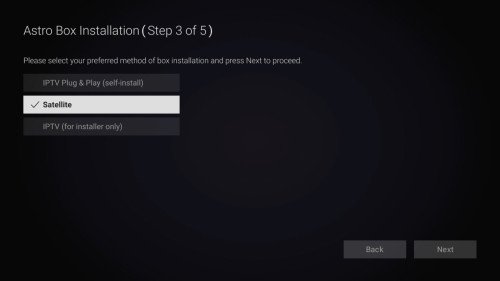
Select "IPTV Plug & Play (self-install)" if you want the box to operate under Plug & Play mode.
or select "Satellite" if you want the box to operate under Satellite mode again in the future, then make sure the LNB Type is set to dCSS (as below)
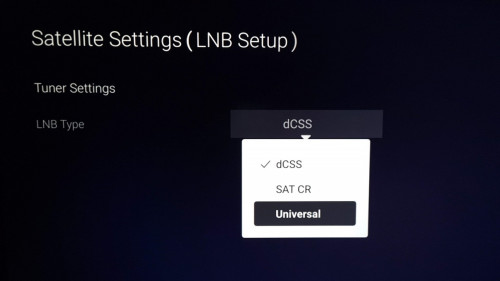
Note: You'll see this screen if you select Satellite (refer image above), and dCSS is the default option.
Anything I need to take note or jot down before I reset?Settings such as your preferred audio/subtitle language, saved WiFi network/passwords, will be affected.
Also, all of your streaming apps that were logged in on the Ultra Box, will be logged out.


 Jan 6 2025, 12:10 AM


 Quote
Quote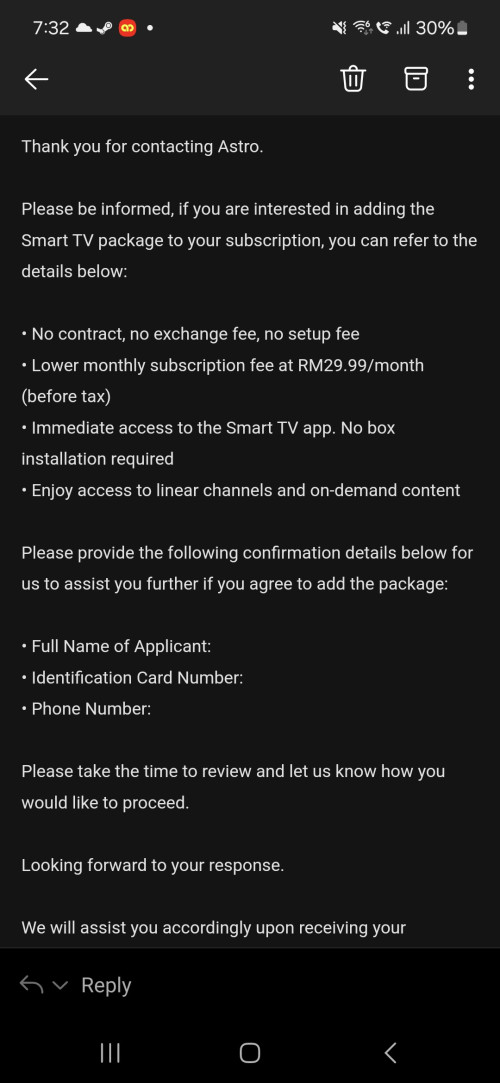


 ) hence that's why they just let you proceed downgrade to the pack instead.


 0.5345sec
 0.58
0.58
 7 queries
 GZIP Disabled