Astro One Packs (Dec 2024) https://product.astro.com.my/tv
Added on Say goodbye to confusing packs! On the 9th of Dec 2024, Astro have announced its new package offerings and introduced “Astro One” branding, consisting of only 3 packs below:
Astro One: Entertainment Pack =
RM49.99 = This is the basic and cheapest Astro pack today, including all your essential channels
Astro One: Sports Pack =
RM99.99 = On top of what you get from Entertainment Pack, you get complete Sports channels
Astro One: Epic Pack =
RM199.99 = Full channels, bundled with 6 streaming apps, including Netflix, Disney+ Hotstar, Max, etc
Subscription Rate CardPacks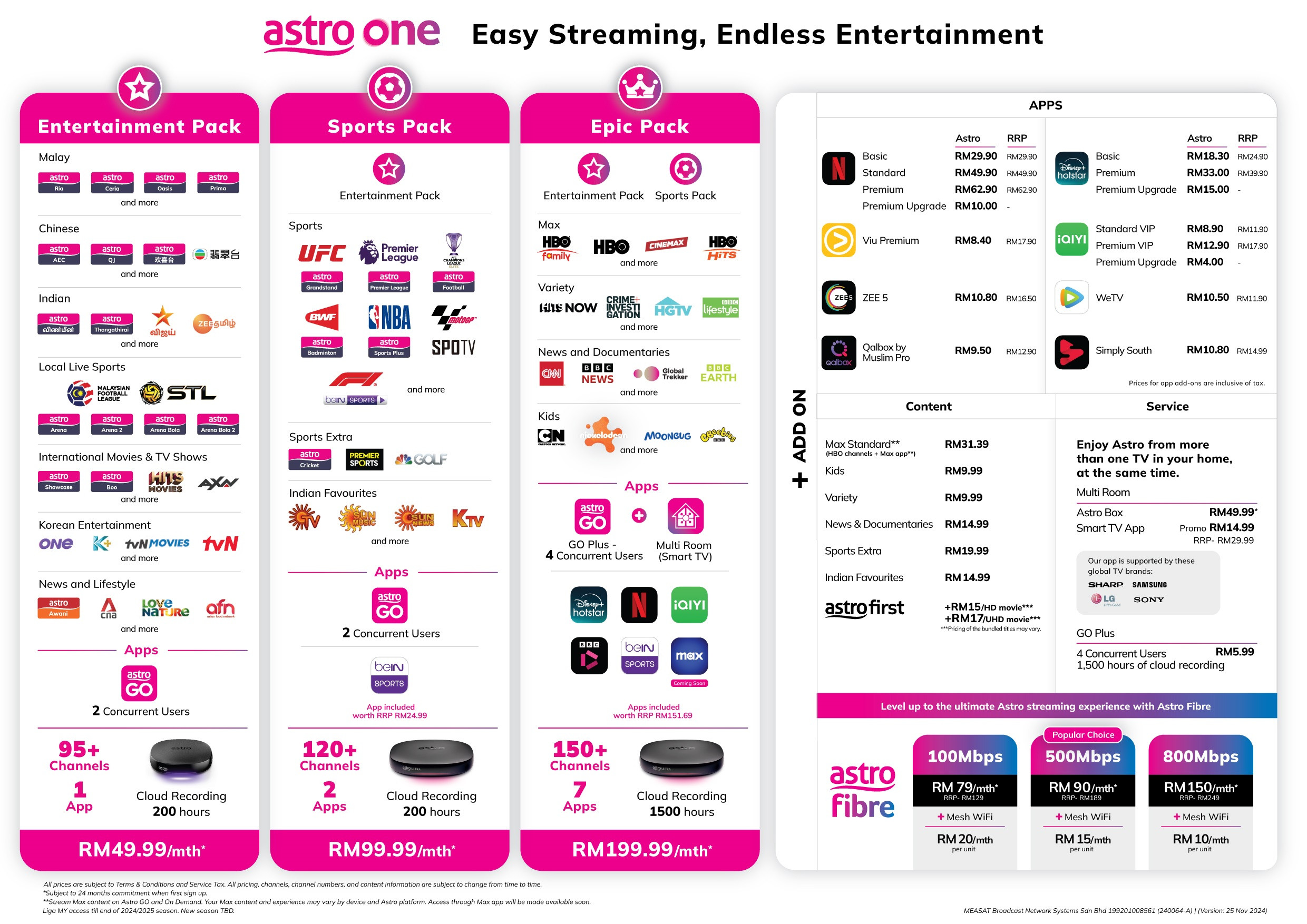
Added on Channel List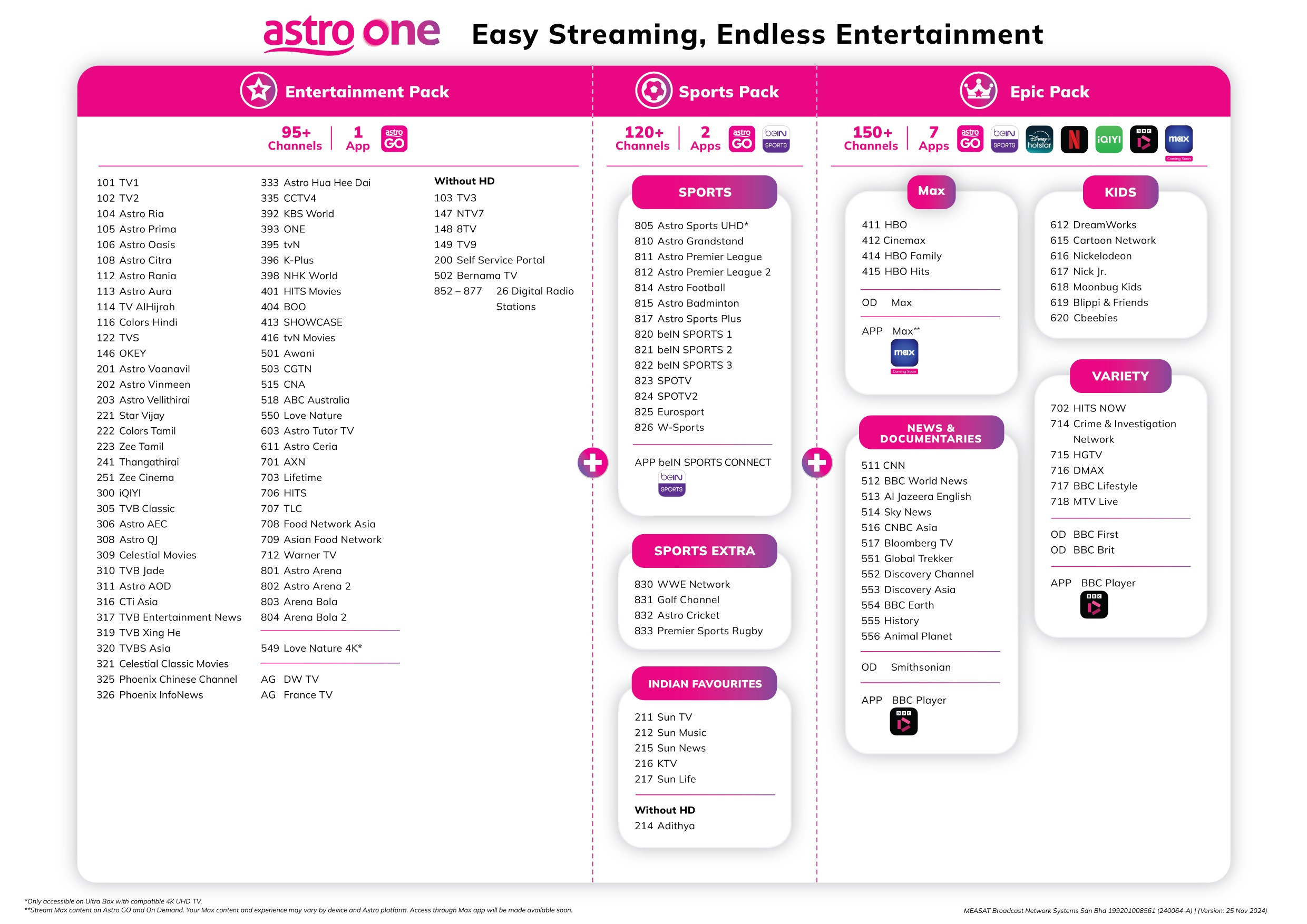
Added on Why Astro introduced new packs?Back on 9 Nov 2021, Astro initially introduced 9 packs, and then eventually became 14 packs, which many find it confusing and complicated. To rub salt into the wound, they even introduced auto contract renewal, where the contract would auto-renew itself indefinitely (as if they tie your legs to subscribe to Astro forever), and many customers are upset about this. It is believed that those packs are “deemed failure” to some extent.
Fast forward to 9 Dec 2024, Astro discontinued those packs and introduced new and simplified pack offerings into only 3 packs.
How do I know if I’m on the legacy pack or the new pack? Here are some
examples for your reference:
| Pack category | Pack names |
| Legacy Packs (1996-2021) | Any packs that mention "Family" (e.g. Family Lite/Extra/Special/Chinese Family/or something like Family+2Mini+Sp+Dy+Mv), Starter Pack, Value Pack 1/2/3/4/5, Starter Pack Plus, Value Pack Plus 1/2/3/4, Super Pack Lite 1/2/3/4 (Movies/Sports), Super Pack 1/2/3/4, Super Pack Plus 1/2/3 |
| New Packs (2021-2024) | Primary Pack, Entertainment Pack, Movies Pack, Sports Pack, Entertainment Plus Pack, Movies Plus Pack, Sports Plus Pack, Premium Pack 1/2/3/4/5, Platinum Lite, Platinum Pack |
Note: The naming convention of “New Packs” is no longer accurate in today’s context, because obviously those packs are not “new” anymore as it is replaced by the latest Astro One packs. Should I call them “2021 packs” since those were introduced in 2021?

Added on Existing legacy pack or 2021 pack customer? Here are 10 things you should know about the new Astro One1) Today, you’ve already been getting the equivalent of channels from "Astro One: Entertainment Pack" Even if you don’t switch to the Astro One pack,
ALL Astro customers today (except the very old “Family” packs) are already getting the same equivalent of channels from Astro One: Entertainment Pack (RM49.99), all thanks to the Astro’s Big Thank You campaign announced on 28 Nov 2024, which is just 1-2 weeks before Astro One pack launch on 9 Dec 2024.
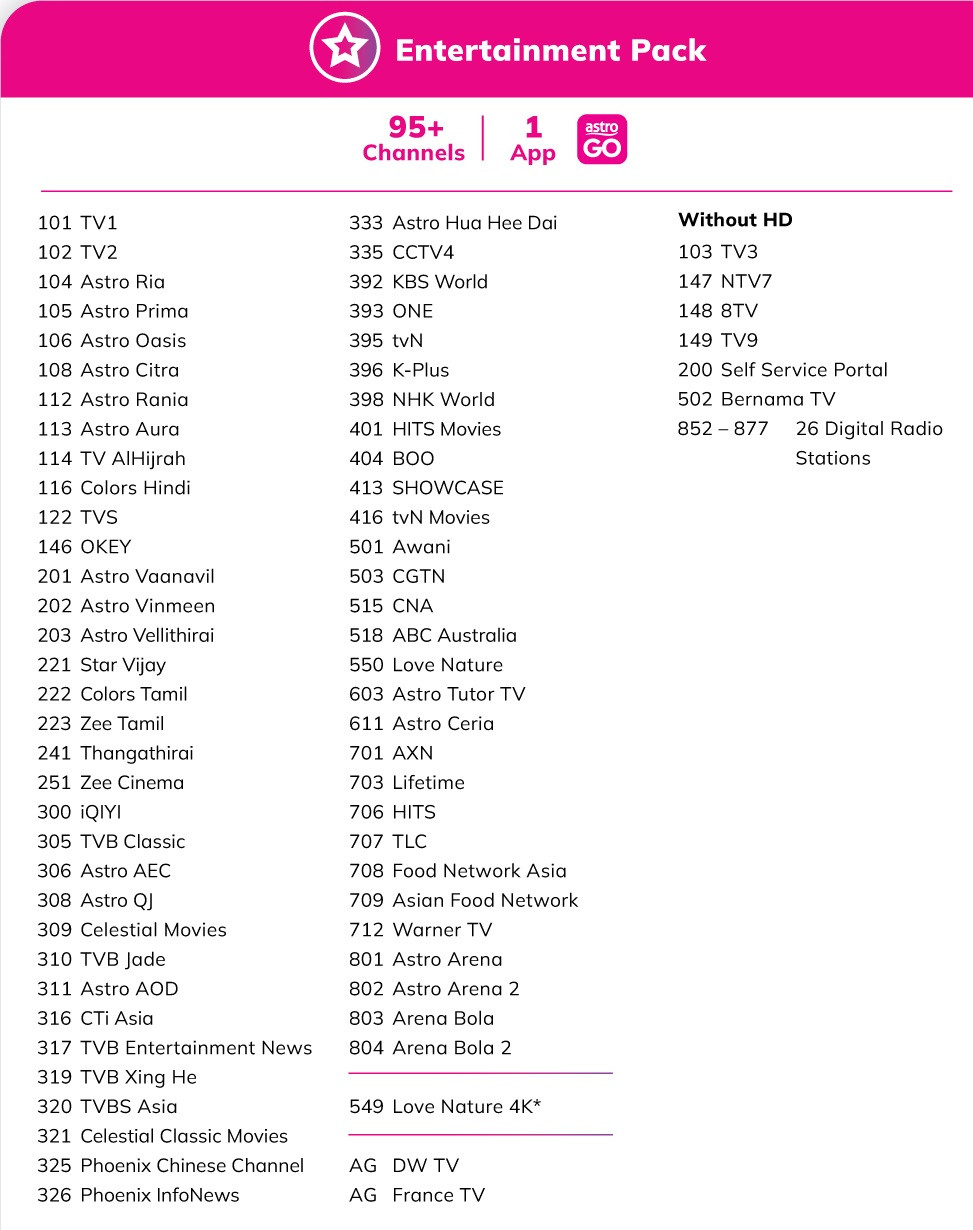
Added on In Astro’s Big Thank You campaign, they made the existing 18 subscription-required channels to be “permanently free” such as tvN (CH395), K-Plus (CH396), Astro Showcase (CH413) and more. This has benefited all Astro customers (except those on the old “Family” packs),
In certain scenarios, this has significantly impacted the comparison between the legacy packs, 2021 packs, and Astro One packs, bringing them closer in value.
So, you don’t need to ask around questions like
“If I switch to Astro One pack, does it include <insert channel name> or not, or need to subscribe to something extra?”… Just refer to the channel listing for Astro One: Entertainment Pack above, then you’ll see all the essential channels are already included.
If the channels you’re looking for aren’t included in Astro One: Entertainment Pack, such as kids or sports channels, then you can look at the content addons or higher tier packs.
There are many other important things to know about Astro’s Big Thank You campaign.
Learn more here:
https://forum.lowyat.net/index.php?showtopi...#entry110872977
Added on 2) 24-month contract only. No more auto contract renewal nonsenseThis time with the Astro One packs, there will only be a 24-month contract option, and no such thing as auto contract renewal.
Meaning, if you subscribe Astro One pack in Dec 2024, then the contract will end in Dec 2026, and that’s it.
After Dec 2026, you will have no contract (unless you make changes to your pack that trigger re-contract, then it’s a different story). It’s just like how a 24-month contract rule out there works...
Astro used to offer 0-month, 12-month, and 24-month contract options for TV packs launched in 2021, as well as the auto contract renewal rule.
The eventual result? Not many customers opted for 0-month and 12-month contract options as it is more expensive, and the auto-contract renewal has obviously made many customers upset with Astro in general.
Eventually, Astro discontinued auto contract renewal on 1 May 2024, and the contract discount has become a perpetual discount.
This is indeed a win for customers who are on the 2021 pack.
If you'd like to know more regarding the discontinuation of auto contract renewal, you can refer here:
https://forum.lowyat.net/index.php?showtopi...#entry109707353
Added on 3) You can still subscribe/remove addons even if you're NOT in Astro One pack Unlike back in those days when the 2021 packs were launched:
- Whatever existing pack/addons you have becomes "frozen"; not allowed to add add-ons, remove add-ons, add Multiroom, or upgrade Astro box. They don’t allow you to make such changes until you switch to the 2021 pack.
- Back then it was that “brutal” and “rigid” and they do this out of desperation, to push customers to move to the new 2021 packs (back then) so that they can be tied with never-ending 12/24 months contract (refer company’s financial performance).
- As time goes by, having such practice appears to be not delivering the expectation they were hoping for, hence they've eventually loosen up those draconian business rules, including discontinuing auto contract renewal, and things became much more flexible now
Today:
- Even if you're on the legacy or the 2021 packs, you are still allowed to subscribe to content addons like Kids RM9.99 or Sports RM42.99 (this addon is not available to Astro One pack customers), apps addons or even add Multiroom as well.
- If you want to remove your existing add-ons, you'll have to call the customer service to do so. And yes, the infamous one-time RM10 switching fee will be imposed as usual.
- Some content add-ons have been discontinued/no longer sellable, such as Korean, Horror, and Indonesian Favourites, as the channels from those add-ons have been included for every Astro customer (except "Family" pack customers), all thanks to the Astro’s Big Thank You campaign.
- Also, Disney+ Hotstar’s 3-month option (RM54.90) is no longer available for new take-ups on Astro.
- Those who are still paying for those no longer sellable add-ons will continue to pay as-is unless you call customer service and tell them to remove them.
Added on 4) Want to watch HBO channels? Subscribe to Max app. Already subscribed to “Movies”? Consider keeping it...- Unlike the legacy pack or the 2021 packs, there’s no more “Movies” pack in the world of Astro One.
- If you want to continue watching HBO channels upon switching to Astro One packs, you need to subscribe to the Max app, because the Max app is bundled together with the HBO linear channels (CH411, 412, 414, 415), and it cannot be subscribed separately.
- In other words, regardless of what pack you’re currently on, as long you can watch HBO linear channels on Astro today, then you are automatically entitled to the Max app (previously HBO GO, and it has been like this since its launch in 2019). So, this is not something new also… It’s just that many people aren’t aware or paying attention to this...

- Alternatively, if you don’t want to subscribe to it as an add-on, you can go for Astro One: Epic Pack RM199.99, as it is the only Astro One pack that bundles HBO linear channels today. If opting Epic Pack seems overbudget for you, then I’d suggest subscribe to the Max app addon instead.

If you’re on the legacy pack or 2021 pack where “Movies” is included in the subscription (e.g. Super Pack, Premium Pack 1,…), you are at an advantage and fortunate as you not only get HBO channels (CH411, 412, 414, 415), but also Disney+ Hotstar Basic and Max Standard.
If you subscribe to those 2 apps separately, the total price is likely to be more than what you pay for “Movies” for the legacy pack or the 2021 pack today. Example:
Example 1:Legacy Pack >> Starter Pack RM61.32 + Movies addon RM30.00 =
RM91.32Astro One Pack >> Astro One: Entertainment Pack RM49.99 + Disney+ Hotstar Basic RM16.94 + Max Standard RM31.39 =
RM98.22Example 2:Legacy Pack >> Super Pack 3 RM151.00 / RM163.00
Astro One Pack >> Astro One: Sports Pack RM99.99 + Disney+ Hotstar Basic RM16.94 + Max Standard RM31.39 + [Decide which add-ons you need, since Super Packs comes with 3 Mini packs of your choice: Kids RM9.99 + Variety RM9.99 + News & Documentaries RM14.99] =
RM183.19 excl tax if add all 3 add-ons mentioned. If you need more cloud recording hours than the default 200 hours, add RM5.99 for Astro GO+ where you’ll get 1500 cloud recording hours, and 4 device concurrency of Astro GO.
Example 3:2021 Pack >> Premium Pack 1
RM129.99Astro One Pack >> Astro One: Sports Pack RM99.99 + Disney+ Hotstar Basic RM16.94 + Max Standard RM31.39 =
RM148.22Example 4:2021 Pack >> Premium Pack 3
RM154.99 (RM159.49 from 1 Mar 2025) Astro One Pack >> Astro One: Sports Pack RM99.99 + Disney+ Hotstar Basic RM16.94 + Max Standard RM31.39 + Netflix Standard RM46.20 + Viu Premium RM7.78 (if you still need this) + Variety RM9.99 + Kids RM9.99 =
RM222.28or
Astro One Pack >> Astro One: Epic Pack RM199.99 + Viu Premium RM7.78 (if you still need this) =
RM207.77All prices shown above excludes Service Tax.As you can see, keeping "Movies" in your subscription is indeed an advantage, especially if you want Disney+ Hotstar and Max.
For this scenario, rather than switching to the Astro One pack, it is better to remain on your current pack. Because remember, once you move to the Astro One pack, you can’t return to your previous pack anymore. It will be a one-way-no-return ticket.
Unless, your goal is to reduce your monthly fee, and you don’t need Disney+ Hotstar or Max or are willing to sacrifice some of your streaming apps or channels, then it’s a different story.
On another note, if your Astro subscription today (regardless of legacy pack or 2021 pack) does not have “Movies”, you can subscribe Max Standard or Disney+ Hotstar as an individual app add-on.
IMPORTANT INFO REGARDING MAX APP ON ASTRO
At the time of writing (Dec 2024): - Anyone who subscribes to the Max Standard RM31.39 (excl. tax) add-on through Astro, or who has never created/linked an HBO GO account with their Astro subscription before 17 Nov 2024, will not be able to link their Max account with Astro for the time being.
- You can link the Max account with your Astro subscription once it is technically ready on Astro's side, estimated around Jan/Feb 2025.
- If you subscribe to Max Standard today, you can still watch HBO linear channels and stream selected Max content via On Demand and Astro GO.
- Max Ultimate plan (app addon and bundle upgrade) is not yet available on Astro, but it will be available eventually.
I have been informed that this is due to technical readiness and time constraints on Astro’s side, as Astro have to prioritise the overall effort for the launch of Astro One pack instead. More info here: https://forum.lowyat.net/index.php?showtopi...ost&p=110772447UPDATE: Effective 15 Jan 2025, you can now link Max account with your Astro subscription.
Added on 5) Subscribing to Astro One: Epic Pack gives you Multiroom (Smart TV)For the first time ever, you get an entitlement to Multiroom (Smart TV) when subscribing to a pack, eliminating the need to add it as a separate standalone service addon (Current ongoing price RM14.99/month, original price RM29.99/month), and it is only on the most expensive Astro One: Epic Pack (RM199.99).
In case you don’t know:
- Multiroom (Smart TV) allows you to enjoy Astro content/channels (just like Ulti/Ultra Box) but in the form of a smart TV app (rather than an Astro box), where you can use it at another smart TV in another room of your house.
- If you’re able to search and install the “Astro” app through the Google Play Store from your Android TV’s app store, or the app store from your Samsung or LG TV, then basically you can enjoy this already.
- The OS version of your smart TV must be Android 8 and above, or Tizen 4.0 and above (for Samsung TVs 2018 and newer) or webOS 4.0 and above (for LG TVs 2018 and newer).
- The official supported TV brands are Samsung, LG, Sharp and Sony.
- If you manage to install the smart TV app other than the 4 brands mentioned (or even on Android TV box/stick), the operation may not be guaranteed and you would not receive customer service support for this (if technical issue arises), since it is not under their "official supported TV brands".
- If you are using a 4K UHD TV, you can enjoy 4K UHD streaming quality on this 2 channels: Love Nature CH549 and Astro Sports UHD CH805, as well as selected On Demand content in 4K UHD.
- Remember, the Multiroom (Smart TV) service is meant to be as a supplementary or companion app (just like Astro GO), rather than literally replacing Astro box altogether.
Added on 6) Should you move to Astro One pack? What are the channels you may lose without subscribing to additional add-ons? You want to know whether should you move to the new pack, hoping to pay less for Astro… But it really depends on your pack subscription, and what are the addons you’re currently paying for. There’s no one-size-fits-all answer here, as everyone’s needs are different.
You can refer to the table I prepared below, and decide for yourself, whether is it worth it or not.
DISCLAIMER:
Please double-check your Astro bill to see which pack and add-ons you’re currently paying for first, as that should be your single source of truth when comparing the costs of switching to your preferred Astro One pack.
The table below is for reference purposes only.
Legacy Packs| Pack name | Price | Which Astro One pack has the similar/closest offerings to my existing pack? | You might lose some existing channels if you don't subscribe to these addons: | You might lose these existing apps if you don't subscribe to these apps addon: |
| Any "Starter Packs" | RM61.32 | Astro One: Entertainment Pack (RM49.99) | Kids1 +RM9.99 | N/A |
| Any "Starter Plus Pack" | RM68.82 | Astro One: Entertainment Pack (RM49.99) | Kids1 +RM9.99 | Disney+ Hotstar Basic +RM16.94 |
| Value Pack 1/2/3 | RM80.00 | If you don't need Premier League (CH811-814, 817) then Astro One: Entertainment Pack (RM49.99). If you need Premier League (CH811-814, 817) then Astro One: Sports Pack (RM99.99) | Kids1 +RM9.99, Indian Favourites +RM14.99 if you're on Value Pack 2 | N/A |
| Value Plus Pack 1/2/3 | RM87.50 | If you don't need Premier League (CH811-814, 817) then Astro One: Entertainment Pack (RM49.99). If you need Premier League (CH811-814, 817) then Astro One: Sports Pack (RM99.99) | Kids1 +RM9.99 | Disney+ Hotstar Basic +RM16.94 |
| Value Pack 4 (Selection Pack) | RM80.00 | If you don't need Premier League (CH811-814, 817) then Astro One: Entertainment Pack (RM49.99). If you need Premier League (CH811-814, 817) then Astro One: Sports Pack (RM99.99) | Your current pack comes with 1 mandatory selection of Mini package (News/Learning/Kids/Variety). Decide based on your needs: Kids1 +RM9.99, Variety +RM9.99, or News & Documentaries +RM14.99 | N/A |
| Value Plus Pack 4 | RM87.50 | If you don't need Premier League (CH811-814, 817) then Astro One: Entertainment Pack (RM49.99). If you need Premier League (CH811-814, 817) then Astro One: Sports Pack (RM99.99) | Your current pack comes with 1 mandatory selection of Mini package (News/Learning/Kids/Variety). Decide based on your needs: Kids1 +RM9.99, Variety +RM9.99, or News & Documentaries +RM14.99 | Disney+ Hotstar Basic +RM16.94 |
| Value Pack 4 (Fans Pack) | RM107.00 | Astro One: Sports Pack (RM99.99) | Your current pack comes with 1 mandatory selection of Mini package (News/Learning/Kids/Variety). Decide based on your needs: Kids1 +RM9.99, Variety +RM9.99, or News & Documentaries +RM14.99 | N/A |
| Value Pack 5 (Stars Pack) | RM99.00 | Astro One: Entertainment Pack (RM49.99) | Your current pack comes with 1 mandatory selection of Mini package (News/Learning/Kids/Variety). Decide based on your needs: Kids1 +RM9.99, Variety +RM9.99, or News & Documentaries +RM14.99 | Disney+ Hotstar Basic +RM16.94, Max Standard2 +RM31.39 |
| Any "Super Pack Lite (Sports)" | RM115.00 | Astro One: Sports Pack (RM99.99) | Your current pack comes with 1 mandatory selection (2 for Super Pack Lite 4) of Mini package (News/Learning/Kids/Variety). Decide based on your needs: Kids +RM9.99, Variety +RM9.99, and/or News & Documentaries +RM14.99 | N/A |
| Any "Super Pack Lite (Movies)" | RM120.00 | If you don't need Premier League (CH811-814, 817) then Astro One: Entertainment Pack (RM49.99). If you need Premier League (CH811-814, 817) then Astro One: Sports Pack (RM99.99) | Your current pack comes with 1 mandatory selection (2 for Super Pack Lite 4) of Mini package (News/Learning/Kids/Variety). Decide based on your needs: Kids +RM9.99, Variety +RM9.99, and/or News & Documentaries +RM14.99 | Disney+ Hotstar Basic +RM16.94, Max Standard2 +RM31.39 |
| Any "Super Pack" | RM151.00 / RM163.00 | Astro One: Sports Pack (RM99.99) | Your current pack comes with 3 mandatory selection of Mini packs (News/Learning/Kids/Variety). For Super Pack 4, all 4 Mini packs have been included. Decide based on your needs: Kids +RM9.99, Variety +RM9.99, and/or News & Documentaries +RM14.99. And also, Indian Favourites +RM14.99 if you're on Super Pack 2 or 4 | Disney+ Hotstar Basic +RM16.94, Max Standard2 +RM31.39 |
| Any "Super Pack Plus" | RM183.00 | Astro One: Sports Pack (RM99.99) | Super Pack Plus has all 4 Mini packs included. Decide based on your needs: Kids +RM9.99, Variety +RM9.99, and/or News & Documentaries +RM14.99. And also, Indian Favourites +RM14.99 if you're on Super Pack Plus 2 or 4 | Disney+ Hotstar Basic +RM16.94, Max Standard2 +RM31.39 |
Remarks:
1 Add Kids if you still need Moonbug Kids CH618. By adding Kids, you'll also get complete kids channels as well (CH612-620).
2 Add Max app to continue watching HBO channels CH411, 412, 414, and 415, as both the app & HBO linear channels are bundled together.
Note: All prices shown above (including both content & app addons) are excluding Service Tax. Remember to add 8% (Service Tax) of the total amount on your own upon calculation, or 6% (Service Tax) if your Astro subscription includes broadband service (e.g. Astro Fibre/Maxis/Allo/CTS). 2021 PacksNetflix Malaysia has increased all of its plan prices effective 14 Nov 2024. All Astro packs that have Netflix bundled in them, will experience a price hike from 1 March 2025 onwards.
| Pack name | Price (Today until 28 Feb 2025) | Price (From 1 Mar 2025) | Which Astro One pack has the similar/closest offerings to my existing pack? | You might lose some existing channels if you don't subscribe to these addons: | You might lose these existing apps if you don't subscribe to these apps addon: |
| Primary Pack | RM59.99 | RM59.99 | Astro One: Entertainment Pack (RM49.99) | You won't be losing any channels | N/A |
| Entertainment Pack | RM89.99 | RM89.99 | Astro One: Entertainment Pack (RM49.99) | Kids +RM9.99, Variety +RM9.99, Indian Favourites4 +RM14.99 | Viu Premium3 +RM7.78 |
| Movies Pack | RM94.99 | RM94.99 | Astro One: Entertainment Pack (RM49.99) | Max Standard2 +RM31.39 | Disney+ Hotstar Basic +RM16.94, Max Standard2 +RM31.39 |
| Sports Pack | RM99.99 | RM99.99 | Astro One: Sports Pack (RM99.99) | You won't be losing any channels | N/A |
| Entertainment Plus Pack | RM129.99 | RM134.49 | Astro One: Entertainment Pack (RM49.99) | Kids +RM9.99, Variety +RM9.99, Indian Favourites4 +RM14.99 | Netflix Standard +RM46.20, Viu Premium3 +RM7.78 |
| Movies Plus Pack | RM129.99 | RM134.49 | Astro One: Entertainment Pack (RM49.99) | Max Standard2 +RM31.39 | Netflix Standard +RM46.20, Disney+ Hotstar Basic +RM16.94, Max Standard2 +RM31.39 |
| Sports Plus Pack | RM129.99 | RM134.49 | Astro One: Sports Pack (RM99.99) | You won't be losing any channels | Netflix Standard +RM46.20 |
| Premium Pack 1 | RM129.99 | RM129.99 | Astro One: Sports Pack (RM99.99) | Max Standard2 +RM31.39 | Disney+ Hotstar Basic +RM16.94 & Max Standard2 +RM31.39 |
| Premium Pack 2 | RM149.99 | RM154.49 | Astro One: Sports Pack (RM99.99) | Kids +RM9.99, Variety +RM9.99, Indian Favourites4 +RM14.99 | Netflix Standard +RM46.20, Viu Premium3 +RM7.78 |
| Premium Pack 3 | RM154.99 | RM159.49 | Astro One: Entertainment Pack (RM49.99) | Max Standard2 +RM31.39, Kids +RM9.99, Variety +RM9.99, Indian Favourites4 +RM14.99 | Netflix Standard +RM46.20, Viu Premium3 +RM7.78, Disney+ Hotstar Basic +RM16.94, Max Standard2 +RM31.39 |
| Premium Pack 4 | RM124.99 | RM124.99 | Astro One: Sports Pack (RM99.99) | Kids +RM9.99, Variety +RM9.99, Indian Favourites4 +RM14.99 | Viu Premium3 +RM7.78 |
| Premium Pack 5 | RM124.99 | RM124.99 | Astro One: Entertainment Pack (RM49.99) | Max Standard2 +RM31.39, Kids +RM9.99, Variety +RM9.99, Indian Favourites4 +RM14.99 | Viu Premium3 +RM7.78, Disney+ Hotstar Basic +RM16.94, Max Standard2 +RM31.39 |
| Platinum Lite | RM164.99 | RM164.99 | Astro One: Sports Pack (RM99.99) | Max Standard2 +RM31.39, Kids +RM9.99, Variety +RM9.99, News & Documentaries +RM14.99, Indian Favourites4 +RM14.99 | Viu Premium3 +RM7.78, Disney+ Hotstar Basic +RM16.94, Max Standard2 +RM31.39 |
| Platinum Pack | RM194.99 | RM199.49 | Astro One: Epic Pack (RM199.99) | You won't be losing any channels | Viu Premium3 +RM7.78 |
Remarks:
2 Add Max app to continue watching HBO channels CH411, 412, 414, and 415, as both the app & HBO linear channels are bundled together.
3 Add Viu Premium if you need it, especially if it was your 1x Asian Favourites selection
4 Add Indian Favourites if you need it, especially if it was your 1x Asian Favourites selection
Note: All prices shown above (including both content & app add-ons) are excluding Service Tax. Remember to add 8% (Service Tax) of the total amount on your own upon calculation, or 6% (Service Tax) if your Astro subscription includes broadband service (e.g. Astro Fibre/Maxis/Allo/CTS). In case you want to know which channels are included in the particular add-ons, you can refer here…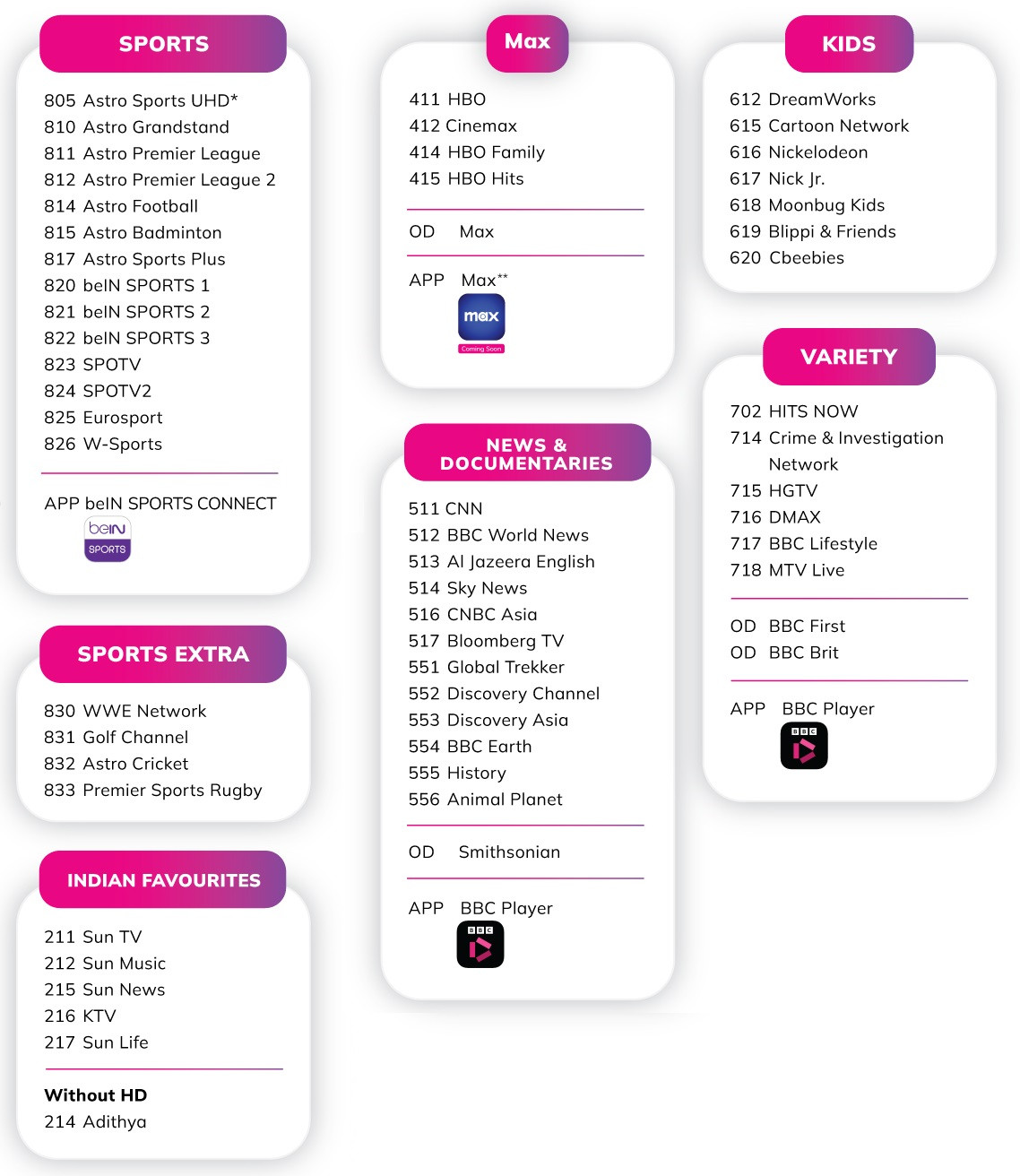
Added on Note: Sports RM42.99 add-on is available to legacy and 2021 pack customers only, and it’ll become ineligible to you to subscribe as an add-on once you move to any Astro One pack (e.g. Astro One: Entertainment Pack). | Pack name | What is the “extra” stuff I’ll get by switching to the Astro One pack? |
| Astro One: Entertainment Pack | You won’t be getting anything extra than what you have today (unless you subscribe to other add-ons, of course) |
| Astro One: Sports Pack | You get complete Sports channels, including Sports Extra channels (Golf, Rugby, Cricket) and also Indian Favourites |
| Astro One: Epic Pack | You get 6 streaming apps (e.g. Netflix Standard, Disney+ Hotstar Basic, Max Standard, IQIYI Standard VIP, beIN Sports Connect, BBC Player), Astro GO+ (4 device concurrency, 1500 hrs cloud recording) and Multiroom Smart TV |
Astro GO device concurrencyRead this if you are particular in Astro GO's device concurrency:
4 device concurrency of Astro GO means you can stream Astro GO on 4 devices
at the same time. Not to be confused with “device logins”.
All legacy pack customers have been enjoying 4 device concurrency of Astro GO for a very long time.
For the 2021 packs, if you are not on the Platinum Pack or subscribed to Astro GO+ (RM5.99/month), then you’d only get 2 device concurrency of Astro GO.
Compared with Astro One packs, you get 2 device concurrency for the Entertainment Pack and Sports Pack, and 4 device concurrency for the Epic Pack.
So if you want to switch from
any legacy pack to either Astro One's Entertainment or Sports Pack, do note that
you will sacrifice your Astro GO's device concurrency from the default 4 to 2, unless you subscribe to Astro GO+ addon for RM5.99/month, which allows you to enjoy 4 device concurrency of Astro GO and 1500 cloud recording hours.
But if you opt for Epic Pack, then don't have to worry as Astro GO+ is already included.
Added on 7) Billing cycle for app addons would not match your Astro’s bill cycle dateIt will be based on the day you subscribe to the app, not your Astro’s bill cycle date. This will impact how the bill proration works for app add-on purchases, especially for app removal/downgrades.
Subscribe app or upgrade app planSubscribing an app or upgrading the app tier will take effect immediately, and prorated charges will apply.
For example, the billing date of your Astro bill is the 10th day of the month (e.g. 10 Jan to 9 Feb)
You subscribe to Disney+ Hotstar Basic addon on 15 Jan. Therefore, the billing cycle for Disney+ Hotstar Basic itself shall be from 15 Jan to 14 Feb.
Result: Prorated charges will apply for Disney+ Hotstar Basic, starting from the day of purchase.
The above scenario shall apply similarly for app tier upgrades (e.g. upgrade from Disney+ Hotstar Basic to Disney+ Hotstar Premium, where proration of both apps plans will be charged accordingly.
Remove app or downgrade app planRemoving an app or downgrading the app tier will only take effect on the next billing cycle, and there will be NO prorated charges.
For example, the billing date of your Astro bill is the 10th day of the month (e.g. 10 Jan to 9 Feb)
You subscribe to Viu Premium addon on 15 Jan. Therefore, the billing cycle for Viu Premium itself shall be from 15 Jan to 14 Feb.
However, on 24 Jan, you remove/cancel the Viu Premium app from your Astro subscription using My Astro.
Result: The removal of your Viu Premium subscription will take effect only at the end of the app’s billing cycle (14 Feb), not on the day you remove the app (24 Jan) or at the end of your Astro’s billing cycle (9 Feb). Consequently, you will still be charged in full according to the app's billing cycle (15 Jan - 14 Feb) for the app you removed.
This scenario also applies similarly to app tier downgrades (e.g. downgrading from Disney+ Hotstar Premium to Disney+ Hotstar Basic), where you will be charged in full for the Premium plan for Jan, while you will be charged in full for the Basic plan for Feb.
What if your Astro account got suspended (e.g. due to non-payment, forgot to pay)?For example, the billing date of your Astro bill is the 10th day of the month (e.g. 10 Jan to 9 Feb).
You subscribe to Viu Premium add-on on 15 Jan. Therefore, the billing cycle for Viu Premium itself shall be from 15 Jan to 14 Feb.
However, your Astro account was suspended starting 10 Feb due to outstanding payments from previous months.
Result You can still use Viu Premium until the end of the app’s billing cycle (14 Feb), even though your Astro account was suspended on 10 Feb. You will still be charged in full for Viu Premium, no proration whatsoever.
If you clear the overdue amount of your Astro account BEFORE the end of the app’s billing cycle (14 Feb), then your Viu Premium subscription shall remain uninterrupted and will continue for the following months (15 Feb - 14 Mar) as per usual cycle.
However, if the overdue amount remains unpaid, your Viu Premium subscription will automatically stop renewing and may be downgraded to the Free tier (if applicable) at the end of the billing cycle (14 Feb).
If you clear the overdue amount of your Astro account at a later date (e.g. 20 Feb), your Viu Premium subscription will restart with a new billing cycle, which will be from 20 Feb to 19 Mar, rather than the previous cycle of 15 Feb to 14 Mar.
Please bear in mind that:
- The above is only applicable for app add-ons.
- If you’re obtaining app subscriptions through pack bundles and your Astro account is suspended, usually the respective streaming app will also be suspended on the same day. Once your Astro service is resumed, the apps will also resume.
- Different apps may have different behaviours and rules regarding proration and plan changes.
- Although it'll less likely to happen, but if you notice that the app’s account subscription is still not active (or not on your subscribed plan tier) even though your Astro account has resumed from suspension, you may need to link the app’s account with your Astro subscription again (as if you are newly subscribing to the app). If all else fails, contact customer service for assistance.
Added on 8) Don’t waste your time using My Astro if you intend to pay less for Astro when moving to Astro One packAstro expects some existing customers to be interested in switching to the Astro One pack, because there is a high chance that customers could pay less than their current subscription.
At the same time, they may either sacrifice some channels or apps they don’t mind losing, or they might not lose anything upon switching, even if it means committing to a new 24-month contract.
When you try to switch to the Astro One pack through My Astro, you can tick/untick addons, add fibre plan, add Multiroom, etc.
But as you proceed to the next step,
it will perform a before/after comparison of your monthly fee in the background.
If it detects that your selections result in
paying more than what you’re paying today, then it will let you proceed to the next step as usual.
But if it detects that your selections result in
paying lesser than what you’re paying today, they will not allow you to proceed and then tell you to contact customer service “for further assistance” instead.
Just because My Astro doesn’t allow it, that doesn’t mean there’s no other way for you to do it. It’s just that they intentionally make it difficult and inconvenient, to discourage you from proceeding, hoping that you would eventually give up.
If you’re considering switching from your existing pack to the Astro One pack to lower your monthly subscription fee,
you'll have to call customer service.
However, there is an exception: My Astro now allows you to easily remove app add-ons, even if you are on the legacy or the 2021 pack.
Added on 9) You can remove app add-ons via My Astro; there’ll be no RM10 switching feeSubscribed to Viu Premium (example), and now feels like want to cancel it, and then subscribe to Disney+ Hotstar (another app)?
You can do it easily through My Astro, by ticking or unticking the apps that you need or don’t need, and then just submit the order.
Usually, subscribing to an app or upgrading the app’s plan tier takes effect immediately, while downgrading the app plan tier will take effect on the next billing cycle date.
Although removing/downgrading apps on Astro means your overall monthly fee will become lower, Astro seems to want to provide easy access to the customers to do so, in the name of “flexibility”, by not imposing an RM10 switching fee, so you can have peace of mind in making changes to your apps anytime. Maybe because app subscription money goes to the respective streaming apps rather than Astro earning it, so they give some leeway on this? 😪
But remember, the above only applies to standalone
apps addon.
At the time of writing (Dec 2024), My Astro does not allow removing content add-ons and pack downgrades.
Even if you call customer service for assistance, an RM10 switching fee will still be imposed if you make changes to your subscription that result in a lower monthly payment for reasons such as removing content add-ons (e.g. Kids, Variety…) or downgrading packs.
For the avoidance of doubt, for example, if you attempt to remove app add-ons and content add-ons at the same time, then an RM10 switching fee will be imposed. Not because of removing the app addon, but because of the content addon removal involved.
Added on 10) Call customer service if you intend to move to Astro One pack to pay less for Astro, then you might get a retention offerIf you intend to switch to the Astro One pack where the new monthly fee would be lower than what you’re paying now, just give up the idea of doing so through touchpoints like My Astro, WhatsApp, any chatbot agents, email, or enquiry forms.
It’s because their response will be the same: they will tell you to call customer service at 03-95433838 “for further assistance”.
If you feel lazy or hate talking to customer service for various reasons, then unfortunately, that’s the only official way... 😪
If you manage to talk to the agent, and you tell them you want to switch to Astro One pack,
they will likely propose retention offers to you.
So far, I see their retention offer is a monthly rebate for XX months. This is according to some of the previous user's posts here, like this one
here and this one
here.
Both of them are on Value Pack and have been offered and agreed to RM15 monthly rebates for 24 months, and no new contract either.
I guess the monthly rebate amount would be higher if you are on the more expensive pack (e.g. Super Pack or Platinum) and lower if you’re on the cheaper pack.
Oh well… Seems like
if you want a monthly rebate “as a loyal customer”, you’ll have to ask for it, by calling customer service and telling them you want to switch to Astro One pack.
Even if you don’t intend to switch to the Astro One pack, just pretend as if you’re interested; at least you might try your luck.
From there, you can see that they would rather convince you to stay on your current pack and even propose retention offers, such as monthly rebates, than easily allow you to switch to the Astro One pack for obvious reasons.
Ugh, that feels so “insincere”… 😪
On another note, logically, if your current total Astro subscription fee is less than RM49.99 (the price of Astro One: Entertainment Pack), then I don’t think Astro will propose any retention offer when you call them to switch to the Astro One pack, especially if you’re on those legacy “Family” pack (~RM39.95/mth).
Or there is also a possibility that they may not propose retention offers to any “Family” pack customers, even if the monthly fee is way higher, as the package is considered “too old”.
If you refuse the retention offer and insist to proceed changing to Astro One pack, where your monthly payments becomes lesser than what you're paying now, then you will be charged an RM10 switching fee.
RM10 switching fee won't be applied if you breach your ongoing contract by moving from your existing pack to the new Astro One pack, since you will be paying the early termination fees.
Added on ConclusionWith the Astro One packs, although it is now 3 packs which is so much simpler in many aspect, it isn’t necessarily a must-switch or better-to-switch thing for every existing customer out there.
Some people think that switching to Astro One means paying more for the same or lesser channels/apps, while others think it is cheaper and get to enjoy more channels/apps by remaining on existing packs.
So, would you switch to the Astro One pack, or "stay where you are"?
I hope you find this info helpful as you make your decision.
 This post has been edited by joshhd: Jan 21 2025, 11:04 PM

 Dec 16 2024, 12:29 AM


 Quote
Quote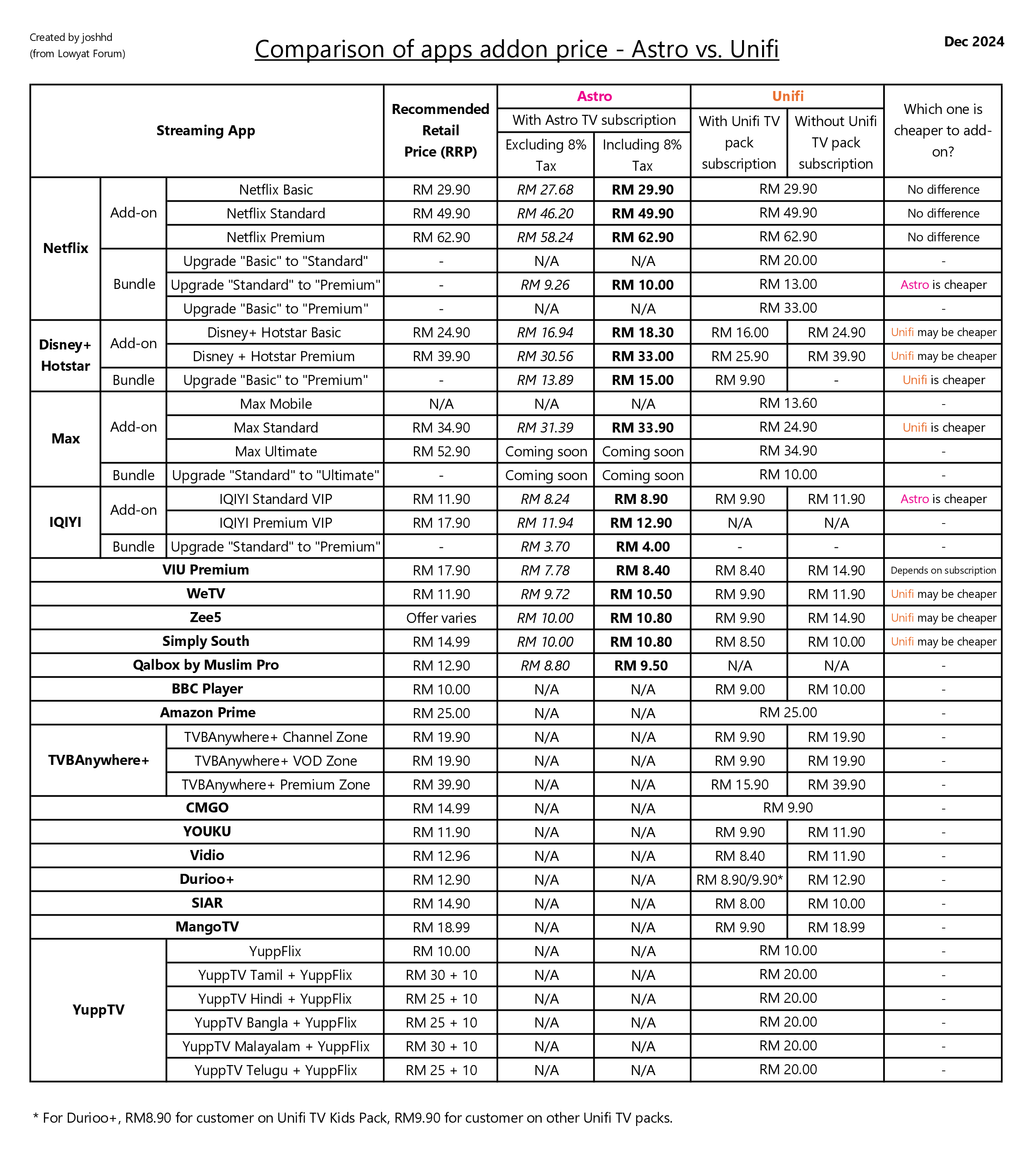


 )
) By doing so, you can make Astro installer's life easier too.


 0.0599sec
 0.76
0.76
 7 queries
 GZIP Disabled