Welcome Guest ( Log In | Register )

Outline · [ Standard ] · Linear+

 Build your own NAS and Homelab with cheap PCs!, UnRaid, Xpenology, NAS4Free, Freenas,OMV

views
     
TSC-Fu
post Apr 24 2018, 10:42 PM, updated 5y ago

Ninja-Fu
******
Senior Member
1,051 posts

Joined: Apr 2005
From: Brisbane, QLD, Ostolia


C-Fu's LYN guide for NAS & Homelab solutions

23/4/2018: First release
27/4/2018: Added Download and installation steps
3/5/2018: Added hardware considerations, and sixth step (almost final step)
28/11/2018: Updated to use simpler, easier tools, and newer DSM 6.2 version. Change name from NAS4Free > XigmaNAS (same thing)
29/10/2019: Added Table of Contents
21/07/2020: Added google drive integration via rclone


QUOTE(1kokies @ Nov 3 2019, 12:46 AM)
First rule of NAS

1. Secure your data
2. Back up your data
3. Take care of your data

Second rule of NAS

1. Choose OS wisely
2. Choose hardware wisely
3. Have back up hardware that is repeatable

Third rule of NAS

1. Contribute to community
2. Expand network relevant to the chosen OS
3. Pool resources

*
Table of Contents
Intro & Guide: this post
Docker & VM
LSI card for extra sata ports

I've been building and selling NAS solutions for many years now, exploring most of the options available in the market and DIY. Since my 60TB RAID is slooooowly building, verifying, parity checking (whatever they call them), I decide to make this guide. I've now come to the conclusion that DIY is the best.

But seems to me that not many people here have a clue, especially when it comes to deciding which DIY NAS solutions that you like. So here's what I know. A different kinda guide than what you can google, I think.

Guide level: Beginner and intermediate. This guide isn't for lazy people. You still need to google and read up. And if what I write here is not true because you're a pro, you're absolutely right. I wrote it in such a way that's easy for noobs to understand, that's all. Feel free to argue, I don't mind tongue.gif

Why go with NAS instead of traditional, typical shared storage (external HDD, windows share)?
- Centralised storage access, with/without cloud (anywhere) access
- Reliability of your data, because honestly, my data is much more expensive than the price of harddisks
- Low power, low cost
- More features than just "share files" (more on this in a bit, and the best thing about NAS in 2018)
- Flexibility in choosing the method (old servers, old pcs, old harddisks)
- Fun to explore and try out. You might just realize that NAS features are the exact thing that you need for a long, long, time but never knew existed for cheap (or free).

DIY, or ready-made solutions?
- ready-made for peace of mind, access via USB (DIY method uses ethernet/wlan only) but really lacking in features or hardware -> buy Synology, QNAP, other RAID-in-a-box devices like Seagate NAS (please, please don't)
- DIY for learning, experimenting, and because you're kedekut and wanna use existing stuff lying around, or even because you got cash to spare and wanna get the best bang for your buck and peace of mind.
- Various ways of RAID-ing your drives - RAIDz2,RAID 5/6/10,SHR,DriveBender,DrivePool,Linux MDADM,etc
- Can do more than just share folders - host servers, become media centers, download stations, automatic torrent downloaders, run multiple OSes at the same time, etc.

DIY NAS features that you don't know you want:
- Personal Google Drive
- Virtualization - also run a bunch of OS and appliance on the same PC. Think a PC with 8 Core CPU & 16GB RAM can do
2C+4GB: NAS OS
2C+4GB: Windows 10
1C+1GB: Webserver/Plex media center manager/Firewall OS/Point-of-sale via browser/Automatic Torrent downloader/Odoo ERP and CRM/Owncloud/Another NAS/other appliances
2C+4GB: Ubuntu/Raspbian/Linux Mint
1C+2GB: Android

All at the same time, accessed via the browser (think Windows 10 from browser), via VNC (TeamViewer/RealVNC) or via GPU's HDMI/VGA out (1 GPU outputs Windows 10, another GPU outputs Linux Mint).
- Containers - Run prebuilt,preinstalled apps ready to go without having to setup and configure shit, especially if you know next to nothing about Linux. Want your own Visio via browser? download draw.io container. Want a collaborative-based Office via browser? download Feng Office container (think 2 people opening the same file on the NAS, and both edits are updated in real time with each other). Want Odoo but dowan to reserve 1C+1GB of your resource? Can also.
- Need to do automatic backup to your preferred choice without nas-in-a-box company limitation, like Thecus with their Microsoft-centric solution.
- Want NAS and other OS in a virtualized (esxi) environment - think esxi as the host OS, and from there you deploy 2C+4GB+HDD abcd for NAS, 2C+4GB+1TB of HDD e for Windows 10 #1, 2C+4GB+1TB of HDD e for Windows 10 #2, etc.
- TONS of things that you can do!

----------Steps!-------------

FIRST STEP - storage
See the storage that you have - a bunch of old harddisks, or buying new mechanical hdds, or if you're rich, got yourselves a bunch of 500GB SSDs for storage :x

Old hdds will die. My experience, if you have old seagates, don't bother and get new hdds. YMMV.

Some solutions and methods demand same hdds only. some can mix. some have compatibility issues with certain hdd models and serials and date. So decide on what you have and want to use for this project. Benefit with Xpenology is, you can (sort of) mix and match harddisks with various capacities into one RAID, so if you have a bunch of harddisks lying around, only go with Xpenology (note that you need to add the smallest harddisks first into your SHR Raid, then add bigger and bigger capacity HDDs after that. Limitation is once older smaller hdd dah kong, can only replace with the biggest hdd in that RAID).

SECOND STEP - hardware
The hardware that you have/want to buy. In all intents and purposes of this guide, minimum requirements for a NAS (but not exactly bad performance!) is LGA775-grade, 4GB DDR2 RAM, Core2Duo PCs. Perfectly fine to run Windows 10 for basic usage on this ancient junk. Can get one whole PC for less than RM500. Most ready-made NAS boxes are using cheap old pc-grade stuff in them.

But if you want to get more benefit out of your NAS, then you need a PC/processor/motherboard with these features built-in: VT-d, HyperThreading, AES-NI (to run a bunch of windows 7/10), AVX (for video transcoding on the fly) 4 RAM slots, 4 or more SATA ports, PCIe 1x (for extra gigabit lan card, or USB3 card) and 16x slot (for GPU and/or additional SATA cards for more storage option), PCI slots (for SATA cards) and so on.

Also don't forget! Since your NAS uses gigabit ethernet, you would also need Cat5E/Cat6 cable AND a gigabit switch/router for best file transfer performance (around 60MB/s to 120MB/s file transfer speed).

Expansions for your old board:
PCIe slots can give you
- [PCI-e x1, x4] Extra gigabit ethernet cards (around RM20-100 each). Most NAS OS allows you to group a few ethernet ports into one, either for load-balancing (if one port transfer speed is full, the other card can take over), bonding (combine all cards' transfer speeds for double/triple the transfer rate) or failover (if one card dies, the other takes over). Personally I just load-balance the ports, better than failover. Bonding requires all of the cards to have bonding feature. Can also add USB 3.0 card just for some fast USB (RM30 at lowyat).
- [PCI-e x4] RAID/sata cards, 4/8 ports are pretty cheap, from RM20-RM250. LSI SAS3081E-R is a very famous name for you to find. better get the splitter cables as well. I got 2 of these in one NAS, giving me space for 16 hdd in addition to 4 hdd from the mobo (and 1 IDE hdd).
- [PCI-e x8] Some RAID/sata cards need x8. Some 10 gigabit cards need x4 or x8.
- [PCI-e x16] if your mobo has 1 x1 & 1 x16 PCI-e slots, use x16 la. Can also be used for (old) GPU, which you can use/reserve for VM use. For example: I use an old nvidia Quadro 512MB for 2 Win10 VMs, 256MB each in NAS4Free, so 1 machine runs a NAS & 2 OS at the same time (the NAS has no use for GPU). I got one very old Win98-grade PC at the office that on startup I open chrome fullscreen to one Win10 VM url.
[PCI] Pretty old, but I bought a PCI 4 port sata raid card that works well for this. But some older mobos have compatibility issues with this card. It's cheap though (RM45).

THIRD STEP - NAS OS/Filesystem
Choosing the filesystem will determine the NAS solution that you can choose. But one thing for sure, you HAVE to use RAID to take full functionality.
hardwareRAID - must have hardware/chip for the RAID to function. Hardware rosak, then hopefully all you have to do is to replace the RAID SATA card, or worse, the motherboard.
softwareRAID - the NAS OS (and your processor, and maybe RAM) will handle the RAID. Hardware rosak, just reinstall the NAS OS and import your RAID array.

Windows 10|NTFS is "free" in a sense that you don't need a serial, and don't need to activate. Just will have a watermark at the bottom right of your screen. Since NAS boxes are most of the time have no monitor attached to it, it doesn't matter la.
Pros: Familiar, easy to setup (initially). You're probably are running Win10 already. Can install Hyper-V for free (see Virtualization), easiest way to set up compared to esxi, proxmox, etc
Cons: Mafan, difficult to extend features other than having Windows fileshare, and have to pay for good things
Things to have/buy/search: DriveBender/DrivePool for modern-style softwareRAID

NAS4FreeXigmaNAS/FreeNAS/FreeBSD|ZFS is the enterprise-grade filesystem. Rock solid like crazy. FreeNAS needs more resource than XigmaNAS, but both are similar in terms of featureset.
Pros: https://www.youtube.com/watch?v=naKd9nARAes. Got VirtualBox built-in via plugin (see Virtualization). Easy to install
Cons: A bit of a learning curve, but not too difficult. Less flexible, and need to plan way ahead. The HDDs must be the same. For every few TB of storage you have, need to have 1GB of ECC RAM (if possible). So if you have 100TB of storage, you'd need about 128GB of ECC RAM. Although, for small-medium companies I've deployed NAS4Free with a few TB of storage with less-than-recommended RAM with no issue.

Xpenology/OpenMediaVault/UnRAID|btrfs/ext4 - Best of the best in terms of overall ease and functionality. I personally choose Xpenology over any other for home/sme use. Basically Synology uses open source codes for their Synology DSM, so people took the opensos code and made it run on consumer PCs. UnRAID is not free, but is a very close second. If you want to use it for playing games (GPU Passthrough), then UnRAID is your only sensible choice - think 2Core+2GB RAM for UnRAID, 6C+14GB+1GPU for Win10.

Xpenology
Pros: Most functionality built-in via packages - Plex for media, Office for collaboration, a bunch of ways to backup, google drive integration, super easy to setup (just use the DS3615xs package if you're unsure)
Cons: Very difficult to setup, need hours of reading, understanding and doing things that are not normally what you want to know in computing, like your USB PID & VID. But once you understood did it, it's actually not difficult at all. No GPU passthrough, so if you want to setup a virtual Windows 10 machine with Steam, you cannot make use of your GPU.

OpenMediaVault
Pros: Similar to xpenology, but less user-friendly, and less package. Much easier to install.
Cons: Not as feature-packed as Xpenology

UnRaid
Pros: Gaming-friendly, GPU passthrough, quite easy to setup, runs off USB (like most of the NAS OS above)
Cons: Not free

GPU passthrough example:
8 Core CPU, 16 GB RAM, 2 GPU, 2 monitor, 2 keyboard, 2 mouse can be splitted like this:
NAS OS: 2 Cores, 2GB RAM, access via browser
Windows 10 #1: 3 Cores, 7GB RAM, connect to 1 LCD with GPU #1, use keyboard #1 & mouse #1
Windows 10 #2: 3 Cores, 7GB RAM, connect to 1 LCD with GPU (or browser, kinda like TeamViewer or VNC) #2, use keyboard #2 & mouse #2

FOURTH STEP - Downloading necessary software & extra hardwares
Below are the common generic (free) softwares that you will need for any/all of the NAS OS above. Most NAS OS rely on installing the OS onto your USB, so you can free up sata ports for your data. You don't need a big USB drive, most can do with 8GB or even 4GB USB if you have that lying around as most OSes will be in your RAM.
ALL IN ONE TOOL FOR XPENOLOGY: https://mega.nz/#F!BtViHIJA!uNXJtEtXIWR0LNYUEpBuiA
1. Win32DiskImager - this is to flash (copy) the .img files directly into your USB drive
2. 7-Zip, download the 64bit x64 version
3. Rufus or Etcher.io, this is to flash .iso images into your USB drive
4. OSFMount, if there's a need to edit the .img file, usually to set boot options for certain NAS OSes
5. A browser, to view the dashboard/desktop of the NAS. Everything is headless, so no need for a monitor, just a spare pc connected to your home network via ethernet (no installation via wifi for now)
6. Ethernet (mobo built-in or ethernet card) & a monitor just for the initial view of the installation, and to find out the IP of the OS so we can login.
7. Putty & WinSCP - this is for post-installation, so not important. Putty is to enter the NAS OS punya terminal/command line, and WinSCP to view the files on your drive for some special purpose (normal use, can just browse via My Computer>Network)
That's it!

Download links

Name Xpenology NAS4Free OpenMediaVault
Requirements LGA775 ECC RAM/Servers preferred (not necessary), DDR2 min. Any common PC minimum
Current Version ALL IN ONE TOOL FOR XPENOLOGY 11.2.0.4, get liveUSB .img.gz file or liveCD .iso file 4.1.3, get the amd64/x64 file and flash to USB via Etcher
Notes See FIFTH STEP Extract, flash .img using Win32DiskImager Flash .iso using etcher/rufus


FIFTH STEP - Installing and booting your NAS OS
When you boot your pc, you need to set your BIOS to boot from the USB (Changer the boot order).

XigmaNAS & OMV : This is a live image, meaning everything is ready to run WITHOUT INSTALLING. So you can check out the web interface and all, and as long as you don't change any setting related to the hdd in your machine, nothing will be saved and everything will be wiped out after reboot.

Xpenology setup:

Download the all-in-one tool and run it. if Windows SmartScreen says can't run, click on info, and Run Anyway (it's safe). Refer this image for each steps.
user posted image

user posted image
STEP 1: Click DOWNLOADS. Choose DS3617XS Loader (.zip file/synoboot.img file) and DSM 6.2 (.pat file) for the same version.
Note: If you are using 4th gen processor, like i7-4790 then it's best to use DS916+ as it supports hardware transcoding for video... if you need it. works with apps like Emby and Plex (Plex needs Plex Pass, about 110USD)

user posted image
STEP 2. While downloading, use USB IMAGE TOOL to find your USB Drive's VID and PID. Xpenology's bootloader pelik sikit, it checks your USB info to successfully boot from it.

user posted image
STEP 3: Unzip the loader zip file that has synoboot.img. Open OSFMount, find the synoboot.img and open partition 0 only (not entire image). We need to open usbdriveletter:\grub\grub.cfg file using notepad++.

user posted image
STEP 4: Generate a new serial for your DS3617XS (or whatever model you choose to use). Not really needed, but since it's there why not.

user posted image
STEP 5: Open usbdriveletter:\grub\grub.cfg file using notepad++ and change these three values. OPTIONAL you can change set timeout='1' to set timeout='5' if it's too fast for you during booting. Save in notepad++.

STEP 6: In the main OSFMOUNT window, click DISMOUNT ALL & EXIT.

STEP 7: Use USB IMAGE TOOL > Restore button and select your synoboot.img file. Your USB Drive needs to be formatted as FAT32, and there's no point in using a USB Drive more than 4GB so get the cheapest possible.

STEP 8: Boot your PC into the USB drive. Wait few minutes while your system boots (no need a monitor after the first time). Use SYNOLOGY ASSISTANT tool or http://find.synology.com to scan and find the IP of your machine. Follow instructions, pick the .pat file you've downloaded in STEP 1. DO NOT CHOOSE TO UPDATE AUTOMATICALLY. DO NOT USE QUICKCONNECT. Remember the IP, and you're done!
-----------------

Hopefully with these infos you can get started. This is not meant as a thorough guide, but merely an introduction to get you up and runningresearching. Feedbacks are welcome, and I might expand this later. Donations of old pc hardwares like CPU, RAM, are very much welcome tongue.gif

This post has been edited by C-Fu: Jul 21 2020, 12:15 AM
TSC-Fu
post Apr 25 2018, 03:06 AM

Ninja-Fu
******
Senior Member
1,051 posts

Joined: Apr 2005
From: Brisbane, QLD, Ostolia


SIXTH STEP: The fun begins

You can find these in Xpenology's app store and various docker images.
Prerequisites for you to know:
Port forward from your router
» Click to show Spoiler - click again to hide... «


Media Centers & Managers - catalog, stream your media locally or remotely, automatic transcoding (convert to whatever video format your device/phone/tv can accept automagically while playing, very CPU intensive)
Plex - Most SMART TVs can download Plex from the TV's app store
This is mine
» Click to show Spoiler - click again to hide... «

Emby - Similar to Plex, but can use GPU for transcoding
This is mine
» Click to show Spoiler - click again to hide... «


Documents & Office
Office - Very similar to MS Office, runs in your browser. If you convert into it's own format, all opened browsers of the same document will get live editing, best for collaboration
Draw.io - Visio-like diagramming and technical drawing software
» Click to show Spoiler - click again to hide... «


Book/Comic/Manga reader
Ubooquity - mostly for comics and manga
» Click to show Spoiler - click again to hide... «

Calibre/Calibre Web - for your ebooks, magazines, etc
» Click to show Spoiler - click again to hide... «

OS
Ubuntu - since Xpenology is linux based, we can also use docker version of ubuntu. Access the OS via browser.
» Click to show Spoiler - click again to hide... «


DOCKER vs VM
A very basic explanation is this:
with Docker, you share your PC's resources (like CPU, RAM, etc) with both the NAS and the appliances, mostly web-based. NAS and appliances share the same underlying OS (Xpenology uses Linux, so your applications must be Linux jugak).
with VM, you partition a subset of your PC's resources dedicated for that machine, kinda like a (few) smaller PCs inside a big PC (your NAS). So your NAS can be Xpenology or XigmaNAS, then use 2 Cores + 8GB RAM for a Windows 10 VM, usually accessible using TightVNC or web browser as the "monitor/display". The choice is yours! My reasoning for using Docker is simply because (one of) my Xpenology PC only has 12GB of RAM, and only 4 Cores so not enough to dedicate for a few VMs. Most of these specialized/dedicated OS (like webserver/wordpress OS) are also available as Docker, and in my use-case, most of my web-based apps are used by less than 50/100 people so no need to dedicate resources for multiple VMs.

A curated list of famous, good applications:

https://github.com/Kickball/awesome-selfhosted
Selfhosting is the process of locally hosting and managing applications instead of renting from SaaS providers.
This is a list of Free Software network services and web applications which can be hosted locally. Non-Free software is listed on the Non-Free page.

https://bitnami.com/stacks
Bitnami is the leader in application packaging providing the largest catalog of click to deploy applications and development stacks. Quickly and easily launch your favorites on your own servers or deploy to every major cloud environment. Choose from local installers, single VMs, multi-tier VMs, container images or Kubernetes Helm charts.

EXAMPLE: WORDPRESS APPLIANCE
VM Version: https://bitnami.com/stack/wordpress/virtual-machine
Docker Version: https://hub.docker.com/r/bitnami/wordpress/


DOCKER EXAMPLE
Basically, Docker is pretty cool, services/softwares are prebuilt, preinstalled with all the necessary configs and tools in an image. You download the image, create a container with that image, and access the image via ports (like http://yournasIP:portnumber). No need to install, configure this that and what you traditionally do before running the software. For example, if you wanna run a wordpress webserver, first you need to install the OS, then install the webserver, configure whatever, then install wordpress. With docker, download the wordpress image, and launch. That's it!

With xpenology, the GUI is pretty powerful, can do 99% of the time from the GUI itself. I'll show an example by installing draw.io.
1. From the package center, install Docker
2. Run docker, go to Registry, and search for draw.io. get the one with the most stars (the top one). If you want more info, click on the link next to the image name. Choose the latest version. We will need to consult the link for additional installation steps (if needed).
user posted image
3. If you go to Image, you can see the download progress. Once it finishes, click Launch. Give it a name. Click Advanced Settings.
4. Go to Port Settings. From the image's docker hub page, we see that it uses port 8080 and 8443 (80 for http, 443 for https). You can change the Local Port to whatever you want/need. In my case, I already use 8080 for some other image, so I change it to 11080 and 11443.
user posted image
5. Go to Advanced Settings and create a shortcut on desktop. point it to your NAS IP with the http port.
user posted image
6. You're done! Turn on via Docker>Container or Xpenology Desktop icon.

This post has been edited by C-Fu: Nov 29 2018, 12:41 AM
hata_ph
post Apr 25 2018, 08:36 AM

On my way
****
Junior Member
580 posts

Joined: May 2006
LIKE rclxms.gif
soul_gamerz
post Apr 25 2018, 08:48 AM

Casual
***
Junior Member
446 posts

Joined: Feb 2010
continue broo..i'm always interested to build my own NAS. Got some LGA775 board with Xeon proc lying around
lin@lowyat
post Apr 25 2018, 02:42 PM

Getting Started
**
Junior Member
155 posts

Joined: Dec 2013


nice post...
Reading and try to understanding...
sorry, uncle old liao.. a bit slow.
but want to build my own nas.
Eng_Tat
post Apr 26 2018, 12:29 PM

Look at all my stars!!
*******
Senior Member
2,215 posts

Joined: Nov 2007
From: Cheras, KL.


park for references. nice info.
TSC-Fu
post Apr 27 2018, 02:25 PM

Ninja-Fu
******
Senior Member
1,051 posts

Joined: Apr 2005
From: Brisbane, QLD, Ostolia


added installation steps. Most NAS OS are quite straightforward - download the img/iso file, flash/burn to USB, boot from the USB, choose install, follow instruction. With the exception of Xpenology la, but a more straightforward way will be released soon.

Note that while we're using old pc, I would personally recommend to max out the RAM and the proc if possible. one LGA775 Core2Duo Acer machine that I got, I use 8GB DDR2 RAM (RM60 for 4x2GB RAM sticks).

QUOTE(lin@lowyat @ Apr 25 2018, 02:42 PM)
nice post...
Reading and try to understanding...
sorry, uncle old liao.. a bit slow.
but want to build my own nas.
*
ako pon uncle biggrin.gif took me 1+ hour to do & understand the whole xpenology setup from the tutorial link hahaha the first time. 2nd time, 5 mins. Good luck biggrin.gif

This post has been edited by C-Fu: Apr 27 2018, 02:30 PM
ArthurHew
post Apr 30 2018, 08:40 AM

Getting Started
**
Junior Member
149 posts

Joined: Oct 2012
So it that meant, the PC running 24hour?
TSC-Fu
post May 1 2018, 12:46 AM

Ninja-Fu
******
Senior Member
1,051 posts

Joined: Apr 2005
From: Brisbane, QLD, Ostolia


QUOTE(ArthurHew @ Apr 30 2018, 08:40 AM)
So it that meant, the PC running 24hour?
*
it's up to you really.

it's like any/most cloud-based service like google, with the exception that you control everything - from your data that you put there, to the services that you have.

you want it to auto turn on at 8am and shutdown at 12am, up to you.

you want it to turn on whenever you want (via WOL), up to you.

you wanna store movies, download movies, up to you.

you wanna have an online microsoft office, up to you.

wanna have visio-like software but web-based, up to you.

wanna have a comic book reader, up to you.

wanna have a windows 10/osx machine on the nas, but access via web browser, up to you.

minute 3:20

as I'm going to focus on xpenology more, in the next update i'll walk through some of the features I think most of you will really like.

This post has been edited by C-Fu: May 1 2018, 12:47 AM
yiwee
post May 1 2018, 09:35 PM

Getting Started
**
Junior Member
137 posts

Joined: Jan 2009
excellent write up and knowledge.
kudos for sharing!
thanks
ArthurHew
post May 3 2018, 08:17 AM

Getting Started
**
Junior Member
149 posts

Joined: Oct 2012
QUOTE(C-Fu @ May 1 2018, 12:46 AM)
it's up to you really.

it's like any/most cloud-based service like google, with the exception that you control everything - from your data that you put there, to the services that you have.

you want it to auto turn on at 8am and shutdown at 12am, up to you.

you want it to turn on whenever you want (via WOL), up to you.

you wanna store movies, download movies, up to you.

you wanna have an online microsoft office, up to you.

wanna have visio-like software but web-based, up to you.

wanna have a comic book reader, up to you.

wanna have a windows 10/osx machine on the nas, but access via web browser, up to you.

minute 3:20

as I'm going to focus on xpenology more, in the next update i'll walk through some of the features I think most of you will really like.
*
So the power consumption more or less like desktop pc?
TristanX
post May 3 2018, 10:17 AM

Where is my stars?
Group Icon
Elite
24,351 posts

Joined: Nov 2004
From: Setapak, Kuala Lumpur


QUOTE(C-Fu @ May 1 2018, 12:46 AM)
it's up to you really.

it's like any/most cloud-based service like google, with the exception that you control everything - from your data that you put there, to the services that you have.

you want it to auto turn on at 8am and shutdown at 12am, up to you.

you want it to turn on whenever you want (via WOL), up to you.

you wanna store movies, download movies, up to you.

you wanna have an online microsoft office, up to you.

wanna have visio-like software but web-based, up to you.

wanna have a comic book reader, up to you.

wanna have a windows 10/osx machine on the nas, but access via web browser, up to you.

minute 3:20

as I'm going to focus on xpenology more, in the next update i'll walk through some of the features I think most of you will really like.
*
I want everything! Currently got IIS, PHP, MySQL, MSSQL, Python, Activeperl, Windows File Sharing.


QUOTE(ArthurHew @ May 3 2018, 08:17 AM)
So the power consumption more or less like desktop pc?
*
If you use a low power CPU like Pentium G4560, power consumption won't be high. It depends on amount of disks you have. Power supply also plays a role too.

This post has been edited by TristanX: May 3 2018, 10:19 AM
TSC-Fu
post May 3 2018, 11:59 AM

Ninja-Fu
******
Senior Member
1,051 posts

Joined: Apr 2005
From: Brisbane, QLD, Ostolia


correct.

most of the time, NAS feature sets depend more on RAM than CPU speed. CPU matters during times like indexing your files and running VM OS, like you assign few CPU cores dedicated to that VM.

your power consumption consists more on the drives IMO.... which is very little. and disable spindown of your hdds, as the power saving that you get is very very little compared to the wear & tear of the drives from spinning up and down repeatedly.

QUOTE(TristanX @ May 3 2018, 10:17 AM)
I want everything! Currently got IIS, PHP, MySQL, MSSQL, Python, Activeperl, Windows File Sharing.
*
can (with the exception of IIS since it's microsoft's)! Few ways to do it from Xpenology:

1. Install from the app store
2. Docker (easiest, fastest, most flexible)

I'll add some docker intros. edit: DONE! thumbup.gif


This post has been edited by C-Fu: May 3 2018, 02:47 PM
mastermindsos
post May 3 2018, 04:51 PM

Casual
***
Junior Member
373 posts

Joined: Jan 2009


I have tried both XPenology and OpenMediaVault.
I like XPenology very much.
But in the end I go for OMV.
Something about XPenology, I can't see how long it will last.
There are also cases where synology update may also stall your server.
I recalled the dev (jun loader) has gone missing, some hardwares do not work with it especially AMD.
With docker, OMV has so much to offer.
But I agree that OMV UI is less user friendly especially for first time user.


TSC-Fu
post May 3 2018, 05:32 PM

Ninja-Fu
******
Senior Member
1,051 posts

Joined: Apr 2005
From: Brisbane, QLD, Ostolia


QUOTE(mastermindsos @ May 3 2018, 04:51 PM)
I have tried both XPenology and OpenMediaVault.
I like XPenology very much.
But in the end I go for OMV.
Something about XPenology, I can't see how long it will last.
There are also cases where synology update may also stall your server.
I recalled the dev (jun loader) has gone missing, some hardwares do not work with it especially AMD.
With docker, OMV has so much to offer.
But I agree that OMV UI is less user friendly especially for first time user.
*
You can use anything you want, that's the beauty. Most of the additional features and services are the same across most NAS OSes, like Windows Share, Plex, Docker, etc.
I haven't tried any AMD machines before, but from what I've read AMD and xpenology works quite flawlessly.

The only main major advantage of Xpenology is SHR, which you can just dump any hdd of mixed sizes and it'll just work. Other than that, everything is pretty much the same.

Add anything you know to the guide, I'll add it to the post.

This post has been edited by C-Fu: May 3 2018, 05:38 PM
silrave
post May 30 2018, 02:21 AM

Look at all my stars!!
*******
Senior Member
5,893 posts

Joined: Jun 2006


hi nice guide
i am finding casing on it
any recommend casing?
mastermindsos
post May 31 2018, 02:09 PM

Casual
***
Junior Member
373 posts

Joined: Jan 2009


QUOTE(silrave @ May 30 2018, 02:21 AM)
hi nice guide
i am finding casing on it
any recommend casing?
*
Depends on type of casing you want.
I cannot find nas case locally.
I bought mine at taobao.
Example:
https://item.taobao.com/item.htm?spm=a230r....bucket=9#detail
https://item.taobao.com/item.htm?spm=2013.1...14-e0f0342c09b6


lol4291
post Jun 2 2018, 12:37 AM

On my way
****
Senior Member
550 posts

Joined: Apr 2011
QUOTE(C-Fu @ Apr 25 2018, 03:06 AM)
» Click to show Spoiler - click again to hide... «
Nice write up smile.gif

I see you using both Plex and Emby. Is it purely for example purpose or you are using both of them?

This post has been edited by lol4291: Jun 2 2018, 12:38 AM
TSC-Fu
post Jun 2 2018, 03:20 AM

Ninja-Fu
******
Senior Member
1,051 posts

Joined: Apr 2005
From: Brisbane, QLD, Ostolia


QUOTE(lol4291 @ Jun 2 2018, 12:37 AM)
Nice write up smile.gif

I see you using both Plex and Emby. Is it purely for example purpose or you are using both of them?
*
i do use both. I'm still evaluating the best ones for my needs, and here's what I've found:

plex
- very fast, responsive UI
- most smart tvs got plex app in their own app store, for free
- android app have to buy, but I bought one years ago for RM1 when got sale
- plex won't correctly find some movies and tv shows, and difficult to make sure plex correctly catalogues the media
- some movies cannot be converted, but probably because of my old processor lacking in certain instructions

emby
- not so fast UI
- a lot more plugins
- only some tvs have emby app
- easier to match media, like i could go to anidb, search for the specific anime, copy the ID in url, and point the media to that url
- got CPU AND GPU transcoding, and more transcoding options available
xxboxx
post Sep 6 2018, 10:52 AM

The mind is for having ideas, not holding them
*******
Senior Member
5,261 posts

Joined: Oct 2004
From: J@Y B33


I read somewhere the tech guy say make sure have hardware raid controller, if just software raid it is too unreliable. How true is that?
TSC-Fu
post Sep 6 2018, 03:37 PM

Ninja-Fu
******
Senior Member
1,051 posts

Joined: Apr 2005
From: Brisbane, QLD, Ostolia


QUOTE(xxboxx @ Sep 6 2018, 10:52 AM)
I read somewhere the tech guy say make sure have hardware raid controller, if just software raid it is too unreliable. How true is that?
*
you should ask amazon, google, oracle, as to why they almost exclusively use software RAID biggrin.gif

generally yes, but in the computing world, you can't really use "generally" la.

the thing about hardware raid is that hardwares fail all the time, especially in enterprise situations. performance also are limited to the chips that are present, some are super fast (and super expensive, especially if it uses some proprietary battery), some are inconsistent (still needs SSD as cache, and that also tengok pada the type of SSD u got, AND hopefully your OS/NAS got the driver for it), and some are just fake hardware RAID that depends on your processor (like software RAID).

only major advantage is that it has memory built-in that stores your currently-used data if suddenly no power. software RAID solves this somewhat by leveraging on your RAM and CPU.

rule of thumb: if you're willing to spend thousands for a hardware raid card, and don't mind paying hundreds more for a fresh new battery for it, and can guarantee your OS got the drivers, then go for it.

rule of thumb #2: if you plan on using only SSDs for your NAS and demand max performance, get a hardware raid (since you've already spend tens of thousands for the SSDs anyway, so the total cost of ownership after adding hardware RAID isn't that much extra), or get a fast CPU.


in this case, ZFS, Synology RAID, Linux MD RAID is far superior overall. flexibility and free alone makes it much better than hardware RAID. dulu2 yes la hardware card is needed. ZFS was built because of the limitations and problems of hardware RAID after all.

in 2018:
H/ware RAID: not use in enterprise or data center anymore
S/ware RAID: used from your laptop to enterprise and data centers
xxboxx
post Sep 6 2018, 11:10 PM

The mind is for having ideas, not holding them
*******
Senior Member
5,261 posts

Joined: Oct 2004
From: J@Y B33


Thanks for the detailed explanation.

So if using software raid only it's better to use ecc ram.

But how software raid solve the issue of when write half the OS crash or power outage, how do it know whether the date was compromised or failed?
aras
post Sep 6 2018, 11:15 PM

New Member
*
Junior Member
35 posts

Joined: Aug 2010
thumbup.gif please continue sharing information
TSC-Fu
post Sep 7 2018, 07:02 PM

Ninja-Fu
******
Senior Member
1,051 posts

Joined: Apr 2005
From: Brisbane, QLD, Ostolia


QUOTE(xxboxx @ Sep 6 2018, 11:10 PM)
Thanks for the detailed explanation.

So if using software raid only it's better to use ecc ram.

But how software raid solve the issue of when write half the OS crash or power outage, how do it know whether the date was compromised or failed?
*
good question.

like hardware raid also, it depends on the implementation.
generally speaking of there's a corruption, two things will occur:
- the NAS OS/raid will trigger a scrubbing process, data will be restored from parity
- no error will be reported

xpenology/synology/btrfs will trigger. ZFS will trigger. others I can't remember. But it's likely that by now most software RAIDs will trigger some sort of error that error-checking/fixing will occur either automatically or you'd be notified in some ways.


one common mistake is that people think ZFS needs ecc. that's not true. ECC is very important in an enterprise situation, but normal usage you won't see any difference between ECC and normal RAM. there IS a chance that you'll get flip bits - 1 in 115,792,089,237,316,195,423,570,985,008,687,907,853,269,984,665,640,564,039,457,584,007,913,129,639,936 tongue.gif


tl;dr version: a bad ram stick will damage your data faster than power outage.
tippman
post Sep 12 2018, 01:14 PM

Regular
******
Senior Member
1,650 posts

Joined: Feb 2009
Hi

I would like to ask, can I put movie in NAS and stream it across on Apple TV 4K? Most of the file are 4k movie average about 70gb size. How efficient is this in the of speed and etc?

Thanks

TSC-Fu
post Sep 15 2018, 12:44 AM

Ninja-Fu
******
Senior Member
1,051 posts

Joined: Apr 2005
From: Brisbane, QLD, Ostolia


QUOTE(tippman @ Sep 12 2018, 01:14 PM)
Hi

I would like to ask, can I put movie in NAS and stream it across on Apple TV 4K? Most of the file are 4k movie average about 70gb size. How efficient is this in the of speed and etc?

Thanks
*
yes. it depends on your NAS really. if your NAS can stream 4k then it'll work. a tip:
- your NAS' CPU capable of decoding 4K - nothing really in the market, although getting a beefy CPU that can handle H264 H265 is a must, provided
- your file is also H264 H265 encoded to avoid transcoding, so it'll be direct play.
- Gigabit connection from NAS to your gigabit router/switch to your Apple TV. Wifi will be a hit/miss thing.

if your 4K media comes from bluray, then most likely it's actually 2K upscaled, as that's pretty much how most 4K bluray are currently.

if you really want 4K, consider using Emby with it, as only Emby (currently) uses GPU for transcoding or 4K.


but if you're using 4K, there's no point to transcode really. just make sure your media are mp4/h265/ac3 and a current/previous gen PC should do fine.
tippman
post Sep 15 2018, 07:33 AM

Regular
******
Senior Member
1,650 posts

Joined: Feb 2009
QUOTE(C-Fu @ Sep 15 2018, 12:44 AM)
yes. it depends on your NAS really. if your NAS can stream 4k then it'll work. a tip:
- your NAS' CPU capable of decoding 4K - nothing really in the market, although getting a beefy CPU that can handle H264 H265 is a must, provided
- your file is also H264 H265 encoded to avoid transcoding, so it'll be direct play.
- Gigabit connection from NAS to your gigabit router/switch to your Apple TV. Wifi will be a hit/miss thing.

if your 4K media comes from bluray, then most likely it's actually 2K upscaled, as that's pretty much how most 4K bluray are currently.

if you really want 4K, consider using Emby with it, as only Emby (currently) uses GPU for transcoding or 4K.
but if you're using 4K, there's no point to transcode really. just make sure your media are mp4/h265/ac3 and a current/previous gen PC should do fine.
*
Thank you for the information. I will do more study on this

TSC-Fu
post Sep 16 2018, 12:56 AM

Ninja-Fu
******
Senior Member
1,051 posts

Joined: Apr 2005
From: Brisbane, QLD, Ostolia


QUOTE(tippman @ Sep 15 2018, 07:33 AM)
Thank you for the information. I will do more study on this
*
no worries. 4K is really an uncharted territory, kinda like how 1080p back then needs something like GeForce 8800 10 years ago in order for it to play smoothly. once CPUs have built-in AVX and AVX2 instructions then and only then 1080p medias started being common. so at the moment the "best" we have is H265, so if your medias are encoded as H265, should be relatively OK with semi-current hardware setup.
naqib0307
post Nov 28 2018, 03:13 PM

Enthusiast
*****
Junior Member
732 posts

Joined: Nov 2013
Interesting project to do soon! Nice sharing. For now I just use Plex and windows file sharing for home network.
TSC-Fu
post Nov 28 2018, 10:07 PM

Ninja-Fu
******
Senior Member
1,051 posts

Joined: Apr 2005
From: Brisbane, QLD, Ostolia


There's a new tool that has everything that you need to install quite a bit easier. I'm gonna test it out and update the tutorial later biggrin.gif ALL DONE! flex.gif

Also, I just tried installing DS3671xs on a haswell/4th gen machine, and it is super, super fast compared to DS3615 on a socket 775 machine biggrin.gif

Also, there's a new bootloader for a new NAS machine based off DS918+ that's reportedly are far faster (if you have a newer machine for this).

This post has been edited by C-Fu: Nov 29 2018, 12:28 AM
chanti-sama
post Jan 8 2019, 02:03 PM

Enthusiast
*****
Senior Member
710 posts

Joined: Jan 2003
From: In the backyard. Up to no good!


Hi.... if in event of power trip. how do u keep the nas intact?

do u let the nas box trip and reboot when power comes back?

the buffalo was hit a few times, end up the hdd went dead.
calistoga
post Jan 8 2019, 02:20 PM

New Member
*
Junior Member
32 posts

Joined: Jan 2003
Good sharing and thanks for writing this up.
TSC-Fu
post Jan 8 2019, 08:18 PM

Ninja-Fu
******
Senior Member
1,051 posts

Joined: Apr 2005
From: Brisbane, QLD, Ostolia


QUOTE(chanti-sama @ Jan 8 2019, 02:03 PM)
Hi.... if in event of power trip. how do u keep the nas intact?

do u let the nas box trip and reboot when power comes back?

the buffalo was hit a few times, end up the hdd went dead.
*
best way is by using UPS with USB.

plug the UPS into your PC's USB port, and some/most NAS OSes like Xpenology will detect it.


As for auto reboot, there are a few ways.

In BIOS, enable
Wake On LAN - you can ping the machine, and it'll reboot. you can set a cheap PC/machine like Raspberry Pi to auto ping your NAS every few minutes to bring it back to life once the RPi is also back to life biggrin.gif
Wake On RTC/Clock/Alarm - auto turn on machine at a set time everyday, so even if everything else fails, your machine will at least turn on once at a specified time once a day everyday.
On Power Loss - Always Turn On - so whenever power is back on, machine is turned on.

If you DIY and use battery-powered RAID card, then your data is safe in the event of power failure. this is one of the big reason why I chose the DIY way - I hate how we pay premium price, especially here in Msia, for a really crappy (essentially) PC.

as for to save your HDD's life, best way is via UPS IMO. No other better way. After 7 years and frequent power trips for the last few months, one of my 3TB WD Red started showing bad sectors. One of the reason why I gladly pay premium and only use NAS-grade HDDs like IronWolfs and WD Reds and HGST Heliums. I rather get NAS-grades than risk using normal/consumer grade harddisks and get peace of mind.
chanti-sama
post Jan 8 2019, 10:13 PM

Enthusiast
*****
Senior Member
710 posts

Joined: Jan 2003
From: In the backyard. Up to no good!


Thank you. I did thought about setting up a small nas for home archiving purpose and also serve as some repository for my dvr files.

Apc smart ups iirc are those active ups that has those agent that graceful shutdown the nas rite?

Isnt these ups costs quite prohibitive for home use?
TSC-Fu
post Jan 9 2019, 01:31 PM

Ninja-Fu
******
Senior Member
1,051 posts

Joined: Apr 2005
From: Brisbane, QLD, Ostolia


QUOTE(chanti-sama @ Jan 8 2019, 10:13 PM)
Thank you. I did thought about setting up a small nas for home archiving purpose and also serve as some repository for my dvr files.

Apc smart ups iirc are those active ups that has those agent that graceful shutdown the nas rite?

Isnt these ups costs quite prohibitive for home use?
*
user posted image

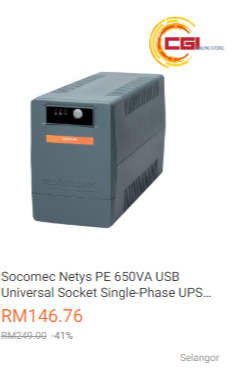
just search for usb ups in lazada or shopee or wherever. The cost is more less about the same as a cheap 80+ PSU. I think 150-200 is a small price to pay for peace of mind smile.gif
Two5Kid
post Jun 10 2019, 06:34 PM

On my way
****
Senior Member
629 posts

Joined: Jan 2003
From: Kota Bharu


Correct me if I'm wrong, I'm looking to run concurrently Windows 10 (for gaming) and MacOS Mojave (for the rest), is this HomeLab build the right path or am I heading in the wrong direction.
TSC-Fu
post Jun 11 2019, 03:28 AM

Ninja-Fu
******
Senior Member
1,051 posts

Joined: Apr 2005
From: Brisbane, QLD, Ostolia


QUOTE(Two5Kid @ Jun 10 2019, 06:34 PM)
Correct me if I'm wrong, I'm looking to run concurrently Windows 10 (for gaming) and MacOS Mojave (for the rest), is this HomeLab build the right path or am I heading in the wrong direction.
*
lebih kurang. apart from needing two gpus for each OS (for best performance), the base OS needs to be xcp-ng, esxi or unraid. setup a VM with resources that you want for Win10 and Mojave, and perhaps another VM for Xpenology.
Two5Kid
post Jun 11 2019, 01:15 PM

On my way
****
Senior Member
629 posts

Joined: Jan 2003
From: Kota Bharu


QUOTE(C-Fu @ Jun 11 2019, 03:28 AM)
lebih kurang. apart from needing two gpus for each OS (for best performance), the base OS needs to be xcp-ng, esxi or unraid. setup a VM with resources that you want for Win10 and Mojave, and perhaps another VM for Xpenology.
*
Thanks for the quick reply. Have you heard about ProxMox? What I want to build is something like this YouTube video, just less resource intensive. I don't do 4K video editing nor do I play graphics-intensive games.


https://www.youtube.com/watch?v=jdYyfoZcgJI

Edit: No idea why it isn't showing up.

This post has been edited by Two5Kid: Jun 11 2019, 01:16 PM
Fubar20
post Jun 11 2019, 02:11 PM

Regular
******
Senior Member
1,187 posts

Joined: Apr 2011
From: Nowhere


QUOTE(Two5Kid @ Jun 11 2019, 01:15 PM)
Thanks for the quick reply. Have you heard about ProxMox? What I want to build is something like this YouTube video, just less resource intensive. I don't do 4K video editing nor do I play graphics-intensive games.


https://www.youtube.com/watch?v=jdYyfoZcgJI

Edit: No idea why it isn't showing up.
*
Can run Hassio also brows.gif
» Click to show Spoiler - click again to hide... «


This post has been edited by Fubar20: Jun 11 2019, 02:14 PM
Two5Kid
post Jun 11 2019, 02:56 PM

On my way
****
Senior Member
629 posts

Joined: Jan 2003
From: Kota Bharu


QUOTE(Fubar20 @ Jun 11 2019, 02:11 PM)
Can run Hassio also  brows.gif
» Click to show Spoiler - click again to hide... «

*
True but it's a bit overkill. Haha! Thanks for the help!

TSC-Fu
post Jun 12 2019, 03:33 PM

Ninja-Fu
******
Senior Member
1,051 posts

Joined: Apr 2005
From: Brisbane, QLD, Ostolia


QUOTE(Two5Kid @ Jun 11 2019, 01:15 PM)
Thanks for the quick reply. Have you heard about ProxMox? What I want to build is something like this YouTube video, just less resource intensive. I don't do 4K video editing nor do I play graphics-intensive games.

*
proxmox is also fine. just that in most comparison promox is often considered to be for a more advanced user. you can use whichever host OS that you want.

personally after trying them all (with my limited skillset), in order of ease of use to paling mafan:

esxi
xcp-ng (can use xen tutorial)
unraid (once you understand this should be the best IMO)
proxmox

but if proxmox makes sense to you, use it! nobody's stopping you biggrin.gif

doesn't matter if you're an exclusively solitaire player, if you want your VM OS to see your GPU, you need a host OS with GPU passthrough. in this sense, Xpenology can only passthrough intel iGPU. and while all of the above OS can indeed do software RAID, it's just not as good as a dedicated NAS OS like freenas or xpe. hence, my earlier reply

QUOTE(C-Fu @ Jun 11 2019, 03:28 AM)
lebih kurang. apart from needing two gpus for each OS (for best performance), the base OS needs to be xcp-ng, esxi or unraid. setup a VM with resources that you want for Win10 and Mojave, and perhaps another VM for Xpenology.
*
Note that if you like your hair, only use radeon with hackintosh.

This post has been edited by C-Fu: Jun 12 2019, 03:39 PM
Two5Kid
post Jun 12 2019, 03:56 PM

On my way
****
Senior Member
629 posts

Joined: Jan 2003
From: Kota Bharu


QUOTE(C-Fu @ Jun 12 2019, 03:33 PM)
proxmox is also fine. just that in most comparison promox is often considered to be for a more advanced user. you can use whichever host OS that you want.

personally after trying them all (with my limited skillset), in order of ease of use to paling mafan:

esxi
xcp-ng (can use xen tutorial)
unraid (once you understand this should be the best IMO)
proxmox

but if proxmox makes sense to you, use it! nobody's stopping you biggrin.gif

doesn't matter if you're an exclusively solitaire player, if you want your VM OS to see your GPU, you need a host OS with GPU passthrough. in this sense, Xpenology can only passthrough intel iGPU. and while all of the above OS can indeed do software RAID, it's just not as good as a dedicated NAS OS like freenas or xpe. hence, my earlier reply
Note that if you like your hair, only use radeon with hackintosh.
*
Thanks for the heads-up. Interesting to know. Will research on it further.
TSC-Fu
post Jun 12 2019, 05:10 PM

Ninja-Fu
******
Senior Member
1,051 posts

Joined: Apr 2005
From: Brisbane, QLD, Ostolia


QUOTE(Two5Kid @ Jun 12 2019, 03:56 PM)
Thanks for the heads-up. Interesting to know. Will research on it further.
*
no worries.


OS like unraid and esxi are a different purpose than a NAS OS. although in the case of unraid and proxmox, it does have some of NAS OS's features, there are features that are not readily available (like offsite backup methods for instance, or a built-in web office suite like google docs).
Two5Kid
post Jun 13 2019, 10:36 AM

On my way
****
Senior Member
629 posts

Joined: Jan 2003
From: Kota Bharu


Probably not going to run the CPU as a NAS, I was just itching for something which I only need to boot once, and I can use both Windows and MacOS on two screens. Maybe play a non-resource intensive game while waiting for MacOS to render some travel videos.

The other reason why I was considering this was that I could probably save half a PC or even half the price of an iMac, with the ability to upgrade the hardware when the time comes. Instead of buying a PC and an iMac at the same time.
TristanX
post Jun 14 2019, 09:10 AM

Where is my stars?
Group Icon
Elite
24,351 posts

Joined: Nov 2004
From: Setapak, Kuala Lumpur


I'm considering moving to Ryzen 3 3200G with MSI X470 Gaming Plus setup. My Corsair Carbide 400R has 6 + 4 bays. Intel security issue is scary.

Currently running IIS, PHP 5 and 7 (can set PHP version per folder), MySQL, Windows File Transfer, Universal Media Server, Media Streaming, Torrent.

This post has been edited by TristanX: Jun 14 2019, 09:27 AM
TSC-Fu
post Jun 14 2019, 12:27 PM

Ninja-Fu
******
Senior Member
1,051 posts

Joined: Apr 2005
From: Brisbane, QLD, Ostolia


QUOTE(TristanX @ Jun 14 2019, 09:10 AM)
I'm considering moving to Ryzen 3 3200G with MSI X470 Gaming Plus setup. My Corsair Carbide 400R has 6 + 4 bays. Intel security issue is scary.

Currently running IIS, PHP 5 and 7 (can set PHP version per folder), MySQL, Windows File Transfer, Universal Media Server, Media Streaming, Torrent.
*
From what I know, with Xpenology:
IIS - only on windows, no linux version, no docker version
PHP 5 and 7 - built in once you install a few of the core apps like calendar, or just install extra ones via docker
MySQL - syno app is available, but I prefer using via docker for each project. plus can easily shift to MariaDB with docker with no issues
Windows File Transfer - turn on samba/windows file sharing
Universal Media Server, Media Streaming - there's the official synology video station, but I prefer the super powerful Plex. there's a bunch more of DLNA apps available anyway.
Torrent - the official Download Station is more than enough, supports torrent youtube and so much more. but can always install deluge, transmission, and a few others.

Xpenology with Ryzen has more issues than with Intel, so put temporary hdds and the usb boot disk to see if everything works. Start with 3617, if that doesn't work, 3615. if 3617 works, try ds918.
UsernameCopied
post Jun 22 2019, 12:43 PM

Getting Started
**
Junior Member
190 posts

Joined: Dec 2016
Is there a video tutorial to set up and build my own NAS?
TSC-Fu
post Jun 22 2019, 03:31 PM

Ninja-Fu
******
Senior Member
1,051 posts

Joined: Apr 2005
From: Brisbane, QLD, Ostolia


QUOTE(UsernameCopied @ Jun 22 2019, 12:43 PM)
Is there a video tutorial to set up and build my own NAS?
*
Probably

but the fifth step is super easy, can't get any easier than that
TSC-Fu
post Aug 20 2019, 02:24 PM

Ninja-Fu
******
Senior Member
1,051 posts

Joined: Apr 2005
From: Brisbane, QLD, Ostolia


Placeholder for VM tutorial biggrin.gif
soul_gamerz
post Sep 27 2019, 03:37 PM

Casual
***
Junior Member
446 posts

Joined: Feb 2010
Is Xpenology not working well with AMD hardware? I have one AMD board with 6 Sata port which i would like to use..but from the reading only version 6.1 is compatible using the old loader. Any feature i will be missing out if using the old version?

This post has been edited by soul_gamerz: Sep 27 2019, 03:41 PM
TSC-Fu
post Sep 27 2019, 08:24 PM

Ninja-Fu
******
Senior Member
1,051 posts

Joined: Apr 2005
From: Brisbane, QLD, Ostolia


QUOTE(soul_gamerz @ Sep 27 2019, 03:37 PM)
Is Xpenology not working well with AMD hardware? I have one AMD board with 6 Sata port which i would like to use..but from the reading only version 6.1 is compatible using the old loader. Any feature i will be missing out if using the old version?
*
nope. all of the major feature differences between 6.1 & 6.2 are mainly the splitting of some functions into separate apps, like replication. if 6.1 works well for you, I suggest you to wait until got confirmation that your hardware works.

since I have no idea on your hardware, a quick search reveals this:

- Outcome of the update: SUCCESSFUL
- DSM version prior update: DSM 6.2.1-23824-1
- Loader version and model: JUN'S LOADER v1.04b - DS918+
- Using custom extra.lzma: NO
- Installation type: BAREMETAL - Gigabyte B450 (AMD Ryzen 3600)
- Additional comment: reboot required

I'd suggest you to get an additional usb, with a spare drive and try a fresh install. DSM 6.2-23739 works well for me, and I've got no time to try since the newest current update won't work with my DS3617xs.

Well if you really wanna try 6.2, install esxi, and passthrough your drives (or better yet, connect your drives to a LSI card and passthrough that). this would be the easiest
https://mega.nz/#!eWokUSiS!6_vFRKsB...8sl58aF9otD0Gbc
admin:synology2019$$$
mac1=0011322CA785

Once everything is set up, shutdown the VM, and save snapshot. you should be able to update at least to 6.2.2-24922 Update 2, but if it screws up, just restore the snapshot.

Save 2 cores for ESXi, or 1 core if it's low usage. at least you can get better VM performance than xpenology's VMM. Hell you can even install hackintosh using spare cores if your CPU has them.
https://www.sysnettechsolutions.com/en/vmwa...mware-esxi-6-7/
soul_gamerz
post Sep 29 2019, 11:09 AM

Casual
***
Junior Member
446 posts

Joined: Feb 2010
QUOTE(C-Fu @ Sep 27 2019, 08:24 PM)
nope. all of the major feature differences between 6.1 & 6.2 are mainly the splitting of some functions into separate apps, like replication. if 6.1 works well for you, I suggest you to wait until got confirmation that your hardware works.

since I have no idea on your hardware, a quick search reveals this:

- Outcome of the update:  SUCCESSFUL
- DSM version prior update: DSM 6.2.1-23824-1
- Loader version and model: JUN'S LOADER v1.04b - DS918+
- Using custom extra.lzma: NO
- Installation type: BAREMETAL - Gigabyte B450 (AMD Ryzen 3600)
- Additional comment: reboot required

I'd suggest you to get an additional usb, with a spare drive and try a fresh install. DSM 6.2-23739 works well for me, and I've got no time to try since the newest current update won't work with my DS3617xs.

Well if you really wanna try 6.2, install esxi, and passthrough your drives (or better yet, connect your drives to a LSI card and passthrough that). this would be the easiest
https://mega.nz/#!eWokUSiS!6_vFRKsB...8sl58aF9otD0Gbc
admin:synology2019$$$
mac1=0011322CA785

Once everything is set up, shutdown the VM, and save snapshot. you should be able to update at least to 6.2.2-24922 Update 2, but if it screws up, just restore the snapshot.

Save 2 cores for ESXi, or 1 core if it's low usage. at least you can get better VM performance than xpenology's VMM. Hell you can even install hackintosh using spare cores if your CPU has them.
https://www.sysnettechsolutions.com/en/vmwa...mware-esxi-6-7/
*
My hardware is quite an old one.. sweat.gif below is the spec:

Mobo: Asrock 960GC-GS FX
CPU: AMD Phenom II X2 B59
RAM: 2GB DDR2

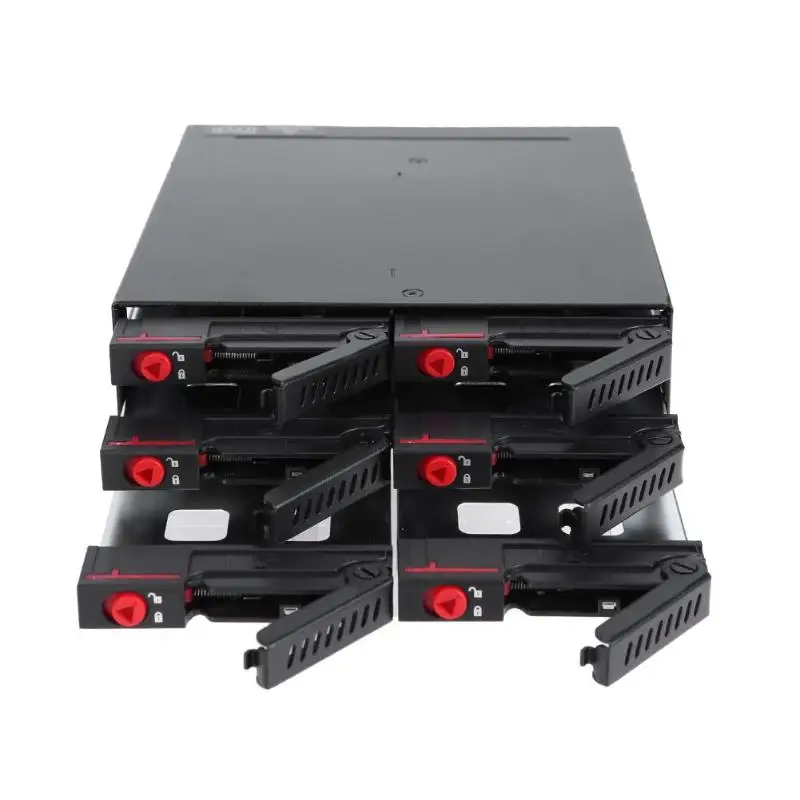
so far I'm able to boot up the v6.1..but since i missing some sata cable to test as it need hdd detected before can continue. I'm planning to use below enclosure to house all the 6 Hdd. hopefully the project is a success..i have a lot of data to park inside rclxm9.gif
user posted image

This post has been edited by soul_gamerz: Sep 29 2019, 11:17 AM
TSC-Fu
post Sep 29 2019, 12:22 PM

Ninja-Fu
******
Senior Member
1,051 posts

Joined: Apr 2005
From: Brisbane, QLD, Ostolia


QUOTE(soul_gamerz @ Sep 29 2019, 11:09 AM)
so far I'm able to boot up the v6.1..but since i missing some sata cable to test as it need hdd detected before can continue. I'm planning to use below enclosure to house all the 6 Hdd. hopefully the project is a success..i have a lot of data to park inside  rclxm9.gif
user posted image
*
uh no, you're not booting 6.1..... yet. the installer is just an installer, it'll work even in socket 775 cpu. once you put in the .pat file then it'll install the DSM 6.1. or 6.2.

try it on a test hdd first, if it works then you're set!

if you have only 2GB of RAM then I don't suggest you to use a lot of apps, maybe just the really essential ones like download station and SMB/Windows/NFS/WebDAV file share.

that enclosure is fine, but I've yet to see anybody test the heat performance anywhere so you'll be the first then biggrin.gif as long as you understand that it's for 2.5" hdd biggrin.gif

This post has been edited by C-Fu: Sep 29 2019, 12:23 PM
soul_gamerz
post Sep 29 2019, 02:25 PM

Casual
***
Junior Member
446 posts

Joined: Feb 2010
QUOTE(C-Fu @ Sep 29 2019, 12:22 PM)
uh no, you're not booting 6.1..... yet. the installer is just an installer, it'll work even in socket 775 cpu. once you put in the .pat file then it'll install the DSM 6.1. or 6.2.

try it on a test hdd first, if it works then you're set!

if you have only 2GB of RAM then I don't suggest you to use a lot of apps, maybe just the really essential ones like download station and SMB/Windows/NFS/WebDAV file share.

that enclosure is fine, but I've yet to see anybody test the heat performance anywhere so you'll be the first then biggrin.gif as long as you understand that it's for 2.5" hdd biggrin.gif
*
Ah yaa..didnt managed to get past the pat file yet. Ram can be added later..that all i have at hand right now that is compatible with the board. Yup..2.5" it have integrated fans inside the bay..hopefully thermal is not an issue
TSC-Fu
post Sep 29 2019, 02:58 PM

Ninja-Fu
******
Senior Member
1,051 posts

Joined: Apr 2005
From: Brisbane, QLD, Ostolia


FYI soul_gamerz my DS3615 is still running well on my E8400 socket 775 system. It was a surprise even till this day lol.

Well try out and lemme know! If the pat is listed in Xpenology_Tools program then it should work.
trencher10
post Oct 8 2019, 04:19 PM

Long-term AFK ...
****
Senior Member
665 posts

Joined: Jan 2003


Question, question: If starting a DIY NAS, and start with only 2 4TB HDDs, want to start with RAID 1, then what is the migration plan to RAID 5 or 6 when want to add more HDD?
TSC-Fu
post Oct 8 2019, 05:56 PM

Ninja-Fu
******
Senior Member
1,051 posts

Joined: Apr 2005
From: Brisbane, QLD, Ostolia


QUOTE(trencher10 @ Oct 8 2019, 04:19 PM)
Question, question: If starting a DIY NAS, and start with only 2 4TB HDDs, want to start with RAID 1, then what is the migration plan to RAID 5 or 6 when want to add more HDD?
*
If you use Xpenology...


RAID type > Can be changed to…
Basic > RAID 1 & 5
RAID 1 > RAID 5
RAID 5 > RAID 6
SHR-1 > SHR-2

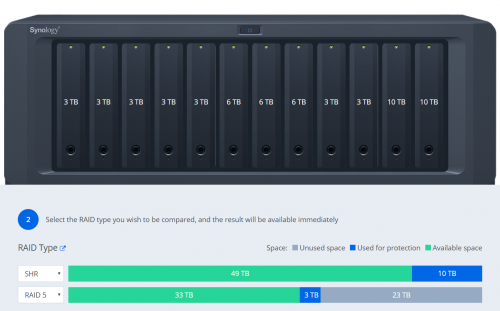
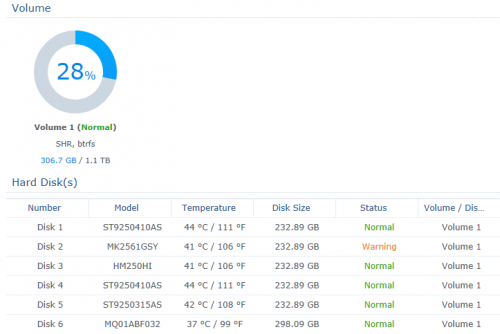
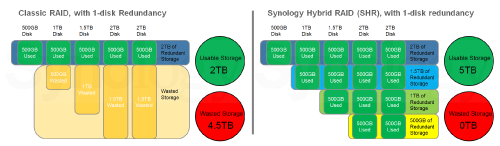
I personally recommend SHR, simply because it maximises the use of space in all of your mixed-capacity drives.

In my case...

user posted image

It's not an issue if all of your drives are the same capacities.

Also bear in mind that with SHR and BTRFS, should you have a catastrophic RAID failure (3 drives dead, etc), you can just use an usb disk with ubuntu live on it, boot it and mount the remaining drives and you can still recover whatever files that's left.

This post has been edited by C-Fu: Oct 8 2019, 05:59 PM
trencher10
post Oct 8 2019, 06:04 PM

Long-term AFK ...
****
Senior Member
665 posts

Joined: Jan 2003


^
Hmmm. I thinking going OMV or FreeNAS route. More like OMV route becoz FreeNAS prefers-more-like-requires Intel.

Considering my main reason for NAS remains file-storage-reliability, so ABSOLUTELY no need for superfluous transcoding, Plex media streaming, torrent, UNLIKELY-TO Internet port forward NAS (yet), or running anything other than on-off file transfers/syncs.

It is, cold-store NAS.

EDIT: Also quick Googles say SHR is on the way to being deprecated? Xpenology already disabling it in DSM?

This post has been edited by trencher10: Oct 8 2019, 06:47 PM
aepock
post Oct 8 2019, 06:16 PM

Getting Started
**
Junior Member
181 posts

Joined: Nov 2005
parking

TSC-Fu
post Oct 8 2019, 06:48 PM

Ninja-Fu
******
Senior Member
1,051 posts

Joined: Apr 2005
From: Brisbane, QLD, Ostolia


QUOTE(trencher10 @ Oct 8 2019, 06:04 PM)
^
Hmmm. I thinking going OMV or FreeNAS route. More like OMV route becoz FreeNAS prefers-more-like-requires Intel.

Considering my main reason for NAS remains file-storage-reliability, so no need for superfluous transcoding, 24/7 Internet port forward NAS (yet), or running anything other than on-off file transfers/syncs.

EDIT: Also quick Googles say SHR is on the way to being deprecated? Xpenology already disabling it in DSM?
*
Not quite.

SHR is a feature enabled by default on selected models. It's not enabled on DS3615, 3617 and ds918. So you have to enable it yourself by editing 2 lines in a config file.

Steps:
1. install putty on your windows machine.
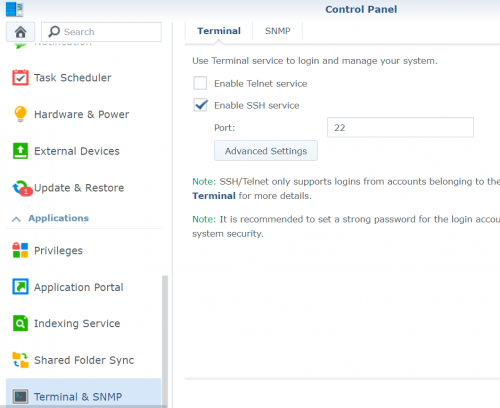
2. enable SSH in your DSM web ui.

user posted image

3. Use PuTTy to ssh into your machine - insert the IP and port number. login using your account.
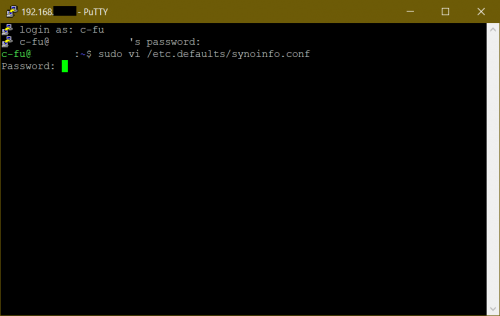
type this:
CODE
sudo vi /etc.defaults/synoinfo.conf

user posted image

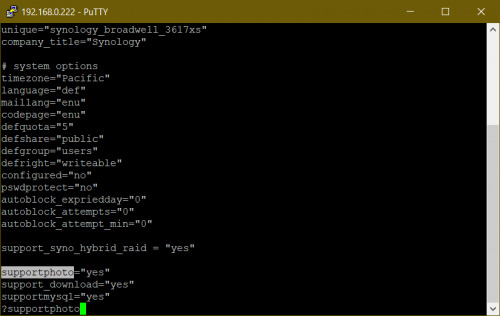
4. type ?supportphoto then press i. insert support_syno_hybrid_raid = "yes" above it, and press Esc to exit insert mode.

user posted image

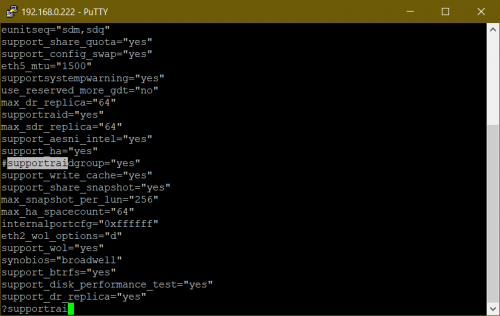
5. type ?supportraidgroup, press i and add # in front of it. press Esc.

user posted image

6. type
CODE
:wq
to save and exit, reboot. and you're set.


SHR advantages:
+ sits on top of BTRFS, so in the event of a raid failure your data is still available as long as the drive is physically OK
+ maximises your disk space
+ parity is split in all drives, different than most other software raid where 1 or more disks are just for parity/protection.
+ snapshot in case file becomes corrupted
+ VERY fast
+ survives fresh DSM install where you can just migrate the disks to other xpenology/synology system

SHR to me has been very reliable and solid for years.

FreeNAS, XigmaNAS, uses ZFS. OMV supports ZFS with a plugin. ZFS too is reliable, but less flexible. In my case I have a lot of drives with mixed capacities so SHR is the only way to go. You can 100% use OMV if you want, nobody's stopping you biggrin.gif but since OMV uses btrfs by default, might as well go with xpe and run omv as a VM in it if you really need some omv apps/plugins that's not available in Xpe (I found none, but I wasn't looking hard enough).

FreeNAS is a total beast, and while it used in enterprise setting, to me it's overkill for a NAS, not to mention the high(er) hardware requirements. But you don't need ECC ram for ZFS, no matter what people say biggrin.gif It's a little scary, but your risk of losing everything in your ZFS pool is 1 in 115,792,089,237,316,195,423,570,985,008,687,907,853,269,984,665,640,564,039,457,584,007,913,129,639,936. it benefits greatly with ECC though.

If you just need fileserving function, Xpe fully works with a RM200 PC smile.gif can't beat that yo

This post has been edited by C-Fu: Oct 8 2019, 07:15 PM
soul_gamerz
post Oct 29 2019, 02:18 PM

Casual
***
Junior Member
446 posts

Joined: Feb 2010
QUOTE(C-Fu @ Oct 8 2019, 05:56 PM)
If you use Xpenology...
RAID type  > Can be changed to…
Basic > RAID 1 & 5
RAID 1  > RAID 5
RAID 5  > RAID 6
SHR-1  > SHR-2

I personally recommend SHR, simply because it maximises the use of space in all of your mixed-capacity drives.

In my case...

user posted image

It's not an issue if all of your drives are the same capacities.

Also bear in mind that with SHR and BTRFS, should you have a catastrophic RAID failure (3 drives dead, etc), you can just use an usb disk with ubuntu live on it, boot it and mount the remaining drives and you can still recover whatever files that's left.
*
boss..is it a good idea to mix up the controller for the disk? I want to use the 6 bay disk enclosre but the original mobo i plan to use which has 6 SATA port just died after i stress it for a while sweat.gif ..now i have second board which only have 4 port, then i want to buy 2 or 4-port PCI-Express Expansion Card *link in shoppe*. Can i use 4 internal SATA port and then additional 2 port from the expansion card? Will Xpenology detect it correctly?
TSC-Fu
post Oct 29 2019, 02:36 PM

Ninja-Fu
******
Senior Member
1,051 posts

Joined: Apr 2005
From: Brisbane, QLD, Ostolia


QUOTE(soul_gamerz @ Oct 29 2019, 02:18 PM)
boss..is it a good idea to mix up the controller for the disk? I want to use the 6 bay disk enclosre but the original mobo i plan to use which has 6 SATA port just died after i stress it for a while  sweat.gif ..now i have second board which only have 4 port, then i want to buy 2 or 4-port PCI-Express Expansion Card *link in shoppe*. Can i use 4 internal SATA port and then additional 2 port from the expansion card? Will Xpenology detect it correctly?
*
yes. but that's a port multiplier. it means it takes 1 sata port and splits the speed into four.

also it runs very very hot, even with just one port used.

you need a lsi card. some are 3G, some are 6G. the 3G kind supports a max of 2TB per drive, so get 6G version if possible.

if you need more slots, get a LSI card, and an expander card.
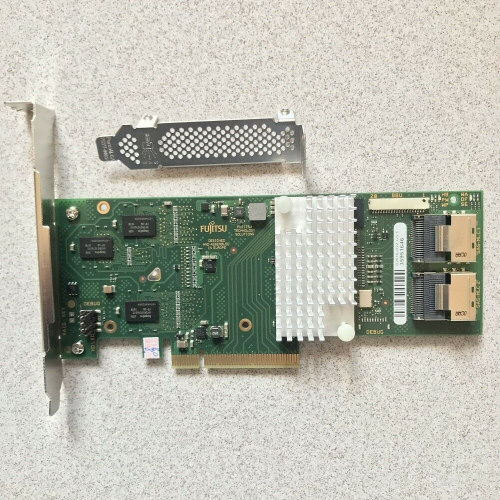
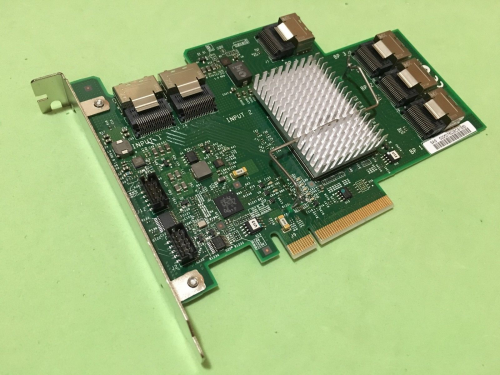
the (rebranded, so cheaper) LSI card:

user posted image
https://www.ebay.com.my/itm/Fujitsu-D2616-L...XEAAOSw9mpaLmFu

the card must be flashed to IT mode so the software (unraid/freenas/xigmanas/xpenology) will handle the raid. flashing is as easy as flashing mobo bios.
there are a billion models available, this is just the cheapest that I found on ebay using the search term "lsi 6G" but there are cheaper cards (I bought mine for RM60, can't remember the model name).

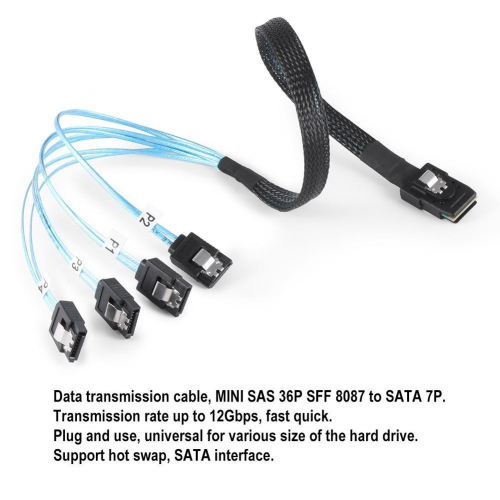
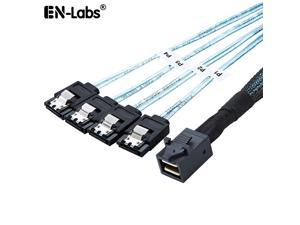
the card as 2 sas ports, so you can connect 2x4 sata ports using this SFF 8087 cable:

user posted image
https://www.lazada.com.my/products/cabledec...5I6eg3&search=1

expander card:

user posted image
https://www.ebay.com.my/itm/IBM-ServeRAID-6...VUAAOSw-kdXzYni


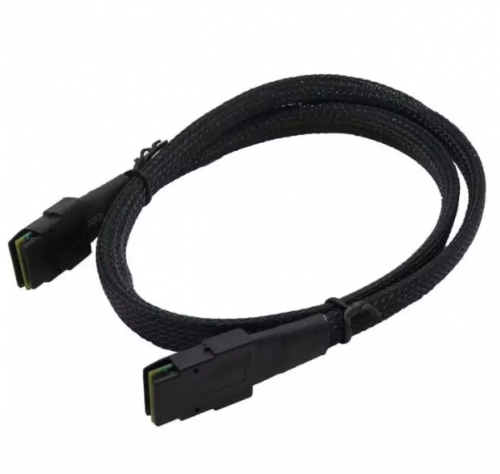
if you wanna connect it to the expander, you need two of this cable to connect to the above expander

user posted image
https://www.lazada.com.my/products/07m-inte...8fP0LD&search=1

and 4x SFF 8087 breakout cable from the expander, giving you 4x4 sata ports.

there are other ways, but this is the cheapest that I know of.

on one of my boards, I mixed the onboard sata ports with 1 lsi 2 ports card, 1 expander, and 1 lsi 4 ports card.
soul_gamerz
post Oct 29 2019, 02:46 PM

Casual
***
Junior Member
446 posts

Joined: Feb 2010
QUOTE(C-Fu @ Oct 29 2019, 02:36 PM)
yes. but that's a port multiplier. it means it takes 1 sata port and splits the speed into four.

also it runs very very hot, even with just one port used.

you need a lsi card. some are 3G, some are 6G. the 3G kind supports a max of 2TB per drive, so get 6G version if possible.

if you need more slots, get a LSI card, and an expander card.
the (rebranded, so cheaper) LSI card:

user posted image
https://www.ebay.com.my/itm/Fujitsu-D2616-L...XEAAOSw9mpaLmFu

the card must be flashed to IT mode so the software (unraid/freenas/xigmanas/xpenology) will handle the raid. flashing is as easy as flashing mobo bios.
there are a billion models available, this is just the cheapest that I found on ebay using the search term "lsi 6G" but there are cheaper cards (I bought mine for RM60, can't remember the model name).

the card as 2 sas ports, so you can connect 2x4 sata ports using this SFF 8087 cable:

user posted image
https://www.lazada.com.my/products/cabledec...5I6eg3&search=1

expander card:

user posted image
https://www.ebay.com.my/itm/IBM-ServeRAID-6...VUAAOSw-kdXzYni
if you wanna connect it to the expander, you need two of this cable to connect to the above expander

user posted image
https://www.lazada.com.my/products/07m-inte...8fP0LD&search=1

and 4x SFF 8087 breakout cable from the expander, giving you 4x4 sata ports.

there are other ways, but this is the cheapest that I know of.

on one of my boards, I mixed the onboard sata ports with 1 lsi 2 ports card, 1 expander, and 1 lsi 4 ports card.
*
ah i see..thank you for the information sifu notworthy.gif
1kokies
post Nov 3 2019, 12:46 AM

On my way
****
Senior Member
532 posts

Joined: Aug 2011


Thanks to CFU for the summarized contents, will try to contribute. Agreed DIY means learning the complications, which is better than depending on adverts and general here say, for ready made NAS.

Sharing from my experience ya

First rule of NAS

1. Secure your data
2. Back up your data
3. Take care of your data

Second rule of NAS

1. Choose OS wisely
2. Choose hardware wisely
3. Have back up hardware that is repeatable

Third rule of NAS

1. Contribute to community
2. Expand network relevant to the chosen OS
3. Pool resources

There are 2 parts to NAS-Data & Services
soul_gamerz
post Dec 5 2019, 08:42 AM

Casual
***
Junior Member
446 posts

Joined: Feb 2010
QUOTE(C-Fu @ Sep 29 2019, 12:22 PM)
uh no, you're not booting 6.1..... yet. the installer is just an installer, it'll work even in socket 775 cpu. once you put in the .pat file then it'll install the DSM 6.1. or 6.2.

try it on a test hdd first, if it works then you're set!

if you have only 2GB of RAM then I don't suggest you to use a lot of apps, maybe just the really essential ones like download station and SMB/Windows/NFS/WebDAV file share.

that enclosure is fine, but I've yet to see anybody test the heat performance anywhere so you'll be the first then biggrin.gif as long as you understand that it's for 2.5" hdd biggrin.gif
*
Here are the temperature for the disks. all of this is only temporary as i will replaced them all with high capacity down the road rclxm9.gif . using SHR i can replaced 1 disk with high capacity and it will expand right?


user posted image
darude87
post Dec 5 2019, 03:48 PM

hhhoooiii!!!
******
Senior Member
1,412 posts

Joined: Jun 2005


hmm, this is an interesting thread, now I think my old phenom II will have a new purpose laugh.gif

something I'm worried about which is power consumption, if I were to build my NAS with phenom II and running it 24/7, any idea will it cost a lot for my electricity bill?
edministrator
post Dec 5 2019, 11:50 PM

Regular
******
Senior Member
1,940 posts

Joined: Nov 2004
From: Soviet Sarawak


QUOTE(C-Fu @ Oct 29 2019, 02:36 PM)

expander card:

user posted image
https://www.ebay.com.my/itm/IBM-ServeRAID-6...VUAAOSw-kdXzYni
if you wanna connect it to the expander, you need two of this cable to connect to the above expander

and 4x SFF 8087 breakout cable from the expander, giving you 4x4 sata ports.

there are other ways, but this is the cheapest that I know of.

on one of my boards, I mixed the onboard sata ports with 1 lsi 2 ports card, 1 expander, and 1 lsi 4 ports card.
*
Hi bro, just wondering what is the difference between getting 2 SAS cards vs 1 SAS card + 1 Expander? Both would result in 16 HDDs config
edministrator
post Dec 6 2019, 08:57 AM

Regular
******
Senior Member
1,940 posts

Joined: Nov 2004
From: Soviet Sarawak


QUOTE(soul_gamerz @ Dec 5 2019, 08:42 AM)
Here are the temperature for the disks. all of this is only temporary as i will replaced them all with high capacity down the road  rclxm9.gif . using SHR i can replaced 1 disk with high capacity and it will expand right?
user posted image
*
no, the biggest capacity usually used as redundancy
soul_gamerz
post Dec 6 2019, 12:56 PM

Casual
***
Junior Member
446 posts

Joined: Feb 2010
QUOTE(edministrator @ Dec 6 2019, 08:57 AM)
no, the biggest capacity usually used as redundancy
*
I see..if i replaced few of them? Eventually i want to replace all of it with 2tb drives
satanhead2003
post Dec 6 2019, 06:32 PM

On my way
****
Senior Member
551 posts

Joined: Dec 2005
Im using intel 4590 as esxi & xpenology ds918 image. Passthrough the onboard intel gpu & onboard sata for xpenology...boom ... U got esxi & nas all in 1. Why ds918?simple, gpu transcoding. Emby server is working, nas is working, bunch of vm is working, docker in xpenology is working. Only VMM inside xpenology not working since it needed nested hw in esxi
TSC-Fu
post Dec 7 2019, 12:23 AM

Ninja-Fu
******
Senior Member
1,051 posts

Joined: Apr 2005
From: Brisbane, QLD, Ostolia


QUOTE(darude87 @ Dec 5 2019, 03:48 PM)
hmm, this is an interesting thread, now I think my old phenom II will have a new purpose laugh.gif

something I'm worried about which is power consumption, if I were to build my NAS with phenom II and running it 24/7, any idea will it cost a lot for my electricity bill?
*
I have no idea sorry. It's too vague. Phenom II I think is 125W at max, and need to calculate drives (15W per drive) and mobo+ram sticks (50? 100? Can't remember). Some enable hdd spindowns, but since you won't save that much with spindowns but introduce more wear and tears, I'd personally recommend AGAINST it.

Then it comes to your house tariff. 100kWh? 300kWh? 100kWh is 33.40 cents. so if your rig is at max load 24/7 and using 130W + 60W (4drives) + 100W = 300W, that would mean 0.3kWh x RM0.35 x 24h x 30 = RM75.60 per month, the absolute worst-case scenario. Hence a good efficient PSU will be your best first investment, second is a low-powered proc (like E5 2650L instead of E5 2650).


QUOTE(edministrator @ Dec 5 2019, 11:50 PM)
Hi bro, just wondering what is the difference between getting 2 SAS cards vs 1 SAS card + 1 Expander? Both would result in 16 HDDs config
*
Effectively no difference other than costs.


QUOTE(edministrator @ Dec 6 2019, 08:57 AM)
no, the biggest capacity usually used as redundancy
*
Not quite. Syno's RAID implementation is different than normal RAID.
user posted image
You don't use the biggest just for redundancy, but you use all/most drives for redundancy AND space to minimize wasted space.

Try it here https://www.synology.com/en-my/support/RAID_calculator


QUOTE(satanhead2003 @ Dec 6 2019, 06:32 PM)
Im using intel 4590 as esxi & xpenology ds918 image. Passthrough the onboard intel gpu & onboard sata for xpenology...boom ... U got esxi & nas all in 1. Why ds918?simple, gpu transcoding. Emby server is working, nas is working, bunch of vm is working, docker in xpenology is working. Only VMM inside xpenology not working since it needed nested hw in esxi
*
you can enable nested hw in esxi. but if you're already using esxi, might as well use esxi's VM implementation instead of VMM.
darude87
post Dec 7 2019, 04:01 PM

hhhoooiii!!!
******
Senior Member
1,412 posts

Joined: Jun 2005


QUOTE(C-Fu @ Dec 7 2019, 12:23 AM)
I have no idea sorry. It's too vague. Phenom II I think is 125W at max, and need to calculate drives (15W per drive) and mobo+ram sticks (50? 100? Can't remember). Some enable hdd spindowns, but since you won't save that much with spindowns but introduce more wear and tears, I'd personally recommend AGAINST it.

Then it comes to your house tariff. 100kWh? 300kWh? 100kWh is 33.40 cents. so if your rig is at max load 24/7 and using 130W + 60W (4drives) + 100W = 300W, that would mean 0.3kWh x RM0.35 x 24h x 30 = RM75.60 per month, the absolute worst-case scenario. Hence a good efficient PSU will be your best first investment, second is a low-powered proc (like E5 2650L instead of E5 2650).
very detailed explanation there, really appreciate the breakdown and easier for me to do some planning. I guess if i were to carry on with Phenom II, might need to try to downclock + downvolt to achieve better power efficiency, but testing stability may be another hassle. Will see how to move on from there

TSC-Fu
post Dec 8 2019, 12:17 AM

Ninja-Fu
******
Senior Member
1,051 posts

Joined: Apr 2005
From: Brisbane, QLD, Ostolia


QUOTE(darude87 @ Dec 7 2019, 04:01 PM)
very detailed explanation there, really appreciate the breakdown and easier for me to do some planning. I guess if i were to carry on with Phenom II, might need to try to downclock + downvolt to achieve better power efficiency, but testing stability may be another hassle. Will see how to move on from there
*
I don't think you need to. a more accurate or average estimate would be to calculate using idle cpu wattage since it's not gonna be 100% all the time. even if you use things like plex that uses cpu transcoding for videos, it'll happen during the duration of the video only.

only way to be sure is to use a watt meter, set the cost according to your place, and leave it for a week and see for yourself.

user posted image

This post has been edited by C-Fu: Dec 8 2019, 12:21 AM
thankyou
post Apr 21 2020, 11:08 PM

Regular
******
Senior Member
1,941 posts

Joined: Jan 2003
QUOTE(edministrator @ Dec 5 2019, 11:50 PM)
Hi bro, just wondering what is the difference between getting 2 SAS cards vs 1 SAS card + 1 Expander? Both would result in 16 HDDs config
*
I assume the purpose is to build a large logical drive instead of 2 logical drive with 2 cards?

edministrator
post Apr 22 2020, 11:36 AM

Regular
******
Senior Member
1,940 posts

Joined: Nov 2004
From: Soviet Sarawak


QUOTE(thankyou @ Apr 21 2020, 11:08 PM)
I assume the purpose is to build a large logical drive instead of 2 logical drive with 2 cards?
*
nope. 2 cards can also build single logical drive using raid from freenas, DSM, etc. using passthrough/IT mode.

This post has been edited by edministrator: Apr 22 2020, 11:37 AM
thankyou
post Apr 22 2020, 12:18 PM

Regular
******
Senior Member
1,941 posts

Joined: Jan 2003
QUOTE(edministrator @ Apr 22 2020, 11:36 AM)
nope. 2 cards can also build single logical drive using raid from freenas, DSM, etc. using passthrough/IT mode.
*
Oh, I didn't mean software RAID from freenas etc... I mean from hardware RAID point of view where expander required as compared to 2 raid cards.

Anyway, I've been googling about flashing firmware for Fujitsu D2616 and it doesn't seems to be supported... Can anyone able to confirm?

Considering building an unraid NAS for Plex...
edministrator
post Apr 22 2020, 12:54 PM

Regular
******
Senior Member
1,940 posts

Joined: Nov 2004
From: Soviet Sarawak


QUOTE(thankyou @ Apr 22 2020, 12:18 PM)
Oh, I didn't mean software RAID from freenas etc... I mean from hardware RAID point of view where expander required as compared to 2 raid cards.

Anyway, I've been googling about flashing firmware for Fujitsu D2616 and it doesn't seems to be supported... Can anyone able to confirm?

Considering building an unraid NAS for Plex...
*
RAID-Controller - SAS 6 Gb/s RAID 5/6 512 MB (D2616) = LSI SAS2108 6 Gb/s RAID-on-Chip

so far SAS2108 does not support IT mode
TSC-Fu
post Apr 22 2020, 02:18 PM

Ninja-Fu
******
Senior Member
1,051 posts

Joined: Apr 2005
From: Brisbane, QLD, Ostolia


QUOTE(thankyou @ Apr 22 2020, 12:18 PM)
Oh, I didn't mean software RAID from freenas etc... I mean from hardware RAID point of view where expander required as compared to 2 raid cards.

Anyway, I've been googling about flashing firmware for Fujitsu D2616 and it doesn't seems to be supported... Can anyone able to confirm?

Considering building an unraid NAS for Plex...
*
you wouldn't want hardware raid on unraid, let alone on freenas.

you can, but you would want the software raid to handle most if not everything.

Also there's a total of ONE thread out there that states how to crossflash D2616 to LSI IT firmware, but links are either dead or my internet's dead.
KenC
post Jul 18 2020, 12:11 PM

Getting Started
**
Junior Member
78 posts

Joined: Feb 2009


C-Fu,
Thanks for taking the time to write this beautiful post. notworthy.gif
Very inspiring for this "another" old uncle. notworthy.gif

Inspired by you, I enthusiastically (which doesnt happen for a long while) pull out my i5-2400 from storage and did some refurbishing. Now it has 16GB ram (was 4GB), a new RM80 128GB SSD + 3TB HDD (was 500GB), a RX580 (was GT something-something) and a new bronze 500W PSU (was the gray box stuff) I picked up online for cheap, one at a time, mostly used items. None of the following fun would happen if I did any sort of budgeting... LOL

Still trying out most of the NAS softwares you listed by creating new VM,s bruce.gif to see what are the things I need. As I have no idea what I want doh.gif ... All in the name of science LOL flex.gif

After fiddling for about 2 months, what I have currently running is Ubuntu 20.04 LTS because I am kedekut and because I reckon the lighter Linux Os will benefit my old girl AND it just came out in April 2020. As for the Virtualization, I use the in-built virtual machine in the kernel KVM with VirtManager GUI don't know what to call it, a hypervisor? anyway, it works rclxm9.gif . I can not notice any difference in performance running SolidWorks and Autocad in VM from running in local machine. Ya, both are as slow as you can imagine with this Sandy-bridge i5. The important point is still can-use-la.... btw, the RX580 with 8Gb does give the rendering a huge boost.

Ubuntu 20.04LTS of course you can choose other distro such as PoP! Arch etc etc everyone is releasing their new LTS 5 year support version.
https://releases.ubuntu.com/20.04/

Manage virtual machines with virt-manager
https://virt-manager.org/

In case you are interested in how I GPU passthrough I just followed the following blog to the teeth...
https://heiko-sieger.info/running-windows-1...hics_processors

Pinyin input is important to me,
https://pinyinjoe.com/linux/ubuntu-18-gnome...inese-setup.htm

SAMBA is my pick to serve files to my other devices, (which dont really happen very often...) and I really don't have much data to store for now... This may change since I now have the superpower to create a NAS when I want with a few click on the keyboard and buying a few HDD moneyflies.gif
https://linuxconfig.org/how-to-configure-sa...cal-fossa-linux

I also fiddling with Jellyfin now and I am thinking of retiring my Pi music streamer...
https://jellyfin.org/

As I continue to fiddle with stuff, I realized I am stuffing more work for the poor i5-2400 with just 4 core w/0 hyper-threading.... My current temptation is an XEON E3-1230V2 which is 4C/8T.... about RM200... a huge price cut from the i7-3770 with nearly same performance. which is about the biggest LGA1155 socket can take... no, wont change the mobo unless I get one for free... at least for now..

My old girl may accidentally rejuvenate into a Virtualization Server bruce.gif .... who would ever guess that 3 months ago.. LOL

OR my kiddo come hijack this old girl when he see papa playing Steam games at 1080p ultra setting bangwall.gif ,,,
mmmm... better not put any RGB light near the box brows.gif don't need the attention...
https://linuxize.com/post/how-to-install-st...n-ubuntu-20-04/

This post has been edited by KenC: Jul 19 2020, 03:42 PM
TSC-Fu
post Jul 20 2020, 03:01 PM

Ninja-Fu
******
Senior Member
1,051 posts

Joined: Apr 2005
From: Brisbane, QLD, Ostolia


That's AWESOME! Congrats!

Whatever people say, 2nd gen is MORE THAN CAPABLE for normal use. As you have noticed, pretty much everything still works.

For Xpenology on QEMU/KVM, a good guide is here.


few notes:
Hypervisor=kvm=VMM
For intel 2nd gen, max you can go is E3-12**v2. On top of my head, I can't remember if E3-1xxx series has a igpu built-in or not - I think it doesn't. iGPU is important if you want to use something like plex/emby/jellyfin for video transcoding purpose. if you want h264/mp4 video transcoding, I believe you need at minimum a 4th gen cpu. if you want a GPU to help with that, just get a minimum 1050 or 1050Ti for extra memory for more video transcoding at the same time. Some 1050Ti cards have no need for external power, so might be a very useful and cheap card for multiple clients.

jellyfin supports amd video transcoding, but performance wise isn't as good as nvidias. But if it works, it works.

you don't have to use virtmanager. there are alternatives, my preferred way are web-based ones.
https://github.com/mistio/mist-ce
https://ovirt.org/
Proxmox (my fav, a standalone OS, a bit complex to set up in the beginning, but totally worth it)
https://github.com/retspen/webvirtcloud (try this first)
https://github.com/kimchi-project/kimchi (try this first also)


QUOTE(KenC @ Jul 18 2020, 12:11 PM)
C-Fu,
Thanks for taking the time to write this beautiful post.  notworthy.gif 
Very inspiring for this "another" old uncle.  notworthy.gif

Inspired by you, I enthusiastically (which doesnt happen for a long while) pull out my i5-2400 from storage and did some refurbishing. Now it has 16GB ram (was 4GB), a new RM80 128GB SSD + 3TB HDD (was 500GB), a RX580 (was GT something-something) and a new bronze 500W PSU (was the gray box stuff) I picked up online for cheap, one at a time, mostly used items. None of the following fun would happen if I did any sort of budgeting... LOL

Still trying out most of the NAS softwares you listed by creating new VM,s  bruce.gif  to see what are the things I need. As I have no idea what I want  doh.gif ... All in the name of science LOL  flex.gif

After fiddling for about 2 months, what I have currently running is Ubuntu 20.04 LTS because I am kedekut and because I reckon the lighter Linux Os will benefit my old girl AND it just came out in April 2020. As for the Virtualization, I use the in-built virtual machine in the kernel KVM with VirtManager GUI don't know what to call it, a hypervisor? anyway, it works  rclxm9.gif . I can not notice any difference in performance running SolidWorks and Autocad in VM from running in local machine. Ya, both are as slow as you can imagine with this Sandy-bridge i5. The important point is still can-use-la.... btw, the RX580 with 8Gb does give the rendering a huge boost.

Ubuntu 20.04LTS  of course you can choose other distro such as PoP! Arch etc etc everyone is releasing their new LTS 5 year support version.
https://releases.ubuntu.com/20.04/

Manage virtual machines with virt-manager
https://virt-manager.org/

In case you are interested in how I GPU passthrough I just followed the following blog to the teeth...
https://heiko-sieger.info/running-windows-1...hics_processors

Pinyin input is important to me,
https://pinyinjoe.com/linux/ubuntu-18-gnome...inese-setup.htm

SAMBA is my pick to serve files to my other devices, (which dont really happen very often...) and I really don't have much data to store for now... This may change since I now have the superpower to create a NAS when I want with a few click on the keyboard and buying a few HDD moneyflies.gif
https://linuxconfig.org/how-to-configure-sa...cal-fossa-linux

I also fiddling with Jellyfin now and I am thinking of retiring my Pi music streamer...
https://jellyfin.org/

As I continue to fiddle with stuff, I realized I am stuffing more work for the poor i5-2400 with just 4 core w/0 hyper-threading.... My current temptation is an XEON E3-1230V2 which is 4C/8T.... about RM200... a huge price cut from the i7-3770 with nearly same performance. which is about the biggest LGA1155 socket can take... no, wont change the mobo unless I get one for free... at least for now.. 

My old girl may accidentally rejuvenate into a Virtualization Server bruce.gif .... who would ever guess that 3 months ago.. LOL

OR my kiddo come hijack this old girl when he see papa playing Steam games at 1080p ultra setting bangwall.gif ,,,
mmmm... better not put any RGB light near the box brows.gif don't need the attention...
https://linuxize.com/post/how-to-install-st...n-ubuntu-20-04/
*
KenC
post Jul 21 2020, 12:16 AM

Getting Started
**
Junior Member
78 posts

Joined: Feb 2009


Yes, 2nd gen Sandy bridge still solid when it comes to real work. Autocad, Solidworks very stable and snappy with the aid of a "dated" mid-range gpu (RX580), more ram and SSD. Still can keep up with most real workload, though a bit slower in rendering but a minute or 2 is never a life and death situation. If I still has the need for a CAD workstation, I will not hesitate to bring this old girl back online. Will keep a VM packed with CAD on the side... never know what life will bring brows.gif

Transcoding is be something I want to figure out sooner or later... at the moment, no dire need... LOL old uncle dont watch much porn LOL

ALL XEON don't come with iGPU. so a GPU is mandatory. I am not in a hurry or in real need of anything. Will wait for the price drop after AMD and Intel have their new release. Ive-bridge 3rd gen i7-3770K is best la, can play overclock some more but the cheapest LGA1155 4C/8T is the E3-1230V2 for now.... if can cheaper lagi best la... if any of the 3770k, 3770, 1270v2, 1240v2 drop below 200 buck I grab also wan I just want more threads... period biggrin.gif

Lately, while digging for ideas to put this old girl to good use, I sesat jalan and ran into Machine Learning, Deep learning, Computer Vision stuff, looks interesting. Contemplating the idea of a GTX 1060 6GB to transform it to a machine learning rig too devil.gif 1050ti will be very affordable but ram tak cukup... 1070 8GB would be nice but too expensive for a toy.
Will be cool to play scissor paper stone with the pc. icon_rolleyes.gif

Apparently, NVIDIA is more useful in the real world.... no wonder more expensive la cry.gif

Thanks for the heads up on the web-base hypervisors and Proxmax. That will keep me busy for a while. thumbup.gif

I think some how this built is slowly transforming into a FunStation... You are right about VM is something I didint know I need LOL...BUT I don't want to draw any conclusion just yet, let it evolve into whatever it will be...

It would be great to squeeze another 5 years of use from this old girl, which is looking promising at the moment.

Macam participant in Junkyard War... bruce.gif

This post has been edited by KenC: Jul 21 2020, 12:18 AM
TSC-Fu
post Jul 21 2020, 02:05 AM

Ninja-Fu
******
Senior Member
1,051 posts

Joined: Apr 2005
From: Brisbane, QLD, Ostolia


QUOTE(KenC @ Jul 21 2020, 12:16 AM)
It would be great to squeeze another 5 years of use from this old girl, which is looking promising at the moment.

Macam participant in Junkyard War...  bruce.gif
*
5 years? People have been using 1st gen intel for NAS since 7 years ago till today laugh.gif

1st gen's advantage is it's the same slot as the xeon counterpart. it also supports ECC, and some boards can actually support up to 48GB ECC ram (3 channels x 3 sticks x 4GB per stick).

also protip: if you can get a really good deal with 1st gen and above, or lga2011 dual slot mobos (or chinese variants called "x79 motherboards), don't hesitate!


imagine, 4c/4t cpu for RM30. or a 8c/16t for RM100, and lga2011 board for RM300. in 2020 and in malaysia, currently the best bang for the buck, for our purpose, is this slot.

for transcoding via plex/jellyfin/emby, rule of thumb is
MP4/h264 needs a min of 4th gen intel (any 4th gen non xeon will do, as all uses the same iGPU)
MKV/h265/hevc file needs a min of 8th gen intel
nvenc via a min of 1050 for h264+h265

no need a lot of porn, once you know a deep secret about RM40/month gsuite, you'll start going down the rabbit path of sonarr+radarr+bazarr+a billion more "companion" web apps biggrin.gif

a good list for you to try, preferably via docker, is https://github.com/awesome-selfhosted/awesome-selfhosted and https://github.com/veggiemonk/awesome-docker .

This post has been edited by C-Fu: Jul 21 2020, 02:11 AM
TSC-Fu
post Jul 21 2020, 02:12 AM

Ninja-Fu
******
Senior Member
1,051 posts

Joined: Apr 2005
From: Brisbane, QLD, Ostolia


Google Drive Integration via RClone
user posted image

If you ever want to move, copy, or sync to Google Drive, or any other cloud service provider, I recommend using RClone. It requires work to set up, but once you do, just like building your own NAS, you'll doh.gif thinking how you've ever live without it tongue.gif
Best of all, it's free, portable, and works on most (if not all) systems out there. Ubuntu, general linux, xpe, proxmox, windows, raspberry pi, macos, and even (rooted) android!

Why google drive?
» Click to show Spoiler - click again to hide... «

Learning time: About 1 hour


Basic idea.
1. Install/Download RClone.
2. Create a new remote (share)
3. Choose cloud provider. Here I'm showing you Google Drive integration, so pick Google Drive
4. Get a new id from google's console, so it allows external access to/from your google drive, and put it in #3
5. Open a generated link to link rclone to your GDrive.
6. Mount your google drive somewhere.
7. Repeat Step 1-3, but choose Encrypt/decrypt a folder. This way even if somebody hacks your google drive, they wouldn't know what are the files in there.


I'm going to use Xpenology for this guide. Enable ssh from control panel, and use something like putty to ssh into your NAS box.

1. download rclone temporarily into a folder, like /volume1/Downloads and run the install script.
curl https://rclone.org/install.sh | sudo bash
2. run rclone config, new remote name (example: gdrive) choose google drive. from your google drive, enable the api access to drive. get a new client id and client secret and put it there. full access, everything else empty, and don't use autoconfig. copy paste the url into a browser, put the authorization code and you're set.
3. run rclone config again, this time choose encrypt/decrypt a remote (example name: crypt). for the folder, use something from #2, and the folder name you want encrypted files like movies to be. example: gdrive:crypt. encrypt filenames & dir names, choose a password. Step #3 is only needed if you are using gdrive for movies.
3a. run rclone lsd gdrive: or rclone lsd crypt: to see it working (lsd is like ls)
4. you then need to mount the crypt folder to a xpenology's shared folder or wherever you want (example: in /volume1/Gdrive/crypt). create a script called mountcrypt.sh somewhere (example: /volume1/mystuff/mountcrypt.sh). insert this.
#!/bin/bash
rclone mount --daemon --allow-other --dir-cache-time 48h --vfs-read-chunk-size 32M --vfs-read-chunk-size-limit 2G --buffer-size 512M --vfs-cache-mode writes --log-level INFO --stats 1m --allow-non-empty crypt: /volume1/Gdrive/crypt
5. from DSM's Control Panel, go to Task Scheduler. Create a new triggered task, event on boot-up. user: root. under Task Settings, script is:
bash /volume1/mystuff/mountcrypt.sh >> /volume1/mystuff/mountcrypt.txt 2>&1
AND SAVE THE TASK. the ">> /volume1/mystuff/mountcrypt.txt 2>&1" part means it will generate a txt file for whatever that happens, like a log. Click OK, then right click on the task and run. open the text file to see any errors that might appear.
6. to copy/sync/move files, say from /volume1/Movies folder to your google drive (example: GoogleDrive/crypt/Movies), create a scheduled task with the script
/volume1/mystuff/movemovies.sh >> /volume1/mystuff/movemovies.txt 2>&1
and save. the movemovies.sh contents are
/bin/rclone move /volume1/Movies crypt:Movies -v --retries 1 --size-only --no-update-modtime
and you're set. replace move with sync or copy if you want.
It looks complicated, and depending on how far you want it to work, it can look complicated I guess. But at most, you only need an hour or two of your life understanding the process. the second time you wanna do it, it'll take 5 minutes. Rclone is good for the simple fact that it's portable, and works on almost every system out there - raspberry pi, ubuntu, windows, proxmox, (rooted) android you name it.

BladeRider88
post Jan 15 2021, 05:54 PM

On my way
****
Junior Member
554 posts

Joined: Nov 2006


Yesterday just completed my fourth Xpenology build. This one just install for testing purpose only. Currently running on 6.2.3 with latest update

user posted image

This post has been edited by BladeRider88: Jan 15 2021, 06:00 PM
TSC-Fu
post Jan 15 2021, 08:48 PM

Ninja-Fu
******
Senior Member
1,051 posts

Joined: Apr 2005
From: Brisbane, QLD, Ostolia


QUOTE(BladeRider88 @ Jan 15 2021, 05:54 PM)
Yesterday just completed my fourth Xpenology build. This one just install for testing purpose only. Currently running on 6.2.3 with latest update

user posted image
*
awesome! Should definitely try xpenology under esxi next time

SUStru.shyne
post Jan 19 2021, 02:11 PM

Getting Started
**
Junior Member
175 posts

Joined: Jan 2020
i use an old samsung laptop to build Synology NAS follow tutorial on Youtube for fun
its working fine, photo will auto backup when i open the app

just that laptop temperature will increase to 42-46 Celsius degree during day time
but i also can't put it into aircon room my electricity bill will cost me alot


TSC-Fu
post Jan 19 2021, 03:41 PM

Ninja-Fu
******
Senior Member
1,051 posts

Joined: Apr 2005
From: Brisbane, QLD, Ostolia


QUOTE(tru.shyne @ Jan 19 2021, 02:11 PM)
i use an old samsung laptop to build Synology NAS follow tutorial on Youtube for fun
its working fine, photo will auto backup when i open the app

just that laptop temperature will increase to 42-46 Celsius degree during day time
but i also can't put it into aircon room my electricity bill will cost me alot
*
for laptops it depends on your bios, see if you can increase the fan speed
have you tried changing the fan speed setting in Control Panel?
SUStru.shyne
post Jan 19 2021, 04:03 PM

Getting Started
**
Junior Member
175 posts

Joined: Jan 2020
QUOTE(C-Fu @ Jan 19 2021, 03:41 PM)
for laptops it depends on your bios, see if you can increase the fan speed
have you tried changing the fan speed setting in Control Panel?
*
changing fan speed in bios setting or the synology os setting?
i even put the laptop upside down to reduce heat from bottom
btw old laptop is samsung rv413, 4gb ram, amd e300 processor

TSC-Fu
post Jan 19 2021, 05:20 PM

Ninja-Fu
******
Senior Member
1,051 posts

Joined: Apr 2005
From: Brisbane, QLD, Ostolia


QUOTE(tru.shyne @ Jan 19 2021, 04:03 PM)
changing fan speed in bios setting or the synology os setting?
i even put the laptop upside down to reduce heat from bottom
btw old laptop is samsung rv413, 4gb ram, amd e300 processor
*
syno OS. it's surprising that amd e300 works. which loader and dsm version?

Zack Styler
post Sep 18 2021, 01:00 PM

Things Happen for a Reason...
******
Senior Member
1,282 posts

Joined: Feb 2006
From: ¯\(º_o)/¯ ¯\(º_o)/¯

just wondering what's the best cost efficient setup for DIY NAS now?

trying to find one but still new to this..
xxboxx
post Sep 18 2021, 09:42 PM

The mind is for having ideas, not holding them
*******
Senior Member
5,261 posts

Joined: Oct 2004
From: J@Y B33


QUOTE(Zack Styler @ Sep 18 2021, 01:00 PM)
just wondering what's the best cost efficient setup for DIY NAS now?

trying to find one but still new to this..
*
Getting second hand hardware. Complete desktop PC for less than 1k, you only need to get HDD and extra RAM if running VM or many dockers.
If you want it to transcode video too then need more latest CPU or GPU. Intel 8th gen IINM start to support x.265 or if use GPU, GTX1060.

This post has been edited by xxboxx: Sep 18 2021, 10:35 PM
stormer.lyn
post Sep 18 2021, 10:45 PM

Regular
******
Senior Member
1,132 posts

Joined: Apr 2014
From: Shah Alam, Selangor
QUOTE(Zack Styler @ Sep 18 2021, 01:00 PM)
just wondering what's the best cost efficient setup for DIY NAS now?

trying to find one but still new to this..
*
- I'm not soliciting a sale, but just sharing my experience on price of hardware -

So it just happened that I was free, and decided to see what to do with my old computers. I have an Intel D945GCLF board (Intel original boards have a very long MTBF) with an embedded low power Atom 230, 2 GB RAM in mini-ITX form factor. Unfortunately it only has 10/100 networking, so I added a Gigabit network card. The board has 2 SATA ports.

I have run Xpenology (Synology DSM 6.1.7 update 3), and OpenMediaVault 5 on it, absolutely stable, and frankly, faster than the Synology "J" model I had before. At current prices, it should be about RM 200, without the hard drives. I think this is incredible value, for a NAS that does more than just file serving for me.

My current "production" NAS is also an older computer. Intel i3-2120 with 8 GB DDR3 RAM, 1 x SSD, 1 x HDD, in a tiny Jonsbo C2 case. It runs OMV5, and the power consumption is about 27W in normal usage. Again, incredible value at a price of maybe RM 400, bought as a second hand computer. Of course I didn't buy it, it is just hardware that was re-purposed because supposedly End-Of-Life.

I admit there is a bit of learning curve with setting up your own NAS, but it is not impossible to do once you start. Synology, and Qnap, and Asustor, and all the NAS manufacturers before have done a good job getting these units into the home, but here's the thing: I think the NAS landscape is going to change tremendously in the near future. Changes in storage technology and form factors, processor power and types, Single-Board-Computers with storage HATs are all going to be driving this change. Your next NAS, complete with storage, might be the size of a standard ATX power supply. It is for this reason I decided not to buy a ready-built NAS at RM 1.8k.

I'm not the smartest person around, but if I can set up a NAS, anyone could. And I think they should. Good luck.
Zack Styler
post Sep 18 2021, 11:19 PM

Things Happen for a Reason...
******
Senior Member
1,282 posts

Joined: Feb 2006
From: ¯\(º_o)/¯ ¯\(º_o)/¯

QUOTE(xxboxx @ Sep 18 2021, 09:42 PM)
Getting second hand hardware. Complete desktop PC for less than 1k, you only need to get HDD and extra RAM if running VM or many dockers.
If you want it to transcode video too then need more latest CPU or GPU. Intel 8th gen IINM start to support x.265 or if use GPU, GTX1060.
*
Thank you, yes am looking at having it as a backup for phones and media too..


QUOTE(stormer.lyn @ Sep 18 2021, 10:45 PM)
- I'm not soliciting a sale, but just sharing my experience on price of hardware -

So it just happened that I was free, and decided to see what to do with my old computers. I have an Intel D945GCLF board (Intel original boards have a very long MTBF) with an embedded low power Atom 230, 2 GB RAM in mini-ITX form factor. Unfortunately it only has 10/100 networking, so I added a Gigabit network card. The board has 2 SATA ports.

I have run Xpenology (Synology DSM 6.1.7 update 3), and OpenMediaVault 5 on it, absolutely stable, and frankly, faster than the Synology "J" model I had before. At current prices, it should be about RM 200, without the hard drives. I think this is incredible value, for a NAS that does more than just file serving for me.

My current "production" NAS is also an older computer. Intel i3-2120 with 8 GB DDR3 RAM, 1 x SSD, 1 x HDD, in a tiny Jonsbo C2 case. It runs OMV5, and the power consumption is about 27W in normal usage. Again, incredible value at a price of maybe RM 400, bought as a second hand computer. Of course I didn't buy it, it is just hardware that was re-purposed because supposedly End-Of-Life.

I admit there is a bit of learning curve with setting up your own NAS, but it is not impossible to do once you start. Synology, and Qnap, and Asustor, and all the NAS manufacturers before have done a good job getting these units into the home, but here's the thing: I think the NAS landscape is going to change tremendously in the near future. Changes in storage technology and form factors, processor power and types, Single-Board-Computers with storage HATs are all going to be driving this change. Your next NAS, complete with storage, might be the size of a standard ATX power supply. It is for this reason I decided not to buy a ready-built NAS at RM 1.8k.

I'm not the smartest person around, but if I can set up a NAS, anyone could. And I think they should. Good luck.
*
Thanks for the sharing, you got me to research more on older motherboards that can be repurposed for NAS..
stormer.lyn
post Sep 19 2021, 11:32 AM

Regular
******
Senior Member
1,132 posts

Joined: Apr 2014
From: Shah Alam, Selangor
QUOTE(xxboxx @ Sep 18 2021, 09:42 PM)
If you want it to transcode video too then need more latest CPU or GPU. Intel 8th gen IINM start to support x.265 or if use GPU, GTX1060.
*
How do you reconcile your statement about Gen8 processors, and the GTX1060, when the Synology DS418play from 2016, with a Celeron J3355 processor, supports 4k H.265 decoding (edited to add) in hardware?

This post has been edited by stormer.lyn: Sep 19 2021, 11:36 AM
xxboxx
post Sep 19 2021, 02:44 PM

The mind is for having ideas, not holding them
*******
Senior Member
5,261 posts

Joined: Oct 2004
From: J@Y B33


QUOTE(stormer.lyn @ Sep 19 2021, 11:32 AM)
How do you reconcile your statement about Gen8 processors, and the GTX1060, when the Synology DS418play from 2016, with a Celeron J3355 processor, supports 4k H.265 decoding (edited to add) in hardware?
*
I said if I remember correctly. Earlier Intel iGPU support 4k x.265 transcode?
stormer.lyn
post Sep 19 2021, 03:54 PM

Regular
******
Senior Member
1,132 posts

Joined: Apr 2014
From: Shah Alam, Selangor
QUOTE(xxboxx @ Sep 19 2021, 02:44 PM)
I said if I remember correctly. Earlier Intel iGPU support 4k x.265 transcode?
*
I'm surprised you can remember something that does not happen. For Intel, it is no where near Gen8 onwards
QUOTE
Synology DS418play from 2016, with a Celeron J3355 processor, supports 4k H.265 decoding in hardware
And I don't know any commercial NAS that requires GTX1060 level graphics, and then only it is able to decode H.265.

I'm seriously curious to know how you came up with this advice
QUOTE
If you want it to transcode video too then need more latest CPU or GPU. Intel 8th gen IINM start to support x.265 or if use GPU, GTX1060.

Actually, forget about it. Doesn't matter to me what advice strangers on the internet give other strangers on the internet.
TSC-Fu
post Sep 19 2021, 06:19 PM

Ninja-Fu
******
Senior Member
1,051 posts

Joined: Apr 2005
From: Brisbane, QLD, Ostolia


If you want h265 transcoding, a minimum of 7TH GENERATION INTEL iGPU is needed.

4k, SD, HD, doesn't matter. J, i3, celeron, doesn't matter. Difference between J and i3 is big. Difference between i3 and i7 is not as much. In terms of amount of transcoding streams that is.

but if you want 10bit aka HDR transcoding, you need 8TH GEN INTEL.

quality wise, intel igpu's qsv is average to above average, while RTX 2xxx and 3xxx is very high quality.

hope this helps.


This post has been edited by C-Fu: Sep 19 2021, 07:27 PM
TSC-Fu
post Sep 19 2021, 07:47 PM

Ninja-Fu
******
Senior Member
1,051 posts

Joined: Apr 2005
From: Brisbane, QLD, Ostolia


QUOTE(Zack Styler @ Sep 18 2021, 01:00 PM)
just wondering what's the best cost efficient setup for DIY NAS now?

trying to find one but still new to this..
*
hardware cost-wise, for any NAS OS out there you need

CPU - Intel 1st gen CPU - the one with i3/i5/i7 and three digit model name, like i7 750. You can go older with DSM, but only if you know what you're doing.
Mobo + RAM - 1st gen can have 6 slots of DDR3 memory of up to 24GB of RAM (6x 4GB DDR3 RAM). very rare mobo models can go up to 48GB. Usually they have 6 or 8 SATA ports.
PSU - Assume CPU +Fans + Mobo + RAM takes 250Watts. 20Watts per HDD. Add them all, plus another 20%, and get a PSU (preferably gold or bronze) rated for that. Turn on hdd spindown in BIOS, and it will sip power.

If you're new, go with intel 2nd gen and above just because 2nd gen has iGPU for display for first time configuration. makes it easier. or get 1st gen with a cheap small GPU.
xxboxx
post Sep 19 2021, 08:37 PM

The mind is for having ideas, not holding them
*******
Senior Member
5,261 posts

Joined: Oct 2004
From: J@Y B33


QUOTE(stormer.lyn @ Sep 19 2021, 03:54 PM)

I'm surprised you can remember something that does not happen. For Intel, it is no where near Gen8 onwards
And I don't know any commercial NAS that requires GTX1060 level graphics, and then only it is able to decode H.265.

I'm seriously curious to know how you came up with this advice

Actually, forget about it. Doesn't matter to me what advice strangers on the internet give other strangers on the internet.
*
Well, you still take time to post something that doesn't matter to you, so let me clarify. It's not about GTX1060 level graphic, it's the hardware transcoding capability. x.265 got 8 bit, 10 bit or 12 bit. As C-Fu said, 10 bit aka HDR need 8th gen Intel. Can see this to understand more about different gen support for different x.265
https://en.wikipedia.org/wiki/Intel_Quick_S...ng_and_encoding

And just because it support doesn't mean it can run it without problem, especially those low powered CPU. I got mini pc Intel N4020 with Win10. x.265 4k 10 bit keep stuttering. x.265 8 bit 1080p is smooth. x.264 4k also run smoothly.
Zack Styler
post Sep 19 2021, 08:37 PM

Things Happen for a Reason...
******
Senior Member
1,282 posts

Joined: Feb 2006
From: ¯\(º_o)/¯ ¯\(º_o)/¯

QUOTE(C-Fu @ Sep 19 2021, 07:47 PM)
hardware cost-wise, for any NAS OS out there you need

CPU - Intel 1st gen CPU - the one with i3/i5/i7 and three digit model name, like i7 750. You can go older with DSM, but only if you know what you're doing.
Mobo + RAM - 1st gen can have 6 slots of DDR3 memory of up to 24GB of RAM (6x 4GB DDR3 RAM). very rare mobo models can go up to 48GB. Usually they have 6 or 8 SATA ports.
PSU - Assume CPU +Fans + Mobo + RAM takes 250Watts. 20Watts per HDD. Add them all, plus another 20%, and get a PSU (preferably gold or bronze) rated for that. Turn on hdd spindown in BIOS, and it will sip power.

If you're new, go with intel 2nd gen and above just because 2nd gen has iGPU for display for first time configuration. makes it easier. or get 1st gen with a cheap small GPU.
*
Thanks I asked in the rig suggestion thread and this is what I got..

Planning to go with this for now..

Pentium G6400 - 239
Asrock B560M-HDV - 360
Kingston HyperX Fury 8GB DDR4-3200 X1 - 189
Cougar GX-S 450W - 159

For HDD/storage wise how many HDD I should start with? minimum of 2 right? Is SSD needed too?

Any suggestion is welcomed.. biggrin.gif

This post has been edited by Zack Styler: Sep 19 2021, 08:39 PM
TSC-Fu
post Sep 19 2021, 09:11 PM

Ninja-Fu
******
Senior Member
1,051 posts

Joined: Apr 2005
From: Brisbane, QLD, Ostolia


QUOTE(Zack Styler @ Sep 19 2021, 08:37 PM)
Thanks I asked in the rig suggestion thread and this is what I got..

Planning to go with this for now..

Pentium G6400 - 239
Asrock B560M-HDV - 360
Kingston HyperX Fury 8GB DDR4-3200 X1 - 189
Cougar GX-S 450W - 159

For HDD/storage wise how many HDD I should start with? minimum of 2 right? Is SSD needed too?

Any suggestion is welcomed..  biggrin.gif
*
G6400 is a beast if you plan to use it for transcoding.
You have 4 sata + M.2, so go with at least 4 drives. use it for your steam drive first. as for M.2, if you need nvme, use DS918 image. if not, you can get a cheap M.2 to pcie x4 adapter that you can then use for a sata card. or get the m.2 to u.2 kit.

user posted image

user posted image

giving you an extra 4 sata ports. if you use the pcie x4 m.2 adapter, you then need to get a pcie x4 to 4/5/6/8 sata adapter. used to be dirt cheap, but because of Chia mining, it's crazy expensive.

user posted image

user posted image


1 SSD is recommended, but not necessary. with Xpe, you can first create one big volume/pool with all of the HDDs (/volume1, 2 or more HDDs) then use 1 or 2 SSD for either cache (for the HDD data), to install all/most of the syno apps (at /volume2) so everything is super speedy, or both (1 SSD for cache, 1 SSD for apps). you really don't need to, but it's pretty useful. can always do it later.

8GB is very sufficient.

you can definitely go with just 2 HDDs, but 4 is nicer (eg. 4x 1TB > 2x2TB).


This post has been edited by C-Fu: Sep 19 2021, 09:21 PM
Zack Styler
post Sep 21 2021, 06:50 PM

Things Happen for a Reason...
******
Senior Member
1,282 posts

Joined: Feb 2006
From: ¯\(º_o)/¯ ¯\(º_o)/¯

QUOTE(C-Fu @ Sep 19 2021, 09:11 PM)
G6400 is a beast if you plan to use it for transcoding.
You have 4 sata + M.2, so go with at least 4 drives. use it for your steam drive first. as for M.2, if you need nvme, use DS918 image. if not, you can get a cheap M.2 to pcie x4 adapter that you can then use for a sata card. or get the m.2 to u.2 kit.

user posted image

user posted image

giving you an extra 4 sata ports. if you use the pcie x4 m.2 adapter, you then need to get a pcie x4 to 4/5/6/8 sata adapter. used to be dirt cheap, but because of Chia mining, it's crazy expensive.

user posted image

user posted image
1 SSD is recommended, but not necessary. with Xpe, you can first create one big volume/pool with all of the HDDs (/volume1, 2 or more HDDs) then use 1 or 2 SSD for either cache (for the HDD data), to install all/most of the syno apps (at /volume2) so everything is super speedy, or both (1 SSD for cache, 1 SSD for apps). you really don't need to, but it's pretty useful. can always do it later.

8GB is very sufficient.

you can definitely go with just 2 HDDs, but 4 is nicer (eg. 4x 1TB > 2x2TB).
*
Thanks for sharing.. biggrin.gif biggrin.gif

I have a question here, I wanted to setup the NAS to be able to stream medias to my TV too which are on the same network, how can I do that?

Can I do it via DLNA?

I am thinking something alone the line of having a software based program installed in the NAS drives, and when I wanted to watch medias from the NAS via TV, I just connect to the NAS and select what I wanted to watch..

Thanks again..
TSC-Fu
post Sep 21 2021, 07:19 PM

Ninja-Fu
******
Senior Member
1,051 posts

Joined: Apr 2005
From: Brisbane, QLD, Ostolia


QUOTE(Zack Styler @ Sep 21 2021, 06:50 PM)
Thanks for sharing..  biggrin.gif  biggrin.gif

I have a question here, I wanted to setup the NAS to be able to stream medias to my TV too which are on the same network, how can I do that?

Can I do it via DLNA?

I am thinking something alone the line of having a software based program installed in the NAS drives, and when I wanted to watch medias from the NAS via TV, I just connect to the NAS and select what I wanted to watch..

Thanks again..
*
Xpe supports DLNA. just install MediaServer and you're set.

TV's internal media player is very very finicky. you need the media to use a very specific codec, specific bitrate, specific bitrate type to be supported.
plus no subtitles. it will just fail most of the time, most of the tv.

Or install Plex/Jellyfin, and enable DLNA from it. DLNA is designed for internal network use, so all devices should be able to find it.

Plex can be used offline as well. Disable remote access if you wish, and enable DLNA server (as a fallback), and in Network, type 192.168.0.0/24 or 192.168.1.0/24 in LAN Networks.

This post has been edited by C-Fu: Sep 21 2021, 07:19 PM
Zack Styler
post Sep 22 2021, 09:54 AM

Things Happen for a Reason...
******
Senior Member
1,282 posts

Joined: Feb 2006
From: ¯\(º_o)/¯ ¯\(º_o)/¯

QUOTE(C-Fu @ Sep 21 2021, 07:19 PM)
Xpe supports DLNA. just install MediaServer and you're set.

TV's internal media player is very very finicky. you need the media to use a very specific codec, specific bitrate, specific bitrate type to be supported.
plus no subtitles. it will just fail most of the time, most of the tv.

Or install Plex/Jellyfin, and enable DLNA from it. DLNA is designed for internal network use, so all devices should be able to find it.

Plex can be used offline as well. Disable remote access if you wish, and enable DLNA server (as a fallback), and in Network, type 192.168.0.0/24 or 192.168.1.0/24 in LAN Networks.
*
Thanks again.. biggrin.gif biggrin.gif
justnits
post Sep 28 2021, 01:36 PM

Mechanical Keyboard Addict
*******
Senior Member
2,968 posts

Joined: Jan 2003
From: Penang, Malaysia


oh gosh, I am 3 years behind this DIY NAS and finding this thread, but I am glad there is a handful of DIY NAS peeps here! thumbup.gif

I have recently been tinkering with Truenas, because of my friend lah, he was asking me for my opinion on what is the best storage solution for his collection of photos.
Long story short, he is not ready to dig deep into his pocket for NAS yet because photography is his side hobby only, not earning much from it, and his internet speed is 1Mbps, not suitable for cloud storage either.
End up he bought a NAS HDD to store his photos first while he slowly progress to getting maybe a Synology NAS later on.

But I didn't stop my research, I stumble upon Truenas and that's how I started this.

QUOTE(Zack Styler @ Sep 19 2021, 08:37 PM)
Thanks I asked in the rig suggestion thread and this is what I got..

Planning to go with this for now..

Pentium G6400 - 239
Asrock B560M-HDV - 360
Kingston HyperX Fury 8GB DDR4-3200 X1 - 189
Cougar GX-S 450W - 159

For HDD/storage wise how many HDD I should start with? minimum of 2 right? Is SSD needed too?

Any suggestion is welcomed..  biggrin.gif
*
Curious to know, which NAS OS are you going to use?

And what is your NAS future path?

I've been using Truenas for a couple of weeks now, and my initial intention was testing to set up a NAS myself and using it as a simple NAS. I got myself a couple of 5400 rpm hdd, and then now I am playing with the plugins and VMs, I wished I have gotten 7200 rpm hdd for better drive performance for those tongue.gif

(also regret selling off my old rig, first gen i7 cpu and cooler master haf case with lots of 3.5HDD bays)


TSC-Fu
post Sep 28 2021, 07:06 PM

Ninja-Fu
******
Senior Member
1,051 posts

Joined: Apr 2005
From: Brisbane, QLD, Ostolia


QUOTE(justnits @ Sep 28 2021, 01:36 PM)
I've been using Truenas for a couple of weeks now, and my initial intention was testing to set up a NAS myself and using it as a simple NAS. I got myself a couple of 5400 rpm hdd, and then now I am playing with the plugins and VMs, I wished I have gotten 7200 rpm hdd for better drive performance for those tongue.gif

(also regret selling off my old rig, first gen i7 cpu and cooler master haf case with lots of 3.5HDD bays)
*
truenas is like the endgame for NAS. if you have identical drives, and capable hardware to match, go for it. you won't be sorry.
xpe/syno is more for people with mixed capacity drives who wants the best capacity+performance.

5400rpm vs 7200rpm doesn't really matter IMO. especially if you use gigabit ethernet.

but once you reach the top of the endgame, what's next? biggrin.gif

that's another topic lah. but to get you guys started, google distributed storage, lizardfs, ipfs...

how do you find truenas? what hardware are you using?
justnits
post Sep 29 2021, 02:23 AM

Mechanical Keyboard Addict
*******
Senior Member
2,968 posts

Joined: Jan 2003
From: Penang, Malaysia


QUOTE(C-Fu @ Sep 28 2021, 07:06 PM)
truenas is like the endgame for NAS. if you have identical drives, and capable hardware to match, go for it. you won't be sorry.
xpe/syno is more for people with mixed capacity drives who wants the best capacity+performance.

5400rpm vs 7200rpm doesn't really matter IMO. especially if you use gigabit ethernet.

but once you reach the top of the endgame, what's next?  biggrin.gif

that's another topic lah. but to get you guys started, google distributed storage, lizardfs, ipfs...

how do you find truenas? what hardware are you using?
*
why i say 5400rpm and 7200rpm may make a difference because i started my truenas with 2 x 2.5" 500gb 7200rpm hdd, and the installation of plugins and VMs are significantly faster than when i install on my 2 x 3.5" 2tb 5400rpm hdd. i'm still trying to figure out what is the exact cause of the slowness but for now i suspect the rpm or that the 2.5" hdd is a sshd. and yes, i've gigabit network at home.

my next NAS OS that i am eager to try is Unraid, that one also flexible with mixed capacity drives and the ability to run gaming on VM (but doubt i'll go the route of VM gaming, unless if i have damn a lot of money)

wahrao, i haven't even familiar with zfs or even btrfs yet, you introduce me to so many new fs rclxub.gif tongue.gif

are you asking how i discover truenas or how truenas works for me?
Truenas is the first NAS OS i tried because when search "diy nas" in Youtube, a lot of videos on Truenas setup/installation guide. so here i am biggrin.gif
and i think Truenas has a little bit of learning curve, i was a bit lost at first but thanks to the many Youtube guides, i manage to play around with it.
so far it has exceeded my expectations, i thought it was only like a simple NAS feature with some plugins, the fact that it can host VM surprises me. manage to create a ubuntu VM to host a DST dedicated server rclxms.gif

my truenas rig specs,
Intel Core i5 6400 | Gigabyte GA-B150M-D3H | 1 x 16GB Kingston HyperX Fury DDR4 2666MHz | FSP HEXA+ 550w | 2 x 500GB Toshiba MQ01ACF050 7,200RPM 2.5" | 2 x 2TB Toshiba P300 5,400RPM 3.5"
2 vdev pools, both are stripe since I only have 2 sets of identical drives each.


btw, what's your view on using ECC for NAS? is it absolutely important for long term use? or it's actually a manageable or negligible risks, depending on usage?

also, normal hard disks is sufficient or a proper NAS hard disks is better?

so far i am getting mixed ideas and answers for both ECC vs Non-ECC and normal HDD vs NAS HDD. would love to hear it from you who's into this for many years now tongue.gif

Zack Styler
post Sep 29 2021, 02:31 PM

Things Happen for a Reason...
******
Senior Member
1,282 posts

Joined: Feb 2006
From: ¯\(º_o)/¯ ¯\(º_o)/¯

QUOTE(justnits @ Sep 28 2021, 01:36 PM)
oh gosh, I am 3 years behind this DIY NAS and finding this thread, but I am glad there is a handful of DIY NAS peeps here!  thumbup.gif

I have recently been tinkering with Truenas, because of my friend lah, he was asking me for my opinion on what is the best storage solution for his collection of photos.
Long story short, he is not ready to dig deep into his pocket for NAS yet because photography is his side hobby only, not earning much from it, and his internet speed is 1Mbps, not suitable for cloud storage either.
End up he bought a NAS HDD to store his photos first while he slowly progress to getting maybe a Synology NAS later on.

But I didn't stop my research, I stumble upon Truenas and that's how I started this.
Curious to know, which NAS OS are you going to use?

And what is your NAS future path?

I've been using Truenas for a couple of weeks now, and my initial intention was testing to set up a NAS myself and using it as a simple NAS. I got myself a couple of 5400 rpm hdd, and then now I am playing with the plugins and VMs, I wished I have gotten 7200 rpm hdd for better drive performance for those tongue.gif

(also regret selling off my old rig, first gen i7 cpu and cooler master haf case with lots of 3.5HDD bays)
*
I have yet to get the required hardware, probably by next month, but then not sure what NAS OS am gonna be on, need to read more on ease of setup and usability wise..
Zack Styler
post Oct 12 2021, 11:38 AM

Things Happen for a Reason...
******
Senior Member
1,282 posts

Joined: Feb 2006
From: ¯\(º_o)/¯ ¯\(º_o)/¯

So I have placed orders for the hardware needed to build the NAS, but still looking around for HDDs..

Any recommendations on the HDDs? Should I go with NAS HDDs or normal HDDs will do?

Have been doing some readings on the reliability on the HDDs too..

The NAS may not be operating 24/7 but will be on standby @wake on LAN..

This post has been edited by Zack Styler: Oct 12 2021, 11:38 AM
TSC-Fu
post Oct 12 2021, 01:29 PM

Ninja-Fu
******
Senior Member
1,051 posts

Joined: Apr 2005
From: Brisbane, QLD, Ostolia


QUOTE(Zack Styler @ Sep 29 2021, 02:31 PM)
I have yet to get the required hardware, probably by next month, but then not sure what NAS OS am gonna be on, need to read more on ease of setup and usability wise..
*
QUOTE(Zack Styler @ Oct 12 2021, 11:38 AM)
So I have placed orders for the hardware needed to build the NAS, but still looking around for HDDs..

Any recommendations on the HDDs? Should I go with NAS HDDs or normal HDDs will do?

Have been doing some readings on the reliability on the HDDs too..

The NAS may not be operating 24/7 but will be on standby @wake on LAN..
*
if you're new, it'll be about ease of install+setup vs ease of use. Xpe won't be the easiest to install vs OMV or truenas, but definitely easier to use.

as for drives, try not to get SMR drives. you can try googling the model + SMR: example WD20EFAX SMR. Use only CMR/PMR drives. https://shop.westerndigital.com/products/in...ta-hdd#WD20EFAX
Zack Styler
post Oct 12 2021, 03:56 PM

Things Happen for a Reason...
******
Senior Member
1,282 posts

Joined: Feb 2006
From: ¯\(º_o)/¯ ¯\(º_o)/¯

QUOTE(C-Fu @ Oct 12 2021, 01:29 PM)
if you're new, it'll be about ease of install+setup vs ease of use. Xpe won't be the easiest to install vs OMV or truenas, but definitely easier to use.

as for drives, try not to get SMR drives. you can try googling the model + SMR: example WD20EFAX SMR. Use only CMR/PMR drives. https://shop.westerndigital.com/products/in...ta-hdd#WD20EFAX
*
1st time doing it, software wise probably need some time to tinker and explore around..

Can i mix different brands and capacitiy of HDDs if I want to do RAID ?

And is it as long as CMR/OMR HDD drives will do, consumer vs NAS types?

Thank you..
TSC-Fu
post Oct 12 2021, 05:56 PM

Ninja-Fu
******
Senior Member
1,051 posts

Joined: Apr 2005
From: Brisbane, QLD, Ostolia


QUOTE(Zack Styler @ Oct 12 2021, 03:56 PM)
1st time doing it, software wise probably need some time to tinker and explore around..

Can i mix different brands and capacitiy of HDDs if I want to do RAID ?

And is it as long as CMR/OMR HDD drives will do, consumer vs NAS types?

Thank you..
*
not recommended of course, but yes you can. I mix drives from seagate ironwolfs and WD reds and others all the time. tarak problem.

I suggest if you are unsure, use it for unimportant data first, like your Steam drive. See if it works, takde problem, etc.

This post has been edited by C-Fu: Oct 12 2021, 05:57 PM
justnits
post Oct 13 2021, 03:15 PM

Mechanical Keyboard Addict
*******
Senior Member
2,968 posts

Joined: Jan 2003
From: Penang, Malaysia


QUOTE(Zack Styler @ Oct 12 2021, 03:56 PM)
1st time doing it, software wise probably need some time to tinker and explore around..

Can i mix different brands and capacitiy of HDDs if I want to do RAID ?

And is it as long as CMR/OMR HDD drives will do, consumer vs NAS types?

Thank you..
*
+1 on the research which are CMR/SMR drives and ONLY go for CMR type.

I am using normal grade hdd, not NAS-grade (poket koyak if go for NAS grade, but it's in my future upgrade path)
I did the mistake of using SMR drives (due to not doing SMR/CMR homework) at first and the performance was horrible. After doing research, I sold off my SMR drives (Toshiba P300 2TB 5400rpm) and got the CMR ones (Toshiba P300 3TB 7200rpm).

I can't say anything about long term use yet, but if any of my drives failed, I'll definitely post an update here.
TSC-Fu
post Oct 13 2021, 10:18 PM

Ninja-Fu
******
Senior Member
1,051 posts

Joined: Apr 2005
From: Brisbane, QLD, Ostolia


If you’re an Unifi Broadband customer that relies on public IP, some of your services might be disrupted very soon. The broadband provider has announced a system migration where users on public IPv4 IPs will be shifted to private IP.

TM is implementing Carrier-Grade NAT (CGNAT) for Unifi 30Mbps, 50Mbps, and 100Mbps customers. According to TM, services that may be affected include non-cloud-based CCTVs, server hosting, and online games where content is hosted by the customer. If you have a file-sharing service, FTP or NAS that uses a public IP, it will be affected as well.

For the large majority of users, your internet experience should not be affected when your service is switched to a private IP. According to the FAQ, the migration exercise will be implemented in stages from mid-September 2021 to January 2022 between 2am to 4am. Affected customers may experience a short downtime of 2-5 minutes.


crap. this will make using your NAS remotely a lot more troublesome. CGNAT is a big headache @_@
Zack Styler
post Oct 13 2021, 11:39 PM

Things Happen for a Reason...
******
Senior Member
1,282 posts

Joined: Feb 2006
From: ¯\(º_o)/¯ ¯\(º_o)/¯

QUOTE(justnits @ Oct 13 2021, 03:15 PM)
+1 on the research which are CMR/SMR drives and ONLY go for CMR type.

I am using normal grade hdd, not NAS-grade (poket koyak if go for NAS grade, but it's in my future upgrade path)
I did the mistake of using SMR drives (due to not doing SMR/CMR homework) at first and the performance was horrible. After doing research, I sold off my SMR drives (Toshiba P300 2TB 5400rpm) and got the CMR ones (Toshiba P300 3TB 7200rpm).

I can't say anything about long term use yet, but if any of my drives failed, I'll definitely post an update here.
*
this is indeed helpful.. thank you..

QUOTE(C-Fu @ Oct 13 2021, 10:18 PM)
If you’re an Unifi Broadband customer that relies on public IP, some of your services might be disrupted very soon. The broadband provider has announced a system migration where users on public IPv4 IPs will be shifted to private IP.

TM is implementing Carrier-Grade NAT (CGNAT) for Unifi 30Mbps, 50Mbps, and 100Mbps customers. According to TM, services that may be affected include non-cloud-based CCTVs, server hosting, and online games where content is hosted by the customer. If you have a file-sharing service, FTP or NAS that uses a public IP, it will be affected as well.

For the large majority of users, your internet experience should not be affected when your service is switched to a private IP. According to the FAQ, the migration exercise will be implemented in stages from mid-September 2021 to January 2022 between 2am to 4am. Affected customers may experience a short downtime of 2-5 minutes.
crap. this will make using your NAS remotely a lot more troublesome. CGNAT is a big headache @_@
*
is there any workaround to overcome this issue? as in able to access our NAS remotely?

TSC-Fu
post Oct 13 2021, 11:45 PM

Ninja-Fu
******
Senior Member
1,051 posts

Joined: Apr 2005
From: Brisbane, QLD, Ostolia


QUOTE(Zack Styler @ Oct 13 2021, 11:39 PM)
this is indeed helpful.. thank you..
is there any workaround to overcome this issue? as in able to access our NAS remotely?
*
there is. but might be complicated.

I'm gonna try a way, see if that works.

in the meantime, best if you report to MCMC that your NAS or online game suddenly stops working at the MCMC portal - when it happens.

This post has been edited by C-Fu: Oct 13 2021, 11:46 PM
Peter_APIIT
post Oct 14 2021, 03:16 PM

Casual
***
Junior Member
364 posts

Joined: Mar 2008


You should add instructions on how to setup OpenMediaVault.

This post has been edited by Peter_APIIT: Oct 14 2021, 03:19 PM
TSC-Fu
post Oct 14 2021, 04:47 PM

Ninja-Fu
******
Senior Member
1,051 posts

Joined: Apr 2005
From: Brisbane, QLD, Ostolia


QUOTE(Peter_APIIT @ Oct 14 2021, 03:16 PM)
You should add instructions on how to setup OpenMediaVault.
*
good idea, although setting up and installing OMV is far easier than xpenology. Will consider when I have some free time and if there is demand, cheers! biggrin.gif
xxboxx
post Oct 14 2021, 05:40 PM

The mind is for having ideas, not holding them
*******
Senior Member
5,261 posts

Joined: Oct 2004
From: J@Y B33


QUOTE(C-Fu @ Oct 13 2021, 10:18 PM)
If you’re an Unifi Broadband customer that relies on public IP, some of your services might be disrupted very soon. The broadband provider has announced a system migration where users on public IPv4 IPs will be shifted to private IP.

TM is implementing Carrier-Grade NAT (CGNAT) for Unifi 30Mbps, 50Mbps, and 100Mbps customers. According to TM, services that may be affected include non-cloud-based CCTVs, server hosting, and online games where content is hosted by the customer. If you have a file-sharing service, FTP or NAS that uses a public IP, it will be affected as well.

For the large majority of users, your internet experience should not be affected when your service is switched to a private IP. According to the FAQ, the migration exercise will be implemented in stages from mid-September 2021 to January 2022 between 2am to 4am. Affected customers may experience a short downtime of 2-5 minutes.
crap. this will make using your NAS remotely a lot more troublesome. CGNAT is a big headache @_@
*
Unifi's IPv6 is public right?
Maybe there's a way to get everything hooked up using it instead.

This post has been edited by xxboxx: Oct 14 2021, 06:11 PM
linkinpark
post Nov 26 2021, 02:09 PM

Casual
***
Junior Member
454 posts

Joined: Jan 2003
From: KL


Is this lsi card suitable to use on Truenas?

https://shopee.com.my/Dahui-IBM-M5015-Megar...4b-4c25fc42ae4f
TSC-Fu
post Nov 26 2021, 11:12 PM

Ninja-Fu
******
Senior Member
1,051 posts

Joined: Apr 2005
From: Brisbane, QLD, Ostolia


QUOTE(linkinpark @ Nov 26 2021, 02:09 PM)
Is this lsi card suitable to use on Truenas?

https://shopee.com.my/Dahui-IBM-M5015-Megar...4b-4c25fc42ae4f
*
no reason that it shouldn't. but googling says that it can't be flashed to IT mode.
it'll work, but any/most NAS OS cannot fully utilize the drives and card since the OS can't manage the raid through it.

best to find cards from ebay. Kinda hard to find IT mode cards from lazatda or peeshop. if jumpa, kejap je habis

This post has been edited by C-Fu: Nov 26 2021, 11:12 PM
linkinpark
post Nov 27 2021, 12:15 AM

Casual
***
Junior Member
454 posts

Joined: Jan 2003
From: KL


QUOTE(C-Fu @ Nov 26 2021, 11:12 PM)
no reason that it shouldn't. but googling says that it can't be flashed to IT mode.
it'll work, but any/most NAS OS cannot fully utilize the drives and card since the OS can't manage the raid through it.

best to find cards from ebay. Kinda hard to find IT mode cards from lazatda or peeshop. if jumpa, kejap je habis
*
Thanks for reply. So how about the below?


https://shopee.com.my/Alwaysonline-D2616-SA...f1-2e252beb799e
TSC-Fu
post Nov 27 2021, 12:42 AM

Ninja-Fu
******
Senior Member
1,051 posts

Joined: Apr 2005
From: Brisbane, QLD, Ostolia


QUOTE(linkinpark @ Nov 27 2021, 12:15 AM)
Thanks for reply. So how about the below?
https://shopee.com.my/Alwaysonline-D2616-SA...f1-2e252beb799e
*
It's still M5015. one way to kinda emulate IT mode is to create multiple RAID0 for every single one of drives, so it kinda looks like JBOD.

this is fine, one of the cheapest that I can find I think ATM:
https://www.ebay.com.my/itm/122752744747?ha...yoAAOSwA91Z4FuC

if you need more ports, connect the two port above to the two bottom port in the card below

https://shopee.com.my/Original-for-468406-B...ab-339f467ab7aa

then you're left with 6x24 sata ports. perfect for 24 sata drives, enough to last you for a while I reckon biggrin.gif


any/most of these are ok
https://www.ebay.com.my/itm/133121547016?ha...fUAAOSwy1ddNw89

This post has been edited by C-Fu: Nov 27 2021, 12:56 AM
linkinpark
post Nov 28 2021, 01:19 AM

Casual
***
Junior Member
454 posts

Joined: Jan 2003
From: KL


QUOTE(C-Fu @ Nov 27 2021, 12:42 AM)
It's still M5015. one way to kinda emulate IT mode is to create multiple RAID0 for every single one of drives, so it kinda looks like JBOD.

this is fine, one of the cheapest that I can find I think ATM:
https://www.ebay.com.my/itm/122752744747?ha...yoAAOSwA91Z4FuC

if you need more ports, connect the two port above to the two bottom port in the card below

https://shopee.com.my/Original-for-468406-B...ab-339f467ab7aa

then you're left with 6x24 sata ports. perfect for 24 sata drives, enough to last you for a while I reckon biggrin.gif
any/most of these are ok
https://www.ebay.com.my/itm/133121547016?ha...fUAAOSwy1ddNw89
*
Really big thanks for the ebay link. rclxms.gif notworthy.gif
linkinpark
post Nov 28 2021, 09:21 AM

Casual
***
Junior Member
454 posts

Joined: Jan 2003
From: KL


https://www.ebay.com.my/itm/133121547016?ha...fUAAOSwy1ddNw89

Lsi9210,9211,9220,9223 .... all lsisas2008 so there not much different right?
TSC-Fu
post Nov 28 2021, 09:42 PM

Ninja-Fu
******
Senior Member
1,051 posts

Joined: Apr 2005
From: Brisbane, QLD, Ostolia


QUOTE(linkinpark @ Nov 28 2021, 09:21 AM)
https://www.ebay.com.my/itm/133121547016?ha...fUAAOSwy1ddNw89

Lsi9210,9211,9220,9223 .... all lsisas2008 so there not much different right?
*
Yes no difference

Dell h200 kind is hugely popular. Too bad it's expensive as shit now. Wasn't even mr80 last time. Blame chia mining 🤣


Change to:
| Lo-Fi Version
0.0997sec    1.03    5 queries    GZIP Disabled
Time is now: 14th December 2025 - 10:19 AM