Welcome Guest ( Log In | Register )

Bump Topic Topic Closed RSS Feed
11 Pages « < 4 5 6 7 8 > » Bottom

Outline · [ Standard ] · Linear+

Unifi Official TM UniFi High Speed Broadband Thread V33, Enjoy Your UniFi

views
     
SilentVampire
post Jul 9 2018, 06:40 PM

Networking Enthusiast
*******
Senior Member
5,714 posts

Joined: Mar 2007


QUOTE(biloxee @ Jul 9 2018, 06:34 PM)
Same. After using it for 7 months I don't think it is that bad. It can stream two 1080p live soccer matches at once to my iPad and android box and I have a minimum of 7 devices connected to it all the time...
*
Congrats. You got the good unit then, and if it is working for you, you don’t have to change it, but there iare problems with it for most users.
SilentVampire
post Jul 9 2018, 07:15 PM

Networking Enthusiast
*******
Senior Member
5,714 posts

Joined: Mar 2007


QUOTE(fruitie @ Jul 9 2018, 06:42 PM)
Yes, of course I still take it. Else the contractor will songlap it. laugh.gif
*
Haha yes, exactly.
SilentVampire
post Jul 10 2018, 03:24 PM

Networking Enthusiast
*******
Senior Member
5,714 posts

Joined: Mar 2007


QUOTE(Max @ Jul 10 2018, 02:58 PM)
no worries..  smile.gif

last time i was on 10mbps (HG655a modem, Tplink WR841n router, EC2108E STB).
i dont think seeing any lag/stutter on hypptv while PC stream youtube with youtube buffering in HD.

btw, how do u check the hypptv/vlan600 bandwith?
just upgraded to adv 30mbps. (new ZTE H267a modem, same ol Wr841n, new EC6108V8 STB)

- i have tried using the ZTE H267a only (all connected to the ZTE), still got stutter

- tried using ZTE as modem only, WR841n as router (all connected to WR841n), still stutter

- tried using ZTE as modem and STB connected to ZTE (port 4), WR841n as router and wifi, still stutter 
im on VDSL. internet currently no problem. can get full speed 30mbps, but hypptv will lag/stutter.
*
WR841N is old. It is time to upgrade, and get a new router. Preferably the TP-Link Archer C7 V4, or the Asus RT-AC1300UHP.
SilentVampire
post Jul 10 2018, 10:02 PM

Networking Enthusiast
*******
Senior Member
5,714 posts

Joined: Mar 2007


QUOTE(XeactorZ @ Jul 10 2018, 09:49 PM)
surf Twitter very slow
won't even load any picture at all
ip start from 42.xxx doh.gif
*
What router are you using? You sure no one else is using your bandwidth? Mine is good, IP 115.x.x.x.
SilentVampire
post Jul 11 2018, 07:38 AM

Networking Enthusiast
*******
Senior Member
5,714 posts

Joined: Mar 2007


QUOTE(XeactorZ @ Jul 10 2018, 10:27 PM)
after restart the modem is okay already
using tp link wdr4300,right now no one using only my phone and my laptop connected to the router
few months back I do get IP address start from 115 or 175
but since April or May onwards I keep on getting IP address start from either 42 or 47
*
No problems here though, might be a router issue?

QUOTE(cannavaro @ Jul 11 2018, 12:03 AM)
just wanna share
my wdr4300 finally died after 5 years of use
ordered the archer c7 from lazada as a replacement
while waiting for it to arrive, I use archer c60 (I have a few of them for a project, to be used merely as AP)

man this model is crap. my experience from less than 24 hours of usage,

slow power up / reboot to 'ready to use internet' status compared to wdr4300.. probably like 1 -2 mins

buggy old firmware (2016) with no updates. among the things I remember:

- iptv suddenly stopped working after I changed wireless settings

- the router suddenly changed the 'igmp version' to 'V3' in the iptv settings page.. I realized this when the iptv stopped working suddenly and I rechecked the settings.

- I put the hypptv box on standby mode; 2 hours later I turn it on again and wtf only channel info visible but on a black screen? Rebooted both the router and tv box twice and it was magically fixed. Ran the diagnostic test on the tv box when it wasn't working, it failed at 'multicast connectivity'

- cannot get 100Mbps on both wired and wireless connection, even on 5GHz. For wired this is probably due to the lack of gigabit ports on the c60. Wifi speed is better (consistent high 90s) than wired speed (high 80s to low 90s), lol. no such issues with the wdr4300

- at one point I was getting a consistent 10Mbps-ish results on speedtest (wired).. I was like what the hell did TM suddenly cap my connection wrongly? Rebooted the router and that problem was fixed

- cannot use special characters (like @,# etc) for the admin password. primitive xD

no wonder when I was buying 3 units of this archer c60 at ALLIT the staff there was like 'boss ini model problem sikit.. you try kalau tak ok boleh return' and I replied "it's ok I just use it as wifi access point bukan main router"
ok end of rant. thanks for reading  laugh.gif
*
It is crap. I thought you were referring to the C7 v4 lol, and got a slight surprise that it is shitty lol, but yes, the C60 is really old, and is not fit for use anymore. Hope the C7 v4 will be much better.

SilentVampire
post Jul 12 2018, 02:43 PM

Networking Enthusiast
*******
Senior Member
5,714 posts

Joined: Mar 2007


QUOTE(hiha123 @ Jul 12 2018, 02:42 PM)
cry.gif How about VDSL2 user at 10-30mb?
*
Subject to to your infra, but highly unlikely.
SilentVampire
post Jul 12 2018, 02:47 PM

Networking Enthusiast
*******
Senior Member
5,714 posts

Joined: Mar 2007


QUOTE(GamaX320 @ Jul 12 2018, 02:44 PM)
Existing dir850l router able support 800mbps?
*
Should be fine, but only on 5GHz, and the DIR-850L is not well-known for its coverage, so we will see.
SilentVampire
post Jul 12 2018, 03:50 PM

Networking Enthusiast
*******
Senior Member
5,714 posts

Joined: Mar 2007


QUOTE(Bighead88 @ Jul 12 2018, 03:45 PM)
How to know if streamyx 8mbps can get 2x speed?
*
Depends on your line quality.

QUOTE(tomastan4134 @ Jul 12 2018, 03:45 PM)
anyone here planning to upgrade their router and wireless access point to ubiquiti  after hearing the speed upgrade?

im currently using asus N66U router + N18U as repeater

not sure can cope with 300mbps internet?
*
Change to Asus RT-AC1300UHP or the best router from Asus, the Asus RT-86U.

QUOTE(suffeylp @ Jul 12 2018, 03:45 PM)
holy mackerel. i am more than happy if its true.
*
Not possible with ADSL, sorry.
SilentVampire
post Jul 12 2018, 04:11 PM

Networking Enthusiast
*******
Senior Member
5,714 posts

Joined: Mar 2007


QUOTE(tomastan4134 @ Jul 12 2018, 04:02 PM)
can the ac86u cover a 13000qft  2 story bungalow?
*
Would suggest mesh for you then, either the Asus Lycra or TP-Link Deco.
SilentVampire
post Jul 12 2018, 06:49 PM

Networking Enthusiast
*******
Senior Member
5,714 posts

Joined: Mar 2007


QUOTE(prokiller1199 @ Jul 12 2018, 06:46 PM)
TM now giving different router besides 850l and c1200 dy check this out
[attachmentid=9911449]
*
Yes, that is the DIR-842 though, which is similar or one level above the DIR-850L.
SilentVampire
post Jul 12 2018, 06:50 PM

Networking Enthusiast
*******
Senior Member
5,714 posts

Joined: Mar 2007


QUOTE(Doraku @ Jul 12 2018, 06:48 PM)
that router is better than D50l and C1200?
*
Only slightly, with better coverage.
SilentVampire
post Jul 12 2018, 07:03 PM

Networking Enthusiast
*******
Senior Member
5,714 posts

Joined: Mar 2007


QUOTE(Doraku @ Jul 12 2018, 06:57 PM)
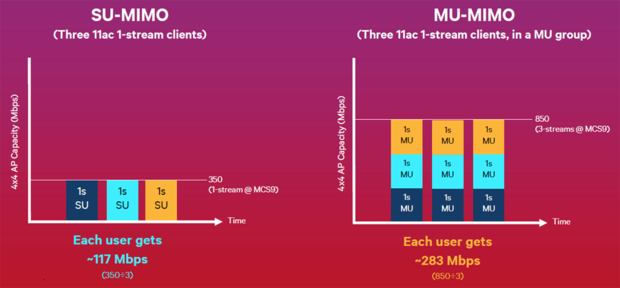
well i think it huge improvement because DIR-842 have MU-MIMO
user posted image
*
QUOTE(prokiller1199 @ Jul 12 2018, 06:58 PM)
yess
*
Sorry to burst your bubble, but MU-MIMO only works, if your devices support MU-MIMO, and can be on 5GHz AC. If your device does not support MU-MIMO or can't connect to 5Ghz AC, then it won't really matter.
SilentVampire
post Jul 12 2018, 09:53 PM

Networking Enthusiast
*******
Senior Member
5,714 posts

Joined: Mar 2007


QUOTE(xperiaVuser @ Jul 12 2018, 09:47 PM)
Sure, at no cost ka? Can we choose the router?
*
We can't choose unfortunately, and they will give you a basic router. It would be better if you get your own router.
SilentVampire
post Jul 12 2018, 10:45 PM

Networking Enthusiast
*******
Senior Member
5,714 posts

Joined: Mar 2007


QUOTE(xHj09 @ Jul 12 2018, 10:17 PM)
https://www.lazada.com.my/products/asus-rt-...w5C78O&search=1

seems like a decent budget router for the turbo 800mbps

anyone?
*
QUOTE(xHj09 @ Jul 12 2018, 10:32 PM)
ooh okay, i doubt i'll be using 5ghz.. 2.4ghz can reach up to 1167Mbps though..

and i'll be on LAN .. possible for full speed?
*
Nope, 2.4GHz can’t reach to that speed, on any router. The number you see is combined for both 2.4GHz and 5GHz, up to 300Mbps for 2.4GHz and up to 867Mbps for 5GHz. Read the product page here: https://www.asus.com/my/Networking/RT-AC1200G-plus/

If you are on LAN, then it is possible. But, on WiFi, you can forget it. Would recommend you get at least, the Asus RT-AC1300UHP.
SilentVampire
post Jul 12 2018, 10:48 PM

Networking Enthusiast
*******
Senior Member
5,714 posts

Joined: Mar 2007


QUOTE(xperiaVuser @ Jul 12 2018, 10:44 PM)
I see, thank you.
Or get this tenda ac18. I think I will get this too, internal hardware almost identical to asus rt-ac68u.
*
Almost identical to Asus RT-AC68U, but do you wonder why it is much cheaper than the Asus? It is because the firmware lags behind the Asus significantly, so don’t expect Asus like performance here, in terms of the firmware.
SilentVampire
post Jul 12 2018, 10:54 PM

Networking Enthusiast
*******
Senior Member
5,714 posts

Joined: Mar 2007


QUOTE(pakmulau @ Jul 12 2018, 10:51 PM)
i hope my router TP-LINK AC2300 will support my upgrade to 300Mbps soon
*
No issues for that particular router, as it supports up to 600Mbps on 2.4GHz, and up to 1625Mbps on 5GHz.
SilentVampire
post Jul 12 2018, 11:05 PM

Networking Enthusiast
*******
Senior Member
5,714 posts

Joined: Mar 2007


QUOTE(xperiaVuser @ Jul 12 2018, 11:01 PM)
yea, the asus does have more features in it's firmware. so far I see people are quite happy with this and reviews are pretty good too, and just RM300 for a AC1900 router...
*
If you think you will be happy with it, then you can try it. It is a decent router for the price. Just letting you know that although it might be similar to the Asus router, it is actually not. So, don’t be disappointed if it doesn’t live up to your expectations.
SilentVampire
post Jul 12 2018, 11:08 PM

Networking Enthusiast
*******
Senior Member
5,714 posts

Joined: Mar 2007


QUOTE(XeactorZ @ Jul 12 2018, 11:03 PM)
yes has been few days ago doh.gif
but for Asus RT-AC1300UHP, it showing 400+867 Mbps
but on data rate, showing 802.11ac up to 150 Mbps?
*
Should be an error. However, if you really want the best experience from the 800Mbps speed and your infra supports up to that speed, you should at least get the Asus RT-68U, just to be safe.
SilentVampire
post Jul 13 2018, 07:28 AM

Networking Enthusiast
*******
Senior Member
5,714 posts

Joined: Mar 2007


QUOTE(prokiller1199 @ Jul 13 2018, 12:49 AM)
that one can flash Merlin firmware right
*
Yes, but do it at your own risk.

QUOTE(ahpek26 @ Jul 13 2018, 12:57 AM)
Asus Malaysia markup for routers are terrible. It's downright disgusting how greedy these people are, putting such a high price just because it's Asus and it's in high demand.
*
True, not sure why it is markup so high doh.gif
SilentVampire
post Jul 13 2018, 08:46 AM

Networking Enthusiast
*******
Senior Member
5,714 posts

Joined: Mar 2007


QUOTE(Xefron @ Jul 13 2018, 08:14 AM)
If you are planning to buy a non-ASUS wireless router, the TP-Link Archer C7 model is a good choice.

The best model after TP-Link WDR4300 for me since others TP-Link are crap.

Entry Level Mu-MIMO

D-Link DIR-842
ASUS RT-AC58U
*
Make sure it is the TP-Link Archer C7 v4 though, and not anything before that.

QUOTE(pokchik @ Jul 13 2018, 08:40 AM)
pricing marked back up because LYN Networks & Broadband promo the router so much..
*
Lol, that is true. But, it is still a good router.

11 Pages « < 4 5 6 7 8 > » Top
Topic ClosedOptions
 

Change to:
| Lo-Fi Version
0.0285sec    0.52    7 queries    GZIP Disabled
Time is now: 4th December 2025 - 04:51 AM