

QUOTE(soonwai @ Mar 25 2018, 12:44 PM)
It’s not displayed either in the webgui or the app. Possibly out of embarrassment.

Archer C7 V4 where to see up time, can not find it.Official TP-Link C1200 V1(EU) Firmware is out, Hidden WDS functionality works!, Page 29
|
|
 Mar 25 2018, 01:08 PM Mar 25 2018, 01:08 PM
Return to original view | Post
#61
|
 
Senior Member
669 posts Joined: Sep 2015 
|
QUOTE(soonwai @ Mar 25 2018, 12:44 PM) It’s not displayed either in the webgui or the app. Possibly out of embarrassment. Archer C7 V4 where to see up time, can not find it. |
|
|
|
|
|
Mar 28 2018, 02:25 AM
Return to original view | Post
#62
|
|
Senior Member
669 posts Joined: Sep 2015
|
QUOTE(SilentVampire @ Mar 27 2018, 08:53 PM) If I am the person in charge of TP-Link MY, I would fire the marketing manager immediately for promoting fake news. This is definitely the best example of ‘fake news’. TP-Link have resources to make C1200 Firmware good, it must be intentional if they don't do it. |
|
|
Mar 28 2018, 12:48 PM
Return to original view | Post
#63
|
|
Senior Member
669 posts Joined: Sep 2015
|
was wandering, why my Archer C1200 system log after i delete all, some item will keep showing after some time, from time to time.
why Archer C7 V4 after delete all, maintain empty all the time. This post has been edited by Alex9182: Mar 28 2018, 12:50 PM |
|
|
Mar 28 2018, 06:14 PM
Return to original view | Post
#64
|
|
Senior Member
669 posts Joined: Sep 2015
|
Ha Ha C1200 is (Best Unifi router) self reboot champion.
Archer C7 is "Hot" router, but i find it running cooler then C1200.  Attached thumbnail(s) 
|
|
|
Apr 3 2018, 12:54 AM
Return to original view | Post
#65
|
|
Senior Member
669 posts Joined: Sep 2015
|
QUOTE(biloxee @ Apr 2 2018, 12:54 AM) v1.1.1 Build 20180101 rel.66049 (BETA) firmware for sure it will reboot itself at unknown time for unknown reason. because it is C1200. 2 weeks+ uptime...and still going.... |
|
|
Apr 3 2018, 09:09 PM
Return to original view | Post
#66
|
|
Senior Member
669 posts Joined: Sep 2015
|
Ooh, Tp-Link Archer C1200 sold outside is V3, not V1 that is why no self reboot issue.
Attached thumbnail(s) 
|
|
|
|
|
|
Apr 7 2018, 10:49 PM
Return to original view | Post
#67
|
|
Senior Member
669 posts Joined: Sep 2015
|
QUOTE(hurricane21 @ Apr 7 2018, 08:35 PM) I thought they updated and removed. C1200 V1 with EU Firmware is all good except it auto random reboot itself every few days. many user here experience this.Guess just flash the EU one, from what I read in this thread, I won’t lose my HyppTV correct? Just the 5ghz WiFi band different? Thanks. once you upgrade to EU Firmware, there is no turning back, you can not go back to TM Firmware. |
|
|
Apr 13 2018, 11:18 AM
Return to original view | Post
#68
|
|
Senior Member
669 posts Joined: Sep 2015
|
QUOTE(hafiez @ Apr 13 2018, 09:09 AM) for the random reboot problem, is it possible to change the power adaptor? do you mean changing power adapter or changing power socket?yesterday when I plugged the router at the 4-way socket, the power starts but the power led blink for a minute. after that is started normal. however if i plug it direct to the wall socket (certain wall), the led power light will remain constant after I switched it ON. I experienced this problem way back in streamyx era forgot which modem. after I changed the power adaptor, the problem disappears. This post has been edited by Alex9182: Apr 13 2018, 11:18 AM |
|
|
Apr 13 2018, 12:27 PM
Return to original view | Post
#69
|
|
Senior Member
669 posts Joined: Sep 2015
|
QUOTE(hafiez @ Apr 13 2018, 11:22 AM) power adaptor or power supply that came with the router package. Archer C1200 comes with 12V 1A power adapter, Archer C7 V4 comes with 12V 2A power adapter, i tried both on Archer C1200 router before, self reboot still occur, seems reboot is not due to power adapter. |
|
|
Apr 15 2018, 08:33 PM
Return to original view | Post
#70
|
|
Senior Member
669 posts Joined: Sep 2015
|
QUOTE(ikengkai @ Apr 15 2018, 06:12 PM) Disable NAT boost feature, and all other special NAT feature... on for 4-5 days okay, then observed 1 reboot. The logging date will roll back to Feb 8 (firmware date) if browse through it... Archer C1200 V1 (TM supplied unit) can not be saved at this moment with all version of FW, Anyway, remain happy with tp-link router, compare dlink. with limited budget, best option is to get Archer C7 V4. it will give you totally trouble free operation. System log will have nothing to show after many days or weeks because totally no problem encounter. This post has been edited by Alex9182: Apr 15 2018, 08:36 PM |
|
|
Apr 30 2018, 02:54 AM
Return to original view | Post
#71
|
|
Senior Member
669 posts Joined: Sep 2015
|
QUOTE(mytaffeta @ Apr 30 2018, 01:58 AM) can you guide where to buy and how to differentiate version? I got mine from Lazada, EIT store for RM 330 after voucher. You just confirm with seller what version before placing order most likely is V4. |
|
|
Apr 30 2018, 12:59 PM
Return to original view | Post
#72
|
|
Senior Member
669 posts Joined: Sep 2015
|
I have recently purchase Asus RT-AC68U (T-Mobile refurbished) RM290+ at Taobao, the original Unit selling at Malaysia around RM900. see This Link. for the condition of the set i received.
This Router with 111 Awards is very good performance, can upgrade to many third party firmware as well. recommended (if you dont mind refurbish unit). With dual core processor, performance sure better then TP-Link Archer C7 V4  PS. Click the red color wording will take you to the link. (just for those who don't know ).This post has been edited by Alex9182: Apr 30 2018, 01:25 PM |
|
|
Apr 30 2018, 11:14 PM
Return to original view | Post
#73
|
|
Senior Member
669 posts Joined: Sep 2015
|
Did a search on topic "router security" and first page will find: -
PCworld.com "Avoid using routers supplied by ISPs". tomsguide.com "If your router is given to you by your internet service provider [ISP], you don't want to use" routersecurity.org "Many people use the device given them by their Internet Service Provider (ISP) which I think is a bad idea" See attached, I can confirm that, before i update Archer C1200 firmware to Aus version, it has back door and on my Network Location, there are many unknown PC. after update, all gone. now i will not use TM router as main router again, use it as AP or bridge is ok. This post has been edited by Alex9182: Apr 30 2018, 11:17 PM Attached thumbnail(s) 
|
|
|
|
|
|
May 1 2018, 01:11 AM
Return to original view | Post
#74
|
|
Senior Member
669 posts Joined: Sep 2015
|
QUOTE(XPS @ Apr 30 2018, 11:32 PM) You believe the stuff written at PCWorld? Many others are saying not to use router provided by ISP, is there any reason for that? |
|
|
May 1 2018, 01:08 PM
Return to original view | Post
#75
|
|
Senior Member
669 posts Joined: Sep 2015
|
@XPS
Test your router security here click here to see if your ISP provided router pass security test. or Failed  This post has been edited by Alex9182: May 1 2018, 01:16 PM Attached thumbnail(s) 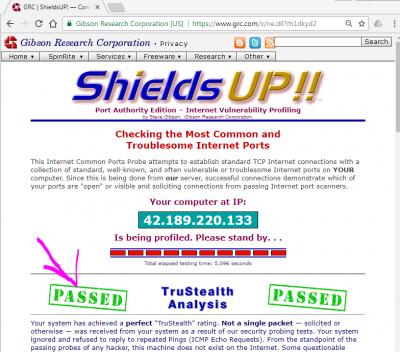

|
|
|
May 1 2018, 04:41 PM
Return to original view | Post
#76
|
|
Senior Member
669 posts Joined: Sep 2015
|
My Asus Ac68u pass but tp-link archer c7 failed.
Pls help me how to setting make it pass. |
|
|
May 1 2018, 06:27 PM
Return to original view | Post
#77
|
|
Senior Member
669 posts Joined: Sep 2015
|
Check all 4 package, all closed.
I also use ping.pe to ping my self, again AC68U all red but Archer C7 green. This post has been edited by Alex9182: May 1 2018, 06:31 PM |
|
|
May 1 2018, 11:08 PM
Return to original view | Post
#78
|
|
Senior Member
669 posts Joined: Sep 2015
|
QUOTE(XPS @ May 1 2018, 10:16 PM) Check your firewall settings. By right out of the box routers should not have ports opened. Did you setup the Archer yourself? yes i setup my self, but nearly everything default, firewall sure is default setting. dont know why fail the test.The old posts in this forum, circa 2012/2013 had some recommendations for DIR-615 by the couple of gurus who are no longer posting. Stuff like turning off TR-021 in addition to firewall setups. Try a search. Please note those firewall recommendations will apply to all routers in general. DLink is mentioned as that is your search key. |
|
|
May 1 2018, 11:09 PM
Return to original view | Post
#79
|
|
Senior Member
669 posts Joined: Sep 2015
|
QUOTE(SilentVampire @ May 1 2018, 06:55 PM) What error message does it display? no error message, green mean it response to ping from outside, red mean it ignore.Attached thumbnail(s) 
|
|
|
May 1 2018, 11:31 PM
Return to original view | Post
#80
|
|
Senior Member
669 posts Joined: Sep 2015
|
QUOTE(XPS @ May 1 2018, 11:15 PM) Check if something like "Respond Ping Request from WAN in Firewall - General" is enabled. It should not be meaning your router will be in stealth mode. Tq Bro, after enable that one, now pass all d. Are there any other site that can test our router more better? |
| Change to: |  0.0585sec 0.0585sec
 0.63 0.63
 7 queries 7 queries
 GZIP Disabled GZIP Disabled
Time is now: 8th December 2025 - 03:46 PM |
 Quote
Quote