Welcome Guest ( Log In | Register )

5 Pages < 1 2 3 4 > » Bottom

Outline · [ Standard ] · Linear+

 Official TP-Link C1200 V1(EU) Firmware is out, Hidden WDS functionality works!, Page 29

views
     
Alex9182
post Feb 28 2018, 11:17 PM

On my way
****
Senior Member
669 posts

Joined: Sep 2015
QUOTE(Jjuggler @ Feb 28 2018, 11:09 PM)
hardware version revision b1
*
tqvm smile.gif

** Ps. at Lazada, review for Asus RT-N12HP is way better then D-Link DIR-850L, most of the good comment is stability, i think is better to get Asus after all.

This post has been edited by Alex9182: Feb 28 2018, 11:44 PM
Alex9182
post Feb 28 2018, 11:53 PM

On my way
****
Senior Member
669 posts

Joined: Sep 2015
QUOTE(Jjuggler @ Feb 28 2018, 03:44 PM)
If you for free then dir850l.
if you want to invest, then pick rt12hp

As mentioned by @SilentVampire bro, you can give asus rtn12hp a try.

*
thumbsup.gif thumbsup.gif

now baru i understand what you mean, brain abit slow.

ok final, go for Asus RT-N12HP rclxm9.gif

This post has been edited by Alex9182: Feb 28 2018, 11:56 PM
Alex9182
post Mar 1 2018, 12:50 AM

On my way
****
Senior Member
669 posts

Joined: Sep 2015
QUOTE(cannavaro @ Mar 1 2018, 12:36 AM)
I'm using a few RT-N12HP in AP mode (not for myself but for tenants)
don't forget to flash it to the latest firmware
the latest FW is dated 30/11/17
oldest FW is way back, 12/01/15

just goes to show how awesome ASUS is unlike TPLINK who simply release a new hardware revision or permanent beta, buggy firmware  laugh.gif

at my office we are still using an ASUS RT-N12 D1, and ASUS released a new firmware for it as well back in November last year!
to give you an idea how old this model is, the oldest FW you can download is dated 27/09/13 !
*
at Asus malaysia site, i see last firmware is "2016/08/11 Version 3.0.0.4.380.2943 ".
at global site, FW dated 30/11/17 is for RT-N12HP B1, can use for malaysia set?

This post has been edited by Alex9182: Mar 1 2018, 12:57 AM
Alex9182
post Mar 1 2018, 01:07 AM

On my way
****
Senior Member
669 posts

Joined: Sep 2015
QUOTE(cannavaro @ Mar 1 2018, 01:00 AM)
Mine are all B1, bought in Malaysia.. IIRC I have like 5 of them? deployed across 4 floors of a building
I recall the box not stating 'B1 version' but on the router itself showing 'B1' at the back.
*
ok, when mine arrived and if B1 then will check if they flash the latest FW for me, if not then i update my self. smile.gif

Alex9182
post Mar 1 2018, 01:31 PM

On my way
****
Senior Member
669 posts

Joined: Sep 2015
QUOTE(alijoe @ Mar 1 2018, 12:00 PM)
Sorry, how about archer c20? good enough as budget replacement to this problematic c1200?
*
ha ha, this router is priced below RM200. why you choose it?

is it cost? functionality/features? brand? stability? aesthetic? Range coverage? speed?

any other models you have in mind?

This post has been edited by Alex9182: Mar 1 2018, 01:33 PM
Alex9182
post Mar 1 2018, 03:11 PM

On my way
****
Senior Member
669 posts

Joined: Sep 2015
QUOTE(SilentVampire @ Mar 1 2018, 02:53 PM)
Definitely the v2. Remember to update to latest firmware, US_170926, and enjoy! Do not enable IPv6 though, as it can be very unstable once you do that, and I tested it briefly with IPv6, and did not like it, and the settings seem to be retained even if you turn IPv6 off, so I just reset it and did not bother with re-enabling IPv6 anymore.
*
expensive model also very unstable, or it happen to all router if enable IPv6?
Alex9182
post Mar 2 2018, 12:39 AM

On my way
****
Senior Member
669 posts

Joined: Sep 2015
QUOTE(kombeng7 @ Mar 2 2018, 12:12 AM)
I wanted to update to TM firmware but I accidentally update to EU firmware. How do I setup the router to connect to Unifi?
*
if Tp-Link brand, watch this link : connect to unifi

This post has been edited by Alex9182: Mar 2 2018, 12:40 AM
Alex9182
post Mar 2 2018, 02:23 PM

On my way
****
Senior Member
669 posts

Joined: Sep 2015
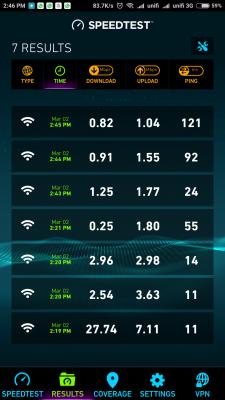
Asus RT-N12HP arrived, setup and update to latest firmware, simple and easy.

However, something is wrong with the WiFi connection even after done factory reset and re-setup.
1). Ping, Download, Upload is abnormally low and in consistent,

2). Wifi range is lower then C1200.

result are the same tested on few devices. maybe i get a defective unit.

Put back Archer C1200, everything back to normal speed

(see attached test result for Asus Vs Tp-Link).

**PS... Note book connected with LAN cable, speed is not effected, (Ping 15ms, Download 32mbps, Upload 10mbps).

This post has been edited by Alex9182: Mar 2 2018, 04:13 PM


Attached thumbnail(s)
Attached Image Attached Image
Alex9182
post Mar 2 2018, 05:35 PM

On my way
****
Senior Member
669 posts

Joined: Sep 2015
Any one know why my Asus RT-N12HP has Wifi connection problem?

If no solution, i will return the unit to Lazada on coming Monday for full refund because of defective unit.


Alex9182
post Mar 2 2018, 05:46 PM

On my way
****
Senior Member
669 posts

Joined: Sep 2015
QUOTE(rhytion @ Mar 2 2018, 05:42 PM)
Interesting, someone from Malaysia working to add those disabled channels into the AU firmware, after someone gained SSH access to the router. Gonna try them myself as well.

https://forum.lede-project.org/t/build-for-...-ac1200/2547/34
*
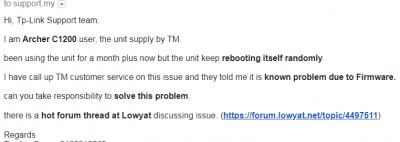
Much appreciated if some with the appropriate knowledge can focusing on solving the reboot issue. making C1200 stable and good.

**Ps, i wrote to Tp-Link asking them to take action. hope more ppl can write to them pressurizing them to take action fast. attached mail screen capture.

This post has been edited by Alex9182: Mar 2 2018, 06:14 PM


Attached thumbnail(s)
Attached Image
Alex9182
post Mar 2 2018, 07:14 PM

On my way
****
Senior Member
669 posts

Joined: Sep 2015
QUOTE(AVFAN @ Mar 2 2018, 07:01 PM)
this is tplink thread.

u shud ask asusmy, provide details:
https://forum.lowyat.net/topic/2651405/+7960

i used rtn12hp_b1 for 4 years, full 50mbps wifi with default settings, no tweaking.
*
i use default setting as well, should work out of the box.

in this case, it must be a faulty unit and i can just return the unit to Lazada for full refund.

no need to play with the problem. smile.gif

This post has been edited by Alex9182: Mar 2 2018, 07:17 PM
Alex9182
post Mar 2 2018, 08:12 PM

On my way
****
Senior Member
669 posts

Joined: Sep 2015
QUOTE(JohnLai @ Mar 2 2018, 07:43 PM)
hmm.gif

1) Did you screw in two antennas properly?

2) Did you adjust the antenna transmit power and force channel 40Mhz? Go to Advanced Settings, Wireless.
Enable Wireless Multicast Forwarding.
Disable Enable WMM ASPD
Disable Enhanced interference management
Set Tx Power adjustment to 200 mW
*
Antenna screw properly, unscrew and rescrew in. The rest i leave it at default.
Default should not give such problems i guess.


This post has been edited by Alex9182: Mar 2 2018, 08:17 PM
Alex9182
post Mar 2 2018, 08:18 PM

On my way
****
Senior Member
669 posts

Joined: Sep 2015
QUOTE(JohnLai @ Mar 2 2018, 08:14 PM)
Don't.
The default wireless options sucks.
I used DSL-N12HP before. (a more or less the same stuff)

After you make the modification, reboot and rebenchmark.
*
I believe many happy user are using default settings, no need to tweak just to get 30mbps within 3 meters away line of sight distance. smile.gif


This post has been edited by Alex9182: Mar 2 2018, 08:21 PM
Alex9182
post Mar 2 2018, 08:23 PM

On my way
****
Senior Member
669 posts

Joined: Sep 2015
QUOTE(JohnLai @ Mar 2 2018, 08:20 PM)
..........Should I explain what those option do?

You need to make those changes if you wanna get 30Mbps..... dry.gif  It doesn't matter about devices being within 3 meters away line of sight distance.
*
Using wifi analyser app found the signal gone missing few moments then come back.

This never happen to C1200.

I will give it a try later, if does not work as it should then i let know. smile.gif

Ps... I already posted at Asus link, should continue discuss there as this is tp-link thread.

This post has been edited by Alex9182: Mar 2 2018, 08:29 PM
Alex9182
post Mar 3 2018, 12:57 PM

On my way
****
Senior Member
669 posts

Joined: Sep 2015
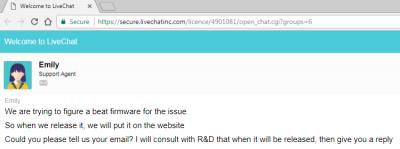
Chat with Tp-Link Support Agent yesterday on Archer C1200 random self reboot problem, see attached reply.

don't know how soon they can find the solution for it.

This post has been edited by Alex9182: Mar 3 2018, 02:42 PM


Attached thumbnail(s)
Attached Image
Alex9182
post Mar 7 2018, 03:13 AM

On my way
****
Senior Member
669 posts

Joined: Sep 2015
QUOTE(shamsay @ Mar 7 2018, 12:24 AM)
15days uptime now..performance still ok..
*
Wow, mine only lasted 6 days before it rebooted.

Alex9182
post Mar 7 2018, 10:57 PM

On my way
****
Senior Member
669 posts

Joined: Sep 2015
QUOTE(Invalid Username @ Mar 7 2018, 10:42 PM)
Complained to TIME today, their engineer called me and pushed a firmware update to my router remotely to Build 20180213 rel. 22243 (EU). However, still experiencing reboot after 2 hours uptime.
*
Before that, what FW you are using? How frequently it reboot itself?
Alex9182
post Mar 9 2018, 09:54 PM

On my way
****
Senior Member
669 posts

Joined: Sep 2015
QUOTE(Invalid Username @ Mar 7 2018, 11:57 PM)
I was using the stock TIME firmware, experience frequent disconnects. Ended up flashing the TM firmware but still same thing happening.
Frequency varies widely, sometimes one day, sometimes few hours.
*
This 2 days, C1200 self rebooted 3 times, really no good.

have just placed order for Archer C7 V4 at Lazada "EIT Store".

pay RM330 for it, hope it is good.


This post has been edited by Alex9182: Mar 10 2018, 04:39 PM
Alex9182
post Mar 10 2018, 09:09 PM

On my way
****
Senior Member
669 posts

Joined: Sep 2015
QUOTE(tritonite @ Mar 10 2018, 08:47 PM)
I would still like to know if it has good performance without all this issue with disconnections that the C1200 has.

I don't want to spend all that money and have it being less reliable than the original DIR-850?
*
Bro, i have took quite some time looking for a reasonable price and good router,

Archer C7 has many good review all over the world, win quite a number of awards, and recommended by few Sifu here at Lowyat.

unless i get a defective unit, i expect it to perform as it should.

Alex9182
post Mar 10 2018, 09:22 PM

On my way
****
Senior Member
669 posts

Joined: Sep 2015
QUOTE(SilentVampire @ Mar 10 2018, 08:42 PM)
Bro, I did recommend you that router or the Asus RT-AC1300UHP last time. Glad you took my advice.
I would recommend the C7 v4 as it is newer than the C5 and price is not too expensive.
*
Ya ya, i remember your self and Bro Jjuggler also recommend this model.

online, can find many good reviews, bad review are very less for this model.

V4 has integrate 5G and 2.4G into 3 external antenna, hope the performance is better then V2.

5 Pages < 1 2 3 4 > » Top
 

Change to:
| Lo-Fi Version
0.2624sec    0.38    7 queries    GZIP Disabled
Time is now: 6th December 2025 - 04:03 AM