Outline ·
[ Standard ] ·
Linear+
Official TP-Link C1200 V1(EU) Firmware is out, Hidden WDS functionality works!, Page 29
|
voncrane
|
 Aug 23 2019, 07:30 AM Aug 23 2019, 07:30 AM
|

|
QUOTE(4lt4ir @ Aug 23 2019, 02:11 AM) I don't think you can control routers remotely via the Tether app. Must be connected to the same wifi network as the router then only can access via the app. I can use the Tether app with my C1200. We are saying the same thing. Forummer asked about being able to use the Tether app OUTSIDE the TP-Link router's network. That's a no. |
|
|
|
|
|
voncrane
|
Oct 2 2019, 12:33 PM
|
|
|
QUOTE(Alpha_Tay @ Oct 1 2019, 07:27 PM) hi, does the new revision of TP-Link Archer C1200 with new TP-Link Logo and new unifi Logo instead of TM Logo still suffer from random reboot, auto restart, or any other common C1200 issue? it's still the same version of Archer C1200 v1.0 , came with 1.0.0 Build 20180403 rel.22124 (EU) firmware preinstalled out of box. thx in adv. [attachmentid=10324411] If it looks, walks and quacks like a duck? It's a duck! So yep, I'd say it's the exact same hardware, except with different stickers. |
|
|
|
|
|
voncrane
|
Oct 2 2019, 06:50 PM
|
|
|
QUOTE(Alpha_Tay @ Oct 2 2019, 12:59 PM) just installed unifi biz 100mbps RM139 and got this wifi router, complain to TM and installer also hard to get them replace it. so far no huge issue using it, so i am wondering if i got the fixed version or not. Yeah, depending on your area, there may or may not be adequate stock of better routers from TM. So unfortunately, we either have to rely on it as is and hope all good or cough up extra money to get a better third party router. QUOTE(taqu @ Oct 2 2019, 03:04 PM) My C1200 went dead sometime ago. Then it magically went alive again. Then it's recently dead again. Have 2 units, one is almost 3 years old and the other is almost a year old.. Max Wi-Fi speeds even via 5GHz remains at 2xxMbps, which is sufficient for my wireless devices. Other network intensive devices are wired and receive full 500Mbps. Fingers crossed mine doesn't go kaput. So far so good.. |
|
|
|
|
|
voncrane
|
Oct 5 2019, 12:53 AM
|
|
|
QUOTE(Alpha_Tay @ Oct 4 2019, 02:02 PM) heard from TM on-site support staff that the unifi installer must have different brand and model of wifi router ready stock and available, if not, go get them from their warehouse, customer should refuse the installation of unifi fibre if another brand and model of wifi router is not provided. Yes.. I agree.. At least for new installs.. That's fairly obvious.. However, I was referring to repeated replacements for those who keep experiencing hardware troubles. Either way, yeah..As long as within warranty, it's TM's problem to replace. |
|
|
|
|
|
voncrane
|
Oct 21 2019, 12:05 AM
|
|
|
QUOTE(Aspick @ Oct 18 2019, 02:04 AM) I flashed to the US V1 Beta firmware, then factory restored and tried to flash to EU firmware. It got stuck with a message something like "Upgrade not possible".  I even tried from US V1 Beta firmware flash to EU Beta firmware Build 20180101 rel.66049(Beta). Not successful with same message above. Conclusion : BEWARE! ONCE YOU FLASHED TO US FIRMWARE, THERE IS NO WAY TO GET BACK TO EU FIRMWARE  We thank you for your sacrifice.  |
|
|
|
|
|
voncrane
|
Feb 1 2020, 06:37 PM
|
|
|
QUOTE(seesawseen2k @ Jan 31 2020, 02:49 PM) Hi Sometimes I need to get a new ip address, so I need to manually reboot the router. But feel its hard to re-connect back after that. Any tips to share? I don't necessarily time my reboot (if I have to) but it doesn't seem long to me. I'd suggest you get a VPN service instead..? Switch at will at much shorter interval. |
|
|
|
|
|
voncrane
|
Jun 9 2020, 11:52 AM
|
|
|
QUOTE(carloz28 @ May 29 2020, 03:50 PM) My time WiFi network suddenly changed it name to blazingspeed and now I’m no longer able to log into the network? Any sifus here can help? I've experienced this phenomenon twice or thrice over about 3 years of ownership... No choice, you simply have to reconfigure it. Log in to the router and setup again. I have a backup of the config setup nicely.. So a quick reset, restore backup file, reboot....and I'm back in business. I suggest you keep a backup of the config too. Do this for any router with backup & restore feature. Saves time. |
|
|
|
|
|
voncrane
|
Jun 14 2020, 03:34 AM
|
|
|
QUOTE(carloz28 @ Jun 9 2020, 12:20 PM) I fixed the prob. Turns out the router tp link has a self update system which completely boots the router back to its default factory setting... What a bummer No surprise there. I haven't experienced it in awhile though. QUOTE(bsb85my @ Jun 12 2020, 01:19 AM) I'm trying to update the firmware. But I don't find the upgrade firmware option. Any help? 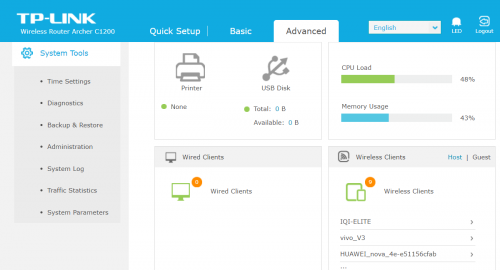 Check first page for the link. |
|
|
|
|
|
voncrane
|
Jul 25 2020, 04:04 AM
|
|
|
QUOTE(skty @ Jul 19 2020, 02:57 PM) Try using it as wired AP mode.. It’s a solid performer.. Definitely overkill on a 4Mbps plan. |
|
|
|
|
|
voncrane
|
Sep 16 2020, 11:49 PM
|
|
|
QUOTE(chrischiang @ Sep 14 2020, 04:22 PM) hello, i trying to flash my unifi unit to work as AP.. should i use the official EU firmware from tplink website (Archer C1200(EU)_V1_180124) or the 1 from EDIT7 (C1200v1_eu-up-1.1.3 Build 20180502 rel.46288) thanks!! I'm using 1.0.0 Build 20180502 rel.45702 (EU)... Wired AP. About a year now and no issues. |
|
|
|
|
|
voncrane
|
Oct 8 2020, 07:47 PM
|
|
|
QUOTE(silvaco22 @ Oct 4 2020, 02:32 PM) Guys, can someone help me which firmware should I use to update if I have Unifi? 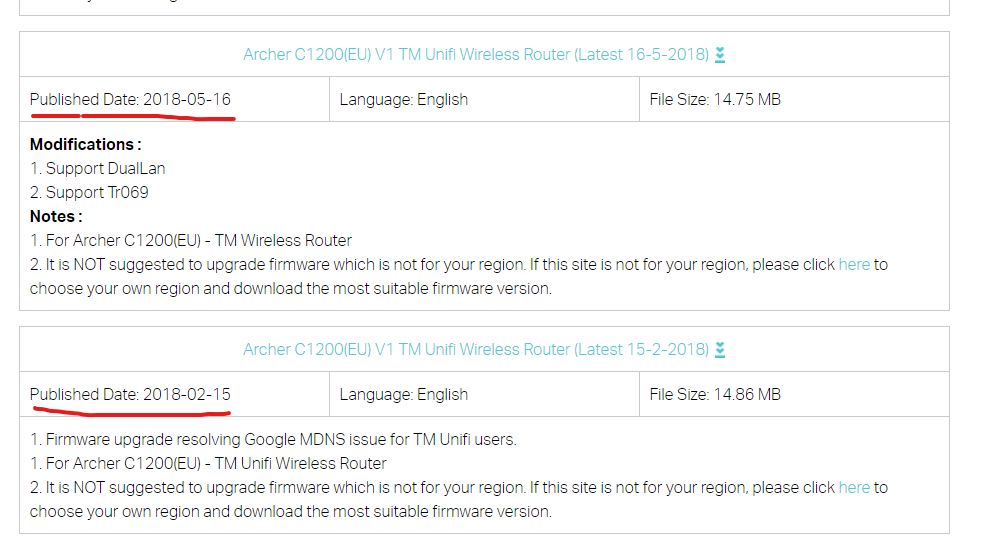 There's two firmware for Unifi router and this is very confusing to me. https://www.tp-link.com/my/support/download...00/v1/#FirmwareAlso, I'm having this issue where the model keeps on rebooting and sometimes it disconnects by itself. I have to manually reset the router in order to get the internet working. I didn't change any settings since the date of installation. Make a backup of your settings first. Then try the latest "Archer C1200(EU) V1 TM Unifi Wireless Router (Latest 16-5-2018)" |
|
|
|
|
|
voncrane
|
Jan 17 2021, 10:21 AM
|
|
|
QUOTE(JustcallmeLarry @ Jan 16 2021, 09:26 PM) guys i never updated my router firmware since the day i got it which is a few years already. But everything is working ok do i still need to update it? At the back of my router it says my is Ver:1.0 and all updates in the link are only for EU and US version, so i dont have to update anything??? There’s a saying... “If it ain’t broke, don’t fix it”. I last updated mine awhile ago and since both are chugging nicely.. I just leave em be. It’s not like we have super custom firmware for the C1200.  |
|
|
|
|
|
voncrane
|
Jan 17 2021, 04:37 PM
|
|
|
QUOTE(bluestolks @ Jan 17 2021, 10:36 AM) hi , im using Time , they provide me with C1200 . Everytime the internet down , it wont reconnect back automaticly , I need to off both of the modem and router to reconnect back , no problem with speed. only this problem anybody can help ? or should I contact Time ? Yes, I suggest you should contact TIME. Particularly if the route is still under a year old, should be under warranty. Ask for a router replacement. QUOTE(nikrizal @ Jan 17 2021, 03:17 PM) My TP-Link AC1200 lasted about three years. Back in October 2020, I had frequent internet failures which I initially thought it's the line issue. After frequently called 100 and getting assistance from Unifi team, it's been confirmed that my AC1200 had finally stopped working. It showed connected but no internet. It's been a great pleasure & experience for me using the AC1200 which rarely gave me problems. Now I try a new router from Asus. Just about time for me to upgrade to Wifi 6. I got a special price on Shopee 11.11 sale, RM462 for TUF AX3000, which I thought a very good price. I hope it'll last longer than AC1200.  |
|
|
|
|



 Quote
Quote
 0.0623sec
 0.32
0.32
 7 queries
 GZIP Disabled