Outline ·
[ Standard ] ·
Linear+
Official TP-Link C1200 V1(EU) Firmware is out, Hidden WDS functionality works!, Page 29
|
voncrane
|
 Jul 10 2018, 12:39 AM Jul 10 2018, 12:39 AM
|

|
QUOTE(hurricane21 @ Jul 10 2018, 12:25 AM) Can setup C1200 as wireless repeater? I upgraded mine to EU firmware but only found AP mode, no wireless bridging mode to be found. AUS fw here and I believe it's wired AP to wireless mode.. 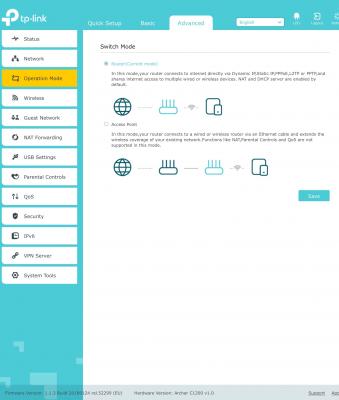 This post has been edited by voncrane: Jul 10 2018, 12:41 AM
 |
|
|
|
|
|
voncrane
|
Aug 22 2018, 03:13 PM
|
|
|
QUOTE(torino @ Aug 22 2018, 03:11 PM) too bad.. i cant connect to hypptv after flashed.. the unifi port also changed from lan4 to lan1.. is it something i can fix by myself?  Yes.. Easiest fix would be to swap the cables position from Port 1 to port 4 and be done.. Alternatively, you can go into the router config and reconfigure the ports.. |
|
|
|
|
|
voncrane
|
Aug 22 2018, 03:26 PM
|
|
|
QUOTE(torino @ Aug 22 2018, 03:22 PM) im not that pro in this particular stuff, pardon me. what's ip-phone for? The VOIP phone service attached to your account. |
|
|
|
|
|
voncrane
|
Aug 27 2018, 11:22 AM
|
|
|
QUOTE(- JaY - @ Aug 27 2018, 10:39 AM) my unifi router C1200 restarts every 1-3 hours, any idea is this common and hardware defect? updated to latest firmware according to TP Link website. If it restarts say once a week or in 2 weeks.. It's considered "normal" due to a persistent bug. But every 3 hours is major problem. If still within warranty, call TM right away and have then replace it. If still unsatisfactory, then consider buying your router. I'm still using the C1200 and it's satisfactory.. I don't check as religiously as before, but I probably get a reboot or 2 per month. That's fine by me. |
|
|
|
|
|
voncrane
|
Sep 15 2018, 09:19 PM
|
|
|
QUOTE(anonymous552235 @ Sep 15 2018, 09:57 AM) Can anyone confirm if i flash to time firmware i can still use with unifi? ..@unifi is annoying but im reluctant to flash EU firmware.. Skip TIME's and just flash EU fw and be done with it... Yes, it'll still work with Unifi, just you have to manually configure it yourself after flashing.. Careful though, some FW once flashed, can't reflash Unifi FW. Search back previous posts for recommended FWs. This post has been edited by voncrane: Sep 15 2018, 09:20 PM |
|
|
|
|
|
voncrane
|
Sep 22 2018, 07:53 AM
|
|
|
QUOTE(SMF97 @ Sep 22 2018, 01:41 AM) If i upgrade the firmware will all my setting will be gone? There's a possibility, so make sure to backup beforehand. |
|
|
|
|
|
voncrane
|
Oct 12 2018, 11:34 AM
|
|
|
QUOTE(yeo_1987 @ Oct 12 2018, 11:00 AM) Somehow don’t like the @unifi suffix appears in WiFi names. Any way to remove it? Is the older Unifi firmware Archer C1200(EU) V1 TM Unifi Wireless Router (15-2-2018) comes with this suffix and beamforming? Flash foreign FW (aka non-TM supplied FW) to remove.. See past pages for some examples... |
|
|
|
|
|
voncrane
|
Oct 12 2018, 12:26 PM
|
|
|
QUOTE(yeo_1987 @ Oct 12 2018, 11:42 AM) Actually I flashed an EU firmware but channels for 5 GHz are limited. Any Malaysia firmware without @unifi suffix but comes with beamforming and greater channel option than EU version? Unfortunately, not to my knowledge.. I too flashed an EU fw and no issues with my 5Ghz network even staying in high-rise and surrounded by many networks. You also have to remember that 5Ghz has limited range for max benefits. |
|
|
|
|
|
voncrane
|
Oct 18 2018, 01:30 PM
|
|
|
QUOTE(ellim33 @ Oct 18 2018, 12:13 PM) goto Advanced, Internet, Advanced. Set connection mode to On Demand and Max Idle Time to Zero. Save. [attachmentid=10074643] Will check and try this later tonight...  Edit.. Done this.. Will monitor ip, if changed or not. This post has been edited by voncrane: Oct 20 2018, 08:55 PM |
|
|
|
|
|
voncrane
|
Oct 20 2018, 08:50 PM
|
|
|
QUOTE(ahlek @ Oct 20 2018, 04:16 PM) can we use tplink tether app to configure C1200 ? Yes.. I use it. |
|
|
|
|
|
voncrane
|
Jan 26 2019, 10:58 PM
|
|
|
Need some urgent help with the WDS setup.. I've tried using
*the 2 FWs..
*with DHCP enabled and disabled..
*LAN IP left as 192.168.0.1, 192.168.1.0, 192.168.0.101, etc...
*Rebooted both C1200s multiple times...
*Used same wifi network names, different wifi network names, open and no-password..
All to no avail.. Need help or is that it's not possible using 2 C1200 routers? I just switched from TM to TIME and now have 2.. Want to try the wifi route before committing to drilling a hole to run cable through and setup a wired AP..
Currently running this beta fw.. "C1200v1_eu-up-1.1.3 Build 20180502 rel.46288_2018-05-02_13.47.59.bin"
|
|
|
|
|
|
voncrane
|
Jan 27 2019, 01:23 AM
|
|
|
QUOTE(imalmighty @ Jan 27 2019, 12:51 AM) Practical max thruput of powerline adapters 100M. Let's assume u hook up 5GHz bands of both c1200s via wds, whereas 2.4G are left out since u cant wds both 2.4G and 5G. Mesh systems dont have this problem, the main router and their slaves can communicate simultaneuously thru both 2.4G and 5G. The mesh system automatically optimizes/adjusts l/balances how much bandwidth to reserve to communicate with other routers and how much bandwidth dedicated to wifi clients(end users). One wifi name for all. No walls and barriers for communication among clients connected to different access points or repeaters or main router, meaning to say u can cast youtube video from furthest AP to TV connected to main router. If subscribe bandwidth(by ISP) above 100M... i doubt u can attain full 300M bandwidth thru wds bridging or repeater&base setup. Better pick powerline then... Thanks.. I did consider the powerline route. But I'd rather go with the cable linked route. As it'll be cheaper and offer faster speeds.. Plus only one hole between the middle rooms needs to be drilled. Run 2 separate cables, one dedicated to the PC and the other to the second router to offer full coverage the rest of the way for other wireless devices. |
|
|
|
|
|
voncrane
|
Mar 1 2019, 11:00 AM
|
|
|
QUOTE(yuktsi14 @ Feb 17 2019, 09:03 PM) Managed to set the used C1200 router I got as a repeater! Thank you all for all the guide and sharing! Same here.. Got both units "free".. But now, whole house has strong Wi-Fi connection and all devices can easily access at least 100Mbps at the furthest.. Happy. QUOTE(adrianmoi @ Mar 1 2019, 08:34 AM) Sorry if I bump into this topic without fully reading..TLDR But is it still safe to flash EU firmware into the c5 provided by TM? I'm experiencing freezes every morning and I had to restart the router? Will flashing the firmware fix it? If you are talking of the C1200? Yes, still safe. I'm even running the beta firmware on one used as wired AP. Never noticed a single reboot this past few weeks. So yes, it's recommended.. It may not solve it permanently, but should be able to go at least a week or 2 without randomly rebooting. This post has been edited by voncrane: Mar 1 2019, 11:01 AM |
|
|
|
|
|
voncrane
|
Mar 4 2019, 02:23 PM
|
|
|
QUOTE(adrianmoi @ Mar 4 2019, 11:39 AM) May I know what version you're using now? I've updated mine to 1.1.3 Build 20180124 rel.52299 last Friday evening. I couldn't test it over the weekend cause no one in office. After coming into office today, line was still working fine till 2 hours later, the hang started again. What was recently done after the hang: Setting the connection mode to "On-demand" and Max Idle Time to 0. Running through tests DNS still using TM, should I just set it to Google's? Primary router is running stock TIME fw.. AP is running Beta fw 1.1.3 Build 20180502 rel. 46288. Primary router's connection settings is same as you just did.. AP router didn't need all such settings. Just plug in cable, setup Wi-Fi SSIDs and passwords.. All good. Prior to this, was connected as wireless AP.. Same fw and it ran well. As for DNS setting, Google's fine.. But up to you to switch or not. |
|
|
|
|
|
voncrane
|
Apr 6 2019, 04:39 PM
|
|
|
QUOTE(smithkuan @ Apr 6 2019, 03:15 PM) i have gone thru the steps and still unable to detect my root router wifi. am i miss out any step? Have to provide more information than that buddy.. |
|
|
|
|
|
voncrane
|
May 12 2019, 12:36 PM
|
|
|
QUOTE(Cruxs @ May 12 2019, 12:33 PM) How to use hypptv box wirelessly? Dont want lan cable cluttering around. Switch on its wifi.. connect to router..  This post has been edited by voncrane: May 12 2019, 12:37 PM This post has been edited by voncrane: May 12 2019, 12:37 PM |
|
|
|
|
|
voncrane
|
Aug 14 2019, 05:38 PM
|
|
|
QUOTE(anwa @ Aug 14 2019, 03:06 PM) Thanks. Already bought M9. Now house fully covered. Going to sell the C1200. Any takers? Have to try your luck elsewhere.. Here we all know how crappy that model can be  Kudos on getting the house fully covered.  This post has been edited by voncrane: Aug 14 2019, 05:39 PM This post has been edited by voncrane: Aug 14 2019, 05:39 PM |
|
|
|
|
|
voncrane
|
Aug 16 2019, 05:07 PM
|
|
|
QUOTE(Aspick @ Aug 14 2019, 10:32 PM) Glad you took my advice. 🤗 It's crappy if use as a router. But others like me have found a good use for it either as an AP or as a WDS. In my case after flashing to US firmware, the WDS function with 5GHz as backhaul and wifi has made my whole house connected with fast internet. 😁 Chill fam.. I'm one of those too.. Whole place covered by two C1200s.. Wired AP.. Combo of stock TIME and EU fw.. I'm a happy camper now..  This post has been edited by voncrane: Aug 16 2019, 05:15 PM This post has been edited by voncrane: Aug 16 2019, 05:15 PM |
|
|
|
|
|
voncrane
|
Aug 20 2019, 02:31 AM
|
|
|
QUOTE(TP-LINK MY @ Aug 19 2019, 09:41 AM) Hi there, Please be informed that our routers customized by ISP do not support the Tether app. -Sandra Err... My main router still running stock TIME fw. Yet, I can control it via the tether app. Both the primary and wired AP can be viewed and modified using the Tether app. Android here. |
|
|
|
|
|
voncrane
|
Aug 21 2019, 10:19 PM
|
|
|
QUOTE(arkana @ Aug 21 2019, 09:22 PM) Model: TP-Link Archer C1200 Hardware Version: V1 TIME: 500mbps package Hi ... can I remotely control thru TP-link "Thether App" from my mobile phone when I'm out of wifi range or I am different location. If possible to do it, how can I set it to remotely control thru my phone on the Thether app. Hope to receive feedback on the matter above. Thanks in advance. I tried and nope.. You must be connected to a compatible tplink router for the Tether app to work. |
|
|
|
|



 Quote
Quote
 0.0205sec
 0.44
0.44
 7 queries
 GZIP Disabled