


HDR, High Dynamic Range
|
|
 Oct 24 2008, 03:51 PM Oct 24 2008, 03:51 PM
|
 
Senior Member
783 posts Joined: Jan 2003 From: Hertfordshire  
|
another one..
|
|
|
|
|
|
Oct 24 2008, 05:20 PM
|
 
Elite
4,744 posts Joined: Jan 2003 From: Kuala Lumpur
|
QUOTE(achew @ Oct 24 2008, 03:14 PM) yup i did dat...but if u compare the img i posted vs the ss inside the link..u can see the color is diff..the one inside the ss looks darker?? Hmmm.. then i dont know the problem, its way out of my league haha...   btw, redo the HDR without those fancy stuffs, but remained the grafitti behind the car.  4agze: damn im loving the red on your shot haha |
|
|
Oct 24 2008, 09:38 PM
|

All Stars
10,261 posts Joined: Jan 2003
|
QUOTE(' or 1=1 -- @ Oct 24 2008, 03:13 PM) great scene, great angle great processing Thanks for your feedback. From another PP sifu I appreciate it.   This post has been edited by calvin_gsc: Oct 24 2008, 09:45 PM |
|
|
Oct 25 2008, 01:59 AM
|
|
Elite
4,744 posts Joined: Jan 2003 From: Kuala Lumpur
|
 HDR'ed on bg, with subject remained more natural rather than too HDR'ed. |
|
|
Oct 25 2008, 09:12 AM
|

Senior Member
2,549 posts Joined: Dec 2004 From: Sungai Petani, Kedah
|
What happen to her?
|
|
|
Oct 25 2008, 12:03 PM
|
|
Elite
4,744 posts Joined: Jan 2003 From: Kuala Lumpur
|
what do you mean?
|
|
|
|
|
|
Oct 25 2008, 08:36 PM
|

Senior Member
952 posts Joined: Apr 2007 From: Sandakan 
|
btw, redo the HDR without those fancy stuffs, but remained the grafitti behind the car.
» Click to show Spoiler - click again to hide... « 4agze: damn im loving the red on your shot haha OMG  Awesome man Awesome man  Remebering me the NFS Remebering me the NFS This post has been edited by ramblie: Oct 25 2008, 08:37 PM |
|
|
Oct 27 2008, 02:33 PM
|

Senior Member
2,630 posts Joined: Jan 2003 From: Klang
|
Hey guys.. I've gotten the trial version of the Photomatix software.. Alot of watermarks... can someone help me pls?
|
|
|
Oct 27 2008, 07:41 PM
|

Senior Member
2,491 posts Joined: Dec 2004 From: initrd 
|
Hehe, my 1st time
  |
|
|
Oct 27 2008, 07:50 PM
|

Senior Member
1,680 posts Joined: Mar 2006 From: Subang
|
still very noob in making HDR
any tips? only hav photoshop, no photomatix  windows user feel like switching to macThis post has been edited by Redcross: Oct 27 2008, 07:52 PM |
|
|
Oct 28 2008, 01:44 AM
|
|
Elite
4,744 posts Joined: Jan 2003 From: Kuala Lumpur
|
QUOTE(Redcross @ Oct 27 2008, 07:50 PM) still very noob in making HDR don blame it on windows. it has nothing to do with it. any tips? only hav photoshop, no photomatix windows user feel like switching to mac all you need is to experiment more and learn, use google to search for better tips, sometimes asking around here is not enough. |
|
|
Oct 28 2008, 02:54 AM
|

Senior Member
1,969 posts Joined: Oct 2007 From: CheRaS, KL
|
QUOTE(R a D ! c 4 L @ Jul 20 2007, 06:52 PM) for your 1st question. Use 1 RAW. That's all i can say. Then go to photomatix > automate > single file conversion > tick "from low to high dynamic range" with radiance rgb. Then look for your file. then click ok. i used the method you mentioned here but when i done all of it and i use RAW file which called the CR2 file right? later after i done i want to see the picture but when i open it, i see no picture one. what happen le? Hmmm... Definitely will be different. If im not wrong, pic two will be darker at some areas. while pic 1 will have a more balanced shot. But still i cant be completely sure. Why not take a time out experiment it yourself? But' ill go for method 1. Then bring to photoshop for further processing Good luck. |
|
|
Oct 28 2008, 10:15 AM
|

Junior Member
333 posts Joined: Feb 2006 From: Punk Rock City
|
Hey guyss I've tried some HDR myself...
http://ardiinfinity.deviantart.com/art/Lov...y-HDR-100055076 there are alot more too.. but for some reason.. i cant make it feel any more mooody... Tips anyone? |
|
|
|
|
|
Oct 28 2008, 10:36 AM
|
|
Elite
4,744 posts Joined: Jan 2003 From: Kuala Lumpur
|
QUOTE(CrossFirE @ Oct 28 2008, 02:54 AM) i used the method you mentioned here but when i done all of it and i use RAW file which called the CR2 file right? later after i done i want to see the picture but when i open it, i see no picture one. what happen le? have you tone mapped the .hdr file? You have to tone map the files 1st then only convert them to .tif so that you can view them or further enhance them. |
|
|
Oct 28 2008, 10:54 AM
|
|
Senior Member
952 posts Joined: Apr 2007 From: Sandakan
|
QUOTE(Doomsday @ Oct 27 2008, 07:41 PM) Hehe, my 1st time Not so bad for the first time buddy Keep on a good work |
|
|
Oct 28 2008, 11:37 AM
|
|
Senior Member
2,491 posts Joined: Dec 2004 From: initrd
|
QUOTE(ramblie @ Oct 28 2008, 10:54 AM) Not so bad for the first time buddy Thanks. Here is the 2nd try Keep on a good work  |
|
|
Oct 28 2008, 07:46 PM
|

Senior Member
3,807 posts Joined: Jan 2003 From: Masking
|
guys..i was wondering...if i took a single file with +1 exposure..and i added another 2 by PS(increase2 n decrease2 using the base file)...when im adding file using photomatix...i shd put as +2 , 0 , -2? or +3 , 1 , -3 ??
|
|
|
Oct 28 2008, 08:18 PM
|

Senior Member
1,394 posts Joined: Apr 2007
|
QUOTE(achew @ Oct 28 2008, 07:46 PM) guys..i was wondering...if i took a single file with +1 exposure..and i added another 2 by PS(increase2 n decrease2 using the base file)...when im adding file using photomatix...i shd put as +2 , 0 , -2? or +3 , 1 , -3 ?? An easier way is to use the automatic single file conversion in Photomatix. Automate > Single File Conversion > RAW file into .hdr After that just open that .hdr file and tone map it.  Anyways here's mine. Taken from inside a car window, so it has a slight bluish cast. 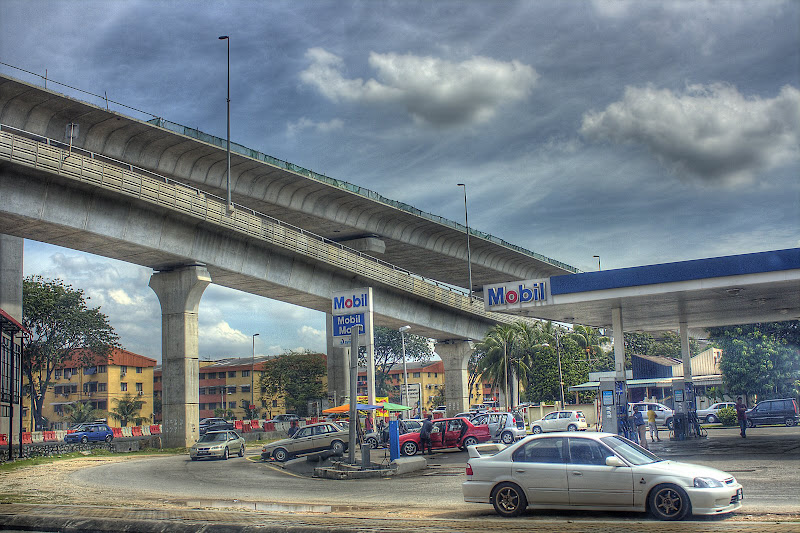 This post has been edited by joyyy: Oct 28 2008, 08:18 PM |
|
|
Oct 28 2008, 08:24 PM
|
|
Senior Member
2,630 posts Joined: Jan 2003 From: Klang
|
QUOTE(joyyy @ Oct 28 2008, 08:18 PM) An easier way is to use the automatic single file conversion in Photomatix. Subang Jaya SS15 Roundabout! Automate > Single File Conversion > RAW file into .hdr After that just open that .hdr file and tone map it. Anyways here's mine. Taken from inside a car window, so it has a slight bluish cast. |
|
|
Oct 28 2008, 08:28 PM
|
|
Senior Member
3,807 posts Joined: Jan 2003 From: Masking
|
 2nd time trying =) |
| Change to: |  0.0341sec 0.0341sec
 1.21 1.21
 6 queries 6 queries
 GZIP Disabled GZIP Disabled
Time is now: 19th December 2025 - 08:27 AM |
 Quote
Quote