Outline ·
[ Standard ] ·
Linear+
[WTA]Docooler M9S-PRO, Bricked?
|
BOTAK_WAI
|
 Nov 29 2017, 03:31 PM Nov 29 2017, 03:31 PM
|

|
|
|
|
|
|
|
puchongite
|
Nov 29 2017, 05:58 PM
|
|
|
QUOTE(BOTAK_WAI @ Nov 29 2017, 03:31 PM) Seems like you upgrade the firmware often. How do you handle the previous app data, app themselves ? It's takes me a lot of time to configure, for example the Kodi add ons. I hate to spend time reconfiguring them back. |
|
|
|
|
|
BOTAK_WAI
|
Nov 29 2017, 06:53 PM
|
|
|
I don't. Just share the firmware to help forumers who bricked their device.
If no one share firmware, i think mine also bricked and can throw into rubbish bin already.
|
|
|
|
|
|
NightFelix
|
Nov 29 2017, 09:30 PM
|
|
|
QUOTE(puchongite @ Nov 29 2017, 05:58 PM) Seems like you upgrade the firmware often. How do you handle the previous app data, app themselves ? It's takes me a lot of time to configure, for example the Kodi add ons. I hate to spend time reconfiguring them back. IDK. I just got my box 2 weeks ago and it was out of the box 7.1.2 and meanwhile, probably with root capable. try Titanium Backup Pro? |
|
|
|
|
|
puchongite
|
Dec 2 2017, 11:22 AM
|
|
|
Just want to mention that I got Astro Go running on this box with Magisk.
The requirement is :-
1. Android 7.1.2 rom tested. The Android 6 did not work suspect due to DRM library issue. Android 6 will get a file format error.
2. TWRP and Magisk. No need to unroot, just install magisk and hide Astro Go will do.
|
|
|
|
|
|
NightFelix
|
Dec 2 2017, 12:51 PM
|
|
|
QUOTE(puchongite @ Dec 2 2017, 11:22 AM) Just want to mention that I got Astro Go running on this box with Magisk. The requirement is :- 1. Android 7.1.2 rom tested. The Android 6 did not work suspect due to DRM library issue. Android 6 will get a file format error. 2. TWRP and Magisk. No need to unroot, just install magisk and hide Astro Go will do. nice. thansk for sharing. but I dont have Astro. lol |
|
|
|
|
|
puchongite
|
Dec 2 2017, 02:02 PM
|
|
|
QUOTE(NightFelix @ Dec 2 2017, 12:51 PM) nice. thansk for sharing. but I dont have Astro. lol Already noticed some regression of the 7.1.2 rom compared to the android 6 one. Basically wifi keyboard (with usb dongle ) has stopped working as before. Only touchpad and mouse related keys are working. Have to type by click the on screen keyboard. Keyboard is working in TWRP, meaning this is a config/set up issue. |
|
|
|
|
|
BOTAK_WAI
|
Dec 2 2017, 02:32 PM
|
|
|
QUOTE(puchongite @ Dec 2 2017, 02:02 PM) Already noticed some regression of the 7.1.2 rom compared to the android 6 one. Basically wifi keyboard (with usb dongle ) has stopped working as before. Only touchpad and mouse related keys are working. Have to type by click the on screen keyboard. Keyboard is working in TWRP, meaning this is a config/set up issue. yup. the 7.1.2 firmware out if the box cant use the keyboard. but working after updated to another latest 7.1.2 firmware. |
|
|
|
|
|
NightFelix
|
Dec 2 2017, 02:43 PM
|
|
|
QUOTE(BOTAK_WAI @ Dec 2 2017, 02:32 PM) yup. the 7.1.2 firmware out if the box cant use the keyboard. but working after updated to another latest 7.1.2 firmware. You USB flash update or TWRP update? |
|
|
|
|
|
BOTAK_WAI
|
Dec 2 2017, 02:49 PM
|
|
|
QUOTE(NightFelix @ Dec 2 2017, 02:43 PM) You USB flash update or TWRP update? usb la... |
|
|
|
|
|
puchongite
|
Dec 2 2017, 03:38 PM
|
|
|
QUOTE(BOTAK_WAI @ Dec 2 2017, 02:49 PM) Please share the link. I will try to use the customization tool to compare the differences. Try to avoid re-installing everything. |
|
|
|
|
|
BOTAK_WAI
|
Dec 2 2017, 03:53 PM
|
|
|
QUOTE(puchongite @ Dec 2 2017, 03:38 PM) Please share the link. I will try to use the customization tool to compare the differences. Try to avoid re-installing everything. shared above already mah. |
|
|
|
|
|
puchongite
|
Dec 2 2017, 03:57 PM
|
|
|
QUOTE(BOTAK_WAI @ Dec 2 2017, 03:53 PM) shared above already mah. Which one you are refering to ? Actually the second link for 2G/16G Rom is a 6.0.1 Rom. The first link is 7.1.2. |
|
|
|
|
|
BOTAK_WAI
|
Dec 2 2017, 04:19 PM
|
|
|
QUOTE(puchongite @ Dec 2 2017, 03:57 PM) Which one you are refering to ? Actually the second link for 2G/16G Rom is a 6.0.1 Rom. The first link is 7.1.2. mine is 3g/32g. |
|
|
|
|
|
puchongite
|
Dec 2 2017, 04:20 PM
|
|
|
QUOTE(BOTAK_WAI @ Dec 2 2017, 04:19 PM) Okay so the fix is in the 3g/32g one ? |
|
|
|
|
|
BOTAK_WAI
|
Dec 2 2017, 04:23 PM
|
|
|
i have no 2g 16g i kenot test
|
|
|
|
|
|
puchongite
|
Dec 3 2017, 08:15 AM
|
|
|
QUOTE(BOTAK_WAI @ Dec 2 2017, 04:23 PM) i have no 2g 16g i kenot test I fixed the wireless keyboard issue by changing the physical keyboard configuration under the keyboard settings somewhere. So now the 7.1.2 ROM is at par with the 6.0.1 ROM, plus able to run Astro Go. |
|
|
|
|
|
NightFelix
|
Dec 4 2017, 10:49 AM
|
|
|
QUOTE(puchongite @ Dec 3 2017, 08:15 AM) I fixed the wireless keyboard issue by changing the physical keyboard configuration under the keyboard settings somewhere. So now the 7.1.2 ROM is at par with the 6.0.1 ROM, plus able to run Astro Go. which Nougat firmware build u are? |
|
|
|
|
|
puchongite
|
Dec 4 2017, 10:57 AM
|
|
|
QUOTE(NightFelix @ Dec 4 2017, 10:49 AM) which Nougat firmware build u are? I used the 2g/16g link provided BOTAK_WAI above. I believe they are obtained from 4pda website. The first link is the Nought firmware. The second link is a Marshmallow firmware, which I believe it is identical or almost identical with the ROM came with the shipment of my unit. I did a file comparison with the ROM for 3g/32g (also in the link above), actually they are almost identical, except for the kernel (hardcoded for the RAM size etc) and a few binaries. So the wireless keyboard issue is a matter of configuration. This post has been edited by puchongite: Dec 4 2017, 11:11 AM |
|
|
|
|
|
BOTAK_WAI
|
Dec 8 2017, 09:57 PM
|
|
|
Docooler M9S Pro (S905X 3G/32G) PCB 

add an usb fan underneath 
powered by usb, added an on/off switch too. 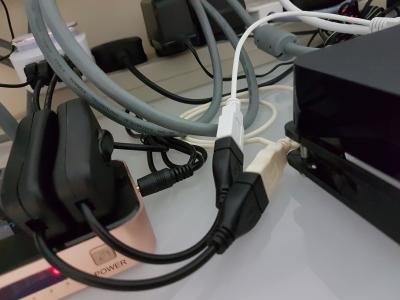
fan off temp: idle 45-50c, max 80c fan on temp: idle 43-45c, max 60c |
|
|
|
|



 Quote
Quote


 0.0248sec
 1.36
1.36
 6 queries
 GZIP Disabled