Outline ·
[ Standard ] ·
Linear+
[WTA]Docooler M9S-PRO, Bricked?
|
NightFelix
|
 Nov 24 2017, 12:06 PM Nov 24 2017, 12:06 PM
|

|
QUOTE(SecretJay @ Nov 24 2017, 12:41 AM) 2g/16g version, sadly I spend whole night and can't find the right firmware.... How twrp recovery works actually? Using the SD card? short answer is YES. First, dont do anything. Get TWRP into SD Card and boot from there, and backup the whole things (include System) first. (Yes, even you are soft-bricked at the moment) 2nd, go to chainfire download latest flashable supersu.zip and flash it from TWRP, wipe it and it will boot as normal (I can't recall which SuperSU I download, I think should be this one: http://www.devfiles.co/download/74iPUjZd/S...1705271822.zip)I was using the same model same exact as BOTAK_WAIThis post has been edited by NightFelix: Nov 24 2017, 12:16 PM |
|
|
|
|
|
NightFelix
|
Nov 27 2017, 01:07 PM
|
|
|
QUOTE(puchongite @ Nov 27 2017, 12:38 PM) I intend to install TWRP into my box. My box is a S905X. I hope someone could give a recommendation of the version of TWRP which is proven to Ok. Likely the remote is not going to be working but at least the TWRP should be able to mount/read the SD card, the system/data partitions. Full spec of your box? |
|
|
|
|
|
NightFelix
|
Nov 27 2017, 02:56 PM
|
|
|
QUOTE(puchongite @ Nov 27 2017, 01:14 PM) Post #7. I have a MXQ Pro + 4K, said to be 2G/16G S905X. The PCB is found to be identical with m9s Pro the S905X version. There are pictures in xda and other forums people posted about the m9s pro (s905x) version. Try this one. http://freaktab.com/forum/tv-player-suppor...-devices/page88p212 (S905X): twrp.p212-3.1.1-0.img (refer above website) I also use this for my M9s-Pro S905X+(3G/32G) |
|
|
|
|
|
NightFelix
|
Nov 27 2017, 03:23 PM
|
|
|
QUOTE(puchongite @ Nov 27 2017, 03:18 PM) What do you use to navigate when in TWRP ? USB mouse or the remote ? USB Mouse. I haven't find any compatible air mouse+keyboard for my box yet. remote still untouch. My Logitech Wireless Mouse (with Dongle that one) also working. My Logitech Bluetooth K380 also working (but just the touch pad, not the keyboard) This post has been edited by NightFelix: Nov 27 2017, 03:24 PM |
|
|
|
|
|
NightFelix
|
Nov 27 2017, 03:51 PM
|
|
|
QUOTE(puchongite @ Nov 27 2017, 03:40 PM) The picture of m9s pro in https://4pda.ru/forum/index.php?showtopic=786429&st=380» Click to show Spoiler - click again to hide... « The PCB identifier is the same as mine :- 1. The antenna is embedded into the PCB. 2. The reset button is behind the SPDIF port. If it was the same, you can use the TWRP try and see. If it work, it will boot into Recovery without any problem and backup the whole image system of your Android box. |
|
|
|
|
|
NightFelix
|
Nov 27 2017, 10:38 PM
|
|
|
QUOTE(puchongite @ Nov 27 2017, 09:35 PM) Okay I tested the TWRP recovery. Boots fine. Tq. I was able to navigate using my usb airmouse. My sdcard is too small, I need to strategize my backup plan first before going further. My current Rom is an android 6. Is there a newer/better ROM than this ? IDK. our M9s Pro already running Android Nougat 7 |
|
|
|
|
|
NightFelix
|
Nov 29 2017, 09:30 PM
|
|
|
QUOTE(puchongite @ Nov 29 2017, 05:58 PM) Seems like you upgrade the firmware often. How do you handle the previous app data, app themselves ? It's takes me a lot of time to configure, for example the Kodi add ons. I hate to spend time reconfiguring them back. IDK. I just got my box 2 weeks ago and it was out of the box 7.1.2 and meanwhile, probably with root capable. try Titanium Backup Pro? |
|
|
|
|
|
NightFelix
|
Dec 2 2017, 12:51 PM
|
|
|
QUOTE(puchongite @ Dec 2 2017, 11:22 AM) Just want to mention that I got Astro Go running on this box with Magisk. The requirement is :- 1. Android 7.1.2 rom tested. The Android 6 did not work suspect due to DRM library issue. Android 6 will get a file format error. 2. TWRP and Magisk. No need to unroot, just install magisk and hide Astro Go will do. nice. thansk for sharing. but I dont have Astro. lol |
|
|
|
|
|
NightFelix
|
Dec 2 2017, 02:43 PM
|
|
|
QUOTE(BOTAK_WAI @ Dec 2 2017, 02:32 PM) yup. the 7.1.2 firmware out if the box cant use the keyboard. but working after updated to another latest 7.1.2 firmware. You USB flash update or TWRP update? |
|
|
|
|
|
NightFelix
|
Dec 4 2017, 10:49 AM
|
|
|
QUOTE(puchongite @ Dec 3 2017, 08:15 AM) I fixed the wireless keyboard issue by changing the physical keyboard configuration under the keyboard settings somewhere. So now the 7.1.2 ROM is at par with the 6.0.1 ROM, plus able to run Astro Go. which Nougat firmware build u are? |
|
|
|
|
|
NightFelix
|
Dec 9 2017, 11:13 AM
|
|
|
BOTAK_WAI no try my HEAT SINK method? lol
This post has been edited by NightFelix: Dec 9 2017, 11:13 AM
|
|
|
|
|
|
NightFelix
|
Dec 11 2017, 09:49 PM
|
|
|
QUOTE(DigitaLDNA @ Dec 11 2017, 07:59 PM) got mine today... 2g/16 version hmmm i ter update the supersu now stuck at mbox screen... Ethernet cannot connect too... mine come with 7.1.2 so how to unbrick this box... need help plz.. 1st timer on android box dont worry la. here at least TS, me and BOTAK also brick the box because of the dam SuperSU thing. Still got one more PM me but the one send back to lazada to claim warranty. |
|
|
|
|
|
NightFelix
|
Dec 11 2017, 11:57 PM
|
|
|
QUOTE(DigitaLDNA @ Dec 11 2017, 10:31 PM) ok igive another try using trwp that @puchongite give.. can get into trwp... and install supersu... now can boot already... but ethernet cannot detect... Try update to latest firmware, see whether is firmware fault or the hardware problems. |
|
|
|
|
|
NightFelix
|
Dec 18 2017, 09:34 AM
|
|
|
QUOTE(qhalidx @ Dec 17 2017, 03:27 PM) Hi guys, never thought i would come to this. I ter-update the dang super su. I already booted the twrp and installed it but i really would love to know what the next step. download SuperSU zip put int SDCard and reflash the SuperSU into your ROM using TWRP |
|
|
|
|
|
NightFelix
|
Feb 6 2018, 12:54 PM
|
|
|
QUOTE(BOTAK_WAI @ Dec 25 2017, 11:07 PM) tested hx_s905x_Nougat_660M_20171030_1748_2017110102 firmware on S905X 3G/32G variant. https://mega.nz/&usg=ALkJrhh3qAx3B5f-H9vZgk...Squm9T0Q7U6NagQupdated: this firmware fix storage capacity info (previously shows 40GB internal storage, now 26GB), but bluetooth seems not working. TLDR: FIRMWARE NOT RECOMMENDED. NightFelix rraauurrnow baru notice u got tag me |
|
|
|
|
|
NightFelix
|
Feb 3 2021, 11:20 AM
|
|
|
QUOTE(mrdokok @ Feb 3 2021, 03:26 AM) review pls |
|
|
|
|



 Quote
Quote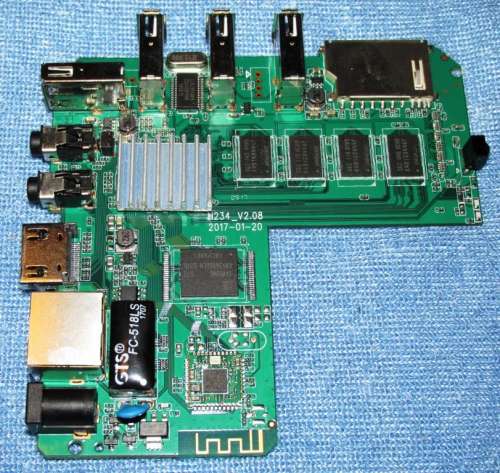

 0.0235sec
 0.36
0.36
 7 queries
 GZIP Disabled