Welcome Guest ( Log In | Register )

Outline · [ Standard ] · Linear+

 [WTA]Docooler M9S-PRO, Bricked?

views
     
puchongite
post Nov 23 2017, 09:26 PM

20k VIP Club
*********
All Stars
33,619 posts

Joined: May 2008
QUOTE(SecretJay @ Nov 23 2017, 09:17 PM)
Hi, I just bought this Docooler M9S-PRO TV Box (TOMTOM Lazada), however the firmware got auto updated (not sure how) and it is bricked (still can power on, blue LED, but stuck at the logo loading)...may I know how to flash it? Anyone has experience dealing with it?

I have tried using the USB_Burning_Tool but keep on stucking at 2% and telling me romcode/intialize ddr error....

Please help me and thanks in advance blush.gif
*
Sounds like you got a hardware error. Better go claim your warranty.
puchongite
post Nov 27 2017, 07:33 AM

20k VIP Club
*********
All Stars
33,619 posts

Joined: May 2008
QUOTE(NightFelix @ Nov 24 2017, 12:06 PM)
short answer is YES.
» Click to show Spoiler - click again to hide... «

I was using the same model same exact as BOTAK_WAI
*
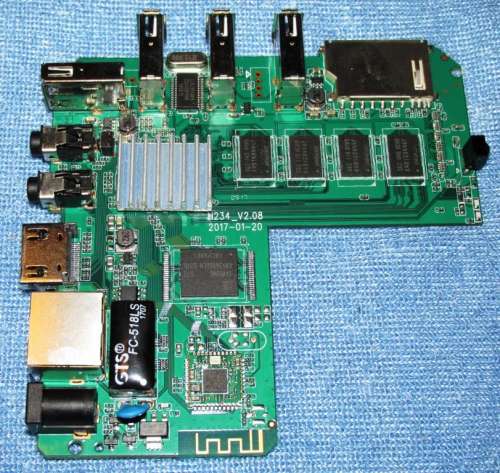
I own a MXQ pro + 4k box. I was complaining of poor wifi for my box and so I open up my box. Finally I found that actually the box which I have is having identical motherboard as m9s pro ( the S905X version ).

The pcb has this identifier H234_v2.08 2017-1-20

https://forum.lowyat.net/topic/4200167/+1829

user posted image

Yesterday somebody posted in xda about the firmware of this box and I did a quick check it seems to match very well with my box :-

https://forum.xda-developers.com/android-st...-t3509591/page6

The firmware link is in the post.

This post has been edited by puchongite: Nov 27 2017, 11:03 AM
puchongite
post Nov 27 2017, 12:38 PM

20k VIP Club
*********
All Stars
33,619 posts

Joined: May 2008

I intend to install TWRP into my box. My box is a S905X. I hope someone could give a recommendation of the version of TWRP which is proven to Ok.

Likely the remote is not going to be working but at least the TWRP should be able to mount/read the SD card, the system/data partitions.
puchongite
post Nov 27 2017, 01:14 PM

20k VIP Club
*********
All Stars
33,619 posts

Joined: May 2008
QUOTE(NightFelix @ Nov 27 2017, 01:07 PM)
Full spec of your box?
*
Post #7.

I have a MXQ Pro + 4K, said to be 2G/16G S905X.

The PCB is found to be identical with m9s Pro the S905X version. There are pictures in xda and other forums people posted about the m9s pro (s905x) version.

This post has been edited by puchongite: Nov 27 2017, 01:41 PM
puchongite
post Nov 27 2017, 03:18 PM

20k VIP Club
*********
All Stars
33,619 posts

Joined: May 2008
QUOTE(NightFelix @ Nov 27 2017, 02:56 PM)
Try this one.
http://freaktab.com/forum/tv-player-suppor...-devices/page88

p212 (S905X): twrp.p212-3.1.1-0.img (refer above website) I also use this for my M9s-Pro S905X+(3G/32G)
*
What do you use to navigate when in TWRP ? USB mouse or the remote ?
puchongite
post Nov 27 2017, 03:40 PM

20k VIP Club
*********
All Stars
33,619 posts

Joined: May 2008
QUOTE(NightFelix @ Nov 27 2017, 03:23 PM)
USB Mouse. I haven't find any compatible air mouse+keyboard for my box yet. remote still untouch.
My Logitech Wireless Mouse (with Dongle that one) also working. My Logitech Bluetooth K380 also working (but just the touch pad, not the keyboard)
*
The picture of m9s pro in

https://4pda.ru/forum/index.php?showtopic=786429&st=380

user posted image

The PCB identifier is the same as mine :-

1. The antenna is embedded into the PCB.
2. The reset button is behind the SPDIF port.


puchongite
post Nov 27 2017, 09:35 PM

20k VIP Club
*********
All Stars
33,619 posts

Joined: May 2008
QUOTE(NightFelix @ Nov 27 2017, 03:51 PM)
If it was the same, you can use the TWRP try and see. If it work, it will boot into Recovery without any problem and backup the whole image system of your Android box.
*
Okay I tested the TWRP recovery. Boots fine. Tq.

I was able to navigate using my usb airmouse.

My sdcard is too small, I need to strategize my backup plan first before going further.

My current Rom is an android 6.

Is there a newer/better ROM than this ?

This post has been edited by puchongite: Nov 27 2017, 09:42 PM
puchongite
post Nov 28 2017, 07:17 AM

20k VIP Club
*********
All Stars
33,619 posts

Joined: May 2008
QUOTE(NightFelix @ Nov 27 2017, 10:38 PM)
IDK. our M9s Pro already running Android Nougat 7
*
Okay android 7.1.2, that seems to correspond to the firmware mentioned in the 4pda forum. Have to use USB burning tool for that image, meaning all previous customisation will be wiped out. It will be painful for me, need to ponder first.


puchongite
post Nov 29 2017, 05:58 PM

20k VIP Club
*********
All Stars
33,619 posts

Joined: May 2008
QUOTE(BOTAK_WAI @ Nov 29 2017, 03:31 PM)
Seems like you upgrade the firmware often. How do you handle the previous app data, app themselves ?

It's takes me a lot of time to configure, for example the Kodi add ons. I hate to spend time reconfiguring them back.
puchongite
post Dec 2 2017, 11:22 AM

20k VIP Club
*********
All Stars
33,619 posts

Joined: May 2008

Just want to mention that I got Astro Go running on this box with Magisk.

The requirement is :-

1. Android 7.1.2 rom tested. The Android 6 did not work suspect due to DRM library issue. Android 6 will get a file format error.

2. TWRP and Magisk. No need to unroot, just install magisk and hide Astro Go will do.
puchongite
post Dec 2 2017, 02:02 PM

20k VIP Club
*********
All Stars
33,619 posts

Joined: May 2008
QUOTE(NightFelix @ Dec 2 2017, 12:51 PM)
nice. thansk for sharing. but I dont have Astro. lol
*
Already noticed some regression of the 7.1.2 rom compared to the android 6 one.

Basically wifi keyboard (with usb dongle ) has stopped working as before. Only touchpad and mouse related keys are working. Have to type by click the on screen keyboard.

Keyboard is working in TWRP, meaning this is a config/set up issue.
puchongite
post Dec 2 2017, 03:38 PM

20k VIP Club
*********
All Stars
33,619 posts

Joined: May 2008
QUOTE(BOTAK_WAI @ Dec 2 2017, 02:49 PM)
usb la...
*
Please share the link. I will try to use the customization tool to compare the differences. Try to avoid re-installing everything.
puchongite
post Dec 2 2017, 03:57 PM

20k VIP Club
*********
All Stars
33,619 posts

Joined: May 2008
QUOTE(BOTAK_WAI @ Dec 2 2017, 03:53 PM)
shared above already mah.
*
Which one you are refering to ? Actually the second link for 2G/16G Rom is a 6.0.1 Rom. The first link is 7.1.2.
puchongite
post Dec 2 2017, 04:20 PM

20k VIP Club
*********
All Stars
33,619 posts

Joined: May 2008
QUOTE(BOTAK_WAI @ Dec 2 2017, 04:19 PM)
mine is 3g/32g.
*
Okay so the fix is in the 3g/32g one ?
puchongite
post Dec 3 2017, 08:15 AM

20k VIP Club
*********
All Stars
33,619 posts

Joined: May 2008
QUOTE(BOTAK_WAI @ Dec 2 2017, 04:23 PM)
i have no 2g 16g i kenot test
*
I fixed the wireless keyboard issue by changing the physical keyboard configuration under the keyboard settings somewhere.

So now the 7.1.2 ROM is at par with the 6.0.1 ROM, plus able to run Astro Go.


puchongite
post Dec 4 2017, 10:57 AM

20k VIP Club
*********
All Stars
33,619 posts

Joined: May 2008
QUOTE(NightFelix @ Dec 4 2017, 10:49 AM)
which Nougat firmware build u are?
*
I used the 2g/16g link provided BOTAK_WAI above. I believe they are obtained from 4pda website.

The first link is the Nought firmware. The second link is a Marshmallow firmware, which I believe it is identical or almost identical with the ROM came with the shipment of my unit.

I did a file comparison with the ROM for 3g/32g (also in the link above), actually they are almost identical, except for the kernel (hardcoded for the RAM size etc) and a few binaries. So the wireless keyboard issue is a matter of configuration.

This post has been edited by puchongite: Dec 4 2017, 11:11 AM
puchongite
post Dec 9 2017, 11:34 AM

20k VIP Club
*********
All Stars
33,619 posts

Joined: May 2008
Is it really that hot ? Until need to add fan or heat sink ?

I think the wifi performance is the #1 problem. I don't have any other problems with it.

This post has been edited by puchongite: Dec 9 2017, 11:34 AM
puchongite
post Dec 9 2017, 01:49 PM

20k VIP Club
*********
All Stars
33,619 posts

Joined: May 2008
QUOTE(mywife @ Dec 9 2017, 01:18 PM)
May I know which version you're using for TWRP & Magisk on this Nougat?
*
The magisk is the usual magisk, you can use the stable 14.0 version.

The TWRP is the TWRP for amlogic reference design p212 ( link in this thread ). That TWRP works for Android 6. It might not work for other boards.

For me, this p212 TWRP did not work for Nought. That is Android 6 TWRP wont work for Nought.

It seems the Nought bootloader can only boot the Recovery if the kernel in the recovery matches with the one in the boot image. So I created a customize TWRP for the ROM image 2g/16g. Likely it won't work for other ROMs.

If one presses the reset button to boot the recovery on the SD card, if that did not work, it might boot the stock recovery in the internal storage. And the default behaviour of stock recovery is to wipe your data partition (factory reset). I factory reseted my ROM a few times because of that.

A bit long story. wink.gif

This post has been edited by puchongite: Dec 9 2017, 02:00 PM
puchongite
post Dec 9 2017, 06:22 PM

20k VIP Club
*********
All Stars
33,619 posts

Joined: May 2008
QUOTE(mywife @ Dec 9 2017, 02:54 PM)
Thanks! Nice info you got there  anyway  :thumbsup:
*
If my memory serves me right, you don't own a m9s pro. You have a mini m8s, which is based on s912.
puchongite
post Dec 11 2017, 09:34 PM

20k VIP Club
*********
All Stars
33,619 posts

Joined: May 2008
QUOTE(DigitaLDNA @ Dec 11 2017, 07:59 PM)
got mine today... 2g/16 version
hmmm i ter update the supersu
now stuck at mbox screen...
Ethernet cannot connect too...
mine come with 7.1.2 so how to unbrick this box... need help plz.. 1st timer on android box
*
As mentioned by BOTAK_WAI, use usb burning tool to burn new ROM. The reset button is behind the SPDIF port ( not the AV port ).

Get toothpick ( non-conductor ). Detach from power supply, attach the usb cable to pc, start the burning tool, press and hold the reset button using toothpick, then insert the other end of USB cable to tv box. Burning will start.

Might need to try a few times.

In case you want to try TWRP, you can use the TWRP on this link :-

https://mega.nz/#F!YORFiSoJ!yyypyiZNq9NAgUE6fnsugA

Base on my limited testing, the Amlogic android 7 bootloader matches the kernel before it will allow to boot. The TWRP in the above link is matched with the ROM given by BOTAK_WAI. If you have other ROMs, it might not boot.

Put the file on SDcard, rename as recovery.img and press hold reset button using toothpick, then insert power.

This post has been edited by puchongite: Dec 11 2017, 09:41 PM

2 Pages  1 2 >Top
 

Change to:
| Lo-Fi Version
0.0242sec    0.34    7 queries    GZIP Disabled
Time is now: 7th December 2025 - 12:24 PM