Outline ·
[ Standard ] ·
Linear+
Unifi Official TM UniFi High Speed Broadband Thread V32, Enjoy Your Speed Upgrade
|
noobandroid
|
 Nov 29 2017, 10:01 PM Nov 29 2017, 10:01 PM
|

|
jesus effing christ! those dumb TM made a mess of my residential network, and now the whole neighbourhood has no UNIFI network AND land line, thats one hell of a fockery
|
|
|
|
|
|
noobandroid
|
Dec 8 2017, 11:27 PM
|
|
|
QUOTE(yakumo @ Dec 8 2017, 11:04 PM) i jsut mine upgraded, but feels sluggish, is it because i change the dns server to google? dont think thats possible, what speed u subbed and what speed u getting? what hardware they gave you? |
|
|
|
|
|
noobandroid
|
Dec 11 2017, 09:16 PM
|
|
|
just went through live chat, they gave me a reference number and say will call me,
btw i copy and pasted the text for the promo and they told me it is sent to existing customer from 62100 number, lol, that cs is confused af
|
|
|
|
|
|
noobandroid
|
Dec 12 2017, 08:21 AM
|
|
|
QUOTE(RallyNight @ Dec 11 2017, 11:39 PM) Anyone in sabah facing no internet for 5days? Wtf man. had total offline for 4 days before |
|
|
|
|
|
noobandroid
|
Dec 14 2017, 09:00 AM
|
|
|
QUOTE(raemon @ Dec 14 2017, 08:59 AM) Are there any downside to the modem router if change the port reserve for IPTV to be web enabled? Meaning for internet. you can change it to Net port and you will not be able to use HypptTV, thats all |
|
|
|
|
|
noobandroid
|
Dec 14 2017, 10:40 PM
|
|
|
do you recon that i need gigabit LAN (IF) i can get to 100 mbps package?
|
|
|
|
|
|
noobandroid
|
Dec 14 2017, 11:38 PM
|
|
|
QUOTE(Neptern @ Dec 14 2017, 10:49 PM) Yes you need gigabit lan port or you will not get full speed. i'm using 10/100 LAN on 50 mbps  |
|
|
|
|
|
noobandroid
|
Dec 18 2017, 11:49 AM
|
|
|
i just got a call from tm, saying i am "chosen" and "entitled" to the rm10 upgrade based on the "received sms" ( which i didn't, and bluffed it to them on live chat, and they might have slotted me in)
followed through the whole "yes, yes, yes" procedure, expecting the 100mbps quite soon 😎😂
This post has been edited by noobandroid: Dec 18 2017, 11:50 AM
|
|
|
|
|
|
noobandroid
|
Dec 20 2017, 10:36 AM
|
|
|
i still can't wrap my head around the fee structure for the promo.. see so many conflicts in this thread
|
|
|
|
|
|
noobandroid
|
Dec 20 2017, 12:01 PM
|
|
|
QUOTE(siawyent @ Dec 20 2017, 11:56 AM) Hi Sifus, I just upgraded my Unifi Lite to Advance 30mbps, the installer gave me a Hypptv box and he said it can only be connected to modem by LAN cable. Now my TV is at Ground floor and the Modem at 1st floor. Hypptv box really cannot be connected by Wifi? Is there any methods to solve this? Is it suggested to pull a new LAN Cable from 1st floor to Ground Floor? How much will it costs? if its a single wiring home, can use powerline to connect both ends, i used tp link and can stream smoothly with no chokes at all |
|
|
|
|
|
noobandroid
|
Dec 20 2017, 11:09 PM
|
|
|
QUOTE(crixalisrox @ Dec 20 2017, 09:28 PM) Want to check with 100mbps user here, may I know which BTU your using and can the speed hit 100mbps? Im using the Huawei hg8240w & router tp-link archer c5, on LAN max speed only 95mbps (cat5e cable) but 5G Wifi can hit over 100mbps Im not sure the BTU is FE or GE port, the technician told me this is latest model and no changes needed. I myself also confused because if FE port then wifi wont hit 100mbps right? If anyone here can confirm the BTU is only FE port, then I want to request for equipment change. try a cat 6 cable instead, as i know of, some cables are terminated mistakenly and can lead to 10/100 instead of gigabit This post has been edited by noobandroid: Dec 20 2017, 11:11 PM |
|
|
|
|
|
noobandroid
|
Dec 21 2017, 11:00 PM
|
|
|
im still waiting on my sms and so slow..
|
|
|
|
|
|
noobandroid
|
Dec 22 2017, 09:56 AM
|
|
|
QUOTE(westlife @ Dec 22 2017, 09:23 AM) yes, never upgrade firmware before. stock firmware. ipv6 disabled. google dns servers: 8.8.8.8 and 8.8.4.4 NAT Boost : disabled.  i can get almost 11MB/s of download speed. i enabled nat boost, ipv6 enabled and updated firmware from tplink my |
|
|
|
|
|
noobandroid
|
Dec 22 2017, 09:59 AM
|
|
|
QUOTE(abcdef123456 @ Dec 22 2017, 09:57 AM) May I know where you disabled the NAT boos?Is it the at the NAT setting where you disabling both "Current NAT Status" & "Current Hardware NAT Status"? unless you have qos to do or need network logging, just leave boost on |
|
|
|
|
|
noobandroid
|
Dec 22 2017, 10:08 AM
|
|
|
QUOTE(abcdef123456 @ Dec 22 2017, 10:05 AM) not sure but imo less features used, less cpu load on router |
|
|
|
|
|
noobandroid
|
Dec 24 2017, 09:16 AM
|
|
|
second time down my unifi, this is getting quite frustrating
|
|
|
|
|
|
noobandroid
|
Dec 26 2017, 10:11 AM
|
|
|
really annoyed by the big downtime at my area, it's been days and this is the 2nd time in a month
don't know what I can do about it, cause all are TM at fault
|
|
|
|
|
|
noobandroid
|
Dec 28 2017, 09:32 PM
|
|
|
QUOTE(fruitie @ Dec 28 2017, 09:23 PM) Well, forever it seems because mine is "perpetual discount" but some said 24 months. I won't bother because God knows what will happen after 24 months. Can try calling 100 to try your luck. S ome still managed to get it even without SMS. I'm one without SMS but gets upgrade QUOTE(sgpdsmss @ Dec 28 2017, 08:57 PM) May i know the device connected to 2.4GHz WIFI..the link speed is how many ? May i know the device connected to 2.4GHz WIFI ..the link speed is how many ? thanks ... 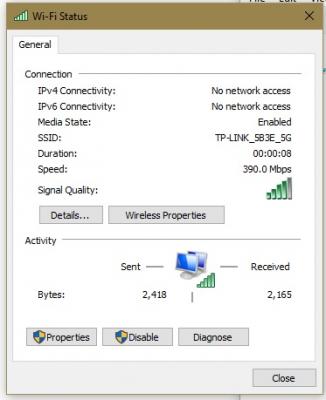
will i be able to achieve 100mbps on wifi link at this speed? This post has been edited by noobandroid: Dec 28 2017, 09:34 PM |
|
|
|
|
|
noobandroid
|
Dec 28 2017, 09:41 PM
|
|
|
QUOTE(Jjuggler @ Dec 28 2017, 09:40 PM) Yes. if and only if on 5ghz. if 2.4ghz can if there is no other wireless interference. but for cancer dota leh? i'm on an independant landed house so not much wifi crowd here This post has been edited by noobandroid: Dec 28 2017, 09:42 PM |
|
|
|
|
|
noobandroid
|
Dec 28 2017, 10:11 PM
|
|
|
QUOTE(jiaen0509 @ Dec 28 2017, 10:05 PM) How you do it? Which department handle or just general cs? Because mine is still under contract. i just make the 100 call, go to billing, say received that sms, and that "douche" just acknowledges without even checking, lmao FYI i just got unifi mid year, then najis budget policy upgrade free to 50mbps, and now RM10 to 100mbps wakaka, such a good half year |
|
|
|
|



 Quote
Quote


 0.2749sec
 0.72
0.72
 7 queries
 GZIP Disabled