Outline ·
[ Standard ] ·
Linear+
Digi Infinite Fan Club [V3], Infinite 150, 100, 80
|
sjneow
|
 Jul 18 2017, 05:52 PM Jul 18 2017, 05:52 PM
|
Getting Started


|
QUOTE(Elvin7 @ Jul 18 2017, 03:10 PM) Any1 using Digi broadband before? i150 seem too much for me, i am considering the RM60 broadband come with 40GB. Digi customer will get RM10 off and 10G extra for 12 months. I am not sure what the main different between except cannot call and sms? stability? I am using Digi prepaid now, speed test average 18m dl 10m ul. Between, there is Unifi lite launching. Any experience Sifu can advise here? I don.t want to spend too much as i am only lite user. I'm on broadband 100, speed is very good. from my room(Kajang) speedtest can consistently get 25-30 mbps. I got similar speeds when I am testing with prepaid do note however the RM60 plan is 16GB normal quota + 16GB streaming quota(Youtube and some other free video streaming sites) and 8 GB on-demand quota(Netflix and other paid video streaming sites). |
|
|
|
|
|
Gladhua1234
|
Jul 18 2017, 06:06 PM
|
New Member
|
QUOTE(khloh1166 @ Jul 18 2017, 11:10 AM) dear all, is i150 speed better than UNIFI 30mbps? my area UNIFI full port and currently using streamyx 1mbps.. i'm tired with the speed. please suggest me. thanks all. you can try to use digi internet.. Since i also use it.it is quite stable.. |
|
|
|
|
|
pokka456
|
Jul 18 2017, 06:08 PM
|
New Member
|
QUOTE(#Victor @ Jul 18 2017, 02:03 PM) Huh? Why first bill RM290? Is ur first bill in the 1st month or 2nd month? And why second bill RM131, can u elaborate? Yes, for me it takes 24 hours to 150 from Postpaid 50, and another 24 hours from Digi Prepaid to Postpaid 50. I went to Digi center to enquire too and not available at stores but they never offer me temporary postpaid or anything, so I just purchase a new prepaid SIM. Maybe just wait another 2 days maximum? One month is too long i think, do u check with them whether they receive change request for ur account to infinite? His bill becomes cheaper in the second month because he has changed his plan to i150  |
|
|
|
|
|
#Victor
|
Jul 18 2017, 06:10 PM
|
|
|
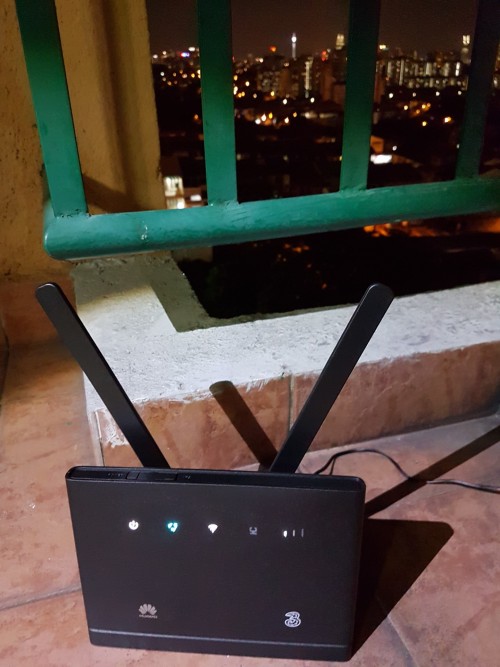
QUOTE(ukee @ Jul 18 2017, 05:50 PM) Just checking in with you guys with the 150 plan Anyone else is getting throttled? I'm using it with my TP-Link M7300 modem and lately the download speed is really terrible but the upload speed is almost double the download speed. Normal browsing + streaming (youtube) is doable but when it comes to downloading files I can only get 200kbps or less which is crazy. It's been happening for a few days now which is really starting to irritate me. I feel that is it being throttled when using it in 4G router but can't confirm because the signal strength might be the culprit. » Click to show Spoiler - click again to hide... « QUOTE(#Victor @ Jul 14 2017, 01:16 PM) Day 2 of using with B315s-22 + DigiTried to relocate my modem at balcony still does not see significant improvement of the signal strength, average speed at 4Mbps but upload speed up to 10-20Mbps.  Speedtest at balcony with 1 bar 4G signal: Speedtest at balcony with 1 bar 4G signal:» Click to show Spoiler - click again to hide... « After moved back to indoor with 1-3 bars 4G signal:Also I found out that switching from External to Auto in Antenna Setting will affect the signal (from 3 bars to 1 bar after setting changed): When time getting late [11:25PM], the download speed seems improved near to 9Mbps but then just for a short while, after that dropped back to average 4Mbps: Btw, I did saw someone mentioned torrent is capped but I able to torrent at maximum speed without VPN or any trick:  *All the result are tested with only 1 device connected to the router without other Internet usage. *All the result are tested with only 1 device connected to the router without other Internet usage. |
|
|
|
|
|
pokka456
|
Jul 18 2017, 06:18 PM
|
New Member
|
QUOTE(#Victor @ Jul 18 2017, 02:03 PM) Huh? Why first bill RM290? Is ur first bill in the 1st month or 2nd month? And why second bill RM131, can u elaborate? Yes, for me it takes 24 hours to 150 from Postpaid 50, and another 24 hours from Digi Prepaid to Postpaid 50. I went to Digi center to enquire too and not available at stores but they never offer me temporary postpaid or anything, so I just purchase a new prepaid SIM. Maybe just wait another 2 days maximum? One month is too long i think, do u check with them whether they receive change request for ur account to infinite? His bill becomes cheaper in the second month because he has changed his plan to i150 |
|
|
|
|
|
ukee
|
Jul 18 2017, 06:36 PM
|
New Member
|
QUOTE(#Victor @ Jul 18 2017, 06:10 PM) I feel that is it being throttled when using it in 4G router but can't confirm because the signal strength might be the culprit. » Click to show Spoiler - click again to hide... « Oh interesting, I might have to try swapping the sim card into my phone then and see if it makes a difference. |
|
|
|
|
|
noien
|
Jul 18 2017, 06:45 PM
|
|
|
I can get quite a stable speed with this.
But how do I get the 6% rebate for the first 6 months?
1 week user and new digi customer here
|
|
|
|
|
|
seehong
|
Jul 18 2017, 06:48 PM
|
Getting Started
|
QUOTE(seehong @ Jul 18 2017, 05:39 PM) just reset to factory defaults and the problem still persists. The 2.4Ghz band is erratic and when connected is slow while the 5Ghz band works fine. LAN connection to my Asus RT-AC1200G+ router works fine with the wifi signal out from there also OK. Wondering whether I should bring back to the supplier to test and request a change. Any opinions? |
|
|
|
|
|
cicak.fakir
|
Jul 18 2017, 06:50 PM
|
|
|
those who have the option to select "auto", "internal", or "external" antenna, i think you better set it explicit to either "internal" or "external".
i cannot imagine how in the world the device can actually detect which circuit it should use. probably if you set "auto", it could be switching back and forth.
ever since i got my "rabbit ears", the modem has been very unresponsive for few minutes at boot when it is set to "auto".
------------
another thing, when you do speed test, you don't run a single test and immediately "a-ha!".
the 1st reading is must always be treated with suspicion. even when we do stress testing on web services and what else, we always discard the first round of any scenario as a "warm up". some components of your system - both remote and local - didn't load into memory the first time, and the time it takes to load them up the first time can impact your benchmark.
run the test for a few rounds to be conclusive, but always discard the first round of each scenario.
scenario could include you moving to a different window location, suddenly mounting or unmounting the antenna, or reconfiguring a modem setting such as "auto", "internal", or "external".
This post has been edited by cicak.fakir: Jul 18 2017, 06:51 PM
|
|
|
|
|
|
cicak.fakir
|
Jul 18 2017, 09:29 PM
|
|
|
QUOTE(Eren_16 @ Jul 18 2017, 08:57 PM) Sometimes i feel the speed is slow after 11pm, what is happening? university and college students. that's "what happened". and gamers. back home from working in lowyat plaza. and late-night netflixers. This post has been edited by cicak.fakir: Jul 18 2017, 09:30 PM |
|
|
|
|
|
jiaen0509
|
Jul 18 2017, 09:45 PM
|
|
|
QUOTE(seehong @ Jul 18 2017, 06:48 PM) just reset to factory defaults and the problem still persists. The 2.4Ghz band is erratic and when connected is slow while the 5Ghz band works fine. LAN connection to my Asus RT-AC1200G+ router works fine with the wifi signal out from there also OK. Wondering whether I should bring back to the supplier to test and request a change. Any opinions? My AC88U just claim warranty. 2.4Ghz can only get 6mbps while 5Ghz and wired working normal. Claim a new unit |
|
|
|
|
|
seehong
|
Jul 18 2017, 09:52 PM
|
Getting Started
|
QUOTE(jiaen0509 @ Jul 18 2017, 09:45 PM) My AC88U just claim warranty. 2.4Ghz can only get 6mbps while 5Ghz and wired working normal. Claim a new unit Will continue to monitor and report back |
|
|
|
|
|
hon kin
|
Jul 18 2017, 10:23 PM
|
|
|
Just started to use this plan. Stay on 21th floor and speed is like 2mbps... T_T Any sifus give some solution? EDIT: My modem is D-Link’s DWR-921, location of modem is now at the balcony  This post has been edited by hon kin: Jul 18 2017, 11:08 PM This post has been edited by hon kin: Jul 18 2017, 11:08 PM |
|
|
|
|
|
tanwh1999
|
Jul 18 2017, 10:24 PM
|
New Member
|
QUOTE(blacktubi @ Jul 18 2017, 10:39 AM) As I said before, it is throttled. We need to complain to Digi regarding this matter. I see more and more users affected by this issue. I would recommend for those who have to call to any networks with low call rate. If you are always calling to Non-DiGi FnF numbers, then digi has just the plan for you. But if you are always calling to all numbers and monthly usage over RM 30, then you should consider DG 30 postpaid plan. |
|
|
|
|
|
Turnip
|
Jul 18 2017, 10:34 PM
|
|
|
Those who uses e5186s 22 router,
Is there a way to know if your router having 4-5 bars rather than looking manually in the Huawei app
Since on the router there's only 3 signals indicator showing? *facepalm*
Or am I missing something here?
This post has been edited by Turnip: Jul 18 2017, 10:35 PM
|
|
|
|
|
|
fruitie
|
Jul 18 2017, 11:13 PM
|
Rise and Shine

|
QUOTE(Turnip @ Jul 18 2017, 10:34 PM) Those who uses e5186s 22 router, Is there a way to know if your router having 4-5 bars rather than looking manually in the Huawei app Since on the router there's only 3 signals indicator showing? *facepalm* Or am I missing something here? No other way as far as I am concerned... Check via app or router setting page. |
|
|
|
|
|
lee hong206
|
Jul 19 2017, 12:00 AM
|
New Member
|
QUOTE(blacktubi @ Jul 18 2017, 11:39 AM) As I said before, it is throttled. We need to complain to Digi regarding this matter. I see more and more users affected by this issue. I agree your opinion too. Which we are complain to Digi regarding the problem, then Digi will know where is their drawbacks. But, we also need to give some times for the Digi solve the problem and a chance to serve us too. This post has been edited by lee hong206: Jul 19 2017, 12:01 AM |
|
|
|
|
|
chuahcs79
|
Jul 19 2017, 12:34 AM
|
Look at all my stars!!

|
QUOTE(cicak.fakir @ Jul 18 2017, 07:49 AM) after I put on the "rabbit ears", gained up to double the download (from up-to-25Mb/s to up-to-50Mb/s) and now consistently getting 16Mb/s upload (from up-to-12Mb/s). Not much difference on the latency since mine had been low even before. Wow t seems rabbit er antenna did wonder here.. t.hanks for feed back.. |
|
|
|
|
|
Turnip
|
Jul 19 2017, 12:54 AM
|
|
|
QUOTE(chuahcs79 @ Jul 19 2017, 12:34 AM) Wow t seems rabbit er antenna did wonder here.. t.hanks for feed back.. *finds rabbit ears* works worse for me. |
|
|
|
|
|
fruitie
|
Jul 19 2017, 01:04 AM
|
Rise and Shine
|
QUOTE(chuahcs79 @ Jul 19 2017, 12:34 AM) Wow t seems rabbit er antenna did wonder here.. t.hanks for feed back.. My router comes free with the rabbit ears, didn't have any significant changes. However, after using MIMO antenna, it does improve albeit a bit. |
|
|
|
|



 Quote
Quote










 0.0187sec
 0.18
0.18
 6 queries
 GZIP Disabled