Welcome Guest ( Log In | Register )

Bump Topic Topic Closed RSS Feed
3 Pages  1 2 3 >Bottom

Outline · [ Standard ] · Linear+

 Digi Infinite Fan Club [V3], Infinite 150, 100, 80

views
     
cicak.fakir
post Jul 14 2017, 11:11 PM

Casual
***
Junior Member
387 posts

Joined: May 2016
QUOTE(yewfatt @ Jul 5 2017, 02:15 PM)
how u get it without contract?
*
read the maxisone go wifi broadband page.

highlight of the page:
- get the broadband only OR
- get the broadband + device + [device discount + contract]

buried in faq and tnc:
- get the broadband + device + [NO device discount + NO contract]
- device warranty through walk-in maxis counter for 12 mths

what is not mentioned at all
- get device only
cicak.fakir
post Jul 14 2017, 11:18 PM

Casual
***
Junior Member
387 posts

Joined: May 2016
QUOTE(#Victor @ Jul 13 2017, 10:38 AM)
Just received my B315s-22 and setup it up to test the capabilities. After speedtest, the average speed I get is around 4Mbps for the router but can get faster speed using phone. The 4G signal strength always maintain at 1-2 bars (lucky enough to get 3 bars but only a short while) even with external antenna (I did change antenna settings to External from Auto in router page), I notice with or without external antenna no improvement for the signal strength.

--snipped--
just got my external "rabbit ears" for same b315s-22.

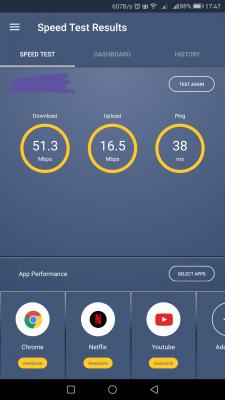
managed to achieve d/load avg 35Mb/s, up to 51Mb/s (previous avg 20Mb/s, max 25Mb/s)
and u/load became consistent at 16Mb/s (previous max 12Mb/s)


Attached Image

This post has been edited by cicak.fakir: Jul 16 2017, 05:55 PM
cicak.fakir
post Jul 15 2017, 09:05 AM

Casual
***
Junior Member
387 posts

Joined: May 2016
QUOTE(fadzly @ Jul 15 2017, 08:54 AM)
U sure it's Mb/s or Mbps? 2 different things u know.
*
they are the same

megabits per second

edit:
in case you confused between
megaBITs per second (Mb/s)
and
megaBYTEs per second (MB/s)

it's in the uppercase and lowercase


edit:
... and then there are mebibits per second (Mib/s) and mebibytes per second (MiB/s)


This post has been edited by cicak.fakir: Jul 15 2017, 09:22 AM
cicak.fakir
post Jul 15 2017, 10:26 AM

Casual
***
Junior Member
387 posts

Joined: May 2016
QUOTE(fadzly @ Jul 15 2017, 09:37 AM)
I see. Ok then. People usually not using / but Use p for Mbps(bit). It's confused me. The symbol for / is usually used for Byte per second.

But u are correct.
*
oh no no

'/' represents 'per'

just like km/h, kmph

-------------

lowercase 'b' for bit
uppercase 'B' is byte (8 bits)

--------------

lowercase 'm' represents 1000
uppercase 'M' represents 1024

--------------

but most didn't care whether they are writing 'm' or 'M', and it causes confusion to those that care about this.

imagine the mathematics will wildly differ in result depending on correctness of notation

1MB = 8Mb
1MB != 1024kb
1MB != 1024kB
1MB = 1024KB
1MB = 8192Kb
1MB != 8192kb
1MB != 8192KB

so, we use extra 'i' as in Kibi, Mebi, Mibi, tibi to be certain of representing 1024.

k vs K/Ki
m vs M/Mi
g vs G/Gi
t vs T/Ti

cicak.fakir
post Jul 16 2017, 02:55 PM

Casual
***
Junior Member
387 posts

Joined: May 2016
QUOTE(northernhero @ Jul 16 2017, 01:46 PM)
Hi all, need some suggestion.

I am currently umobile 28 (xiaomi redmi note 3), webe broadband (Huawei e5377) user.

Recently webe everyday disconnect and some time slow internet speed, so I am thinking to switch to Digi.

However, I am torn between these combo, hope you guys could enlight me.

1. Cutting umobile and webe, use digi infinite to tether to my laptop. Cost wise jump from RM90/month to RM150/month. I can try to sell my huawei modem.

2. Cutting webe, use digi infinite in huawei modem alongside with umobil. Cost jump from RM90/month to RM180/month. Good combination but cost wise was a bit of stretch.

On top of this 2 combo, I still have streamyx 1mbps, stable but turtle speed.

Please share ur 2 cents.
*
test with a digi prepaid sim. if coverage is adequate, you will be delighted to see it surpasses your experience with streamyx 1mb/s.

advise: if you think you would later convert the digi prepaid into infinite 150, look for a nice number upfront if you prefer. cannot change msisdn of infinite subscription afterward, digi said.

cut streamyx (110?) and webe broadband (58) = 168. convert to digi 150, use as mobile broadband to cover both home and on-the-road use.

convert umobile (28) to digi 50 (50) = extra rm4 on top of rm28 + rm18 from terminating streamyx and webe.

if you still insist on keeping infinite specifically for home and requiring another for modem on-the-road, subscribe to digi data sharing sim as supplementary to your digi 50 (add 10 to enable data sharing + 10 for the sim). if you think 10 GB from the digi 50 is not enough, upgrade to digi 80 or digi 110 as required.
cicak.fakir
post Jul 17 2017, 03:12 PM

Casual
***
Junior Member
387 posts

Joined: May 2016
QUOTE(Azureknight94 @ Jul 17 2017, 01:43 PM)
Hi guys, am thinking of getting the b310 and wanna ask if u guys add any antennas to it? Does it make a big difference to the performance? If so which antenna do you guys recommend getting? Thanks biggrin.gif
*
QUOTE(cicak.fakir @ Jul 14 2017, 11:18 PM)
just got my external "rabbit ears" for same b315s-22.

managed to achieve d/load avg 35Mb/s, up to 51Mb/s (previous avg 20Mb/s, max 25Mb/s)
and u/load became consistent at 16Mb/s (previous max 12Mb/s)
Attached Image
*
This post has been edited by cicak.fakir: Jul 17 2017, 03:13 PM
cicak.fakir
post Jul 17 2017, 03:14 PM

Casual
***
Junior Member
387 posts

Joined: May 2016
QUOTE(EON @ Jul 17 2017, 03:12 PM)
went to digi centre to subscribe the i150 plan tody.. but they told me that i150 is not available to subscribe at the centre they gave me 110 postpaid for temporary and they request to change online? May i know hw many day do i have to wait until they change to i150? Anyone got the same exprience ?
*
i150 is available only through digi website.
submit your conversion application via the website.
cicak.fakir
post Jul 17 2017, 11:53 PM

Casual
***
Junior Member
387 posts

Joined: May 2016
QUOTE(xauxix @ Jul 17 2017, 11:49 PM)
guys, i would like to ask some questions..

i got my sim today, bought online and already activate under my name.

but, when i check the plan it shows digi postpaid 50 instead of digi infinite 150 plan.

when i ask my seller, he answer that digi will upgrade the plan soon.. is it true?

if its true, how many days takes to upgrade to infinite 150?
*
can buy direct from digi, but you still want to use reseller....

This post has been edited by cicak.fakir: Jul 17 2017, 11:54 PM
cicak.fakir
post Jul 18 2017, 07:49 AM

Casual
***
Junior Member
387 posts

Joined: May 2016
QUOTE(chuahcs79 @ Jul 18 2017, 12:09 AM)
What is the difference in terms of speed and consistency and latency ping? Mind to share ?
*
after I put on the "rabbit ears", gained up to double the download (from up-to-25Mb/s to up-to-50Mb/s) and now consistently getting 16Mb/s upload (from up-to-12Mb/s). Not much difference on the latency since mine had been low even before.
cicak.fakir
post Jul 18 2017, 06:50 PM

Casual
***
Junior Member
387 posts

Joined: May 2016
those who have the option to select "auto", "internal", or "external" antenna, i think you better set it explicit to either "internal" or "external".

i cannot imagine how in the world the device can actually detect which circuit it should use. probably if you set "auto", it could be switching back and forth.

ever since i got my "rabbit ears", the modem has been very unresponsive for few minutes at boot when it is set to "auto".


------------


another thing, when you do speed test, you don't run a single test and immediately "a-ha!".

the 1st reading is must always be treated with suspicion. even when we do stress testing on web services and what else, we always discard the first round of any scenario as a "warm up". some components of your system - both remote and local - didn't load into memory the first time, and the time it takes to load them up the first time can impact your benchmark.

run the test for a few rounds to be conclusive, but always discard the first round of each scenario.

scenario could include you moving to a different window location, suddenly mounting or unmounting the antenna, or reconfiguring a modem setting such as "auto", "internal", or "external".

This post has been edited by cicak.fakir: Jul 18 2017, 06:51 PM
cicak.fakir
post Jul 18 2017, 09:29 PM

Casual
***
Junior Member
387 posts

Joined: May 2016
QUOTE(Eren_16 @ Jul 18 2017, 08:57 PM)
Sometimes i feel the speed is slow after 11pm, what is happening?
*
university and college students.
that's "what happened".

and gamers. back home from working in lowyat plaza.

and late-night netflixers.

This post has been edited by cicak.fakir: Jul 18 2017, 09:30 PM
cicak.fakir
post Jul 19 2017, 08:09 AM

Casual
***
Junior Member
387 posts

Joined: May 2016
QUOTE(hapisal @ Jul 19 2017, 08:00 AM)
can someone put an image what kind of rabbit ear is it? googled but cannot find which one laugh.gif
*
Attached Image
cicak.fakir
post Jul 19 2017, 02:33 PM

Casual
***
Junior Member
387 posts

Joined: May 2016
QUOTE(chuahcs79 @ Jul 19 2017, 11:48 AM)
my B310 didnt come with rabbit ear antenna,. it come with the LTE MIMO antenna.
*
i think some people are confused about between the concept of "MIMO" antennas against the physical appearance of "MIMO" antennas.

1 connector = 1 antenna. period.

the appearance is irrelevant for the concept. what matters is
if you want LTE, you must get MIMO, you must get 2 antennas.
and that means, you must have 2 connectors.

each of the antenna is meant to transmit and receive different waves at same time.
that obviously wont work if the 2 antennas get Y-patched to the same connector.

whether its a pair of 2 rabbit ears each with its own connector, or,
2 antennas contained within 1 housing with 2 connectors jutting out,
that is up to your preference.

cicak.fakir
post Jul 19 2017, 02:54 PM

Casual
***
Junior Member
387 posts

Joined: May 2016
Found one article that itself also increased my understanding on LTE signal.
I'm going to "angle" my rabbit ears when i get home, rather than its current straight-to-the-ceiling.


TLDR;

1) This - is where MIMO comes in to play - if we're unable to improve air transmission, why not increase the number of antennas?

2) By using multiple antennas we can forget about the difficulties in transmitting over air and instead place the burden on the signal processing hardware in your modem.

3) To take full advantage of MIMO (currently used in 4G LTE communications) two antennas must be used.

4) ... cannot use a 'Y' patch lead or some other trick to connect both ports of the modem into one antenna, ...

5) ... nor can we connect both external antennas into one port.

6) ... the first antenna must be rotated horisontally to a 45 degree angle and the second to a 135 degree angle. This is because of "polarisation diversity". LTE uses polarisation diversity to help distinguish between the two data streams sent from the tower.

7) MIMO is switched on and off by the modem. When signal strength or quality is low it's difficult for the modem to distinguish between the two data streams, so when signal levels drop below a certain threshold level, MIMO is switched off and the modem operates with only one antenna.

8) When using only one antenna ensure it is connected to Port 1 of the modem, which is often labelled on the plastic/rubber tag covering the port.

https://www.telcoantennas.com.au/site/how-does-mimo-work
cicak.fakir
post Jul 19 2017, 11:37 PM

Casual
***
Junior Member
387 posts

Joined: May 2016
QUOTE(uhlaw @ Jul 19 2017, 09:42 PM)
Just received my MIMO antenna.. and as a result, my rabbit antenna is better than this MIMO antenna in term of speed and signal strength... feel wasted of buying that MIMO antenna sad.gif
*
if you have a pair of rabbit antennas, then they're also MIMO lerrr.....
MIMO = minimum 2 independent antennas.
cicak.fakir
post Jul 22 2017, 11:08 AM

Casual
***
Junior Member
387 posts

Joined: May 2016
QUOTE(Snuffykl @ Jul 21 2017, 10:15 PM)
Just wondering can apply family plan(28/38) under i150 plan to share data?
*
technically, you can have subline under the i150. read the terms and conditions.

but, for the. data sharing, you need to pay rm10 add-on to the primary line for the sharing to be enabled. this add-on is not available for i150.

I know. because I have bought gadget sim under i150. i'm too bright, eh?
cicak.fakir
post Jul 22 2017, 02:54 PM

Casual
***
Junior Member
387 posts

Joined: May 2016
QUOTE(kkm @ Jul 22 2017, 01:18 PM)
Using a gadget sim is not the same as Internet sharing with a sub-line. The gadget sim is purely for your own tablet or other device, and it does not have a number and cannot make calls.  For Infinite 150, you can have sub-lines in a family plan, but internet cannot be shared.
*
aiyo......

/begin rant

I was answering question about taking sublines under i150. the answer is yes, and it's there in terms and conditions.

and then I expand further on data sharing under i150, that is it not possible, because for primary lines (does not matter which plan) to be able to share, it needs the rm10 add-on, which is not even allowed for i150.

and I gave example about my own subscribing to gadget sim under i150 to show that I am talking from experience and not pulling from under.

---------

since you are zooming about gadget sim, LET ME CORRECT YOUR UNDERSTANDING about gadget sim.

thanks to my own attempt, I know what a digi gadget sim is. it is still a subline, IT STILL GETS A MSISDN NUMBER, but it is without voice and no sms and no mms and no video call and no data; cannot even buy add-on via USSD or web or app. its sole capability it to get beg for data through mercy from primary line.

while you can still subscribe to gadget sim or sub28 or sub38 to be under i150, you cannot share data from primary line, because you cannot add the rm10 add-on that otherwise would enable data sharing from primary line.

and should you later decide to switch the gadget sim plan into 28, 38, or any other primary plan, it already have its own MSISDN.

-------------

now to expand further.

gadget sim does not have any add-on option. period.

28 (comes with its own 3GB, 50mins, 50sms) does have option to add-on more data. it cannot share out its allocation.

38 (unlimited calls, sms) does not have own data. I have not subscribed to this, but I guess you can buy its own data add-on. most probably, also not allowed to share out.


/end rant

cicak.fakir
post Jul 22 2017, 03:03 PM

Casual
***
Junior Member
387 posts

Joined: May 2016
QUOTE(kkm @ Jul 22 2017, 02:48 PM)
So basically we have to pay RM20 to get a gadget sim? RM10 to activate Internet Sharing (even though we can't share with another phone), and RM10 more for the gadget sim?
*
in general, rm10/month add-on to the primary line. then rm10 for each gadget sim.

in specific to i150, the rm10 sharing add-on is not avaiable.

gadget sim can only get data through sharing from primary. does not even have add-on option for itself.

having 38 sim still can survive if all you need is voice and sms.
having 28 sim still can survive since it has its own 3GB, 50mins, and 50sms.
and i guess mms and video call since they're paid per use.

but having gadget sim is useless if under i150.
cicak.fakir
post Jul 29 2017, 05:47 PM

Casual
***
Junior Member
387 posts

Joined: May 2016
QUOTE(shamnh @ Jul 29 2017, 03:54 PM)
Bad news.. webe just call me. I reg 3 number under webe and plan to port out 1 number to digi. He says i need to port out all my number. Cannot port out 1 number only..
*
of course. it's the mnp rule. all telco.

you can only mnp standalone primary number, OR, the primary number with all its sublines at the same time.

you cannot mnp a subline number on its own.
cicak.fakir
post Jul 29 2017, 06:51 PM

Casual
***
Junior Member
387 posts

Joined: May 2016
QUOTE(wanttobuylaptop @ Jul 29 2017, 06:29 PM)
I think can change sub line to primary then port out after done
*
yes, this is correct procedure.

3 Pages  1 2 3 >Top
Topic ClosedOptions
 

Change to:
| Lo-Fi Version
0.2635sec    0.67    7 queries    GZIP Disabled
Time is now: 2nd December 2025 - 11:56 PM