Welcome Guest ( Log In | Register )

19 Pages « < 15 16 17 18 19 >Bottom

Outline · [ Standard ] · Linear+

 TP-LINK Malaysia Official Thread, Technical Enquiries and Support

views
     
SilentVampire
post Jun 7 2019, 08:32 AM

Networking Enthusiast
*******
Senior Member
5,714 posts

Joined: Mar 2007


QUOTE(vergas @ Jun 7 2019, 12:27 AM)
Thank you for your recommendation. I found 2 TP-Link Archer C6 as below:

https://www.lazada.com.my/products/tp-link-...38ceqN1wfC&mp=1

https://www.lazada.com.my/products/tp-link-...38ceqN1wfC&mp=1

Only RM20 difference in price, what is the difference?
*
Listen to the guy above me. His words hold more weight brows.gif
SilentVampire
post Jun 12 2019, 10:29 PM

Networking Enthusiast
*******
Senior Member
5,714 posts

Joined: Mar 2007


QUOTE(myron649 @ Jun 12 2019, 04:52 PM)
hi....plan to change my stock D link router to C2300....my package 500mbps... but it still does not support unifi tv? not keen on mesh system...prefer one single unit
*
C2300 is a very good choice, and it supports unifitv for sure.
SilentVampire
post Jun 18 2019, 08:46 AM

Networking Enthusiast
*******
Senior Member
5,714 posts

Joined: Mar 2007


QUOTE(squall_12 @ Jun 18 2019, 07:52 AM)
hi guy,

i am thinking of replacement my default TM tplink ac1200 to have a better wifi coverage on my house and so which tplink wireless router is best used for my unifi 100mbp line?

Thanks
*
TP-Link C2300.
SilentVampire
post Jun 20 2019, 08:03 AM

Networking Enthusiast
*******
Senior Member
5,714 posts

Joined: Mar 2007


QUOTE(| e 3 h y 0 r | @ Jun 20 2019, 01:27 AM)
Just got my deco 9 plus x 2
Live in double storey 2800sqf
Unifi 500mbps Modem in my room
Main deco in my room (1st floor), 2nd deco in hall downstairs.
Why can't i achieve 200mbps on my phone (huawei mate 10 pro) when i'm standing next to main deco?
How to improve wifi connection for 2nd deco in hall and my sis's room downstairs is only achieving 50mbps
*
You need to be on 5GHz to be able to support that speed.
SilentVampire
post Jun 20 2019, 02:02 PM

Networking Enthusiast
*******
Senior Member
5,714 posts

Joined: Mar 2007


QUOTE(| e 3 h y 0 r | @ Jun 20 2019, 12:23 PM)
How to ensure my deco uses 5ghz? It can't be set right?
Does it mean my 5ghz is unstable, I'm standing just next to deco.
*
I think it can be forced to do so, via mobile app, buy if it can’t, then that is one limitation of the router.
SilentVampire
post Jun 20 2019, 05:55 PM

Networking Enthusiast
*******
Senior Member
5,714 posts

Joined: Mar 2007


QUOTE(| e 3 h y 0 r | @ Jun 20 2019, 02:08 PM)
er, u don't own deco?
*
No, but my relative have it and I have explored it.
SilentVampire
post Jun 23 2019, 12:25 PM

Networking Enthusiast
*******
Senior Member
5,714 posts

Joined: Mar 2007


QUOTE(db07mufan @ Jun 23 2019, 12:10 PM)
Hi guys,

Anyone know how i can solve the problem, I have 2 units of Deco M9 one upstairs one downstairs. My laptop and phone has a problem connecting whenever i turn it on. It'll take me a good 5-10 minutes reconnecting and reconnecting to the wifi.

i've googled but seems like i cant find anything specific. Fast Roaming and Beam Forwarding is enabled in my Deco App
*
Your probably can’t solve it. It might have something to do with the fact that the Deco 2.4GHz is 40MHz and your laptop and phone does not support 40MHz that well.

SilentVampire
post Jun 23 2019, 04:08 PM

Networking Enthusiast
*******
Senior Member
5,714 posts

Joined: Mar 2007


QUOTE(db07mufan @ Jun 23 2019, 12:28 PM)
Thanks!  bye.gif  cry.gif

No way to change it to 20MHz?
*
No. But, you can try what blacktubi suggest as well.
SilentVampire
post Jun 26 2019, 10:43 PM

Networking Enthusiast
*******
Senior Member
5,714 posts

Joined: Mar 2007


QUOTE(takoWALIAO @ Jun 26 2019, 10:33 PM)
Hi, I hope this is the right place to ask...

I have a T4U adapter with the latest drivers installed (a least according to website), but whenever I download heavy files over 5ghz, I sometimes get "no internet access" halfway. I disconnect and reconnect and everything goes fine.

Is this a common problem, and is there a way to stop this?
*
Sounds like your router issue. What router are you using?
SilentVampire
post Jun 27 2019, 01:10 PM

Networking Enthusiast
*******
Senior Member
5,714 posts

Joined: Mar 2007


QUOTE(takoWALIAO @ Jun 26 2019, 10:55 PM)
Archer C7. Used since last year Aug.
*
Hmm, not router then. Set your 5GHz to 40MHz and see if that helps.
SilentVampire
post Jul 1 2019, 06:19 PM

Networking Enthusiast
*******
Senior Member
5,714 posts

Joined: Mar 2007


QUOTE(JuneResources @ Jul 1 2019, 10:33 AM)
Hi, I just get install for the unifi.
Oh ya, look nice and powerful of the TPlink AC1200..

But when I go to router check, the wifi ssid got @unifi.. Damn it.. doh.gif
Any advice how you guy to remove @unifi?

And sometimes this router occasionally experience "Fail to obtain NTP server" at "Time setting.
What is the issued?

Because of this one, my stb box suddenly the date and time cannot auto change the current date.
Everything back to 2014.. sweat.gif
*
You can't. Flash another region's firmware at your own risk. Most of us just buy our own routers and never use the TM stock router.
SilentVampire
post Jul 2 2019, 10:34 AM

Networking Enthusiast
*******
Senior Member
5,714 posts

Joined: Mar 2007


QUOTE(JuneResources @ Jul 2 2019, 09:28 AM)
Damn it bangwall.gif ..
Need again spend some cost to buy own routers.
Feel like free routers equal to not provide routers at all. doh.gif
*
Honestly, if you buy and use your own router, you will find that it is a much better experience, and you will have control over your own network. It is up to you, of course.
SilentVampire
post Jul 2 2019, 04:03 PM

Networking Enthusiast
*******
Senior Member
5,714 posts

Joined: Mar 2007


QUOTE(JuneResources @ Jul 2 2019, 11:58 AM)
Nowadays router which can support fiber quite costly. doh.gif
It won't be cost around rm50 can buy router already.
However if really have, pm and offer me.. brows.gif

My requirement not so high, as long as internet stable and I don't like behind @unifi at wifi ssid name there..
Feel like want to show other ppl "I am using Unifi".. puke.gif
*
You can get Tenda for quite cheap, or even TP-Link A6 which is not bad.

QUOTE(Ckmwpy0370 @ Jul 2 2019, 02:01 PM)
yes me too, the cost router not cheap and quite costly now adays, sometimes thinking is it worth it to buy!

@unifi ssid you can rename or customize it at ur prefer name
*
Yes, it is worth it as you use the wifi everyday, so think of it as a long-term investment.
SilentVampire
post Jul 14 2019, 10:25 AM

Networking Enthusiast
*******
Senior Member
5,714 posts

Joined: Mar 2007


QUOTE(eehs @ Jul 14 2019, 10:19 AM)
Hi,

Just replaced my router to AC1900 Archer A9 for my 500 mbps UNIFI plan.
Tried the WIFI and the speed seems under expectation. Anything I can do for this?

user posted image
*
If you are on 2.4GHz, that is no surprise. You will need to be on 5GHz for great speed and it doesn’t matter what router you use.
SilentVampire
post Jul 14 2019, 12:55 PM

Networking Enthusiast
*******
Senior Member
5,714 posts

Joined: Mar 2007


QUOTE(eehs @ Jul 14 2019, 10:30 AM)
Thanks mate! Reconnect to 5Ghz.. Download 159.6 MBPS ; Upload 106.2 MBPS. Is this acceptable?
*
Yes, it really depends on your device and how much congestion and interference from other devices there.
SilentVampire
post Jul 14 2019, 12:55 PM

Networking Enthusiast
*******
Senior Member
5,714 posts

Joined: Mar 2007


QUOTE(eehs @ Jul 14 2019, 10:30 AM)
Thanks mate! Reconnect to 5Ghz.. Download 159.6 MBPS ; Upload 106.2 MBPS. Is this acceptable?
*
Yes, it really depends on your device and how much congestion and interference from other devices there.
SilentVampire
post Jul 18 2019, 11:21 AM

Networking Enthusiast
*******
Senior Member
5,714 posts

Joined: Mar 2007


QUOTE(mamakap @ Jul 18 2019, 08:21 AM)
Hi, I set my Tp-link router A10 AC2600 mac address filtering 'on', but when I connect my router with my RE200 range extender there no internet connection. I have to turn my router mac address filtering 'off' then my RE200 range extender can access internet. How can I allow my RE200 to access internet with my router mac addess filtering 'on'? thanks.
*
Add your RE200 to the approved list to access the Internet. Why do you set it as on though? I don’t understand. If someone can hack your WiFi, they can easily bypass the MAC address filter.
SilentVampire
post Jul 20 2019, 08:25 AM

Networking Enthusiast
*******
Senior Member
5,714 posts

Joined: Mar 2007


QUOTE(mihawk @ Jul 20 2019, 07:22 AM)
Hi, im using tplink c6 router with stock firmware. Is it recommended to upgrade the firmware? Currently no problem surfacing from it, but hands itchy to upgrade, lol
*
Yes, you should update. Make sure to have your PPPoE username and password ready and update from here: https://www.tp-link.com/my/support/download...er-c6/#Firmware
SilentVampire
post Aug 28 2019, 02:46 PM

Networking Enthusiast
*******
Senior Member
5,714 posts

Joined: Mar 2007


QUOTE(eehs @ Aug 28 2019, 10:46 AM)
Hi guys, need help here. I have been using Archer A9 for 3 months and it's all the while ok whit hypptv connect to Lan 1.
Yesterday, out of sudden hypptv hang and showed error code 180005. Contacted UNIFI support and they asked me to reconect the HyppTv lan to Lan 4. And now the error message changed to 180001, still I am unable to access hypptv.
Checked my tplink router setting, IPTV is defaultet to Lan 1. Would it be possible to change the Lan 1 to Lan 4?

Thanks!

user posted image
*
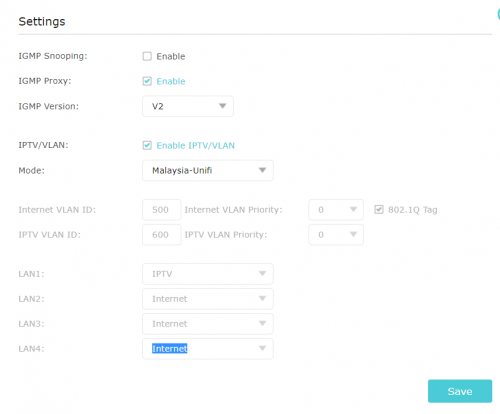
Leave it at Port 1, set IGMP version to 3, and enable IGMP snooping.

This post has been edited by SilentVampire: Aug 28 2019, 02:46 PM
SilentVampire
post Sep 1 2019, 08:26 AM

Networking Enthusiast
*******
Senior Member
5,714 posts

Joined: Mar 2007


QUOTE(phamtom X @ Aug 31 2019, 10:52 PM)
hi,

did anyone encounter the TP-link Archer C1200 facing 100% CPU load? the wifi router also seems to have trouble to connect the internet sometimes and it will auto reconnect itself back after a few minutes.

troubleshooting steps has been performed:
1. shut down the router and wait for 5 mins later to turn it back on
2. disabled USB and share printing

please do advise for any troubleshooting steps that i can perform
*
It is a VERY common problem, and it is a known issue. The only fix is to get a new router. Read the link in my signature.

19 Pages « < 15 16 17 18 19 >Top
 

Change to:
| Lo-Fi Version
0.1170sec    0.42    7 queries    GZIP Disabled
Time is now: 3rd December 2025 - 12:08 PM