Welcome Guest ( Log In | Register )

19 Pages « < 16 17 18 19 >Bottom

Outline · [ Standard ] · Linear+

 TP-LINK Malaysia Official Thread, Technical Enquiries and Support

views
     
SilentVampire
post Sep 3 2019, 07:48 PM

Networking Enthusiast
*******
Senior Member
5,714 posts

Joined: Mar 2007


QUOTE(metalfreak @ Sep 3 2019, 01:57 PM)
Hi guys,

I'm using TPLINK C1200(from unifi). My PC is connected via WiFi and I noticed some stuff for the past 1 week. The router is close to 2 years old.

When using 5G on my phone, it seems alittle slower while on PC, it makes my in game character "stuck" depending on which directional button you press(I'm playing Overwatch). I will lose control of my character for 2 - 3 seconds before things return to normal. for ping, it spikes up to 70+ before returning to normal <50ms. This happens throughout my Overwatch gaming session.

If its youtube, when i switch in between timeline, the wait time seems slower than before. It used to be almost immediate, but it takes about 2-3 seconds

When tested with speedtest, the download and upload is perfect but the wifi connection seems alittle off.
Are these signs of TPLINK's wifi deteriorating ?
*
I would recommend changing to another router. It will solve all your issues.
SilentVampire
post Sep 4 2019, 02:23 PM

Networking Enthusiast
*******
Senior Member
5,714 posts

Joined: Mar 2007


QUOTE(metalfreak @ Sep 4 2019, 09:46 AM)
Hi bro, thanks I plan to. I'm planning to get ASUS RT AC68U biggrin.gif
*
Get AC86U. It is newer, and better.
SilentVampire
post Sep 4 2019, 02:41 PM

Networking Enthusiast
*******
Senior Member
5,714 posts

Joined: Mar 2007


QUOTE(metalfreak @ Sep 4 2019, 02:25 PM)
I read afew pages back in a thread(cant remember which one)....it has issue with unifitv?
*
Newest firmware seem to have fixed the issue.
SilentVampire
post Sep 13 2019, 03:50 PM

Networking Enthusiast
*******
Senior Member
5,714 posts

Joined: Mar 2007


QUOTE(metalfreak @ Sep 13 2019, 02:51 PM)
Hey guys. I just want to share my findings with my new ASUS RT AC86U.

its simply amazing. the coverage is damn wide! The router is located upstairs hall area. my wet kitchen used to be a wifi dead spot but I'm getting like 70% speed now!

Simply amazing. Worth every penny!(Ringgit lah)
RM899 from Compuzone Digital Mall
*
Thank you for your feedback. We know all of that, and that is why we always recommend that people buy their own router.
SilentVampire
post Sep 22 2019, 03:43 PM

Networking Enthusiast
*******
Senior Member
5,714 posts

Joined: Mar 2007


QUOTE(Tmj1920 @ Sep 22 2019, 11:31 AM)
Hi guys, i've recently bought a TP-Link Deco M$ mesh kit for my setup and it says it supports Hypptv as well. However, i enabled the IPTV function but when i use my HyppTV all i see is a satellite icon and it doesnt load. Does anyone have similar problem or can help me solve this problem?
*
Updated latest firmware? Plugged into the correct port on the Deco M5?
SilentVampire
post Sep 23 2019, 03:09 PM

Networking Enthusiast
*******
Senior Member
5,714 posts

Joined: Mar 2007


QUOTE(Tmj1920 @ Sep 23 2019, 11:10 AM)
I'm using Deco M4. Updated to latest firmware that supports IPTV as well
*
Unfortunately, it seems that the Deco M4 has no HyppTV support according to Blacktubi: https://www.blacktubi.com/review/tp-link-deco-m4-review/
SilentVampire
post Sep 25 2019, 08:58 AM

Networking Enthusiast
*******
Senior Member
5,714 posts

Joined: Mar 2007


QUOTE(blstz @ Sep 25 2019, 07:43 AM)
Hello.

Been using C2300 for my Unifi. Everything is working ok except one issue.

Everytime I power cycle the unit (power off and then power on again), I cant seem to connect to my wifi (both 5Ghz and 2.4Ghz) with any of my devices due to unable to get an IP from the router, even though my wifi AP will be visible. FYI, The router will still be able to connect to the internet (internet connection LED is white).

My solution is that I will need to hard reset the router and then do a restore to get it working again. Sometimes after a restore, I still cant connect to my wifi and will take a few tries before my devices can connect to wifi again.

My unit is on the latest firmware. I've tried with many difference devices but it seems to be the router that is the problem. Even tried from a clean setup but still having the same problem. But once i get it going, it works perfectly.

Has anyone encountered this before?  sad.gif

Never had this issue with C1200 last time. Will work flawlessly after every reboot.

Thanks
*
Did you try waiting for a while longer? It does take some time for your devices to connect to the router. However, if it doesn’t connect at all, time for you to get a warranty replacement.

SilentVampire
post Sep 25 2019, 10:26 AM

Networking Enthusiast
*******
Senior Member
5,714 posts

Joined: Mar 2007


QUOTE(blstz @ Sep 25 2019, 09:34 AM)
yeah...wait for quite long also wont connect. only solution is to redo the settings again.
*
Probably best to claim warranty.
SilentVampire
post Sep 29 2019, 02:16 PM

Networking Enthusiast
*******
Senior Member
5,714 posts

Joined: Mar 2007


QUOTE(OhNooy @ Sep 29 2019, 12:44 PM)
Hi all,
Need recommendation. Right now I'm using Asus RT-N12HP and recently I have issue in intermittent wifi especially after 1030pm. Tried asking in Asus thread and the suggestion is to change to 5GHz capable router. However, I have chosen the RT-N12HP due to the high power 9dB, now in TP Link product portfolio I'm not sure if there is similar with same price range. Otherwise, if possible also recommend me if cheap router + range extender will work. Thanks!
*
Just get the TP-Link C2300 or the Asus RT-AC86U that most people on the other thread recommended to you.
SilentVampire
post Sep 29 2019, 05:47 PM

Networking Enthusiast
*******
Senior Member
5,714 posts

Joined: Mar 2007


QUOTE(OhNooy @ Sep 29 2019, 02:44 PM)
These are way beyond budget. No other smaller budget option?
*
Tenda AC18 is not really a good choice for you, as the firmware is a bit dated. TP-Link A9 would be the next best choice. Blacktubi’s review: https://www.blacktubi.com/review/tp-link-archer-a9/
SilentVampire
post Nov 6 2019, 12:33 PM

Networking Enthusiast
*******
Senior Member
5,714 posts

Joined: Mar 2007


QUOTE(rublik @ Nov 6 2019, 11:04 AM)
Hi,

Need advice

Should I get M5 (2 unit) or C2300 (2 unit) for my office? I have around 20 staff and about 10 PC connecting wirelessly

Thanks
*
Get the M5.
SilentVampire
post Nov 8 2019, 03:59 PM

Networking Enthusiast
*******
Senior Member
5,714 posts

Joined: Mar 2007


QUOTE(tforturtle @ Nov 8 2019, 01:26 PM)
Thanks for your suggestions 🙏
Mind to ask which router is the best for unifi 300mbps ?
*
Get the C2300. You won’t regret it.
SilentVampire
post Nov 8 2019, 10:47 PM

Networking Enthusiast
*******
Senior Member
5,714 posts

Joined: Mar 2007


QUOTE(EUPH0RIA @ Nov 8 2019, 04:06 PM)
Hi guys, I just bought Archer A9 AC1900 router and I'm getting 20-30mbps on the 2.4ghz and around 100/200 on the 5ghz band. I think something is throttling the speed cuz on cable i can get 800mbps easily. Pls help thanks sad.gif
*
Please click the link on my signature and read ALL the green text. You will understand why is that so then.
SilentVampire
post Nov 15 2019, 01:12 PM

Networking Enthusiast
*******
Senior Member
5,714 posts

Joined: Mar 2007


QUOTE(TheUndead @ Nov 15 2019, 10:58 AM)
Hi, need suggestion. My house is a Double story house with a 2000 sq ft . should i go for a deco m5 ( 2pack ) setup or just buy a deco m5 and a wifi extender?

any input is greatly appreciated, tq.
*
Get the 3-pack Deco M5 if you can. Forget about the extender. If you want best speed and coverage, get the three pack Deco M9 Plus.
SilentVampire
post Nov 20 2019, 09:47 PM

Networking Enthusiast
*******
Senior Member
5,714 posts

Joined: Mar 2007


QUOTE(perky @ Nov 20 2019, 08:27 PM)
Hi guys, anyone have any problem with their archer c5400 v2 router after updating to the latest firmware: 1.2.5 Build 20190411 rel.52981 ? I'm on unifi 800mbps, after updating to the new firmware, my download speed dropped from 800mbps to 250mbps after a few hours. It will be back to normal after i reboot the router. My problem is similar to this: Here (Reported in the tp link forum). It is quite annoying that I have to reboot the router to get back to the normal speed which I never encountered in the previous firmware.
*
Did you try hard resetting your router? If it continue to happen, that is probably the only way.
SilentVampire
post Jun 16 2020, 04:58 PM

Networking Enthusiast
*******
Senior Member
5,714 posts

Joined: Mar 2007


QUOTE(Imp Bron @ Jun 16 2020, 04:16 PM)
I just bought Deco M4R. It turn out great for my usage. Get almost full speed of unify 100mpbs. However I got one problem.

My old aunty can't connect her old Nokia pre-android Nokia asha 501. We already recommend her to switch to Android phone but she hate new learning curve. She said it took years for her to learn how to use Nokia Asha properly. She's not going to spend time to learn how to use a new device.

Anyone know why Nokia asha can't connect to the mesh network? Or any advance settings that I can tinker so her Nokia Asha can be connected to the Deco M4 mesh. Thanks
*
It can't connect probably because the Deco M4R uses 40Mhz for its 2.4GHz, and the Nokia can't support that, or the Nokia phone does not support the Wi-Fi standards N or AC.
SilentVampire
post Jul 1 2020, 08:12 PM

Networking Enthusiast
*******
Senior Member
5,714 posts

Joined: Mar 2007


QUOTE(seng83 @ Jul 1 2020, 11:25 AM)
Anyone using C3150 for unifi 800mbps plan?

I am just getting the max speed of about 550mbps tested with lan connected

i try to enable the nat boost, but i cant find it even in the system parameter page.

anyone here using the same router experience this?
*
Did you try testing with the speed test itself in the router?

QUOTE(FusionXY @ Jul 1 2020, 11:31 AM)
Hello SilentVampire.
Can you help him out? Are you still using that router?

Thanks.
*
Yes, I’m still using that router. It is actually a really good router. I’m quite disappointed that TP-Link EOL’ed the router.
SilentVampire
post Jul 2 2020, 02:37 PM

Networking Enthusiast
*******
Senior Member
5,714 posts

Joined: Mar 2007


QUOTE(FusionXY @ Jul 1 2020, 08:29 PM)
Oh, still going strong? How long have you been using it?
I feel that way too, heard that popular TP-Link Router C2300 also discontinued already right?
Manage to achieve speed up to 500Mbps?( If you are using speed more than 500Mbps ).

It's time to experience Wireless AX Router now.
Technology getting better and better nowadays.

Thanks.
*
Still going strong. Yes, the C2300 have been discontinued too. Very dumb move by TP-Link. My speed is 300Mbps, so I'm not sure if it can go above 500Mbps.

QUOTE(seng83 @ Jul 2 2020, 02:12 AM)
yes, the result show 550mbps
*
Tried testing the speed with TM stock router?
SilentVampire
post Apr 21 2021, 10:10 AM

Networking Enthusiast
*******
Senior Member
5,714 posts

Joined: Mar 2007


QUOTE(Scissorshand @ Apr 21 2021, 09:58 AM)
Guys new AX20 setup problem seeking guidance

Unifi credentials works on old dir842 then input the same on new router but unable to connect.

What an I doing wrong since this should be a walk in the park..😅
*
You sure you have the correct PPPoE username and password configured?
SilentVampire
post Jul 23 2021, 10:49 AM

Networking Enthusiast
*******
Senior Member
5,714 posts

Joined: Mar 2007


QUOTE(sadlyfalways @ Jul 23 2021, 03:30 AM)
Has anyone noticed dhcp issues with their deco network ?

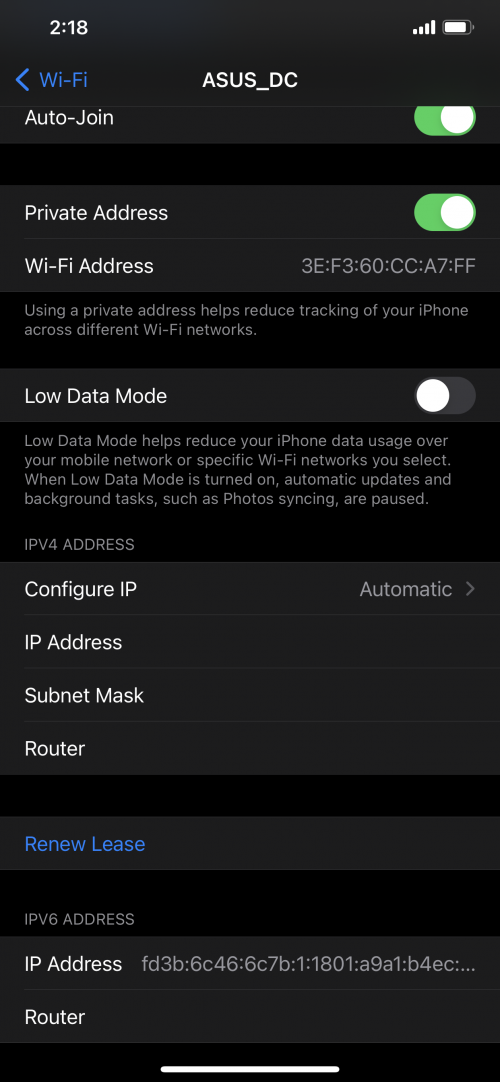
Today I reset my whole network through app. Usually within one minute everything connects back normally. This time I noticed my iPhone still on 4G after about 5 minutes. I went into setting and checked the WiFi it says connected with the tick, but no IP address.

I clicked on forget WiFi and rejoined but it was the same. Then I checked my iPad and MacBook were connected successfully.

I then disabled the iOS private MAC address feature and the phone finally connected and got an IP address. For the iPad however, when I disabled the private MAC address, it refused to connect at all with no IP address being given. When I turned back private MAC address the iPad gets the ip again.

This is very weird behaviour which I have not seen before, almost like only certain Mac addresses were only allowed to get the IP.

Does anyone know how to fix or prevent this ?

I’m using deco x90 as my main deco. Even when switch off all other deco the issues were still there until reset again.

Has anyone else had a similar problem with deco and their iPhones ? It shows the tick but 4G is still visible lol

Any help would be greatly appreciated, I spent too much on this router to try and replace it again. Expected something more stable and reliable than this

P.S. it’s called ASUS dc because all my smart stuff are configured to used that old ssid. I’m using the deco

user posted image
*
Unfortunately, it is a common issue across their Deco products, especially if you are using the Deco in AP mode. I would suggest you to search on TP-Link forums for this DHCP issue. It seems that TP-Link Deco products does have its own DHCP server which can’t be turned off. Very stupid and dumb move.

19 Pages « < 16 17 18 19 >Top
 

Change to:
| Lo-Fi Version
0.0297sec    0.24    7 queries    GZIP Disabled
Time is now: 3rd December 2025 - 02:28 AM