Welcome Guest ( Log In | Register )

76 Pages « < 65 66 67 68 69 > » Bottom

Outline · [ Standard ] · Linear+

 [OFFICIAL]Rig Suggestion Q&A Thread V13!

views
     
babylon52281
post Jun 22 2025, 02:30 PM

Look at all my stars!!
*******
Senior Member
2,674 posts

Joined: Apr 2017
QUOTE(chocobo7779 @ Jun 22 2025, 10:51 AM)
I just bought one for like RM1099 bundle free - a bit overpriced, but it is in stock at a local store and I don't want to wait too long for shipping sweat.gif
Anyway, what would be a nice air cooler for my new CPU?  hmm.gif
*
PA120/SE, PS120/SE, but if you want perfect RAM clearance for dual towers get FUMA 2/3, or for chunky single cooler; Mugen 5/6.

QUOTE(chocobo7779 @ Jun 22 2025, 01:15 PM)
My current heatsink fan is making some grinding noise - if I were to change the fans only what should I get?  hmm.gif
...or is it more economical to buy a new heatsink?  hmm.gif
*
Change fan will always be cheaper if its single fan only, Artic P12 or Scythe Kaze Flex 2 (1800 RPM ver) for budget but quiet & quality fan.
babylon52281
post Jun 22 2025, 04:27 PM

Look at all my stars!!
*******
Senior Member
2,674 posts

Joined: Apr 2017
QUOTE(TristanX @ Jun 22 2025, 03:03 PM)
Just replace the fan to a better one. I think Noctua NF-A12X25 on clearance sale right now. Still pricey but at least it is not RM200.
*
LOL if its more than RM 100 can change whole cooler ady
babylon52281
post Jun 22 2025, 04:29 PM

Look at all my stars!!
*******
Senior Member
2,674 posts

Joined: Apr 2017
QUOTE(teanu @ Jun 22 2025, 03:16 PM)
Hi guys, update. So i updated my motherboard bios via instantflash. While changed back to old gpu with new cpu, able to boot into windows. After swapping back to new gpu, the motherboard doesnt have redlight indicator when turn on (gpu fans are spinning). Seems to be able to boot however my monitor display is not working when connected. Any clues?
*
Try manually set bios video output to dGPU or PCIE X16 or something like that.
babylon52281
post Jun 22 2025, 06:39 PM

Look at all my stars!!
*******
Senior Member
2,674 posts

Joined: Apr 2017
QUOTE(TristanX @ Jun 22 2025, 04:32 PM)
Well yeah, he wants silence. RM100ish is fine for a premium product. It comes with 6 years warranty. And you don't need to tweak anything. I would just upgrade cooler for that price though.
*
Umm didnt mention about silence, just wanting to replace a grinding fan which sounds like about to die. Cooler is only Hyper212 so a Noctua fan will be as pricey as new Hyper212 cooler.

Imho Noctuas are pretty overated, P12 will tapau its perf except its sometimes inconsistent bearing quality.
babylon52281
post Jun 24 2025, 05:11 PM

Look at all my stars!!
*******
Senior Member
2,674 posts

Joined: Apr 2017
QUOTE(teanu @ Jun 24 2025, 01:24 PM)
Thanks all, just for update. After reassembling gpu again and with some prayers. Thankfully able to boot in with no further issues. Now the question would like to ask is, what is the general guideline to know if my current PSU is suffice? Based on what i google it seems is mostly either:
- Wait/Monitor signs that other hardware are flickering/restart
- Go to online websites, put in component info and put 100-150W buffer.

With this currently being the last upgrade for my MB, can i confirm that probably a buffer of 50-100W will suffice?
*
I would prolly hard lock the CPU power & max MHZ as turbo boost will juice it above its official 105W TDP. I would also undervolt the GPU to give it more power headroom. For symptoms can be varied I think most obvious is CTD when gaming/intense use worse is hard crash and reboot. Purely gaming it wont always max out the system power limit but sometimes it will spike which can cause instabilities and even take out the PSU.

EDIT: If you opt for a good 850-1000W ATX3.x PSU now, you can port it over to a new build even few years down the line as PSUs dont get obsoleted as fast as other hardware. Do consider it.

This post has been edited by babylon52281: Jun 24 2025, 05:13 PM
babylon52281
post Jun 24 2025, 09:24 PM

Look at all my stars!!
*******
Senior Member
2,674 posts

Joined: Apr 2017
QUOTE(teanu @ Jun 24 2025, 09:01 PM)
Much thanks for the recommendations. Will have a look at whats available for sale since today is pay date sale. But dang, these 1000W higher end PSUs do cost quite abit.  rclxub.gif
*
A good 1000W ATX3 PSU will last you this build, into the next build and maybe even the one after. Its an investment if you think like that.
babylon52281
post Jun 25 2025, 10:14 AM

Look at all my stars!!
*******
Senior Member
2,674 posts

Joined: Apr 2017
QUOTE(atelierknight @ Jun 25 2025, 12:34 AM)
mmm okie. Btw, I didn't realize just how many holes the airflow case has. Scared I spill a cup of water or something. Tristan, what would you recommend for a normal case then?
*
Just about any modern case has open tops for air intake/outtake. If your worried about that dont place your system under the desk but ontop.
babylon52281
post Jun 26 2025, 08:18 AM

Look at all my stars!!
*******
Senior Member
2,674 posts

Joined: Apr 2017
QUOTE(TristanX @ Jun 25 2025, 08:39 PM)
Lian Li Lancool 207. Currently the best price/performance case.
*
These arent cheap but for some reason just why laa they skimp on giving the rear exhaust fan too? knock.gif
babylon52281
post Jun 26 2025, 10:05 AM

Look at all my stars!!
*******
Senior Member
2,674 posts

Joined: Apr 2017
QUOTE(adamtayy @ Jun 26 2025, 09:14 AM)
Nah, deepcool @ Rm270

Can fight Lianli chassis??
*
OP concern is spilled water coming in thru top fans/intake holes, so both cases are disqualified.

This post has been edited by babylon52281: Jun 26 2025, 10:05 AM
babylon52281
post Jun 27 2025, 08:48 AM

Look at all my stars!!
*******
Senior Member
2,674 posts

Joined: Apr 2017
https://www.techpowerup.com/338380/ddr4-mod...-the-first-time

DDR4 prices have going up in the global market, expect the increase to come soon if not here already.

Lucky Im all filled up with 4x sticks.

For system recos, I guess its time to ditch DDR4 based builds.
babylon52281
post Jun 27 2025, 06:54 PM

Look at all my stars!!
*******
Senior Member
2,674 posts

Joined: Apr 2017
QUOTE(PJng @ Jun 27 2025, 01:27 PM)
No wonder i see recently even double day sale very expensive

As i posted last year, very cheap for 32GB KVR RAM
*
So its ady here kah? Well better stock it up as its only going to go up higher and higher.
babylon52281
post Jun 28 2025, 10:51 AM

Look at all my stars!!
*******
Senior Member
2,674 posts

Joined: Apr 2017
QUOTE(sexysarah1992 @ Jun 28 2025, 08:32 AM)
Hi guys, anyone can quote me this build. Planning to upgrade home PC

Aorus Pro x870e
Ryzen 9 9950x3d
Rtx 5080
Kc3000 4tb x 2
Tryx 360 Panaroma
G skill trident Z5 royal neo 64GB
Rog strix 1200w platinum
*
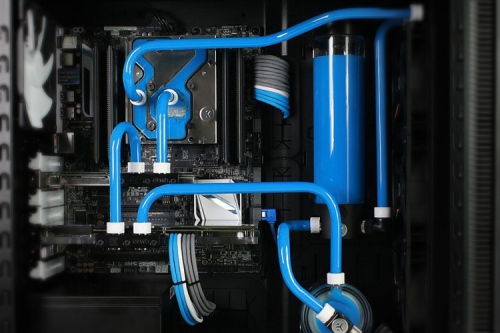
Wow such highend build why not consider custom water loop?

user posted image
babylon52281
post Jun 28 2025, 07:15 PM

Look at all my stars!!
*******
Senior Member
2,674 posts

Joined: Apr 2017
QUOTE(TristanX @ Jun 28 2025, 06:44 PM)
Acer Nitro Intel Arc B580 12GB sale is back. RM1143.12 from same shop. Just search Acer graphic card on Shopee. Deletes RTX 5050 8GB.
*
At that prices can also delete 9060XT 8GB for price/perf.
babylon52281
post Jun 29 2025, 11:08 AM

Look at all my stars!!
*******
Senior Member
2,674 posts

Joined: Apr 2017
QUOTE(atelierknight @ Jun 29 2025, 01:33 AM)
But what about the 9060xt 16gb?
I'm slowly buying my parts 1 by 1 to clear my coins but they limit it to rm30 a day. so I haven't bought my graphics card yet. So I guess I could switch from the 9060xt 16gb to intel Arc B580 gpu
*
Of course the more you pay the more perf you get. All the way up to RTX 5090.

Important is whats your budget and what you can get within that limit. If you think to overspend theres no end.

This post has been edited by babylon52281: Jun 29 2025, 11:09 AM
babylon52281
post Jun 29 2025, 03:53 PM

Look at all my stars!!
*******
Senior Member
2,674 posts

Joined: Apr 2017
QUOTE(minano0001 @ Jun 29 2025, 01:04 PM)
Don't get intel gpu
*
OP is building a brand new system and looking for budget parts. Why not go with ARC?
babylon52281
post Jun 30 2025, 10:02 PM

Look at all my stars!!
*******
Senior Member
2,674 posts

Joined: Apr 2017
QUOTE(minano0001 @ Jun 29 2025, 07:18 PM)
Arc has compatibility issues when playing games, best go with nvidia or AMD. Unless op don't intend to play games
*
Alchemist gen your right, then BMG came with less compatibility issues and to now they have fixed a lot of latest game support. Their only weakness is heavier CPU overheads and questionable Day 1 driver ready support for new launch games. Other than that they have the value for money segment since both Nvidia and AMD is fighting to see who can charge customers more for shit.
babylon52281
post Jul 2 2025, 02:17 AM

Look at all my stars!!
*******
Senior Member
2,674 posts

Joined: Apr 2017
QUOTE(Davird @ Jul 1 2025, 04:42 PM)
Need advice on office PC. something good that will last another 5 years.
No games.
usage mostly online, emails. word. excel. little bit of light Photoshop.

Current pc.
Intel G5400
Asrock H310m-hdv
kingston DDR4 8gb

It served me well, but now its about to kaput. Takes a minute to load Chrome browser let alone Adobe Reader.

Currently thinking of this new build.
I5 12400
MSI PRO B760M-E DDR5 or should i stick with DDR4?
Kingston fury DDR5 black 8gbx2
Kingston KC3000 1TB
PSU ??
Case ??

I need recommendation on PSU and Casing as i would be using back an old WD HDD as storage.
*
It looks good, whether going for DDR4 or DDR5 is not an issue for your usage but trying to get a LGA1700 DDR4 mobo is getting harder to find. Also DDR4 RAM has been increasing so look at a system (mobo+RAM) pricing and availability that you can buy. Go for the cheaper option as no point to buy more expensive just for office PC.

And get 32 GB RAM (2x 16GB) as excel spreadsheets can eat up a good chunk if it gets complex. I would reco you get those cheaper green coloured ValueRAM sticks (those w/o heatsink) as you dont need XMP profile of the Fury version, less stability and you spend more money.

PSU get 550W from either FSP HV Pro 85+ or MSI A550BN/BNL
babylon52281
post Jul 2 2025, 03:23 PM

Look at all my stars!!
*******
Senior Member
2,674 posts

Joined: Apr 2017
QUOTE(Skylinestar @ Jul 2 2025, 01:12 PM)
Where is the best place to buy Noctua fans?
*
Shopee. You can make use of coins & vouchers + free delivery
babylon52281
post Jul 2 2025, 03:32 PM

Look at all my stars!!
*******
Senior Member
2,674 posts

Joined: Apr 2017
QUOTE(respectmypm @ Jul 2 2025, 02:20 PM)
Hi sifu. i want to build a pc. please comment if this list is balance or not. planning to hold onto it for next 10 years or unill it kaput. thank you.

cpu: ryzen 7 7700

ram: kingston fury beast 16gbx2 ddr5

mobo: msi b850m mortar

psu: corsair rm750e

ssd: kingston kc3000 1tb

case: lian li lancool 207

cpu fan: thermalright peerless assassin 120

gpu: sapphire rx9060xt 16gb
*
Thats not a 10 years longevity PC. A 10 years longevity PC is something like

9950X3D (moar cores!)
thermalright peerless assassin 140 (bigger bro to the 120)
64GB 6000MHZ CL30 DDR5 RAM
X870E ATX mobo
RTX 5090 (or at least a 4090)
4TB Gen5 SSD + 4TB Gen4 SSD
1000W ATX3.1 Cyber & 80Plus Platinum rated PSU

You will never need to upgrade anything unless your pr0n fills up >4TB.


babylon52281
post Jul 2 2025, 09:43 PM

Look at all my stars!!
*******
Senior Member
2,674 posts

Joined: Apr 2017
QUOTE(Davird @ Jul 2 2025, 07:27 PM)
Thank you. Will go for DDR5 as it would be much cheaper and easier to get if needed an upgrade in future. Going for 550w PSU and tecware fusion air M2 looks really nice.
Thank you. I'm going with DDR5 but could not seem to find the Kingston value ram. Only a few stores sell them and the 32gb are priced at (RM399 - Viewnet) more than the fury beast (RM380 - just IT shopee)

This is the updated rig for now. (Price from shopee)

i5-12400 + MSI pro b760m-E DDR5 - RM1003
Fury beast black DDR5 32gb (16x2) - RM380
Kingston NV3 1TB - RM248 / KC3000 ITB - RM360
FSB HV Pro 85+ 550w - RM170
Techware Fusion Air M2 - RM138

As for the SSD, should I go for the cheaper NV3 or stick with KC3000?
*
Thats cuz Fury Beast default speed is 4800MHZ while valueRAM is 5600MHZ only thing is Fury can OC to 6000MHZ via XMP. But since Fury cheaper then get the Fury rams. Just be adviced not to activate XMP since office work wont benefit at all.

For SSD get KC3000 as it has DRAM & TLC which is needed for OS bootdrive otherwise a DRAMless QLC like NV3 lifespan will go down fast.

76 Pages « < 65 66 67 68 69 > » Top
 

Change to:
| Lo-Fi Version
0.0520sec    0.70    7 queries    GZIP Disabled
Time is now: 4th December 2025 - 08:19 AM